Bifrost Edge moves the AI gateway from the data centre onto every laptop
Maxim AI's Bifrost Edge is an endpoint agent that routes desktop chat apps, browser AI, coding agents and MCP servers through the company gateway, with app and MCP approvals, guardrails and MDM rollout.
Maxim AI has taken its Bifrost AI gateway out of the data centre and onto employees’ computers. Bifrost Edge, an agent for macOS, Windows and Linux, sits on each company machine and sends the traffic of desktop chat apps, browser AI, coding agents and the MCP servers they call through the organisation’s own Bifrost deployment. The gateway-side pieces have arrived across Bifrost’s 2.x releases: device and app attribution and Edge control views in v2.0.0 on 26 August 2026, endpoint-attributed MCP inspections in v2.2.0 on 15 September, and detection of Antigravity CLI and Desktop “including behind the edge proxy” in v2.3.1 on 19 October. The full Edge documentation set, from identity setup to MDM payloads, is now public.
The change matters because unsanctioned AI at work no longer looks like a developer hard-coding a personal API key. It looks like the Claude desktop app, ChatGPT in a browser tab, Cursor in the editor and Claude Code in a terminal, each with its own login and its own list of MCP servers. A server-side gateway governs only the traffic that someone has pointed at it. Edge is Maxim AI’s answer to the traffic nobody pointed anywhere.
The audience is security, IT and platform teams that already run, or are evaluating, a central gateway for model access and now have to account for what employees run on their laptops. This piece covers what shipped and when, why the problem moved to the endpoint, how Edge captures and governs traffic, how app and MCP approvals work, how rollout through MDM works, how it compares with what Microsoft and Cloudflare offer, and what to watch next.
What shipped, and when
Bifrost is an open-source AI gateway written in Go and maintained by Maxim AI. It exposes one API in front of many model providers and applies identity, virtual keys, budgets, routing, failover, guardrails and logging to every call. Edge is described in its documentation as “the endpoint layer of the same platform”, and the overview page is direct about the policy model: “The governance you already configure - virtual keys, budgets, rate limits, guardrails, and audit logs - is exactly what Edge enforces on each machine.”
Edge itself is a separately installed agent, but the gateway has been gaining the plumbing it needs release by release. The changelogs show the sequence:
| Release | Date | Edge-related change |
|---|---|---|
| v2.0.0 | 26 Aug 2026 | Logs and MCP tool logs record user agent, app, source, decision, app key and device ID; MCP tool logs observed by the Edge agent can be ingested; fallback pages for Edge control views (config, devices, inventory) |
| v2.1.1 | 9 Sep 2026 | Claude Cowork traffic identified as its own app in logs and dashboards, with Cowork’s base64 text documents decoded |
| v2.2.0 | 15 Sep 2026 | Endpoint-attributed MCP inspections: device, app key, server label, tool name and decision carried onto MCP logs; skills registrable as a marketplace in Claude Desktop and Cowork |
| v2.3.1 | 19 Oct 2026 | Antigravity CLI and Antigravity Desktop logged as their own apps, including behind the edge proxy |
The v2.0.0 notes list the “Edge Fallback Pages” item and the app-attribution work that lets the dashboard rank traffic by application. The v2.2.0 notes add that inspected MCP tool calls are logged “with bounded identity sourced from the gateway rather than payload-supplied headers”, which matters for audit: a device cannot claim to be a different device by setting a header. The same release adds a Git endpoint so skills stored in Bifrost can be registered as a marketplace in Claude Desktop and Cowork. The v2.3.1 notes extend client detection to the Antigravity tools, both when they call the gateway directly and when Edge forwards them.
Maxim AI’s product page for Bifrost Edge frames the pitch in one line: route, govern and secure all AI traffic from the tools running on laptops under the same platform as the gateway.
Why the gateway had to leave the data centre
For two years the standard enterprise answer to “how do we control AI use” has been a gateway: issue virtual keys, point applications at one URL, set budgets and log everything. That works for software the company writes. It works less well for software the company’s employees install.
The surveys say the tools are already on the machines
Microsoft and LinkedIn’s 2024 Work Trend Index found that “78% of AI users are bringing their own AI tools to work”, rising to 80% at small and medium-sized companies, and that 52% of people who use AI at work are reluctant to admit using it for their most important tasks. Microsoft UK’s research, run by Censuswide in October 2025 among 2,003 employees, found that 71% of UK employees have used unapproved consumer AI tools at work and 51% continue to do so every week. And Microsoft’s February 2026 Cyber Pulse report says “29% of employees have turned to unsanctioned AI agents for work tasks”.
These numbers describe people, not API keys. The tools in question are chat apps, browser tabs and, increasingly, agents. GenAI Brief’s longer treatment of the problem, why blocking shadow AI fails and what actually governs it, makes the case that bans push usage further out of sight. Edge is built on the opposite assumption: let people keep the tools, and move the control point to where the tools run.
A server-side gateway only sees traffic pointed at it
Some AI tools make central routing easy. Claude Code, for example, reads ANTHROPIC_BASE_URL, and Anthropic’s gateway documentation describes a managed-settings option that pins it: with allowedProviders set to ["customEndpoint"], “Claude Code then refuses a session pointed anywhere else, including at Anthropic directly or at a developer’s own proxy.” That is a strong control for one coding agent on a managed machine.
It does not generalise. ChatGPT on the web talks to chatgpt.com. A desktop chat app signs in to its vendor’s service with the user’s own account. A new coding agent appears every quarter, each with its own configuration format. A gateway that relies on per-tool configuration is always one install behind. The Edge overview puts the alternative plainly: “Instead of relying on every user to point their tools at Bifrost, Edge runs quietly on each machine and brings all AI traffic under governance automatically.”
MCP servers are configuration files, not network services
The second blind spot is tools. MCP servers are usually added by editing a JSON file on the laptop. The MCP project’s own guide to connecting local servers shows Claude Desktop’s file at ~/Library/Application Support/Claude/claude_desktop_config.json on macOS and under %APPDATA% on Windows. Each entry is a command to run. The specification’s security best practices list what can go wrong with local servers from untrusted sources: “Arbitrary code execution”, “No visibility”, “Command obfuscation” and data exfiltration. GenAI Brief’s guide to MCP security and authentication covers the remote side of that protocol; the local side is a fleet-inventory problem, and no server-side gateway can read a file on someone’s laptop.
How Edge works on a laptop
The documentation describes the user experience in three parts: one sign-in, an always-on agent, and automatic coverage of supported apps. The mechanism underneath has four.
Identity first: one SSO sign-in, one governed key
Edge has no local API keys. On first run, the user signs in through the browser with the organisation’s single sign-on, and “that sign-in links the machine to the user and syncs all policies assigned to them.” The setup guide lists the supported identity providers: Okta, Microsoft Entra ID, Keycloak, Zitadel, Google Workspace, Auth0 or a generic OIDC provider, configured under Governance, then User Provisioning, in the Bifrost dashboard. Users can be bulk-imported, synced from a directory, or pushed by SCIM.
The key that pays for the user’s traffic comes from an access profile. Under roles and access profiles, an admin creates a profile with “the providers, models, budgets, rate limits, and MCP access Edge users should have” and attaches it to a role. When a user becomes eligible, “Bifrost creates a per-user copy of the profile and issues the user a governed virtual key.” That is the identity every Edge request carries into the gateway’s logs.
An agent in the menu bar
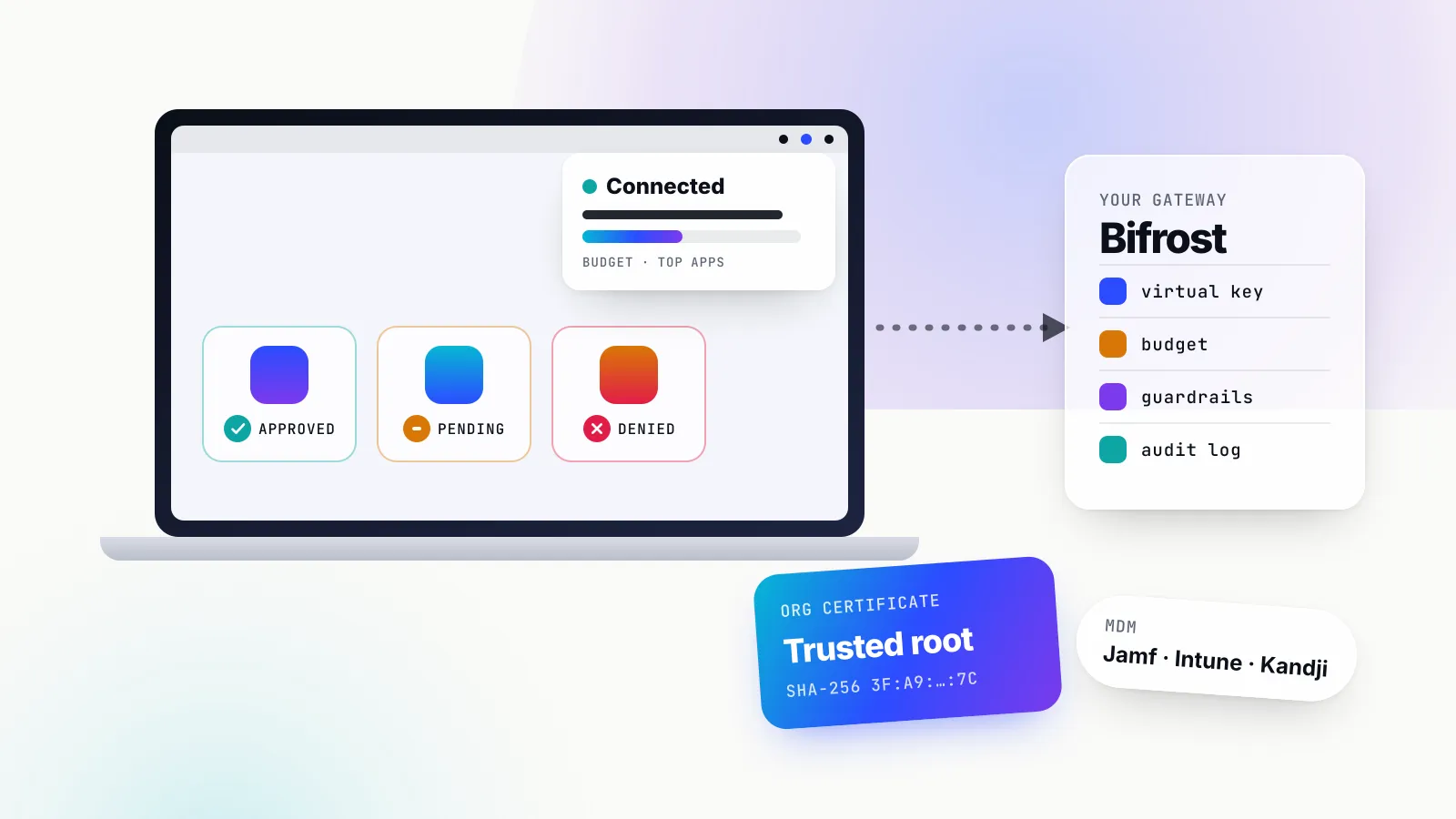
After sign-in, Edge lives in the menu bar on macOS or the system tray on Windows and Linux. The documentation’s screenshot shows budget usage, top models and top applications, along with a connection indicator and, for users with more than one virtual key, a key picker. Underneath the tray app is a privileged background service; the troubleshooting guide notes that system privileges “are required to create the network device and manage the system trust store.”
The certificate is the mechanism
Encrypted AI traffic can only be governed if it can be read. Edge therefore depends on an organisation certificate that each machine trusts. Admins generate a certificate authority in the Bifrost dashboard (under Edge Control, then Edge Settings) or upload an existing PEM certificate and key; the private key is displayed once and must be stored safely. The dashboard shows the active certificate’s SHA-256 fingerprint so teams can check that a device or MDM profile carries the right one.
Interception is scoped. The verification guide states that “Only configured and supported AI domains are intercepted. Unrelated device traffic is not routed through Edge.” Diagnostics lists the conditions for capture: interception switched on, configured domains resolving, and network routes installed. Until the certificate is trusted, Edge “passes traffic through without inspecting it”, which is a sensible failure mode: a half-installed agent does not break the user’s tools.
This pattern is not new to enterprise networks. Anthropic’s own network configuration guide for Claude Code notes that “Enterprise TLS-inspection proxies work without additional configuration when their root certificate is installed in the OS trust store”. What is new is aiming that pattern only at AI domains and handing the decrypted request to an AI gateway rather than a generic web proxy.
The request lands in the existing gateway
Once captured, a request reaches Bifrost under the user’s governed key and is treated like any other gateway call: the access profile’s providers and models apply, the budget and rate limit are charged, guardrails run, and the log entry records the app and device. The rollout settings include app routing modes, which decide “whether supported apps use managed gateway routing or, where offered, subscription passthrough”, so an organisation can choose between Bifrost’s provider keys and the user’s existing app subscription per app.
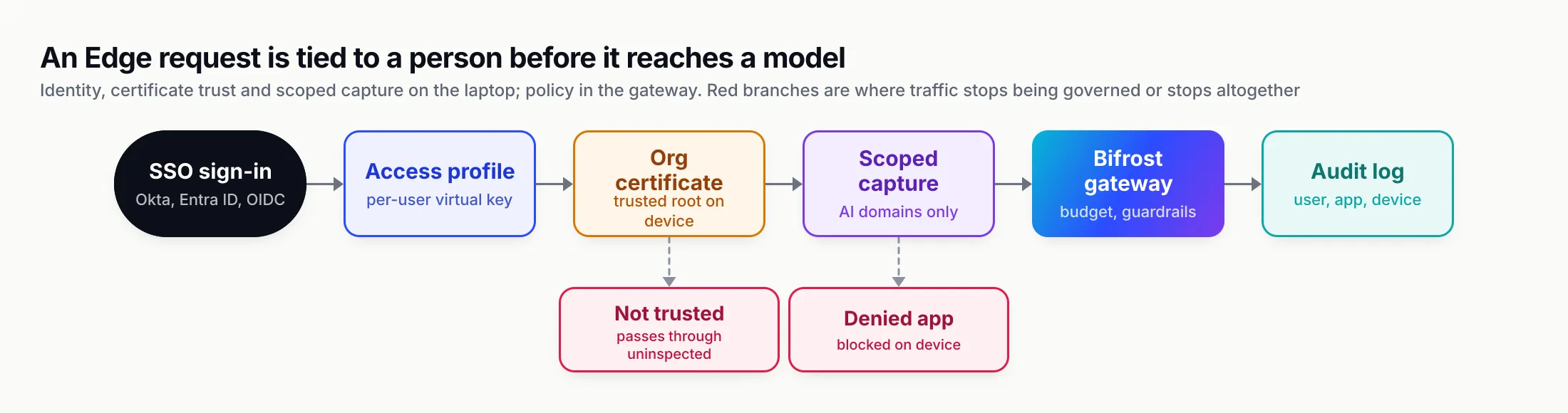
Figure 1: Every Edge request is tied to a person before it is tied to a model. The certificate decides whether traffic can be governed; the gateway decides what governance means.
Discover, approve, deny: apps and MCP servers
Routing is half of Edge. The other half is inventory and enforcement, run from three dashboards: Devices, Approvals and Configurations.
Devices
The Devices dashboard lists every machine running the agent with its hostname, owner (the signed-in user’s name and email), platform and architecture, agent version, number of AI apps installed (with versions on hover), number of MCP servers configured, first-seen date and last check-in. A fleet summary shows totals by operating system and counts of apps and MCP servers by status. Opening a device shows its installed apps, its MCP servers “and the tools each exposes”, and the owner, and lets an admin approve or deny items from there.
Approvals and the pending state
Edge collects what it finds into two catalogs, one for apps and one for MCP servers. The Approvals dashboard gives each entry one of three statuses:
| Status | Meaning in the documentation | Default effect |
|---|---|---|
| Pending | Discovered and awaiting review | Keeps working, unless pending items are set to be blocked |
| Approved | Explicitly allowed | Runs normally, governed through Bifrost |
| Denied | Blocked | Edge stops it on the device |
The default is permissive: “A newly discovered app or MCP server is pending by default and continues to work until you deny it.” The setting Allow pending apps and MCP servers flips that, so a stricter organisation can block anything new until someone signs it off. The catalogs are deduplicated, so a server configured on 400 laptops appears once and one decision covers all of them. Admins can act in bulk, “including everything in a given status (for example, denying all pending MCP servers)”. Decisions take effect on each device at its next check-in.
Policy can also be scoped. The troubleshooting guide notes that “User-scoped decisions override team and global decisions”, which lets a security team allow a tool for one group without opening it to the whole company.
What enforcement means for MCP
For MCP servers the catalog records the server’s name, “how it connects (local command or remote URL), and the tools it exposes.” The MCP governance page is explicit that a denial is not advisory: “When you deny a server, Edge enforces that decision directly on each machine so the disallowed tool cannot be used, even by an app that had it configured before the policy existed.” Diagnostics includes an MCP check that confirms “the shim is running when MCP capture is configured”, and since v2.2.0 inspected MCP tool calls are logged with device, app key, server label, tool name and decision.
MCP discovery and enforcement cover Claude Code, Claude Desktop, Gemini CLI, OpenCode, Codex and Cursor, according to the supported applications page. For the first time, the documentation says, an organisation can answer “what MCP servers are running on our fleet?” with data.
What the user sees
When an app is allowed, nothing changes for the user. When it is blocked, the documentation says “the user gets a clear signal that it is not permitted on a company machine”. Disallowed apps “are blocked before any data leaves the machine”, which is the property that distinguishes enforcement on the endpoint from detection after the fact.
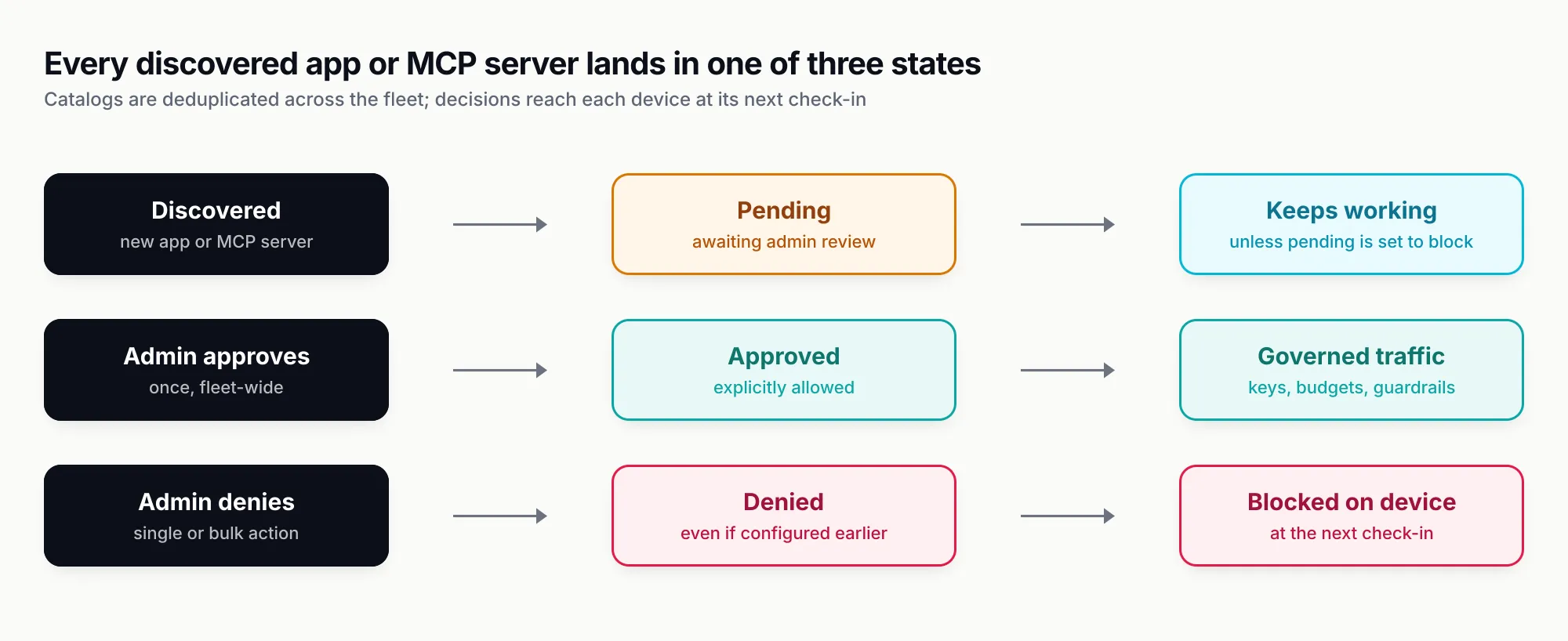
Figure 2: The pending state is the policy decision most teams will argue about. Edge’s default favours continuity; one setting turns it into an allowlist.
Guardrails on device traffic
Because Edge sends requests into the gateway, the gateway’s guardrails apply to them. The security page says existing guardrail profiles “cover Edge traffic with no additional configuration” and lists the options: Bifrost’s built-in Gitleaks-backed secrets detection, custom regex rules (including a PII detection template), AWS Bedrock Guardrails, Azure Content Safety, Google Model Armor, CrowdStrike AIDR, Gray Swan Cygnal, Patronus AI and Check Point’s AI Agent Security.
The guardrail is applied “before the prompt reaches a model and before the response comes back.” The documentation gives two worked surfaces. In ChatGPT on the web, a prompt typed into the browser is routed through Edge and checked, so “Sensitive content such as secrets or PII is caught before it leaves the machine.” In Claude Cowork, agentic activity is governed by the same rules and profiles.
This is the control that maps most directly onto the risk security teams cite. OWASP’s LLM02 entry on sensitive information disclosure lists “personal identifiable information (PII), financial details, health records, confidential business data, security credentials, and legal documents” as what leaks. A secrets detector on the gateway has always caught keys pasted into the company’s own apps; with Edge, the same detector sees a key pasted into a browser tab.
The applications Edge governs
Edge’s supported applications list spans four categories, with providers as a fifth:
| Category | Applications | What Edge does |
|---|---|---|
| Desktop apps | Claude Desktop, ChatGPT (desktop), Cursor, Codex (desktop) | Routes and governs AI traffic |
| Coding agents | Claude Code, Codex CLI, OpenCode | Routes and governs AI traffic |
| AI in the browser | ChatGPT web (chatgpt.com), Claude web (claude.ai) | Governs AI conversations |
| MCP discovery | Claude Code, Claude Desktop, Gemini CLI, OpenCode, Codex, Cursor | Discovers and enforces MCP server policy |
| Providers | Every provider Bifrost supports, from OpenAI, Anthropic, Azure OpenAI, AWS Bedrock, Gemini and Vertex AI to Groq, Mistral, Ollama, vLLM and xAI | Keeps requests from any tool pointed at them under policy |
The changelogs show the client list being reflected in the gateway’s attribution: Claude Cowork has been identified as its own app since v2.1.1, and Antigravity CLI and Desktop since v2.3.1. The documentation offers an in-page request button for adding applications.
Rolling it out: MDM, certificates and one restart
An endpoint agent is only as good as its rollout. Edge’s design assumes the fleet is managed, and the documentation is specific about what each platform needs.
Supported device-management platforms
The MDM page names five: Jamf for Mac fleets, Microsoft Intune for Windows, macOS and Linux, Kandji for Apple devices “with zero-touch provisioning”, Omnissa Workspace ONE, and JumpCloud. The managed configuration “carries only non-sensitive connection settings. Identity and keys come from the user’s sign-in.”
The payloads
The deployment payloads are short. Every device gets the Edge package for its operating system and architecture and a managed config.json:
{
  "base_url": "https://<your-bifrost-host>"
}
The file lives at /Library/Application Support/Bifrost Edge/config.json on macOS, %ProgramData%\BifrostEdge\config.json on Windows and /etc/bifrost-edge/config.json on Linux. It takes precedence over a URL entered in the tray, and the agent watches it, so a corrected URL does not need a reinstall.
Platform specifics differ mainly in certificate trust:
- macOS. Push the active CA in a device-scoped payload of type
com.apple.security.root. The macOS instructions warn that a user-scoped profile or a genericcom.apple.security.pkcs1orcom.apple.security.pempayload, because “Those forms do not establish the machine-wide root trust the agent checks”. An optional managed preference,DisableLocalUninstall, removes the local uninstall command if set before installation. The package,macos-arm64.pkg, installs a system daemon and the per-user menu-bar agent on Apple Silicon Macs. - Windows. Use
windows-amd64.intunewinfor x64 Intune deployments, or the MSI for other MDMs and ARM64, installed silently withmsiexec /i "windows-amd64.msi" /qn. The.intunewinformat is Intune’s standard wrapper for classic apps; Microsoft’s Win32 app management guide explains that the Win32 Content Prep Tool “converts application installation files into the .intunewin format.” No separate CA profile is needed; the elevated agent installs the CA into the Windows Root store. - Linux. Deploy the
.debor.rpmpackage and writeconfig.jsonwith mode0644. The agent installs the CA into the system trust store; for browser interception,certutilmust be present throughlibnss3-toolsornss-tools.
After trust, every computer restarts: “A full computer restart is required for the CA certificate change to take effect.” The same applies whenever the CA is replaced, and on macOS a replacement CA needs a new trusted-root profile.
Verifying a pilot device
The documentation insists that installation is not success. A device is ready when the tray shows the signed-in user and Connected, the computer has restarted after trust, Diagnostics reports Healthy, the device appears under Devices with the right owner, and a request from a supported app shows up in Bifrost’s logs attributed to that user. The Diagnostics checks cover the background service, account, configuration, certificate, traffic capture, gateway reachability and MCP. The Diagnostics snapshot excludes access tokens, refresh tokens, virtual-key values and CA private keys. Agents poll for configuration every 60 seconds by default, with a minimum of five, and keep the last configuration they received if the gateway is unreachable.
Where Edge sits against the big platforms
Edge is not the only way to see AI traffic on a corporate network. The large security platforms have added shadow-AI features of their own, and the difference is mostly about where the request ends up.
Microsoft’s shadow AI discovery in Entra Global Secure Access is “a network-based feature that provides visibility into unsanctioned AI applications and tools”, identifying traffic to services such as ChatGPT, Claude, SaaS MCP servers and model APIs, showing usage and bytes transferred, and supporting policies that “block or monitor specific AI applications”. Cloudflare’s AI security report dashboard requires “Cloudflare Gateway enabled to inspect outbound HTTP and DNS traffic” and shows top AI applications, review statuses and data uploaded per status, plus access events for MCP servers placed behind Cloudflare Access. Google, AWS and other cloud vendors offer guardrail services, several of which plug into Edge as guardrail providers.
| Approach | Example | What it sees | What it can do with the request |
|---|---|---|---|
| Secure web gateway or SSE analytics | Microsoft Entra Global Secure Access, Cloudflare Gateway | Destinations, users, bytes, app review status | Allow, block or monitor the destination |
| Per-tool gateway configuration | Claude Code ANTHROPIC_BASE_URL with allowedProviders | Every request from that one tool | Full gateway policy, for tools that expose a setting |
| Endpoint agent into an AI gateway | Bifrost Edge | Requests from supported apps, browser AI and coding agents, plus the MCP servers configured on the device | Virtual-key identity, model and provider policy, budgets, guardrails, audit logs, app and MCP allow or deny |
The distinction is that a network security product treats an AI service as a destination, while Edge treats each prompt as a gateway request with an owner, a budget and a model policy. The two can coexist: a company might use its secure web gateway to block unknown AI domains outright and Edge to govern the approved ones at request level. The local MCP inventory is the piece a network product cannot replicate, because those servers are configuration files and processes on the machine.
Three scenarios
A development team on Cursor and Claude Code. A platform team already issues virtual keys for internal services. With Edge on developer laptops, Claude Code and Cursor traffic reaches the same gateway under each developer’s own key, charged against a per-user budget from the engineering access profile. A developer adds a community MCP server to Cursor; it appears in the MCP catalog as pending, with its launch command and tool list visible. The security team reviews it once, and the decision applies to every laptop that has the same server configured.
A support team pasting into ChatGPT on the web. The risk here is not the model; it is the customer record in the prompt. With Edge in place and a PII and secrets profile on the gateway, a prompt typed into chatgpt.com is checked before it leaves the machine, and the request is logged against the employee’s identity. The team keeps the tool it likes; the data protection officer gets a log.
A regulated firm that wants an allowlist. A bank turns off “Allow pending apps and MCP servers”, so anything new is blocked until approved, shortens the sync interval so decisions land within seconds rather than a minute, and uses user-scoped overrides to let a research group trial a new agent before it is approved firm-wide. Each step is a setting documented in Edge’s configuration pages.
Regulation and frameworks expect an inventory
The policy case for endpoint coverage is that governance frameworks increasingly assume an organisation knows what AI it uses. The NIST AI Risk Management Framework playbook’s GOVERN 1.6 reads: “Mechanisms are in place to inventory AI systems and are resourced according to organizational risk priorities.” The EU AI Act’s Article 4, in force since 2 February 2025, requires providers and deployers to ensure “a sufficient level of AI literacy” among staff dealing with AI systems, which is hard to demonstrate for tools the organisation cannot see. For high-risk systems, Article 26 requires deployers to keep “the logs automatically generated by that high-risk AI system” under their control.
None of this says a chat app on a laptop is a high-risk AI system. It does say that inventory and logs are becoming the baseline evidence of governance. GenAI Brief’s AI governance framework guide maps NIST, ISO/IEC 42001 and the AI Act to runtime controls; a device-level catalog of apps and MCP servers, with per-user logs, is one way to fill in the inventory row of that map. Maxim AI positions Edge as part of a wider AI governance offering built on the gateway.
The limits of endpoint governance
The constraints here belong mostly to the category, not to one product.
Endpoint agents need managed endpoints. Any agent-based control assumes the company manages the machine. Personal phones, contractors’ laptops and home computers sit outside MDM, and no endpoint agent reaches them. Network controls and contractual policy still have a role there.
Certificate trust is an operational commitment. Any tool that inspects TLS traffic needs a trusted root on each device, and that applies to secure web gateways as much as to AI governance. Edge’s documentation spells out the steps: device-scoped profiles on macOS, a restart after trust, and the same routine when the CA is rotated. Teams that already run TLS inspection for web traffic will recognise it.
Inspection raises employee-privacy questions. Reading prompts is the point of the product, and in some jurisdictions works councils, staff notices or data protection impact assessments come before switching it on. Edge’s scoping to configured AI domains and its exclusion of tokens and key values from diagnostics help, but the policy conversation is the organisation’s to have.
Policy still needs an owner. Edge lets admins choose whether newly discovered apps and servers work while pending or wait for approval. Either way, discovery only turns into control when someone reviews the catalogue, which makes the approvals queue a standing job for the security team rather than a one-off.
It is an enterprise capability. The setup guide lists “a running Bifrost Enterprise deployment with an Edge entitlement and an available device seat” as a prerequisite, along with an OIDC identity provider.
What to watch next
Three things will decide how far this model spreads.
First, the client list. Coding agents and desktop AI apps are multiplying faster than any vendor can catalogue them, and Bifrost’s changelogs show the gateway adding detection client by client, from Cowork in September to Antigravity in October. The pace at which that list grows is the practical measure of coverage.
Second, MCP. Inventory and allow-or-deny are the first layer. The v2.2.0 work that attributes inspected MCP tool calls to a device and a server points at a richer next step: policy per tool rather than per server, using the tool lists Edge already collects.
Third, convergence with network security. Microsoft and Cloudflare are approaching the same problem from the network edge, with discovery and destination-level blocking. Maxim AI is approaching it from the AI gateway, with request-level identity, budgets and guardrails. We think most large organisations will end up running both, and the open question is which layer becomes the system of record for “who used which model, with which data, through which tool”. By moving the gateway onto the laptop, Bifrost Edge makes a clear bid for that role.
Sources
- Bifrost Edge overview Bifrost (Maxim AI)
- How Edge works Bifrost (Maxim AI)
- Govern AI apps Bifrost (Maxim AI)
- Govern MCP servers Bifrost (Maxim AI)
- Security & guardrails Bifrost (Maxim AI)
- Devices Bifrost (Maxim AI)
- Approvals Bifrost (Maxim AI)
- Configurations Bifrost (Maxim AI)
- Deploy with MDM Bifrost (Maxim AI)
- Deploy Edge with MDM (payloads and certificate trust) Bifrost (Maxim AI)
- Prepare identity and access Bifrost (Maxim AI)
- Configure Edge Bifrost (Maxim AI)
- Sign in and verify Bifrost (Maxim AI)
- Supported applications Bifrost (Maxim AI)
- Bifrost v2.0.0 changelog Bifrost (Maxim AI)
- Bifrost v2.2.0 changelog Bifrost (Maxim AI)
- Bifrost v2.3.1 changelog Bifrost (Maxim AI)
- 2024 Work Trend Index: AI at work is here. Now comes the hard part Microsoft and LinkedIn
- Rise in 'Shadow AI' tools raising security concerns for UK organisations Microsoft UK
- Microsoft's Cyber Pulse: nearly one in three employees use unapproved AI agents at work Microsoft
- Shadow AI discovery in Global Secure Access Microsoft Learn
- AI security report dashboard Cloudflare
- Win32 app management in Microsoft Intune Microsoft Learn
- Claude Code LLM gateway configuration Anthropic
- Claude Code enterprise network configuration Anthropic
- MCP security best practices: local MCP server compromise Model Context Protocol
- Connect to local MCP servers Model Context Protocol
- NIST AI RMF Playbook: Govern National Institute of Standards and Technology
- EU AI Act, Article 4: AI literacy Future of Life Institute (AI Act Explorer)
- EU AI Act, Article 26: obligations of deployers of high-risk AI systems Future of Life Institute (AI Act Explorer)
- OWASP Top 10 for LLM Applications 2025: LLM02 Sensitive Information Disclosure OWASP Gen AI Security Project
Frequently asked questions
What is Bifrost Edge?
Bifrost Edge is an endpoint agent from Maxim AI that runs on company computers (macOS, Windows and Linux) and sends traffic from supported AI apps, browser AI, coding agents and MCP servers through the organisation's Bifrost gateway. The virtual keys, budgets, rate limits, guardrails and audit logs already configured on the gateway then apply to that traffic.
How does Bifrost Edge capture traffic from apps like Claude Desktop or ChatGPT?
Each device trusts an organisation certificate authority generated or imported in Bifrost. With that trust in place, Edge intercepts only configured and supported AI domains and routes those requests to Bifrost; unrelated device traffic is not routed through Edge. Users do not change base URLs or install SDKs.
Which applications does Bifrost Edge support?
The supported-applications page lists Claude Desktop, the ChatGPT desktop app, Cursor and the Codex desktop app; the Claude Code, Codex CLI and OpenCode coding agents; ChatGPT on the web and Claude on the web; and every provider Bifrost supports. MCP discovery covers Claude Code, Claude Desktop, Gemini CLI, OpenCode, Codex and Cursor.
Can Bifrost Edge block MCP servers?
Yes. Edge reads the MCP configuration of supported apps on each machine and builds a fleet-wide, deduplicated catalog showing each server's name, whether it runs as a local command or a remote URL, and the tools it exposes. An admin can approve or deny each server, and a denied server is blocked on the device at its next check-in, even if it was configured before the policy existed.
How do you deploy Bifrost Edge with Jamf, Intune or Kandji?
Push the Edge package for each operating system plus a managed config.json containing the Bifrost URL. On macOS, also push the active Edge CA in a device-scoped com.apple.security.root payload. Windows and Linux agents install the CA themselves. Each computer must restart once after the certificate is trusted, and each user signs in once with SSO.
What happens to a newly discovered AI app before an admin reviews it?
It is marked pending. By default a pending app or MCP server keeps working until it is denied. If the Allow pending apps and MCP servers setting is turned off, pending items are blocked until an administrator approves them.
Does Bifrost Edge require Bifrost Enterprise?
Yes. The setup guide lists a running Bifrost Enterprise deployment with an Edge entitlement and an available device seat, plus an OIDC identity provider such as Okta, Microsoft Entra ID, Google Workspace, Keycloak, Zitadel or Auth0, as prerequisites.