ToolsExplainer
Claude API keys: how to create, scope, secure and rotate them
A Claude API key is a sk-ant secret from the Claude Console. Key types, workspaces, headers, limits, expiry, leaks, Claude Code precedence and cloud auth, as of October 2026.
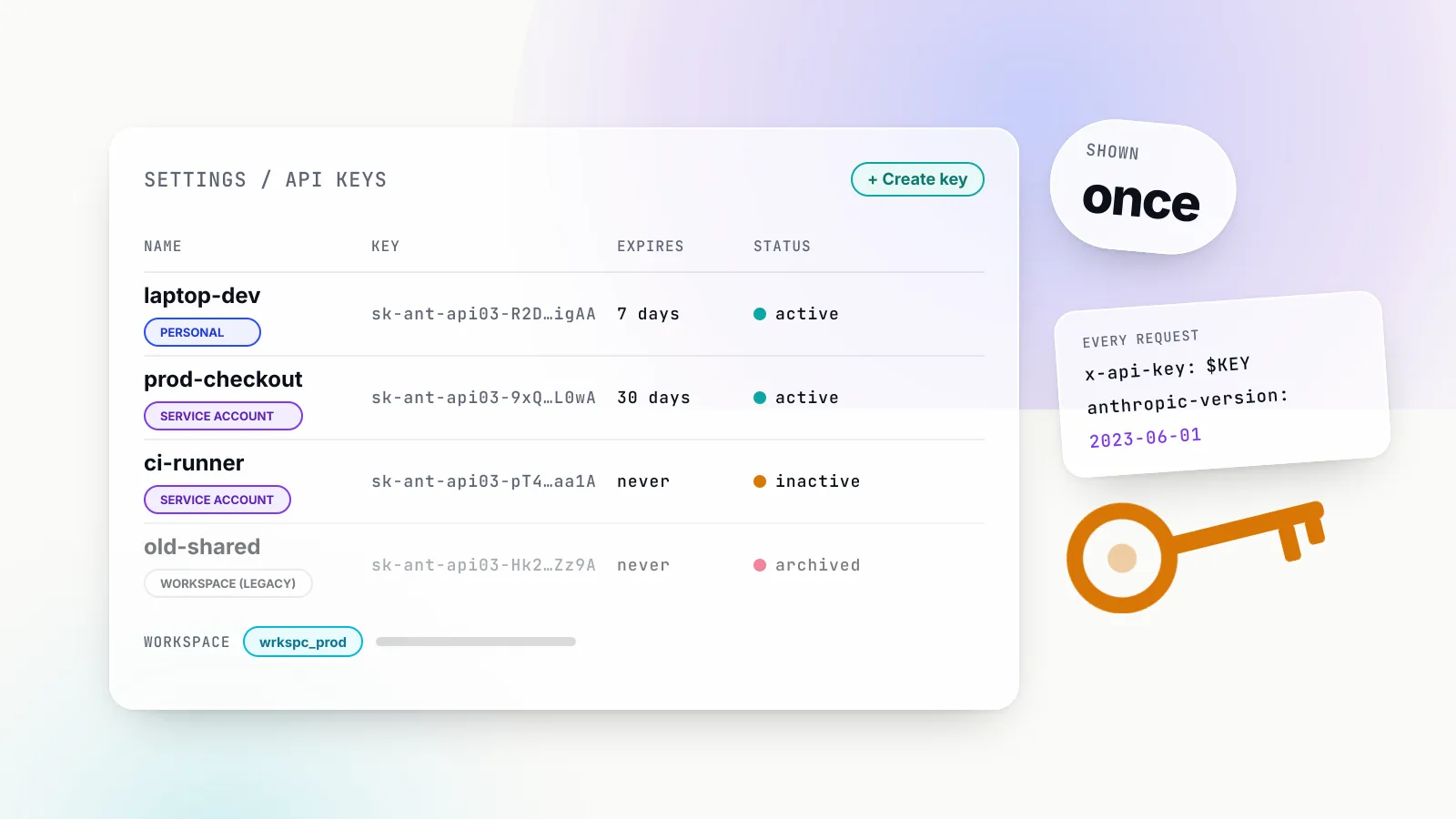
A Claude API key is a secret string beginning sk-ant- that authenticates your code to the Claude API at api.anthropic.com. You create it in the Claude Console, it is shown exactly once, and every request it signs is billed to your organisation and counted against that organisation’s rate and spend limits. That sounds like any other API key, and for a weekend script it is.
For a team it is not. In 2026 Anthropic reworked its key model: keys now have a type (personal, service account or legacy workspace), an optional expiry, and a workspace scope that decides where each request runs and which limits apply. Admin keys are a separate species. Claude Code has its own credential precedence that can quietly switch a subscriber onto per-token billing. And Bedrock, Google Cloud and Microsoft Foundry ignore Console keys entirely.
This guide covers all of it, from creating the first key to retiring static keys altogether. It is written for developers wiring up the API for the first time and for platform teams who now own dozens of keys. Facts are taken from Anthropic’s documentation as read in October 2026; the administration side of the Claude Console has its own guide, so this one covers only what keys need.
What a Claude API key is, and what it is not
The Claude API is a REST API, and the API key is its default credential. Anthropic’s authentication docs describe it as a static sk-ant-api... secret sent as a bearer token and recommend it for local development, prototyping, scripts and servers where you control secret storage. The same page lists two alternatives that avoid static secrets, Workload Identity Federation and App Attest, which come later in this guide.
Three things a Claude API key is not:
- Not a subscription credential. A Claude Pro, Max, Team or Enterprise plan pays for the Claude apps and for Claude Code when you log in with a claude.ai account. The API is billed separately, per token, through the Console. Our Claude Code pricing explainer sets the two billing models side by side.
- Not a cloud credential. Claude on Amazon Bedrock, Google Cloud’s Agent Platform and Microsoft Foundry authenticates with that cloud’s identity system. A Console key does nothing there.
- Not an admin credential. Organisation management uses a different key with a different prefix,
sk-ant-admin01-, covered below.
The terminology has also drifted. Anthropic’s own page title is “Get your Claude API key”, and it notes that these are also called Anthropic API keys. The Console itself now lives at platform.claude.com, with the keys page at platform.claude.com/settings/keys. Older tutorials that say “Anthropic Console” or use a different address describe the same object.
How to get a Claude API key
The procedure in Anthropic’s create-a-key steps is short:
- Sign in to the Claude Console at
platform.claude.com, or create an account. - Open the API keys page (
platform.claude.com/settings/keys) and click Create key. - Name the key, choose an expiration, set Linked account to yourself or to a service account, and optionally pick a workspace to scope it to.
- Copy the key. The Console shows the full value, which starts with
sk-ant-, only at creation. If you lose it, you cannot view it again; create a new one.
Two details trip people up. First, the Create key button can be greyed out. The docs say this means your role may not allow you to create keys in that place, and the fix is an admin changing your role or creating a service account key for the workload. At organisation level, the Admin API documentation lists five roles: user (playground only), claude_code_user (playground and Claude Code), developer (playground and API key management), billing, and admin. Inside a workspace, the Workspace Developer and Workspace Limited Developer roles can create and manage API keys; Workspace User cannot.
Second, a key you create is immediately live, and the organisation it belongs to may be on a low starting tier. New organisations with little history can begin in an Evaluation tier with limits below the standard limits until usage history builds up. A key that works for a test call can still be throttled hard under load on day one.
Anthropic also ships a command-line client, ant, which can log in through a browser OAuth flow instead of using a key (ant auth login). It is convenient on a laptop, but the rest of this guide assumes the key-based flow most applications use.
The four kinds of key
Until 2026, a Claude key was a Claude key. The Console now asks you to choose a key type at creation, and the type decides who the key acts as, where it works, and when it stops working.
| Key type | Acts as | Works in | Stops working when |
|---|---|---|---|
| Personal key | You, with your roles | One workspace, or every workspace your role allows | You leave the organisation (keys are archived, not restored on re-invite) |
| Service account key | A service account (svac_...) | One workspace, or every workspace the account is in | The service account is archived, or removed from a single-workspace key’s workspace |
| Workspace key (legacy) | No one | The workspace it was created in | It expires, is disabled or deleted, or the workspace is archived |
| Admin API key | An org admin’s automation | Admin, usage, cost and rate-limit APIs | It expires or is deleted |
The first three are described in the key types table of Anthropic’s authentication docs. Personal and service account keys are “identity-backed”: each request acts as a user or service account the organisation already manages, so the key cannot outlive the person or workload that owns it. Anthropic now calls workspace keys legacy and says to prefer identity-backed keys or federation for new integrations.
The practical rule follows directly. Use a personal key for your own development. Use a service account key for anything shared, such as CI, a production service or an agent, because a shared personal key acts as one person and breaks when they leave. Creating the service account itself is an admin task, done on the Console’s Service accounts page.
The fourth type is different in kind. An Admin API key starts with sk-ant-admin01-, can be created only by members with the admin role, and authenticates the Admin API, the Usage and Cost API, the Rate Limits API, the Claude Code Analytics API and the Compliance API’s activity feed. Console admin keys have no selectable scopes: every one carries full access to all endpoints that accept them. Claude Enterprise organisations create a scoped admin key in claude.ai instead, with a different prefix (sk-ant-api01-) and explicit scopes such as read:analytics. One admin key covers all the admin APIs, so there is no reason to mint one per report.
There is one more key you may find in your list without having created it. When a member first signs in to Claude Code with a Console account, Anthropic creates a Claude Code workspace and Claude Code mints a per-user API key in this workspace. You cannot create keys in that workspace by hand, and each one stops working when its owner is removed.
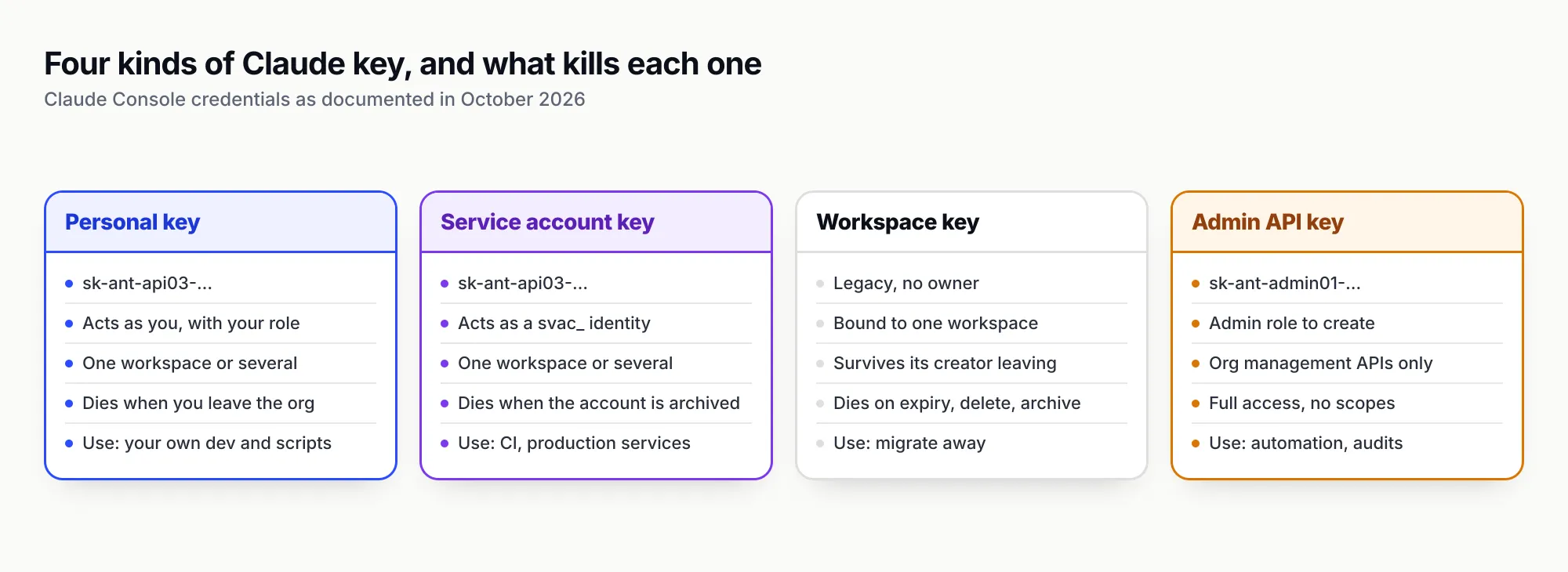
Figure 1: Pick the key type by asking who should own the key when the person who created it leaves.
Making your first request: headers, curl, Python and TypeScript
A Claude API request needs three headers besides the body. The authentication headers table lists them:
| Header | Value | Required |
|---|---|---|
Authorization | Bearer <key> | Yes, unless x-api-key is set |
x-api-key | <key> | Legacy fallback, still supported |
anthropic-version | 2023-06-01 | Yes |
content-type | application/json | Yes |
anthropic-workspace-id | wrkspc_... | Only with a multi-workspace key |
The documentation now treats Authorization: Bearer as the standard and x-api-key as the fallback, a reversal of older guides. In practice both work, and the API’s own error text still names the older header. Sending a deliberately invalid key in either header on 21 October 2026 returned a 401 with "type":"authentication_error" and the message invalid x-api-key; sending no key at all returned x-api-key header is required.
The anthropic-version header pins the API contract. 2023-06-01 remains the current value, and Anthropic’s versioning page says it will not break your usage within a version, though it may add optional inputs, output values and enum variants.
The minimal curl call, with the key in an environment variable rather than on the command line:
export ANTHROPIC_API_KEY="sk-ant-api03-..."

curl https://api.anthropic.com/v1/messages \
  -H "x-api-key: $ANTHROPIC_API_KEY" \
  -H "anthropic-version: 2023-06-01" \
  -H "content-type: application/json" \
  -d '{
    "model": "claude-opus-5-5",
    "max_tokens": 256,
    "messages": [{"role": "user", "content": "Say hello in five words."}]
  }'
The official SDKs read ANTHROPIC_API_KEY from the environment and set the version and content-type headers themselves. This Python example handles the three key-related failures separately; we ran it against version 1.17.0 of the anthropic package with an invalid key and it printed the 401 branch as expected:
import anthropic

client = anthropic.Anthropic()  # reads ANTHROPIC_API_KEY from the environment

try:
    message = client.messages.create(
        model="claude-opus-5-5",
        max_tokens=256,
        messages=[{"role": "user", "content": "Say hello in five words."}],
    )
    print(message.content[0].text)
except anthropic.AuthenticationError as e:
    print("401: key missing, malformed, disabled or expired", e.status_code)
except anthropic.PermissionDeniedError:
    print("403: key lacks access to this resource or workspace")
except anthropic.RateLimitError as e:
    print("429: retry-after =", e.response.headers.get("retry-after"))
The TypeScript equivalent, which also shows how to pin a workspace for a multi-workspace key. It type-checks under --strict against @anthropic-ai/sdk 0.137.0 and behaved the same way at runtime:
import Anthropic from "@anthropic-ai/sdk";

const workspaceId = process.env.ANTHROPIC_WORKSPACE_ID;

// Reads ANTHROPIC_API_KEY from the environment.
const client = new Anthropic({
  defaultHeaders: workspaceId ? { "anthropic-workspace-id": workspaceId } : {},
});

try {
  const message = await client.messages.create({
    model: "claude-opus-5-5",
    max_tokens: 256,
    messages: [{ role: "user", content: "Say hello in five words." }],
  });
  const block = message.content[0];
  if (block.type === "text") console.log(block.text);
} catch (err) {
  if (err instanceof Anthropic.AuthenticationError) {
    console.error("401: key missing, malformed, disabled or expired");
  } else if (err instanceof Anthropic.RateLimitError) {
    console.error("429: retry-after =", err.headers?.get("retry-after"));
  } else {
    throw err;
  }
}
With no key in the environment at all, neither SDK sends a request. Both throw immediately with “Could not resolve authentication method”, which is a useful signal that a deployment never received its secret. Passing the key as a constructor argument (api_key= in Python, apiKey: in TypeScript) also works, but it is the pattern most likely to end up hard-coded in a repository.
Every response carries a request-id header plus anthropic-organization-id and anthropic-workspace-id, which tell you which organisation and which workspace the key resolved to. Logging those two IDs on every call is the cheapest way to catch a key that is running in the wrong place.
Workspaces decide where a key’s requests land
Workspaces are how a Console organisation separates projects, environments and teams while keeping one bill. Every organisation has a Default Workspace that cannot be renamed or archived, and can have up to 100 workspaces by default. For keys, one sentence in the docs matters most: every request runs in exactly one workspace and can only reach resources inside it.
Which workspace depends on the key:
- A legacy workspace key always runs in the workspace it was created in.
- A single-workspace personal or service account key always runs in the workspace chosen at creation, and requests can omit the workspace header.
- A multi-workspace key runs in whatever workspace the request’s
anthropic-workspace-idheader names, provided the user or service account has access to it.
Get the header wrong and the errors are specific. Omitting it with a multi-workspace key returns a 400 invalid_request_error stating that anthropic-workspace-id is required. A malformed ID is another 400; an unknown workspace, or one the key’s identity cannot access, returns a 404 Workspace <id> not found. The docs deliberately make “no access” and “does not exist” look the same.
Scoping matters beyond limits. Files uploaded through the Files API, Message Batches and custom Skills are workspace resources, so a batch created with the staging key is invisible to the production key. Prompt caches are also isolated per workspace on the Claude API, Claude Platform on AWS and Microsoft Foundry, though only per organisation on Bedrock and Google Cloud. A team that splits one application across two workspaces will pay for two caches.
There is a reporting quirk too. The Default Workspace has a normal wrkspc_ ID, but API keys and usage reports show null for its workspace_id, as do keys that are not scoped to any workspace. The Admin API’s scope field on each key is what tells the two apart.
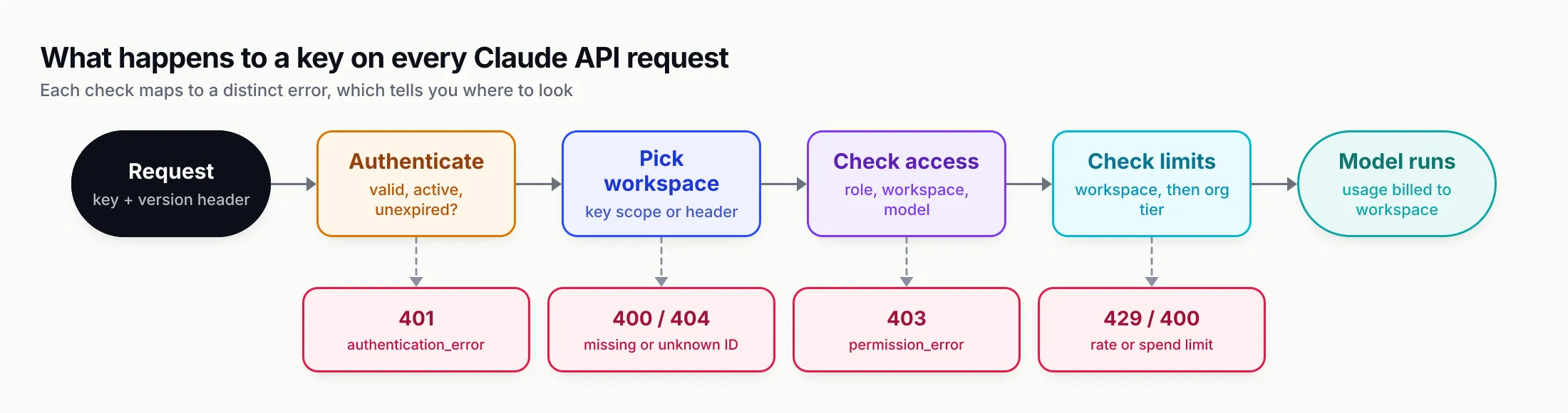
Figure 2: Each failure has its own status code, so the error tells you which part of the key’s configuration to look at.
Rate limits, spend limits and usage tiers
Limits attach to the organisation first and the workspace second, never to an individual key. Two keys in the same workspace share one pool, which is why splitting traffic across more keys does not raise throughput.
Anthropic’s rate-limits page, as of October 2026, describes four usage tiers. Organisations move up automatically based on usage history and account standing, or by using Request tier increase on the Console’s Rate limits page.
| Tier | Monthly spend cap | Claude Opus 5.5 RPM | Input tokens/min | Output tokens/min |
|---|---|---|---|---|
| Start | $500 | 1,000 | 2,000,000 | 400,000 |
| Build | $1,000 | 5,000 | 5,000,000 | 1,000,000 |
| Scale | $200,000 | 10,000 | 10,000,000 | 2,000,000 |
| Custom | None; set with the account team | Negotiated | Negotiated | Negotiated |
Each model class has its own row, and some rows share a combined bucket across older versions; check the per-tier tables for the model you use. One rule makes the input limit larger than it looks: for most current models only uncached input tokens and cache writes count toward input tokens per minute, so the docs’ own example of a 2,000,000 ITPM limit with an 80 per cent cache hit rate works out to 10,000,000 total input tokens per minute.
Spend limits behave differently from rate limits, and the difference is visible in the error:
- Tier spend cap reached. Requests return HTTP 429
rate_limit_errorwitherror.details.error_codeset toenforced_spend_limit_reached, and noretry-afterheader. SDK retries keep failing until 00:00 UTC on the first of the next month or until the tier is raised. - Your own spend limit reached. If you set a lower limit on the Billing page, or a workspace limit, requests return HTTP 400
invalid_request_errorwith a message beginning You have reached your specified API usage limits. - Rate limit reached. A 429 that usually carries
retry-after, plusanthropic-ratelimit-*response headers showing the most restrictive limit in effect.
Workspace limits are the real control for keys. On the Workspaces page you can cap a workspace’s monthly spend, and on the Rate limits page you can cap its requests and tokens per minute per model. Workspace limits can be set lower than, but not higher than the organisation’s, and the Default Workspace cannot carry a spend limit. That last point is a reason not to leave production keys in the Default Workspace: it is the one place where a leaked key’s spend can only be stopped by the organisation-wide cap.
A worked example. A team on the Build tier runs a support bot in a “Production” workspace and lets developers experiment in “Dev”. Capping Dev at $150 a month and 200,000 input tokens per minute on the model they use means a runaway notebook loop, or a developer key pasted into a public gist, burns at most $150 before requests start returning 400s. Production keeps the rest of the organisation’s headroom. Without the cap, the same loop runs until it hits the $1,000 tier cap and takes production down with it.
Expiry, rotation and auditing keys with the Admin API
Every key created in the Console now gets an expiration chosen at creation: 3 hours, 1 day, 7 days or 30 days, a custom duration, or Never. Organisations can impose a maximum, in which case Never disappears from the menu. Expiry cannot be changed afterwards. Anthropic emails the creator 7 days before expiry for keys that lived at least 14 days, and 1 day before for keys that lived at least 7; shorter-lived keys expire silently. After expiry the key returns 401 and cannot be reactivated.
The Console offers two ways to stop a key. Disable is reversible: the key’s status becomes inactive and Re-enable brings it back. Delete is permanent: the key is archived and still appears in listings with status: "archived". Anthropic’s help centre recommends rotating keys on a consistent schedule (for example, every 90 days) and using separate keys for development, testing and production.
A rotation that does not drop traffic looks like this:
- Create the new key with the same type, linked account and workspace, and an expiry.
- Write it to the secrets manager entry the service reads, and redeploy or let the service reload it.
- Watch the old key’s usage fall to zero on the Console’s Usage page.
- Disable the old key first, wait a day for stragglers, then delete it.
For more than a handful of keys, use the Admin API. It can list keys and change their name or status, and each key object reports expires_at, a principal (user, service account, or null for a legacy workspace key) and a scope (one workspace or the whole organisation). What it cannot do is create keys or reveal one: Anthropic’s FAQ says plainly that you create API keys in the Claude Console, and responses show only a partial_key_hint such as sk-ant-api03-R2D...igAA.
An audit that finds active keys with no expiry, then deactivates one:
# List active keys (Admin API key in ANTHROPIC_ADMIN_KEY)
curl "https://api.anthropic.com/v1/organizations/api_keys?limit=100&status=active" \
  -H "x-api-key: $ANTHROPIC_ADMIN_KEY" \
  -H "anthropic-version: 2023-06-01" \
  | jq '.data[] | select(.expires_at == null) | {id, name, principal, scope, partial_key_hint}'

# Deactivate one (reversible; "archived" is the permanent equivalent)
curl "https://api.anthropic.com/v1/organizations/api_keys/apikey_01Rj2N8SVvo6BePZj99NhmiT" \
  -H "x-api-key: $ANTHROPIC_ADMIN_KEY" \
  -H "anthropic-version: 2023-06-01" \
  -H "content-type: application/json" \
  -d '{"status": "inactive"}'
The Admin API also accepts a personal or service account key that is not scoped to a single workspace, acting with that identity’s permissions, and an OAuth token with the org:admin scope. Service accounts and federation rules can only be managed with that OAuth token. Member offboarding, SSO, roles and the Usage and Cost API belong to organisation administration; our Claude platform administration guide covers them in depth.
When a key leaks
Anthropic’s help centre is blunt about the risk: a key is like a credit card number, and if someone obtains and uses it, they incur charges on your behalf. It names the usual causes as plaintext keys committed to public GitHub repositories and keys pasted into third-party tools.
The main automatic safety net is GitHub. Anthropic is in GitHub’s secret scanning partner programme, and the help centre describes the flow: GitHub scans public repositories for Claude keys, notifies Anthropic when it finds one, and Anthropic automatically deactivates the exposed API key before emailing the affected user.
GitHub’s own pattern list shows how far the coverage goes, as of October 2026:
| Secret type (GitHub) | Partner alert | User alert | Push protection | Validity check |
|---|---|---|---|---|
anthropic_api_key | Yes | Yes | Yes | Yes |
anthropic_admin_api_key | Yes | Yes | Yes | No |
anthropic_user_api_key | Yes | Yes | Yes | No |
anthropic_service_api_key | Yes | Yes | Yes | No |
The GitHub supported patterns table lists separate entries for the newer personal (“user”) and service account keys, so the 2026 key types are covered. Push protection blocks a commit containing a detected key before it reaches GitHub, but only on repositories where it is on. The partner programme only covers public repositories on GitHub; a key in a private repo, a Slack message, a CI log or another Git host gets no such treatment.
If you suspect a leak:
- Disable or delete the key on the API keys page. Disabling is enough to stop use and keeps the record.
- Create and deploy a replacement with an expiry this time.
- Check what it was used for. The help centre points to the Console’s Logs and Usage pages to spot unfamiliar traffic.
- Remove the secret from history, but do not rely on it. Rewriting Git history does not unpublish forks, clones or caches, which is why step 1 comes first.
The limits from the previous section are the damage cap. A leaked key in a workspace with a $150 spend limit is an incident; the same key in the Default Workspace of a Scale-tier organisation could be a very large bill. The help centre makes the same point for prepaid accounts, advising care with auto-reload thresholds because they act as a safeguard against unexpected high usage.
Prevention is ordinary secret hygiene: keep keys in environment variables injected from a secrets manager, add .env to .gitignore, run a scanner such as Gitleaks in CI, and never put a key in a mobile or browser app. Prompt-injected agents are a newer path, since an agent with shell access can be talked into printing its environment; the defences in our prompt injection guide apply to keys too.
Retiring static keys: Workload Identity Federation and App Attest
The most effective way to stop a key leaking is not to have one. Workload Identity Federation lets a workload swap an identity token it already has, from AWS IAM, Google Cloud, GitHub Actions, Kubernetes, Entra ID, Okta or any OIDC issuer, for a short-lived Claude access token at POST /v1/oauth/token. There is no sk-ant-api string to mint, store or rotate.
Setup creates three objects in the Console: a service account, a federation issuer and a federation rule that maps matching tokens to the service account. The minted token lives for the rule’s token_lifetime_seconds, between 60 and 86,400 with a default of 3,600, and never more than twice the remaining lifetime of the IdP JWT it was exchanged for. The SDKs perform the exchange and refresh it themselves when you set ANTHROPIC_FEDERATION_RULE_ID, ANTHROPIC_ORGANIZATION_ID, ANTHROPIC_SERVICE_ACCOUNT_ID, ANTHROPIC_IDENTITY_TOKEN_FILE and, where needed, ANTHROPIC_WORKSPACE_ID, and construct the client with no arguments.
The migration has one trap, and Anthropic’s docs flag it in a warning box. Every SDK resolves credentials in a fixed order: constructor arguments, then ANTHROPIC_API_KEY or ANTHROPIC_AUTH_TOKEN, then a named profile, then the federation variables. A leftover key in the environment silently shadows federation, so the workload keeps using the static key you thought you had retired. Unset the variable everywhere, confirm with ant auth status, then delete the key.
Federation is not a complete answer. Anthropic notes it is only as strong as the identity provider’s configuration, and a long-lived cloud credential one step upstream can undo it. But it turns a leak from “a key that works until someone notices” into “a token that expires within the hour”.
For apps that run on users’ devices there is a third option. App Attest lets a genuine, attested installation of a registered iOS or macOS app obtain a token scoped to your workspace that expires after one hour and can call only the Messages API. Before it existed, the only safe pattern for a mobile app was a back-end proxy holding the key.
Claude Code: API key or subscription?
Claude Code accepts almost every credential in this guide, which is exactly why it causes billing surprises. When several are present, it picks one in a documented authentication precedence:
- Cloud provider credentials, when
CLAUDE_CODE_USE_BEDROCK,CLAUDE_CODE_USE_VERTEXorCLAUDE_CODE_USE_FOUNDRYis set. ANTHROPIC_AUTH_TOKEN, sent asAuthorization: Bearer, intended for gateways and proxies.ANTHROPIC_API_KEY, sent asX-Api-Key.- The output of an
apiKeyHelperscript. CLAUDE_CODE_OAUTH_TOKEN, a one-year subscription token fromclaude setup-token.- Anthropic profiles and federation credentials.
- The subscription login from
/login, the default for Pro, Max, Team and Enterprise.
The subscription sits last. If ANTHROPIC_API_KEY is set in your shell and you approve it at the one-time prompt, every Claude Code session bills that key per token rather than drawing on your plan. In non-interactive -p mode, the docs say the key is always used when present, no approval needed. The fix is unset ANTHROPIC_API_KEY and a look at /status, which marks the credential that is not in use. Cloud sessions on the web are the exception: they always use subscription credentials. Which way of paying is cheaper depends on usage; the Claude Code pricing explainer works through it.
For teams, apiKeyHelper is the useful setting. It runs a shell command and sends its output as both X-Api-Key and Authorization: Bearer, so the command can fetch a short-lived credential from a vault instead of leaving a key in a dotfile:
{
  "apiKeyHelper": "/usr/local/bin/fetch-claude-key.sh"
}
Claude Code caches the output for five minutes by default (tunable with CLAUDE_CODE_API_KEY_HELPER_TTL_MS), re-runs the helper when a request fails with 401 or 403, and, from v2.1.246, re-runs it before a request when the cached output is an expired JWT. A helper defined in project settings does not run until you accept the workspace trust prompt, which stops a cloned repository from executing it on its own.
Organisations that bill Claude Code through the Console get two extra controls. Members with the Claude Code role can only create Claude Code keys, and the Claude Code workspace is the only workspace that supports per-user monthly spend limits. Since v2.1.242 developers can also sign in to a Console account without creating an API key, storing a refreshable OAuth profile instead of a static key. Administrators who want to stop environment keys entirely can set forceLoginMethod or forceLoginOrgUUID in managed settings, which blocks ANTHROPIC_API_KEY, ANTHROPIC_AUTH_TOKEN and apiKeyHelper at startup because the organisation behind an environment credential cannot be verified.
Claude on Bedrock, Google Cloud and Microsoft Foundry
Searches for “Claude API key” often come from people using Claude through a cloud provider, and the answer there is that the Console key does not apply. Each platform authenticates with its own identity system:
| Platform | Credential | How it is sent | SDK client |
|---|---|---|---|
| Claude API (Console) | sk-ant- key, or federation token | Authorization: Bearer or x-api-key | Anthropic |
| Amazon Bedrock | IAM role or STS credentials (SigV4); short-term Bedrock bearer token | SigV4 signature, or token in x-api-key | AnthropicBedrockMantle |
| Claude Platform on AWS | SigV4, or a key generated in the AWS Console | SigV4, or x-api-key | AnthropicAWS |
| Google Cloud Agent Platform | Application default credentials | Authorization: Bearer from gcloud auth print-access-token | AnthropicVertex |
| Microsoft Foundry | Foundry resource key, or Entra ID token | api-key or x-api-key; Authorization: Bearer for Entra | AnthropicFoundry |
On Bedrock, Anthropic’s guide lists three paths in order of preference: a Bedrock service role, IAM assumed roles with a 12-hour maximum session, and short-term bearer tokens it calls least preferred. The recommended hardening is a policy that denies bedrock:CallWithBearerToken unless the token is short-term. The newer Bedrock endpoint, bedrock-mantle.{region}.api.aws/anthropic/v1/messages, uses the same request body as the first-party API.
Claude Platform on AWS is Anthropic-operated but billed through AWS Marketplace, and its keys are generated in the AWS Console. The docs warn that keys created in the standard Claude Console don’t work there, and that principals need the aws-external-anthropic:CallWithBearerToken action to use keys at all. For processes such as an LLM gateway that cannot sign SigV4, AWS publishes token generators that mint short-term keys capped at 12 hours.
On Google Cloud, you authenticate with gcloud auth application-default login or a service account, and two request details differ: the model is in the URL and anthropic_version goes in the body as vertex-2023-10-16. Microsoft Foundry offers both a resource key from the Foundry portal, read by the SDK from ANTHROPIC_FOUNDRY_API_KEY, and Microsoft Entra ID tokens governed by Azure RBAC roles such as Foundry User.
The pattern is the same as federation on the first-party API: the cloud platforms let you avoid a long-lived Claude-specific secret entirely, and on all of them a short-lived identity token is the better choice for production. Teams running Claude across several clouds for failover will find more on the routing side in our piece on gateways for Bedrock, Vertex and Azure failover.
Centralising Claude keys behind a gateway
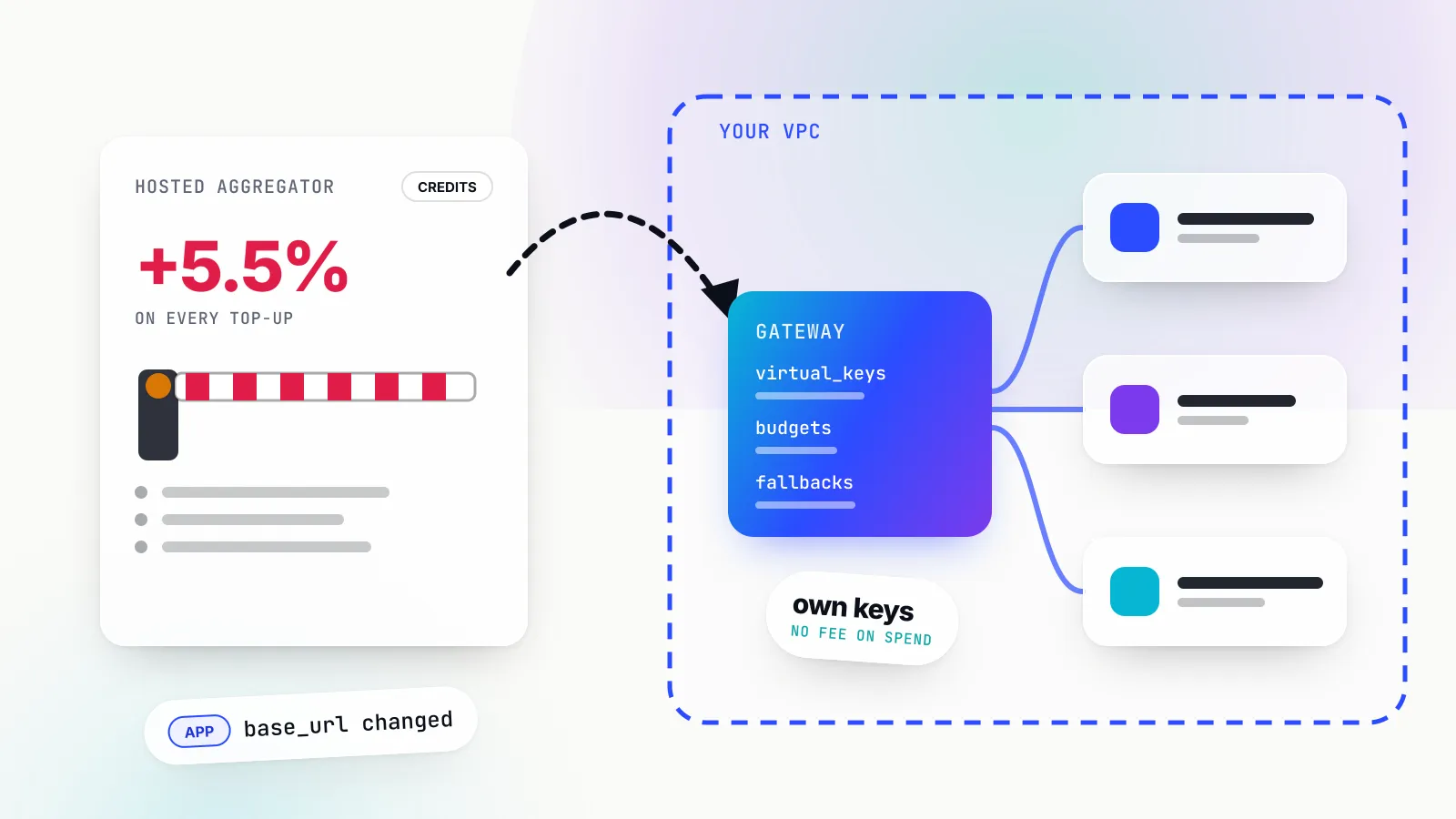
Workspaces and federation solve the problem inside Anthropic’s platform. Many organisations have a wider one: dozens of services, several model providers, and developers who each want a key. The standard answer is to keep provider keys in one place, an AI gateway, and issue applications their own gateway credentials instead.
The open-source Bifrost gateway from Maxim AI is one example of how this works. Applications and developers authenticate with a Bifrost virtual key (sk-bf-...), which Bifrost accepts in Anthropic-style x-api-key, Authorization: Bearer or its own x-bf-vk header. Each virtual key carries its own allowed providers and models, a dollar budget with a reset period, token and request rate limits, and can be restricted to specific provider keys; the real Anthropic key never leaves the gateway. Virtual keys can also expire, after which requests get a 403 and the key stays visible for audit, and an operator can make a valid virtual key mandatory for every inference request. Bifrost’s enterprise tier adds identity-provider sign-in, RBAC, audit logs and secret manager integration so provider keys are not stored in plaintext in its database.
Pointing Claude Code at such a gateway is two environment variables, because Claude Code sends ANTHROPIC_AUTH_TOKEN as a bearer token ahead of any API key. Bifrost’s Claude Code guide uses exactly this:
export ANTHROPIC_BASE_URL=https://bifrost.example.com/anthropic
export ANTHROPIC_AUTH_TOKEN=sk-bf-your-virtual-key
claude
For rotating credentials, the same guide uses apiKeyHelper to fetch a short-lived gateway token on each refresh. The application SDKs need only a base_url change and the virtual key in place of the Anthropic key.
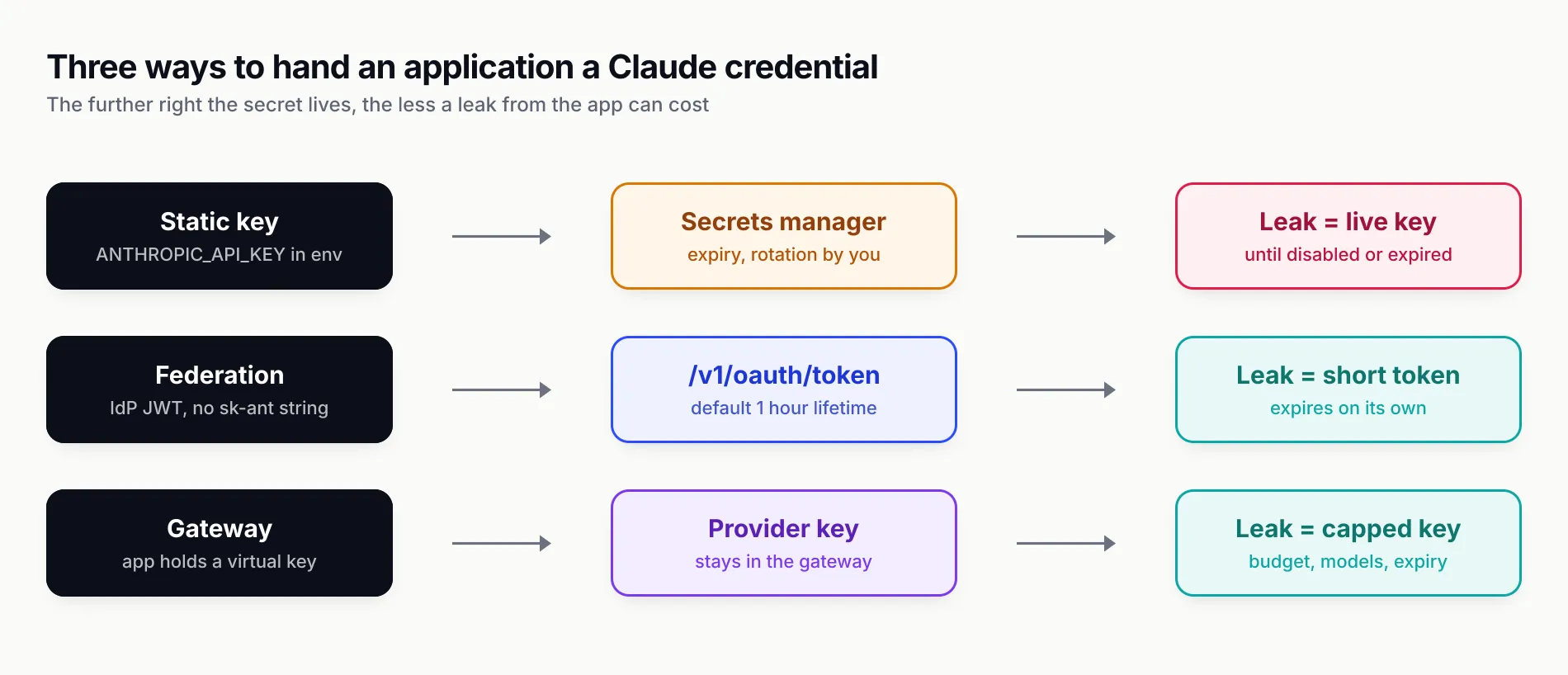
Figure 3: Moving the long-lived secret away from the application is what limits the cost of a leak.
A gateway is not free of trade-offs. It is another hop on every request and another service to run, patch and secure, and its own Anthropic key becomes the single most valuable secret in the company, so it deserves federation or a secrets manager of its own. Teams that use only Claude, from one platform, may find that service account keys in per-environment workspaces with spend limits already give them most of the control. A gateway earns its place when there are several providers, many teams, or coding agents on hundreds of laptops; our explainer on what an AI gateway does and the shadow AI governance guide cover when that point arrives.
A checklist for owning Claude API keys
For an individual developer:
- Create a personal key with an expiry, scoped to one workspace, and keep it in your shell’s secret store or a
.envfile that is git-ignored. - If you pay for a Claude plan, check
/statusin Claude Code and unsetANTHROPIC_API_KEYunless you mean to bill the API. - Turn on push protection for your GitHub repositories.
For a team running Claude in production:
- Replace legacy workspace keys and shared personal keys with service account keys, one per workload, each scoped to a single workspace.
- Keep production out of the Default Workspace, and give every workspace a spend limit and per-model rate limits.
- Give every key an expiry; where Never is unavoidable, rotate on a schedule and audit
expires_atthrough the Admin API. - Log
request-idandanthropic-workspace-idon every response. - Move workloads with a platform identity to Workload Identity Federation, and check that no
ANTHROPIC_API_KEYis left shadowing it. - Use
apiKeyHelperor managed settings to keep static keys off developer machines. - When the number of providers, teams or agents grows past what workspaces can model, put a gateway in front and hand out virtual keys instead.
The key itself is the least interesting part of all this. What protects you is the set of answers you can give when one leaks: who owned it, which workspace it ran in, what it was allowed to spend, and how quickly it would have expired anyway. Choosing the key type, workspace and expiry when you create the key is what makes those answers short.
Sources
- Get your Claude API key Anthropic
- Authentication (API keys, key types, expiration, workspace selection) Anthropic
- API overview, authentication headers Anthropic
- Workspaces Anthropic
- Rate limits, spend limits and usage tiers Anthropic
- Errors Anthropic
- Create an Admin API key Anthropic
- Admin API, API keys Anthropic
- Workload Identity Federation Anthropic
- API key best practices: keep your keys safe and secure Anthropic Help Center
- Supported secret scanning patterns GitHub
- Claude Code authentication Anthropic
- Claude Code settings reference, apiKeyHelper Anthropic
- Claude in Amazon Bedrock Anthropic
- Claude Platform on AWS Anthropic
- Claude on Google Cloud Anthropic
- Claude in Microsoft Foundry Anthropic
- Bifrost virtual keys Maxim AI
- Bifrost with Claude Code Maxim AI
Frequently asked questions
How do I get a Claude API key?
Sign in to the Claude Console at platform.claude.com, open Settings, then API keys (platform.claude.com/settings/keys), and click Create key. Name it, pick an expiry, link it to yourself or a service account, and optionally scope it to a workspace. Copy the sk-ant- secret immediately: the Console shows it only once.
Is the Claude API key free?
Creating a key costs nothing, but every request made with it is billed to your Console organisation at API token prices, separately from any Claude Pro, Max, Team or Enterprise subscription. New organisations start on a low usage tier, and each tier carries a monthly spend cap.
Does a Claude Pro or Max subscription include an API key?
No. Subscriptions cover the Claude apps and Claude Code when you log in with your claude.ai account. The Claude API is billed separately through the Claude Console. If you set ANTHROPIC_API_KEY and approve it in Claude Code, Claude Code bills that key instead of your subscription.
Should I use the x-api-key header or Authorization Bearer?
Anthropic's current documentation describes Authorization: Bearer as the standard header and x-api-key as a legacy fallback that is still supported. Both work with a Console key. The official SDKs set the header for you from ANTHROPIC_API_KEY, along with anthropic-version: 2023-06-01.
What happens if I accidentally push my Claude API key to GitHub?
Anthropic is a GitHub secret scanning partner. When a Claude API key appears in a public repository, GitHub notifies Anthropic, which deactivates the key and emails you. Create a replacement, deploy it, and treat the old key as burned even after you rewrite Git history.
Can I create Claude API keys through the API?
No. Keys are created in the Claude Console. The Admin API can list, retrieve, rename and change the status of existing keys, and it reports each key's type, scope, expiry and a redacted hint, but it never returns a key's secret value.
Do Claude API keys work on Amazon Bedrock, Google Cloud or Microsoft Foundry?
No. Each cloud uses its own credentials: AWS IAM or Bedrock bearer tokens on Bedrock, Google Cloud application default credentials on Agent Platform, and Foundry API keys or Entra ID tokens on Microsoft Foundry. Even Claude Platform on AWS uses keys generated in the AWS Console, not the Claude Console.