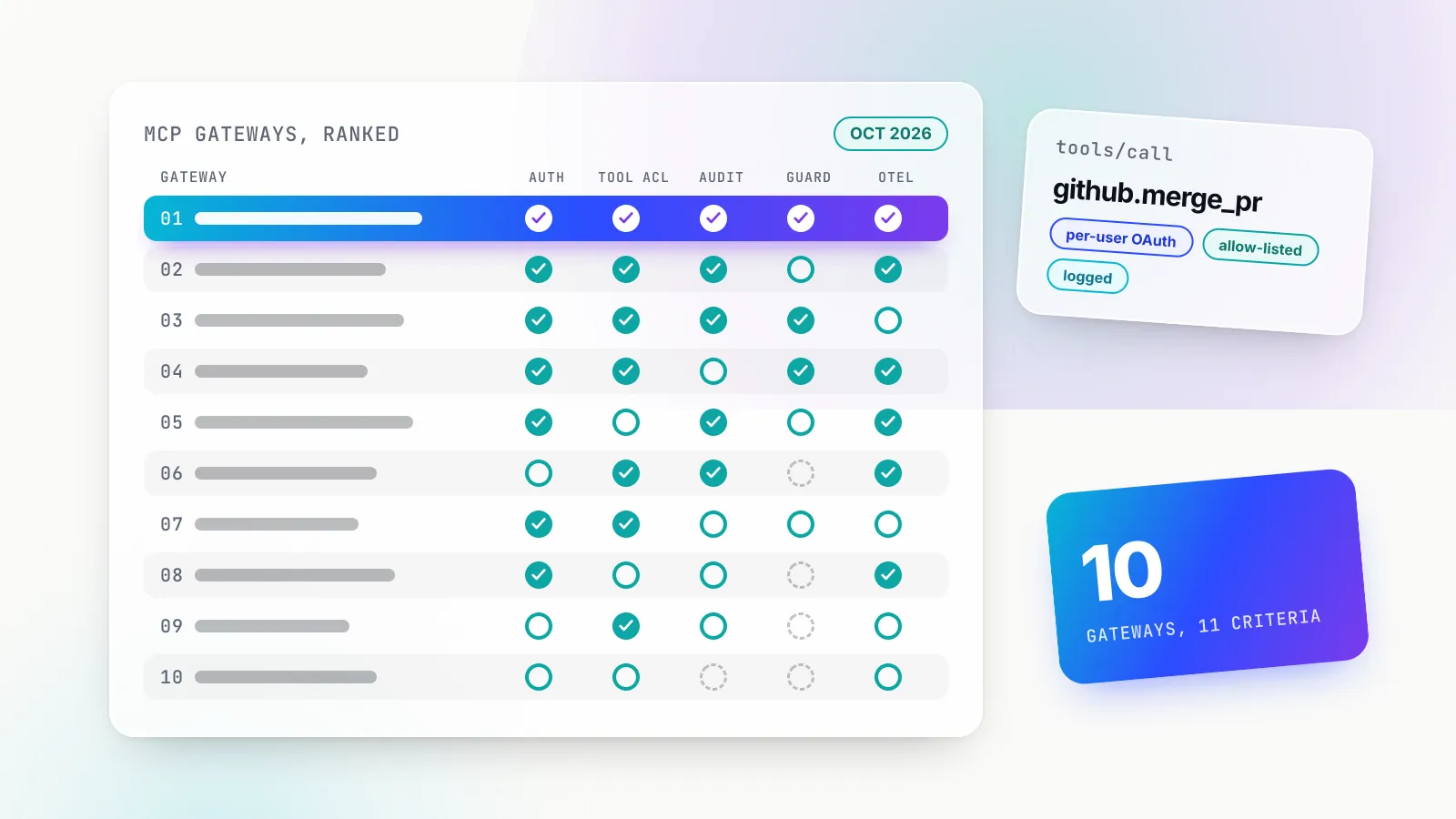
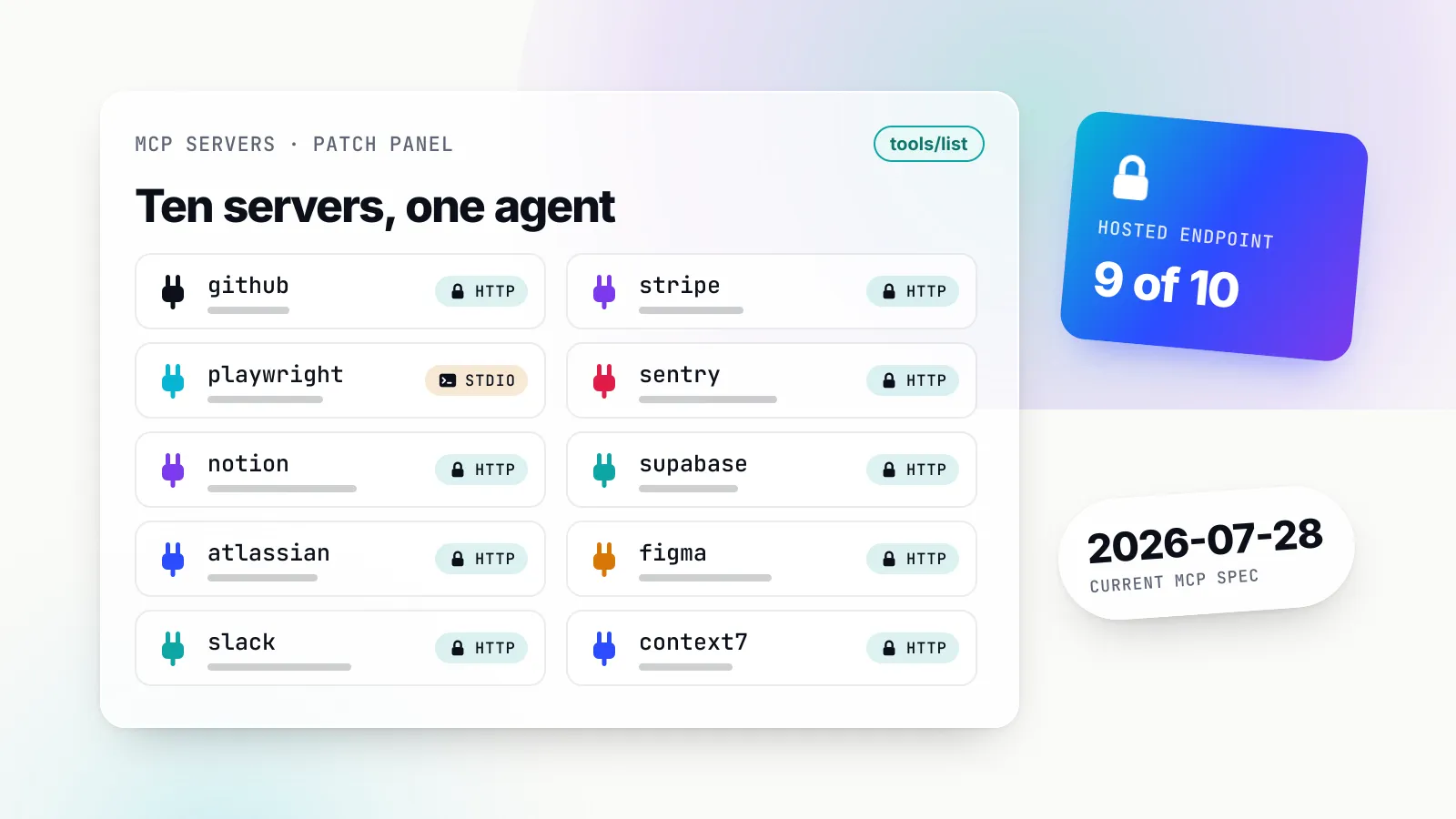
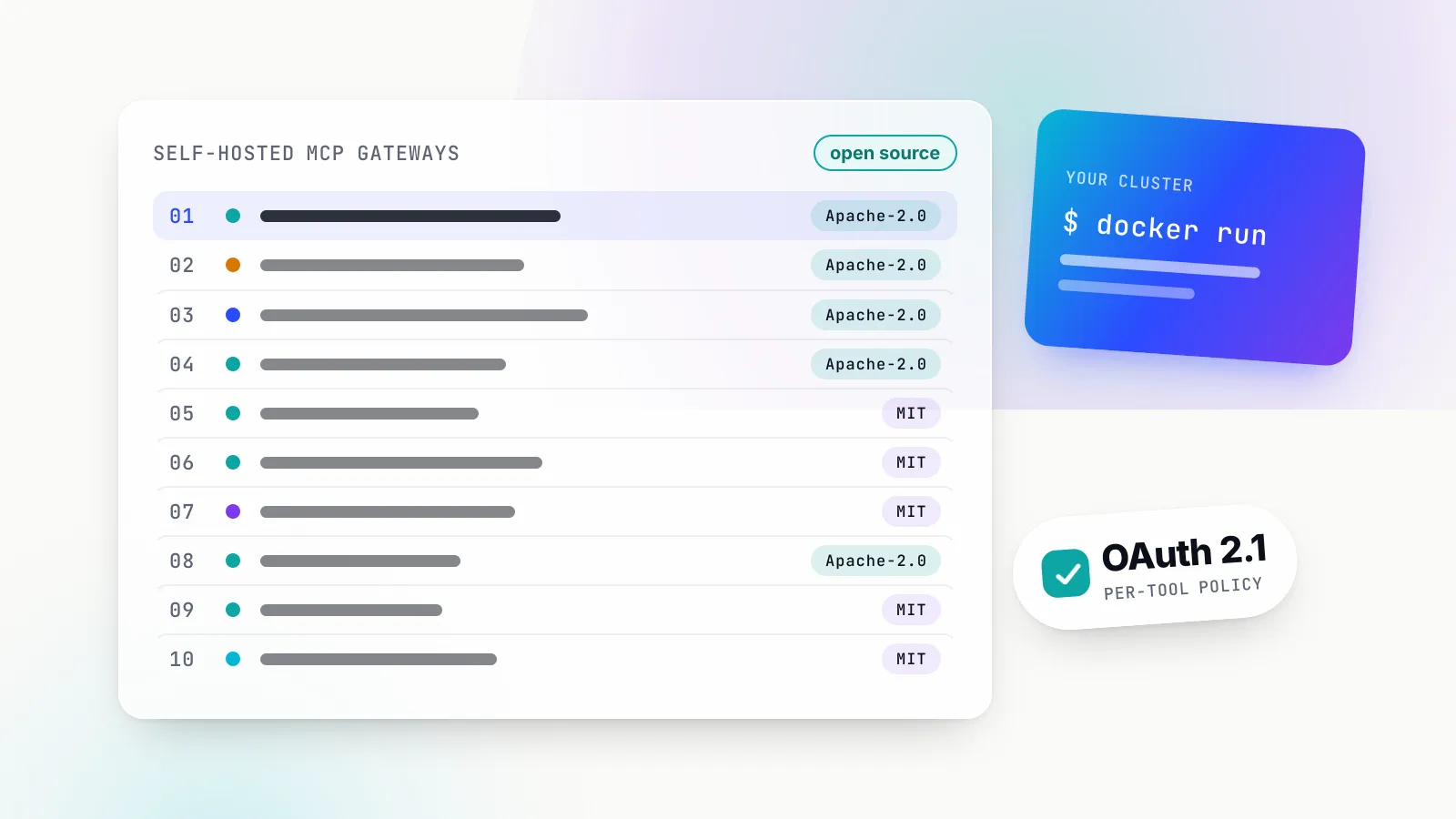
ToolsComparison
Top 10 MCP servers for coding agents in 2026, ranked on what they cost and what they risk
GitHub, Context7, Playwright, Chrome DevTools, Sentry and five more MCP servers ranked for Claude Code, Cursor, Codex and Copilot, with measured tool-definition token costs and injection risks.
The Model Context Protocol has become the standard way to give a coding agent tools it does not ship with. Claude Code, Cursor, OpenAI’s Codex CLI and IDE extension, GitHub Copilot’s agent mode, Windsurf’s Cascade and Gemini CLI all speak it, and the public catalogues now list thousands of servers. Very few of them make a coding agent measurably better at its job. The ones that do share a trait: they close a feedback loop the agent cannot close from the shell, by handing it the current docs, a real browser, the production error or the ticket and design the change came from.
This ranking is for engineers and platform teams choosing which servers to install, and for whoever has to answer for what those servers can reach. Every server was assessed from its own repository and documentation in early October 2026, and for the seven that run locally we measured the token cost of their tool definitions directly. The short version: install GitHub and Context7 first, add a browser server when the agent touches front-end code, connect Sentry and your database only in read-only mode, and treat every server that reads outside content as a prompt-injection surface.
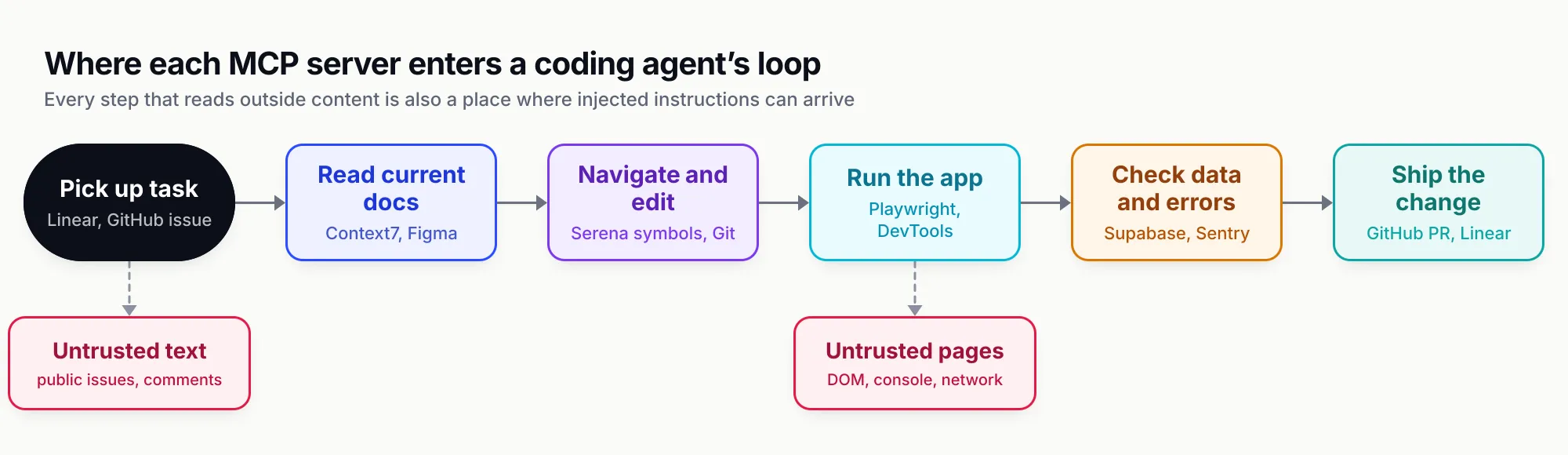
Figure 1: Each server earns its place at one step of the loop, and the steps that read outside content are where injected instructions arrive.
How we ranked the servers
A server’s rank reflects six criteria, weighted roughly in this order.
- Measurable agent benefit. Does the server give the agent a signal it cannot get from reading files and running commands? A browser that shows the rendered page, an error tracker that shows the stack trace from production, and a docs index that shows the current API all qualify. A server that wraps something the agent already does natively, such as reading files, scores low.
- Token cost of tool definitions. Every connected server sends its tool names, descriptions and JSON input schemas to the model. We counted them (method below), because a server that costs 12,000 tokens per session has to earn that.
- Local versus remote. Local stdio servers run with the developer’s privileges on the developer’s machine; remote servers hold credentials elsewhere and add a network dependency. Neither is better in general, but the choice changes who can audit what.
- Authentication. OAuth with scopes beats a long-lived personal token pasted into a JSON file. Scope filtering and read-only modes count in a server’s favour.
- Prompt-injection exposure. Servers that return text written by strangers (public issues, web pages, user-submitted rows) can carry instructions the agent obeys. We credit servers that document the risk and ship a mitigation.
- Maintenance. An official maintainer, recent releases and a clear licence. A server last updated a year ago will break when the client or the upstream API changes.
There is little independent benchmarking of MCP servers for coding work, so “measurable benefit” is a judgement about which feedback loop a server closes, not a score from a leaderboard. Where a vendor publishes a number, it is labelled as the vendor’s.
The contenders at a glance
| Rank | Server | Maintainer and licence | Runs | Auth | Best fit |
|---|---|---|---|---|---|
| 1 | GitHub MCP Server | GitHub; MIT | Remote or local (Docker, binary) | OAuth or PAT | Any team whose work lives in GitHub |
| 2 | Context7 | Upstash; MIT client, private backend | Remote or local | Optional API key | Fast-moving frameworks and SDKs |
| 3 | Playwright MCP | Microsoft; Apache 2.0 | Local | None (local browser) | Checking that UI changes behave |
| 4 | Chrome DevTools MCP | Chrome DevTools team; Apache 2.0 | Local | None (local Chrome) | Performance, network and console debugging |
| 5 | Sentry MCP | Sentry; FSL-1.1, Apache 2.0 future licence | Remote, or stdio for self-hosted | OAuth or user token | Fixing errors seen in production |
| 6 | Supabase MCP | Supabase; Apache 2.0 | Remote, CLI-local or self-hosted | OAuth 2.1 (remote) | Supabase projects; Neon is the Postgres alternative |
| 7 | Linear MCP | Linear; hosted service | Remote | OAuth 2.1 or API key | Teams that plan work in Linear |
| 8 | Figma MCP | Figma; hosted service | Remote or desktop app | Figma sign-in, seat-dependent | Design-to-code handoff |
| 9 | Serena | Oraios AI; GPL-3.0-or-later | Local | None | Large codebases and symbol-level refactors |
| 10 | Docker MCP Toolkit and Gateway | Docker; MIT (gateway) | Local containers | Docker Desktop secrets, OAuth | Running many local servers in isolation |
Two obvious candidates are missing. The Git and Filesystem servers in the MCP reference repository are, in the maintainers’ words, “reference implementations” and “not production-ready solutions”, and every coding agent on this list already reads, edits and commits files natively. They remain useful for chat apps that lack file access, not for agents that have a terminal. Teams on other code hosts or trackers should look for that vendor’s official server before reaching for a community one.
1. GitHub MCP Server
The GitHub MCP Server is GitHub’s official server for repositories, issues, pull requests, Actions, code scanning, Dependabot alerts and more. It runs as a hosted remote server at https://api.githubcopilot.com/mcp/ or locally from the ghcr.io/github/github-mcp-server image or a Go binary, under an MIT licence. The latest release at the time of writing is v1.14.0, published on 2 October 2026, and the README lists hosts from VS Code, Cursor, Windsurf and Claude Desktop to Xcode, JetBrains, Copilot CLI and Gemini CLI.
Strengths. Issues and pull requests are where coding work starts and ends, so a server that can read an issue, inspect a failing Actions run and open or review a pull request gives the agent the whole loop. The configuration surface is the best on this list. Toolsets are opt-in (the default is context, repos, issues, pull_requests and users), individual tools can be added with --tools, and --read-only removes every write tool even if one is requested explicitly. With classic tokens, scope filtering hides tools the token cannot use. The configuration guide also documents a lockdown mode, which limits content from public repositories to users with push access. GitHub describes it as “a best-effort content filter meant to reduce prompt-injection risk from untrusted repository content” and is explicit that it is not an authorisation boundary.
Limitations. It is the heaviest server we measured: the default toolsets expose 46 tools costing about 12,300 tokens, and --toolsets all exposes 91 tools at about 26,000. It is also the server with the best-documented injection incident. In May 2025 Invariant Labs showed an agent reading a malicious public issue being steered into copying private repository data into a public pull request, and noted the weakness was “not specific to any particular agent or MCP client”. Lockdown and narrow tokens reduce that risk; they do not remove it.
Best fit. Every team on GitHub, configured read-only with the toolsets the task needs, and with lockdown on for anyone who works across public repositories.
2. Context7
Context7, from Upstash, fetches current, version-specific documentation and code examples for a library and puts them in the prompt. It exposes two tools, resolve-library-id and query-docs, through a remote endpoint at https://mcp.context7.com/mcp or a local package, and ships a CLI mode as an alternative to MCP. The client code is MIT-licensed; the API backend, parser and crawler are private.
Strengths. It targets the most common way coding agents fail: confidently writing code against an API from their training data that has since changed. Asking for the current docs of the exact version in package.json before writing code is the cheapest reliability gain available. It is also the lightest useful server we measured, at about 1,100 tokens for its two tool definitions. It works without an account; a free API key raises rate limits and adds private repositories.
Limitations. The definitions are cheap, but the results are not: each query-docs call puts documentation into context, so the token cost moves from session start to every lookup. The content is only as good as its source, and the README says so plainly: “Context7 projects are community-contributed and while we strive to maintain high quality, we cannot guarantee the accuracy, completeness, or security of all library documentation.” Documentation fetched from a third party is untrusted input like any other. Because the backend is closed, teams cannot self-host the index.
Best fit. Any agent working with frameworks that move faster than model training cut-offs, which in 2026 means most of them.
3. Playwright MCP
Playwright MCP is Microsoft’s server for driving a real browser with Playwright. Its defining choice is to operate on the page’s accessibility tree, not on screenshots: the agent receives a structured snapshot of roles, names and references, and acts on those references, so it needs no vision model. It runs locally with npx @playwright/mcp@latest, under Apache 2.0; v0.0.83 shipped on 28 September 2026.
Strengths. It closes the loop between “the code compiles” and “the feature works”. An agent can start the dev server, open the page, fill the form, read console errors and confirm the change before reporting success. Extra capabilities (vision coordinates, PDF, DevTools, network, storage, testing assertions, configuration) are opt-in through --caps, which keeps the default lean: 25 tools at about 4,400 tokens in our measurement, rising to 72 tools and about 9,500 tokens with every capability on.
Limitations. Accessibility snapshots of large pages are verbose, and they land in context as tool results. Microsoft’s own README now steers coding agents elsewhere: it says CLI invocations “are more token-efficient: they avoid loading large tool schemas and verbose accessibility trees into the model context”, recommends the separate Playwright CLI with skills for coding agents, and keeps MCP for loops that need persistent browser state. It is also blunt about security: “Playwright MCP is not a security boundary”, and the --allowed-origins flag is documented as not being one either. Any page the browser loads is untrusted text in the agent’s context.
Best fit. Front-end and full-stack work where the agent should verify behaviour in a browser, and exploratory or self-healing test loops that benefit from a persistent session.
4. Chrome DevTools MCP
Chrome DevTools MCP, now titled “Chrome DevTools for agents”, gives an agent control of a live Chrome instance plus the DevTools inspection surface. Its tool reference lists 59 tools across 11 categories, including performance traces with insight analysis, network request inspection, console messages with source-mapped stack traces, a Lighthouse audit and 14 heap-snapshot tools for memory investigation. It runs locally with npx -y chrome-devtools-mcp@latest, under Apache 2.0; v1.10.1 was released on 23 September 2026.
Strengths. Where Playwright answers “does it work”, Chrome DevTools answers “why is it slow, broken or leaking”. An agent can record a trace and read its performance insights, find the request that returned a 500, or compare two heap snapshots, which is debugging work that previously required a human at the DevTools panel. The default configuration exposes 30 tools at about 6,200 tokens; --slim cuts that to three tools (navigate, evaluate, screenshot) at about 200 tokens for basic tasks.
Limitations. Google collects usage statistics by default, including tool success rates, latency and environment information; opt out with --no-usage-statistics. Performance tools may send trace URLs to the Chrome UX Report API to fetch field data unless --no-performance-crux is set, which matters for internal URLs. The README warns that the server “exposes content of the browser instance to the MCP clients”, so a profile signed into internal tools is exposed too; --isolated with a throwaway profile is the safer default. Only Chrome and Chrome for Testing are officially supported.
Best fit. Performance work, network and console debugging, and memory leaks in Chrome. Pair it with Playwright rather than choosing between them.
5. Sentry MCP
Sentry’s MCP server is a hosted service at https://mcp.sentry.dev/mcp that uses OAuth on first connection, with a stdio mode for self-hosted Sentry. The maintainers say it is “primarily designed for human-in-the-loop coding agents”, with tools chosen for debugging rather than full Sentry administration. It is published under the Functional Source License 1.1, converting to Apache 2.0 after two years.
Strengths. Production errors are the feedback loop agents most often lack. With Sentry connected, an agent can pull the issue, the stack trace and the surrounding events, and ask Sentry’s Seer for a root-cause analysis (analyze_issue_with_seer), then fix the code in the same session. Tool exposure is grouped into skills, and the remote endpoint accepts ?skills=inspect,triage or ?disable-skills=seer to narrow it. A Claude Code plugin packages it as a subagent so the main context does not carry Sentry’s tools.
Limitations. In stdio mode the server exposed nine tools costing about 5,900 tokens in our measurement, including two meta-tools (search_sentry_tools, execute_sentry_tool) that route to further tools. The natural-language search tools (search_errors, search_issues and others) require an LLM provider key configured on the server, so a self-hosted setup sends queries to a second model provider. Error messages and breadcrumbs can contain user-supplied strings, which makes them an injection channel like any other. The licence is source-available, not open source, until each release converts.
Best fit. Teams on Sentry who want agents to go from alert to fix, using the remote service with narrowed skills.
6. Supabase MCP (and Neon)
The Supabase MCP server connects an agent to a Supabase project: tables, migrations, SQL, logs, edge functions, branches and docs. The remote server at https://mcp.supabase.com/mcp uses OAuth 2.1; local Supabase CLI and self-hosted installations get a reduced tool set without OAuth. The code is Apache 2.0.
Strengths. Database work is where agents most need ground truth: the real schema, the real migration history, the real query plan. Supabase’s controls are the most concrete on this list. read_only=true executes SQL “as a read-only Postgres user”, so it is enforced by the database rather than by a tool filter; project_ref scopes the server to one project; and feature groups (database, debugging, development, functions, account, docs, branching, storage) trim the rest. On defaults we measured 29 tools at about 4,500 tokens; read-only and project-scoped, 13 tools at about 2,200.
Limitations. Supabase’s own guidance leads with the risk: a support ticket containing injected instructions can trick an agent into running queries that expose data. It advises connecting to production “only when the task requires production evidence”, never sharing the server with end users because it “operates under the context of your developer permissions”, and keeping manual approval of tool calls on. Branching is experimental and limited to paid plans.
Neon’s MCP server is the equivalent for Neon Postgres, with OAuth or API-key access, URL-level readonly, projectId and tool-category scoping, and migrations run on a temporary branch before they are applied. Neon states that it does “not recommend using the Neon MCP Server in production environments”.
Best fit. Development and staging projects, connected read-only and scoped to one project unless a task genuinely needs writes.
7. Linear MCP
Linear’s MCP server, launched on 1 May 2025, is a hosted service at https://mcp.linear.app/mcp with OAuth 2.1 and dynamic client registration, or a Linear API key in the Authorization header. Linear’s setup guides cover Claude, Cursor, VS Code, Zed, Windsurf, Jules, v0 and Codex.
Strengths. It lets an agent start from the ticket rather than from a paraphrase of it: read the issue and its comments, find related work, then update status and post a summary when the change ships. The read-only story is simple: a separate endpoint at /mcp/readonly, the read OAuth scope, or an API key with only read permission. There is nothing to install and no token on disk when OAuth is used.
Limitations. It is hosted only, so there is no self-hosted option for teams with residency rules. Linear’s documentation describes tools for “finding, creating, and updating objects in Linear like issues, projects, and comments” but does not publish a tool list, and because the server requires OAuth we did not measure its definition size. Ticket text is written by anyone with workspace access, and by customers where intake is wired to support, so it is an injection channel; read-only is the sensible default for agents that only need context.
Best fit. Teams that plan in Linear and want agents to begin from the issue and close the loop on it.
8. Figma MCP
Figma’s MCP server hands design context to a coding agent. The remote server at https://mcp.figma.com/mcp is “available on all seats and plans”; the desktop server requires a Dev or Full seat on a paid plan. Read tools include get_design_context, get_variable_defs, get_metadata, get_screenshot and the Code Connect mappings; remote-only write tools such as use_figma and generate_figma_design create and edit native Figma content.
Strengths. It replaces the screenshot-and-guess workflow with structured design data: the layer structure, the variables and styles in use, and, through Code Connect, the actual components in the codebase that a frame maps to. That is the difference between an agent producing plausible markup and one producing your design system’s components with your tokens.
Limitations. Rate limits depend on seat and plan, and they are tight for the cheaper seats: View and Collab seats get up to six read calls a month on paid plans (20 on Starter), while Dev and Full seats get 200 a day on Professional and 600 a day on Organization. Only clients listed in Figma’s MCP catalogue can connect. Writing to the canvas is free during the beta and will become “a usage-based paid feature”. It is a hosted, proprietary service.
Best fit. Front-end teams with a maintained design system and Dev seats for the engineers whose agents need it.
9. Serena
Serena, from Oraios AI, gives an agent IDE-like code navigation and editing through language servers. Instead of reading files and editing by line, the agent calls find_symbol, find_referencing_symbols, get_symbols_overview, replace_symbol_body or rename_symbol. The README claims support for more than 40 languages. It installs with uv tool install -p 3.13 serena-agent; the application is GPL-3.0-or-later, with its language-server layer under MIT. Version 1.7.0 was released on 9 August 2026.
Strengths. In a large repository, the expensive part of an agent’s work is often finding the right code: reading whole files to locate one function, or grepping and missing a reference. Symbol-level retrieval and edits address that, and a rename that updates every reference becomes one call. The README reports agents describing the tools as “much more token-efficient than typical alternatives”; that is anecdotal and unmeasured, but the mechanism is sound.
Limitations. At 24 tools and about 6,400 tokens in its IDE context, it is not light, and several tools overlap with what agents already do natively, which gives the model two ways to do the same thing. Language servers need installing and indexing, and quality varies by language. The GPL licence matters to anyone redistributing it.
Best fit. Large, typed codebases (Java, TypeScript, Go, Rust, Python with types) where navigation, not generation, is the bottleneck.
10. Docker MCP Toolkit and Gateway
The Docker MCP Toolkit runs MCP servers as containers from Docker’s catalogue of “300+ verified servers”, behind a local MCP Gateway that each client connects to once. The gateway is open source under MIT; the Toolkit interface needs Docker Desktop 4.62 or later.
Strengths. It answers the local-server security problem the MCP specification describes, where a stdio server runs arbitrary code with the user’s privileges. Catalogue images under mcp/ are built and signed by Docker; containers default to 1 CPU and 2 GB of memory and have no host filesystem access unless granted. The gateway run reference shows --block-secrets and --log-calls on by default, with --verify-signatures, --block-network and pluggable interceptors available. Profiles group servers per project and carry tool allow-lists (docker mcp profile tools --enable github.create_issue), and Dynamic MCP tools (mcp-find, mcp-add, mcp-exec) let an agent add servers on demand rather than loading every definition up front.
Limitations. It is a way to run servers, not a capability in itself, so its value depends on what you put in it. Containers cannot see the code on the host by default, which is the point but also friction for servers that need the working tree. Docker’s documentation describes the code-mode tool as unreliable in its current early state. Letting an agent add servers from a catalogue during a session is convenient, and it is also a way for servers nobody approved to appear.
Best fit. Developers running several local servers who want isolation and secrets handling without building it themselves.
What actually differs: tool weight, untrusted content and who holds the token
The ten servers do different jobs, but they can be compared on three properties that decide whether a given setup is cheap, safe and maintainable.
Tool-definition weight, measured
We started each local server on 5 October 2026, called tools/list, and serialised what a client sends to the model for each tool: name, description and input schema. Token figures divide characters by four, a rough rule of thumb; tokenisers differ and clients add their own wrapping, so treat these as relative weights rather than exact bills. Linear and Figma require OAuth and were not measured.
| Server and configuration | Tools | Characters | Approx. tokens |
|---|---|---|---|
GitHub, --toolsets all | 91 | 103,938 | 26,000 |
| GitHub, default toolsets | 46 | 49,342 | 12,300 |
Playwright, all --caps | 72 | 37,828 | 9,500 |
GitHub, --read-only | 27 | 27,937 | 7,000 |
| Serena, IDE context | 24 | 25,549 | 6,400 |
| Chrome DevTools, default | 30 | 24,619 | 6,200 |
| Sentry, stdio | 9 | 23,556 | 5,900 |
| Supabase, default | 29 | 17,854 | 4,500 |
| Playwright, default | 25 | 17,616 | 4,400 |
| Supabase, read-only, one project | 13 | 8,839 | 2,200 |
| Context7 | 2 | 4,588 | 1,100 |
Chrome DevTools, --slim | 3 | 738 | 200 |
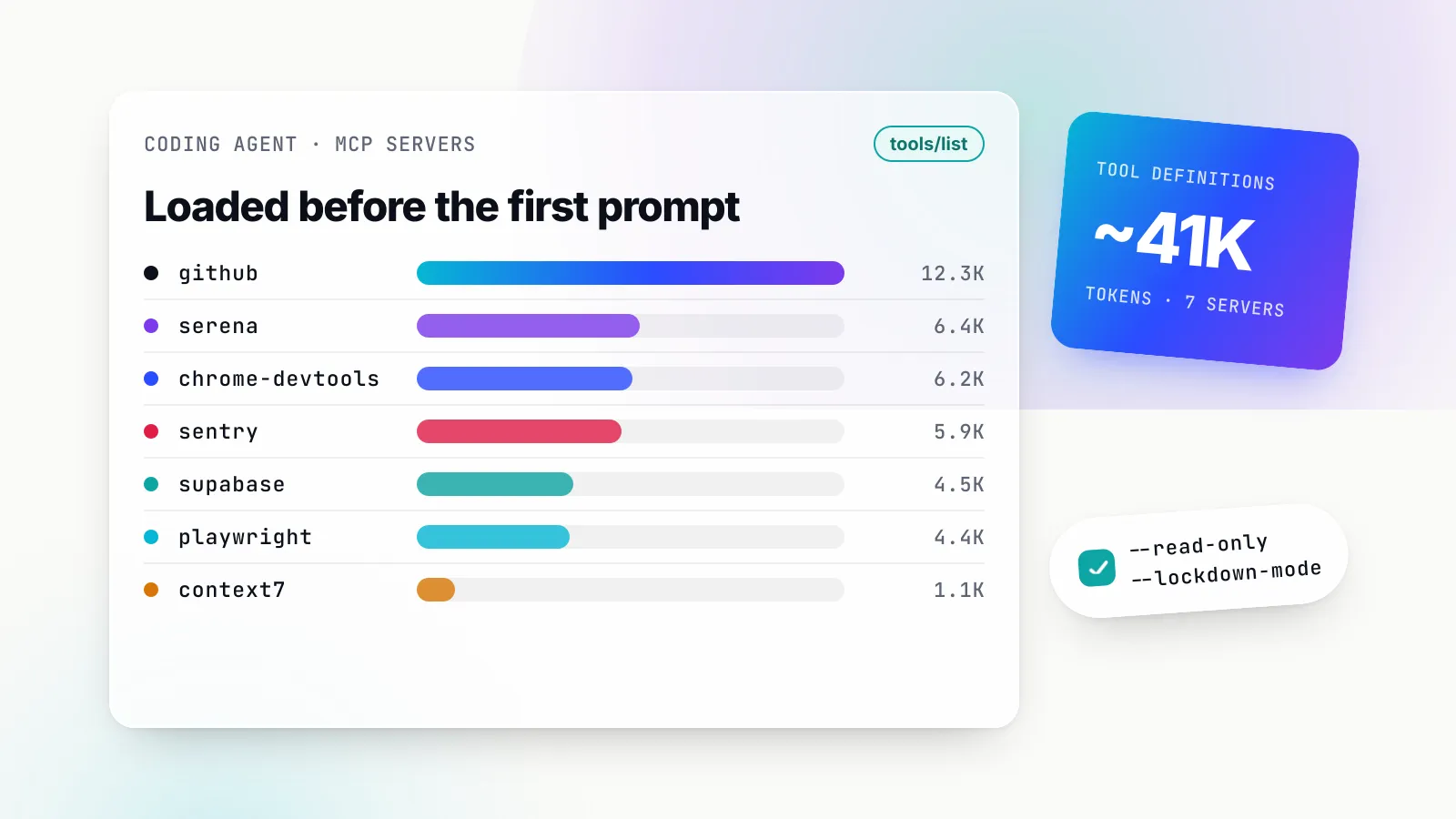
Seven servers on defaults (GitHub, Context7, Playwright, Chrome DevTools, Sentry, Supabase and Serena) add roughly 41,000 tokens of definitions before the developer types a word. Scoping changes the picture: GitHub read-only saves about 5,300 tokens, and Supabase read-only and project-scoped halves its cost.
Clients are starting to absorb this. Claude Code’s tool search, on by default for Claude 4.5-generation models and later, loads only tool names and server instructions at session start and fetches full definitions when needed; the documentation says this means “adding more MCP servers has minimal impact on your context window”. It also warns when a single tool result exceeds 10,000 tokens and caps results at 25,000 by default, which is the other half of the cost: results such as accessibility trees, documentation pages and stack traces are often larger than the definitions. Anthropic’s engineering post on code execution with MCP puts the scale of the problem at one example workflow falling from 150,000 tokens to 2,000 when tools were presented as code instead of definitions.
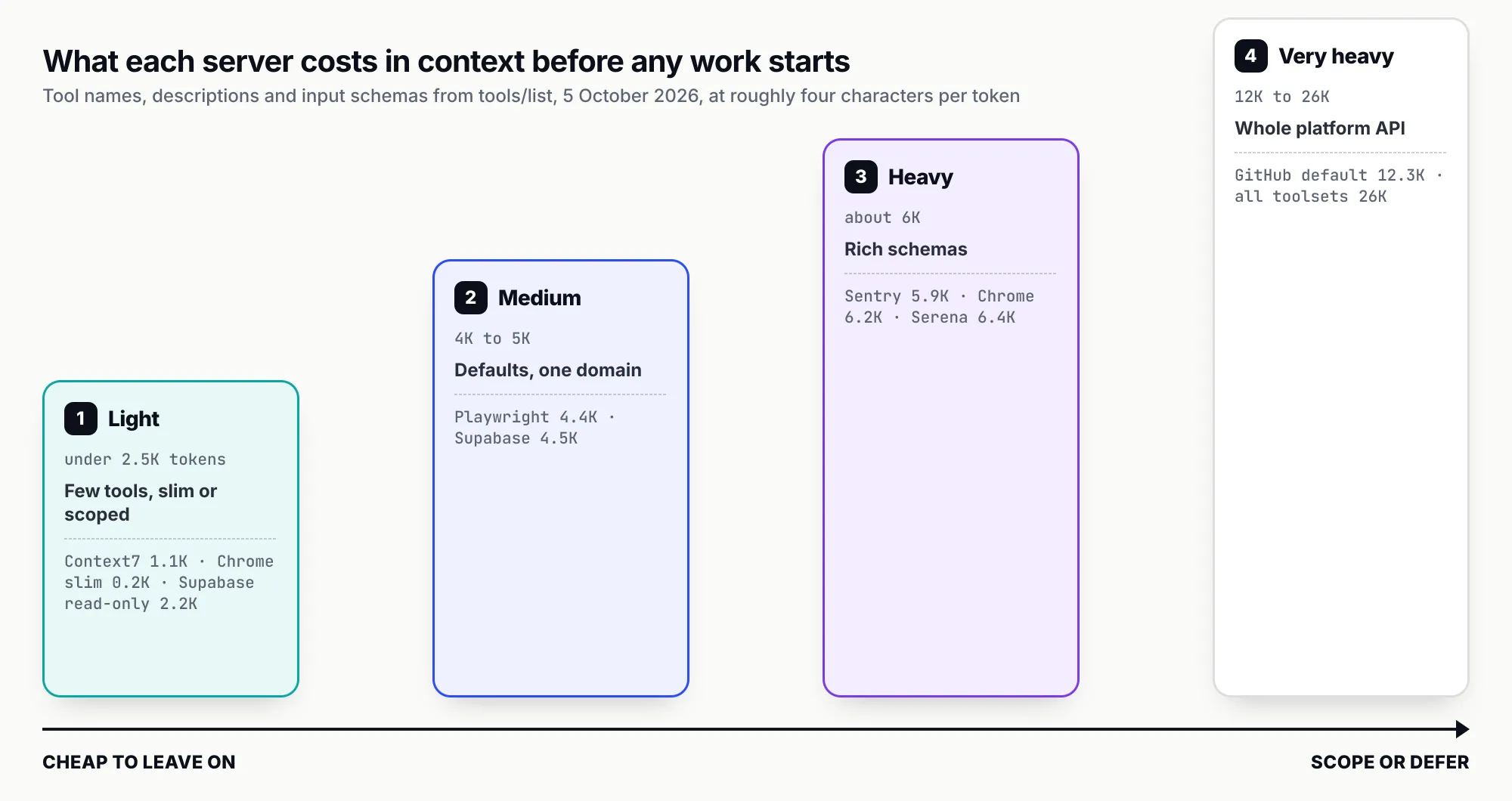
Figure 2: Tool-definition cost spans two orders of magnitude, and the heaviest servers are also the most configurable.
Untrusted content is the larger risk
Token cost is a budgeting problem. Prompt injection is a security problem, and almost every server here carries it. The pattern is the same each time: the server returns text that someone outside the team wrote (a public issue, a web page, an error message, a support ticket stored in a table, a community-contributed docs page) and the agent treats instructions in that text as instructions from the user. When the same session holds a write-capable tool, the injected text can turn into an action.
The vendors differ in how seriously they treat it. GitHub ships lockdown mode and a hard read-only filter. Supabase enforces read-only at the database role and publishes the attack scenario. Playwright and Chrome DevTools state plainly that they are not security boundaries. Context7 disclaims the security of community content. Sentry and Linear do not discuss injection in the material we read, though their data is just as exposed. The MCP specification’s security best practices add the local-server risk: a stdio server is code running with the client’s privileges, and a malicious startup command can exfiltrate SSH keys before any tool is called.
The practical rule is to avoid pairing untrusted input with unscoped write access in the same session. Read issues with a read-only GitHub server; open the pull request from a session that has not just browsed arbitrary pages; keep approval prompts on for writes.
Local, remote and who holds the token
Remote servers (GitHub hosted, Context7, Sentry, Supabase, Linear, Figma) mostly use OAuth, keep tokens out of config files and update without anyone reinstalling. Local servers (Playwright, Chrome DevTools, Serena, Docker) touch the developer’s machine directly, which is why they can drive a local browser or language server. GitHub, Sentry and Supabase offer both. The less visible difference is where credentials sit: a personal access token in ~/.cursor/mcp.json on fifty laptops is fifty copies of a secret nobody rotates, while a remote server with OAuth or a gateway that holds the credential centrally leaves nothing on disk.
Governing MCP use by coding agents across a team’s laptops
Choosing servers is the easy part. The harder question for a platform or security team is what is actually installed. Each developer can add servers to Claude Code, Cursor, Codex and VS Code in a minute, with tokens of whatever scope they had to hand, and none of it is visible centrally. That is shadow MCP, a subset of the wider shadow AI problem: an inventory nobody holds, write tools nobody approved, and no record of which agent called what.
The clients provide part of the answer. Claude Code supports managed MCP configuration with allowedMcpServers and deniedMcpServers by name or URL pattern. Codex reads enabled_tools and disabled_tools per server from a config.toml shared by its CLI, IDE extension and desktop app. Copilot Business and Enterprise have an “MCP servers in Copilot” policy that switches MCP on or off for the organisation. Docker profiles carry tool allow-lists. Each covers one client, with its own syntax, and none produces a cross-client inventory or a log of tool calls.
An MCP gateway puts that control in one place. Bifrost, an open-source gateway from Maxim AI, connects to upstream MCP servers and exposes their tools through one /mcp endpoint, as its MCP gateway page and documentation describe. Tool filtering is set per virtual key and is deny-by-default: a key with no MCP configuration gets no tools except from servers marked “allow by default”, and request headers can only narrow a key’s allow-list, never widen it. Credentials stay in the gateway, with shared or per-user OAuth. For token cost, Code Mode replaces tool definitions with four meta-tools and has the model write Python executed in a Starlark sandbox; Bifrost’s own benchmark reports a 92.8 per cent cut in input tokens at 508 tools across 16 servers. For safety, Bifrost’s guardrails include Gitleaks-based secrets detection and PII checks, and the enterprise guardrails apply at “the actual tool-execution boundary, not merely the tool call proposed by an LLM”, with rules that can target tool names and arguments. Gateway-level observability records duration and failure rate per tool and per server alongside model token spend, which answers the question of what each server costs in practice.
A gateway only governs what is pointed at it, and a developer’s ad hoc server in a local config file is not. Bifrost Edge extends the same gateway policies to the endpoint. According to its MCP governance documentation, Edge reads the MCP configuration of supported apps on each machine (Claude Code, Claude Desktop, Gemini CLI, OpenCode, Codex and Cursor at the time of writing), builds a fleet-wide inventory of which servers are configured where, sends newly discovered servers for approval, and blocks denied servers on the device “even by an app that had it configured before the policy existed”. It runs on macOS, Windows and Linux and deploys through MDM tools such as Jamf, Intune and Kandji.
Two practical notes. The guardrail providers and audit logs are part of Bifrost’s enterprise tier. And Claude Code turns its tool search off when ANTHROPIC_BASE_URL points at a non-Anthropic host unless ENABLE_TOOL_SEARCH is set explicitly, so routing through any proxy needs that setting checked. Our MCP gateway explainer covers the architecture in more depth, and the companion ranking of MCP servers beyond coding covers servers for general agents.
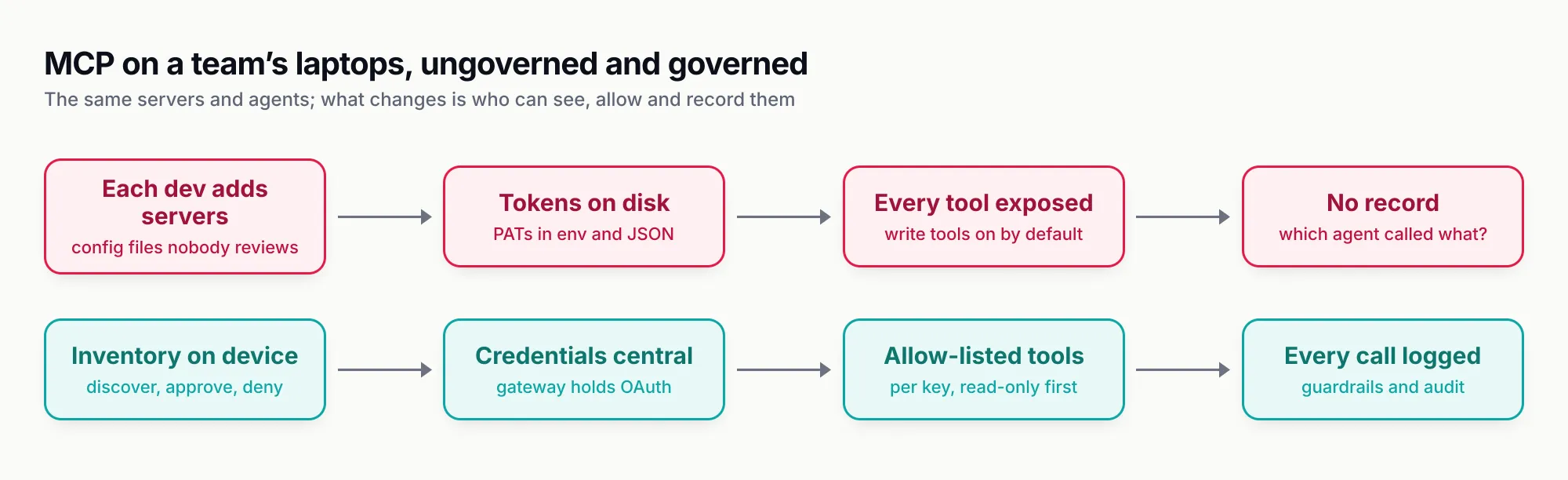
Figure 3: The servers and agents stay the same; governance changes who can see them, allow them and reconstruct what they did.
Recommendations keyed to constraints
- You are a single developer starting out. Install Context7 and the GitHub server with read-only on and only the toolsets you use. Add Playwright when you work on UI. Leave everything else until a task needs it.
- Your agent writes front-end code against a design system. Figma MCP with Code Connect, Playwright to check the result, and Chrome DevTools in
--isolatedmode when something renders slowly. Budget Dev seats; the cheaper seats’ monthly limits are too low for daily agent use. - Your agent fixes production bugs. Sentry’s remote server with skills narrowed, the GitHub server for the pull request, and your database server read-only against a staging copy. Keep production database access out of agent sessions unless the task needs production evidence, as Supabase itself advises.
- You work in a large, typed monorepo. Try Serena for navigation and refactoring, and measure whether sessions get cheaper or more accurate before rolling it out; the evidence for it is still anecdotal.
- You run many local servers. Put them behind the Docker MCP Gateway for container isolation, signed images and secrets blocking, and pin servers in a profile rather than letting agents add them dynamically.
- You are responsible for a team or a fleet. Start with an inventory: you cannot allow-list servers you have not found. Combine client-level allow-lists with an MCP gateway that holds credentials, filters tools per key and logs every call, and use an endpoint agent such as Bifrost Edge to discover and enforce on machines. Default to read-only tools and add write access per team.
- You are watching token spend. Prefer clients with deferred tool loading, turn on slim and read-only modes, and consider a CLI where the vendor offers one, as Playwright and Context7 do. Our agent frameworks survey covers the same trade-off for agents you build yourself.
The judgement
We think the useful MCP servers for coding agents have settled into a small, stable set: a code host, a docs index, a browser, an error tracker, a database, a tracker and a design tool. GitHub and Context7 lead because they fix the most frequent failures at the lowest risk once scoped. The rest of the field differs less in features than in how seriously each vendor treats untrusted content and how far it lets you scope permissions down, and those two properties deserve more weight in the choice than tool count. The open problem in October 2026 is not finding good servers; it is knowing which ones are running on every laptop in the company and what they did.
Feature claims are drawn from public documentation and vendor announcements as of October 2026; check current docs before deciding.
Sources
- GitHub MCP Server repository and README GitHub
- GitHub MCP Server configuration guide (read-only, lockdown and scope filtering) GitHub
- Context7 repository Upstash
- Playwright MCP repository Microsoft
- Chrome DevTools MCP repository Google Chrome DevTools
- Chrome DevTools MCP tool reference Google Chrome DevTools
- Sentry MCP repository Sentry
- Sentry MCP service Sentry
- Supabase MCP server guide and security risks Supabase
- Neon MCP server repository Neon
- Linear MCP server documentation Linear
- Figma MCP server tools and prompts Figma
- Figma MCP server rate limits and access Figma
- Serena repository Oraios AI
- Docker MCP Toolkit documentation Docker
- docker mcp gateway run reference Docker
- Model Context Protocol reference servers Model Context Protocol
- MCP specification 2025-11-25: security best practices Model Context Protocol
- GitHub MCP exploited: accessing private repositories via MCP Invariant Labs
- Code execution with MCP Anthropic
- Connect Claude Code to tools via MCP Anthropic
- Codex MCP configuration OpenAI
- Extending GitHub Copilot Chat with MCP GitHub
- Bifrost MCP gateway overview Maxim AI
- Bifrost MCP tool filtering Maxim AI
- Bifrost Code Mode Maxim AI
- Bifrost Edge MCP server governance Maxim AI
- Bifrost enterprise guardrails Maxim AI
Frequently asked questions
What is the best MCP server for coding agents?
For most teams it is the GitHub MCP server, because issues, pull requests, Actions runs and code-scanning alerts are where coding work starts and ends. Context7 is the best second server, since it fixes the most common failure of coding agents: writing against an API version that no longer exists.
How many MCP servers should a coding agent have connected?
As few as the task needs. Each server's tool definitions are sent to the model, and on defaults seven popular servers add roughly 41,000 tokens before any work begins. Clients with deferred tool loading, such as Claude Code's tool search, soften this, but scoping servers to read-only modes and specific toolsets is still the cheaper and safer default.
Is Playwright MCP or Chrome DevTools MCP better?
They answer different questions. Playwright MCP drives pages through accessibility snapshots and works across browsers, which suits checking that a UI change behaves. Chrome DevTools MCP exposes performance traces, network requests, console messages and heap snapshots in Chrome, which suits debugging why something is slow or broken. Many teams run Playwright by default and add Chrome DevTools when debugging.
Are MCP servers safe to use with coding agents?
They are as safe as the data they read and the permissions they hold. The main risk is prompt injection: an issue, web page, error message or database row containing instructions the agent follows. Use read-only modes, scope tokens narrowly, keep tool-call approval on for write actions, and prefer servers that document their injection mitigations, such as GitHub's lockdown mode.
Should coding agents use MCP or a CLI?
Both have a place. Playwright's own README recommends its CLI plus skills for coding agents because CLI calls avoid loading large tool schemas, and Context7 ships a CLI mode for the same reason. MCP is the better fit for hosted services that need OAuth, such as Sentry, Linear and Figma, and for stateful sessions like a long-running browser.
How do companies govern which MCP servers developers install?
Client settings help: Claude Code supports managed allow and deny lists, Codex supports per-server tool allow lists, and Copilot Business and Enterprise have an MCP policy. A fleet view needs more: an inventory of servers configured on each machine, central allow and deny decisions, and logs of tool calls, which is what endpoint agents such as Bifrost Edge paired with an MCP gateway provide.