ToolsExplainer
MCP gateway explained: what it does and when agent teams need one
An MCP gateway puts one governed endpoint between agents and the MCP servers they call. How tool filtering, upstream auth, audit and token control work, and where the risks sit.
An MCP gateway is a proxy that sits between AI agents and the Model Context Protocol servers they call, so that tool discovery, credentials, access policy and logging are handled in one place instead of being configured separately inside every agent. It matters once more than a handful of agents share more than a handful of MCP servers: at that point each agent host holds its own tokens, sees every tool whether it needs it or not, and leaves no shared record of what it did. This explainer is for platform and security engineers deciding whether to put one in front of their tools, and what it should do when they do.
The worked example throughout is Bifrost, an open-source AI gateway written in Go by Maxim AI that acts as both an MCP client to upstream servers and an MCP server to agents, alongside routing ordinary LLM traffic. The mechanics described here are general; the specifics are checked against each project’s documentation and the MCP specification as of September 2026.
What is an MCP gateway?
An MCP gateway is an aggregation and policy layer for MCP tools. Agents connect to a single MCP endpoint on the gateway. The gateway connects to the real MCP servers, merges their tools into one catalogue, and on each request decides which of those tools the caller can list and call, which credential to use upstream, and what to record.
Three neighbouring pieces of infrastructure are easy to confuse with it, and the differences decide where each one belongs.
| Layer | What it governs | Typical controls | Example question it answers |
|---|---|---|---|
| MCP server | Execution of its own tools | Input validation, its own auth | “Can this server create a Jira ticket?” |
| MCP gateway | Which agent reaches which tool on which server | Tool allow-lists, upstream credentials, tool-call logs, argument checks | “May the support agent call shell.exec?” |
| LLM gateway | Traffic to model providers | Provider keys, budgets, failover, prompt guardrails | “Which model serves this request, and who pays?” |
| API gateway | HTTP traffic to known services | Routes, rate limits, API keys | “Is this client allowed to hit /orders?” |
In practice the MCP and LLM gateway roles are increasingly shipped together, because the same identity (a key, a team, a user) should govern both the model calls and the tool calls an agent makes. The plain-language guide to AI gateways covers the model side; the comparison of production LLM gateways shows which products include native MCP support and which bolt it on through plugins.
Why agent teams add an MCP gateway
Teams add an MCP gateway when the number of connections, not the number of tools, becomes the problem. With N agents and M servers wired directly, there are up to N×M configurations, each with its own credential, its own copy of the tool list and its own logging, or none. The protocol itself does not centralise any of that.
The specification is explicit about why. The current revision (2025-11-25) defines two standard transports: stdio, where the client launches the server as a local subprocess, and Streamable HTTP, which replaced the older HTTP+SSE transport from the 2024-11-05 revision. Authorisation is marked OPTIONAL. HTTP servers that implement it should follow an OAuth 2.1 profile, while stdio implementations “SHOULD NOT follow this specification, and instead retrieve credentials from the environment.” In a point-to-point estate, that means API tokens sitting in configuration files and environment variables on every machine that runs an agent.
The consequences show up in four places:
- Credential sprawl. A GitHub token with repository write access lives in every developer’s IDE config and every CI agent’s environment. Rotating it means finding all of them.
- Tool sprawl. Each agent sees every tool on every server it is connected to, including ones it should never call.
- No shared record. The spec says clients SHOULD “log tool usage for audit purposes”, but each client logs locally, in its own format, if at all.
- No single place to change policy. Revoking one team’s database access means editing every agent it runs.
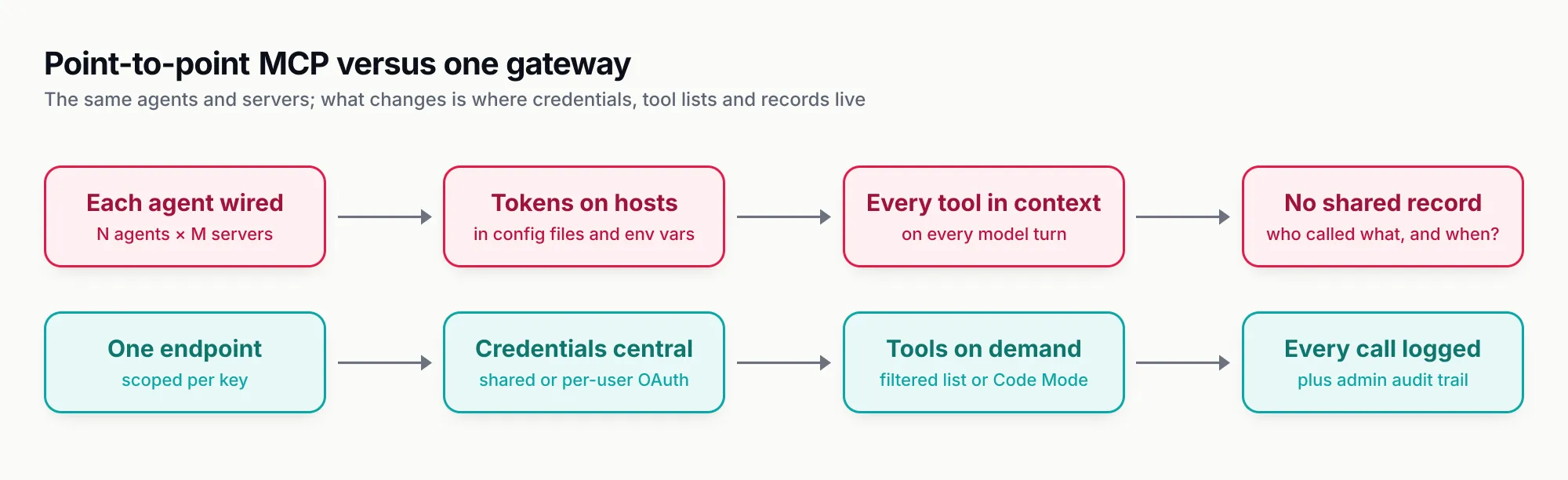
Figure 1: The agents and servers do not change. A gateway moves credentials, tool lists and records from every host to one place.
A gateway also changes who can reason about an agent’s reach. In the agent frameworks survey, MCP is the shared tool protocol across all four framework camps; a gateway is what lets a platform team set tool policy once regardless of which framework each product team picked.
How an MCP gateway handles a tool call
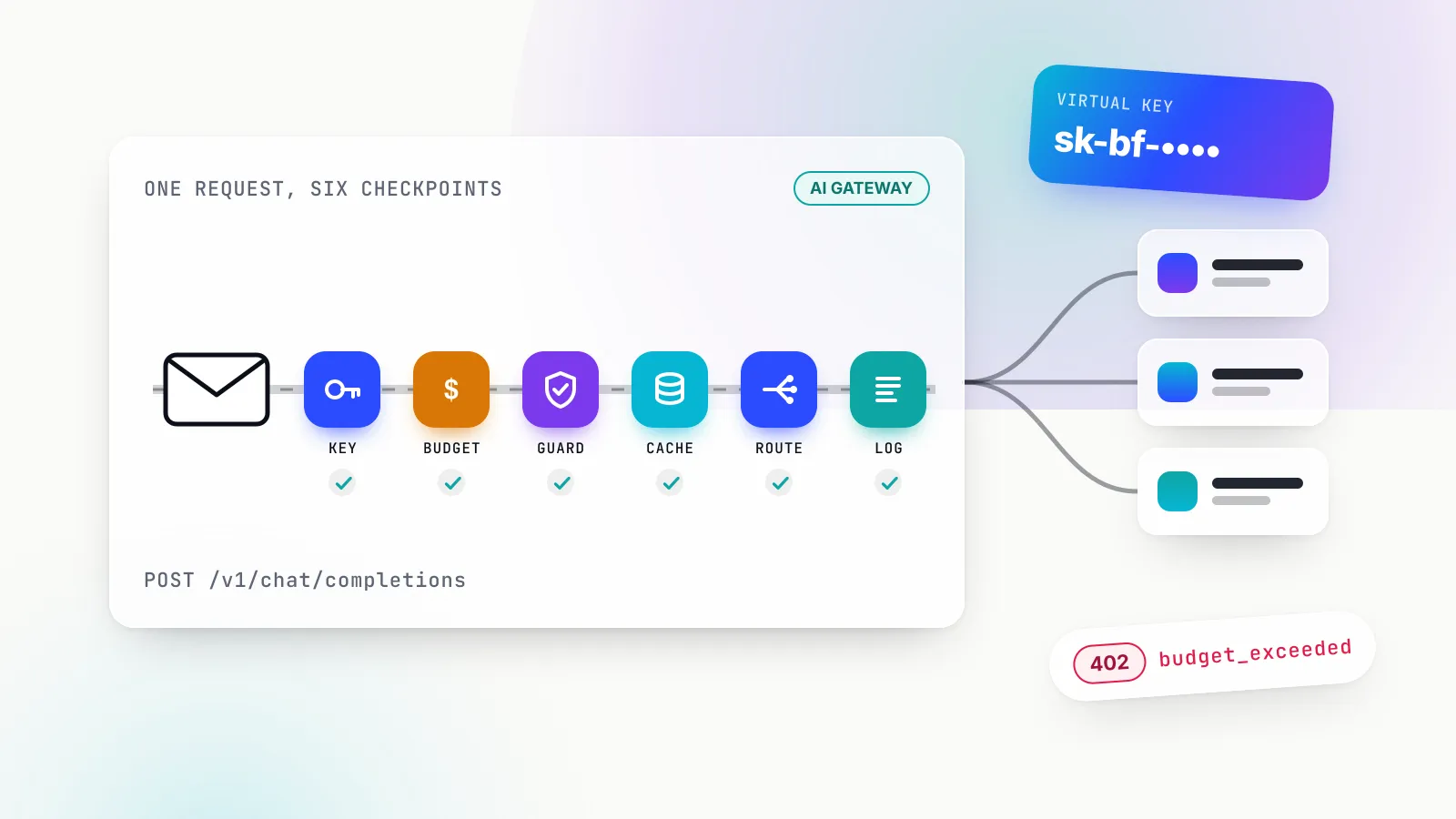
An MCP gateway processes a tool call in six steps: identify the caller, filter the tool list, check the specific call, attach the upstream credential, forward it, and log the result. Each step is a place where policy applies, and each is where products differ most.
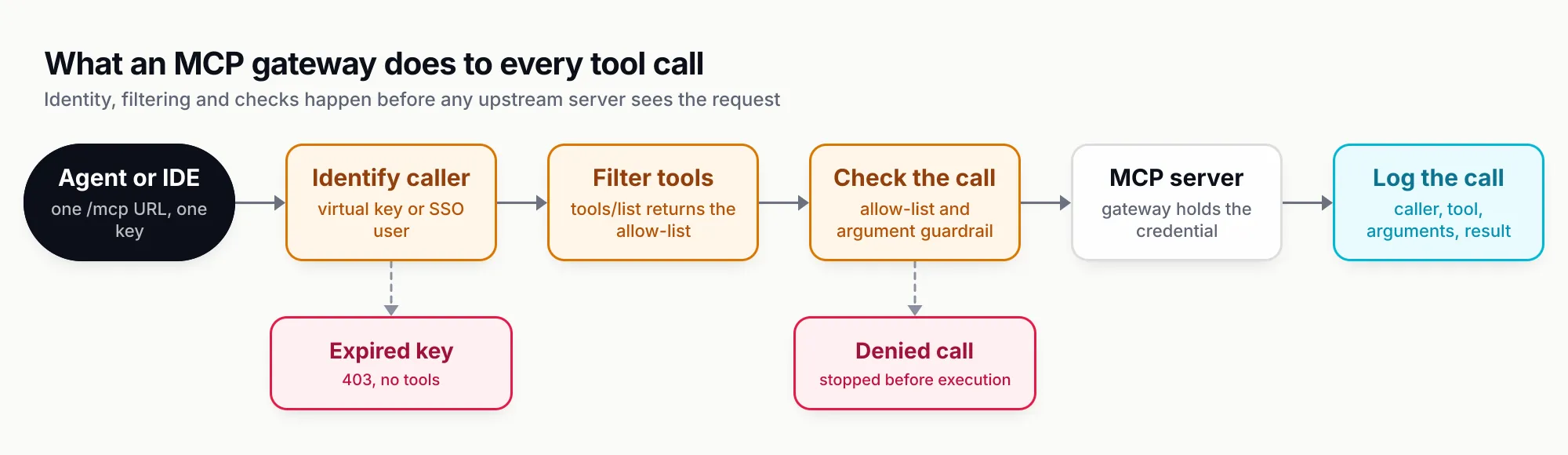
Figure 2: Identity, filtering and argument checks all run before an upstream server sees anything.
Tool discovery and filtering
The first job is aggregation. Bifrost as an MCP gateway connects to upstream servers over stdio, HTTP or SSE and exposes the combined catalogue at a single /mcp endpoint: POST for JSON-RPC messages such as tools/list and tools/call, GET for a server-sent-events stream. It pings each upstream server every 10 seconds by default with a 5-second timeout, marks a server unstable after five consecutive failures, and re-syncs each server’s tool list on a default 10-minute cycle so newly added tools appear without a restart.
Filtering then stacks in layers. Bifrost applies three levels of tool filtering: the server configuration sets a baseline (tools_to_execute, where an empty list means no tools), a request header can narrow it for one call, and the virtual key narrows it again. A tool must pass every applicable layer to reach the model.
Per-key tool allow-lists
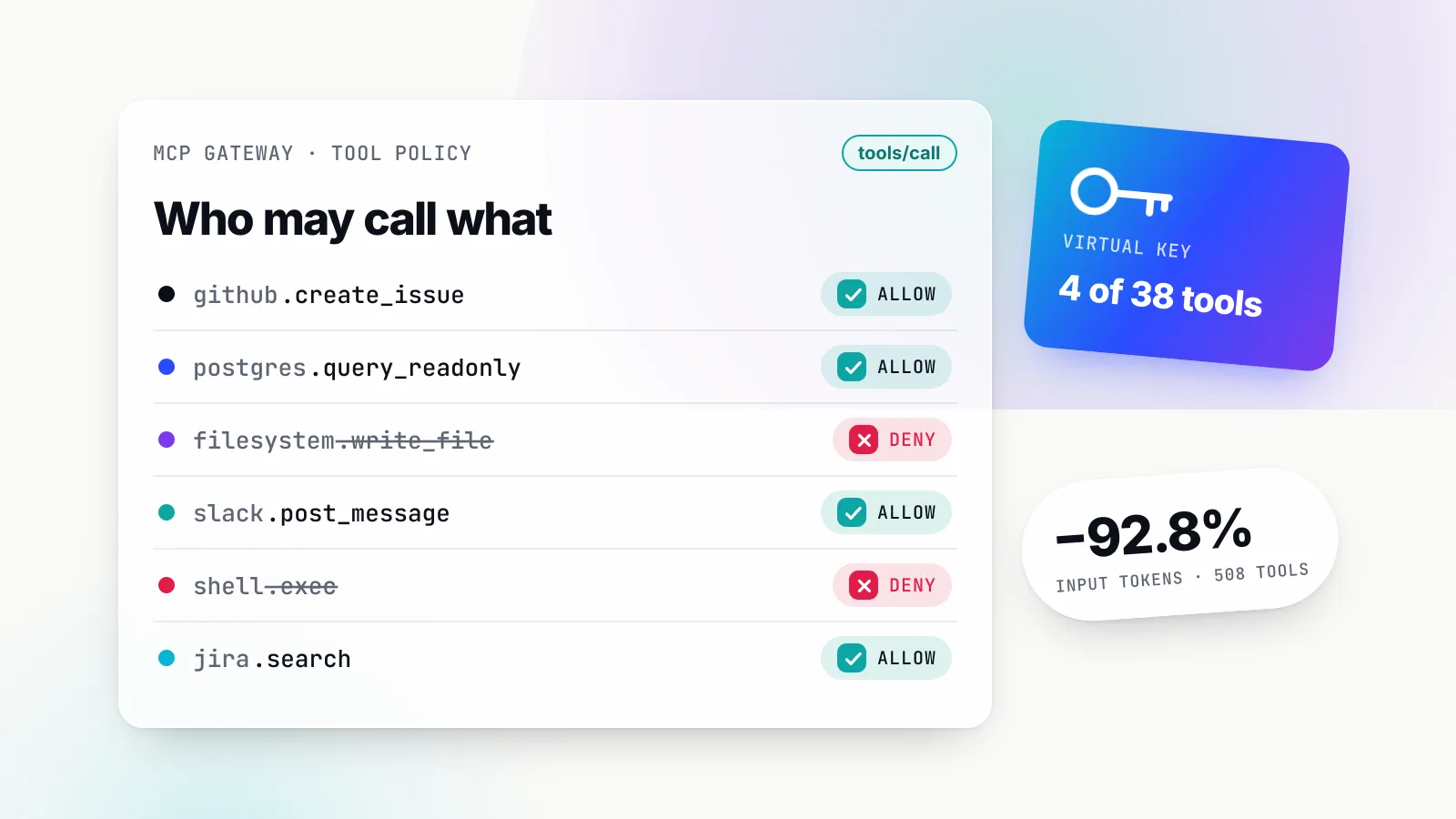
The control that matters most for security is the per-caller allow-list. In Bifrost, a virtual key with no MCP configuration gets no MCP tools: deny by default, except for servers an administrator has explicitly marked “Allow by Default”. For each server attached to a key, the administrator lists specific tools or uses * for all. The tools/list response contains only what the key allows, tools/call is checked against the same list at execution time, and an inactive or expired key is refused with HTTP 403. A caller can send an x-bf-mcp-include-tools header to narrow its own list further, but the header “can only narrow, never widen” the key’s grant.
For teams that want a curated bundle rather than a per-key list, Bifrost’s Virtual MCPs group selected tools from several servers behind their own endpoint at /mcp/<slug>, reachable only through the virtual keys they are attached to. The feature, previously called MCP tool groups, is part of the open-source gateway; the enterprise tier adds grants through access profiles and role-based visibility.
For example, a support agent’s key is attached to a Virtual MCP containing jira.search, github.create_issue and a read-only Postgres tool. The same gateway also fronts filesystem and shell servers, but the support agent’s tools/list never mentions them, and a crafted tools/call for shell.exec fails the allow-list check before any subprocess starts.
Authentication to upstream servers
The second security job is credential custody. The specification forbids “token passthrough”: an MCP server “MUST NOT pass through the token it received from the MCP client” to an upstream API, and must reject tokens that were not issued for it. The security best practices spell out why: passthrough breaks audience validation, hides the real caller from downstream logs and turns the server into an exfiltration proxy for anyone holding a stolen token.
A gateway resolves this by holding upstream credentials itself and deciding whose identity to use. Bifrost supports six MCP authentication types:
| Auth type | Who authenticates | Suits |
|---|---|---|
none | Nobody | Public or local tools with no key |
headers | Administrator, once | A shared internal service token |
oauth | Administrator, once | One company-wide OAuth app |
per_user_headers | Each user, on first call | Personal API keys |
per_user_oauth | Each user, on first call | Personal Notion, GitHub or Sentry accounts |
token_exchange (enterprise) | Each caller, every call | Internal servers that trust the company identity provider |
The per-user modes matter for least privilege: a shared admin token gives every agent the union of everyone’s access, while per-user OAuth means the agent acting for a support engineer can only see that engineer’s repositories. Bifrost stores per-user credentials against the caller’s identity and, with token exchange, stores none at all; offboarding a user at the identity provider takes effect within the cached token lifetime, which the documentation caps at five minutes.
Audit of tool calls
The last job is the record. The OWASP MCP Top 10 lists “Lack of Audit and Telemetry” as MCP08, and the reason is practical: when an agent does something unexpected, the investigation starts with which tool it called, with which arguments, under whose identity.
Two kinds of log answer different questions. Tool-call logs record each execution; Bifrost writes MCP log entries alongside LLM logs and can attach selected request headers as metadata for tracing and tenant identification. Administrative audit logs record changes to policy itself, such as who widened a key’s tool list; in Bifrost Enterprise those entries can be HMAC-signed, retained on a schedule and exported as JSON, JSON Lines or Syslog. A team that only has the first kind can see what an agent did but not who gave it permission.
One default inverts what many agent SDKs do. Bifrost does not execute tool calls automatically: a chat completion returns suggested calls, and execution needs a separate API call unless Agent Mode is switched on for named tools. In pure gateway mode, approval stays in the host application, which matches the specification’s guidance that there “SHOULD always be a human in the loop with the ability to deny tool invocations.”
The token cost of large tool lists
Every tool definition an agent can see is sent to the model on every turn, so tool count becomes a line item. A gateway can cut it in two ways: send fewer definitions through filtering, or replace direct tool calls with a code-execution pattern that loads definitions only when needed.
Anthropic described the problem in its November 2025 post on code execution with MCP: tool descriptions “occupy more context window space, increasing response time and costs,” and “every intermediate result must pass through the model.” In its example, presenting tools as code files so the agent loads only the definitions it needs cut token usage from 150,000 to 2,000, a saving of 98.7%. That is a single illustrative case, not a benchmark.
Bifrost implements the pattern as Code Mode. Instead of the full catalogue, the model sees four meta-tools (listToolFiles, readToolFile, getToolDocs and executeToolCode), reads Python-style stubs for the servers it needs, and writes a short Starlark script that Bifrost runs in a sandbox with the real tool bindings. Intermediate results stay in the sandbox and only the final output returns to the model. Code Mode is enabled per upstream server, so small utilities can stay as direct tools.
The vendor’s published benchmark, run on Claude Sonnet 4.6 with the same query set in each round, is the most detailed public data on the effect:
| Round | MCP footprint | Pass rate, classic | Pass rate, Code Mode | Input tokens, classic | Input tokens, Code Mode | Change |
|---|---|---|---|---|---|---|
| 1 | 96 tools, 6 servers | 64/64 | 64/64 | 19.9M | 8.3M | −58.2% |
| 2 | 251 tools, 11 servers | 64/65 | 65/65 | 35.7M | 5.5M | −84.5% |
| 3 | 508 tools, 16 servers | 65/65 | 65/65 | 75.1M | 5.4M | −92.8% |
Estimated cost fell by 55.7%, 83.4% and 92.2% across the three rounds. Two caveats apply. First, this is a vendor benchmark, not an independent measurement; the raw report is public in the bifrost-benchmarking repository, which helps. Second, the wall-clock gains in that report are smaller than the token gains: 26.8%, 6.8% and 17.1% faster across the rounds, and in round 1 the simplest queries were marginally slower. The savings scale with tool count, which is why the documentation recommends Code Mode from three or more servers and classic tool calls for one or two.
Code execution also has a security cost that Anthropic states plainly: “Running agent-generated code requires a secure execution environment with appropriate sandboxing, resource limits, and monitoring.” Filtering has no such cost. For many teams the first and cheapest token saving is simply not showing a support agent the 60 tools of an infrastructure server it will never call, and the Bifrost MCP gateway resource page sets out how allow-lists and Code Mode combine.
MCP server security: the risks a gateway addresses
MCP server security has two halves: attacks that arrive through tools, and damage that follows from agents having more access than they need. A gateway does little about the first on its own and a great deal about the second.
The attack that made MCP security a topic is tool poisoning. In April 2025 Invariant Labs demonstrated that instructions hidden in a tool’s description, “invisible to users but visible to AI models,” could make an agent read ~/.cursor/mcp.json and ~/.ssh/id_rsa and send their contents out through an innocent-looking parameter of an add tool. The same post described two variants: a rug pull, where a server changes a tool’s description after the user approved it, and shadowing, where one malicious server’s descriptions alter how the agent uses tools from other, trusted servers. OWASP now tracks the class as MCP03:2025 Tool Poisoning.
The second pattern arrives through tool results rather than descriptions. In May 2025 Invariant Labs showed that a malicious issue filed in a public repository could steer an agent using the GitHub MCP server into reading the user’s private repositories and leaking their contents in a pull request on the public one. The researchers called it a “toxic agent flow”, and their first recommended mitigation was a permission boundary: an agent may access only one repository per session.
That recommendation is the general rule. OWASP’s LLM06:2025 Excessive Agency traces agent damage to three root causes: excessive functionality, excessive permissions and excessive autonomy. Its first mitigation is to “limit the extensions that LLM agents are allowed to call to only the minimum necessary.” Per-key allow-lists, per-user credentials and a human approval step map directly onto those three causes.
The OWASP MCP Top 10, in beta as of September 2026, gives a checklist to map controls against:
| OWASP MCP risk | What a gateway contributes |
|---|---|
| MCP01 Token Mismanagement and Secret Exposure | Upstream credentials held centrally, not on each host |
| MCP02 Privilege Escalation via Scope Creep | Per-key tool allow-lists; per-user auth modes |
| MCP03 Tool Poisoning | Only reviewed servers reach the catalogue; curated tool sets |
| MCP06 Prompt Injection via Contextual Payloads | Guardrails on tool arguments and results |
| MCP07 Insufficient Authentication and Authorization | One authenticated endpoint; expired keys refused |
| MCP08 Lack of Audit and Telemetry | Tool-call logs plus policy-change audit logs |
| MCP09 Shadow MCP Servers | Nothing, unless paired with an endpoint agent |
For the injection rows, Bifrost Enterprise applies guardrails at the tool-execution boundary: a rule can inspect or redact a tool’s arguments before it runs and block it before execution, or inspect a successful result and withhold it from the model. Rules target specific servers, tools and even individual arguments, and use the same guardrail providers as LLM traffic.
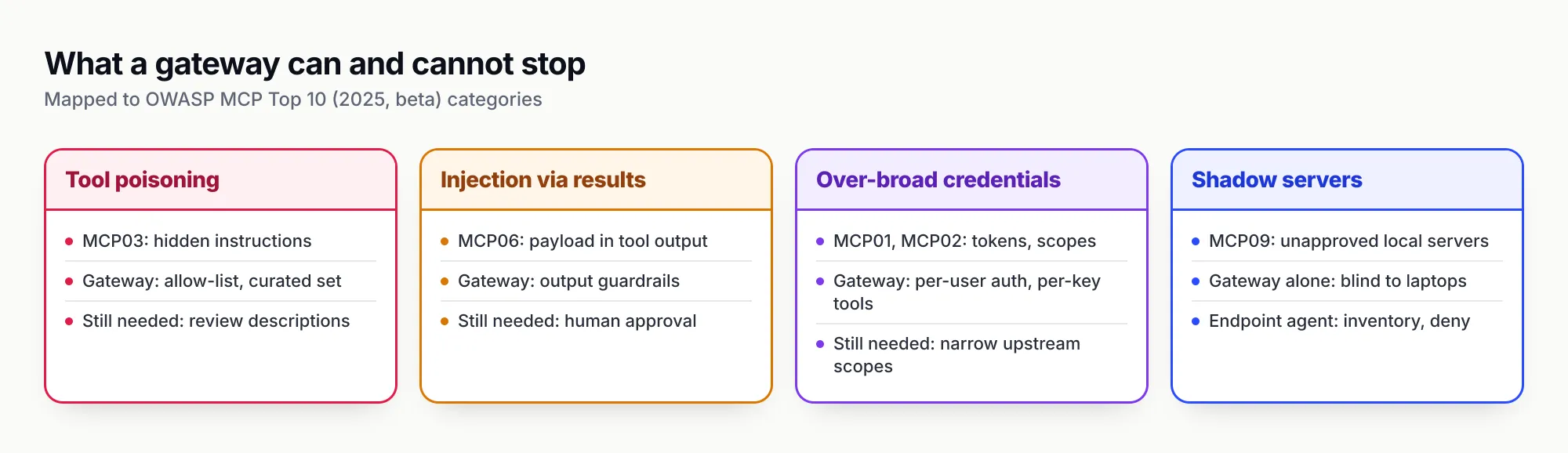
Figure 3: A gateway reduces how far an attack can reach. It does not detect a poisoned description on its own.
What a gateway cannot fix
The counter-argument deserves weight. A gateway sees tool names, arguments and results; it does not understand intent. If an approved server ships a poisoned description, the gateway forwards it faithfully unless someone reviewed the text or a guardrail flags it. Allow-lists also have a maintenance cost: they are only as good as the review behind them, and a team that sets every key to * has bought a logging proxy, not a policy layer. And a gateway adds a hop, which matters for chatty agents making dozens of calls per task.
There is also a structural limit: a gateway only governs traffic configured to reach it. The specification’s security guidance describes local MCP servers as binaries that “may have direct access to the user’s system”, started by a client configuration that can embed arbitrary commands. None of that passes through a central gateway.
Laptops and endpoint MCP servers
Developer machines are where most MCP servers actually run. Claude Code, Cursor, Codex and Claude Desktop all let a user add a stdio server with a short configuration entry, and that server runs with the user’s privileges and credentials from the local environment. OWASP lists the result as MCP09, Shadow MCP Servers: tools in use that no one approved and no gateway sees.
This is where the gateway model needs an endpoint component. Bifrost applies governance and security controls (virtual keys, budgets, guardrails, audit logs) centrally at the gateway, and Bifrost Edge, currently in alpha, extends that same governance and security to AI traffic on employee machines. For MCP specifically, Edge MCP governance reads the MCP configuration inside supported AI apps on each machine and builds a fleet-wide inventory: which servers are configured, in which apps, on how many devices. Discovery covers Claude Code, Claude Desktop, Gemini CLI, OpenCode, Codex and Cursor today.
Administrators then allow or deny each server once for the whole fleet. The decision is enforced on the device rather than advised: a denied server cannot be used even by an app that had it configured before the policy existed. Newly discovered servers raise an approval request in the admin console, and administrators choose whether pending servers keep working or are blocked until reviewed. The Edge agent is pushed silently through MDM tools such as Jamf, Intune and Kandji, with Workspace ONE and JumpCloud also documented.
The gateway is the control plane where tool policy, credentials and logs live for agents that connect to it; the endpoint layer finds and governs the servers that were never pointed at it. The wider problem, unsanctioned AI apps and not only MCP servers, is covered in shadow AI governance.
Open-source MCP gateway options in 2026
Open-source MCP gateways split into two groups: gateways that govern both LLM and MCP traffic under one identity model, and dedicated MCP proxies focused on hosting, routing or federating tool servers.
| Gateway | Scope | Tool access control | Deployment focus | Licence |
|---|---|---|---|---|
| Bifrost | LLM and MCP gateway | Per-key allow-lists, deny by default; Virtual MCPs; six upstream auth modes; Code Mode | Self-hosted binary, Docker, Kubernetes | Apache 2.0 |
| Docker MCP Gateway | MCP only | Runs each server in an isolated container with restricted privileges; injects credentials | Local with Docker Desktop, or Docker Engine | Open source |
| Microsoft MCP Gateway | MCP only | Entra ID auth with role-based access to registered servers | Kubernetes, session-aware routing | MIT |
| IBM ContextForge | MCP, A2A and REST federation | User-scoped access, OAuth and JWT; virtual servers wrapping REST APIs | Python, Docker, Kubernetes | Apache 2.0 |
| agentgateway | HTTP, gRPC, MCP and A2A data plane | Tool access policies per MCP target; JWT and OIDC | Linux Foundation project, Kubernetes-oriented | Open source |
| LiteLLM | LLM and MCP proxy | MCP server access by key, team or organisation | Python proxy | MIT core, enterprise add-ons |
Bifrost is the top pick for teams running agents in production, for three reasons that follow from its documentation. It defaults to deny at the key level and enforces the list at both tools/list and tools/call, which is the posture OWASP’s excessive-agency guidance asks for. Its per-user OAuth, per-user headers and token-exchange modes address the credential problem more thoroughly than a single shared upstream token. And because the same virtual key governs model routing, budgets and tool access, a team gets one identity model rather than two gateways to reconcile. Code Mode is the differentiator for teams with hundreds of tools; the Bifrost MCP gateway overview collects the relevant documentation in one place.
The dedicated proxies have real strengths. Docker’s container isolation directly answers the local-server compromise risk the specification describes, Microsoft’s gateway suits teams standardised on Entra ID and Kubernetes, and ContextForge fits when internal REST services need to become MCP tools without new code. For how the LLM side of these products compares, see the five LLM gateways compared on this site, the survey of leading AI gateways for production, and the review of open-source LLM gateways you can self-host, which also notes which ones treat MCP as a native feature and which as a plugin.
When to add an MCP gateway, and how to start
The trigger is sharing, not size. A single developer with one or two local servers gains little from a gateway. The case becomes strong when any of the following is true:
- More than one team or product uses the same MCP servers.
- Any MCP server holds write access to production systems, customer data or source code.
- Agents run unattended, in CI or as background workers, with no human watching each tool call.
- The combined tool list is large enough that definitions take a visible share of every prompt; in the Code Mode benchmark above, classic tool calls already carried a large overhead at 96 tools.
- Security or compliance needs to answer “which agent called which tool, as whom” after the fact.
A sensible rollout order, keyed to risk rather than features:
- Inventory first. List the MCP servers in use, including those on developer machines. The gap between the servers a platform team knows about and those actually configured is usually the first finding.
- Put write-capable servers behind the gateway. Start with the servers that can change things: source control, ticketing, databases, cloud consoles.
- Issue per-agent keys with explicit allow-lists. Start from deny and add tools as each agent needs them. Resist
*except for read-only servers. - Move credentials to the gateway. Prefer per-user OAuth or token exchange where the upstream supports it; retire tokens stored in local configs.
- Turn on logging and review it. Tool-call logs catch misbehaving agents; policy-change audit logs catch misconfigured keys.
- Add guardrails and code execution where the data justifies them. Argument guardrails for destructive tools; Code Mode once tool counts climb.
For teams comparing self-hosted AI gateway options more broadly, the deciding question is whether MCP governance should live in the same gateway as model routing. The better choice for most agent platforms is yes, because the identity that pays for a model call should be the same identity that is allowed to call a tool.
An MCP gateway will not make an unsafe tool safe. What it does is make the question “what can this agent reach?” answerable in one place, and make the answer smaller. Teams evaluating an MCP gateway can request a Bifrost demo or start from the open-source repository.
Feature claims are drawn from each vendor’s public documentation as of September 2026.
Sources
- MCP specification 2025-11-25: Transports Model Context Protocol
- MCP specification 2025-11-25: Authorization Model Context Protocol
- MCP specification 2025-11-25: Tools Model Context Protocol
- MCP security best practices Model Context Protocol
- OWASP MCP Top 10 (2025, beta) OWASP Foundation
- MCP03:2025 Tool Poisoning OWASP Foundation
- LLM06:2025 Excessive Agency OWASP GenAI Security Project
- MCP Security Notification: Tool Poisoning Attacks Invariant Labs
- GitHub MCP Exploited: Accessing private repositories via MCP Invariant Labs
- Code execution with MCP Anthropic
- Bifrost MCP overview and gateway mode Maxim AI
- Bifrost MCP tool filtering per virtual key Maxim AI
- Bifrost tool filtering levels Maxim AI
- Bifrost Virtual MCPs Maxim AI
- Bifrost MCP authentication Maxim AI
- Bifrost Code Mode Maxim AI
- Bifrost MCP Code Mode benchmark report Maxim AI
- Bifrost guardrails (including MCP guardrails) Maxim AI
- Bifrost observability (LLM and MCP logs) Maxim AI
- Bifrost audit logs Maxim AI
- Bifrost Edge: govern MCP servers Maxim AI
- Docker MCP Gateway Docker
- Microsoft MCP Gateway Microsoft
- IBM ContextForge IBM
- agentgateway Linux Foundation
- LiteLLM MCP gateway BerriAI
Frequently asked questions
What is an MCP gateway?
An MCP gateway is a proxy that sits between AI agents and the Model Context Protocol servers they use. Agents connect to one endpoint; the gateway authenticates the caller, returns only the tools that caller is allowed to use, injects the credential for the upstream server, applies checks to each tool call and logs it. It turns many point-to-point tool connections into one governed path.
What is the difference between an MCP server and an MCP gateway?
An MCP server exposes tools, such as reading a GitHub issue or querying a database, and executes them. An MCP gateway exposes no tools of its own; it aggregates many servers behind one endpoint and decides who can reach which tool, under which credential, with what logging. The server is the execution layer and the gateway is the policy layer in front of it.
Is there an open-source MCP gateway?
Yes. Bifrost (Apache 2.0) combines an MCP gateway with an LLM gateway. Docker MCP Gateway runs servers as containers, Microsoft MCP Gateway targets Kubernetes, IBM ContextForge federates MCP, A2A and REST, agentgateway is a Linux Foundation data plane, and LiteLLM includes an MCP gateway in its proxy. They differ mainly in policy depth and deployment model.
Do I need an MCP gateway if I only use one or two MCP servers?
Usually not. A single developer with one or two local servers gains little from a gateway beyond logging. The case strengthens once several agents or people share the same servers, once credentials for production systems are involved, or once the combined tool list is large enough that its definitions take a noticeable share of every prompt.
How does an MCP gateway reduce token usage?
In two ways. Filtering removes tools a caller does not need from the list the model sees, so fewer definitions are sent on each turn. Code execution patterns, such as Bifrost's Code Mode, replace hundreds of tool definitions with a few meta-tools the model uses to load signatures on demand and run a short script, keeping intermediate results out of the context window.
Can an MCP gateway prevent tool poisoning?
Partly. A gateway can keep unreviewed servers out of the tool list, pin each caller to a curated set and run guardrails on tool arguments and results. It cannot tell a malicious instruction hidden in an approved tool's description from a legitimate one unless someone reviews those descriptions. Treat it as blast-radius reduction, not a detector.
How do you secure MCP servers?
Follow the MCP specification's authorisation rules for HTTP servers, validate token audience and never pass client tokens through. Grant each agent the minimum tools and scopes it needs, keep a human approval step for destructive tools, log every call, review tool descriptions before approval, and inventory local servers on developer machines so none run outside policy.