ToolsExplainer
Claude Skills explained: how Agent Skills work in Claude Code, apps and the API
Claude Skills are folders of instructions and scripts that agents load on demand. How SKILL.md works, where skills run, how to write one, and skills vs MCP.
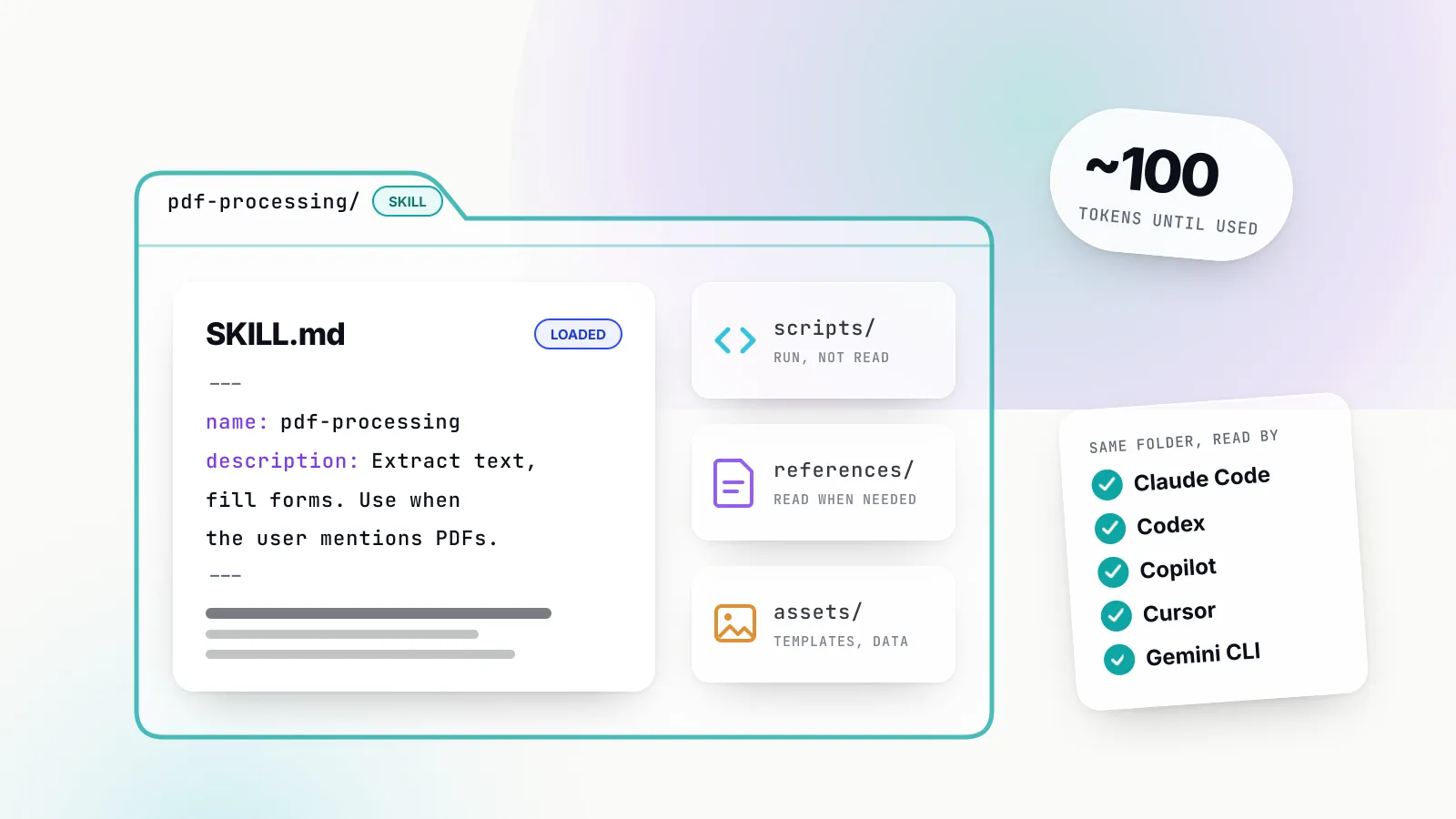
Claude Skills are folders of instructions, scripts and reference files that Claude loads only when a task calls for them. Each one centres on a single SKILL.md file: a short YAML header with a name and a description, then Markdown instructions. Anthropic launched the feature on 16 October 2025 for the Claude apps, Claude Code and the API, and published the format as the open Agent Skills standard two months later. By October 2026 the same folder works, with minor differences, in OpenAI’s Codex, GitHub Copilot, Cursor, Gemini CLI and dozens of other agents.
That portability is why “Claude Skills” and “Claude Code skills” are now among the most searched agent terms. Skills are the cheapest way to make a general agent follow your team’s procedures: a release checklist, a house style for reports, the right way to query a particular warehouse. They are also a new kind of supply-chain risk, because a skill can tell an agent to run code with the user’s permissions.
This explainer covers how skills work, where they run on each Claude surface, how to write one that triggers reliably, what the open standard changed, how to vet third-party skills, and how skills differ from MCP servers, subagents and hooks. It is written for developers and platform teams deciding where skills fit in their agent setup.
What Claude Skills are
A Claude Skill is a directory whose required file, SKILL.md, gives an agent the procedural knowledge for one kind of task, plus any scripts, templates or reference documents that task needs. Anthropic’s engineering post describes building one as “like putting together an onboarding guide for a new hire”.
The Agent Skills specification defines the layout:
pdf-processing/
├── SKILL.md          # required: metadata + instructions
├── scripts/          # optional: executable code
├── references/       # optional: documentation
└── assets/           # optional: templates, data, images
The minimum viable skill is two lines of frontmatter and some instructions:
---
name: pdf-processing
description: Extract text and tables from PDF files, fill forms, merge documents. Use when working with PDF files or when the user mentions PDFs, forms, or document extraction.
---

# PDF processing

Use pdfplumber for text extraction. For form filling, read references/FORMS.md first.
Run scripts/fill_form.py to write values; do not edit the PDF by hand.
Two fields are required. name is at most 64 characters of lowercase letters, numbers and hyphens, must not start or end with a hyphen, and under the open spec must match the folder name. Anthropic’s surfaces add that it cannot contain the reserved words “anthropic” or “claude”. description is up to 1,024 characters and has to say both what the skill does and when to use it, because the description is the only thing the agent reads when deciding whether to load the skill.
The open spec adds four optional fields: license, compatibility (up to 500 characters of environment requirements), metadata (a free-form string map) and allowed-tools, a space-separated list of pre-approved tools that the spec marks experimental. Individual agents add more on top, which matters later when you try to share one skill across tools.
What skills are not
A skill is not a model fine-tune, a plugin binary or a tool definition. Nothing about the model changes. The skill is text and files on a filesystem that the agent reads with ordinary file and shell tools, which is why the same folder can work across agents built on different models.
It is also not a replacement for project memory files. Claude Code’s feature guide draws the line plainly: CLAUDE.md loads every session and suits “always do X” rules, while a skill loads on demand and suits reference material and repeatable workflows. The guide’s rule of thumb is to keep CLAUDE.md under 200 lines and move the rest into skills.
How progressive disclosure keeps skills cheap
Progressive disclosure means the agent loads a skill in stages, so an installed but unused skill costs almost nothing. Anthropic’s overview documentation defines three levels, each loaded at a different moment, and the engineering post calls this “the core design principle that makes Agent Skills flexible and scalable”.
| Level | When it loads | Approximate cost | What it contains |
|---|---|---|---|
| 1. Metadata | Always, at session start | About 100 tokens per skill | name and description |
| 2. Instructions | When the skill triggers | Under 5,000 tokens recommended | The SKILL.md body |
| 3. Resources | Only when referenced | Nothing until read | Reference files, scripts, assets |
At level one, the name and description of every installed skill go into the system prompt. When a request matches a description, the agent reads SKILL.md from disk with a shell command and the body enters the context window. If the body points to references/FORMS.md and the current task involves forms, the agent reads that file too; if not, the file stays on disk at zero cost.
Scripts are the third trick. When instructions say to run scripts/validate_form.py, the agent executes it and only the output (“Validation passed”, or a specific error) enters the context. The script’s source never does. Anthropic’s documentation argues this makes bundled scripts more efficient and more reliable than asking the model to write equivalent code each time, and the engineering post notes that “many applications require the deterministic reliability that only code can provide”.
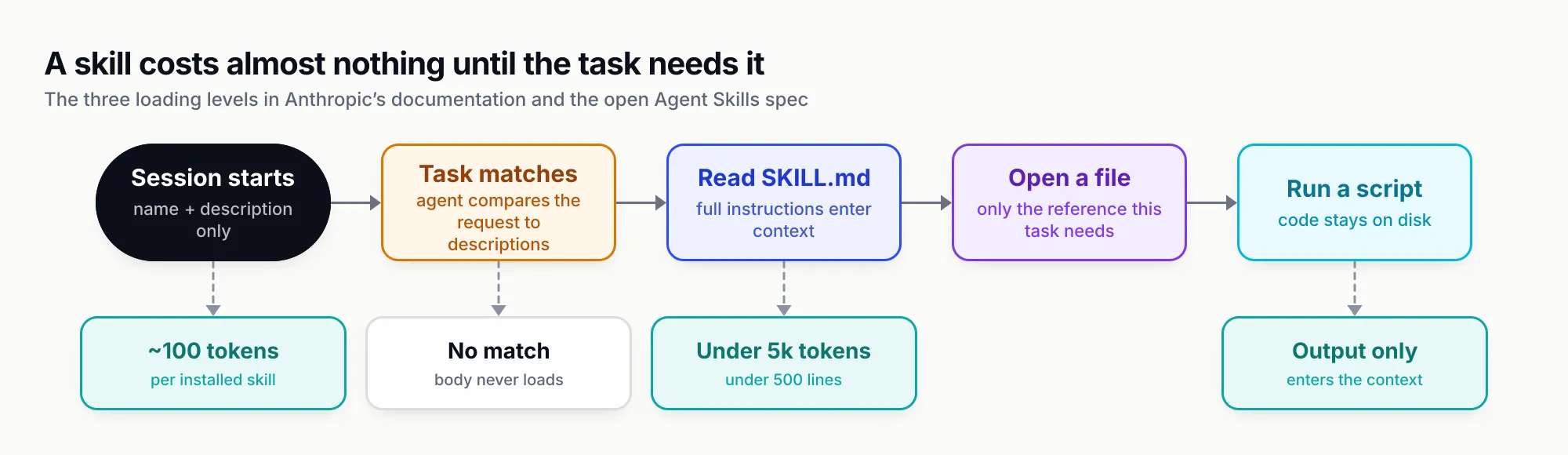
Figure 1: Every installed skill pays the level-one cost on every turn; the rest is paid only when a task actually uses the skill.
The consequence is that a skill can bundle a large amount of material, such as a full API reference or a set of database schemas, without bloating every conversation. The cost that does scale with the number of installed skills is the level-one listing, which is why every agent that supports skills caps or truncates it. Claude Code truncates the combined description and when_to_use text at 1,536 characters per skill in its listing. OpenAI’s Codex documentation caps the initial skills list at 2% of the context window, or 8,000 characters when the window size is unknown.
Where Claude Skills run: apps, Claude Code and the API
Claude Skills use one folder format on three surfaces, but the runtime, the storage location and the sharing model differ on each, and custom skills uploaded to one surface do not automatically appear on another. Anthropic’s documentation is explicit that skills uploaded to the API are not available in claude.ai, and vice versa.
Claude apps (claude.ai, desktop and Cowork)
In the Claude apps, skills run in Claude’s sandboxed code execution environment. Anthropic’s help centre lists skills on the Free, Pro, Max, Team and Enterprise plans, with code execution and file creation switched on. Anthropic’s pre-built document skills for PowerPoint, Excel, Word and PDF activate automatically when Claude creates those files. Custom skills are uploaded as zip files.
Sharing has moved since launch. Anthropic’s December 2025 update to its launch post added organisation-wide management, and the help centre now documents Team and Enterprise owners provisioning skills to every member, sharing with named people or groups, and publishing to an organisation library that can require review. The API overview page still describes claude.ai skills as individual to each user; the help centre is the more recent description of the apps.
Network access in the apps depends on user and admin settings: full, partial or none. Claude Enterprise organisations can also turn on skill and plugin security scanning, which blocks uploaded skills that fail a scan for hidden code execution, data exfiltration or instructions that tamper with Claude’s safeguards. Anthropic’s enterprise guide is clear that scanning does not cover skills uploaded through the API or skills that predate the setting.
Claude Code
Claude Code skills are plain directories on disk, with no upload step. The Claude Code skills documentation lists the places it looks:
| Scope | Path | Who gets it |
|---|---|---|
| Enterprise | Managed settings directory | Everyone in the organisation |
| Personal | ~/.claude/skills/<name>/SKILL.md | You, in every project |
| Project | .claude/skills/<name>/SKILL.md | Anyone who clones the repository |
| Nested | <subdir>/.claude/skills/ | Loads when Claude works in that subdirectory |
| Plugin | <plugin>/skills/<name>/SKILL.md | Anyone who installs the plugin, namespaced as /plugin:skill |
When names collide, enterprise beats personal and personal beats project. Edits are picked up live in the current session. Claude Code also syncs skills enabled on a claude.ai account into ~/.claude/skills/synced/ for signed-in sessions, which narrows, but does not close, the gap between the apps and the terminal.
Claude Code is where the format is most extended. Custom slash commands have been merged into skills, so .claude/commands/deploy.md and .claude/skills/deploy/SKILL.md both create /deploy. The frontmatter accepts fields the open spec does not define, including:
disable-model-invocation: true, which makes a skill run only when a person types its name. The docs recommend it for anything with side effects, such as deploys and commits, and it also keeps the description out of context entirely.user-invocable: false, the reverse: Claude can load it, but it is hidden from the/menu.context: forkwith anagenttype, which runs the skill in a subagent with its own context window.allowed-tools,disallowed-tools,model,effort,hooksandpaths, the last restricting automatic activation to matching files.
Claude Code skills can also inject live data. A line such as !`git diff HEAD` runs before Claude sees the skill and is replaced by the command’s output. That is powerful and is also the clearest example of why skills need review: the command runs on the developer’s machine. Administrators can set disableSkillShellExecution in managed settings to replace every injected command with a placeholder.
The runtime is the user’s own computer, with the same network access as any other program. Anthropic’s documentation advises skills to install packages locally rather than globally so they do not interfere with the machine.
The Claude API
On the API, skills run inside the code execution tool’s container. A request names them in the container parameter alongside the code_execution_20250825 tool:
{
  "model": "claude-opus-5-5",
  "max_tokens": 4096,
  "container": {
    "skills": [
      { "type": "anthropic", "skill_id": "pptx", "version": "latest" },
      { "type": "custom", "skill_id": "skill_01AbC...", "version": "latest" }
    ]
  },
  "tools": [{ "type": "code_execution_20250825", "name": "code_execution" }],
  "messages": [{ "role": "user", "content": "Turn the Q3 numbers into a five-slide deck" }]
}
According to Anthropic’s API guide, a request can carry up to 20 skills. Custom skills are uploaded through the /v1/skills endpoints, must stay under 30 MB uncompressed, and are versioned: each new version is a complete snapshot, and requests can pin a version or use latest. Uploaded skills are shared across the whole workspace, so the guide suggests a separate workspace per tenant when isolation matters.
The API runtime is the most locked down. Skills have no network access and cannot install packages at runtime; only the code execution tool’s pre-installed packages are available. Agent Skills are also not covered by zero data retention arrangements, according to the overview page, which matters to teams on ZDR contracts.
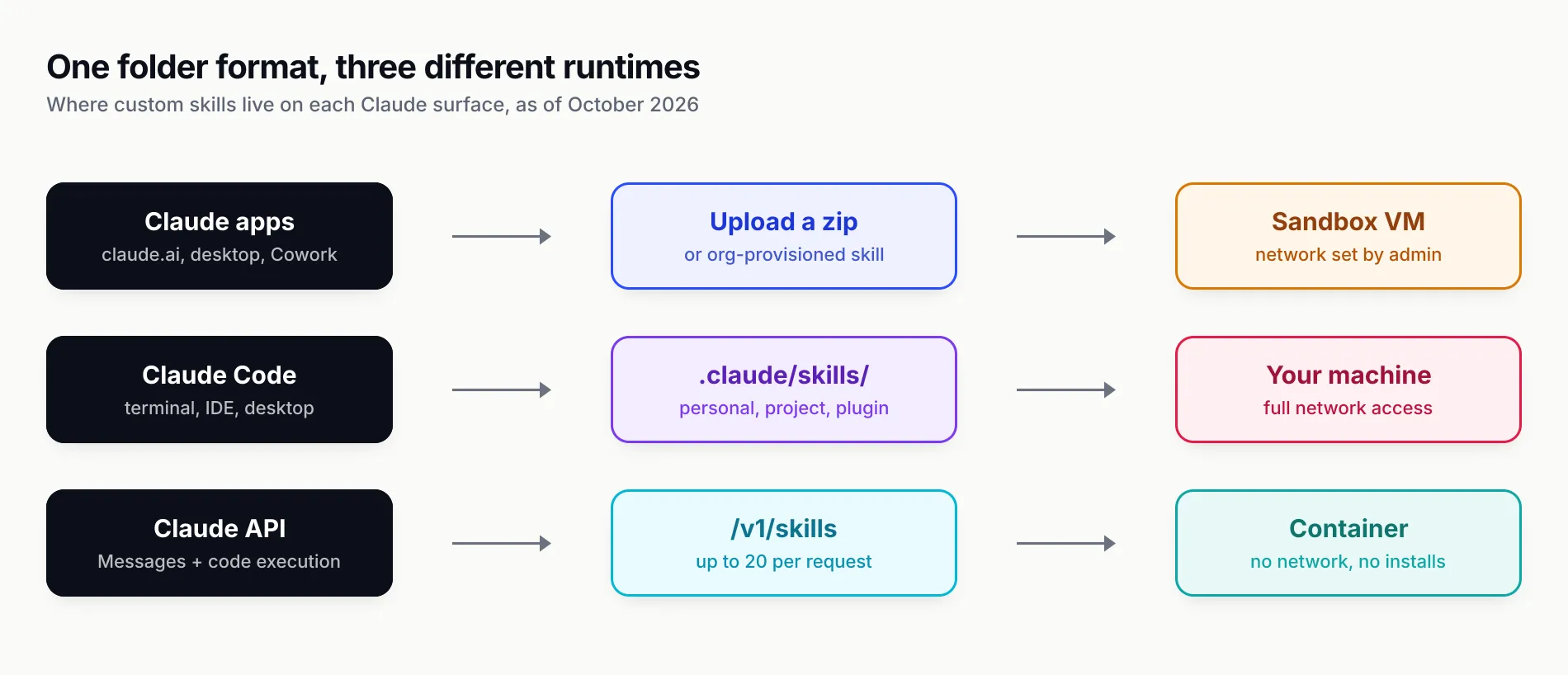
Figure 2: The same SKILL.md behaves differently depending on where it runs; a skill that fetches a URL works in Claude Code and fails on the API.
The open Agent Skills standard and who supports it
Anthropic published the Agent Skills format as an open standard at agentskills.io on 18 December 2025, and by October 2026 it is the closest thing the agent ecosystem has to a shared packaging format for procedural knowledge. The site describes the format as “originally developed by Anthropic, released as an open standard”, with development on GitHub and a reference validator, skills-ref, that checks frontmatter and naming.
The specification is deliberately small. It fixes the folder layout, the two required fields, the four optional ones and the three-stage loading model, and leaves almost everything else, including invocation controls, sandboxing and distribution, to each agent. The agentskills.io client showcase listed 46 products as of mid-October 2026. The ones most developers will meet:
| Agent | Where it looks for skills | Notable additions |
|---|---|---|
| Claude Code | .claude/skills/, ~/.claude/skills/, plugins | Slash invocation, context: fork, injected shell output |
| OpenAI Codex and ChatGPT | .agents/skills/ up to the repo root, ~/.agents/skills, /etc/codex/skills | agents/openai.yaml for UI, invocation policy and MCP dependencies; $skill-installer |
| GitHub Copilot | .github/skills, .claude/skills, .agents/skills; ~/.copilot/skills | Works in cloud agent, code review, CLI and IDE agent modes; gh skill installs |
| VS Code | Same project folders plus ~/.claude/skills and ~/.agents/skills | /create-skill, extensions can contribute skills |
| Cursor | .agents/skills/, .cursor/skills/, plus .claude and .codex folders for compatibility | /migrate-to-skills converts dynamic rules and commands |
| Gemini CLI | .gemini/skills/ or .agents/skills/, user and workspace tiers | activate_skill tool with a consent prompt before loading |
Beyond those, the showcase lists JetBrains’ Junie, Block’s Goose, OpenCode, OpenHands, Amp, Factory, Roo Code, Kiro, Letta, Mistral’s Vibe, Spring AI, Laravel Boost, Databricks Genie Code, Snowflake Cortex Code and Pulumi Neo among others.
Three practical observations follow from the table. First, .agents/skills/ is becoming the neutral location: Codex, Copilot, VS Code, Cursor and Gemini CLI all read it, and a team that wants one copy of a skill for several agents should put it there. Claude Code still reads .claude/skills/, which Copilot, VS Code and Cursor also scan for compatibility.
Second, the extensions do not travel. Claude Code’s context: fork and injected shell output, Codex’s openai.yaml and VS Code’s chatSkills extension point are each agent-specific. Unknown frontmatter fields are silently ignored by Claude Code, but the Claude apps and API reject any field outside the open set (name, description, license, compatibility, metadata, allowed-tools) with a hard error on upload. A portable skill should stick to those six fields and put agent-specific behaviour in a separate, clearly marked section of the body.
Third, the security model is not standardised. Gemini CLI asks the user to approve each activation; Claude Code relies on its permission rules; the Claude API isolates skills in an offline container. The same skill can therefore be harmless in one agent and dangerous in another.
How to write a skill that triggers reliably
A good skill is narrow, has a description written for the agent’s selection step, keeps its body short, and moves anything long or deterministic into referenced files and scripts. Anthropic’s authoring guide is the most detailed public source on what works, and most of its advice applies to any agent that reads the format.
Write the description for selection, not for people
The description is the trigger. Anthropic’s guide says Claude may be choosing among more than 100 skills and uses the description alone to pick. It asks for third-person phrasing, because the description is injected into the system prompt and a mixed point of view “can cause discovery problems”, and for both what the skill does and the specific situations that should trigger it.
| Weak description | Strong description |
|---|---|
| “Helps with documents” | “Analyze Excel spreadsheets, create pivot tables, generate charts. Use when analyzing Excel files, spreadsheets, tabular data, or .xlsx files.” |
| “I can help you write commits” | “Generate descriptive commit messages by analyzing git diffs. Use when the user asks for help writing commit messages or reviewing staged changes.” |
Claude Code’s docs add one more instruction: put the key use case first, because the listing truncates. Gerund names such as processing-pdfs are Anthropic’s suggested convention; vague names such as helper or utils make selection harder.
Keep the body lean and assume a capable reader
The guide’s default assumption is that “Claude is already very smart”. Its example shows a 50-token instruction to use pdfplumber outperforming a 150-token version that explains what a PDF is. Keep SKILL.md under 500 lines, split longer material into files referenced directly from SKILL.md, and keep those references one level deep: the guide warns that Claude may only preview files reached through a chain of references.
Match freedom to fragility
The guide’s most useful framing is “degrees of freedom”. For a code review, where many approaches are valid, give high-level steps and let the model judge. For a database migration that must run in exact order, give one script and the instruction “Do not modify the command or add additional flags.” The analogy it uses is a narrow bridge with cliffs on both sides versus an open field.
Bundle scripts for anything deterministic
If a step can be done by code, ship the code. A validator that prints a specific error (“Field ‘signature_date’ not found. Available fields: customer_name, order_total”) turns a fuzzy instruction into a feedback loop the agent can follow. The guide’s plan, validate, execute pattern, where the agent writes a changes.json, runs a checker and only then applies changes, is a sound default for any skill that edits files in bulk.
Two portability details: always use forward slashes in paths, and refer to MCP tools by their fully qualified name (ServerName:tool_name) so the agent can find them when several servers are connected.
Evaluate before and after
Anthropic recommends building evaluations before writing much of the skill: run the agent on representative tasks without it, record the failures, write three scenarios that test those gaps, then write the minimum instructions that pass. The enterprise guide asks for three to five queries per skill covering when it should trigger, when it should not, and ambiguous cases, tested on every model the organisation uses. It also lists “coexistence” as a failure mode: a new skill with a broad description can steal triggers from existing ones.
Claude Code’s documentation suggests comparing runs with and without the skill in fresh sessions, and its /skill-doctor command reports each skill’s context cost and usage so unused skills can be switched off.
A worked example
A data team that keeps answering the same revenue questions might write a querying-revenue skill. The description names the triggers (“ARR, MRR, churn, net revenue retention, or the finance warehouse”). The body states three rules that the model would otherwise get wrong, such as excluding test accounts and using the fiscal calendar, then points to references/finance-schema.md for the tables and to scripts/check_query.py, which runs EXPLAIN and rejects queries that scan the raw events table. Questions about marketing attribution never load any of it. Questions about churn load about 2,000 tokens of instructions and one schema file, and the checker catches the expensive query before it runs.
Security: treat third-party skills as software
A skill is executable intent: it can instruct the agent to run commands and can ship scripts that run with the agent’s permissions, so installing one from an unknown publisher carries the same risk as installing an unknown package. Anthropic’s overview warns that “a malicious Skill can direct Claude to invoke tools or execute code in ways that don’t match the Skill’s stated purpose”, and recommends using skills only from trusted sources.
The risk is not theoretical. In February 2026 the security company Snyk scanned 3,984 skills from the ClawHub and skills.sh registries and reported that 534 (13.4%) had at least one critical issue and 1,467 (36.82%) had a flaw of some severity, with 76 confirmed malicious payloads; 91% of the malicious skills combined code with prompt injection. The OWASP Agentic Skills Top 10, an incubator project, ranks malicious skills first and describes the January 2026 ClawHavoc campaign: 1,184 malicious skills across 12 publisher accounts delivering the Atomic Stealer malware to macOS users. It also cites a USENIX Security 2026 measurement that confirmed 157 malicious skills among 98,380 analysed.
The attack patterns OWASP lists are mostly social rather than technical: typosquatted names, “prerequisites” sections that tell the user to paste a terminal command from an attacker’s domain, and fake setup dialogs. The common thread is that the payload hides in Markdown that a human skims and an agent obeys.
Anthropic’s enterprise guide gives a risk-tier table that works as a review checklist:
| Look for | Why it matters | Anthropic’s concern level |
|---|---|---|
Scripts (*.py, *.sh, *.js) | They run with full environment access | High |
| Instructions to ignore safety rules or hide actions | Can bypass controls | High |
| References to MCP tools | Extend reach beyond the skill itself | High |
URLs, curl, fetch, requests | Possible exfiltration route | High |
| Hard-coded keys or tokens | Leak through Git history and context | High |
Paths outside the skill folder, ../ | May read unintended data | Medium |
The guide’s process advice is equally concrete: read every file, run scripts in a sandbox and compare their behaviour with the description, separate authors from reviewers, keep skills in Git, compute checksums of reviewed versions, and pin production API requests to specific versions, because “a new version uploaded by anyone in the workspace immediately changes what production agents run”. OWASP adds hash-pinning installed skills and never auto-running a skill’s “prerequisites”.
In Claude Code, the controls are in settings. A permission deny rule on Skill blocks all skills; rules such as Skill(deploy *) allow or deny specific ones; skillOverrides can hide a skill from the model or from the menu; and disableSkillShellExecution stops injected commands. Teams that standardise these in managed settings get a baseline that individual developers cannot quietly loosen.
The limit of all of this is that review happens once and execution happens every day. A reviewed skill that tells the agent to “post the summary to the incident channel” is safe only if the tool it reaches is scoped correctly at the moment of the call. That is the point where skills stop being the right layer of control.
Skills vs MCP vs subagents vs hooks
Skills, MCP servers, subagents and hooks solve four different problems: skills supply know-how, MCP servers supply access to external systems, subagents supply isolated context, and hooks supply guaranteed enforcement. Claude Code’s feature guide compares them directly, and the comparison is the clearest answer to “agent skills vs MCP”.
Skill vs MCP. The Model Context Protocol connects an agent to an external service through a server that exposes tools, with the connection and authentication handled by that server. A skill carries knowledge about how to use those tools well. The guide’s example pairs them: an MCP server connects to the database, and a skill documents the schema and the team’s query patterns. On context cost they now look similar in Claude Code, because MCP tool search is on by default and loads only tool names until a tool is needed. The real difference is that an MCP server holds credentials and performs actions; a skill does neither on its own.
Skill vs subagent. A subagent is a separate worker with its own context window that returns a summary. A skill adds to whichever context loads it. They combine in both directions: a subagent can preload skills through its skills: field, and a skill can run itself in a subagent with context: fork.
Skill vs hook. A hook is a script, HTTP call, MCP tool call, prompt or subagent that fires on a lifecycle event, such as before a tool runs or when a session starts. The guide’s advice is blunt: “An instruction like ‘never edit .env’ in CLAUDE.md or a skill is a request, not a guarantee. A PreToolUse hook that blocks the edit is enforcement.”
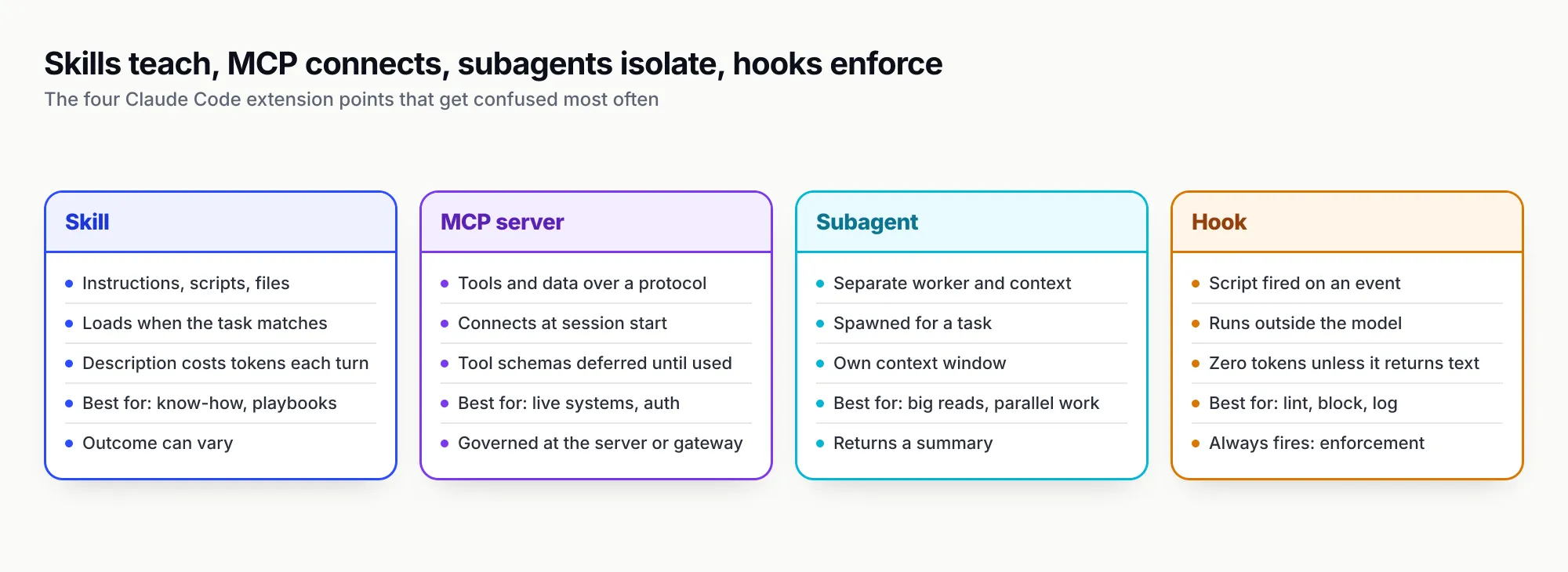
Figure 3: If a rule must hold every time, it belongs in a hook or in the tool layer, not in a skill’s prose.
Plugins sit above all four as the packaging layer. A Claude Code plugin can bundle skills, hooks, subagents and MCP server definitions into one installable, namespaced unit, which is how Anthropic’s own skills repository is distributed to Claude Code users. That convenience also means installing one plugin can add tools and automation alongside instructions, so the review in the previous section applies to the whole bundle.
A useful division of labour for a team:
- Put conventions every task needs in
CLAUDE.md(orAGENTS.mdfor agents that read it). - Put procedures and reference material in skills, with side-effecting ones set to manual invocation.
- Put access to external systems behind MCP servers, scoped per user or per team.
- Put anything that must never be skipped, such as blocking writes to secrets or running a linter, in hooks.
- Use subagents when a task would flood the main conversation with output nobody will read again.
Where governance sits: skills, MCP servers and the gateway
For a team, the controllable surface of a skill is not the skill but the tools it tells the agent to use, and in most agent setups those tools arrive over MCP. Skills cannot hold credentials or enforce permissions; they are text the model interprets. MCP servers can, which makes the MCP connection the natural place for access control, credential handling and an audit trail.
The difficulty is that MCP connections usually live in each developer’s configuration. The top MCP servers for coding agents each have their own scoping options, and a skill written for one person’s GitHub server setup will reach whatever that person’s token allows. An MCP gateway changes this by putting one governed endpoint between agents and every MCP server: it decides which tools each caller can see, holds upstream credentials, and logs each call. GenAI Brief’s MCP gateway explainer covers the mechanism in detail, and the MCP gateway comparison covers the options.
Bifrost, the open-source AI gateway from Maxim AI, is a worked example of how that layer pairs with skills. Its MCP gateway aggregates connected MCP servers behind a single /mcp endpoint, and its Claude Code integration guide shows adding it with one claude mcp add --transport http command carrying a virtual key. From there, three controls line up with the skill risks above:
- Tool filtering. Bifrost’s tool filtering stacks three levels (client configuration, request headers and virtual key), and a tool must pass all of them. Per-key allow-lists are deny-by-default, so a skill that instructs Claude to call
github.delete_repofails at the gateway if that developer’s key does not include it. - Authentication. The MCP authentication modes range from shared headers and OAuth to per-user OAuth and token exchange, so upstream credentials sit in the gateway rather than in a skill’s environment variables or a laptop’s config file.
- Logging. Requests and tool calls through the gateway are recorded centrally, which gives the “monitor” step in Anthropic’s skill lifecycle something to work from; Anthropic notes that usage analytics are not available through the Skills API itself.
The same deployment also routes model traffic, so a team running Claude Code, Codex and Cursor through one gateway can apply budgets and tool policy in one place. Bifrost reports 11 µs of added overhead per request at 5,000 requests per second in its published benchmark. Advanced controls such as SSO, RBAC, audit logs, guardrails and clustering come with the enterprise tier.
The division is worth stating plainly: review skills for intent, and enforce at the tool layer. A skill tells the agent what to do; the gateway decides whether it is allowed to.
What to do with Claude Skills now
Skills are worth adopting because they are cheap, portable and already supported by most agents a team is likely to use. The practical sequence:
- Start with the prompts you repeat. Claude Code’s guide suggests turning anything you have pasted into chat three times into a skill. Write the description first, in the third person, with the triggers up front.
- Store skills in Git under
.agents/skills/if several agents need them, and stick to the six open-spec frontmatter fields for anything you want to upload to the Claude apps or API. - Set side-effecting skills to manual invocation with
disable-model-invocation: true, and test every skill against cases where it should and should not trigger. - Review third-party skills like dependencies. Read every file, look for scripts, URLs and credential access, pin versions, and prefer publishers you can identify.
- Put enforcement below the skill. Use hooks for rules that must always hold, and scope the MCP tools skills rely on at the server or the gateway, per user and per team.
The open standard has settled the format question faster than MCP settled the protocol question, and the folder you write for Claude Code today will very likely load in the next agent your team tries. What it has not settled is trust. Until registries sign and scan skills by default, the safest assumption is that any skill can ask an agent to do anything its tools allow, so the tools are where the limits belong.
Sources
- Agent Skills overview Anthropic
- Skill authoring best practices Anthropic
- Skills for enterprise Anthropic
- Using Agent Skills with the API Anthropic
- Extend Claude with skills (Claude Code) Anthropic
- Extend Claude Code: CLAUDE.md, skills, subagents, hooks, MCP and plugins Anthropic
- Equipping agents for the real world with Agent Skills Anthropic
- Introducing Agent Skills Anthropic
- Using Skills in Claude Anthropic Help Center
- Agent Skills specification agentskills.io
- Agent Skills overview and client showcase agentskills.io
- Build skills (Codex and ChatGPT) OpenAI
- About agent skills GitHub
- Use Agent Skills in VS Code Microsoft
- Agent Skills in Gemini CLI Google
- Agent Skills in Cursor Cursor
- AST01: Malicious Skills (OWASP Agentic Skills Top 10) OWASP Foundation
- MCP specification 2025-11-25: Tools Model Context Protocol
- Bifrost tool filtering Maxim AI
- Bifrost MCP tool filtering per virtual key Maxim AI
- Bifrost MCP authentication Maxim AI
- Bifrost with Claude Code Maxim AI
Frequently asked questions
What are Claude Skills?
Claude Skills, which Anthropic also calls Agent Skills, are folders containing a SKILL.md file with a name, a description and instructions, plus optional scripts and reference files. Claude sees only the name and description until a task matches, then reads the instructions and opens other files as needed. They work in the Claude apps, Claude Code and the Claude API.
How do I add a skill to Claude Code?
Create a folder with a SKILL.md file in ~/.claude/skills/ for a personal skill or .claude/skills/ inside a repository for a project skill, or install one through a plugin. Claude Code picks up edits in the current session. Invoke it with /skill-name or let Claude load it when your request matches the description.
What is the difference between agent skills and MCP?
An MCP server exposes tools and data from an external system over a protocol, with the connection and authentication handled by the server. A skill is a set of instructions and files that teaches the agent how to do a task, which may include how to use those MCP tools well. Most real setups use both: MCP for access, skills for procedure.
Are Claude Skills free?
Anthropic's help centre lists skills on the Free, Pro, Max, Team and Enterprise plans, with code execution switched on. On the API, skills run inside the code execution tool, so usage is billed as normal model tokens plus code execution. There is no separate charge for the skill format itself.
Do Claude Skills work with other AI agents?
Yes. The format was published as the open Agent Skills standard on 18 December 2025. As of October 2026, OpenAI Codex, GitHub Copilot, VS Code, Cursor, Gemini CLI, Goose, OpenCode and dozens of other clients read SKILL.md folders, though each adds its own extensions and directory conventions.
Are third-party skills safe to install?
Treat them like installing software. A skill can tell the agent to run commands and can bundle scripts that execute with the agent's permissions. Security researchers found hundreds of malicious skills on public registries in early 2026. Read every file, check for network calls and credential access, and pin reviewed versions.
How many skills can Claude use at once?
The API accepts up to 20 skills per request. Claude Code has no fixed count but truncates each skill's listing text at 1,536 characters and recommends keeping the set focused. Anthropic's enterprise guidance warns that too many active skills reduce the chance that Claude picks the right one.