ToolsComparison
Codex vs Claude Code in October 2026: models, sandboxes, pricing and which to pick
Codex vs Claude Code compared on models, sandboxing, MCP, hooks, subagents, plan limits and admin controls, with a decision guide for developers and teams.
Codex vs Claude Code is the comparison most engineering teams now run before standardising on a coding agent. OpenAI’s Codex and Anthropic’s Claude Code both read a repository, edit files, run commands and open pull requests, from a terminal, an IDE, a desktop app or a cloud sandbox. In October 2026 their feature lists look almost identical. Their defaults, models, prices and admin controls do not, and those are what decide which one suits a given developer or organisation.
This comparison is for developers choosing a daily agent and for platform teams deciding whether to standardise on one, allow both, or put both behind shared controls. It covers the models behind each agent, the agent loop, sandboxing and approvals, MCP, skills, hooks and subagents, pricing and plan limits, and enterprise controls, then ends with a decision guide.
Every capability claim comes from OpenAI’s and Anthropic’s own documentation and pricing pages, read between 13 and 15 October 2026. GenAI Brief did not benchmark the two agents. Both products ship changes weekly, so date-stamped facts below will drift.
Codex vs Claude Code at a glance
Codex and Claude Code are agentic coding tools: each runs a loop in which a model reads context, calls tools (file edits, shell commands, MCP tools), observes the result and continues until the task is done or it needs a human. Both are now multi-surface products rather than single CLIs.
| OpenAI Codex | Anthropic Claude Code | |
|---|---|---|
| Surfaces | CLI, IDE extension, ChatGPT desktop app, web (Codex Cloud), iOS | CLI, VS Code and JetBrains extensions, desktop app, web, mobile |
| Default model (Oct 2026) | GPT-6.1 Sol recommended; GPT-6 Astra and GPT-6 Luna available | Opus 5.5 on Pro, Max, Team, Enterprise and the API |
| Other models | Any Responses API provider via model_providers | Claude only (Fable 5.1, Sonnet 5.5, Haiku 5.5); Bedrock, Vertex, Foundry |
| Local sandbox | On by default; network off; Seatbelt, bubblewrap, native Windows | Off by default; Bash only; Seatbelt, bubblewrap; no native Windows |
| Approval model | on-request or never, plus Auto-review (“Approve for me”) | Six permission modes; auto mode with a classifier is the starting mode |
| Project instructions | AGENTS.md | CLAUDE.md, and reads AGENTS.md |
| MCP | STDIO and streamable HTTP, OAuth, bearer tokens | HTTP (recommended), STDIO, SSE (deprecated), OAuth |
| Hooks | 12 lifecycle events; scripts or MCP tools | 33 lifecycle events; command, HTTP, MCP tool, prompt and agent hooks |
| Subagents | On by default; custom agents; Ultra mode for parallel work | Built-in Explore and Plan; custom subagents; experimental agent teams |
| Entry price | $20 Plus; Free and $8 Go limited to the desktop app | $20 Pro; Max from $100 |
| Team price | Business $20 per user per month (annual) | Team Standard $20 per seat per month (annual) |
| Source | CLI and SDK published in openai/codex | Not open source; sandbox runtime is published |
The rest of this piece explains the rows that matter most, starting with the models, because model quality still dominates how either agent feels on real work.
The models behind each agent
The model is the largest single difference between Codex and Claude Code, because neither vendor supports the other’s models. Codex is built for OpenAI’s GPT-6 family; Claude Code is built for Claude. Each agent’s prompts, tool definitions and context management are tuned to its own models, which is why switching agents usually means switching model families too.
Codex: GPT-6.1 Sol, Astra and Luna
OpenAI’s Codex models page recommends GPT-6.1 Sol for complex coding and agentic work, describing it as offering “near-Astra performance for complex work at a lower cost than Astra”. GPT-6 Astra is the most capable option and GPT-6 Luna is the efficient model for “clear, repeatable tasks”. GPT-5.5 retired from Codex for ChatGPT sign-ins on 14 October 2026; API-key sessions can still call it.
GPT-6.1 Sol’s API model page lists a 1,050,000-token context window, 128,000 maximum output tokens and an April 2026 knowledge cutoff. Codex exposes reasoning effort from Light (Low in the CLI) up to Max, and an Ultra setting that splits a task across subagents in parallel. Fast mode and, on the $500 Pro plan and eligible Enterprise plans, Ultrafast mode trade more usage for quicker token generation.
Claude Code: Opus 5.5 by default, Fable 5.1 for long tasks
Anthropic’s model configuration page states that the default setting resolves to Opus 5.5 on Pro, Max, Team, Enterprise and the Anthropic API. The sonnet alias resolves to Sonnet 5.5 and haiku to Haiku 5.5. Fable 5.1 is described as the most capable model in Claude Code, “suited to tasks larger than a single sitting”, but it is never the default and on some plans bills to usage credits rather than included limits, with a consent prompt before it does.
Opus 5.5 and later models carry a native 1M-token context window. Claude Code also supports opusplan, which uses Opus during plan mode and Sonnet for execution, and effort levels that default to medium on the 5.5 models.
What the models cost per token
At API rates, the two default models are not priced alike. Anthropic’s API pricing lists Opus 5.5 at $4 per million input tokens and $20 per million output tokens, with cache hits at $0.20. OpenAI lists GPT-6.1 Sol at $2 input and $10 output, with cached input at $0.10, but doubles input and cache rates and raises output 1.5 times for prompts over 272,000 tokens.
| Model | Used by | Input / MTok | Output / MTok | Cached input / MTok |
|---|---|---|---|---|
| GPT-6.1 Sol | Codex (recommended) | $2 | $10 | $0.10 |
| Claude Opus 5.5 | Claude Code (default) | $4 | $20 | $0.20 |
| Claude Sonnet 5.5 | Claude Code (sonnet) | $2 | $10 | $0.10 |
| Claude Fable 5.1 | Claude Code (fable) | $10 | $50 | $0.25 |
| Claude Haiku 5.5 | Claude Code (haiku) | $0.10 | $0.50 | $0.01 |
So Claude Code’s default costs twice Codex’s recommended model per token, while Sonnet 5.5 matches GPT-6.1 Sol exactly. Per-token price is only half the story: a model that finishes a task in fewer turns can be cheaper overall. GenAI Brief’s October 2026 model ranking covers how these models compare on independent indices; for this comparison, the point is that a team on API billing can move Claude Code to Sonnet 5.5 and reach price parity with Codex.
How the agent loop and surfaces differ
Both agents run the same basic loop and both now cover every surface a developer works in. The differences are in how a session moves between local and cloud, how instructions are loaded, and how each runs unattended.
Terminal and IDE. The Codex CLI installs with a standalone script, npm (@openai/codex) or Homebrew, and the Codex CLI page lists codex resume, codex --image, codex --search, codex cloud and codex mcp as core commands. Its IDE extension runs in VS Code, Cursor and Windsurf, while Xcode and JetBrains ship their own Codex integrations. Claude Code installs with a script on macOS, Linux, WSL and Windows, and its overview lists the CLI, VS Code and JetBrains extensions, a desktop app and the web.
Cloud work. Codex Cloud runs tasks in published cloud environments: Codex prepares the repository, installs dependencies and tests the setup, then each task runs in its own workspace “while your computer is asleep”. Claude Code’s cloud sessions run on Anthropic-managed infrastructure or a self-hosted environment, and are available on Pro, Max and Team, and to Enterprise users with premium or Chat plus Claude Code seats. A local session moves to the cloud with claude --cloud, and back with --teleport.
Project instructions. Codex reads AGENTS.md. Claude Code reads CLAUDE.md, and its memory documentation says it can read a repository’s AGENTS.md in place of or alongside CLAUDE.md. That one detail makes mixed teams practical: a single AGENTS.md can serve both agents.
Unattended runs. Codex uses codex exec for scripts and CI, and the Codex SDK embeds the agent in other programs. Claude Code uses claude -p for non-interactive runs and the Agent SDK for embedding, plus GitHub Actions and GitLab CI integrations. Both vendors also run managed pull-request review: Codex’s GitHub code review is generally available, while Anthropic’s Code Review is a research preview for Team and Enterprise subscriptions.
Open source. OpenAI’s open-source page lists the Codex CLI, SDK and app server as developed in the openai/codex repository; the IDE extension and Codex Cloud are not open source. Anthropic does not publish Claude Code itself as open source, though the sandbox it uses is built on the open-source @anthropic-ai/sandbox-runtime package. For teams that audit what runs on developer machines, the ability to read the Codex CLI’s source is a real point in its favour.
Sandboxing and approvals: the biggest design difference
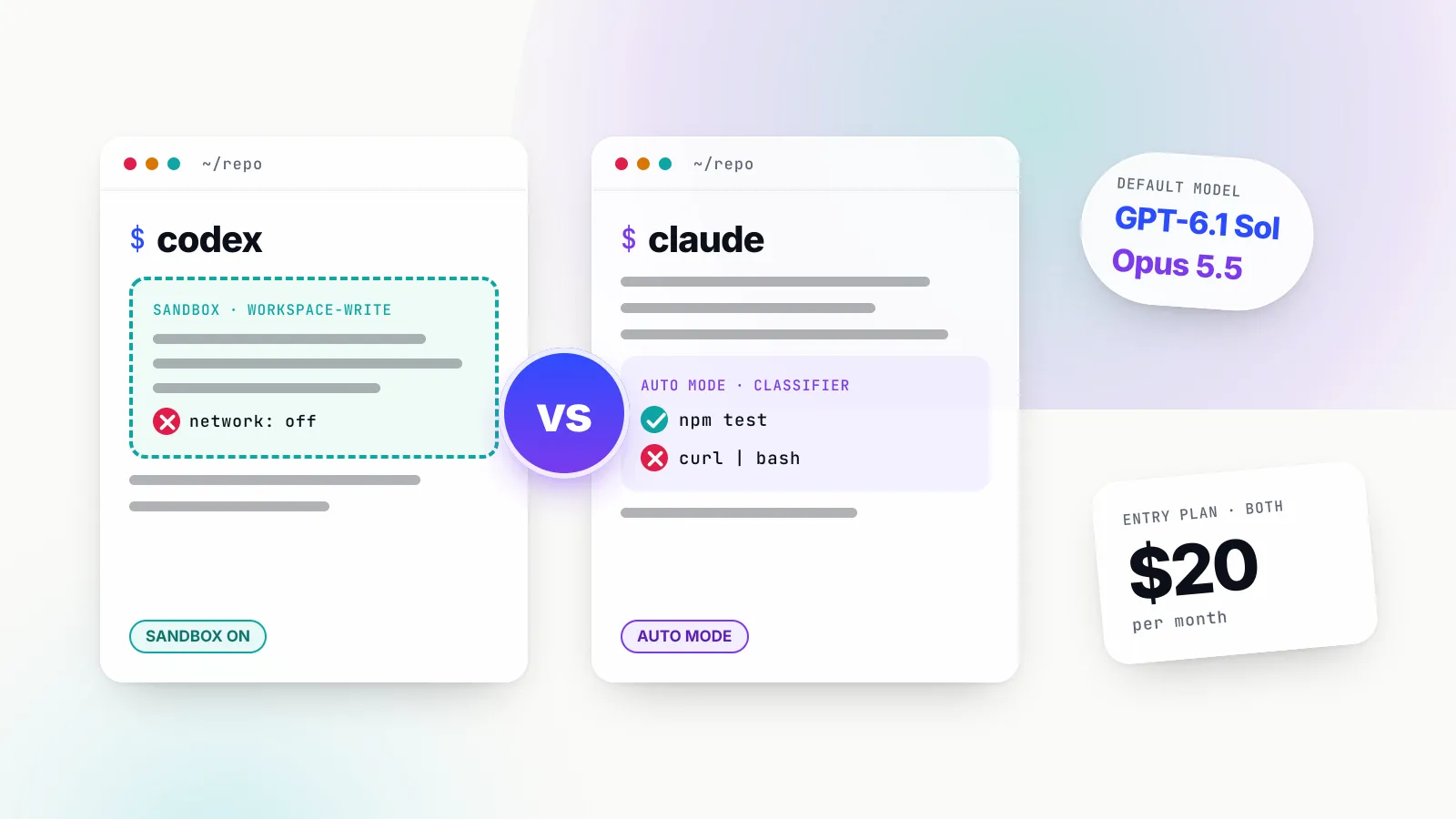
Codex and Claude Code take opposite starting positions on local safety. Codex puts every command in an operating-system sandbox and asks before crossing it. Claude Code leaves its sandbox off and controls actions through permission modes, with an AI classifier reviewing risky actions in its default auto mode.
Codex: sandbox first, approvals at the boundary
OpenAI’s sandbox documentation says that when a local chat runs commands in the desktop app, CLI or IDE extension, “those commands run inside a constrained environment instead of running with full access by default”. The sandbox applies to spawned commands too, so git, package managers and test runners inherit the same boundary. Enforcement is native per platform: Seatbelt on macOS, bubblewrap on Linux and WSL2, and a native Windows sandbox in PowerShell.
The default workspace-write mode lets Codex read files, edit inside the workspace and run routine commands. The approvals and security page is explicit that “by default, the agent runs with network access turned off”, and Codex asks before editing outside the workspace or running commands that need the network. Approval policies are on-request or never; the older untrusted policy is no longer selectable. An Auto-review option (“Approve for me” in the app) sends eligible approval requests to an automatic reviewer instead of the user, without widening the sandbox.
Claude Code: permission modes first, sandbox optional
Claude Code’s sandboxing page states plainly: “The sandbox is off by default.” When turned on with /sandbox or sandbox.enabled, it wraps Bash, PowerShell and Monitor commands, blocks direct network access in favour of a local proxy with an allowed-domains list that starts empty, and limits writes to the working directory. It does not cover Claude’s built-in file and web tools, hooks or local MCP servers, which follow permission rules instead. On native Windows, commands run unsandboxed; Windows users need WSL2 for the sandbox.
The primary control is the permission mode. Claude Code offers six: default (labelled Manual, asks on first use of each tool), acceptEdits, plan, auto, dontAsk and bypassPermissions. Since v2.1.283, the permission modes page says, auto mode is “the built-in starting permission mode for interactive terminal and VS Code sessions on every plan and provider”. In auto mode a separate classifier reviews actions before they run and blocks, by default, actions such as curl | bash, sending sensitive data to external endpoints, production deploys and migrations, granting IAM permissions and force pushes. Anthropic’s own warning is that auto mode “reduces permission prompts but does not guarantee safety”.
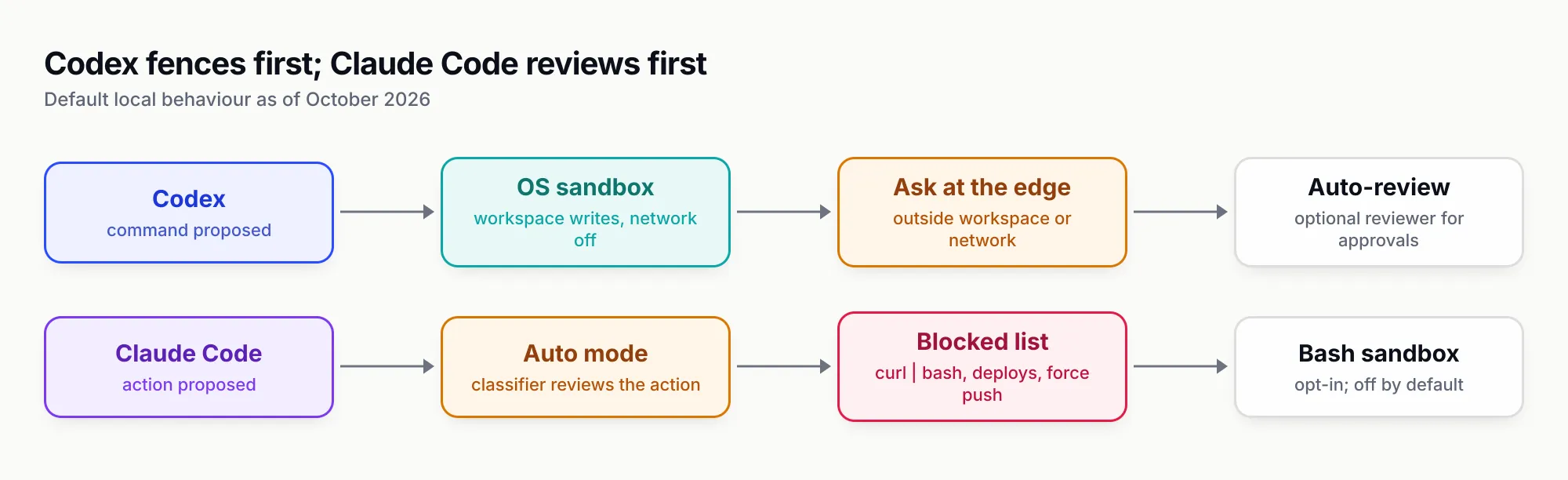
Figure 1: Codex enforces a boundary first and asks at its edge; Claude Code reviews each action first and treats the OS sandbox as an opt-in second layer.
What the difference means in practice
For an individual developer the two approaches feel similar: few prompts on routine work, a stop on anything risky. The difference shows up in two places.
First, what stops a mistake. In Codex, a command that tries to reach the network fails at the operating-system level unless approved. In Claude Code with the default settings, the same command is judged by a classifier model; it is stopped if the classifier flags it, not because the OS refuses it. Teams that want an enforced network boundary in Claude Code should turn on the sandbox and set sandbox.network.allowedDomains, ideally through managed settings. Anthropic’s admin guide makes the same point: denying WebFetch does not stop curl if Bash is allowed, and “sandboxing closes that gap”.
Second, Windows. Codex has a native Windows sandbox; Claude Code does not sandbox commands on native Windows at all. For Windows-heavy engineering organisations, that is a meaningful gap on the Claude Code side unless developers work in WSL2.
MCP, skills, hooks and subagents
Both agents now support the same four extension points, and two of them share open standards. The gap is depth: Claude Code exposes more lifecycle events and more hook types, while Codex shares one configuration across its app, CLI and IDE.
MCP servers
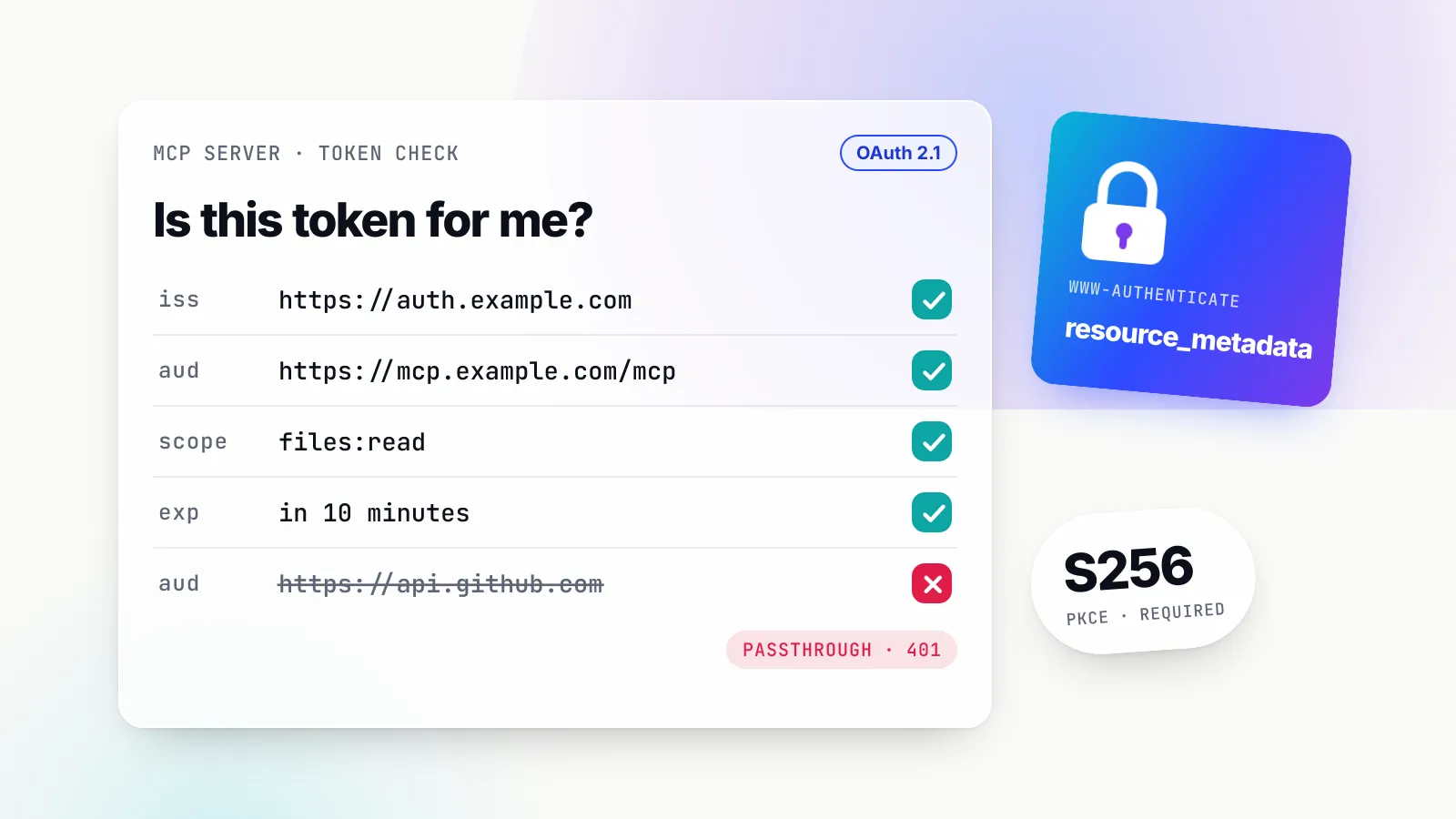
Codex supports STDIO servers and streamable HTTP servers with bearer tokens or OAuth (including Client ID Metadata Documents and Dynamic Client Registration), according to its MCP page. Configuration lives in ~/.codex/config.toml, or a project’s .codex/config.toml for trusted projects, and is shared by the desktop app, CLI and IDE extension. Codex also reads each server’s instructions field as server-wide guidance.
Claude Code recommends HTTP servers for remote connections, supports STDIO for local ones and keeps SSE as a deprecated fallback. Servers can be scoped per user, per project (.mcp.json) or locally, and administrators can restrict or deploy servers organisation-wide through managed MCP settings. For which servers are worth connecting to either agent, see GenAI Brief’s ranking of MCP servers for coding agents.
Skills
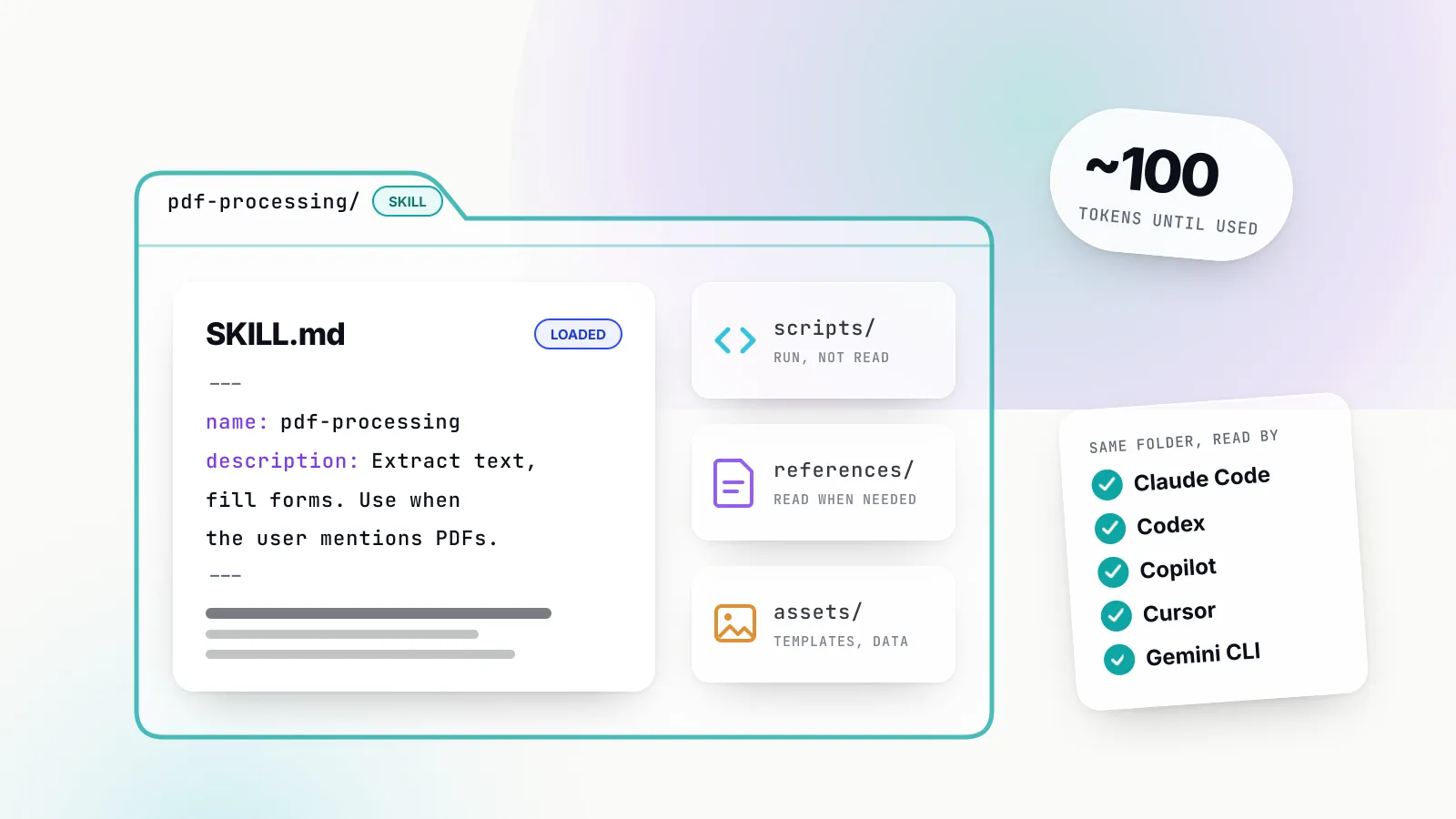
Both agents implement the Agent Skills open standard: a SKILL.md file with a name, a description and instructions, loaded only when relevant. Codex caps the initial skills list at 2 per cent of the context window by default and reads the full SKILL.md only when it selects a skill. Claude Code extends the standard with invocation control, skills that run in a subagent and dynamic context injection, and has merged its custom slash commands into skills. In both, plugins package skills, MCP servers and hooks for distribution. A skill written for one agent generally works in the other.
Hooks
Hooks run scripts at fixed points in the agent loop, which is where teams enforce policy (block a command, scan a prompt for secrets, log a session). Codex’s hooks page lists 12 events, including PreToolUse, PermissionRequest, PostToolUse, UserPromptSubmit, Stop, SessionStart and SessionEnd, and hooks can run scripts or MCP tools. Non-managed hooks must be reviewed and trusted before they run.
Claude Code’s hooks reference lists 33 events, adding the likes of PostToolBatch, PermissionDenied, PreModelSwitch, FileChanged, WorktreeCreate, TeammateIdle and MCP Elicitation. Hooks can be shell commands, HTTP calls, MCP tool calls, or prompt and agent hooks that ask a model to decide. For a team building custom guardrails into the agent itself, Claude Code offers noticeably more places to attach them.
Subagents and parallel work
Codex enables subagent workflows by default: the main thread spawns specialised agents in parallel and collects their results, and users can define custom agents with their own models and instructions. The Ultra setting goes further, handling separate parts of a complex task in parallel subagents. OpenAI notes that subagent runs “consume more tokens than comparable single-agent runs”.
Claude Code’s subagents run in their own context windows with their own tool permissions, and it ships built-in Explore and Plan subagents that start without CLAUDE.md to stay cheap. Custom subagents are Markdown files and can pin a smaller model such as Haiku. Agent teams, where several Claude Code sessions coordinate through shared tasks and messages, remain experimental and are disabled by default.
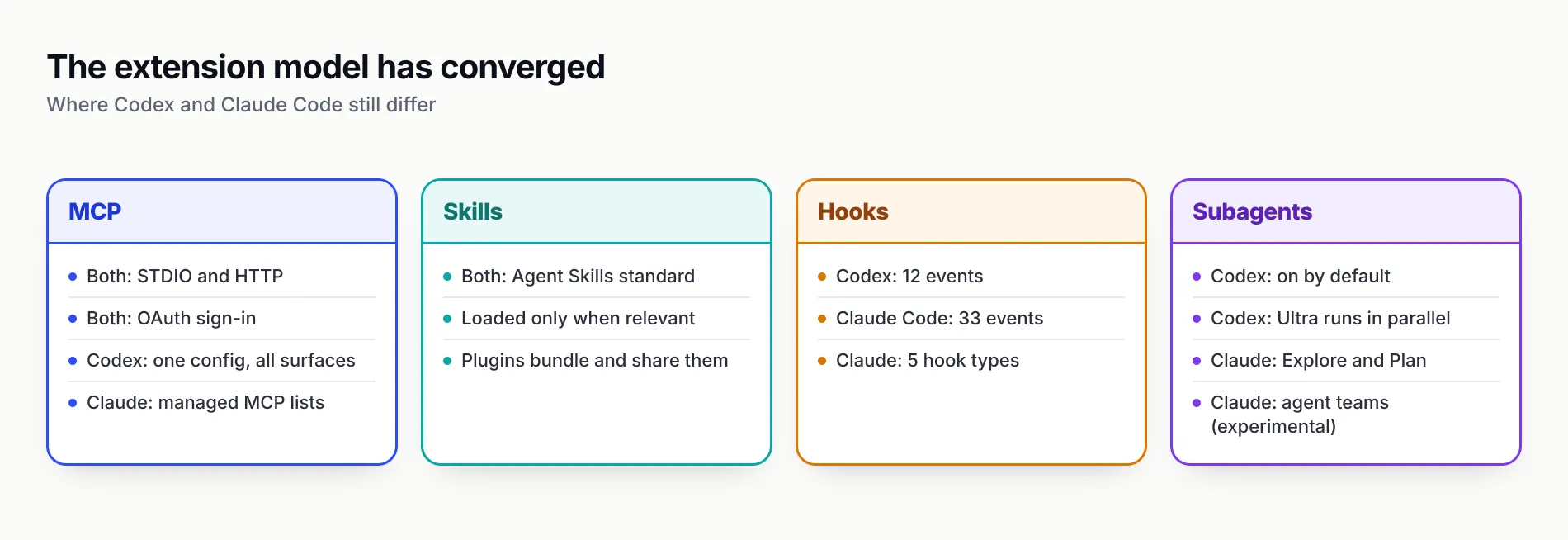
Figure 2: The extension model has converged; Claude Code’s lead is in hook coverage, Codex’s in one shared configuration across surfaces.
Pricing and plan limits compared
Codex vs Claude Code pricing starts at the same $20 a month for an individual and the same $20 a seat (billed annually) for a business team. They diverge below and above that line: OpenAI has cheaper entry tiers with limited Codex access, and both vendors sell premium individual plans from $100 a month.
| Plan | OpenAI Codex | Anthropic Claude Code |
|---|---|---|
| Free | $0: GPT-6 Luna in the desktop app, subject to rollout | Claude Code not listed on the Free plan |
| Low tier | Go, $8 a month: GPT-6 Luna in the desktop app | None |
| Individual | Plus, $20 a month: CLI, IDE, web, iOS, GPT-6.1 Sol | Pro, $20 a month ($17 annual): Claude Code included |
| Power user | Pro at $100, $200 or $500 a month | Max from $100 a month (5x or 20x Pro usage) |
| Business | $20 per user per month annual, $25 monthly | Team Standard $20 annual, $25 monthly; Premium $100 annual |
| Enterprise | Contact sales; flexible credit pricing available | $20 per seat per month annual plus usage at API rates, 20-seat minimum |
| Pay as you go | API key at API token prices; no cloud features | Console API key at API token prices |
Sources: OpenAI’s Codex pricing page and Anthropic’s plans page, both read on 15 October 2026.
How the limits work
Neither vendor publishes a fixed message quota. OpenAI’s estimates for Plus and Standard Business seats are 15 to 160 local messages per five-hour window on GPT-6.1 Sol, 5 to 45 on GPT-6 Astra and 350 to 3,000 on GPT-6 Luna; “Pro plans currently have no five-hour limit”, and weekly limits may also apply. Fast mode draws included usage 2.5 times faster, and Ultrafast eight times faster. Codex and ChatGPT Work share the same allowance.
Anthropic describes Max as “5x or 20x more usage than Pro” and does not publish message counts on its plans page. Claude Code’s /usage command shows which skills, subagents, plugins and MCP servers are consuming a subscriber’s plan, which helps explain a fast-draining allowance. On the API side, Anthropic’s cost guidance puts average enterprise spend at about $13 per developer per active day and $150 to $250 per developer per month, with 90 per cent of users below $30 a day.
Which is cheaper
For a subscriber, the two are priced identically at the $20 entry point, and the cheaper choice is whichever plan’s allowance lasts longer on the developer’s own work. For API-billed teams, Codex on GPT-6.1 Sol costs half as much per token as Claude Code on its default Opus 5.5, while Claude Code on Sonnet 5.5 matches it. Long sessions that cross 272,000 input tokens erase part of GPT-6.1 Sol’s advantage, because of its long-prompt surcharge. GenAI Brief’s piece on the real cost of an AI product explains why per-token prices understate what agentic workloads cost.
Enterprise controls and data handling
Both vendors now give administrators a policy layer that developers cannot override, usage analytics, audit records and data-retention options. Claude Code’s controls are more granular on the developer machine; Codex’s sit inside the wider ChatGPT Enterprise workspace.
Policy enforcement on developer machines
Codex separates admin-enforced requirements from starting defaults. According to OpenAI’s managed configuration page, requirements.toml (for example /etc/codex/requirements.toml on Unix) constrains security-sensitive settings, including the approval policy, the automatic-review policy, sandbox mode, web search, managed hooks, which MCP servers users can enable and which plugin marketplaces they can use, while the legacy managed_config.toml only sets starting values that users can change. Workspace-level Agent Security policies, announced at DevDay on 29 September 2026, control which tools agents use and how they access files and the network for local and Codex Cloud execution.
Claude Code’s admin setup guide describes four delivery channels for managed settings: server-managed from the claude.ai admin console (fetched at startup and refreshed hourly), macOS plist or Windows HKLM registry policy, a managed-settings.json file, and a lower-priority Windows user registry. Managed settings can lock permission rules (allowManagedPermissionRulesOnly), disable bypass and auto modes, force the sandbox on, restrict MCP servers and plugin marketplaces, allow only managed hooks, restrict models (availableModels), cap effort levels, pin version ranges and limit which API providers a machine may use. The list is long, and for a security team that wants to dictate exactly what the agent may do, it is the most complete policy surface either vendor offers.
Visibility, audit and data
Codex Enterprise includes SCIM, enterprise key management, RBAC, audit logs and usage monitoring through the Compliance API, an Analytics API for aggregated reporting, and data retention and residency controls. GPT-6.1 Sol supports US and EU data residency.
Claude Code exports sessions, tool calls and tokens through OpenTelemetry on every provider, offers an analytics dashboard and APIs, supports zero data retention for qualified Enterprise accounts, and documents a HIPAA-ready configuration for local mode. Anthropic recommends a gateway for request-level audit logs: its self-hosted Claude apps gateway records a per-request audit log with identity-provider identity, or teams can use another LLM gateway.
Cloud provider routes
Claude Code can run entirely on Amazon Bedrock, Google Cloud’s Agent Platform or Microsoft Foundry, which lets organisations inherit existing cloud compliance and billing, though cloud sessions, Routines and Code Review then require claude.ai seats as well. Codex can also send model requests directly to Amazon Bedrock for OpenAI models available there, taking OpenAI’s hosted Responses API out of the request path.
Running Codex and Claude Code side by side in a team
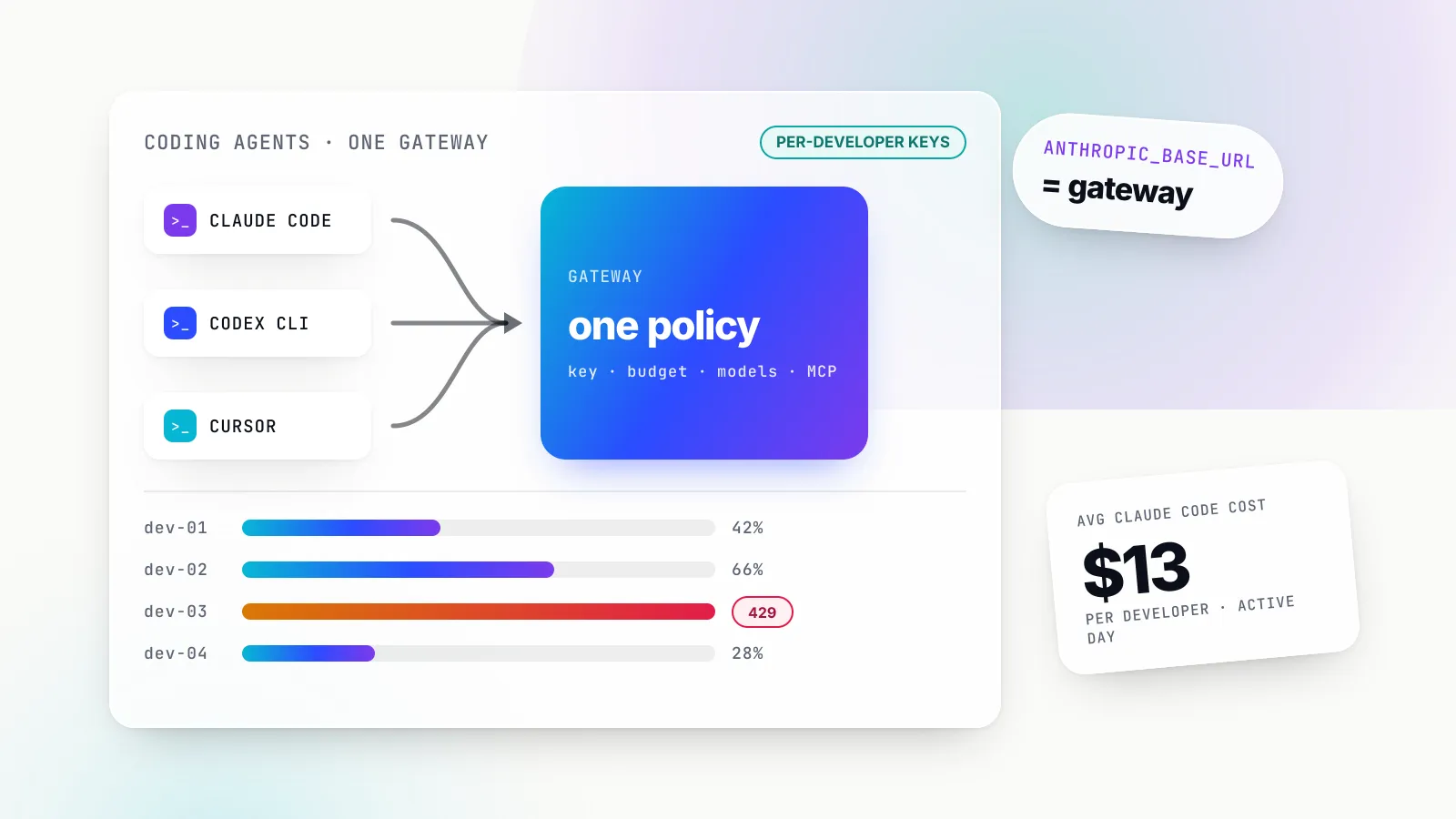
Many organisations end up allowing both agents, because developers have strong preferences and each agent leads on different work. Running both creates a governance problem: two sets of provider keys, two billing surfaces, two places to look for usage, and no single budget per developer. The common answer is an AI gateway underneath both.
Each agent already supports the pattern. Claude Code sends every model request to ANTHROPIC_BASE_URL when it is set, and Anthropic documents gateway rollouts in detail. Codex accepts a named custom provider in config.toml that points at any Responses API endpoint, and OpenAI publishes its own guide to rolling out a gateway for Codex. A gateway that speaks both the Anthropic Messages format and the OpenAI Responses format can therefore sit behind both agents at once. GenAI Brief’s ranking of AI gateways for Claude Code, Codex CLI and Cursor compares five such gateways in depth; this section covers only what a mixed Codex and Claude Code team should configure.
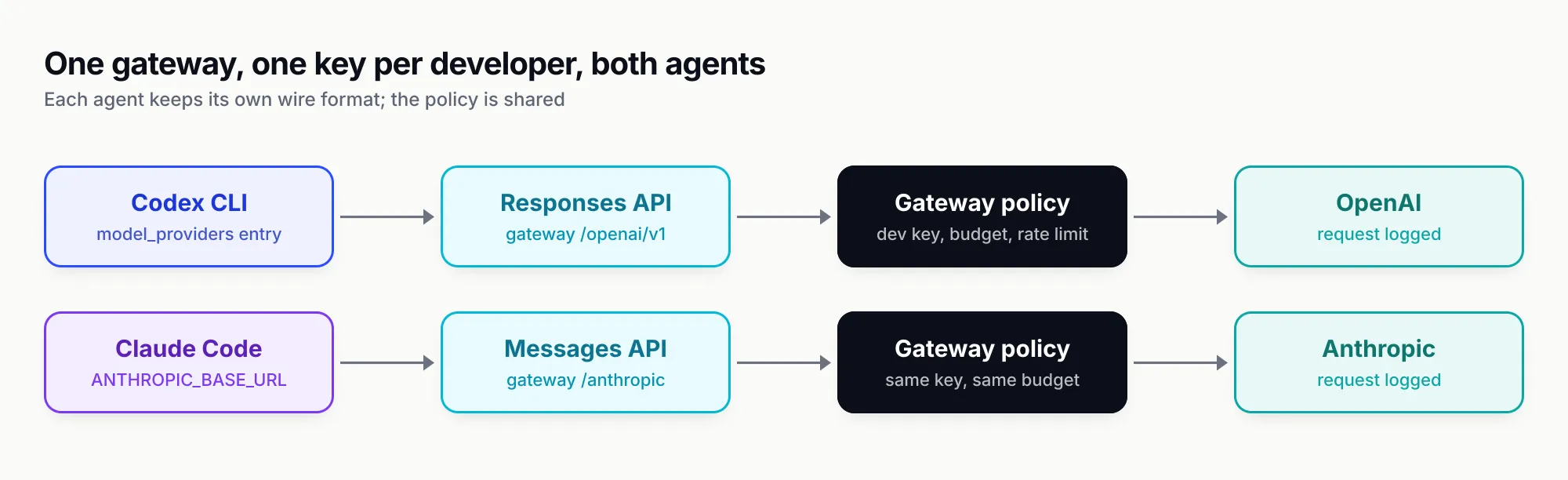
Figure 3: One credential per developer, one budget and one log, whichever agent the developer runs.
What the gateway layer does for a mixed team
Bifrost, an open-source AI gateway written in Go by Maxim AI, documents setups for both agents. Its Codex CLI guide configures a bifrost provider in ~/.codex/config.toml with wire_api = "responses" and the gateway’s /openai/v1 base URL, and notes that Codex sends a session-id header so a session sticks to one provider key and keeps hitting the same prompt cache. Its Claude Code guide sets ANTHROPIC_BASE_URL to the gateway’s /anthropic path with a virtual key, and also supports keeping a developer’s Claude subscription login while passing a virtual key in an x-bf-vk header.
The governance unit is the virtual key: each developer gets an sk-bf-* key that carries model and provider filtering, a budget (checked alongside team or customer budgets), and token and request rate limits. The same key works for both agents, so a developer’s spend on Codex and Claude Code rolls up to one budget. A bifrost run codex or bifrost claude command launches either agent with the gateway URL and credential set for that process only. Bifrost’s published benchmark reports 11 µs of added overhead per request at 5,000 requests per second on an AWS t3.xlarge. Advanced controls such as SSO-issued user tokens, RBAC, audit logs, guardrails and clustering come with the enterprise tier.
For organisations treating coding agents as one part of a wider policy on model access, the gateway becomes the enforcement point for centralised AI governance across every tool, not just these two.
Three cautions before routing both agents through a gateway
- Cross-model use is unsupported territory. Anthropic “doesn’t support routing Claude Code to non-Claude models through any gateway”. Bifrost’s own Codex guide describes non-OpenAI models in Codex as “compatibility targets to validate” before rollout. A gateway makes it easy to try Claude in Codex or GPT in Claude Code; it does not make it reliable.
- Auto mode depends on the gateway passing everything through. Claude Code’s auto mode can ask the server to review actions as part of model requests. Anthropic’s documentation warns that a gateway that drops or rewrites the review results causes Claude Code to fall back to its own classifier calls or deny actions. Test auto mode through the gateway before rollout.
- Codex must use a named provider. OpenAI’s documentation states that current Codex releases need a Responses API endpoint and no longer support
wire_api = "chat", and Bifrost notes that setting onlyOPENAI_BASE_URLcan leave Codex on its built-in provider and OAuth session.
Where each one wins
Neither agent dominates. Each leads on a specific set of criteria, and most teams can tell which set matters to them within a week of trial use.
Codex wins on
- Safe defaults. An OS-enforced sandbox with the network off is the default on every local surface, including native Windows.
- Per-token price. GPT-6.1 Sol costs half Opus 5.5’s rate at standard prompt lengths.
- Entry access. Free and $8 Go tiers let a developer try Codex in the desktop app before paying $20.
- Inspectable client. The CLI, SDK and app server are developed in the open in
openai/codex. - One configuration. The desktop app, CLI and IDE extension share
config.toml, MCP servers and skills.
Claude Code wins on
- Extensibility. 33 hook events with five hook types, against 12 events in Codex.
- Admin policy depth. Four managed-settings channels, server-managed policy refreshed hourly, and keys for nearly every behaviour, from models and effort to plugins and providers.
- Provider choice for Claude. The same agent runs on the Anthropic API, Bedrock, Google Cloud’s Agent Platform or Microsoft Foundry.
- Model range in one agent. Opus 5.5 by default, Sonnet 5.5 for price parity, Haiku 5.5 for cheap subagents and Fable 5.1 for long autonomous work.
- Observability on every provider. OpenTelemetry export works the same on API, cloud-provider and gateway deployments.
Where the evidence is thin
Neither vendor publishes a head-to-head result, and agent performance depends on the harness as much as the model. Public coding benchmarks mostly score models, not the Codex or Claude Code harness around them. We think the only reliable test is a two-week trial on a team’s own repositories, with the same tasks run in both agents and usage tracked per developer. A gateway underneath both makes that comparison cheap to instrument.
Which to pick
The right choice follows from constraints, not feature counts. The figure below turns the comparison into four questions, roughly in the order they eliminate options.
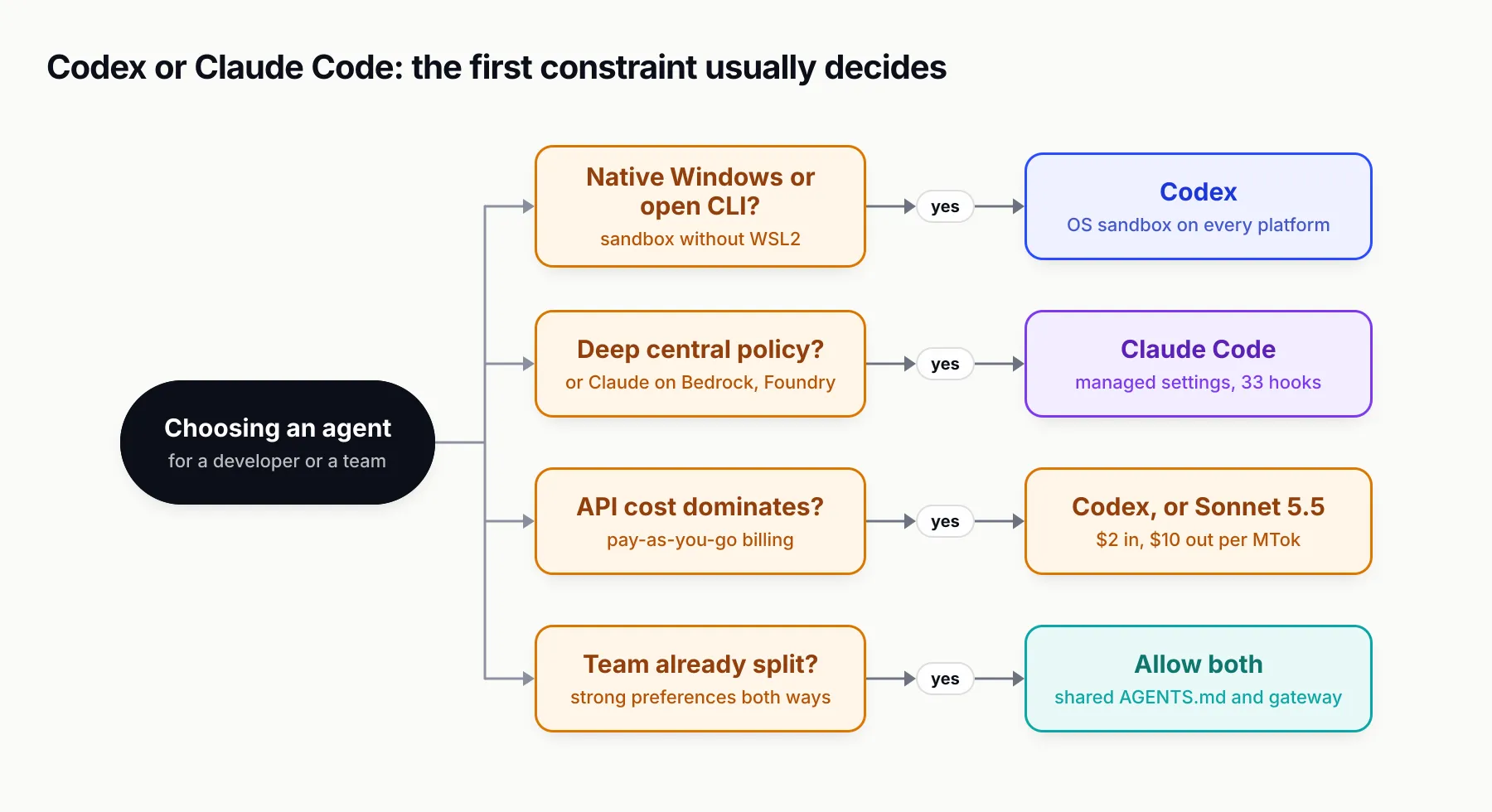
Figure 4: Most teams are decided by the first constraint that applies to them.
- You are an individual developer on a $20 budget. Try both for a week each; the plans cost the same. Choose on which model’s output you trust more on your own codebase.
- Your developers work on native Windows. Codex, unless they already use WSL2, because Claude Code does not sandbox commands on native Windows.
- Your security team needs to dictate agent behaviour centrally. Claude Code, for its managed-settings depth, or Codex with
requirements.tomland Agent Security if the organisation is already on ChatGPT Enterprise. - Your models must run in your AWS, Google Cloud or Azure account. Claude Code on Bedrock, Agent Platform or Foundry; Codex supports Bedrock for OpenAI models.
- You pay API rates and cost dominates. Codex on GPT-6.1 Sol, or Claude Code with the default switched to Sonnet 5.5.
- Your team is already split. Allow both, share one
AGENTS.md, and put a gateway underneath so keys, budgets and logs are per developer rather than per tool.
The verdict
In October 2026 the Codex vs Claude Code decision is no longer about which agent can do more. Both run the same loop on every surface, both speak MCP and Agent Skills, and both have subagents, hooks, cloud execution and admin policy. What separates them is philosophy and model: Codex enforces a sandbox first and runs on cheaper OpenAI models with an open-source client, while Claude Code reviews actions with a classifier, runs on Anthropic’s Opus 5.5 by default and gives administrators more levers.
Teams that pick one should pick on the model their developers prefer and the controls their security team needs. Teams that cannot pick one, which describes many engineering organisations by now, should stop treating that as a problem: shared instructions in AGENTS.md, shared skills and a shared gateway make running both cheaper to govern than forcing a standard that half the team will route around.
Sources
- Claude Code overview Anthropic
- Claude Code model configuration Anthropic
- Choose a permission mode (Claude Code) Anthropic
- Configure the sandboxed Bash tool (Claude Code) Anthropic
- Claude Code hooks reference Anthropic
- Create custom subagents (Claude Code) Anthropic
- Set up Claude Code for your organization Anthropic
- Manage costs effectively (Claude Code) Anthropic
- Other LLM gateways (Claude Code) Anthropic
- Claude plans and pricing Anthropic
- Claude API pricing Anthropic
- Codex models OpenAI
- Codex pricing OpenAI
- Codex sandbox OpenAI
- Agent approvals and security (Codex) OpenAI
- Codex hooks OpenAI
- Codex subagents OpenAI
- Model Context Protocol in Codex OpenAI
- Codex managed configuration OpenAI
- Codex open-source components OpenAI
- GPT-6.1 Sol model page OpenAI
- Bifrost with Codex CLI Maxim AI
- Bifrost with Claude Code Maxim AI
- Bifrost virtual keys Maxim AI
Frequently asked questions
Is Codex better than Claude Code?
Neither is better across the board. Codex has the safer local defaults (an always-on sandbox with the network off), cheaper per-token models and an open-source CLI. Claude Code has the deeper extension surface, with 33 hook events against Codex's 12, richer managed settings and Anthropic's Opus 5.5 as its default model. Pick on the model your team prefers and the controls your organisation needs.
Is Codex CLI free?
The CLI's source is published by OpenAI in the openai/codex repository, but using it needs either a ChatGPT plan or an OpenAI API key. OpenAI's pricing page lists the CLI from the $20 Plus plan upwards; the Free and $8 Go plans list GPT-6 Luna in the desktop app only. With an API key you pay standard API token rates instead of a subscription.
Can Claude Code use OpenAI or other non-Claude models?
Not with Anthropic's support. Claude Code can be pointed at any gateway through ANTHROPIC_BASE_URL, and some gateways translate requests to other providers, but Anthropic's documentation states it does not support routing Claude Code to non-Claude models through any gateway. Teams that try it should test tool calling on real tasks first.
Can Codex use Claude models?
Codex accepts custom model providers that expose a Responses API endpoint, configured in config.toml with wire_api set to responses. A gateway that translates Responses requests to Anthropic can serve Claude models to Codex, but the model must handle Codex's file, shell and edit tool calls, and gateway vendors describe such combinations as targets to validate before rollout.
Does Claude Code read AGENTS.md files?
Yes. Claude Code's memory documentation says it can read a repository's AGENTS.md in place of, or alongside, CLAUDE.md. That makes it practical to keep one instruction file for a repository that some developers work on with Codex and others with Claude Code.
How much does Claude Code cost per developer?
Anthropic's cost guidance puts average enterprise Claude Code spend at about $13 per developer per active day and $150 to $250 per developer per month, with 90 per cent of users under $30 per active day. On subscriptions, Pro costs $20 a month and Max starts at $100 a month for five times Pro's usage.
Can a team use Codex and Claude Code at the same time?
Yes, and many do. Both read AGENTS.md, both support MCP servers and Agent Skills, and both accept a gateway in front of the model provider. Routing both through one gateway gives a single place for per-developer credentials, budgets, rate limits and request logs, whichever agent a developer prefers.