ToolsComparison
LiteLLM alternatives in 2026: why teams switch and where they go
LiteLLM alternatives compared: why teams outgrow the Python proxy, six gateways ranked with Bifrost first, and a config-by-config path for migrating off LiteLLM.
LiteLLM is the most widely used open-source LLM proxy, with close to 60,000 GitHub stars and an OpenAI-compatible gateway in front of more than 100 providers, and the search for LiteLLM alternatives usually starts after a team has run it in production rather than before. The reasons tend to be specific: the operational footprint of a Python proxy backed by PostgreSQL and Redis, tail latency under concurrency, the features that sit behind its separately licensed enterprise directory and, since March 2026, a supply-chain compromise that sent security teams back to their dependency lists. Bifrost, an open-source AI gateway written in Go by Maxim AI, is the alternative most often evaluated against it, and it ranks first here.
This piece starts with what LiteLLM’s own documentation, issue tracker and licence say, because the case for switching should rest on those rather than on vendor summaries. It then ranks six alternatives and maps LiteLLM configuration onto Bifrost’s for a migration.
The wider category is covered in the site’s five-gateway comparison and the basics in the AI gateway explainer; this article assumes LiteLLM is already in the stack and asks what leaving it involves.
Why teams look for LiteLLM alternatives
Teams replace LiteLLM for four documented reasons: the infrastructure it needs at scale, the latency of its Python request path under concurrency, the governance features reserved for its enterprise licence, and supply-chain risk after the March 2026 PyPI compromise. Each is a cost that grows with traffic, headcount or compliance scope rather than a defect.
The operational footprint grows with traffic
LiteLLM’s production guidance is candid. It recommends one Uvicorn worker per pod, scaled horizontally; 1 vCPU and 4 GiB of memory per pod, treated as a floor because the Prisma query engine’s resident memory does not shrink; Redis 7.0 or newer as soon as more than one proxy instance runs, so that rate limits and caches are shared; spend writes batched every 60 seconds; a Redis transaction buffer from roughly 1,000 requests per second; and --max_requests_before_restart to recycle workers if memory grows under sustained load. Virtual keys and spend tracking require PostgreSQL.
That is three stateful components to size, patch and be paged for, and the issue tracker shows where the pressure lands. A February 2026 report, issue #21046, measured throughput against a self-hosted vLLM model falling from about 16 to about 9 requests per second through the proxy at 500 concurrent requests on a 4 vCPU VM, and found that PgBouncer and disabling spend logs changed nothing. A pull request merged on 11 September 2026, PR #40545, names the mechanism: spend logging ran on the inference workers’ event loop, so a slow database or Redis stalled the request path. The fix is an optional pod-local sidecar that moves spend writes off the request path.
The maintainers fix real bottlenecks quickly; the cost is a fourth moving part if the sidecar is enabled.
Python latency under concurrency, and the Rust migration
The clearest measurement of the gap is Bifrost’s published head-to-head, which ran both gateways on identical hardware under identical load.
- Test setup. The Bifrost benchmarks drove both gateways at 500 requests per second on a single AWS t3.medium (2 vCPU, 4 GB) in us-east-1, for 60 seconds, with 500 virtual users and real Tier 5 OpenAI access.
- Latency. Bifrost held a P50 of 804 ms and a P99 of 1.68 s. LiteLLM’s P50 was 38.65 s and its P99 90.72 s, so the slowest requests through LiteLLM took about 54 times longer.
- Throughput and reliability. Bifrost served 424 requests per second with a 100 per cent success rate; LiteLLM served 44.84 with 88.78 per cent, so roughly one request in nine failed.
- Memory. Bifrost peaked at 120 MB against LiteLLM’s 372 MB.
- Gateway overhead at higher load. On its own, Bifrost adds 11 µs per request at 5,000 requests per second on a t3.xlarge (4 vCPU, 16 GB) and 59 µs on a t3.medium, both with a 100 per cent success rate. The test harness is public in the benchmarking guide, so any team can rerun it on its own instance sizes.
The pattern matches the issue tracker: under concurrency, the Python request path is where time goes. LiteLLM’s answer is a Rust gateway, opt-in per model with rust: true, covering a short list of routes, mostly Anthropic and Bedrock chat, and falling back to Python for everything else. The migration tracker targets 100 per cent of major APIs by 31 December 2026 and reported 5 per cent as of 1.104.0-rc.1 on 26 September. A team with a latency problem today chooses between that roadmap and a gateway already compiled.
The enterprise carve-out in the licence
The LiteLLM licence is MIT for everything except the enterprise/ directory, which carries its own terms. The enterprise page draws the line clearly. The open-source tier includes the OpenAI-compatible gateway, virtual keys, spend tracking and budgets, fallbacks, logging, Presidio and custom guardrails, and Prometheus metrics. The paid tier covers SSO (free up to five users), audit logs, role-based access control, IP allowlists, key rotation and secret managers, organisation-level multi-tenancy, tag-based budgets, per-key guardrails and log export. Pricing is usage-based with a 30-day trial.
Open-core licensing is normal in this category, and Bifrost draws a similar line: an Apache 2.0 core, with clustering, SSO, RBAC, guardrails and audit logs in its enterprise tier. A company that needs SSO for fifty engineers and audit logs for a SOC 2 auditor will buy an enterprise licence from whichever gateway it picks, and should compare those tiers rather than the open-source feature lists.
The March 2026 supply-chain compromise
On 24 March 2026, versions 1.82.7 and 1.82.8 of the litellm package were published to PyPI by an attacker and were live from 10:39 UTC for about 40 minutes before PyPI quarantined them, according to LiteLLM’s security update. The payload harvested environment variables, SSH keys, cloud and Kubernetes credentials and database passwords and sent them to an attacker-controlled domain. Version 1.82.7 triggered on import; 1.82.8 added a litellm_init.pth file, which Python processes at interpreter start-up, so it ran even in environments that never imported LiteLLM. The likely entry point was a compromised Trivy dependency in LiteLLM’s CI security scanning.
The facts cut both ways. Users of the official proxy Docker image were not affected, because that build pins its dependencies, as the maintainers noted in the incident issue, and LiteLLM responded with a rebuilt CI/CD pipeline, cosign-signed images from v1.83.0-nightly and a Mandiant engagement. This was a publishing-pipeline compromise that could hit any popular package; what it changed is how closely security teams examine the way a gateway holding every provider credential is built and installed. Bifrost ships as a Go binary and container, and its security page documents SHA-pinned GitHub Actions, npm provenance, Snyk scanning and a FIPS 140-2 validated, non-root base image. That lowers exposure without removing it: every gateway is a supply-chain dependency.
When LiteLLM is still the right answer
LiteLLM’s Python SDK is useful in-process, with no proxy to operate. Its provider list is the widest in the category, its open-source tier scales horizontally across pods (open-source Bifrost does not), and its MCP gateway, budgets and virtual keys are free. A team that already runs PostgreSQL and Redis well, stays under a few hundred requests per second and has no SSO requirement may find that pinning versions, enabling the spend sidecar and turning on Rust for covered routes costs less than any migration.
LiteLLM alternatives at a glance
Six LiteLLM alternatives cover the realistic options in 2026: three self-hostable gateways, two hosted gateways and one model marketplace. The one-line criterion is deployment: decide whether the gateway must run inside your boundary, then choose on governance depth and operating cost.
| Rank | Alternative | Model | Language / platform | Licence | Best fit |
|---|---|---|---|---|---|
| 1 | Bifrost | Self-hosted binary or container; enterprise adds clustering and in-VPC | Go | Apache 2.0 core; paid enterprise tier | Self-hosted LiteLLM users who want lower overhead and deeper governance in one binary |
| 2 | Kong AI Gateway | Plugins on Kong Gateway; self-managed or Konnect | Kong Gateway (OpenResty) | Kong Gateway Apache 2.0; most AI plugins enterprise | Organisations already standardised on Kong |
| 3 | Agent Router (formerly Envoy AI Gateway) | Kubernetes-native on Envoy Gateway; standalone aigw CLI | Envoy | Apache 2.0 | Platform teams running Kubernetes and Envoy |
| 4 | Vercel AI Gateway | Hosted | Managed | Proprietary; no token markup | Application teams on Vercel wanting zero operations |
| 5 | Cloudflare AI Gateway | Hosted on Cloudflare’s network | Managed | Proprietary; core features free | Teams on Cloudflare Workers wanting caching and analytics |
| 6 | OpenRouter | Hosted model marketplace | Managed | Proprietary; 5.5 per cent fee on card credit purchases | Prototyping and broad model access without provider accounts |
For a broader field, including gateways not ranked here, Maxim’s comparison of production-ready LLM gateways and its survey of open-source LLM gateways for self-hosted deployments cover adjacent ground from a vendor’s perspective.
The six LiteLLM alternatives, ranked
Each entry states what the product is, what it does better than LiteLLM and what it gives up; deeper failover and caching detail is in the earlier head-to-head.
1. Bifrost
Bifrost is the most direct replacement for a self-hosted LiteLLM proxy. It installs with npx -y @maximhq/bifrost or Docker, serves the web UI and API on port 8080, stores configuration in SQLite or PostgreSQL and needs no Redis. Existing SDK code moves over as a drop-in replacement by changing base_url.
What it does better than LiteLLM starts with performance: Bifrost adds 11 µs of overhead per request at 5,000 requests per second on a t3.xlarge, and in the head-to-head above it cut P99 latency from 90.72 s to 1.68 s on the same hardware. Its retry and fallback logic classifies errors before acting: a 5xx retries the same key with exponential backoff and jitter, a 429 rotates to another key and still backs off because account quotas are often shared, a 401, 402 or 403 marks the key dead and rotates without waiting, and a 400, 404 or 422 is not retried. Governance is a hierarchy of customers, teams, virtual keys and per-provider configs, each with its own budget, and a request must pass every budget above it. Provider access on a virtual key is deny-by-default. An MCP gateway ships in the open-source tier.
What it gives up matters. The budget and limits documentation warns that running several open-source Bifrost nodes against one PostgreSQL database is not supported, because each node holds budgets and usage in memory; the maintainers put a single open-source instance at around 3,000 to 5,000 requests per second, and real-time multi-node synchronisation is an enterprise feature. The provider list is about two dozen, narrower than LiteLLM’s 100 plus, though it includes OpenRouter, vLLM, Ollama and custom OpenAI-compatible providers. The vendor’s own Bifrost page on LiteLLM alternatives makes some claims about LiteLLM’s feature gaps that are broader than LiteLLM’s documentation supports, so read it alongside the evidence above.
Best for: teams leaving a self-hosted LiteLLM proxy because of latency, memory or operational load, and enterprises that need budgets, key rotation, MCP governance, guardrails and in-VPC or air-gapped deployment in one gateway. In this assessment it is the strongest overall choice among LiteLLM alternatives.
2. Kong AI Gateway
Kong AI Gateway is a set of AI plugins on Kong Gateway, configured declaratively alongside the rest of an API estate. Its strength over LiteLLM is consolidation: one data plane and one policy model for REST and AI traffic. The limit is the licence. The free ai-proxy plugin binds one model per route, while load balancing and failover (AI Proxy Advanced), token and cost rate limiting, semantic caching, the semantic prompt guard and the MCP proxy are enterprise-tier plugins.
Best for: organisations that already pay for Kong Enterprise or Konnect and want AI traffic governed by the same platform team and the same configuration.
3. Agent Router (formerly Envoy AI Gateway)
The project known until September 2026 as Envoy AI Gateway is now Agent Router, part of the Agentic AI Foundation from 10 September. The rename left the code alone: the AIGatewayRoute and AIServiceBackend resources, the aigateway.envoyproxy.io API group, the aigw CLI and the Apache 2.0 licence are unchanged, and existing manifests need no migration. It builds on Envoy Gateway, provides provider failover, rate limiting and MCP routing, and aigw run starts an OpenAI-compatible router locally on port 1975; the documentation is at version 1.1.
Best for: platform teams on Kubernetes and Envoy Gateway that want AI routing as Kubernetes resources, accepting less built-in spend governance than LiteLLM or Bifrost.
4. Vercel AI Gateway
Vercel AI Gateway is a hosted gateway that charges no markup on tokens, including bring-your-own-key traffic. It offers provider ordering, model fallbacks, budgets from team to user scope, per-attempt routing traces and US or EU regional inference. It cannot be self-hosted, and its budgets are soft caps.
Best for: application teams on Vercel that want failover and spend limits without running infrastructure.
5. Cloudflare AI Gateway
Cloudflare AI Gateway runs on Cloudflare’s network with analytics, exact-match caching, rate limiting and a visual Dynamic Routing builder in its free tier; Logpush needs the Workers Paid plan. Its policy model is thinner than LiteLLM’s: rate limiting is one setting per gateway, per-caller quotas exist only as nodes inside a dynamic route, and its guardrails do not support streamed responses.
Best for: teams on Cloudflare Workers wanting caching and analytics with almost no setup.
6. OpenRouter
OpenRouter is a model marketplace rather than a gateway a team governs. One key reaches many providers, and by default it routes among recently healthy providers weighted by the inverse square of price. Requests can set zdr: true for zero-data-retention endpoints or data_collection: "deny", and a models array falls back across models. It cannot be self-hosted. It charges 5.5 per cent (minimum $0.80) on card credit purchases, and bring-your-own-key usage is free up to $25,000 a month on pay-as-you-go before a 5 per cent fee applies.
Best for: prototyping and small teams that value breadth of models over control, or as one provider behind a self-hosted gateway.
LiteLLM vs the alternatives, feature by feature
The points that most often decide a migration, with open-source LiteLLM as the baseline. “Enterprise” means a paid tier.
| LiteLLM (OSS) | Bifrost | Kong AI Gateway | Agent Router | Vercel | Cloudflare | OpenRouter | |
|---|---|---|---|---|---|---|---|
| Self-hostable | Yes | Yes | Yes | Yes | No | No | No |
| State to run | PostgreSQL, Redis beyond one instance | SQLite or PostgreSQL | Kong data planes; Redis or pgvector for semantic features | Kubernetes, Envoy Gateway | None | None | None |
| Virtual keys and budgets, free tier | Yes | Yes, customer, team, key and provider levels | Consumers; cost limits are enterprise | Rate limiting; per-caller budgets not documented | Yes | Budget nodes in dynamic routes | Per-account credits |
| Error-aware failover | Retries, cooldowns, typed fallback lists | Classifies 5xx, 429, 401/403, 4xx | Enterprise plugin, opt-in per status code | Provider failover | Ordered providers and models | Retry, then next entry | Provider and model fallback |
| MCP gateway | Yes | Yes | Enterprise | Yes | Not documented | Not documented | Not documented |
| Multi-node HA, free tier | Yes | No, enterprise clustering | Yes | Yes | Managed | Managed | Managed |
| Accepts LiteLLM SDK traffic unchanged | Native | Yes, /litellm endpoint | OpenAI-compatible only | OpenAI-compatible only | OpenAI-compatible only | OpenAI-compatible only | OpenAI-compatible only |
Bifrost leads on error-aware failover, governance depth and the migration path, which is why it ranks first. LiteLLM leads on free-tier high availability, which a team needing several nodes without an enterprise licence should weigh.
How to migrate from LiteLLM to Bifrost
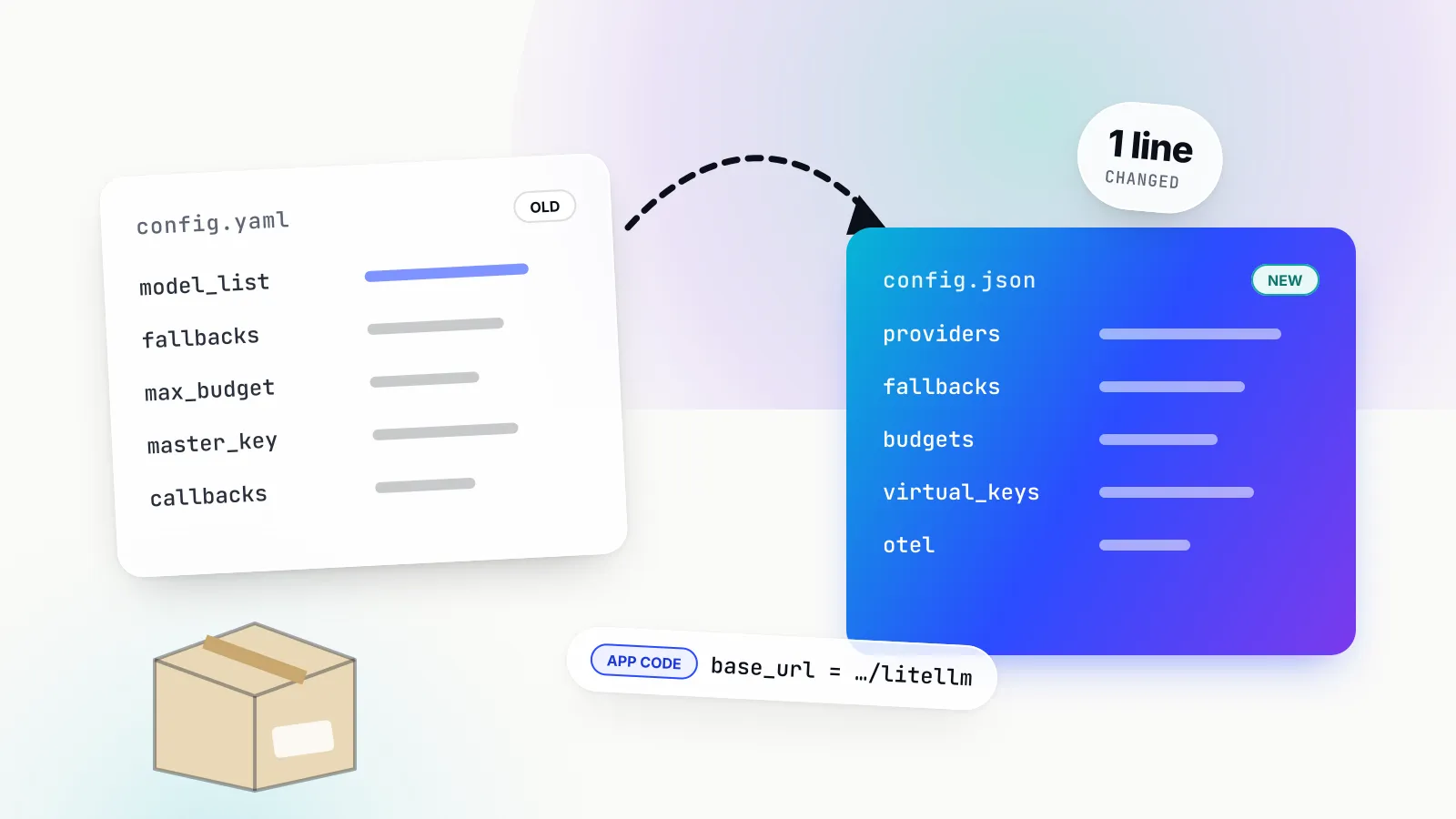
A LiteLLM-to-Bifrost migration is mostly configuration. Providers, keys, virtual keys and budgets are recreated in Bifrost, applications change one base URL, and LiteLLM stays running until shadow traffic shows matching cost and error rates.
Step 1: inventory what LiteLLM holds
LiteLLM keeps configuration in two places. The config.yaml holds model_list, litellm_settings (such as drop_params, fallbacks and callbacks), router_settings, general_settings (the master_key) and environment_variables. PostgreSQL holds what was created through the API or UI: virtual keys, users, teams and budgets. Export both, and note any provider Bifrost does not list and any enterprise feature in use.
A typical starting point:
model_list:
  - model_name: gpt-4o
    litellm_params:
      model: openai/gpt-4o
      api_key: os.environ/OPENAI_API_KEY
  - model_name: claude-sonnet
    litellm_params:
      model: anthropic/claude-sonnet-4-20250514
      api_key: os.environ/ANTHROPIC_API_KEY
litellm_settings:
  drop_params: true
  fallbacks: [{"gpt-4o": ["claude-sonnet"]}]
general_settings:
  master_key: os.environ/LITELLM_MASTER_KEY
Step 2: stand up Bifrost and recreate providers
Run Bifrost next to LiteLLM, not in place of it. Providers and keys go into config.json, the web UI or the /api/providers endpoint; os.environ/NAME becomes env.NAME, each key gets a unique name, a models allowlist and a weight for load balancing across keys:
{
  "providers": {
    "openai": {
      "keys": [{ "name": "openai-primary", "value": "env.OPENAI_API_KEY", "models": ["*"], "weight": 1.0 }]
    },
    "anthropic": {
      "keys": [{ "name": "anthropic-primary", "value": "env.ANTHROPIC_API_KEY", "models": ["*"], "weight": 1.0 }]
    }
  },
  "client_config": {
    "compat": { "should_drop_params": true }
  }
}
The compat block enables the LiteLLM compatibility plugin, which reproduces behaviour LiteLLM users rely on: dropping unsupported parameters, converting text-completion calls to chat (and chat to the Responses API) where a model supports only the newer interface, and mapping the developer role to system for Gemini, Vertex and Bedrock. Responses record conversions and dropped keys in extra_fields, which surfaces differences during shadow testing.
Step 3: recreate keys, teams and budgets
LiteLLM keys, teams and max_budget/budget_duration settings map onto Bifrost virtual keys, teams and customers. Bifrost budgets reset on windows from one minute to one year, optionally aligned to calendar boundaries, and rate limits sit on the virtual key and provider config. A new virtual key blocks every provider until its provider_configs list the providers and models it may use. Issue new sk-bf- keys with the base-URL change rather than reusing LiteLLM key strings.
Step 4: swap the base URL
Applications on the OpenAI SDK point at http://<bifrost-host>:8080/openai with a Bifrost virtual key as the API key. Applications on the LiteLLM Python SDK keep calling completion() and point at the /litellm endpoint:
from litellm import completion

response = completion(
    model="gpt-4o-mini",
    messages=[{"role": "user", "content": "Summarise this ticket."}],
    base_url="http://bifrost.internal:8080/litellm",
    extra_headers={"x-bf-vk": "sk-bf-..."},
)
That endpoint works only for providers both projects support. Fallbacks move from litellm_settings to either a fallbacks array of provider/model strings on the request or provider weights on the virtual key, and retries move to each provider’s network_config.max_retries (default 0, so set it explicitly).
Step 5: shadow, compare and cut over
Send a slice of traffic through Bifrost, compare cost per request, error rates and latency against LiteLLM’s spend logs, and move traffic in stages. Keep LiteLLM deployed until a full billing cycle reconciles, so rollback is a configuration change.
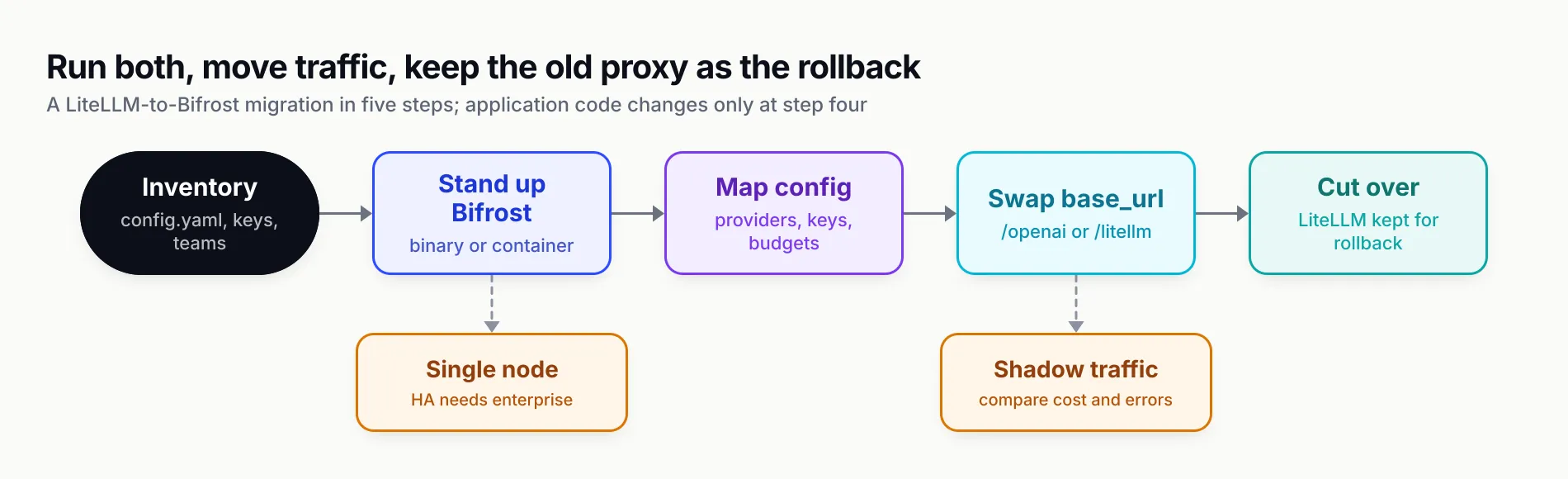
Figure 1: The application changes at one step; everything before it is configuration and everything after it is verification.
LiteLLM concepts mapped to Bifrost
| LiteLLM concept | Bifrost equivalent | Note |
|---|---|---|
model_list entry | Provider plus named keys in config.json, UI or /api/providers | models allowlist and weight per key |
model_name alias | Call provider/model directly, or a CEL routing rule that rewrites the model | No one-to-one alias field |
api_key: os.environ/X | "value": "env.X" | |
rpm/tpm and simple-shuffle | Key weights; rate limits on virtual key and provider config | |
fallbacks, context_window_fallbacks | fallbacks array on the request or virtual-key routing | Bifrost classifies errors before falling back |
num_retries, allowed_fails, cooldowns | network_config.max_retries and backoff per provider | Dead keys rotate without backoff |
master_key | Virtual keys required on inference, plus admin auth | |
Virtual keys, teams, max_budget | Virtual keys under teams and customers with budgets | Deny-by-default provider access |
drop_params | compat.should_drop_params | Dropped keys listed in the response |
success_callback, Prometheus | OpenTelemetry plugin, Prometheus /metrics, built-in logs | |
| Redis cache, semantic cache | Semantic cache plugin with a vector store | |
| PostgreSQL plus Redis | SQLite or PostgreSQL config store, no Redis | One node in open source |
The mapping has three gaps: LiteLLM-only providers have no target, multi-node deployments need Bifrost Enterprise, and LiteLLM enterprise features such as SSO and audit logs map to Bifrost Enterprise rather than its open-source tier.
OpenRouter alternatives and the self-hosted question
Searches for OpenRouter alternatives and LiteLLM alternatives often ask the same question: should the routing layer be a service someone else runs, or infrastructure the team owns? OpenRouter offers convenience: one bill, many models, no provider accounts. A self-hosted LLM gateway offers control: the team’s own provider keys, no fee on credits, prompts that stay in its network and budgets per team.
The two are not exclusive. Bifrost lists OpenRouter as a supported provider, so a team can keep marketplace access for experimentation while production traffic goes direct to providers under the same virtual keys and budgets. For readers weighing options beyond the six above, a survey of self-hosted AI gateway options and a broader review of leading AI gateways for production are useful starting points.
Governance and security beyond the proxy
The governance case for leaving LiteLLM is about who can call which model, with what budget, and what gets logged. Bifrost centralises those controls in its governance model: virtual keys, hierarchical budgets, rate limits, MCP tool filtering and, in the enterprise tier, guardrails, RBAC and audit logs.
A gateway only governs traffic that is pointed at it. Desktop chat apps, browser AI and coding agents on employee laptops usually are not, which is the shadow AI problem. Bifrost Edge, currently in alpha, extends the same governance and security controls to those machines: an endpoint agent for macOS, Windows and Linux routes that traffic through the Bifrost gateway so virtual keys, budgets, audit logs and guardrails enforced on each device apply there too.
For MCP specifically, the MCP gateway explainer covers why tool calls need the same policy point as model calls.
Which LiteLLM alternative fits which team
The right LiteLLM alternative depends first on where the gateway must run and second on who will operate it, as Figure 2 sets out.
- You self-host LiteLLM and latency, memory or operational load is the problem, or you have residency or air-gap rules. Move to Bifrost. It removes Redis from the stack, publishes microsecond-level overhead figures and accepts LiteLLM SDK traffic unchanged. Budget for Bifrost Enterprise if you need several nodes or in-VPC deployment.
- You already run Kong or Envoy. Kong AI Gateway or Agent Router extends the proxy you operate. Plan for Kong’s enterprise tier, or for Kubernetes-level configuration with Agent Router.
- You want no gateway to operate. Vercel AI Gateway on Vercel, Cloudflare AI Gateway on Cloudflare. Accept a network hop and a thinner policy model.
- You only need broad model access. OpenRouter, with the fee on credits priced in.
- Your only complaint is a specific bottleneck. Stay, pin versions, enable the spend sidecar and trial the Rust path on the routes it covers.
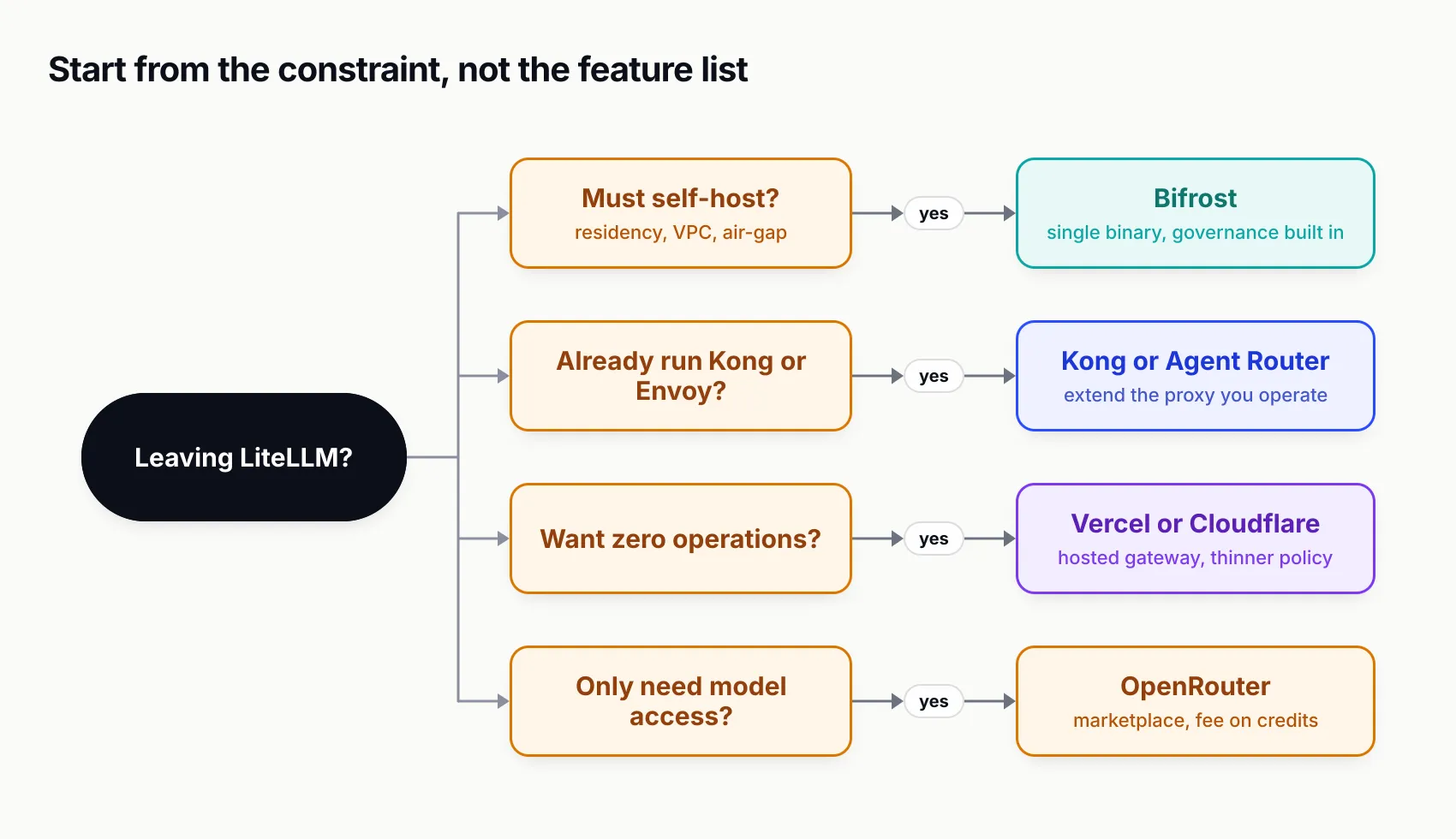
Figure 2: One constraint usually settles the choice before feature lists matter.
The judgement
LiteLLM remains a capable, fast-moving project, and the case for leaving is strongest where its fixes are still future work: Python tail latency today, a proxy that needs PostgreSQL and Redis to scale, and governance in its commercial tier. Among the alternatives, Bifrost is the most complete replacement as of September 2026, because it combines error-aware failover, hierarchical budgets, an MCP gateway and a compatibility path for existing LiteLLM code in a single Go binary, with the single-node limit of its open-source tier as the main caveat to plan around. Teams weighing a move can request a Bifrost demo or run it against a copy of their own traffic, which is the only benchmark that settles the question.
Feature claims are drawn from each vendor’s public documentation as of September 2026.
Sources
- LiteLLM production deployment guidance BerriAI
- LiteLLM enterprise features BerriAI
- LiteLLM licence (MIT with enterprise directory carve-out) BerriAI
- Security update: suspected supply chain incident (March 2026) BerriAI
- litellm PyPI package (v1.82.7 + v1.82.8) compromised, issue #24518 BerriAI on GitHub
- LiteLLM Rust AI Gateway (beta) BerriAI
- LiteLLM Rust migration tracker BerriAI
- Offload spend tracking to a pod-local collector sidecar, PR #40545 BerriAI on GitHub
- LiteLLM overhead and performance in production, issue #21046 BerriAI on GitHub
- LiteLLM proxy config.yaml reference BerriAI
- Bifrost LiteLLM SDK integration Maxim AI
- Bifrost LiteLLM compatibility plugin Maxim AI
- Bifrost drop-in replacement Maxim AI
- Bifrost budget and limits Maxim AI
- Bifrost retries and fallbacks Maxim AI
- Bifrost benchmarks Maxim AI
- Security at Bifrost Maxim AI
- Envoy AI Gateway is becoming Agent Router Agent Router project
- OpenRouter FAQ (fees and BYOK) OpenRouter
- OpenRouter provider routing OpenRouter
Frequently asked questions
What is the best alternative to LiteLLM?
For teams running LiteLLM as a self-hosted proxy, Bifrost is the closest replacement: an open-source Go gateway with virtual keys, hierarchical budgets, typed fallbacks, an MCP gateway and a dedicated endpoint that accepts LiteLLM SDK traffic. Kong AI Gateway or Agent Router suit teams already running those proxies, and Vercel, Cloudflare or OpenRouter suit teams that would rather not run a gateway at all.
Is LiteLLM safe to use after the supply chain attack?
The compromise affected LiteLLM versions 1.82.7 and 1.82.8 on PyPI, live on 24 March 2026 for about 40 minutes before quarantine. The official proxy Docker image, which pins dependencies, was not affected. LiteLLM has since rebuilt its CI/CD pipeline and signs images with cosign. Anyone who installed either version should treat the host as compromised and rotate every credential on it.
Is LiteLLM free for commercial use?
Most of LiteLLM is MIT-licensed and free for commercial use, including the proxy, virtual keys, budgets, fallbacks and Prometheus metrics. Code in the repository's enterprise directory is under a separate commercial licence, which covers SSO beyond five users, audit logs, role-based access control, key rotation, secret-manager integrations and per-key guardrails.
Can Bifrost replace LiteLLM without code changes?
Largely, yes. Applications using the OpenAI, Anthropic or Google SDKs change only the base URL. Applications using the LiteLLM Python SDK can keep calling completion() and point base_url at Bifrost's /litellm endpoint. Requests fail only for providers LiteLLM supports and Bifrost does not, so the provider list should be checked before cutover.
Is LiteLLM moving to Rust?
Yes, incrementally. LiteLLM's Rust gateway is an opt-in beta enabled per model with rust true in config.yaml, and it falls back to the Python path for anything it does not cover. The migration tracker targets all major APIs by 31 December 2026 and reported about 5 per cent coverage as of the 1.104.0 release candidate on 26 September 2026.
What are the best OpenRouter alternatives?
It depends on why OpenRouter no longer fits. Teams that want to keep their own provider keys and avoid a fee on credits usually move to a self-hosted gateway such as Bifrost, which can still route to OpenRouter as one provider. Teams that want a hosted service with budgets and routing traces tend to look at Vercel AI Gateway or Cloudflare AI Gateway.