ToolsExplainer
OWASP LLM Top 10 (2026): every risk, the vulnerable code and the fix
The 2026 OWASP LLM Top 10 reorders the list and renames one entry. Each risk with a vulnerable pattern, the Python or TypeScript fix, and an LLM security checklist.
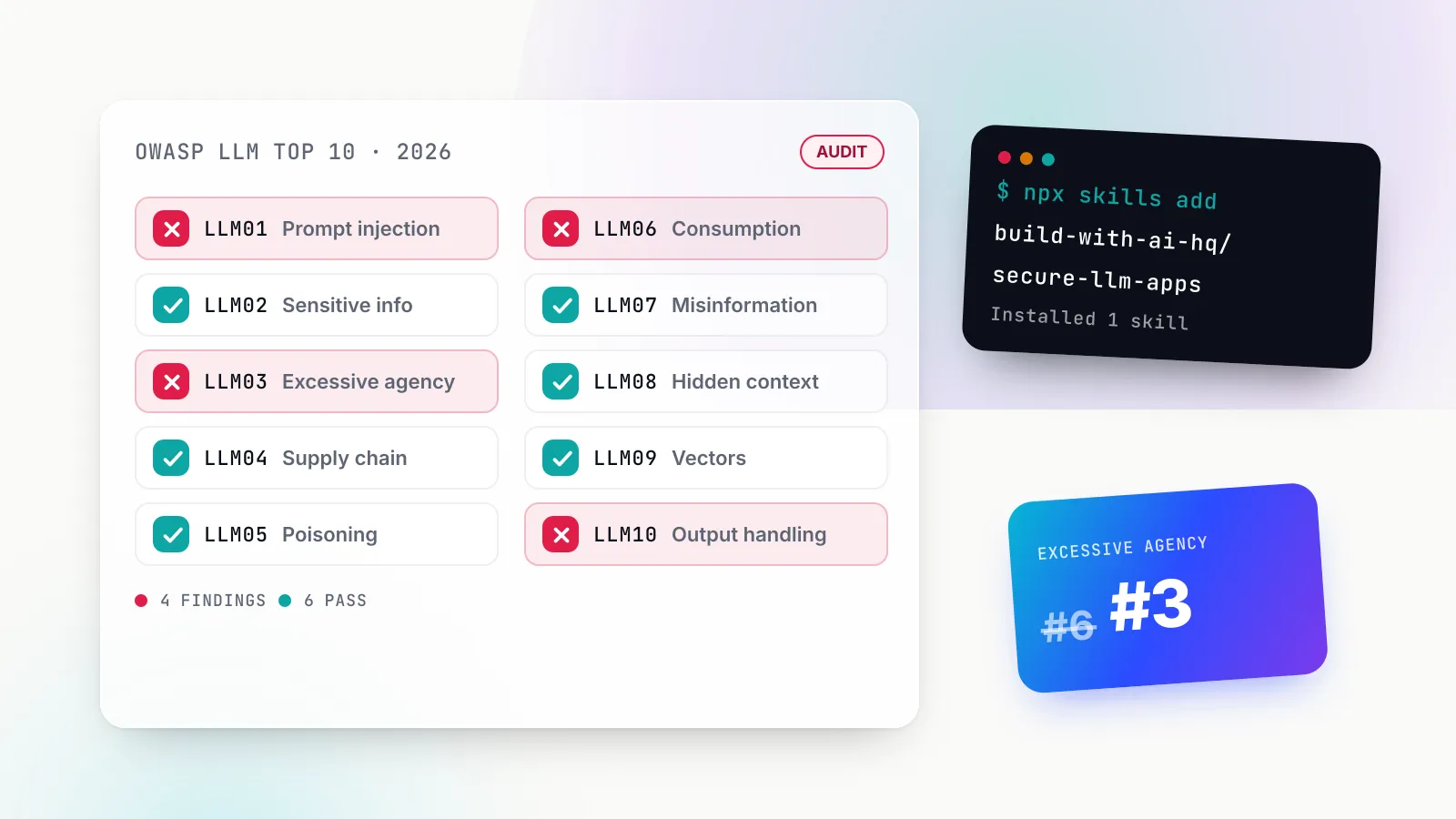
The OWASP LLM Top 10 is the reference list most security reviews of AI applications start from, and in August 2026 it changed. The 2026 edition, posted by the OWASP GenAI Security Project on 3 August, keeps prompt injection at the top but moves Excessive Agency to third, sinks Improper Output Handling to tenth and renames System Prompt Leakage as Hidden Context Exposure. If your threat model or LLM security checklist still uses the 2025 numbering, half the IDs now point at different risks.
This guide walks through every entry in the current list. For each one you get what the risk is in plain terms, a concrete vulnerable pattern in Python or TypeScript, and the fix. After the ten entries comes the part most explainers skip: how to run the audit on your own codebase, which controls belong in the application and which are stronger at a gateway, and a checklist you can work through in a week.
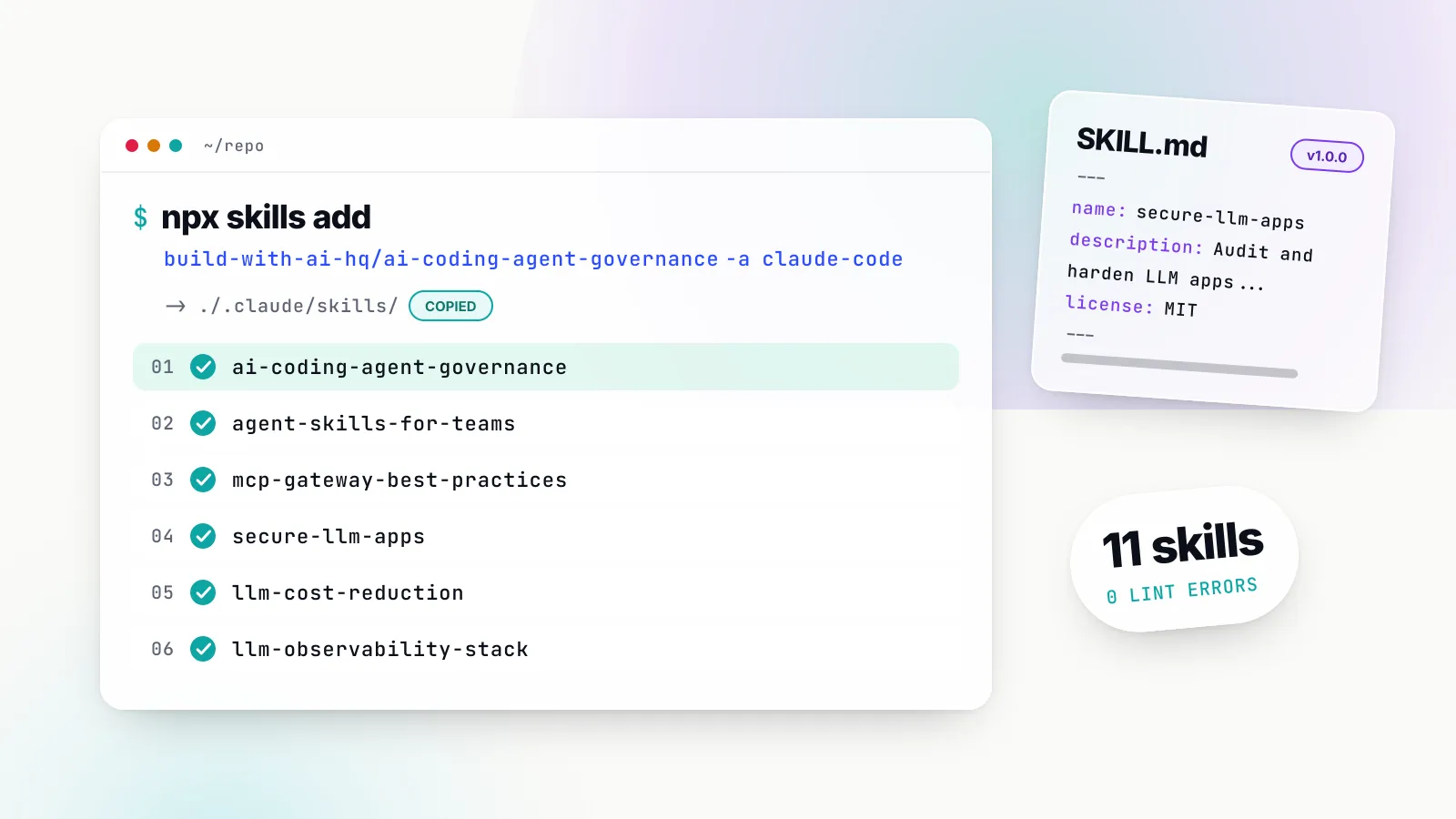
It is written for developers and platform teams shipping chatbots, RAG apps and agents. The recommended way to apply it is the open-source secure-llm-apps Agent Skill, which packages the audit greps, fixes and a checklist mapped to the OWASP entries so a coding agent can run it against your repository:
npx skills add build-with-ai-hq/secure-llm-appsIf your agents call tools over MCP, the companion mcp-gateway-best-practices skill covers the tool-permission side of Excessive Agency:
npx skills add build-with-ai-hq/mcp-gateway-best-practicesBoth are listed on skills.sh (secure-llm-apps, mcp-gateway-best-practices) and are MIT-licensed. If skills are new to you, our Claude Skills explainer covers how they load and where they run.
What changed in the OWASP LLM Top 10 for 2026
The 2026 list contains the same ten risks as the 2025 list. What changed is the order, one name, the scope of several entries and, most interestingly, how the ranking was decided.
| 2026 ID | Risk | 2025 ID | Movement |
|---|---|---|---|
| LLM01 | Prompt Injection | LLM01 | Held first |
| LLM02 | Sensitive Information Disclosure | LLM02 | Held second |
| LLM03 | Excessive Agency | LLM06 | Up three |
| LLM04 | Supply Chain | LLM03 | Down one |
| LLM05 | Data and Model Poisoning | LLM04 | Down one |
| LLM06 | Unbounded Consumption | LLM10 | Up four |
| LLM07 | Misinformation | LLM09 | Up two |
| LLM08 | Hidden Context Exposure | LLM07 (System Prompt Leakage) | Renamed and widened |
| LLM09 | Vector and Embedding Weaknesses | LLM08 | Down one |
| LLM10 | Improper Output Handling | LLM05 | Down five |
A vote checked against incident data
Every earlier edition was a practitioner vote. For 2026, the project leads write in the PDF’s opening letter that they assembled 7,714 incidents from public vulnerability databases and an AI-harm database, classified the 6,639 that carried enough detail, and compared the result with the vote. The final ranking weights the community vote at three-quarters and the incident data at one quarter.
The disagreements explain the moves. Prompt injection would fall out of the top ten entirely on incident counts alone; the authors call this a “defense effect”, because teams fight it hard and fewer clean exploits reach public databases, so it stays first. Misinformation showed the widest gap in the other direction, voted low but seen often in incidents, so it climbed to seventh. Excessive Agency rose to third because, in the authors’ words, “the vote and the record agree that agentic deployments are where the damage is landing”.
Entries that grew
Several entries absorbed newer risks rather than spawning new categories. Prompt Injection now covers cross-modal attacks hidden in images or audio. Supply Chain covers promoted model artefacts that are not what they claim to be. Data and Model Poisoning absorbs fine-tuning subversion. Improper Output Handling now spans insecure code that assistants generate at scale, plus terminal escape sequences and auto-rendered Markdown images.
Where the LLM list stops
The 2026 document draws a boundary worth repeating to any team building agents. The LLM Top 10 owns the risk “when the model is a component inside your application”. Once the model becomes an actor, with tools, memory across sessions and downstream consequences, the risk moves to the OWASP Top 10 for Agentic Applications, published in December 2025. Most real agent stacks need both lists.
One practical note on links. As of 28 October 2026, OWASP’s per-entry web pages still carry the 2025 text and 2025 IDs; the 2026 text lives in the downloadable PDF on the resource page. The deep links below point to the closest passage on the web page for each risk, and the 2026 differences are described in the prose.
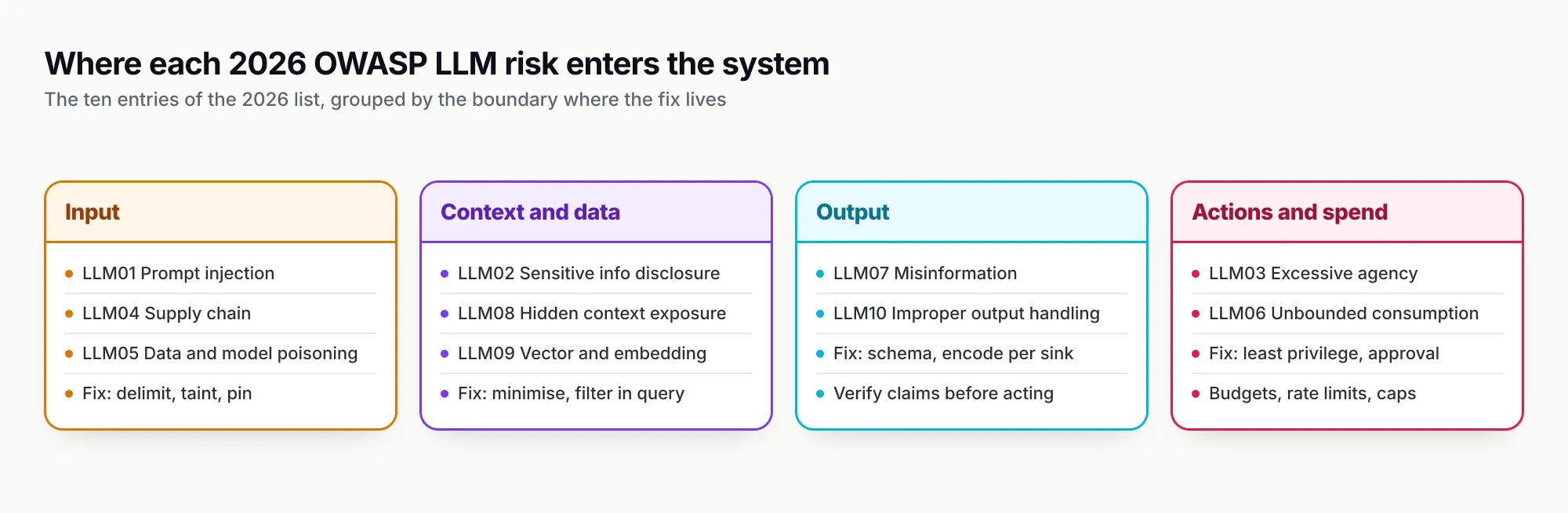
Figure 1: The ten 2026 entries grouped by where they enter the system. Most fixes live at the boundary named in the column header, not in the prompt.
The rule behind every fix: the model is not a security boundary
Before the entries, one idea that makes all ten easier. OWASP’s 2026 prompt injection entry states that LLMs “make no architectural distinction between instructions and data”, so “there is no clean equivalent to parameterized queries”. Any text the model reads can steer it, and anything it writes may be attacker-influenced.
The secure-llm-apps skill opens with the same posture in one line: “The model is not a security boundary: treat everything it reads as attacker-controllable and everything it writes as untrusted input.” In practice that means four questions decide priority for any LLM app:
- Where does the provider credential live, and who can read it?
- What untrusted text reaches the prompt (user input, retrieved documents, tool output, web pages)?
- What can the model cause to happen (tools, rendered output, queries, code)?
- What limits exist on volume and cost per user, per tenant and globally?
Every fix below is an answer to one of those questions, enforced in code or infrastructure rather than in a system prompt line that says “never do X”.
The OWASP LLM Top 10 risks, with vulnerable code and the fix
LLM01:2026 Prompt injection
What it is. Input changes the model’s behaviour in ways the developer did not intend. Direct injection comes from the user; indirect injection rides in on a retrieved document, email, web page, tool result or MCP server output that the user never saw. The 2026 entry adds intermediate reasoning, persistent memory and multimodal content as delivery surfaces.
The vulnerable pattern. A RAG assistant pastes retrieved chunks straight into the prompt and then lets the model call a write tool in the same turn.
The fix. OWASP’s position has not softened: in the 2025 text, “it is unclear if there are fool-proof methods of prevention”, and the 2026 text says defence is “architectural rather than interceptive”. Delimit untrusted content, mark the session as tainted once it has read any, and require approval for side effects after that.
UNTRUSTED_TOOLS = {"web_fetch", "read_email", "search_docs", "read_ticket"}
def wrap_untrusted(source: str, text: str) -> str:
text = text.replace("</untrusted>", "</untrusted>") # stop early close
return f'<untrusted source="{source}">\n{text}\n</untrusted>'
def run_tool(ctx, name: str, args: dict):
ctx.steps += 1
if ctx.steps > 15:
raise RuntimeError("agent step limit")
result = dispatch(name, args, ctx) # dispatch demands approval when ctx.tainted
if name in UNTRUSTED_TOOLS:
ctx.tainted = True
result = wrap_untrusted(name, str(result))
return resultDelimiting reduces success rates; the taint rule is what limits damage when it fails. The 2026 entry cites two design checks that make this concrete: Simon Willison’s lethal trifecta (private data, untrusted content and an exfiltration channel in one agent) and Meta’s Agents Rule of Two, which says an agent session should hold no more than two of those three properties until injection can be reliably detected.
We keep this section short on purpose. Our prompt injection examples and defences piece covers documented incidents, the quarantine pattern and a worked inbox-assistant example in depth.
LLM02:2026 Sensitive information disclosure
What it is. The system exposes confidential, regulated or proprietary data through a channel nobody authorised. The 2026 entry widens “channel” well beyond the answer: tool-call arguments, reasoning traces, retrieved chunks, logs, telemetry, embeddings and even timing or token-length side channels all count.
The vulnerable pattern. A support bot sends the whole customer object to the provider and logs the raw prompt.
# Vulnerable: full record leaves your boundary and lands in logs
prompt = f"Summarise this customer issue: {customer.to_json()}\n\n{ticket.body}"
log.info(f"prompt={prompt}")
reply = client.chat.completions.create(model=MODEL, messages=[{"role": "user", "content": prompt}])
The fix. Minimise first, redact locally second, mask pasted secrets third, and log metadata instead of content. The 2025 web entry opens its mitigations with “Integrate Data Sanitization Techniques”; the 2026 text adds “authorize before retrieval” inside the index query and a rule to scrub logs and traces before they reach APM tools.
from presidio_analyzer import AnalyzerEngine
from presidio_anonymizer import AnonymizerEngine
from presidio_anonymizer.entities import OperatorConfig
import re, hashlib

analyzer, anonymizer = AnalyzerEngine(), AnonymizerEngine()
ENTITIES = ["PERSON", "EMAIL_ADDRESS", "PHONE_NUMBER", "CREDIT_CARD", "IBAN_CODE", "IP_ADDRESS"]
SECRET = re.compile(r"sk-(?:proj-)?[A-Za-z0-9_-]{20,}|-----BEGIN (?:RSA |EC |OPENSSH |)PRIVATE KEY-----")

def safe_text(text: str) -> str:
    text = SECRET.sub("<SECRET_REMOVED>", text)
    found = analyzer.analyze(text=text, entities=ENTITIES, language="en", score_threshold=0.4)
    return anonymizer.anonymize(text=text, analyzer_results=found,
        operators={"DEFAULT": OperatorConfig("replace", {"new_value": "<REDACTED>"})}).text

prompt = f"Summarise this customer issue:\n{safe_text(ticket.body)}"   # only the field the task needs
log.info("llm_call", extra={"user": hashlib.sha256(uid.encode()).hexdigest()[:16],
                            "model": MODEL, "in_chars": len(prompt)})
Presidio runs on your own infrastructure, so detection happens before data leaves. It is pattern and NER based and will miss some entities, which is why minimisation comes first. The skill’s PII reference adds reversible pseudonymisation (the model sees <PERSON_1> and your code restores the name afterwards), a TypeScript path through Presidio’s REST containers, and a fail-closed rule: if the redaction service is down, do not send the raw text.
LLM03:2026 Excessive agency
What it is. The system can take damaging actions in response to unexpected, ambiguous or manipulated model output. OWASP names three root causes: excessive functionality, excessive permissions and excessive autonomy. It is the biggest mover of 2026, up from sixth.
The vulnerable pattern. An agent gets every tool a server exposes, runs them with a service account, and lets the model choose who it is acting for.
// Vulnerable: model picks the tool AND the tenant, nothing checks either
for (const call of msg.tool_calls ?? []) {
  const args = JSON.parse(call.function.arguments);
  results.push(await tools[call.function.name](args));   // includes delete_user, run_shell
}
The fix. OWASP’s first mitigation is blunt: limit the tools agents are allowed to call to the minimum necessary. The 2026 text adds “complete mediation”: authorisation lives in logic, never in the model’s judgement. Classify each tool by risk, inject identity from the session, and gate destructive calls on a human seeing the exact arguments.
type Risk = "read" | "write" | "destructive";
const TOOLS: Record<string, { fn: (a: any) => Promise<unknown>; risk: Risk }> = {
  search_orders: { fn: searchOrders, risk: "read" },
  refund_order: { fn: refundOrder, risk: "destructive" },
};

export async function dispatch(name: string, args: Record<string, unknown>, ctx: Ctx) {
  const tool = TOOLS[name];
  if (!tool) return { error: `unknown tool ${name}` };
  const scoped = { ...args, tenantId: ctx.tenantId };          // from the session, not the model
  if (!(await ctx.user.can(name, scoped))) return { error: "forbidden" };
  if (tool.risk === "destructive" || (tool.risk === "write" && ctx.sawUntrustedContent)) {
    if (!(await ctx.requestApproval(name, scoped))) return { error: "user declined" };
  }
  return tool.fn(scoped);
}
When tools arrive over MCP, the same principle needs enforcing where the tools are served. The MCP specification says servers must validate inputs, implement access controls and rate limit tool invocations, and that clients should prompt for confirmation on sensitive operations. The mcp-gateway-best-practices skill turns that into a procedure: inventory every MCP config on the machine and in the repo, measure the tool surface, classify each tool as read, write, destructive or external side effect, then cut to a budget of 5 to 20 tools per agent task and allowlist per identity. Our guide to MCP security and authentication covers the OAuth and transport side.
LLM04:2026 Supply chain
What it is. Vulnerabilities in third-party models, adapters, datasets, packages, conversion pipelines and serving frameworks. The 2026 entry adds “slopsquatting”: coding assistants hallucinate plausible package names, attackers register them in advance, and an unverified AI-suggested dependency resolves to malicious code. It also flags pipelines that resolve models by a mutable reference such as a latest tag rather than an immutable digest.
The vulnerable pattern.
# Vulnerable: mutable name, pickle weights, whatever the hub serves today
model = AutoModelForCausalLM.from_pretrained("someorg/support-model")
The fix. Pin artefacts to an immutable revision, prefer safe serialisation, and treat the hub namespace as untrusted. OWASP’s mitigations begin with “carefully vet data sources and suppliers” and in 2026 add signed inventories (AIBOMs) and model signing, while warning that signing proves origin, not safety.
model = AutoModelForCausalLM.from_pretrained(
    "someorg/support-model",
    revision="3f1c2a9e0b7d4c55a1e2f6b8c9d0e1f2a3b4c5d6",   # a reviewed commit, not a branch
    use_safetensors=True,                               # refuse pickle weights
)
pip install --require-hashes -r requirements.txt # lockfile with hashes
npm ci # install exactly what package-lock.json saysFor LLM applications rather than model builders, the supply chain also includes the MCP servers, SDKs and gateway you run. The secure-llm-apps checklist asks for MCP servers, model files and SDKs to be pinned and from trusted sources, tool descriptions reviewed (a malicious server can inject through descriptions), and the gateway image version pinned. That is the part of this entry the skill covers; model provenance and AIBOMs are outside its scope.
LLM05:2026 Data and model poisoning
What it is. Data or model artefacts are manipulated to embed harmful behaviour, bias or backdoors. The 2026 entry stresses that poisoning happens wherever data is ingested, not only at pre-training: fine-tuning sets, embeddings, RAG corpora, chat templates and tokenizer configs. It cites research in which as few as 250 poisoned documents compromised models from 600 million to 13 billion parameters regardless of dataset size.
The vulnerable pattern. A feedback button writes user-submitted “corrections” straight into the shared knowledge base that every customer’s assistant retrieves from.
The fix. Control who can write to anything the model learns or retrieves from, and review user content before it enters shared corpora. OWASP’s first mitigation is to “track data origins and transformations”.
APPROVED_SOURCES = {"confluence:support-kb", "git:docs-repo"}

def ingest(doc, actor):
    if doc.source not in APPROVED_SOURCES:
        return queue_for_review(doc, reason="unapproved source")
    if actor.role not in {"kb-editor", "docs-bot"}:
        return queue_for_review(doc, reason="unprivileged writer")
    record = {"sha256": sha256(doc.body), "source": doc.source, "author": actor.id,
              "ingested_at": now(), "version": doc.version}
    audit_log.write(record)                    # lineage you can roll back
    index.upsert(doc.id, embed(doc.body), metadata={**record, "tenant_id": doc.tenant_id})
The skill’s checklist covers the application-level slice: who can write to the RAG corpus or fine-tuning data is controlled and audited, and user-submitted content is not indexed into shared corpora without review. Training-pipeline controls such as anomaly detection on loss curves and trigger probing are for teams that fine-tune, and sit outside an application audit.
LLM06:2026 Unbounded consumption
What it is. The application allows excessive, uncontrolled inference, which leads to denial of service, runaway cost or model extraction. The 2026 entry, up four places, names reasoning-loop attacks that burn thinking tokens with short benign-looking prompts, multimodal inputs that expand into many tokens, and MCP tool chains that turn one request into a cascade. Its conclusion: “Traditional request-rate limiting alone is no longer sufficient.”
The vulnerable pattern. An anonymous endpoint with no max_tokens, no step cap and no per-user limit.
The fix. OWASP 2026 lists token-aware rate limits, “hard spending caps” that halt inference rather than merely alert, and “agentic circuit breakers”: step limits, recursion limits, time limits and per-run cost ceilings. The 2025 page starts with input validation and size limits. In application code:
import { createClient } from "redis";
const redis = createClient(); await redis.connect();

export async function allow(userId: string, limit = 30, windowS = 60) {
  const key = `llm:rl:${userId}:${Math.floor(Date.now() / 1000 / windowS)}`;
  const n = await redis.incr(key);
  if (n === 1) await redis.expire(key, windowS);
  return n <= limit;
}

// in the handler
if (!(await allow(session.userId))) return new Response("rate limited", { status: 429 });
if (message.length > 8000) return new Response("input too large", { status: 400 });
const r = await client.chat.completions.create({ model, max_tokens: 800, messages });
Per-user request limits in each app are a start. Token budgets and spend caps per key, team and customer are easier to hold centrally, which we cover in the gateway section below.
LLM07:2026 Misinformation
What it is. The model produces incorrect, unsupported or misleading output that looks credible enough to drive a human decision, a workflow or an agent action. The 2026 framing is about consequences: “a wrong answer turns into a wrong action”. Examples include incorrect state inference (the model decides a condition is met when it is not) and fabricated code or dependencies.
The vulnerable pattern. The model reads a ticket, says “this order is eligible for a refund”, and the code issues the refund on that sentence.
The fix. The 2026 entry calls it “claim-check-act”: separate generation from execution and verify claims against the system of record before acting. The 2025 page leads with grounding through retrieving relevant and verified information.
from pydantic import BaseModel, Field
from typing import Literal

class RefundClaim(BaseModel):
    order_id: str = Field(pattern=r"^ord_[A-Za-z0-9]{12}$")
    reason: Literal["damaged", "not_delivered", "wrong_item"]

claim = RefundClaim.model_validate_json(llm_json)        # the model claims
order = orders.get(claim.order_id, tenant_id=ctx.tenant_id)
eligible = order.status == "delivered" and order.age_days <= 30 and not order.refunded
if eligible and order.total_cents <= 5_000:              # the code checks
    refund(order.id)                                     # then acts
else:
    escalate_to_human(order.id, claim)
The model’s contribution is narrowed to a typed claim; the eligibility rule lives in code. The secure-llm-apps checklist covers this entry with one item (high-stakes outputs cite sources or are reviewed by a human, and the interface says the answer is generated), so treat its coverage here as light. Most of the protection comes from the schema validation in LLM10.
LLM08:2026 Hidden context exposure
What it is. The renamed and widened successor to System Prompt Leakage. Hidden context is anything assembled into the model’s context that the user is not meant to see: the system prompt, developer instructions, retrieved policy text and tool schemas. OWASP’s design rule is to assume it is discoverable, so its disclosure must have “little or no direct security impact”. Severity runs from informational (nothing sensitive) to critical (disclosure chains to code execution or privilege escalation).
The vulnerable pattern.
SYSTEM_PROMPT = """You are SupportBot. Use API key sk-live-... for the billing tool.
Only admins may issue refunds over $500; the user's role is in the conversation."""
That prompt contains a credential and an authorisation rule enforced by the model, both of which the 2026 entry rates high severity.
The fix. The 2025 page’s first mitigation is to separate sensitive data from system prompts. Move the credential into the tool’s server-side configuration, enforce the refund rule in the dispatcher from LLM03, and add a canary so you know when extraction succeeds:
SYSTEM_PROMPT = f"You are SupportBot for Acme. Answer from the provided documents. [{CANARY}]"

def check_output(text: str, req_id: str) -> str:
    if CANARY in text:                       # random per deployment, from env
        alert("hidden context leak", req_id)
        return "Sorry, I can't help with that."
    return text
Remember that tool schemas are hidden context too. A leaked schema showing an admin_override parameter is a map for the attacker, which is another reason to keep tool sets small.
LLM09:2026 Vector and embedding weaknesses
What it is. Attacks that exploit the embedding layer: cross-tenant leakage through shared similarity search, embedding inversion (recovering text from vectors), retrieval-time poisoning, retrieval jamming and semantic cache poisoning. The 2026 entry offers a tidy summary: “poisoning makes the system wrong, inversion makes it leak, jamming makes it silent, and access-control failure makes it indiscriminate.”
The vulnerable pattern. One shared index for all customers, filtered after retrieval, with a semantic cache keyed only on the query embedding.
hits = index.query(vector=embed(q), top_k=8)               # every tenant's chunks
hits = [h for h in hits if h.metadata["tenant_id"] == tid]  # too late: ranking already mixed
cached = semantic_cache.get(embed(q))                      # another tenant's answer can match
The fix. Enforce the tenant and permission filter inside the query, and key caches by tenant. OWASP’s first mitigation is to implement fine-grained access controls and permission-aware vector stores.
hits = index.query(
    vector=embed(q), top_k=8,
    filter={"tenant_id": ctx.tenant_id, "acl_group": {"$in": ctx.user.groups}},  # inside the query
)
cache_key = (ctx.tenant_id, ctx.user.role, round_vector(embed(q)))
cached = semantic_cache.get(cache_key)
The filter syntax above is illustrative and varies by vector store; the point is that the restriction is part of the search, not a step after it. The secure-llm-apps PII reference covers this under “Retrieval and multi-tenant data”, including the rule that conversation memory and semantic caches “must be keyed by tenant/user”. Embedding inversion and jamming defences are store-level concerns the skill does not address.
LLM10:2026 Improper output handling
What it is. Model output reaches a downstream component without validation, sanitisation or encoding: SQL, HTML, shell, eval, file paths, email templates. The 2026 edition adds terminal sinks (ANSI escape sequences that spoof output or hijack the clipboard) and client renderers that auto-fetch Markdown images, a classic exfiltration channel. It fell the furthest of any entry, from fifth to tenth, yet it is still the risk behind the most familiar exploits: XSS, SQL injection and remote code execution with the model as the carrier.
The vulnerable pattern.
out = r.choices[0].message.content
db.execute(f"SELECT * FROM orders WHERE note = '{out}'")   # SQL injection via the model
subprocess.run(out, shell=True) # remote code execution<div dangerouslySetInnerHTML={{ __html: modelOutput }} /> // XSS and image exfiltrationThe fix. OWASP’s guidance is to treat the model as any other user: parse output into a schema, then encode for the specific sink.
import { z } from "zod";
import DOMPurify from "isomorphic-dompurify";

const Action = z.object({
  intent: z.enum(["lookup", "refund", "escalate"]),
  orderId: z.string().regex(/^ord_[A-Za-z0-9]{12}$/),
  amountCents: z.number().int().min(0).max(50_000),
}).strict();
const parsed = Action.safeParse(JSON.parse(llmText));
if (!parsed.success) throw new Error("invalid model output");     // fail closed

await db.query("SELECT * FROM orders WHERE id = $1", [parsed.data.orderId]);  // parameterised

const ALLOWED_HOSTS = new Set(["docs.example.com"]);
DOMPurify.addHook("afterSanitizeAttributes", (node) => {
  for (const attr of ["src", "href"]) {
    const v = node.getAttribute(attr);
    if (v && !ALLOWED_HOSTS.has(new URL(v, "https://invalid.local").host)) node.removeAttribute(attr);
  }
});
const safeHtml = DOMPurify.sanitize(markdownToHtml(modelOutput));  // no raw HTML, no foreign images
import re
ANSI = re.compile(r"\x1b\[[0-9;?]*[ -/]*[@-~]|\x1b\][^\x07\x1b]*(\x07|\x1b\\)|[\x00-\x08\x0b-\x1f\x7f]")
print(ANSI.sub("", model_output)) # strip escape and control sequences before a terminal sinkThe skill’s sink table summarises the rule for each destination: parameterised queries and allowlisted table names for SQL; escape by default and sanitise Markdown for HTML; a fixed command with an argument list for shell; an isolated sandbox with no network and no secrets for code execution; and a host allowlist with private IP ranges blocked for URLs.
LLM security at the gateway: controls that should not live in each app
Most of the fixes above are application code, and they have to be. No proxy can parameterise your SQL or know which documents a user may read. But a set of controls is stronger when it sits outside the application, because it keeps holding when an app is compromised, a key leaks or an agent is prompt-injected. Those controls map to LLM02, LLM03, LLM06 and LLM08 in particular.
An AI gateway sits between applications and model providers (and, for MCP, between agents and tool servers). The secure-llm-apps skill uses Bifrost, Maxim AI’s open-source gateway, for this layer, and the controls below come from Bifrost’s documentation as of October 2026.
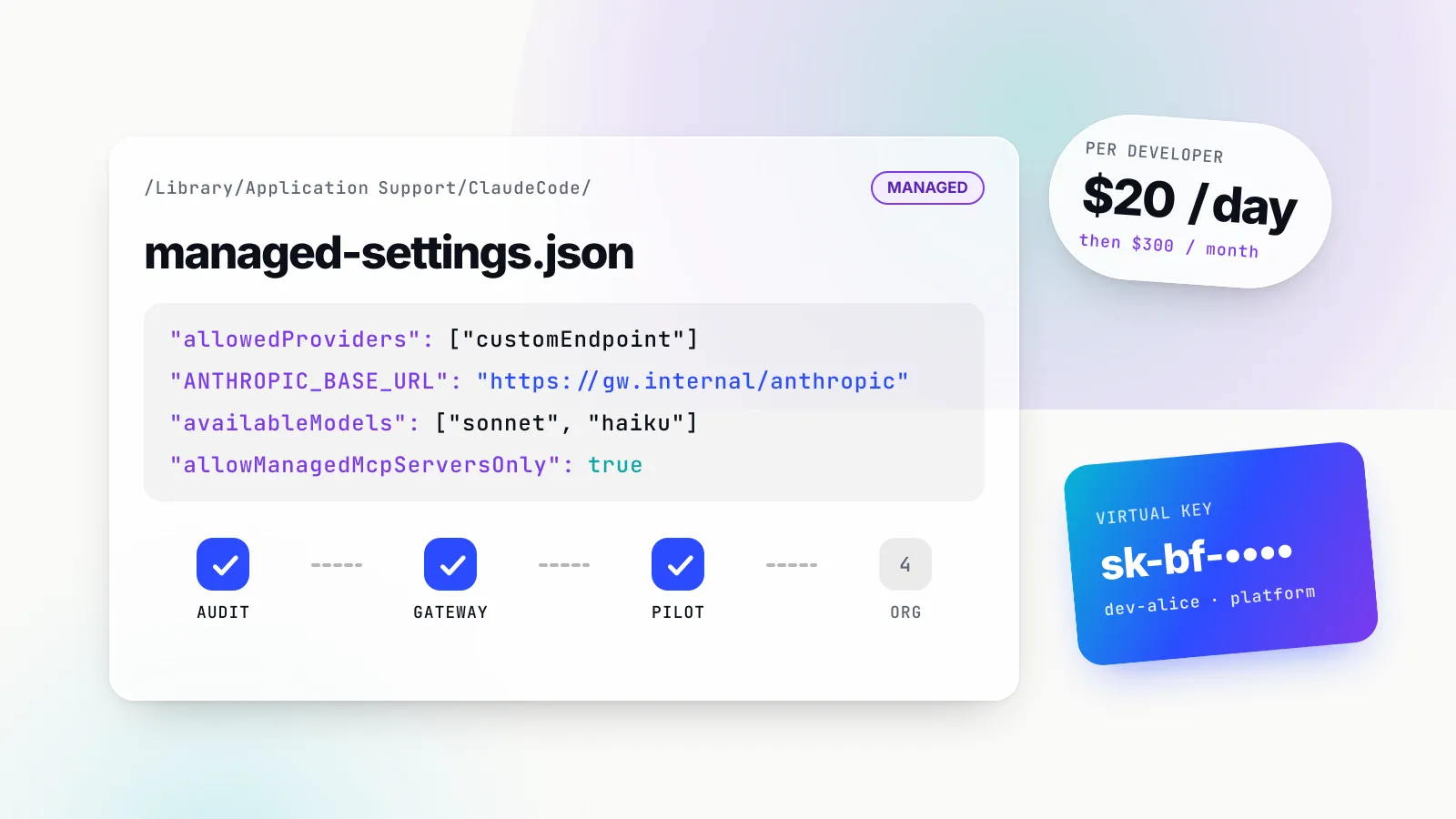
Scoped keys instead of provider keys (LLM02, LLM08). Provider keys live only in the gateway. Each service, team or developer gets a virtual key restricted to specific providers and models, which can be revoked without touching the provider account and can carry an expiry date. Setting enforce_auth_on_inference makes requests without a valid key fail; the docs describe making virtual keys mandatory as a configuration switch. A leaked key is now a bounded credential, not the master key to your provider bill.
Budgets and token rate limits (LLM06). The budget and rate limit documentation describes request and token limits per virtual key and per provider, checked hierarchically: a request must pass “both the request limit and token limit checks at all applicable levels”. Budgets reset on durations from a minute to a year. This is the hard spending cap OWASP 2026 asks for, enforced before the provider is called.
Per-key MCP tool allowlists (LLM03). Bifrost’s MCP tool filtering is deny-by-default: a virtual key with no MCP configuration gets no tools, except from clients explicitly marked “Allow by Default”. A caller-supplied header can only narrow the allowlist, “never widen”, and the allowlist “is enforced again at MCP tool execution time”. A prompt-injected agent cannot talk its way into tools its key was not granted.
Content-free logs (LLM02). The client configuration offers disable_content_logging to strip message content from the log store and keep metadata only. The same page warns that each observability connector has its own flag defaulting to false, so turning off content in one place still exports it from others. That warning alone is worth an audit item.
Guardrails on prompts, responses and tool calls (LLM01, LLM02). Bifrost guardrails validate LLM inputs and outputs and MCP tool executions against rules, with providers including Microsoft Presidio for PII and a Gitleaks-backed secrets detection guardrail. These are part of the enterprise tier, as are SSO and RBAC; the virtual keys, budgets, rate limits, tool filtering and logging controls above are in the open-source gateway. Maxim’s overview of AI guardrails at the gateway describes the model, and its AI governance page covers the identity, budget and audit side. Our ranking of AI guardrails tools compares guardrail layers more broadly.
A minimal virtual key that applies several of these at once, taken from the skill’s gateway reference:
curl -X POST http://localhost:8080/api/governance/virtual-keys \
  -H "Content-Type: application/json" -u "$BIFROST_ADMIN_USER:$BIFROST_ADMIN_PASS" \
  -d '{
    "name": "support-agent-prod",
    "provider_configs": [{"provider": "openai", "allowed_models": ["gpt-4o-mini"], "key_ids": ["*"]}],
    "mcp_configs": [{"mcp_client_name": "orders", "tools_to_execute": ["search_orders", "get_order"]}],
    "budgets": [{"max_limit": 200.00, "reset_duration": "1M"}],
    "rate_limit": {"request_max_limit": 600, "request_reset_duration": "1m",
                   "token_max_limit": 500000, "token_reset_duration": "1h"},
    "is_active": true
  }'
The application change is a base URL and a key:
from openai import OpenAI
client = OpenAI(base_url=os.environ["BIFROST_URL"] + "/openai", api_key=os.environ["BIFROST_VK"])
A virtual key is still a bearer credential, so it stays server-side. Its value is that it is scoped, capped, expirable and revocable in isolation. The gateway also needs locking down itself, since it holds every provider key: admin auth on, direct keys off (allow_direct_keys: false), explicit CORS origins, a private network and a pinned version.
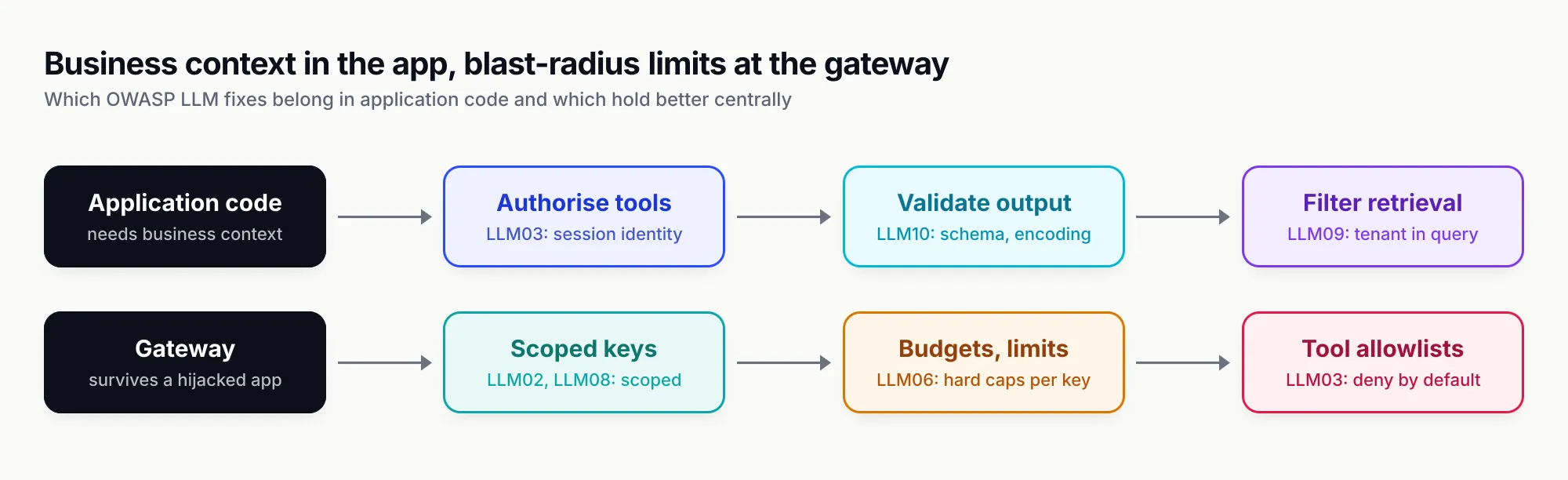
Figure 2: Application code owns the fixes that need business context; the gateway owns the ones that must survive a compromised app or a hijacked agent.
How to audit your codebase with the secure-llm-apps skill
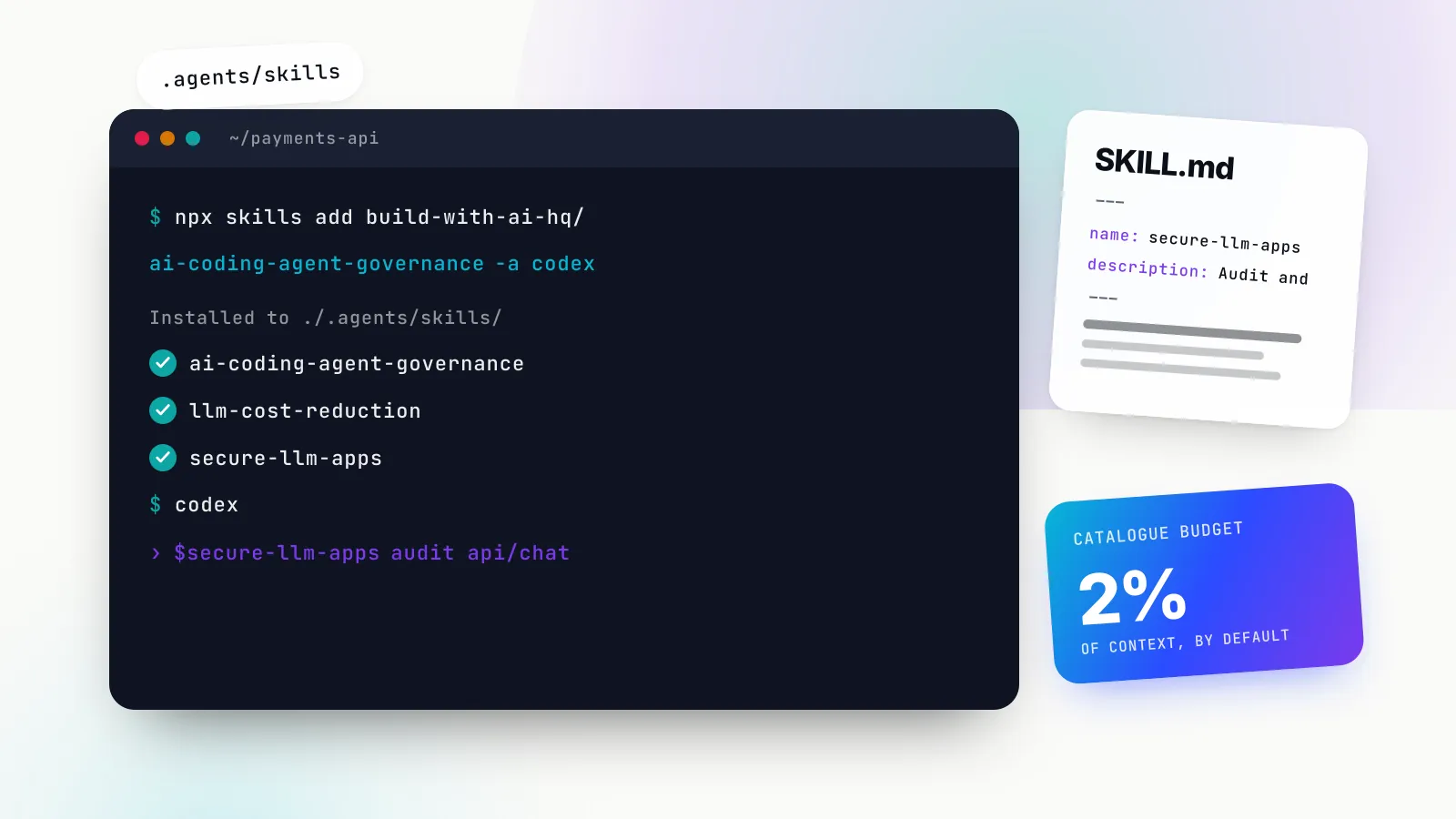
Reading the list is the easy part. The work of turning it into secure LLM applications is finding every place in a real codebase where one of these patterns hides. The secure-llm-apps skill packages that search so a coding agent (Claude Code, Codex, Cursor and other clients that read the Agent Skills format) can run it on request.
Install
# project-level, for every agent the CLI detects
npx skills add build-with-ai-hq/secure-llm-apps

# only for Claude Code, no prompts
npx skills add build-with-ai-hq/secure-llm-apps -a claude-code -y

# globally, for every project on this machine
npx skills add build-with-ai-hq/secure-llm-apps -g
The skills CLI help output (npx skills add --help, version 1.7.4) also lists -l to list a repository’s skills without installing, --copy to copy files instead of symlinking, and npx skills list, update and remove for maintenance. Once installed, the skill triggers on requests such as “is my AI app secure”, “security review of our chatbot”, “my OpenAI key leaked”, “rate limit LLM calls per user” or simply “OWASP LLM Top 10”.
What the skill contains
The skill is one SKILL.md plus four reference files the agent opens only when a task needs them:
| File | Read when | What it gives the agent |
|---|---|---|
SKILL.md | Always, on trigger | Six quick-diagnosis greps, four priority questions, seven core practices in impact order, gateway controls, a verification list |
references/prompt-injection.md | App uses RAG, browses, reads email or files, or runs tools | Threat model, taint tracking, quarantine pattern, exfiltration channels, MCP risks, test payloads |
references/keys-and-gateway.md | Moving keys out of clients, issuing scoped keys, restricting MCP tools | Key placement table, leaked-key runbook, virtual keys, per-key tool allowlists, gateway lockdown |
references/pii-and-data.md | User or regulated data, pasted credentials, logging decisions | Presidio redaction and pseudonymisation in Python and TypeScript, secret masking, tenant isolation, logging hygiene |
references/audit-checklist.md | Full security review | Complete grep list, a checklist grouped by OWASP entry, a finding report template |
How each OWASP entry maps to the skill
The skill’s audit checklist follows the 2026 numbering, so its findings line up with the list above. Here is where the skill covers each entry, with an honest read of coverage depth.
| 2026 entry | Where the skill covers it | Coverage |
|---|---|---|
| LLM01 Prompt Injection | Core practice 2; prompt-injection.md (taint, quarantine, payloads as CI tests) | Deep |
| LLM02 Sensitive Information Disclosure | Practices 1, 5, 7; pii-and-data.md; key and logging greps | Deep |
| LLM03 Excessive Agency | Practice 3 (risk-classed dispatch, approvals, step caps); per-key MCP allowlists | Deep |
| LLM04 Supply Chain | Checklist: pin MCP servers, SDKs, gateway image; review tool descriptions | Light |
| LLM05 Data and Model Poisoning | Checklist: control and audit corpus writes; review user content before indexing | Light |
| LLM06 Unbounded Consumption | Practice 6 (rate limits, caps, budgets); consumption greps | Deep |
| LLM07 Misinformation | Checklist: citations or human review for high-stakes output | Light |
| LLM08 Hidden Context Exposure | No secrets or authz in system prompts; canary detection | Medium |
| LLM09 Vector and Embedding Weaknesses | Tenant filters in the query; caches keyed by tenant | Medium |
| LLM10 Improper Output Handling | Practice 4 (pydantic and zod schemas, sink table); sink greps | Deep |
The pattern is clear: the skill is strongest on the risks an application team controls directly (keys, injection containment, agency, output handling, data leakage, spend) and light on the ones that belong to model builders and data pipelines. That is a scope decision, and it matches where most teams building on hosted models actually have exposure.
How we tested
On 28 October 2026 we installed the skill in an empty scratch directory with version 1.7.4 of the skills CLI and telemetry disabled (DISABLE_TELEMETRY=1 DO_NOT_TRACK=1). Running npx skills add build-with-ai-hq/secure-llm-apps -l cloned the repository and listed one skill. Running it again with -a claude-code -y installed it to ./.claude/skills/secure-llm-apps/ as a copy, containing SKILL.md, README.md, LICENSE, the four reference files and an assets folder. The CLI also wrote a skills-lock.json recording the source repository and a content hash, and npx skills list showed the skill under Project Skills for Claude Code. The installer’s summary box printed a ./.agents/skills/ path, but no .agents directory was created for this Claude Code-only install.
We then wrote a deliberately vulnerable two-file sample app: a TSX component calling OpenAI from the browser with a NEXT_PUBLIC_ key and rendering output with dangerouslySetInnerHTML, and a Python handler with a password in the system prompt, run_shell and delete_user tools, a prompt logged in full, an f-string SQL query and subprocess.run(..., shell=True) on model output. Running the skill’s six quick-diagnosis greps, plus the checklist’s system-prompt grep, flagged every seeded issue: the browser key and dangerouslyAllowBrowser, all three dangerous sinks, the tool list, the content log line and the system prompt. The consumption grep returned no hits, which is the finding: no max_tokens or step limit anywhere. The greps found the system prompt but did not recognise the password inside it as a secret; that took reading the hit, which is what the skill instructs (“each hit is a lead, not a verdict”).
We did not run a full agent session against a production codebase, so we cannot report how an agent prioritises or fixes findings end to end. The greps, checklists and code in the skill are what we verified directly.
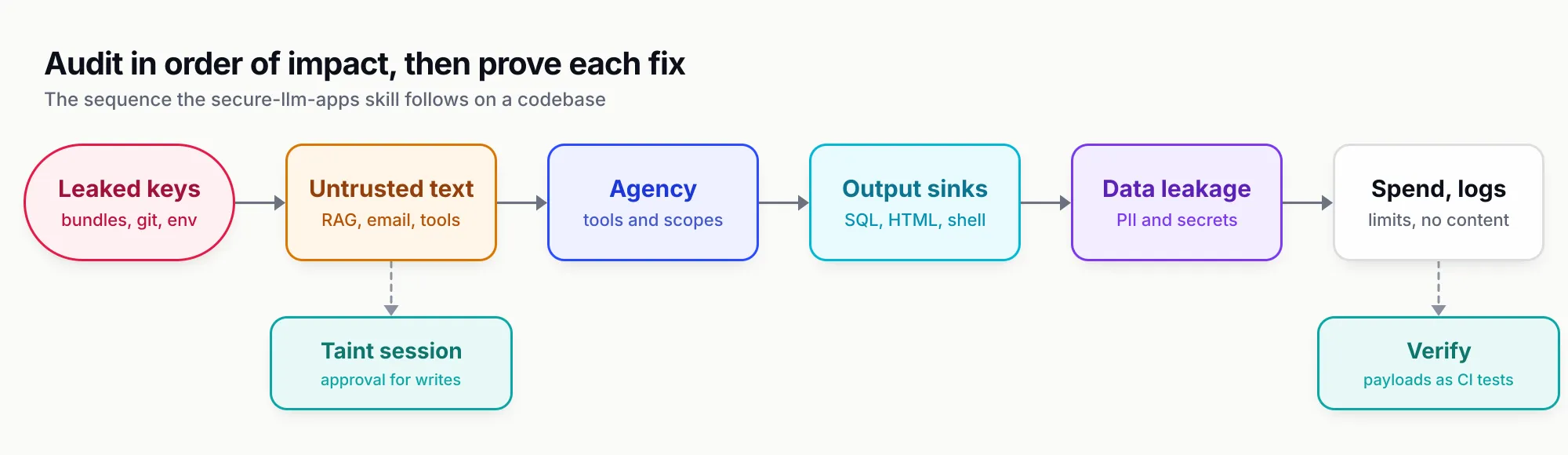
Figure 3: The audit order the skill follows, by impact. Key exposure and untrusted content reaching tools come before everything else.
An LLM security checklist you can run this week
This condenses the skill’s checklist and OWASP’s 2026 mitigations into the items that catch the most in a first pass. Each item is checkable with a grep, a test or a config read.
Keys and infrastructure
- No provider key in any client bundle, mobile binary, repository or image layer. After a production build,
grep -rE "sk-|AIza" dist/ .next/static/ build/returns nothing. - Secret scanning runs in pre-commit and CI (gitleaks or trufflehog).
- Apps hold scoped, revocable keys rather than provider keys; a revoked test key makes the app fail closed.
- If you run a gateway: admin auth on, keys enforced on inference, direct keys off, explicit CORS origins, private network, pinned version.
Untrusted input (LLM01, LLM05)
- Every retrieval, fetch, email, file and tool-result path delimits content and taints the session.
- Write and destructive tools need approval once the session is tainted.
- Injection payloads run as CI regression tests through every untrusted path, asserting on behaviour (no unapproved tool call, no request to an unlisted host), not on reply text.
- Writes to RAG corpora and fine-tuning data are permissioned and logged.
Agency (LLM03)
- Each agent has the minimum tool set; read and write tools are separate.
- Tenant and user arguments come from the session, never from model output.
- Destructive tools show the exact arguments to a human before running.
- Step, tool-call and time limits exist on every agent loop.
- MCP tools are allowlisted per agent identity, and auto-execution is limited to read-only tools.
Output (LLM07, LLM10)
- Model output is parsed into schemas with enums, patterns and bounds, and invalid output fails closed.
- No model output reaches SQL strings, shell strings,
evalor raw HTML. - Markdown renders without raw HTML, and image and link hosts are allowlisted.
- High-impact actions verify the model’s claim against the system of record first.
Data and context (LLM02, LLM08, LLM09)
- Only task-required fields go to the provider; PII is redacted locally and pasted secrets masked.
- System prompts contain no credentials, internal URLs or authorisation rules; a canary string is monitored.
- Vector queries filter by tenant and permission inside the query; caches are keyed by tenant.
- Default logs hold metadata only, in the app, the gateway and every exporter.
Consumption (LLM06)
- Every LLM endpoint is authenticated.
- Per-user and per-tenant request and token limits exist, plus a global ceiling.
- Input size,
max_tokens, retrieved chunk count and timeouts are capped. - Budgets stop inference when exceeded instead of only alerting.
For each finding, the skill’s report template asks for location, OWASP category, what an attacker can do, the exploit input, the fix and the test that proves it fixed. That last field is the one teams skip and regret.
What the list and the skill leave out
Three boundaries are worth knowing before you call an audit done.
Agentic risks. OWASP’s 2026 LLM document repeatedly hands off to the Agentic Top 10 for memory poisoning, inter-agent channels, tool misuse across multi-step plans and cascading failures. If your system has persistent memory or agents calling agents, an LLM Top 10 audit is necessary but not sufficient.
Model-building risks. Training-data memorisation, membership inference, differential privacy, model signing and backdoor probing matter for teams that fine-tune or ship weights. The secure-llm-apps skill, by design, focuses on applications that call hosted or self-hosted models and does not audit training pipelines.
Adversarial testing. A grep audit finds patterns; it does not prove a defence holds against an attacker who has read it. OWASP’s 2026 prompt injection entry asks for testing “against adaptive attackers who have read the deployed defense”. The skill’s injection payloads are a regression floor, not a red-team exercise.
What to do next
Start with the four questions: where the key lives, what untrusted text reaches the prompt, what the model can cause, and what limits exist. Then:
- Re-map any existing findings or tickets from 2025 IDs to 2026 IDs using the table at the top. LLM03, LLM06 and LLM10 now mean different things.
- Install the skill and ask your coding agent for an OWASP LLM Top 10 review of the repository. Read every hit in context.
- Fix in impact order: leaked keys first, then untrusted content reaching tools, then agency, output sinks, data leakage, consumption and logging.
- Move the controls that must survive a compromised app (scoped keys, budgets, tool allowlists, content-free logs) to a gateway, and treat the gateway itself as a secrets store.
- Turn the injection payloads and abuse scripts into CI tests, and rerun them whenever you change model, prompt or tools.
The 2026 list’s own summary is the right closing posture: build the system so that when the model is fooled, “and it will be, nothing important breaks”. The OWASP list tells you where that matters most, and the skill tells you where to look in your own code.
Sources
- OWASP Top 10 for LLM Applications 2026 (resource page and PDF, v1.0) OWASP GenAI Security Project
- LLM Top 10 risks archive (2025 per-entry pages) OWASP GenAI Security Project
- LLM01:2025 Prompt Injection OWASP GenAI Security Project
- LLM06:2025 Excessive Agency OWASP GenAI Security Project
- LLM05:2025 Improper Output Handling OWASP GenAI Security Project
- LLM07:2025 System Prompt Leakage OWASP GenAI Security Project
- OWASP Top 10 for Agentic Applications for 2026 OWASP GenAI Security Project
- secure-llm-apps Agent Skill (SKILL.md and references) build-with-ai-hq
- mcp-gateway-best-practices Agent Skill build-with-ai-hq
- skills CLI README Vercel Labs
- Agent Skills specification agentskills.io
- MCP specification 2025-11-25: Tools, security considerations Model Context Protocol
- Agents Rule of Two: a practical approach to AI agent security Meta AI
- The lethal trifecta for AI agents Simon Willison
- Bifrost virtual keys Maxim AI
- Bifrost budget and rate limits Maxim AI
- Bifrost MCP tool filtering per virtual key Maxim AI
- Bifrost client configuration (content logging, auth, CORS) Maxim AI
- Bifrost guardrails overview Maxim AI
- Bifrost secrets detection guardrail Maxim AI
Frequently asked questions
What is the OWASP LLM Top 10?
It is a ranked list of the ten most critical security risks in applications built on large language models, maintained by the OWASP GenAI Security Project. Each entry describes the risk, common examples, prevention steps and attack scenarios. The current edition is the 2026 list, published on 3 August 2026.
What are the OWASP Top 10 for LLM 2026 risks?
LLM01 Prompt Injection, LLM02 Sensitive Information Disclosure, LLM03 Excessive Agency, LLM04 Supply Chain, LLM05 Data and Model Poisoning, LLM06 Unbounded Consumption, LLM07 Misinformation, LLM08 Hidden Context Exposure, LLM09 Vector and Embedding Weaknesses and LLM10 Improper Output Handling.
What changed between the 2025 and 2026 OWASP LLM Top 10?
No entries were added or removed, but the order moved. Excessive Agency rose from sixth to third, Unbounded Consumption from tenth to sixth, and Improper Output Handling fell from fifth to tenth. System Prompt Leakage became Hidden Context Exposure, which also covers tool schemas and retrieved policy text. The ranking now blends a practitioner vote with incident data.
What is the number one LLM security risk?
Prompt injection, in both the 2025 and 2026 editions. OWASP notes that it would fall out of the top ten if ranked purely on public incident counts, and argues this reflects how hard mature teams defend against it rather than a lower risk. It cannot be fully prevented, so defences focus on limiting what a hijacked model can do.
How do I check my LLM app against the OWASP Top 10?
Inventory where untrusted text enters the prompt, what the model can cause to happen, where its output lands and what limits exist on spend. Then grep the codebase for leaked keys, dangerous sinks, tool definitions, missing token caps and content logging. The open-source secure-llm-apps Agent Skill packages this audit with a checklist mapped to each entry.
Is the OWASP LLM Top 10 the same as the OWASP Agentic Top 10?
No. The LLM list covers the model as a component inside your application. The Agentic Top 10, published in December 2025, covers systems where the model acts with tools, memory and multi-step autonomy. OWASP's 2026 LLM document says the two should be read together once a model starts acting on its own.
Can an AI gateway fix OWASP LLM risks on its own?
No. A gateway enforces controls that should not depend on each app, such as scoped keys, budgets, rate limits, tool allowlists, guardrails and content-free logs. It cannot parameterise your SQL, escape your HTML or check a user's permissions inside your business logic, so application fixes are still required.