ToolsExplainer
Claude --dangerously-skip-permissions: a practical guide to what it bypasses
What Claude Code's --dangerously-skip-permissions flag skips, the checks that survive it, real incident patterns, and safe recipes for containers, sandboxes and CI.
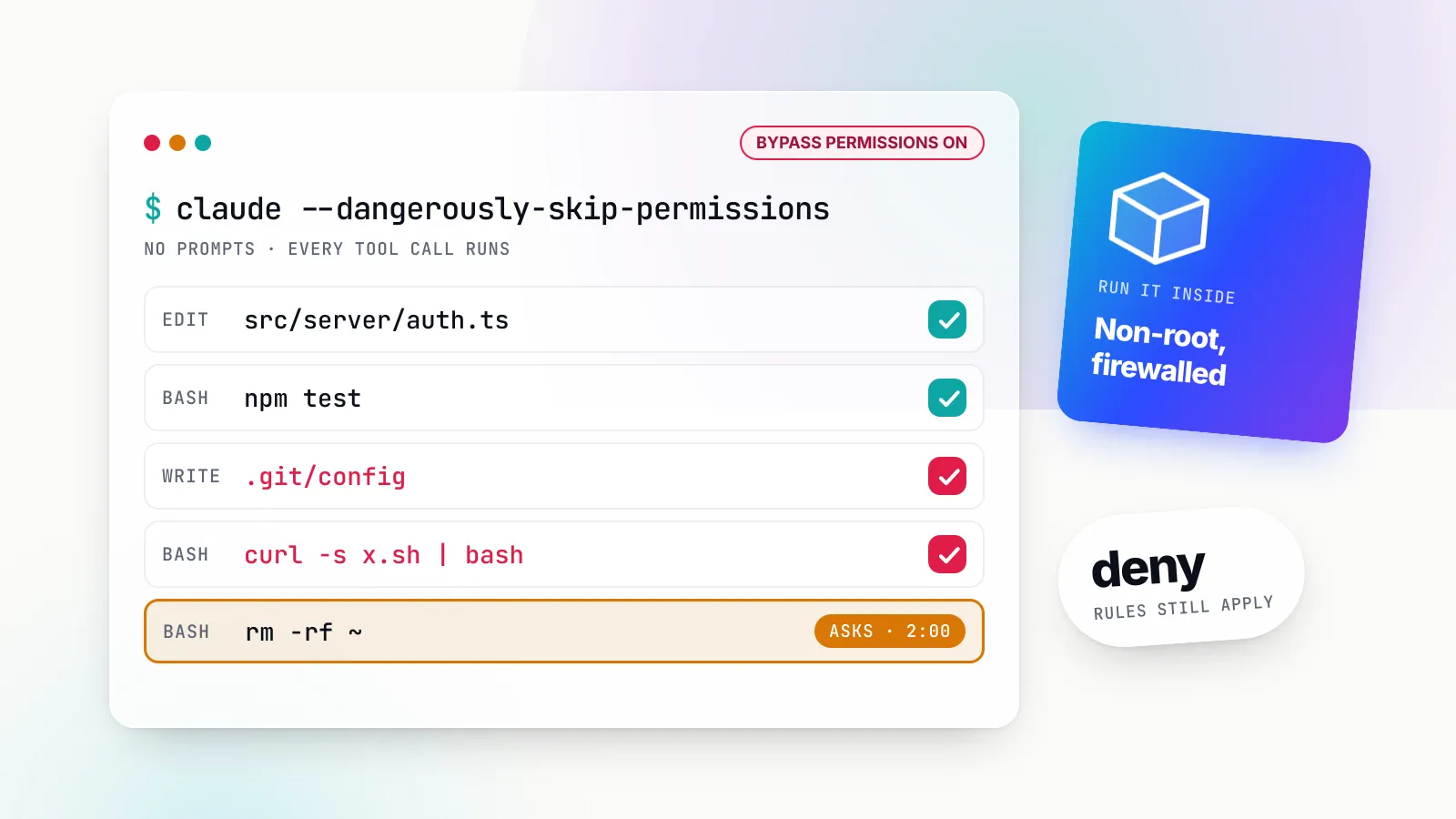
claude --dangerously-skip-permissions starts Claude Code with its permission prompts switched off. Every file edit, shell command, web fetch and MCP tool call runs the moment the model decides to make it, including writes to the folders Claude Code normally guards most closely, such as .git and .claude. It is the fastest way to let an agent work through a long task unattended, and it is also the setting behind most of the stories about coding agents deleting things they should not have touched.
The flag is not quite what its name suggests. A handful of checks survive it, a few new safeguards have been bolted on since 2025, and Anthropic now ships two alternatives (a classifier-driven auto mode and an OS-level Bash sandbox) that remove most of the reasons people reached for it. This guide, written against the Claude Code documentation and CHANGELOG as of October 2026 (the current release is 2.1.306), sets out exactly what the flag skips, what it does not, the incident patterns recorded in primary sources, and the recipes that make it acceptable.
It is written for developers deciding whether to type the flag, and for platform teams deciding whether to allow it at all.
What the flag actually does
The CLI reference defines --dangerously-skip-permissions in one line: skip permission prompts, equivalent to --permission-mode bypassPermissions. The flag is a shortcut into one of Claude Code’s six permission modes, and everything the documentation says about bypassPermissions applies to it.
The permission modes page describes that mode as disabling “permission prompts and safety checks so tool calls execute immediately, including writes to protected paths”. There are four ways in:
# Start in bypass mode
claude --dangerously-skip-permissions
claude --permission-mode bypassPermissions

# Start in another mode, but put bypass in the Shift+Tab cycle for later
claude --permission-mode plan --allow-dangerously-skip-permissions

# Non-interactive run
claude -p "Upgrade the test fixtures and fix failures" --dangerously-skip-permissions
The fourth route is permissions.defaultMode: "bypassPermissions" in a settings file, and here the rules have tightened. Since v2.1.257, Claude Code ignores that value when it appears in a project’s .claude/settings.json or .claude/settings.local.json; it takes effect only from user settings, a --settings file or managed settings. A repository you clone cannot switch you into bypass mode by checking in a settings file. You also cannot enter bypass mode mid-session unless the session was started with it enabled.
A few more guard rails sit around the entrance:
- First-run dialog. The first interactive bypass session shows a warning you must accept. Accepting writes
skipDangerousModePermissionPrompt: trueto~/.claude/settings.json, and the settings reference notes that a repository cannot set that key for you. Declining exits. Non-interactive-pruns show no dialog at all. - No root. On Linux and macOS, Claude Code refuses to start in bypass mode as root or under
sudo, printing--dangerously-skip-permissions cannot be used with root/sudo privileges for security reasons. The check is skipped inside a recognised sandbox. --restrictedwins. A session started with--restricted(v2.1.248 or later), designed for evaluation harnesses on shared machines, refuses bypass mode.- Cloud sessions ignore it. Claude Code on the web does not offer bypass permissions and silently ignores
defaultMode: "bypassPermissions"from settings files. - IDE toggles. In the VS Code extension the mode appears only after you enable the Allow dangerously skip permissions setting; in the desktop app, Pro and Max users flip a toggle while Team and Enterprise plans follow organisation policy.
What it skips
In bypass mode, the permission system that normally sits between the model and your machine stops asking. In practice that means five things go quiet.
Routine approvals. In Manual mode (config value default), Claude Code asks before every non-read-only Bash command, every file modification, most web fetches and every web search. In bypass mode, none of those prompts appear. Allow rules become irrelevant: the documentation says plainly that allow rules have no effect in bypassPermissions, because everything is already allowed.
Protected paths. Claude Code keeps a list of directories and files whose corruption would damage the repository, the toolchain or Claude Code itself: .git, .vscode, .idea, .husky, .devcontainer, most of .claude, plus files such as .gitconfig, .bashrc, .zshrc, .npmrc, .pre-commit-config.yaml, .mcp.json and .claude.json. In every other mode, writes to protected paths are prompted, routed to the classifier or denied. In bypass mode they are allowed. This is the single largest difference between bypass and acceptEdits, and it matters because several of those files execute code later: a modified .bashrc runs in your next shell, a modified .husky hook runs on your next commit, a new .mcp.json entry starts a server the next time Claude Code launches.
Plan mode blocks, interactively. In an interactive terminal session where bypass is available, plan mode’s edit blocks are not enforced. Claude is still told to plan without editing, but a file edit or shell command it attempts during planning runs without asking. Plan mode keeps its blocks in -p runs, the Agent SDK and the VS Code chat panel.
The sandbox’s exits. If you also enabled the Bash sandbox, two of its escape routes open without a prompt. A command the sandbox blocked can be retried with dangerouslyDisableSandbox, and the sandbox documentation says that in bypass mode “the retry runs without a prompt”. And a sandboxed command that connects to a host outside your allowed domains is allowed without a prompt in bypass mode, unless strictAllowlist or allowManagedDomainsOnly is on. A sandbox paired with bypass mode and default settings is far weaker than the same sandbox in Manual mode.
Network-fetch caution. In Manual mode, curl and wget are deliberately not auto-approved, as one of Claude Code’s prompt injection protections. In bypass mode that protection is gone along with every other prompt.
What still stops a bypassed tool call
The name overstates the case. The documentation keeps a short list of actions no mode auto-approves, and several other controls are evaluated before the mode is consulted at all.
Deny rules. “Deny rules block in every mode, including bypassPermissions.” A permissions.deny entry such as Bash(git push --force *) or Read(./.env) holds, and a managed deny rule cannot be overridden by any flag. A bare tool name such as WebFetch in the deny list removes the tool from Claude’s context entirely.
Ask rules. An explicit permissions.ask rule still forces a prompt in bypass mode. In a -p run, where nobody can answer, the call is denied instead.
PreToolUse hooks. Hooks run before the permission decision for every tool call, in every mode. A hook that returns permissionDecision: "deny" or exits with code 2 stops the call, and the hooks reference says exit 2 blocks “even when your hook prints JSON” that would allow it. Hooks are the main way to add custom policy to a bypass session. (A 2.0.30 fix addressed hooks and plugins not executing under the flag, so check that you are on a current version.)
Tools that need a human. The built-in AskUserQuestion tool, MCP tools marked requiresUserInteraction, and connector tools an organisation set to ask all still prompt.
Critical-path removals. rm and rmdir aimed at a critical path (the filesystem root, any top-level directory such as /usr, your home directory, your working directory and its parents) are never approved by an allow rule or a hook. Since v2.1.281, the terminal prompt for one in bypass or auto mode shows a two-minute countdown; if nobody answers, the command is denied with a hint to rewrite it, and after three unanswered prompts in a session further critical removals are denied immediately. Patterns that become a root deletion when a variable is empty, such as rm -rf "$DIR"/*, count as critical too.
Outside reads, when you ask for it. With permissions.blockReadsOutsideWorkingDirectories on (v2.1.257 or later), recognised file-reading Bash commands prompt even in bypass mode.
Cross-session messages. Messages to your sessions on other machines still need approval, and inbound messages from another of your sessions are held unless the sender is also bypassing prompts.
PowerShell system paths. Remove-Item against a system path or with a bare wildcard is denied in every mode on Windows.
The limits of text-matching checks
Most of these survivors inspect the command text Claude writes, and the documentation is candid that this is not a security boundary. Its section on what a Bash rule doesn’t match shows Bash(rm *) stopping rm -rf build/ but not /bin/rm -rf build/ or bash -c 'rm -rf build/', and Bash(git push *) missing git -C . push origin main.
The critical-path check has had the same class of gap. A September 2026 bug report, issue #96300, showed that in bypass mode on v2.1.280 Claude Code stopped rm -rf <cwd> but “does not ask when the same command is wrapped in sh -c or bash -c”, and the files were deleted. The CHANGELOG records the fix in v2.1.288, after earlier fixes for $(...) and backtick forms (v2.1.208) and subshells. The reporter’s own scope note is the useful lesson: no check on command text can cover every wrapper, and a script file or python -c will always get past it. The surviving checks are a seatbelt against model error. They are not containment.
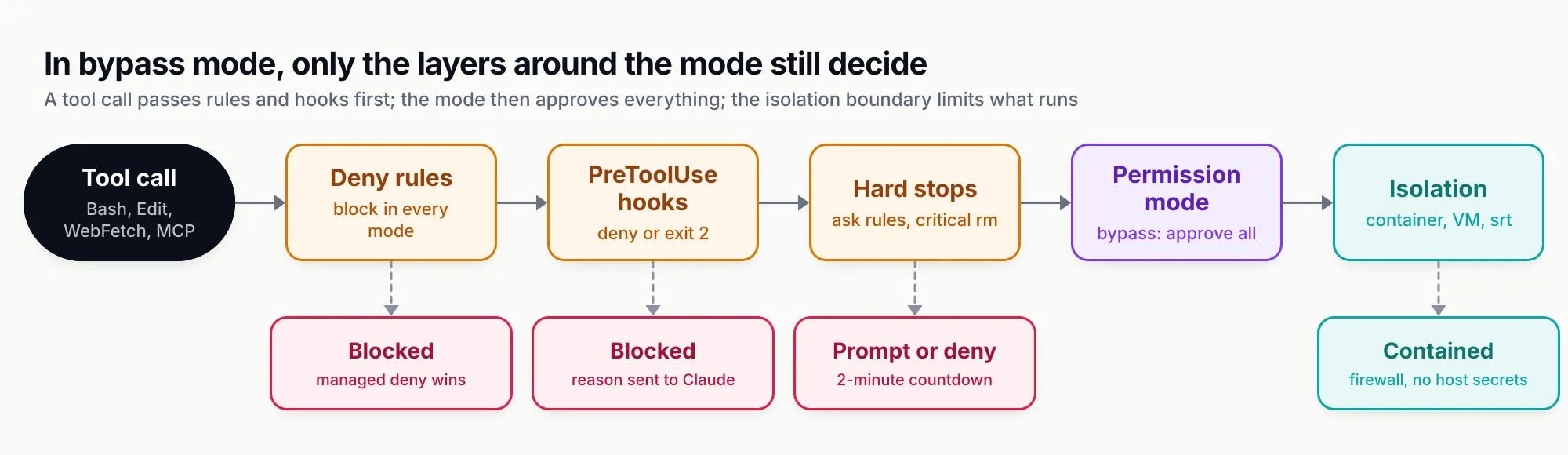
Figure 1: In bypass mode the permission-mode step approves everything, so the layers before it (rules and hooks) and after it (the container, VM or sandbox boundary) are the only controls left.
The six permission modes compared
Bypass mode is the far end of a range. The table summarises the available modes as documented in October 2026.
| Mode | Runs without asking | What replaces the prompt | Protected-path writes | Critical rm | Intended for |
|---|---|---|---|---|---|
default (Manual) | Reads and read-only commands | You | Prompted | Prompted | Sensitive or unfamiliar work |
acceptEdits | Plus edits and mkdir, touch, rm, mv, cp, sed in the working directory | You, for everything else | Prompted | Prompted | Iterating on code you review in git diff |
plan | Reads; classifier-approved commands where auto mode is available | You approve the plan | Classifier or prompt | Prompted | Exploring before changing |
auto | Everything, after checks | A classifier model | Routed to classifier | Prompted with countdown; denied headless | Long tasks with fewer prompts |
dontAsk | Reads plus pre-approved tools only | Nothing: anything else is denied | Denied | Denied | Locked-down CI and scripts |
bypassPermissions | Everything | Nothing | Allowed | Prompted with countdown | Isolated containers and VMs only |
Two defaults changed this year and shape how often anyone needs the flag. With v2.1.283 or later, auto mode is the built-in starting mode for interactive terminal and VS Code sessions on every plan and provider, subject to a supported model. And since v2.1.302, claude -p and Agent SDK runs with no mode set start in Manual mode, where any call that needs approval is denied unless an allow rule, hook, canUseTool callback or --permission-prompt-tool approves it. That second change is why people reach for --dangerously-skip-permissions in scripts: a bare claude -p now refuses to do much. The answer is usually an allowlist, covered below, not bypass.
The comparison with OpenAI’s agent is instructive. Codex CLI’s equivalent is --dangerously-bypass-approvals-and-sandbox (alias --yolo), which its reference describes as running every command “without approvals or sandboxing” and says to use only inside an externally hardened environment. Both vendors put the same burden on the user: the flag is a statement that something outside the agent is doing the containment. Our Codex vs Claude Code comparison covers the wider difference in defaults, where Codex sandboxes local commands by default and Claude Code does not.
How the flag’s behaviour has changed
Bypass mode has been revised often enough that advice from 2025 is now wrong in places. These entries come from the Claude Code CHANGELOG, which records versions but not dates.
| Version | Change |
|---|---|
| 1.0.7 | Fixed the flag sometimes not working in --print mode |
| 2.0.30 | Fixed hooks and plugins not executing under the flag; added allowUnsandboxedCommands to disable the sandbox escape hatch by policy |
| 2.1.69 | VS Code mode picker respects disableBypassPermissionsMode and hides the option |
| 2.1.78 | Fixed .git, .claude and other protected directories being writable without a prompt in bypass mode |
| 2.1.126 | Reversed course: bypass mode now skips prompts for writes to .claude/, .git/, .vscode/, shell config files and other protected paths, with catastrophic removals still prompting “as a safety net” |
| 2.1.208 | rm -rf ~ hidden in $(...), backticks or <(...) now prompts in bypass and auto mode |
| 2.1.223 | Fixed a subagent definition’s bypassPermissions ignoring the organisation’s disable policy |
| 2.1.248 | Added --restricted, which refuses bypass mode |
| 2.1.257 | defaultMode: "bypassPermissions" in project settings files is ignored |
| 2.1.281 | Dangerous rm prompt waits two minutes, then denies so unattended sessions continue |
| 2.1.288 | Dangerous rm inside bash -c or sh -c no longer runs unprompted (issue #96300) |
| 2.1.296 | Windows: rm -rf /c/Users/<name> in Git Bash now asks in bypass mode |
The 2.1.78 to 2.1.126 sequence is worth noticing. For a period, bypass mode still prompted on protected paths; Anthropic then decided the mode should mean what it says and moved the protection to the removal checks and to documentation telling users to isolate the process. If your mental model of the flag dates from that window, it is too generous.
The real risks, from primary sources
The arguments against running unattended agents on a workstation are often made with anecdotes. The primary record is narrower and more useful, and it falls into five patterns.
Overeager agents doing what they think you meant
Anthropic’s engineering write-up on how it built auto mode is the best first-party source. “We keep an internal incident log focused on agentic misbehaviors,” it says, and lists past entries: “deleting remote git branches from a misinterpreted instruction, uploading an engineer’s GitHub auth token to an internal compute cluster, and attempting migrations against a production database.” Each was “the result of the model being overeager, taking initiative in a way the user didn’t intend”.
The post adapts more examples from that log. A request to “clean up old branches” became a pattern-matched delete of remote branches. An agent that hit an auth error started grepping environment variables and config files for other tokens. “Cancel my job” became a deletion of the closest name match on a shared cluster. A debugging script was about to be shared as a public GitHub Gist. A failed deploy pre-check was retried with a skip-verification flag. None of these needed an attacker. In a bypass session, every one of them would have run.
The same post explains why approval prompts alone did not solve this: “in practice users accept 93% of them anyway”. Prompt fatigue is the reason the flag exists, and it is also why Anthropic built a classifier rather than simply telling users to read prompts more carefully.
Path and quoting mistakes
Issue #49464, filed in April 2026, records Claude attempting rm -f ~/ while cleaning up untracked files in a repository that contained a directory literally named ~. The reporter’s root-cause line: “Claude misinterpreted directory ./~ (or ~/ in git status) as a shell expansion to the home directory.” The user blocked it at the prompt. In bypass mode, the only remaining check would have been the critical-path rule, which treats the home directory as critical, and which (as issue #96300 showed) depends on how the command is spelled.
Prompt injection
The permission modes page could not be clearer: “bypassPermissions offers no protection against prompt injection or unintended actions.” Anything the agent reads (a README, an issue comment, a web page, a tool result) can carry instructions, and in bypass mode there is no human between those instructions and your shell. Our guide to prompt injection examples and defences covers the mechanics; the short version for this flag is that the classic “lethal trifecta” of private data, untrusted input and an outbound channel is fully present in a bypass session on a developer laptop.
The dev container documentation spells out the residual risk even inside a container: when run with --dangerously-skip-permissions, dev containers “do not prevent a malicious project from exfiltrating anything accessible inside the container, including the Claude Code credentials stored in ~/.claude”.
Untrusted repositories configuring the agent
The workspace trust table matters more in headless runs than most users realise. A claude -p run never shows the trust dialog, and in a folder you never trusted it still uses the repository’s settings-file hooks, its env block and helper commands, and connects servers listed in its .mcp.json “without asking, approved or not”. Add bypass mode, and a malicious repository supplies both the instructions and the tools. Anthropic’s own advice for running claude -p in a repository you did not write is to pass --setting-sources user or --bare, and --settings '{"disableAllHooks": true}'.
Malware driving the agent you installed
The August 2025 compromise of the Nx build system is the clearest case of an attacker using local AI CLIs as a tool. Nx’s security advisory says malicious package versions contained code that “scans the file system, collects credentials, and posts them to GitHub as a repo under user’s accounts”, and the postmortem adds that the post-install script “attempted to use local AI tools (like Claude and Gemini)”. The advisory’s appendix reproduces the prompt the malware gave the agent: a “file-search agent” told to inventory configuration and environment files into /tmp/inventory.txt.
The lesson for this flag is structural. Any process running as you can invoke claude with any flags it likes. A personal habit of never typing --dangerously-skip-permissions does nothing against a post-install script that types it for you. A managed disableBypassPermissionsMode setting does, because Claude Code then rejects the flag regardless of who passed it.
When the flag is acceptable
None of this makes the flag useless. Throwaway environments exist precisely so that an agent can thrash without consequence, and Anthropic documents the flag as the right tool for “Run fully unattended inside a container” in its common setups table. The question is whether the environment, not the agent, is doing the containment.
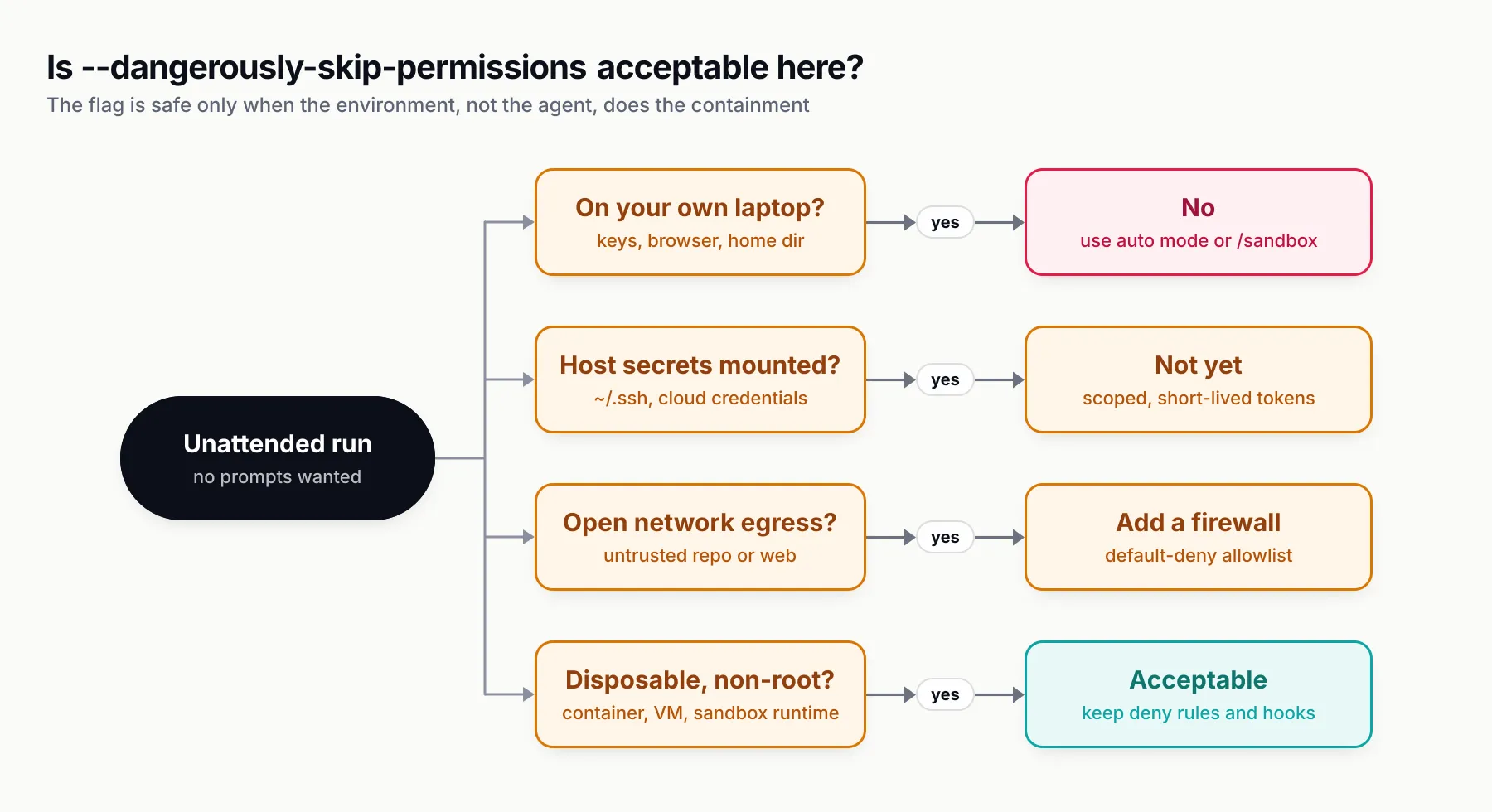
Figure 2: The flag is acceptable when the answer to “what is the worst this session could do?” is “destroy a container I was going to throw away”.
We think four conditions have to hold together:
- The process is inside a boundary that covers everything. The built-in Bash sandbox is not that boundary on its own. It wraps shell commands only; Claude’s file tools, MCP servers, hooks and helper commands run outside it. Anthropic’s sandbox environments page says to “always run
--dangerously-skip-permissionssessions inside a container, a VM, or the sandbox runtime”. - Nothing valuable is reachable inside it. No mounted
~/.ssh, no cloud credential files, no long-lived personal tokens. Repository-scoped or short-lived tokens only. - Egress is restricted. A default-deny firewall or proxy allowlist, so that a hijacked session cannot send what it can read.
- The blast radius on persistent state is acceptable. The bind-mounted workspace still appears on your host, and a
git pushwith valid credentials still reaches the remote. Protect branches on the server side.
If any of the four is missing, auto mode or an allowlist is the better tool.
Safe recipes
Recipe 1: the dev container
Anthropic’s dev container guide is the documented home for the flag: “Because the container runs Claude Code as a non-root user and confines command execution to the container, you can pass --dangerously-skip-permissions for unattended operation.” The minimal configuration installs Claude Code through the official Dev Container Feature:
{
  "image": "mcr.microsoft.com/devcontainers/base:ubuntu",
  "features": {
    "ghcr.io/anthropics/devcontainer-features/claude-code:1.0": {}
  },
  "remoteUser": "vscode",
  "mounts": [
    "source=claude-code-config-${devcontainerId},target=/home/vscode/.claude,type=volume"
  ],
  "containerEnv": {
    "CLAUDE_CONFIG_DIR": "/home/vscode/.claude"
  }
}
Three additions turn it from convenient into defensible. First, restrict network egress: the reference container’s init-firewall.sh limits outbound traffic to an allowlist and needs the NET_ADMIN and NET_RAW capabilities through runArgs. Second, keep host secrets out; for cloud providers, the guide recommends passing credentials as environment variables or workload identity rather than mounting credential files. Third, put a managed-settings.json at /etc/claude-code/ in the image with your deny rules, while remembering the guide’s own caveat: because the Dockerfile lives in the repository, anyone with write access can remove that step. Policy that must not be bypassed belongs in server-managed settings or MDM.
Recipe 2: the sandbox runtime, without Docker
The open-source @anthropic-ai/sandbox-runtime package wraps the whole Claude Code process in the same Seatbelt (macOS) or bubblewrap (Linux, WSL2) isolation the Bash sandbox uses, so file tools, MCP servers and hooks are inside the boundary too. The sandbox runtime section describes it as a beta research preview. You write ~/.srt-settings.json granting writes to the project, ~/.claude, ~/.claude.json and the temp directory, and network access to api.anthropic.com plus claude.ai and platform.claude.com if you sign in with OAuth. Then:
npm install -g @anthropic-ai/sandbox-runtime
srt claude --dangerously-skip-permissions
The runtime denies writes to .git/hooks, .git/config, .mcp.json, .claude/commands, .claude/agents and shell startup files at the project root by default, which restores some of the protected-path cover that bypass mode removes. The documentation warns that on Linux this deny list is built once at launch and does not cover repositories the session creates later.
Recipe 3: if you must pair bypass with /sandbox, close the exits
Running /sandbox on a laptop and then using bypass mode is the most common half-measure. If you do it, set the sandbox so that bypass cannot open it:
{
  "sandbox": {
    "enabled": true,
    "failIfUnavailable": true,
    "allowUnsandboxedCommands": false,
    "network": {
      "strictAllowlist": true,
      "allowedDomains": ["registry.npmjs.org", "github.com"]
    },
    "filesystem": {
      "denyRead": ["~/.ssh", "~/.aws"]
    }
  }
}
allowUnsandboxedCommands: false turns off the unsandboxed retry, strictAllowlist stops bypass mode from letting unlisted hosts through, and failIfUnavailable makes Claude Code exit instead of silently running unsandboxed when a dependency is missing. Even then, the file tools and MCP servers are outside the sandbox, and the security limitations warn that broad domains such as github.com can be exfiltration paths because the proxy does not inspect TLS by default. Treat this as defence in depth for a supervised session, not as the boundary for an unattended one.
Recipe 4: CI with an allowlist instead of bypass
Most pipelines do not need bypass mode. They need a fixed list of things the agent may do. The documented pattern from non-interactive mode is dontAsk plus --allowedTools:
claude -p "Run the test suite and fix any failures" \
  --permission-mode dontAsk \
  --allowedTools "Read" "Edit" "Bash(npm test)" "Bash(npm run lint)" "Bash(git diff *)" \
  --disallowedTools "WebFetch" "mcp__*" \
  --setting-sources user
In dontAsk mode, anything not pre-approved is denied rather than run, and the session never waits for input. --setting-sources user keeps an untrusted pull request’s .claude/settings.json and .mcp.json out of the run. If your run uses an Agent SDK canUseTool callback or --permission-prompt-tool, add --permission-prompts none (v2.1.259 or later) so nothing waits on a host that is not there.
Where the task genuinely needs open-ended shell access, run bypass mode inside an ephemeral runner container with only a repository-scoped token, and let the runner’s teardown be your undo button.
Recipe 5: guardrails that survive bypass
Deny rules and hooks are the policy layer that still works when the mode approves everything. A project or user settings file for a bypass container might hold:
{
  "permissions": {
    "deny": [
      "Read(./.env)",
      "Read(./secrets/**)",
      "Bash(git push --force *)",
      "Bash(terraform destroy *)",
      "Bash(gh gist *)",
      "Bash(npm publish *)"
    ]
  },
  "hooks": {
    "PreToolUse": [
      {
        "matcher": "Bash",
        "hooks": [
          { "type": "command", "command": "${CLAUDE_PROJECT_DIR}/.claude/hooks/guard.sh" }
        ]
      }
    ]
  }
}
The hook reads the tool input as JSON on stdin and can refuse anything your rules cannot express:
#!/bin/bash
# .claude/hooks/guard.sh: block pushes to main and gist creation, wherever they appear in the command
CMD=$(jq -r '.tool_input.command')
if echo "$CMD" | grep -Eq 'git .*push.* main|gh gist'; then
  echo "Blocked by guard.sh: pushes to main and gists need a human" >&2
  exit 2
fi
exit 0
Remember the limits from earlier: rules match command text, and a hook that greps strings can be evaded by a wrapper. Use them to catch the model’s ordinary mistakes, and the container to contain everything else.
Recipe 6: use auto mode instead
For interactive work on a real machine, auto mode is the documented replacement. A separate classifier model, Sonnet 5 by default as of October 2026, reviews shell commands, network operations and other actions with real downside before they run; reads and in-project edits skip it. Its default block list reads like a catalogue of the incidents above: downloading and executing code such as curl | bash, sending sensitive data to external endpoints, production deploys and migrations, force pushes, git reset --hard over uncommitted work, terraform destroy, and, pointedly, launching another agent loop “started with --dangerously-skip-permissions”.
On entering auto mode, Claude Code also drops allow rules that amount to arbitrary code execution, such as blanket Bash(*) and wildcarded interpreters. After three consecutive blocks or 20 in total, auto mode pauses and resumes prompting.
It is not a guarantee. Anthropic’s engineering post reports that on 52 real overeager actions, the deployed two-stage pipeline let 17% through, and calls that “the honest number”. Its own framing is the right one: compared with bypass mode, auto mode “is a substantial improvement”; compared with careful manual review, it is arguably a regression. Anthropic’s companion sandboxing post makes the parallel case for the Bash sandbox, reporting that “sandboxing safely reduces permission prompts by 84%” in internal use.
Locking it down across a team
The control that matters for organisations is a single key. Set permissions.disableBypassPermissionsMode to "disable", and Claude Code rejects the flag, ignores a subagent definition’s permissionMode: bypassPermissions (enforced since v2.1.223), and hides the option in the VS Code picker. The key is a lock: when several managed sources disagree, Claude Code applies the strictest value. A developer can also set it in their own user settings to lock themselves out.
The managed settings guide gives a starting file that does exactly this:
{
  "permissions": {
    "deny": ["Read(./.env)", "Read(./secrets/**)"],
    "disableBypassPermissionsMode": "disable"
  },
  "allowManagedPermissionRulesOnly": true
}
The file goes at /Library/Application Support/ClaudeCode/managed-settings.json on macOS, /etc/claude-code/managed-settings.json on Linux and WSL, and C:\Program Files\ClaudeCode\managed-settings.json on Windows, or arrives through MDM or server-managed settings from the Claude admin console. /status shows Enterprise managed settings (file) when it has applied. The equivalent permissions.disableAutoMode removes auto mode if a security team prefers manual review. Our sibling guide to Claude API platform administration covers the organisation-level controls that sit around these settings.
Disabling the flag on laptops does not mean banning it. A common pattern is to disable it fleet-wide through MDM and leave it available inside the approved dev container image, where the managed file in the image omits the key. That keeps the documented use case and removes the risky one.
Audit what bypassed sessions did
If you allow bypass anywhere, record what it did. Claude Code’s OpenTelemetry export emits a claude_code.tool_decision event for each permission decision, including the session’s permission_mode, and tool_result events with the decision source; OTEL_LOG_TOOL_DETAILS=1 adds the Bash commands and tool inputs. That is enough to answer “which sessions ran in bypass mode, and what did they execute?” after the fact.
Routing the model traffic through an LLM gateway adds the other half of the record. Anthropic’s gateway documentation lists what one centralises: credentials that stay server-side, usage attribution per developer, budgets and rate limits, and audit logging of every model request. For bypass sessions specifically, the useful properties are that the container holds a revocable gateway credential rather than a provider key (which matters given the dev container warning about exfiltrating ~/.claude), and that a runaway loop hits a spending cap. Bifrost, Maxim AI’s open-source gateway, documents this setup for Claude Code: point ANTHROPIC_BASE_URL at Bifrost’s Anthropic-compatible route and pass a virtual key in ANTHROPIC_AUTH_TOKEN, where each virtual key carries its own access permissions, budgets and rate limits and requests appear in the gateway’s logs. One caution if you combine a gateway with auto mode: Claude Code’s server-side classifier review travels with the model requests, and a gateway that strips or truncates those results causes Claude Code to fall back to local classifier calls or deny the action. Our sibling guide to Claude API keys covers scoping the credentials that end up inside these containers.
What to do
The flag is a tool for disposable environments, and the documentation has caught up with that framing faster than most users’ habits have. Five steps cover almost every case:
- On your own machine, stop using it. Use auto mode for hands-off interactive work, or Manual mode with
/sandboxin auto-allow for fewer prompts without a classifier. - In scripts and CI, start with
dontAskand an--allowedToolslist. Reach for bypass only inside an ephemeral runner container, as a non-root user, with repository-scoped tokens. - When you do use it, contain the whole process. A dev container with a default-deny firewall, the sandbox runtime, or a VM. The Bash sandbox alone does not count, and if you layer it, set
allowUnsandboxedCommands: falseandstrictAllowlist: true. - Keep deny rules and a PreToolUse hook in the image. They are the only policy the mode does not override, and they catch the overeager mistakes Anthropic’s incident log describes.
- For teams, set
disableBypassPermissionsModethrough MDM or server-managed settings, allow it back only in the approved container image, and exporttool_decisionevents so bypass sessions leave a trail.
The name was chosen as a warning, and it still is one. What has changed is that the reasons to ignore it have mostly gone away.
Sources
- Choose a permission mode Anthropic
- CLI reference Anthropic
- Configure permissions Anthropic
- Settings reference, permissions.disableBypassPermissionsMode Anthropic
- Deploy managed settings Anthropic
- Configure the sandboxed Bash tool Anthropic
- Choose a sandbox environment Anthropic
- Development containers Anthropic
- Hooks reference, PreToolUse decision control Anthropic
- Run Claude Code programmatically Anthropic
- Security Anthropic
- Monitoring, tool decision event Anthropic
- Other LLM gateways Anthropic
- How we built Claude Code auto mode Anthropic Engineering
- Making Claude Code safer with sandboxing Anthropic Engineering
- Claude Code CHANGELOG Anthropic (GitHub)
- Issue #96300: dangerous rm inside sh -c runs in bypass mode anthropics/claude-code (GitHub)
- Issue #49464: Claude attempts to delete home directory when cleaning up file named '~' anthropics/claude-code (GitHub)
- Malicious versions of Nx and some supporting plugins were published (GHSA-cxm3-wv7p-598c) Nx (GitHub Security Advisory)
- S1ngularity postmortem Nx
- Codex CLI command line options OpenAI
- Bifrost with Claude Code Maxim AI
- Bifrost virtual keys Maxim AI
Frequently asked questions
What does claude --dangerously-skip-permissions do?
It starts Claude Code in bypassPermissions mode, the same as --permission-mode bypassPermissions. Tool calls such as file edits, shell commands, web fetches and MCP calls run without a permission prompt, including writes to protected paths like .git and .claude. Deny rules, ask rules, hooks and a few hard-coded checks still apply.
Is --dangerously-skip-permissions safe?
Only inside an isolation boundary. Anthropic's documentation says the mode offers no protection against prompt injection or unintended actions and should be used only in containers, VMs or dev containers, ideally without open internet access. On a laptop with your SSH keys and cloud credentials, it is not safe.
What still prompts in bypass permissions mode?
Explicit ask rules, the AskUserQuestion tool, MCP tools marked requiresUserInteraction, connector tools an organisation set to ask, rm and rmdir commands aimed at critical paths such as / or your home directory (with a two-minute countdown in the terminal), and reads outside the working directories when blockReadsOutsideWorkingDirectories is on. Deny rules block outright.
Why does Claude Code say --dangerously-skip-permissions cannot be used with root/sudo privileges?
On Linux and macOS, Claude Code refuses to start in bypassPermissions mode when running as root or under sudo. The check is skipped inside a recognised sandbox. The fix is to run Claude Code as a non-root user, which Anthropic's reference dev container already does.
How do I disable --dangerously-skip-permissions for my team?
Set permissions.disableBypassPermissionsMode to "disable" in managed settings, delivered by MDM, a managed-settings.json file or server-managed settings. Claude Code then rejects the flag, ignores a subagent's permissionMode of bypassPermissions, and hides the option in the VS Code picker.
What is the difference between auto mode and --dangerously-skip-permissions?
Both remove routine prompts. Bypass mode replaces the prompt with nothing. Auto mode replaces it with a classifier model that reviews shell commands, network calls and other risky actions and blocks things like force pushes, curl piped to bash and production deploys. Anthropic reports a 17% miss rate on real overeager actions, so auto mode reduces risk rather than removing it.
Can I use --dangerously-skip-permissions in CI?
You can, inside an ephemeral runner container with no long-lived secrets. For most pipelines a narrower run is better: claude -p with --permission-mode dontAsk and an --allowedTools list, which denies anything you did not pre-approve instead of running it.