ToolsExplainer
Claude API platform admin: roles, workspaces and the Admin API explained
How to administer the Claude Developer Platform: Console roles, workspaces and their limits, Admin API keys and curl calls, usage and Claude Code reports, SSO and data retention.
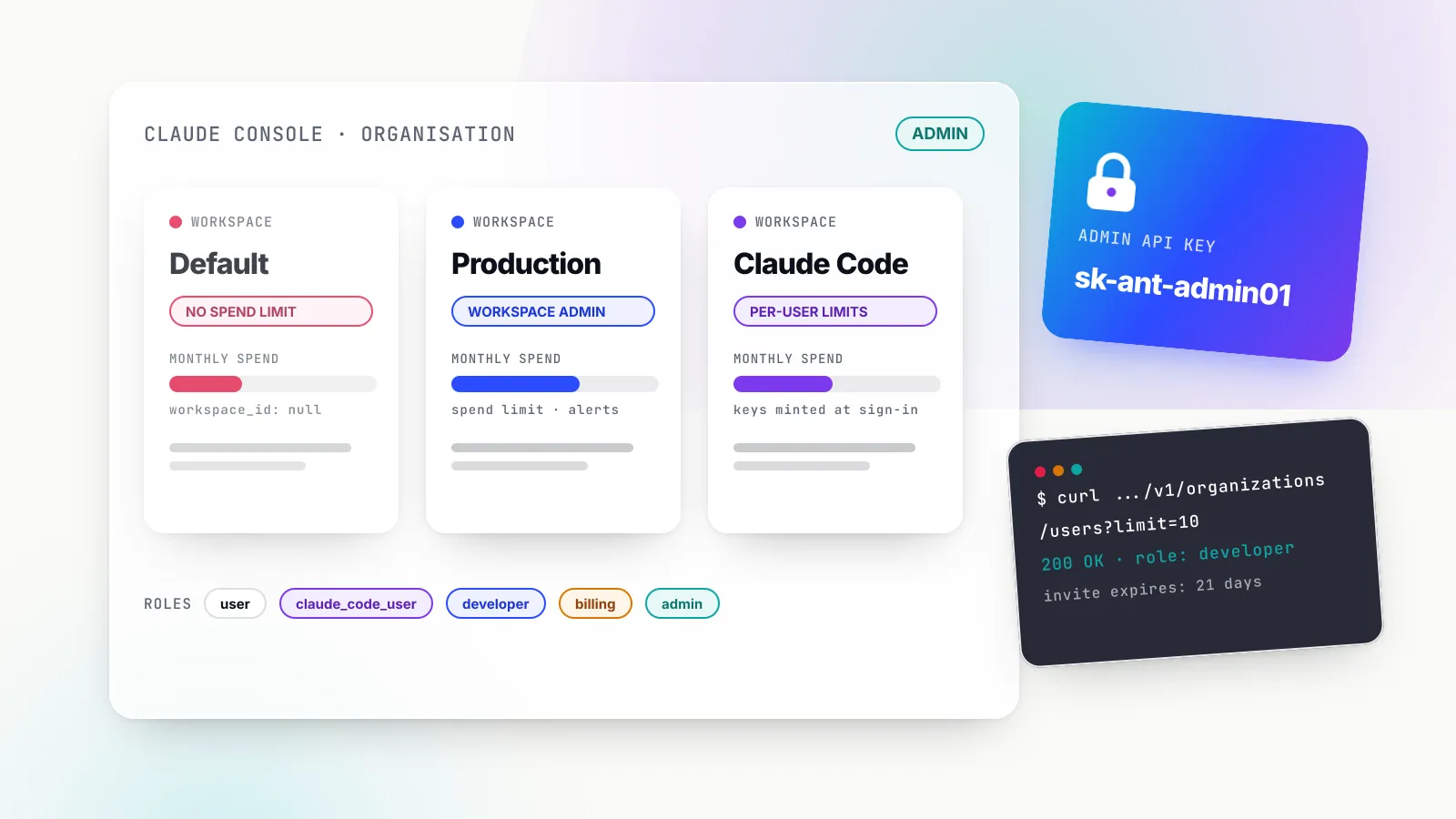
Administering the Claude Developer Platform comes down to four objects: an organisation that owns billing and identity, workspaces that hold keys, limits and data, members with roles at both levels, and credentials that act on their behalf. Anthropic exposes all four in the Claude Console at platform.claude.com and, for most of them, through the Admin API under api.anthropic.com/v1/organizations.
This matters because the defaults are loose. A new organisation has one Default Workspace, a monthly spend cap set by its usage tier and whatever keys developers have made. Once a second team, a production service or Claude Code arrives, someone has to decide who can mint keys, which workloads share rate limits, how spend is attributed and what happens to access when a person leaves. That someone is the platform admin, and this guide is for them: engineering managers, platform teams and security leads who run an Anthropic API account rather than a claude.ai seat plan.
Everything below is drawn from Anthropic’s documentation as read on 21 October 2026. The platform changes often (personal keys, service accounts and an org:admin OAuth scope are all recent), so treat role names, limits and endpoint lists as dated facts. If your question is about creating and using keys as a developer, our sibling guide to Claude API keys covers that side; this piece stays on administration.
What “platform admin” covers on the Claude Developer Platform
Anthropic runs two separate admin planes, and confusing them causes most of the wrong answers people find. The Claude Console (also called the Claude Platform) administers API organisations: pay-as-you-go or invoiced API usage, Claude Code billed through the API, workspaces and keys. claude.ai organisation settings administer Claude Team and Claude Enterprise seat plans. The Admin API serves both, but with different keys and different subsets of endpoints.
The first rule is that the Admin API is unavailable for individual accounts. A solo developer who signed up with a personal email has no organisation to administer until they set one up on the Organization settings page. The second rule is that a key created in one organisation cannot manage a different one; a company with both a Console organisation and an Enterprise plan needs one key in each.
| Admin task | Where it is done for a Console organisation | Programmable? |
|---|---|---|
| Invite, re-role and remove members | Console Members page | Yes, Admin API |
| Create, rename and archive workspaces | Console Workspaces page (admins only) | Yes, Admin API |
| Add members to workspaces | Console Members page | Yes, Admin API |
| Create API keys | Console API keys page | No |
| Disable or rename API keys | Console API keys page | Yes, Admin API |
| Workspace spend limits | Console Workspaces page | Not documented for Console |
| Workspace rate limits | Console Rate limits page | Yes, Rate Limits API |
| Usage, cost and Claude Code reports | Console Usage, Cost and Claude Code pages | Yes |
| SSO, domain verification, provisioning | Console Identity and access page | No |
| Data retention, HIPAA | Console Data retention page | No |
The pattern is clear enough to plan around: membership and structure are scriptable, key creation and identity configuration are deliberately manual, and reporting is fully programmatic.
Organisation roles and what each one can do
Every Console member holds exactly one organisation role. Anthropic’s Admin API guide documents five organisation-level roles, and these are the values the API accepts and returns:
| API value | Console name | What the role adds |
|---|---|---|
user | User | Can use the playground |
claude_code_user | Claude Code User | Playground plus Claude Code |
developer | Developer | Playground plus managing API keys |
billing | Billing | Playground plus managing billing details |
admin | Admin | All of the above plus managing users |
Owners and primary owners sit above admin. They have all admin permissions and can also manage admins, and everything Anthropic says about the admin role on the Admin API page applies to them too.
The Help Center version of the same table is more granular, and it does not quite match. Anthropic’s support article describes six distinct roles, adding a Limited Developer between Claude Code User and Developer. It also spells out details the API page omits: Developers and Limited Developers can manage API keys and webhook endpoints, view usage and cost data, and manage vaults and credentials, but only full Developers can view session traces and download files. Billing members cannot reach the Claude Code workspace. Admins alone can create MCP tunnels and send events to active sessions. We treat the API table as authoritative for automation, because it lists the values the endpoints accept, and the Help Center table as the better description of what a person sees in the Console.
Claude Code’s own documentation adds one practical distinction for onboarding: when you invite people for Claude Code, the Claude Code role lets users create only Claude Code API keys, while the Developer role lets them create any kind of key. For a company that wants engineers on Claude Code but not minting production keys, claude_code_user is the right default.
Workspace roles and how inheritance works
Workspace roles layer on top. The Workspaces guide lists five workspace roles:
| Workspace role | Permissions |
|---|---|
| Workspace User | Use the playground only |
| Workspace Limited Developer | Create and manage API keys and use the API, without session tracing views or file downloads |
| Workspace Developer | Create and manage API keys and use the API |
| Workspace Admin | Full control over workspace settings and members |
| Workspace Billing | View workspace billing (inherited, never assigned) |
The inheritance rules are where surprises come from. Organisation admins automatically become Workspace Admin everywhere. Billing members automatically get Workspace Billing everywhere. Users and developers have no workspace access until someone adds them. Admins and billing members cannot be removed from a workspace or have their workspace role changed while they hold those organisation roles; you change the organisation role first. And a demoted admin keeps access only to workspaces where they were assigned a role by hand, which makes demotion a quiet way to cut access widely.
The upshot for least privilege: keep admin for a handful of people, give most engineers developer or claude_code_user at the organisation level, and grant Workspace Developer or Workspace Admin only in the workspaces they own.
Workspaces: the unit of isolation, limits and data
Workspaces separate projects, environments or teams while maintaining centralized billing and administration. The documented facts that shape a design, as of October 2026:
- Every organisation has a Default Workspace that cannot be renamed, archived or deleted. It has a real
wrkspc_ID, but List Workspaces omits it unless you passinclude_default=true, and usage reports, cost reports and API keys shownullfor itsworkspace_id. - The cap is 100 workspaces per organisation by default; archived workspaces do not count, and the account team can raise it.
- Only organisation admins can create workspaces.
- Files, Message Batches and Skills created through the API are scoped to a workspace, and prompt caches are isolated per workspace on the Claude API.
- Every API response carries an
anthropic-workspace-idheader, so you can confirm which workspace a request counted against.
Two settings are fixed at creation and deserve a decision before the first call. The Create Workspace endpoint accepts a data_residency object whose workspace_geo is the geographic region for workspace data storage, immutable once set (us is the only value listed), plus allowed_inference_geos and default_inference_geo (global or us). It also accepts an external_key_id for a customer-managed encryption key, which is write-once: once attached, it cannot be detached or replaced. Tags are free-form key-value pairs, which is useful for chargeback.
The Claude Code workspace
When the first member signs in to Claude Code with a Console account, Anthropic automatically creates a Claude Code workspace and adds each subsequent Claude Code user to it. Claude Code mints a per-user key there at sign-in; you cannot create keys in it by hand. Those keys stop working when their owner leaves the workspace or organisation. Claude Code traffic is rate-limited separately, admins can cap its share of organisation limits, and it is the only workspace that supports per-user monthly spend limits. The warning that matters: archiving this workspace disables Claude Code sign-in through Console billing for the whole organisation.
For teams weighing Console billing against seat plans for Claude Code, our breakdown of Claude Code pricing covers the cost side.
Spend limits and rate limits
Limits exist at two levels. The organisation’s usage tier sets a monthly spend cap and default rate limits:
| Usage tier | Monthly spend cap (as of October 2026) |
|---|---|
| Start | $500 |
| Build | $1,000 |
| Scale | $200,000 |
| Custom | None; arranged with the account team |
At the cap, API usage pauses until 00:00 UTC on the first day of the next month and requests return HTTP 429 with error_code enforced_spend_limit_reached and no retry-after header, so automatic retries will not help. An admin can set a lower organisation limit on the Billing page; hitting a self-set limit returns HTTP 400 with a message beginning You have reached your specified API usage limits, or the workspace variant of that message.
Per workspace, admins can set a monthly spend limit with alert thresholds on the Workspaces page, and rate limits (requests, input tokens and output tokens per minute, per model group) on the Rate limits page. The rules: workspace limits can be lower but not higher than the organisation’s, the Default Workspace cannot have a spend limit, unset limits match the organisation’s, and organisation limits always apply even if workspace limits add up to more. Anthropic’s own example is an organisation with 40,000 input tokens per minute giving one workspace 30,000 so it protects other Workspaces from potential overuse.
The practical consequence of the Default Workspace rules: do not run production in it. It cannot be spend-limited, it reports as null in cost data, and its access follows organisation roles rather than an explicit member list.
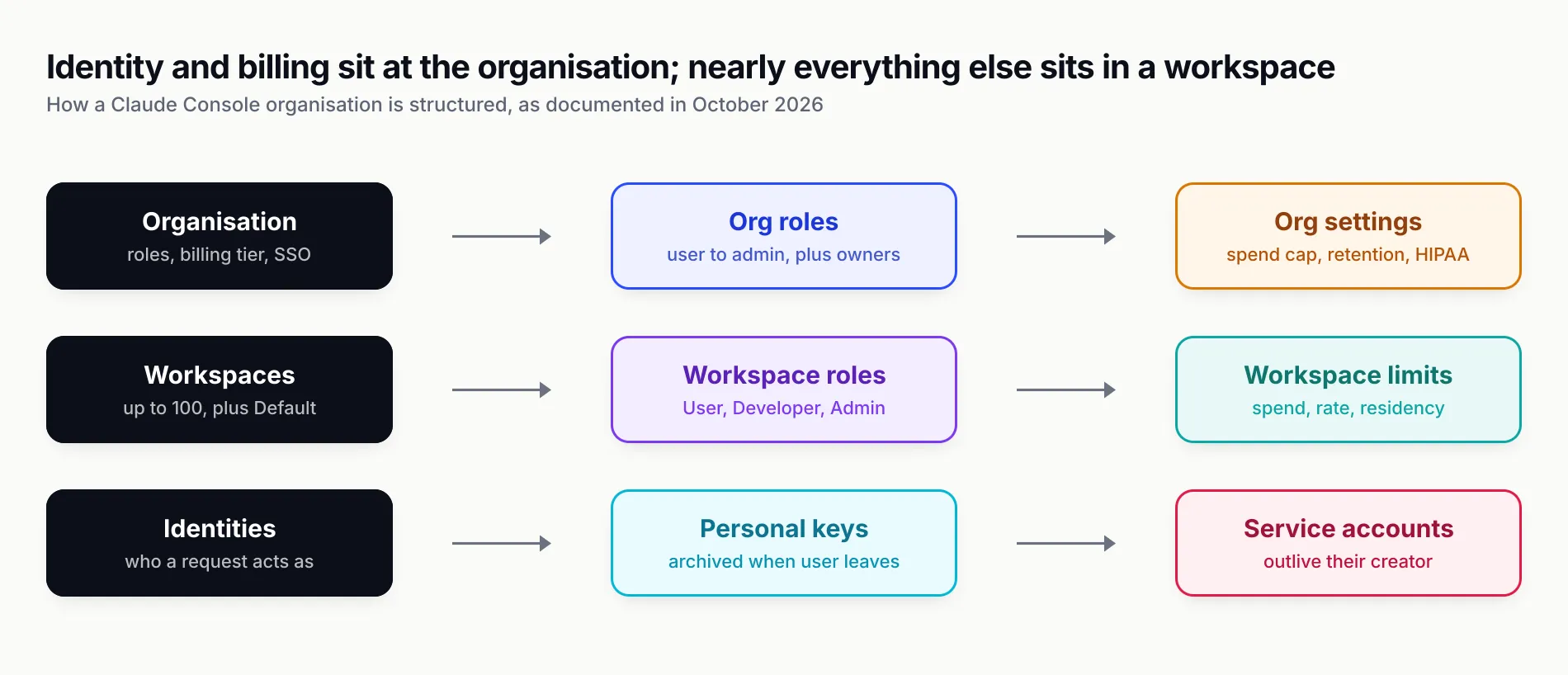
Figure 1: Identity and billing live at the organisation, almost everything else lives in a workspace, and keys inherit both.
Admin API credentials: who can hold the keys
The Admin API accepts three kinds of credential:
- An Admin API key, starting
sk-ant-admin, sent inx-api-key. Only members with the admin role can create one. - An OAuth bearer token with the
org:adminscope, sent asauthorization: Bearer. Only admins, owners and primary owners can obtain one. - A personal key or service account key that is not scoped to a single workspace, which has the same permissions as the linked account.
An Admin API key covers most endpoints. The exceptions are the service-account, federation-issuer and federation-rule endpoints, which accept only an org:admin OAuth token. Workspace keys never work against the Admin API.
Creating an Admin API key
For a Console organisation, an admin goes to platform.claude.com/settings/admin-keys, clicks Create admin key, names it and chooses an expiration. Console admin keys do not have selectable scopes: every key carries full access to every endpoint that accepts Admin API keys. The secret begins sk-ant-admin01- and is shown once. One key covers the Admin API, the Usage and Cost API, the Rate Limits API, the Claude Code Analytics API and the Compliance API Activity Feed.
That lack of scopes is the most important security fact on this page. A Console admin key used only to pull a nightly cost report can also remove members and disable every production key. Store it accordingly, and set an expiration: Console keys offer 3 hours, 1 day, 7 days, 30 days, a custom duration or Never, the expiration cannot be changed after creation, and an organisation-wide maximum-expiration policy removes the Never option. Anthropic emails the creator 7 days before expiry for keys with a lifetime of at least 14 days.
OAuth tokens and service accounts
The interactive alternative is the ant CLI. An admin logs in under a dedicated profile with the org:admin scope and exports a short-lived bearer token:
ant auth login --profile admin --scope "org:admin"
export ANTHROPIC_AUTH_TOKEN=$(ant auth print-credentials --profile admin --access-token)
These tokens are short-lived, so a leaked one ages out on its own, and Anthropic recommends a shell reserved for administration with ANTHROPIC_API_KEY unset. One caveat: an org:admin token grants access to the whole organisation regardless of the workspace its profile is bound to.
For CI and other unattended jobs, Anthropic points to service accounts (svac_ IDs) and Workload Identity Federation, where a workload exchanges an identity token from AWS, Google Cloud, GitHub Actions, Kubernetes or another OIDC issuer for a short-lived Claude token. The key types table now distinguishes personal keys (act as you, archived when you leave), service account keys (act as the service account, survive the creator leaving) and legacy workspace keys (belong to the workspace, outlive everyone). Anthropic recommends identity-backed keys over workspace keys for new integrations, and that recommendation changes the offboarding maths covered below.
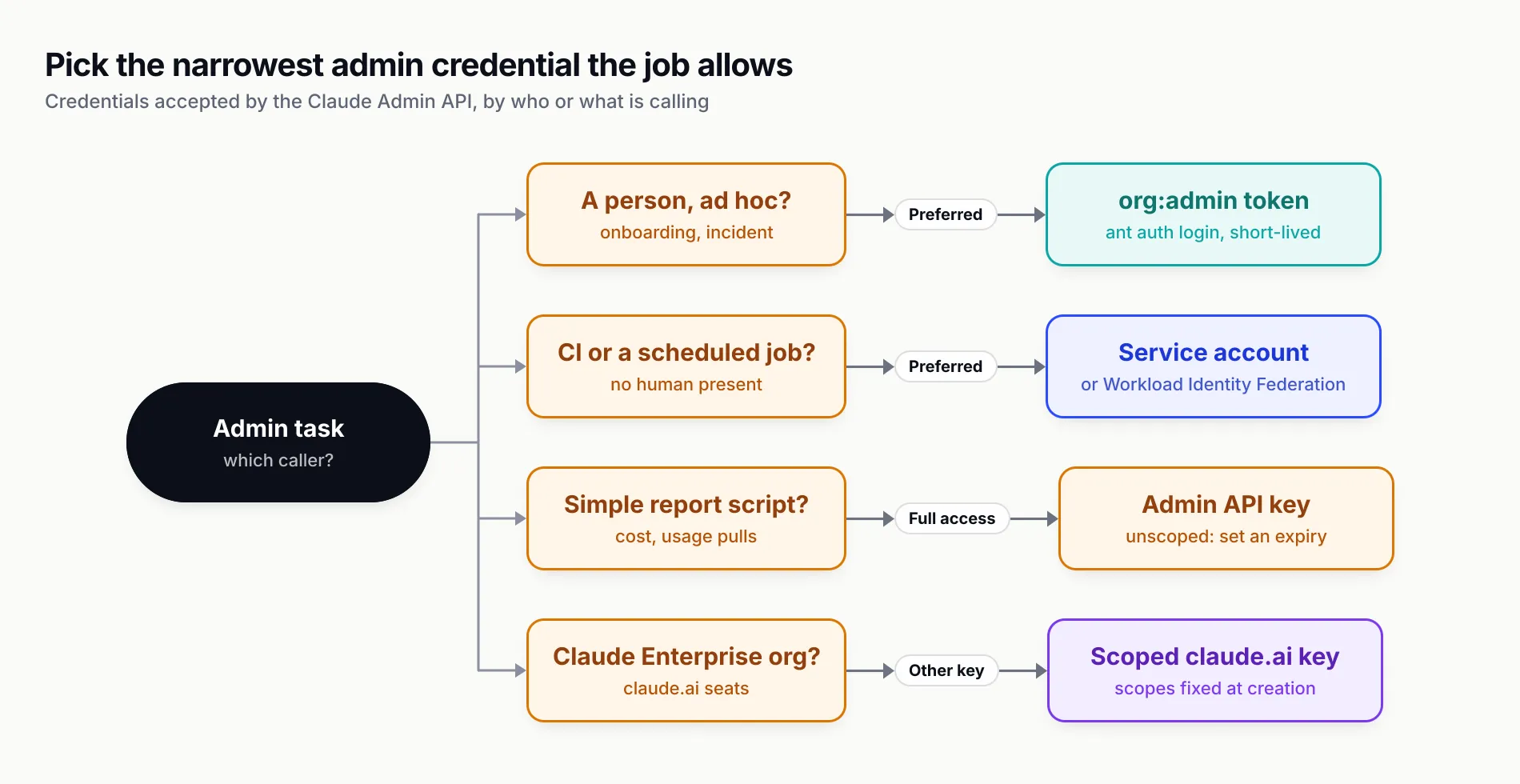
Figure 2: The unscoped Admin API key is the easiest credential to start with and the riskiest one to leave lying around.
The Admin API, endpoint by endpoint
All endpoints sit under https://api.anthropic.com/v1/organizations and take the anthropic-version: 2023-06-01 header. The SDKs expose them under client.organization and the CLI under ant organization. The examples below follow Anthropic’s documented request shapes; they assume ANTHROPIC_ADMIN_KEY holds an sk-ant-admin01- key, and the IDs are Anthropic’s placeholder values.
| Resource | Endpoints | Notes |
|---|---|---|
| Organisation | GET /me | Returns the organisation the credential belongs to |
| Members | GET /users, GET /users/{id}, POST /users/{id}, DELETE /users/{id} | Cannot remove members with the admin role |
| Invites | POST /invites, GET /invites, GET /invites/{id}, DELETE /invites/{id} | Expire after 21 days |
| Workspaces | create, get, list, update, POST /workspaces/{id}/archive | Archive is irreversible |
| Workspace members | POST, GET, DELETE on /workspaces/{id}/members[/{user_id}] | Roles such as workspace_developer, workspace_admin |
| API keys | GET /api_keys, GET /api_keys/{id}, POST /api_keys/{id} | Read, rename, change status; no create |
| Rate limits | GET /rate_limits, GET and POST on /workspaces/{id}/rate_limits | Workspace overrides only |
| Service accounts, federation | svac_, fdis_, fdrl_ resources | org:admin OAuth token only |
Check the credential and list members
curl "https://api.anthropic.com/v1/organizations/me" \
  -H "x-api-key: $ANTHROPIC_ADMIN_KEY" \
  -H "anthropic-version: 2023-06-01"

curl "https://api.anthropic.com/v1/organizations/users?limit=10" \
  -H "x-api-key: $ANTHROPIC_ADMIN_KEY" \
  -H "anthropic-version: 2023-06-01"
The first call is the cheapest way to confirm which organisation a key belongs to before running anything destructive. It returns an id, a type of organization and the name.
Invite someone and change a role
curl "https://api.anthropic.com/v1/organizations/invites" \
  -H "x-api-key: $ANTHROPIC_ADMIN_KEY" \
  -H "anthropic-version: 2023-06-01" \
  -H "content-type: application/json" \
  -d '{"email": "new.engineer@example.com", "role": "claude_code_user"}'

curl "https://api.anthropic.com/v1/organizations/users/user_01XyDMpzjS89pFZXqSFUBDr6" \
  -H "x-api-key: $ANTHROPIC_ADMIN_KEY" \
  -H "anthropic-version: 2023-06-01" \
  -H "content-type: application/json" \
  -d '{"role": "developer"}'
Anthropic’s documented example invites with developer; claude_code_user is one of the five role values the API lists. Invites expire after 21 days and the period is not configurable, so an onboarding script should check for expired invites and resend.
Create a workspace and give a team access
curl -X POST "https://api.anthropic.com/v1/organizations/workspaces" \
  -H "x-api-key: $ANTHROPIC_ADMIN_KEY" \
  -H "anthropic-version: 2023-06-01" \
  -H "content-type: application/json" \
  -d '{"name": "Production - Support Bot"}'

curl -X POST "https://api.anthropic.com/v1/organizations/workspaces/wrkspc_01JwQvzr7rXLA5AGx3HKfFUJ/members" \
  -H "x-api-key: $ANTHROPIC_ADMIN_KEY" \
  -H "anthropic-version: 2023-06-01" \
  -H "content-type: application/json" \
  -d '{"user_id": "user_01XyDMpzjS89pFZXqSFUBDr6", "workspace_role": "workspace_developer"}'
Audit and disable keys
curl "https://api.anthropic.com/v1/organizations/api_keys?limit=100&status=active&workspace_id=wrkspc_01JwQvzr7rXLA5AGx3HKfFUJ" \
  -H "x-api-key: $ANTHROPIC_ADMIN_KEY" \
  -H "anthropic-version: 2023-06-01"

curl "https://api.anthropic.com/v1/organizations/api_keys/apikey_01Rj2N8SVvo6BePZj99NhmiT" \
  -H "x-api-key: $ANTHROPIC_ADMIN_KEY" \
  -H "anthropic-version: 2023-06-01" \
  -H "content-type: application/json" \
  -d '{"status": "inactive"}'
Each key in the list response now carries expires_at, a principal and a scope. The principal tells you whether the key acts as a user (user_actor), a service account (service_account_actor) or nobody (null, a legacy workspace key). The scope is either a single workspace or the whole organisation. Do not rely on the old top-level workspace_id field: it is deprecated and reads null both for Default Workspace keys and for organisation-wide keys. Setting inactive is reversible from the Console; deleting a key archives it permanently.
Cap a workspace’s rate limit
curl -X POST "https://api.anthropic.com/v1/organizations/workspaces/wrkspc_01JwQvzr7rXLA5AGx3HKfFUJ/rate_limits/$RATE_LIMIT_ID" \
  -H "x-api-key: $ANTHROPIC_ADMIN_KEY" \
  -H "anthropic-version: 2023-06-01" \
  -H "content-type: application/json" \
  -d '{"limits": [{"type": "input_tokens_per_minute", "value": 30000}]}'
$RATE_LIMIT_ID is the top-level id of the matching entry from GET /v1/organizations/rate_limits, not the rlg_ group ID. A null value clears the override. Changes take effect within about an hour, and organisation limits cannot be raised through the API at all; that goes through Request tier increase in the Console.
What the Admin API will not do
Three limits are documented and worth designing around. It cannot create API keys: keys are made in the Console, which keeps a compromised automation account from minting fresh credentials. It cannot remove members with the admin role, so revoking an admin is a manual job for an owner. And there is no documented Console endpoint for workspace spend limits, SSO or retention settings. Anthropic’s Enterprise user-management page also documents a shared Admin API limit of 100 requests per minute per organisation, with invite creation limited separately to 1,200 an hour; we have not found the same figure on the Console guide, so treat it as a planning ceiling rather than a guarantee.
Reporting: usage, cost, Claude Code and rate limits
Reporting is where the Admin API pays for itself, because the Console pages are read-only views of the same data.
Usage and Cost API
The Usage API at /v1/organizations/usage_report/messages returns token counts (uncached input, cached input, cache creation, output) in time buckets, filterable and groupable by API key, workspace, model, service tier, context window, inference geography and speed. A weekly per-workspace pull:
curl "https://api.anthropic.com/v1/organizations/usage_report/messages?\
starting_at=2026-10-13T00:00:00Z&\
ending_at=2026-10-20T00:00:00Z&\
group_by[]=workspace_id&\
group_by[]=model&\
bucket_width=1d" \
  -H "anthropic-version: 2023-06-01" \
  -H "x-api-key: $ANTHROPIC_ADMIN_KEY"
The Cost API at /v1/organizations/cost_report returns USD, as decimal strings in cents, at daily granularity only, grouped by workspace or description:
curl "https://api.anthropic.com/v1/organizations/cost_report?\
starting_at=2026-10-01T00:00:00Z&\
ending_at=2026-10-21T00:00:00Z&\
group_by[]=workspace_id&\
group_by[]=description" \
  -H "anthropic-version: 2023-06-01" \
  -H "x-api-key: $ANTHROPIC_ADMIN_KEY"
The bucket limits cap how much you get per call:
| Bucket width | Default buckets | Maximum buckets |
|---|---|---|
1m | 60 | 1,440 |
1h | 24 | 168 |
1d | 7 | 31 |
Data typically appears within 5 minutes, and Anthropic supports polling once a minute for sustained use. Three reconciliation traps: Priority Tier costs are not in the cost endpoint and must be tracked through usage with service_tier; code execution appears only in cost, not usage; and Console playground usage has a null api_key_id. Finance teams that want a ready-made view can use the partner integrations Anthropic lists, including Datadog, Grafana Cloud, CloudZero and Vantage.
Claude Code Analytics API
/v1/organizations/usage_report/claude_code returns one record per user per day, with sessions, lines added and removed, commits and pull requests created through Claude Code, accept and reject counts for the Edit, MultiEdit, Write and NotebookEdit tools, and tokens with estimated cost by model:
curl "https://api.anthropic.com/v1/organizations/usage_report/claude_code?\
starting_at=2026-10-20&\
limit=100" \
  -H "anthropic-version: 2023-06-01" \
  -H "x-api-key: $ANTHROPIC_ADMIN_KEY"
starting_at is a single UTC date, limit defaults to 20 with a maximum of 1,000, and data lags by up to an hour. The API is free for all organisations with Admin API access. Its blind spots are large, though. It does not include subscription usage: engineers who sign in with Pro, Max, Team or Enterprise are attributed to the claude.ai organisation. And it only tracks Claude Code on the Claude API, so Bedrock, Vertex, Foundry and Claude Platform on AWS usage is invisible. A team with mixed sign-in methods needs OpenTelemetry export to see everything.
Rate Limits API
GET /v1/organizations/rate_limits returns each rate limit group with the models it covers and its requests_per_minute, input_tokens_per_minute and output_tokens_per_minute values. Use the group’s rlg_ ID as the stable key: display names and model lists change when Anthropic regroups models. The workspace endpoint returns overrides only unless you pass include_inherited=true, so a missing group means “inherits the organisation limit”, not “unlimited”.
Identity: SSO, domain verification and provisioning
SSO for a Console organisation works through a parent organisation, which stores domain verification and SSO settings and can be shared across several Claude and Console organisations. Enterprise plans get one automatically and Team plans get one when SSO is first enabled, but a Console organisation’s parent is not created automatically; requires action. A Console organisation without a Team or Enterprise plan has to ask Anthropic’s sales team for one; a company that already has an Enterprise plan can have an owner invite the Console organisation to merge into its parent.
Once the Identity and access page appears at platform.claude.com/settings/identity, the setup requires an Admin on the Console side and follows a fixed order. You verify each domain with a DNS TXT record beginning anthropic-domain-verification-, then configure the IdP connection through a WorkOS-hosted flow (Anthropic names WorkOS as its provider for domain verification and SSO). A verified domain belongs to one parent organisation and cannot be claimed by another, and each parent links to exactly one identity provider. After verification, owners get a Restrict organization creation toggle that stops anyone creating new Claude or Console organisations, including personal accounts, on the company’s domains. That is the closest the Console gets to domain capture, and it is a useful brake on shadow API accounts.
Provisioning has three modes:
| Provisioning method | Team plan | Enterprise plan | Console organisation |
|---|---|---|---|
| Invite only | Yes | Yes | Yes |
| Just-in-time (JIT) | Yes | Yes | Yes |
| SCIM | No | Yes | Only under an Enterprise parent |
The SCIM footnote is easy to miss: a Console organisation merged with a Team plan’s parent does not get SCIM. Provisioning also changes what the Admin API can do. On the Enterprise side, Anthropic documents that when an IdP provisions users by JIT or SCIM, invite creation returns 400, and IdP-managed roles or membership block role updates and removals through the API. Plan for the IdP to become the source of truth for membership, with the Admin API used for workspace assignment and reporting.
Data retention, zero data retention and HIPAA
Retention is an organisation decision with workspace-level exceptions, and the defaults are documented precisely.
Standard retention. For API users, Anthropic automatically deletes inputs and outputs within 30 days, except for features with their own storage (such as the Files API), agreed arrangements such as zero data retention, Usage Policy enforcement and legal requirements. Flagged content can be retained for up to 2 years whatever arrangement is in place.
Zero data retention. ZDR means Anthropic does not store prompts or responses at rest after the response is returned. It is arranged through sales, enabled per organisation, and does not carry over to new organisations under the same account. It covers the Messages and Token Counting APIs for eligible features and Claude Code used with API keys from a commercial organisation. It does not cover any Console usage including the playground, Claude Managed Agents, stateful features such as batches, files and code execution, or CORS requests from browsers.
Covered Models. The surprising entry for October 2026: Anthropic lists Claude Fable 5.1, Claude Mythos 5.1, Claude Fable 5 and Claude Mythos 5 as Covered Models that require 30-day data retention, so they are not available under ZDR without express authorisation. A ZDR organisation that wants them can enable 30-day retention for one workspace on the Data retention page while the others stay at zero retention. The Default Workspace always follows the organisation setting, which is yet another reason to keep real work out of it.
HIPAA readiness. Eligible organisations can accept Anthropic’s standard BAA in the Console, and the controls apply immediately. The setting is permanent and cannot be disabled by an administrator; the API then rejects non-eligible features with a 400 error. Because enforcement is organisation-wide, Anthropic tells customers to use a separate organisation for workloads that do not need HIPAA readiness. Claude Code is not covered.
Audit trail. A standalone Console organisation can read the Compliance API’s Activity Feed with its Admin API key, and only the Activity Feed; content, session and directory endpoints need a Compliance Access Key from a Claude Enterprise tenant. Anthropic states the Activity Feed retains data for six years.
Platform admin versus Claude Team and Enterprise admin
The same endpoint paths serve both products, which is why search results blur them. They are different systems with different keys:
| Claude Console organisation | Claude Enterprise organisation | |
|---|---|---|
| Where admin keys are made | platform.claude.com, admins only | claude.ai, primary owner (or owner for compliance scopes) |
| Key prefix | sk-ant-admin01- | sk-ant-api01- |
| Key scopes | None; full access | Selected at creation, fixed afterwards |
| Organisation roles via API | user, claude_code_user, developer, billing, admin | user, managed, owner, membership_admin, primary_owner |
| Roles the API can assign | All five Console roles | Only user and managed |
| Workspaces, API keys, rate limits | Yes | No |
| Groups and custom roles | No | Yes (custom roles read-only) |
| Per-user spend limits | Claude Code workspace, in the Console | Spend Limits API |
| Usage and cost | Usage and Cost API | Claude Enterprise Analytics API |
| Compliance API | Activity Feed only | Full, with a Compliance Access Key |
The Enterprise role model is built around groups and custom roles: a managed member gets permissions from the custom roles attached to their groups, and administrative roles can be assigned only in claude.ai settings. The Spend Limits API, with eight endpoints for per-user limits and increase requests, is Enterprise-only and not available to Console organisations. Enterprise scopes include a single read-only read:org_audit for security tooling, something Console admin keys have no equivalent for.
Many companies run both: Enterprise seats for staff using Claude and a Console organisation for products built on the API. In that setup, merging the Console organisation under the Enterprise parent gives one SSO configuration and SCIM, while billing and usage stay with each organisation.
Where Anthropic’s controls stop
The native controls are good at structure and weak at granularity, and three gaps come up repeatedly.
Budgets are monthly and per workspace. There is no documented per-key or per-application spend limit for general API traffic; per-user monthly limits exist only in the Claude Code workspace. A workspace per service gets close, but at 100 workspaces per organisation that runs out for teams that want a budget per customer or per agent.
Admin credentials are coarse. A Console admin key has no scopes, so the reporting job, the onboarding script and the incident-response runbook all hold the same full-power credential unless you build around it with short-lived OAuth tokens and service accounts.
Visibility is split by sign-in method. API-key traffic, Console Claude Code logins, subscription logins and cloud-provider traffic land in four different reporting systems. The usage and analytics endpoints cannot join them.
The counter-argument is that Anthropic is closing these gaps quickly. Personal keys, service accounts, key expiration policies, workspace rate-limit writes and the org:admin scope are all recent additions, and the Rate Limits API is explicitly pitched for keeping gateways and proxies in sync. For a single-product team with a handful of workspaces, the native controls are enough.
Teams that need finer budgets, or the same policy across Anthropic and other providers, usually add a gateway in front of the API (our explainer on AI gateways covers the pattern). Bifrost, Maxim AI’s open-source gateway, is one example: its governance layer uses a hierarchical budget structure in which customers, teams, virtual keys and individual provider configs each carry their own budget, with request and token rate limits at each level. Applications hold a virtual key rather than an Anthropic key, so the real sk-ant- credentials sit in one place and a per-agent budget does not need its own workspace. The trade-off is another hop to run and secure; the gateway does not replace Anthropic-side workspace limits, which remain the backstop if the gateway is bypassed. The governance controls behind it are covered in our AI governance framework.
A worked example: onboarding, offboarding and the monthly review
Consider a 60-person engineering organisation with three products on the API and Claude Code billed through the Console.
Structure. One workspace per product per environment (six), plus the automatic Claude Code workspace, with the Default Workspace left empty. Each production workspace gets a spend limit at roughly 120% of last month’s cost from the Cost API and an alert at 80%, plus an input-token rate limit so one product cannot starve the others. Development workspaces get lower limits.
Roles. Three admins (platform lead, security lead and the CTO as owner), one billing member in finance, developer for the twelve engineers who run services, and claude_code_user for everyone else. Engineers get Workspace Developer only in their product’s workspaces.
Credentials. Production services use service account keys scoped to one workspace, or Workload Identity Federation where the platform supports it. The nightly reporting job uses an Admin API key with a 30-day expiration, rotated by a calendar reminder backed by the expiry email. Ad hoc admin work uses ant auth login --scope "org:admin".
Offboarding. When an engineer leaves, the IdP deprovisions them (or a script calls DELETE /users/{id}). Their personal keys are archived automatically and their Claude Code key stops working. Service account keys keep running, which is the point. The residual risk is legacy workspace keys they created: those continue to work, so the monthly review lists active keys, filters for a null principal, and migrates or disables them.
Monthly review. Pull members and their roles, flag any admin added in the past 30 days, list keys expiring in the next 14 days, compare cost by workspace against limits, and pull Claude Code analytics to see who is active. Every step is a GET request against the endpoints above.
What to do this week
- Move production out of the Default Workspace. It cannot be spend-limited, it hides as
nullin reports, and its retention follows the organisation. - Audit roles. List members with
GET /v1/organizations/users; cutadminto the people who must manage users, and move Claude Code-only engineers toclaude_code_user. - Find ownerless keys. List active keys and flag those whose
principalisnullor whoseexpires_atisnull; plan their replacement with personal or service account keys. - Set workspace limits. Spend limits with alerts on every non-default workspace, and rate-limit overrides where one workload could crowd out another.
- Treat the Admin API key as a root credential. Give it an expiration, keep it in a secrets manager, and prefer
org:adminOAuth tokens for people and service accounts for jobs. - Decide retention before you need it. Confirm whether you have ZDR, whether you need a 30-day workspace for Covered Models, and whether HIPAA work belongs in its own organisation.
- Request a parent organisation if you need SSO. Domain verification plus Restrict organization creation is the fastest way to stop new, unmanaged API accounts on your company domain.
The Admin API turns the Console from a settings page into something you can version, review and audit. The teams that get the most from it write the role model and workspace layout down first, then script the parts Anthropic lets them script, and accept that key creation and identity stay deliberate, manual steps.
Sources
- Admin API Anthropic
- Create an Admin API key Anthropic
- Authentication: key types and expiration Anthropic
- Workspaces Anthropic
- Create Workspace (API reference) Anthropic
- Usage and Cost API Anthropic
- Claude Code Analytics API Anthropic
- Rate Limits API Anthropic
- Rate limits: spend limits and tiers Anthropic
- API and data retention Anthropic
- User management (Claude Enterprise) Anthropic
- Compliance API Anthropic
- Spend Limits API Anthropic
- API Console roles and permissions Anthropic Help Center
- Important considerations before enabling SSO and JIT/SCIM provisioning Anthropic Help Center
- Set up single sign-on (SSO) Anthropic Help Center
- How long do you store my organization's data? Anthropic Privacy Center
- Claude Code identity and access management Anthropic
- Bifrost budget and limits Maxim AI
Frequently asked questions
What is the Claude Admin API?
The Admin API is a set of endpoints under api.anthropic.com/v1/organizations that lets a Claude Console organisation manage its members, invites, workspaces, workspace members and API keys programmatically, and read usage, cost, Claude Code and rate limit reports. It is unavailable for individual accounts.
How do I get an Anthropic Admin API key?
An organisation member with the admin role opens the Admin keys page in the Claude Console (platform.claude.com/settings/admin-keys), clicks Create admin key, names it and picks an expiration. The secret starts with sk-ant-admin01- and is shown once. Claude Enterprise organisations create a scoped key in claude.ai instead.
What roles exist in the Claude Console?
Anthropic's Admin API documentation lists five organisation roles: user, claude_code_user, developer, billing and admin, with owners and primary owners holding all admin permissions plus the ability to manage admins. The Help Center also lists a Limited Developer role. Workspaces add Workspace User, Limited Developer, Developer and Admin roles, plus an inherited Workspace Billing role.
Can I create API keys with the Admin API?
No. As of October 2026 API keys are created in the Claude Console. The Admin API can list and retrieve keys, rename them and change their status to inactive, which is how most teams automate key audits and emergency revocation.
How do I set spend limits per workspace in the Claude Console?
Open the Workspaces page, select the workspace and click Spend limits to cap monthly spend and set alert thresholds. Rate limits per workspace are set on the Rate limits page or through the Set Workspace Rate Limits endpoint. Workspace limits can only be lower than the organisation's, and the Default Workspace cannot have a spend limit.
Does the Claude Code Analytics API include Pro, Max, Team or Enterprise users?
No. It reports only Claude Code usage authenticated against your Claude Console organisation on the Claude API. Subscription logins are attributed to the claude.ai organisation, and usage through Bedrock, Vertex, Foundry or Claude Platform on AWS is excluded.
Is zero data retention on by default for the Claude API?
No. By default Anthropic deletes API inputs and outputs within 30 days. Zero data retention is arranged per organisation through Anthropic's sales team, does not cover Console playground use, and does not apply to the Covered Models that require 30-day retention.