ToolsExplainer
The definitive guide to Atlassian MCP: setup, auth, admin controls and limits
Atlassian's hosted MCP server gives AI clients Jira, Confluence, Bitbucket and more at mcp.atlassian.com/v2/mcp. How to connect it, how OAuth and API tokens differ, what admins control and where it stops.
Atlassian’s MCP server is the official way to give an AI client live access to Jira, Confluence and the rest of Atlassian Cloud. It is a hosted endpoint, https://mcp.atlassian.com/v2/mcp, that Claude, ChatGPT, Cursor, VS Code, Codex, Gemini CLI and any other Model Context Protocol client can connect to. Once a user signs in, the agent can search work items with JQL, read and write Confluence pages, open Bitbucket pull requests and pull Loom transcripts, always with that user’s existing permissions.
That makes it one of the most useful servers a software team can connect, and one of the more consequential. Jira and Confluence hold a company’s plans, incidents, customer tickets and internal documentation, and an agent with write access can change all of it. Atlassian has built an unusual amount of admin control around the server for exactly that reason: domain and IP allowlists, per-app permission groups, audit logging and a data security policy that can hide content from MCP altogether.
This guide is for the developer who wants it working in their editor this afternoon and for the Atlassian admin who has to decide whether to allow it at all. It covers what the server exposes, how to connect each major client, how OAuth and API tokens differ, every admin control we could find in Atlassian’s documentation, the rate limits and costs, worked workflows, and the self-hosted alternative for Data Center. Facts are as of October 2026 and come from Atlassian’s support and developer documentation unless stated. If MCP itself is new to you, start with our plain-language introduction to MCP and come back.
What the Atlassian MCP server is, and what it is called now
The product has had three names in eighteen months, which matters when you search for help. Atlassian announced a “Remote MCP Server” in beta on 1 May 2025, with Anthropic as the first partner and the server built on Cloudflare’s Agents SDK. It was renamed the Atlassian Rovo MCP Server and declared generally available on 4 February 2026. Since then, the documentation has increasingly dropped “Rovo”: the support pages are titled “Atlassian MCP server”, and their URLs have moved under an “atlassian-ai-gateway” collection, with old links redirecting. The official GitHub repository calls it the Atlassian MCP Server and licenses its packaging and skills under Apache 2.0. The server itself is not open source; the repository holds manifests, plugin packaging and agent skills, not the service code.
Architecturally it is a remote MCP server speaking Streamable HTTP. There is nothing to install on the user’s machine for clients that support remote servers natively. The product page states that the server “does not store or cache your Jira or Confluence content” and acts as a proxy between the client and the Cloud site. The same page says it does not currently support FedRAMP or HIPAA requirements, which rules it out for some regulated tenants before any other question arises.
Products it reaches
The README lists Jira, Confluence, Jira Service Management, Bitbucket Cloud, Compass, Loom and Atlassian platform data: Projects, Goals, Teams, Focus, Talent and the Teamwork Graph. The v2 supported tools page adds Assets, capacity planning and a cross-provider code search toolset. We counted roughly 240 distinct tools on that page in October 2026. Compass appears in the README’s product table but not as its own toolset on the v2 tools page, so treat Compass support on v2 as something to test rather than assume.
Some products come with conditions, according to the README’s product notes:
- Bitbucket Cloud tools work only if the Bitbucket workspace is linked to an Atlassian organisation.
- Loom tools work only for Loom workspaces linked to an Atlassian site.
- Jira Service Management tools work only with API token authentication, and only if an admin has enabled it.
- Teamwork Graph tools can return data from third-party tools connected to Jira, such as GitHub pull requests and builds. For GitHub for Atlassian with “full access”, results follow the user’s GitHub permissions; other connectors follow the user’s Jira permissions.
How the server exposes its tools
Roughly 240 tool definitions would eat a large share of any model’s context window before the user typed a word. v2 avoids that by exposing a small set of primary tools and letting the client find the rest on demand. The common tools are:
| Tool | What it does |
|---|---|
atlassianUserInfo | Returns the signed-in user’s account |
getAccessibleAtlassianResources | Lists sites the user can reach with their cloudId; every other call needs one |
discover | Natural-language search over the deferred tool catalogue |
executeRead, executeWrite, executeDestructive | Run a discovered tool; the split lets the client apply confirmation by risk |
getContentFormatGuide | Formatting guidance for rich Confluence content and whiteboards |
Around two dozen product tools are also marked primary and visible directly, including getJiraIssue, createJiraIssue, editJiraIssue, transitionJiraIssue, searchJiraIssuesUsingJql, getConfluenceContent, createConfluenceContent, updateConfluenceContent, searchConfluence, getLoomVideo and the Teamwork Graph context tools.
The three execute tools are a thoughtful piece of design. Because a destructive deletion has to go through executeDestructive rather than a generic call, a client that asks for confirmation per tool can auto-approve reads, prompt for writes and always stop on deletes. In Claude Code, that maps directly to allow and ask rules in permissions settings.
There is one escape hatch. If you put the server behind an MCP gateway, or use a client that cannot work with discover-and-execute, Atlassian documents an override that returns every tool as a paginated flat list: https://mcp.atlassian.com/v2/mcp?tools=all. We return to why a gateway wants that below.
Permission groups
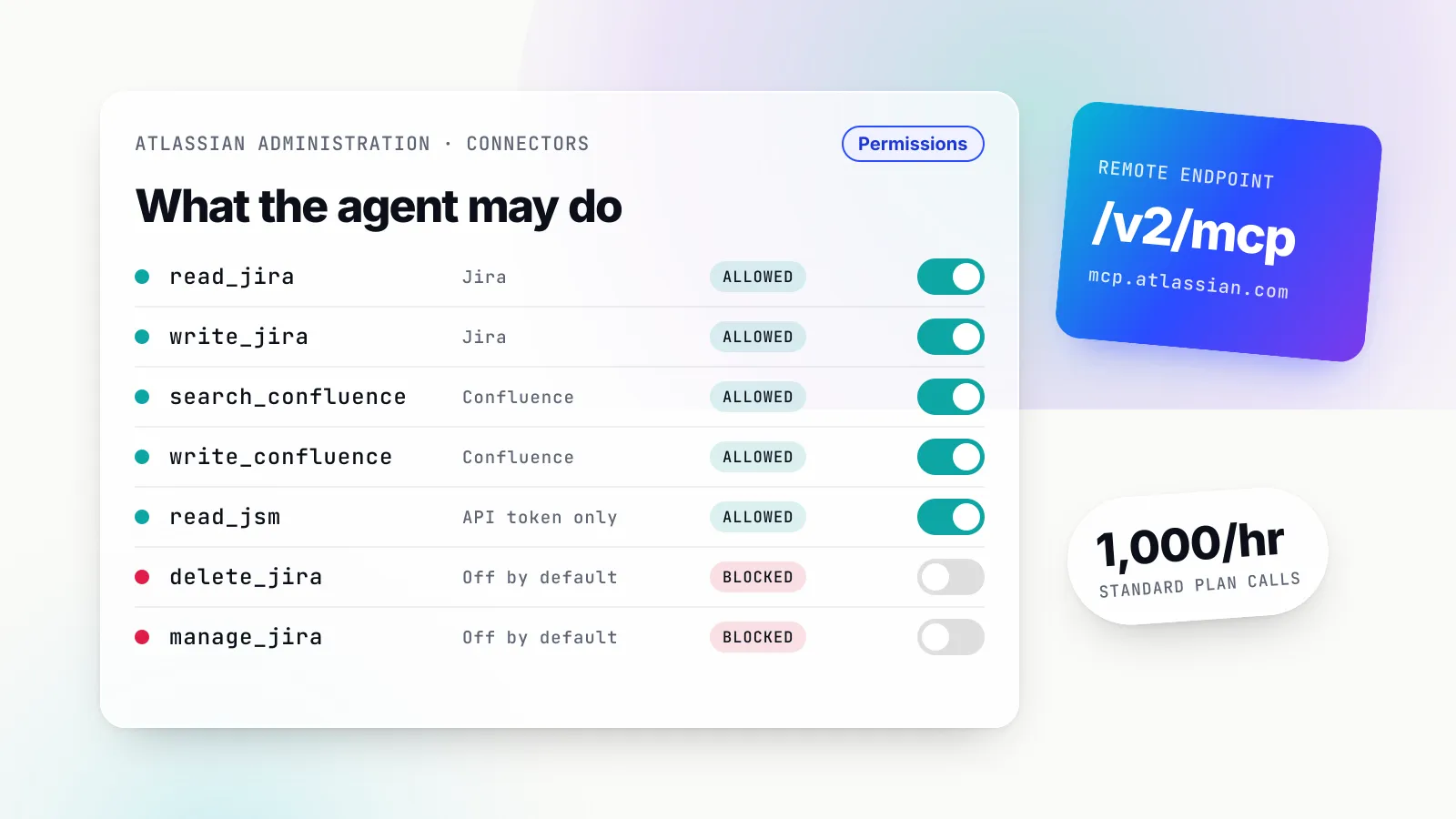
Tools are organised into permission groups by product and intent, and both the OAuth scopes and the admin switches work at that level. The main groups:
| Product | Groups | OAuth 2.1 | API token |
|---|---|---|---|
| Jira | read_jira, write_jira, search_jira | Yes | Yes |
| Jira (admin-enabled) | delete_jira, manage_jira | Yes | Yes |
| Confluence | read_confluence, write_confluence, search_confluence | Yes | Yes |
| Bitbucket Cloud | read_bitbucket, write_bitbucket | Yes | Yes |
| Jira Service Management | read_jsm, write_jsm | No | Only |
| Atlassian platform | read_teamwork_graph, write_teamwork_graph, search_atlassian | Yes | Yes |
| Teams | read_teams, write_teams | Only | No |
| Code search | search_code | Only | No |
| Loom, Goals, Projects, Focus, Talent | read_*, write_* | Yes | Yes |
Two rows deserve attention. delete_jira is disabled by default and covers permanent deletion of issues, comments and attachments. manage_jira, also off by default, can create Jira spaces, update project settings and edit screens. The Jira Service Management tools are narrower than the product name suggests: as of October 2026 they cover operations alerts, on-call schedules and teams (getJsmOpsAlerts, getJsmOpsScheduleInfo, getJsmOpsTeamInfo and updateJsmOpsAlert), not customer request queues.
write_confluence is broader than “edit a page”. It includes addConfluenceContentPermissions, replaceConfluenceContentPermissions, setConfluenceContentRestrictionState and enableConfluencePublicLink. An agent with Confluence write access can, in principle, make a page public. That is the single strongest argument for narrowing write permissions per app, covered in the admin section.
Setting it up in Claude, Cursor, VS Code and other clients
All clients point at the same URL. What differs is whether the client speaks remote HTTP natively, where it stores the configuration and how it runs the OAuth flow. Atlassian’s getting-started page is the canonical list; the snippets below are taken from it and from each client’s own documentation.
Claude Code
claude mcp add --transport http atlassian https://mcp.atlassian.com/v2/mcpThen start a session and run /mcp to authenticate. The browser opens, you approve the consent screen, and the tools appear. By default the command writes to local scope; add --scope project to put the entry in .mcp.json at the repository root so the whole team gets it, or --scope user for every project on your machine. The equivalent JSON entry needs an explicit type, because Claude Code treats an entry with a URL but no type as a configuration error:
{
  "mcpServers": {
    "atlassian": {
      "type": "http",
      "url": "https://mcp.atlassian.com/v2/mcp"
    }
  }
}
For a headless run such as claude -p in CI, there is no /mcp panel to complete OAuth, so either sign in interactively first with claude mcp login atlassian or use an API token header (see the authentication section). The repository also ships a Claude Code plugin with Atlassian’s agent skills bundled, if you prefer to install it that way.
If you are moving from v1, note that v2 is a separate OAuth resource, so v1 credentials do not carry over. Atlassian’s upgrade page publishes a shell one-liner that rewrites v1 entries in ~/.claude.json and project .mcp.json files, backs up the original and tells you which servers to log in to again.
Claude.ai and Claude Desktop
In Claude Desktop, Atlassian’s instructions are to go to Settings, then Extensions, then Browse extensions, then Plugins, and install Atlassian. On claude.ai, Atlassian is in the connector directory; users add it from Customize, then Connectors. On Team and Enterprise plans, an owner adds the connector for the organisation and each member then connects individually, so Claude only sees what that member can see in Atlassian.
One detail from Anthropic’s help centre matters a great deal for Atlassian admins. For remote connectors, the connection to your MCP server originates from Anthropic’s servers, not the user’s laptop, even in Claude Desktop. If your Atlassian organisation enforces an IP allowlist, a user on the corporate VPN will still be blocked unless Anthropic’s published outbound range (160.79.104.0/21 as of October 2026) is allowed. The same applies to ChatGPT, whose egress ranges Atlassian’s README points to.
If you need a local connection instead, Atlassian supports any client that can run the mcp-remote proxy, which needs Node.js 18 or later:
{
  "mcpServers": {
    "atlassian": {
      "command": "npx",
      "args": ["-y", "mcp-remote", "https://mcp.atlassian.com/v2/mcp"]
    }
  }
}
That keeps traffic on the local network’s egress IP, which is sometimes the simpler fix for an IP allowlist.
Cursor
The quickest route is the Atlassian plugin on the Cursor Marketplace, which bundles the server and Atlassian’s skills. To configure it by hand, Cursor reads .cursor/mcp.json in a project or ~/.cursor/mcp.json globally, and remote servers take a url key:
{
  "mcpServers": {
    "atlassian": {
      "url": "https://mcp.atlassian.com/v2/mcp"
    }
  }
}
Cursor’s OAuth callback uses a custom protocol, cursor://cursor.mcp, which is why Atlassian’s list of supported domains includes a protocol-specific entry for it.
VS Code and GitHub Copilot
Open the Extensions view, search for @mcp Atlassian and select Install. Alternatively, run MCP: Add Server from the Command Palette, choose HTTP and paste the URL. VS Code has been reorganising where MCP configuration lives: its documentation now offers a Copilot global file and a workspace-root .mcp.json, and labels the older .vscode/mcp.json as deprecated in the guided flow while keeping it for compatibility. The two formats differ: portable files use mcpServers, the VS Code format uses servers. In the VS Code format the entry is:
{
  "servers": {
    "atlassian": {
      "type": "http",
      "url": "https://mcp.atlassian.com/v2/mcp"
    }
  }
}
Codex, Windsurf, Gemini CLI and the rest
Codex takes codex mcp add atlassian --url https://mcp.atlassian.com/v2/mcp. Windsurf uses a serverUrl key in its Cascade MCP settings. The README lists GitHub Copilot CLI, Gemini CLI, Docker’s MCP Toolkit, Kiro and Amazon Quick Suite as supported clients, and any other MCP client can use the URL directly. Atlassian also publishes a prompt you can paste into a coding agent asking it to install and authenticate the server itself, which works in most terminal agents.
Authentication: OAuth 2.1, API tokens and enterprise-managed sign-in
OAuth 2.1, the default
With OAuth, the client initiates an authorisation flow, the user approves a consent screen on Atlassian, and the client sends the resulting access token as a Bearer header on every call. The consent screen decides which Atlassian apps and scopes the token covers, and the server loads only the tools compatible with what was granted. Tokens are typically bound to a specific cloudId, and the server checks that each request targets the site the token was granted for.
The important property is that OAuth runs as the person. There are no shared credentials, every audit log entry names a real user, and if the user cannot see a Jira project in the browser, the agent cannot see it either. For interactive use in an IDE or chat client, this is the right choice and needs no admin action beyond leaving the defaults alone.
API tokens, for headless use
API token authentication exists for service-style or non-interactive tools: backend automations, CI pipelines and anything that cannot open a browser. It is off until an organisation admin enables it under Atlassian Administration, Connectors, Atlassian MCP server, Authentication. Two mechanisms are supported:
| Mechanism | Header | Typical owner |
|---|---|---|
| Personal API token | Authorization: Basic <base64(email:api_token)> | An individual developer |
| Service account API key | Authorization: Bearer <api_key> | An admin-managed service account |
Building the Basic credential is a one-liner, echo -n "you@example.com:YOUR_TOKEN" | base64, and the client configuration then carries a static header:
{
  "mcpServers": {
    "atlassian-mcp": {
      "url": "https://mcp.atlassian.com/v2/mcp",
      "headers": {
        "Authorization": "Bearer YOUR_SERVICE_ACCOUNT_KEY"
      }
    }
  }
}
In Claude Code the same thing is claude mcp add --transport http atlassian https://mcp.atlassian.com/v2/mcp --header "Authorization: Bearer ${ATLASSIAN_MCP_KEY}", with the variable kept out of the repository.
Atlassian is candid about the trade-offs. Some tools are missing because the product scopes they need cannot be granted to personal tokens or API keys; Teams and code search are OAuth-only. Tokens are not bound to a cloudId, so the client must pass the right one explicitly, which is useful for cross-site jobs and a source of mistakes. And because there is no OAuth redirect, API token connections are not checked against the domain allowlist at all; only the IP allowlist and the token’s scopes constrain them.
The audit trail changes too. With API tokens, Atlassian notes that tool calls may run under a service account and the log will show that account, not the individual who typed the prompt into the AI tool. If ten engineers share one CI key, the log tells you the key did it.
One inconsistency is worth flagging. The API token page shows v2 URLs, but the v2 migration script on the upgrade page deliberately skips token-authenticated entries, describing bearer and basic auth as “documented only for v1/mcp”. Test token authentication against the v2 endpoint before you migrate a production automation.
Enterprise-managed authentication
For organisations on Okta, Atlassian documents enterprise-managed authentication, also called Cross App Access, for Claude. Instead of each user consenting individually, MCP authorisations are brokered through the identity provider, so app assignments, groups and conditional access decide who can connect. The setup involves enabling it in Atlassian Administration, configuring an XAA resource application in Okta with Atlassian’s issuer URL and your cloudId, and choosing managed authentication in Claude. As of October 2026, the guide still uses the v1 authv2 URL and warns that v2 uses different OAuth scopes, so anyone restricting scopes in Okta needs to add the v2 ones.
The admin controls, gate by gate
Atlassian’s admin model is easier to reason about as a series of gates. A tool call succeeds only if it clears all of them, and failing any one returns a specific error.
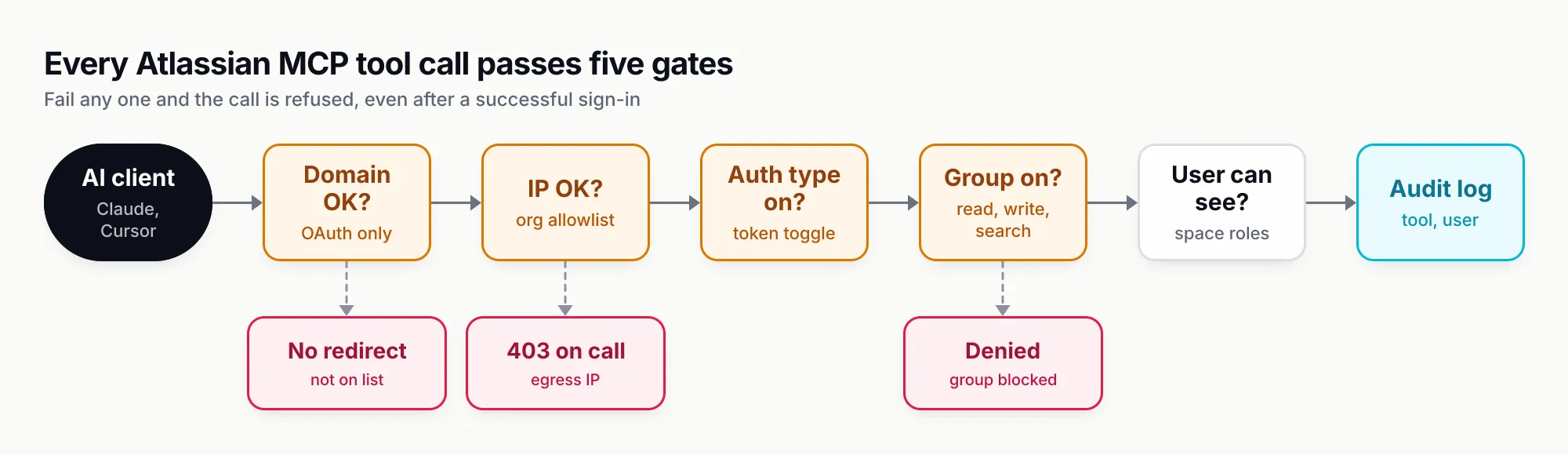
Figure 1: Sign-in succeeding proves very little. Each later gate can still refuse the call, and each has its own error message.
Gate 1: domains, for OAuth clients
The domains list decides which client origins can receive OAuth redirects and tokens. By default Atlassian allows a list of Atlassian-supported domains; in October 2026 it included claude.ai, claude.com, chatgpt.com, vscode.dev, mcp.docker.com, localhost, 127.0.0.1 and the Cursor and Raycast protocol handlers, among about 40 entries. Admins can only allow or block that list as a whole, not remove individual entries, and can add their own trusted domains with wildcards and braces, such as https://{dev,staging,prod}.platform-demo.com/**. Patterns must include a protocol, and http:// is accepted only for localhost.
A cautious admin’s pattern is to untick “Allow Atlassian supported domains” and add back only the clients the company has approved. Atlassian notes that the localhost entries are what let local MCP clients complete OAuth from the user’s device, so removing them blocks tools such as mcp-remote; do that only deliberately.
Gate 2: IP allowlists
IP allowlisting is managed at the organisation level, not in the MCP settings, but it applies to every MCP call for the relevant app, whatever the auth method. The confusing case is the one described above: the OAuth consent screen may appear and succeed, then every tool call fails with “You don’t have permission to connect from this IP address”, because the hosted AI client calls from its own cloud. Bitbucket Cloud IP restrictions are configured separately by workspace admins.
There is also an egress rule in the other direction. The server renders interactive Jira and Confluence widgets in clients such as Claude through iframes, and if your network blocks *.atlassian.net the server can look as if it is down.
Gate 3: allowed authentication method
The API token switch is the third gate. Turning it off prevents token-based connections without touching domains or IP rules; users trying to connect with a token see “You don’t have permission to connect via API token”.
Gate 4: permission groups
The Permissions tab under Connectors, Atlassian MCP server, is now the primary control over what the server can do, and Atlassian says it takes precedence over Connected Apps and individual Marketplace app permissions. It works on three intents, Read, Write and Search, each of which can be allowed, blocked or partially allowed, and “Edit details” sets them per app. A common configuration is read and search everywhere, write in Jira only, and nothing destructive.
Watch the “Apply to future additions” option. When an intent is allowed with it on, new permissions requesting the same intent are granted automatically, without admin review. That is convenient while Atlassian adds tools every month, and the opposite of least privilege. Blocked users see “Access denied: Your organization admin has not authorized the write permission”, and changes take effect immediately without the user reconnecting.
Gate 5: the user’s own permissions, and data security policies
Only after those gates do normal Jira and Confluence permissions apply. Access is limited to what the user can already see, and project and space roles are respected.
Organisations with Atlassian Guard Standard have one more lever: a data security policy control that can prevent the MCP server reading covered content at organisation, site, content or classification level (classification coverage needs Guard Premium). Blocked Jira work items vanish from MCP results, including JQL searches, even when the user can open them in the browser. Two caveats from the documentation: the control is enforced only for OAuth, not API tokens, and it covers only the Atlassian MCP server, not third-party MCP servers that call the REST APIs.
Audit and revocation
Every tool call through the server is recorded in the organisation’s audit log on all tiers, with tool name, action and user; filter for “Rovo MCP User Actions” under Insights, then Audit log. The first OAuth installation of the MCP app is logged only with Guard Standard, and later users who authorise it do not appear. Admins can revoke the app from connected-apps settings, block user-installed OAuth apps entirely, and users can revoke their own authorisations from their profile.
Rate limits and Rovo credits
Atlassian publishes site-level rate limits by plan on the product page. As of October 2026:
| Jira or Confluence plan | MCP calls per hour, per site |
|---|---|
| Free | 500 |
| Standard | 1,000 |
| Premium and Enterprise | 1,000, plus 20 per user, up to 10,000 |
A Premium site with 200 users gets 1,000 + 4,000 = 5,000 calls an hour; the 10,000 ceiling is reached at 450 users. The limit is shared across the site, so one aggressive automation can starve everyone’s IDE sessions.
Bursts matter as much as hourly totals. A GitHub issue opened in May 2026 reports 429 Too Many Requests after roughly 20 parallel calls, with only a few hundred calls over several hours, using API token auth against v1. Atlassian had not published a per-second limit when we checked, so treat concurrency as constrained and retry with back-off.
MCP use is not free in a second sense. Calls that retrieve data or generate insights consume Rovo credits from the same organisation-wide pool used by Rovo Chat, Studio and Agents, scaled by context volume and reasoning depth. Atlassian names the enriched search and Teamwork Graph tools (search, searchAtlassian, getTeamworkGraphContext) as credit consumers. Admins can watch consumption under Insights, then Platform usage. If a team wires an agent into a CI job that searches Confluence on every build, the credit pool is where it shows up.
Keeping calls and tokens down
Atlassian’s README suggests a short block in AGENTS.md (or CLAUDE.md) that sets the default cloudId, Jira project and Confluence space and caps search results:
## Atlassian MCP
- MUST use Jira project key = PAY
- MUST use Confluence spaceId = "123456"
- MUST use cloudId = "https://yourcompany.atlassian.net" (do NOT call getAccessibleAtlassianResources)
- MUST use maxResults: 10 or limit: 10 for ALL Jira JQL and Confluence CQL searches
That removes a discovery round trip from every session and stops a vague question from pulling hundreds of issues into context. In Claude Code, large results also hit the client’s own ceiling: it warns above 10,000 tokens of MCP output and truncates at 25,000 by default.
Worked workflows
The examples below assume OAuth in Claude Code or Cursor, with read, search and Jira write allowed.
Triage a Jira backlog
“Find open bugs in PAY created in the last 14 days with no assignee. Group them by component, flag likely duplicates, and propose a priority for each with one line of reasoning. Do not change anything yet.”
Behind the prompt, the agent calls searchJiraIssuesUsingJql with something like project = PAY AND issuetype = Bug AND statusCategory != Done AND assignee IS EMPTY AND created >= -14d, then getJiraIssue on candidates to read descriptions and comments. Because the request says not to change anything, a well-configured client never reaches executeWrite. The follow-up is the useful part:
“Apply your priorities to the five highest, assign the two checkout bugs to me, link the duplicates to PAY-812 and add a comment on each explaining why.”
Now the agent uses editJiraIssue, createJiraIssueLink and addOrEditJiraIssueComment, and each write prompts for approval if your client is set to ask. The split between a read-only first pass and an explicit write instruction is the habit to build; it gives a human a chance to catch a bad duplicate match before thirty issues are relinked.
For sprint work, getJiraBoardSprintData resolves a board and its active sprint in one call and manageJiraSprint can create, populate and start sprints, which makes “move everything still in review into next sprint” a single request.
Draft a Confluence page from code
This is where a coding agent with repository access and the Atlassian server together beat either alone.
“Read the payment-retry module and its tests. Write a Confluence page in the ENG space titled ‘Payment retry: how it works’ covering the state machine, configuration flags and failure modes. Link the three open PAY issues that touch this code. Create it as a draft.”
The agent reads local files with its own tools, calls getContentFormatGuide through executeRead to get the rich-content format right, then createConfluenceContent. To keep documentation current, the next prompt after a refactor is “diff the page against the current code and update only the sections that changed”, which uses getConfluenceContent, diffConfluenceContentVersions and updateConfluenceContent’s granular edit mode instead of rewriting the whole page.
Move work forward from a pull request
Atlassian’s own example is one of the most common: “Move PROJ-456 to ‘In Review’ and add a comment that the PR is up.” With Bitbucket linked, the agent can go further, opening the pull request with createBitbucketRepoPullRequest, reading pipeline step logs with getBitbucketRepoPipelineStepLog when the build fails, and transitioning the issue when it passes. Teams on GitHub get the pull-request context through the Teamwork Graph tools instead.
Summarise without searching by hand
Rovo search and fetch accept natural language, so “Show Confluence pages about quarterly planning” works without CQL. Atlassian notes that mentioning “JQL” or “CQL” in the prompt steers the server towards the advanced search tools instead, which are more predictable for precise filters and do not draw on the enriched search path.
The security model, and where it falls short
Running as the user is the server’s main safety property and also its main risk. The agent can do anything the user can do, and the user may have broad access. Atlassian’s own guidance on MCP risk names prompt injection first and recommends least privilege and human review of any action that changes data.
The scenario is concrete. In June 2025 Cato Networks published a proof of concept in which an outside party filed a Jira Service Management ticket containing hidden instructions; when a support engineer’s AI assistant processed the ticket through MCP, it ran with the engineer’s privileges and wrote internal data back into the ticket, where the outsider could read it. Simon Willison summarised it as the “lethal trifecta” of private data, untrusted content and an outbound channel in one session. Nothing in the server was buggy. It did what it was told. Our catalogue of prompt-injection attacks and defences covers the general pattern; for Atlassian specifically, the controls that help are:
- Separate read and write agents for anything that processes externally submitted content: service desk tickets, public issue trackers, comments from customers. A triage agent that can read tickets but cannot comment or edit cannot exfiltrate through the ticket.
- Block
write_confluencewhere it is not needed. It includes permission changes and public links, which are exactly the outbound channels an injected instruction looks for. - Keep
delete_jiraandmanage_jiraoff unless a named workflow needs them. - Require confirmation on
executeWriteand always onexecuteDestructivein the client. - Prefer OAuth over shared API tokens so the audit log names a person and data security policies apply.
- Watch the audit log for spikes in write actions from one user or service account.
There are also gaps that admins should know about. API token connections bypass domain checks and data security policies. The audit log records the MCP action but not the prompt that caused it, so reconstructing why an agent made a change means going to the client’s own logs. Nothing in Atlassian’s controls limits which other MCP servers sit in the same session, and that combination is where the trifecta forms. The broader treatment of these questions is in our guide to MCP security and authentication.
Running it behind an MCP gateway
Atlassian’s controls govern what happens inside Atlassian. They cannot tell you that the same engineer’s agent also has a Slack server, a database server and a browser connected, nor enforce one policy across all of them. That is the job of an MCP gateway: a proxy that holds the upstream connections, decides which tools each caller can see and logs every call in one place. Atlassian explicitly anticipates this and documents the ?tools=all endpoint for gateways, because a gateway needs the flat tool list to filter it.
Bifrost, Maxim AI’s open-source Go gateway, is one example of how that looks in practice. You register the Atlassian endpoint once as an upstream MCP client, and each team’s virtual key gets an explicit tool allow-list; a key with no MCP configuration gets no MCP tools at all, so a new agent starts with nothing rather than all 240 Atlassian tools. For an upstream like Atlassian that should run as the person, Bifrost’s per-user OAuth mode means each end-user supplies their own credential, which Bifrost stores against the caller’s identity, so Atlassian’s audit log still names individuals. The gateway then adds what Atlassian’s log lacks: the caller, the tool, the arguments and the result in one record across every MCP server. Note that in pure gateway mode the approval decision stays with the client, so you still configure confirmation in Claude Code or Cursor.
The trade-off is real. A gateway is another service to run and another place credentials live, and for a single team using OAuth in their IDEs, Atlassian’s built-in controls are enough. The case for a gateway grows with the number of agents, servers and teams, and with the need for one audit trail across them.
Data Center and self-hosted alternatives
The official server requires an Atlassian Cloud site; the README lists that as the first prerequisite, and nothing in Atlassian’s documentation offers a Data Center version as of October 2026. Self-hosted teams have two practical routes.
The main one is sooperset/mcp-atlassian, a community Python server under the MIT licence that supports Jira Server and Data Center 8.14+ and Confluence 6.0+ as well as Cloud. It is explicitly not an Atlassian product. Version 0.23.1 was released in August 2026 and the project lists 98 tools. For Data Center you authenticate with a personal access token:
{
  "mcpServers": {
    "mcp-atlassian": {
      "command": "uvx",
      "args": ["mcp-atlassian"],
      "env": {
        "JIRA_URL": "https://jira.your-company.com",
        "JIRA_PERSONAL_TOKEN": "your_pat",
        "CONFLUENCE_URL": "https://confluence.your-company.com",
        "CONFLUENCE_PERSONAL_TOKEN": "your_pat",
        "READ_ONLY_MODE": "true"
      }
    }
  }
}
The project’s configuration reference documents READ_ONLY_MODE, an ENABLED_TOOLS allow-list and TOOLSETS groups (TOOLSETS=default restricts it to about 35 core tools), plus a Docker image and a Streamable HTTP mode with per-request tokens for multi-user deployments. Those switches matter because none of Atlassian’s Cloud admin controls exist here: no domain list, no MCP permission tab, no MCP audit events. Whatever governance you want, you configure in the server or put in front of it.
The second route is Atlassian’s own Teamwork Graph CLI, which Atlassian recommends over MCP for scripts and CI pipelines. It is still Cloud-only, so it helps Cloud teams with headless jobs rather than Data Center teams.
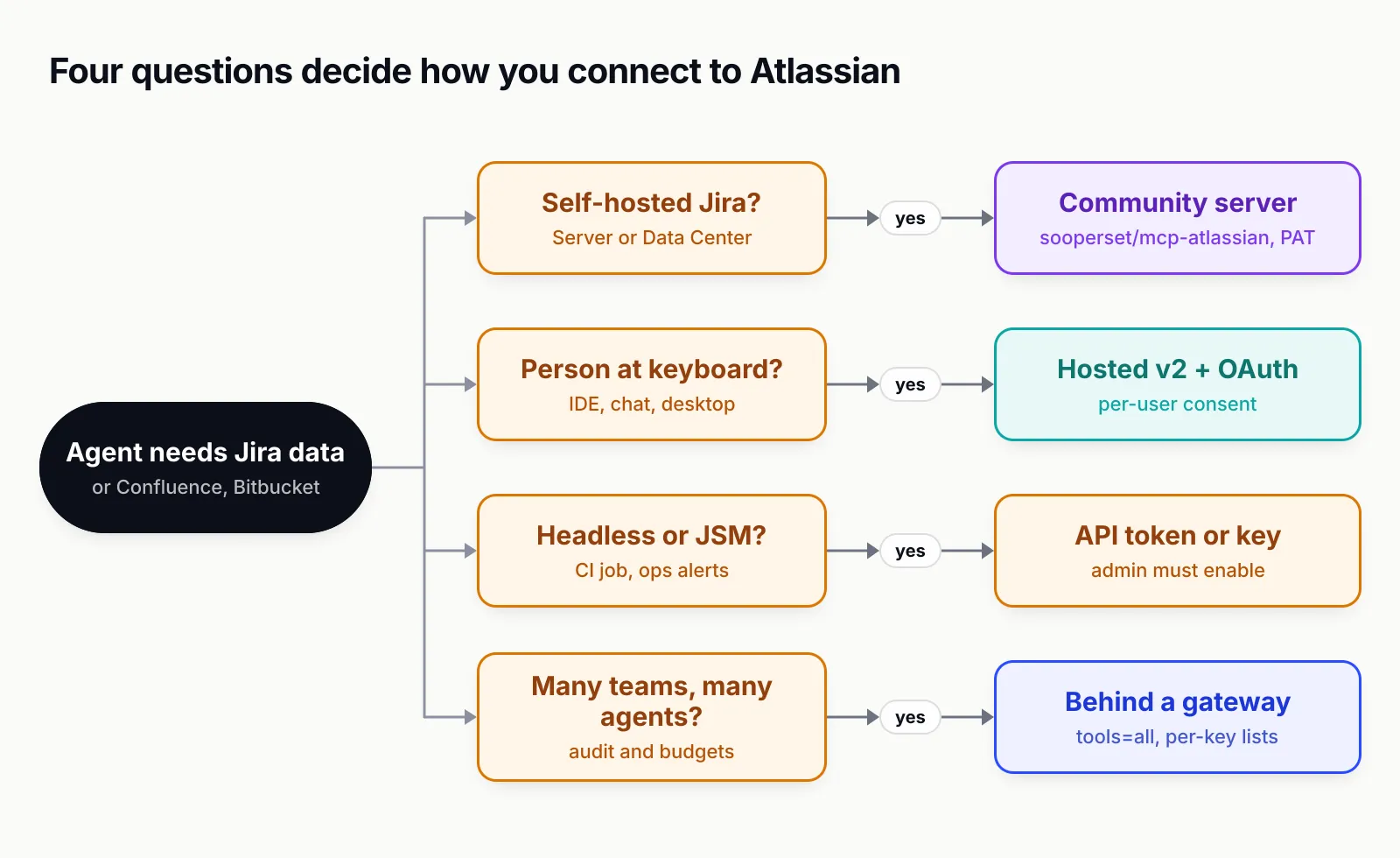
Figure 2: Deployment and who is driving the agent decide the route; most teams end up using two of these at once.
Questions to settle before you switch it on
For a developer, the steps are short: add the v2 URL to your client, sign in, put your default project and space in AGENTS.md, and keep write approvals on. For an admin, the decision is about policy, and these are the questions we would want answered first:
- Which clients are approved? Decide whether to keep the Atlassian-supported domain list or replace it with an explicit one, and check each hosted client’s egress IPs against your allowlist.
- Which intents per app? Read and search are low risk; Confluence write includes permission and public-link changes; delete and manage should stay off by default.
- Turn off “Apply to future additions” unless you are comfortable with new tools arriving pre-approved.
- Are API tokens needed? If only for Jira Service Management alerts or CI, use a least-privilege service account, rotate its key and review its audit entries.
- Which content should agents never read? If you have Guard Standard, a data security policy on sensitive spaces is the cleanest answer, as long as those users connect through OAuth.
- What will it cost? Check your plan’s hourly limit and Rovo credit allowance before connecting automations.
- What else is in the session? If agents combine Atlassian with other servers, decide where cross-server policy and audit will live.
The Atlassian MCP server is one of the better-governed vendor servers available, and the right default for Cloud teams. Its weak point is not the server but the agents connected to it: an assistant with broad Jira and Confluence write access, reading untrusted tickets, with other tools in reach. Configure the permission groups as though that assistant will eventually be tricked, and the rest of the setup is routine. For how it compares with other servers worth connecting, see our ranking of the top MCP servers of 2026, and for Slack’s equivalent, our guide to the Slack MCP server.
Sources
- Atlassian MCP Server repository (README) Atlassian
- Get started with the Atlassian MCP server Atlassian Support
- Atlassian MCP server supported tools Atlassian Support
- Configure OAuth 2.1 Atlassian Support
- Configure authentication via API token Atlassian Support
- How to upgrade from Atlassian MCP v1 to Atlassian MCP v2 Atlassian Support
- Understand Atlassian MCP server Atlassian Support
- Control Atlassian MCP server settings Atlassian Support
- Available Atlassian MCP server domains Atlassian Support
- Configure Atlassian MCP server permissions Atlassian Support
- Monitor Atlassian MCP server activity Atlassian Support
- Prevent Atlassian MCP server access Atlassian Support
- Configure enterprise-managed authentication Atlassian Support
- Atlassian Rovo MCP server product page (rate limits, data handling) Atlassian
- Atlassian Rovo MCP Server is now GA Atlassian
- MCP clients: understanding the potential security risks Atlassian
- sooperset/mcp-atlassian repository sooperset (community)
- Connect Claude Code to tools via MCP Anthropic
- Get started with custom connectors using remote MCP Anthropic
- Anthropic IP addresses Anthropic
- Cursor MCP documentation Cursor
- Add and manage MCP servers in VS Code Microsoft
- Bifrost MCP tools per virtual key Maxim AI
- Bifrost MCP authentication Maxim AI
Frequently asked questions
What is the Atlassian MCP server?
It is Atlassian's official, cloud-hosted Model Context Protocol server, marketed as the Atlassian Rovo MCP Server. AI clients such as Claude, ChatGPT, Cursor and VS Code connect to https://mcp.atlassian.com/v2/mcp and can then search, read and update Jira, Confluence, Bitbucket, Jira Service Management, Loom and other Atlassian Cloud data with the signed-in user's permissions.
How do I add the Atlassian MCP server to Claude Code?
Run claude mcp add --transport http atlassian https://mcp.atlassian.com/v2/mcp in your terminal, then open a Claude Code session and run /mcp to complete the OAuth sign-in in your browser. Add --scope project if you want the entry committed to the repository's .mcp.json for your team.
Is the Atlassian MCP server free?
All Atlassian Cloud customers have access, but calls are rate-limited per site by plan (500 an hour on Free, 1,000 on Standard, and 1,000 plus 20 per user up to 10,000 on Premium and Enterprise, as of October 2026). Calls also consume Rovo credits from the organisation's shared pool, so heavy use has a cost even if there is no separate licence.
Does the Atlassian MCP server work with Jira Data Center?
No. The official server requires an Atlassian Cloud site. For Jira Server or Data Center 8.14+ and Confluence 6.0+, the usual option is the community-maintained, MIT-licensed sooperset/mcp-atlassian server, which you run yourself and authenticate with personal access tokens.
Can I use an API token instead of OAuth?
Yes, if an organisation admin turns on API token authentication in Atlassian Administration under Connectors, then Atlassian MCP server. You send either a personal token as Basic auth (base64 of email:token) or a service-account key as a Bearer token. API-token connections are not checked against the domain allowlist and some tools are unavailable, but Jira Service Management tools work only this way.
How do admins restrict or turn off the Atlassian MCP server?
Admins can block Atlassian-supported domains and add trusted ones, enforce IP allowlists, disable API token auth, and switch Read, Write and Search permission groups on or off per app on the Permissions tab. Organisations with Atlassian Guard Standard can also use a data security policy to stop the MCP server reading covered Jira and Confluence content.
What is the difference between v1 and v2 of the Atlassian MCP server?
v2, at https://mcp.atlassian.com/v2/mcp, exposes more tools and products and uses a discover-and-execute pattern so the client only loads a small set of primary tools up front. It is a separate OAuth resource, so v1 sign-ins do not carry over. Atlassian's upgrade guide says remaining v1 connections will automatically start using v2 tools on 1 March 2027.