ModelsExplainer
Self-hosted LLM guide for 2026: VRAM maths, Ollama vs vLLM and the break-even
When a self-hosted LLM pays off, how to size GPU memory for weights and KV cache, which inference server fits which job, and what the hardware really costs.
A self-hosted LLM is a language model you download and run on hardware you control, instead of renting it by the token from an API. In October 2026 that is a realistic choice for most teams: open-weight models such as Qwen3.8-27B and gpt-oss-120b run on a single GPU, and the serving software (Ollama, llama.cpp, vLLM, SGLang) is mature, free and OpenAI-compatible. What has not changed is the arithmetic. A self-hosted model costs GPU memory you must size correctly, hardware that bills whether it is busy or idle, and operational work that an API provider used to do for you.
This guide is for engineers deciding whether to self-host, and how. It covers when self-hosting makes sense and when it does not, worked GPU-memory maths for weights and KV cache, hardware tiers from a laptop to a multi-GPU node, the inference servers compared (with an Ollama vs vLLM section), a break-even calculation against current API prices, and the monitoring, scaling and security work that follows. Versions and prices were checked against official pages between 12 and 15 October 2026.
For which open model to pick, see our ranking of open-weight models for teams that self-host. For the gateway layer in depth, see AI gateways for routing between vLLM, Ollama and cloud LLMs. This piece sits underneath both: how to stand up the models in the first place.
When a self-hosted LLM makes sense, and when it does not
Self-hosting is the right call when the data cannot leave your network, when you need a model version that never changes under you, or when traffic is steady and large enough to keep GPUs busy. It is usually the wrong call when traffic is small or spiky, when you need frontier-level quality on hard tasks, or when nobody on the team wants to be on call for inference.
The reasons that hold up:
- Privacy and data control. Prompts and outputs never cross a network boundary you do not own. For health records, legal documents, source code under contract or anything covered by a data-processing agreement that names specific subprocessors, this is often the deciding factor. Note that local tools are not automatically local-only: the Ollama FAQ documents cloud-hosted models alongside local ones, and a
OLLAMA_NO_CLOUD=1setting (ordisable_ollama_cloudinserver.json) to turn the cloud features off. - Sovereignty and air gaps. Some environments cannot reach a public API at all: defence, some public-sector and critical-infrastructure networks, factory floors. A model on local hardware is the only option there, and the rest of the stack has to work offline too. Our guide to AI gateways for air-gapped and in-VPC deployments covers that side.
- Version stability. A hosted model can be retired or silently updated. Weights on your disk produce the same outputs next year, which matters for regulated workflows and for evaluation baselines.
- Latency and locality. A model on the same machine or the same rack removes the network round trip and the provider’s queue. For short completions, autocomplete and on-device features, that can matter more than raw model quality.
- Cost at sustained volume. If GPUs run near capacity around the clock, cost per token can fall below API prices. The break-even section below puts numbers on this; it is a higher bar than most teams expect.
- Customisation. Fine-tuned weights, LoRA adapters, custom sampling and constrained decoding are all easier on your own server.
The reasons that do not hold up as well:
- “It is free.” The software is; the GPUs, power, engineering time and idle hours are not.
- “Open models are as good as closed ones.” The gap is months rather than years, as we argued in open weights trail the frontier by months, but it is still real on the hardest reasoning and agentic tasks.
- “We will save money on a small app.” At low volume, per-token APIs win comfortably, because you pay nothing while idle.
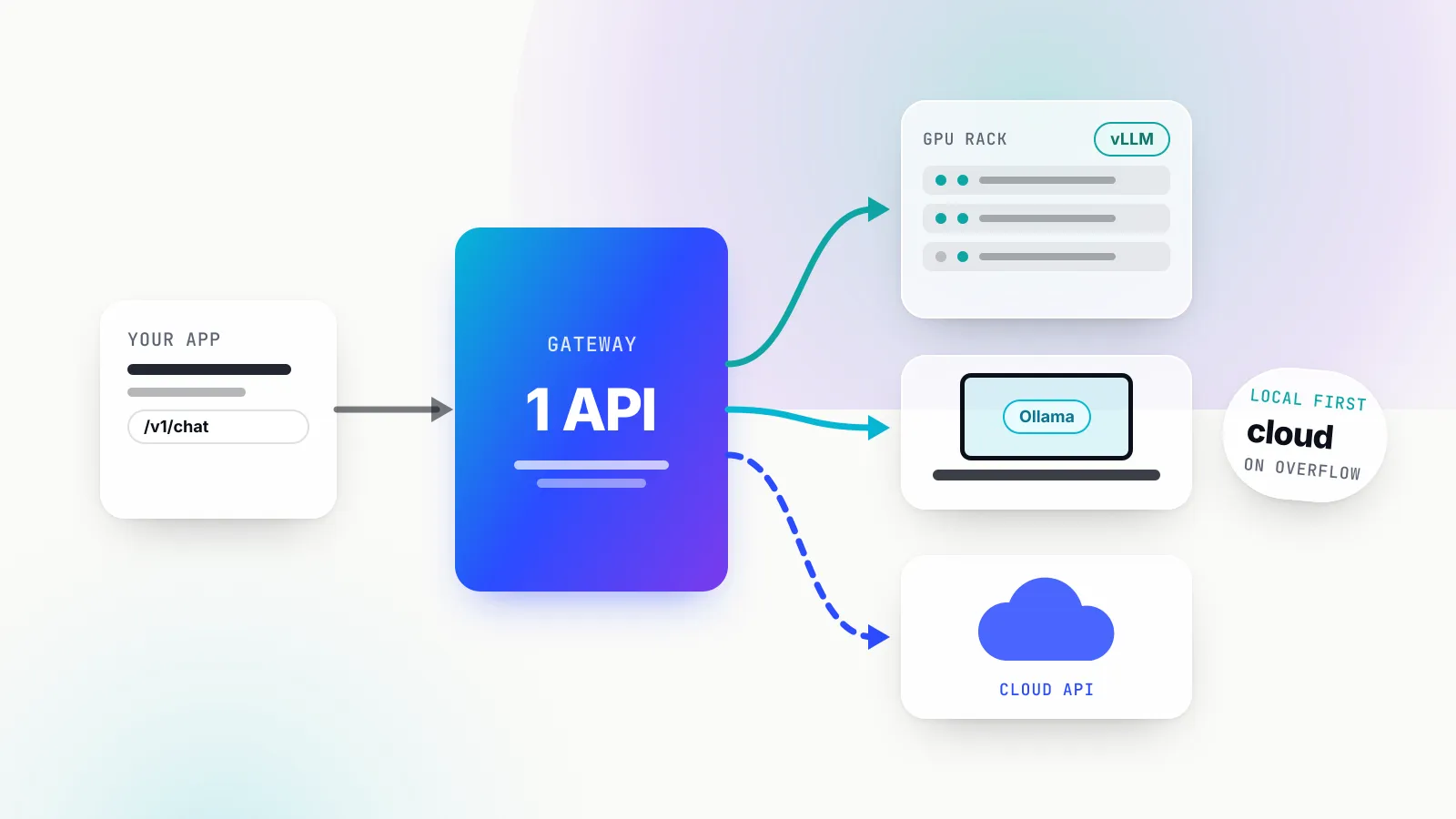
Most teams land on a hybrid: a self-hosted model for steady, sensitive or high-volume traffic, and a hosted API for the hardest prompts and for overflow. That shapes the architecture at the end of this guide.
Sizing a model by GPU memory: weights, KV cache and headroom
The first question for any self-hosted LLM is whether it fits. GPU memory has to hold three things: the model weights, the KV cache for every sequence in flight, and working memory for activations and the runtime itself. Weights are fixed once the model is loaded. The KV cache grows with context length and with the number of concurrent users, and it is the part people forget.
Weights
Weight memory is the parameter count times the bytes per parameter:
weights (GB) = parameters (billions) x bits per weight / 8At 16-bit precision (BF16 or FP16), that is two bytes per parameter. Quantisation lowers it. The llama.cpp quantize README publishes measured bits per weight for each GGUF format on Llama 3.1 8B: 16.0 for F16, 8.5 for Q8_0, 6.56 for Q6_K, 5.70 for Q5_K_M and 4.89 for Q4_K_M, the most common default. The same table lists the 8B model at 14.96 GiB in F16 and 4.58 GiB in Q4_K_M.
Smaller weights also generate faster, because single-user decoding is limited by how quickly the GPU can read the weights from memory. In that same llama.cpp table, Llama 3.1 8B generates 71.9 tokens per second at Q4_K_M against 29.2 at F16 on the project’s reference machine. Quality loss at 8-bit is usually negligible; at 4-bit it is small for most chat and coding work and more noticeable on maths, long reasoning chains and small models. Below 4 bits, test carefully on your own prompts.
Data-centre servers use different formats from GGUF. The vLLM quantization docs list FP8, MXFP4, NVFP4, INT8, INT4, GPTQ, AWQ, compressed-tensors and others, plus GGUF on NVIDIA and AMD GPUs. Some models ship quantised by their authors: the gpt-oss-120b model card says the mixture-of-experts weights were post-trained in MXFP4, which is how a 117-billion-parameter model fits on a single 80 GB GPU.
KV cache
Every token a model has seen in a conversation leaves behind a key and a value vector in each attention layer, so the model does not recompute them for the next token. That store is the KV cache. Its size per token is:
KV bytes per token = 2 (K and V) x layers x KV heads x head dimension x bytes per valueMultiply by the context length, then by the number of sequences being served at once. The inputs are all in the model’s config.json.
Worked example 1: Qwen3-8B. The model card lists 8.2 billion parameters, 36 layers and grouped-query attention with 8 KV heads; the config sets a head dimension of 128. In BF16:
- KV per token: 2 x 36 x 8 x 128 x 2 bytes = 147,456 bytes, or 144 KiB.
- One 4,096-token chat: 0.6 GB. One 32,768-token chat: 4.8 GB. One 131,072-token context (the extended length the card supports): 19.3 GB.
- Weights: 16.4 GB in BF16, or about 5.0 GB at Q4_K_M.
So on a 24 GB card, a 4-bit Qwen3-8B with one 32K conversation needs roughly 10 GB plus overhead and fits easily. Eight users with 32K contexts each need 38.7 GB of KV cache alone, which no single consumer card holds. Concurrency, not the weights, is what breaks the budget.
Worked example 2: Qwen3.8-27B. This model uses a hybrid layout. Its config has 64 layers, but only one in four (16 layers) is full attention; the other 48 are Gated DeltaNet linear-attention layers that keep a fixed-size state rather than a growing cache. The full-attention layers have 4 KV heads with a head dimension of 256. In BF16:
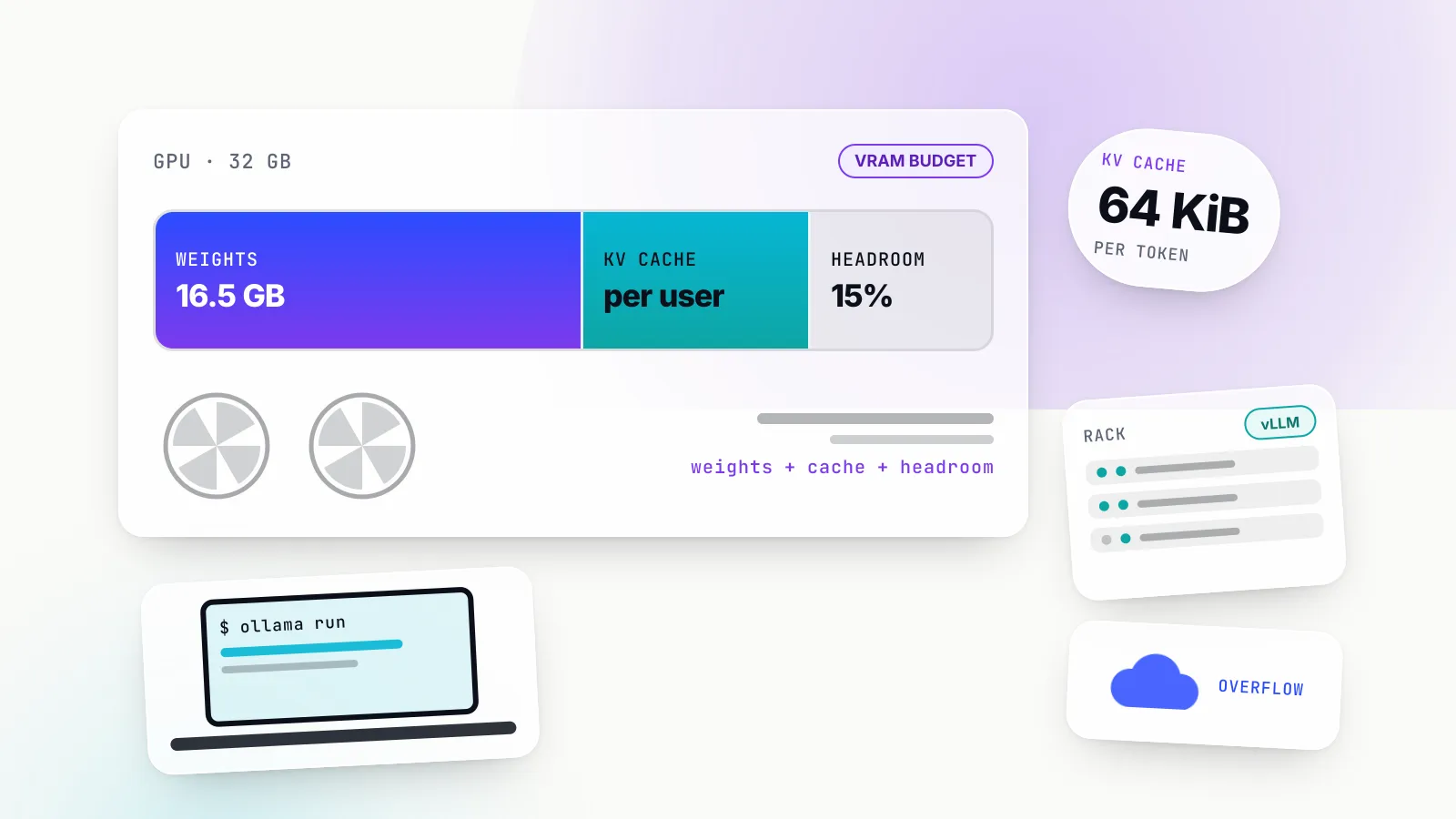
- KV per token: 2 x 16 x 4 x 256 x 2 bytes = 65,536 bytes, or 64 KiB, less than half of Qwen3-8B’s despite three times the parameters.
- One 32K chat: 2.1 GB. The full native 262,144-token context: 17.2 GB.
- Weights, from the published GGUF files: 54.7 GB in BF16, 29 GB at Q8_0 and 16.5 GB at Q4_K_M.
On a 32 GB RTX 5090, Q4_K_M weights plus a 32K context come to about 18.6 GB, leaving room for longer contexts or a few parallel users. Q8_0 at 29 GB plus the same context leaves almost nothing for activations, so it is not a comfortable fit. On an 80 GB H100 serving BF16 weights with vLLM, the default memory budget leaves roughly 18 GB for cache and activations: on the order of eight 32K conversations at once, fewer once the linear-attention state and activations are counted.
Worked example 3: gpt-oss-120b. The config alternates sliding-window layers (a 128-token window) with full-attention layers: 18 of each, 8 KV heads, head dimension 64. Only the 18 full-attention layers grow with context, at 2 x 18 x 8 x 64 x 2 = 36,864 bytes (36 KiB) per token, or 4.8 GB at the full 131,072-token context. The sliding layers add a fixed sliver.
The lesson from the three examples: read the config before trusting a rule of thumb. Architecture choices (grouped-query attention, sliding windows, linear attention) change KV cost per token by a factor of four or more between models of similar size.
Shrinking the cache and setting the budget
Both main serving paths let you quantise the KV cache. The Ollama FAQ documents OLLAMA_KV_CACHE_TYPE with f16 as the default, q8_0 at about half the memory with “a very small loss in precision”, and q4_0 at about a quarter with a more noticeable loss at long contexts. It requires Flash Attention, which Ollama enables automatically where supported. vLLM’s --kv-cache-dtype accepts fp8 variants, nvfp4 and several integer formats, per its engine arguments.
The serving engine also decides how much memory to claim. vLLM’s --gpu-memory-utilization defaults to 0.92 of the GPU, and whatever is left after weights becomes the KV cache pool. SGLang’s equivalent is --mem-fraction-static, which its server arguments page suggests lowering if you see out-of-memory errors. Ollama sizes per model from its context setting, and two of its defaults surprise people: the context window is 4,096 tokens unless you raise OLLAMA_CONTEXT_LENGTH or num_ctx, and memory scales with OLLAMA_NUM_PARALLEL times the context length, so four parallel slots at 8K reserve the cache for 32K tokens.
A practical budget: weights, plus KV cache for your target context times your target concurrency, plus 10 to 20 per cent headroom for activations, CUDA graphs and fragmentation.
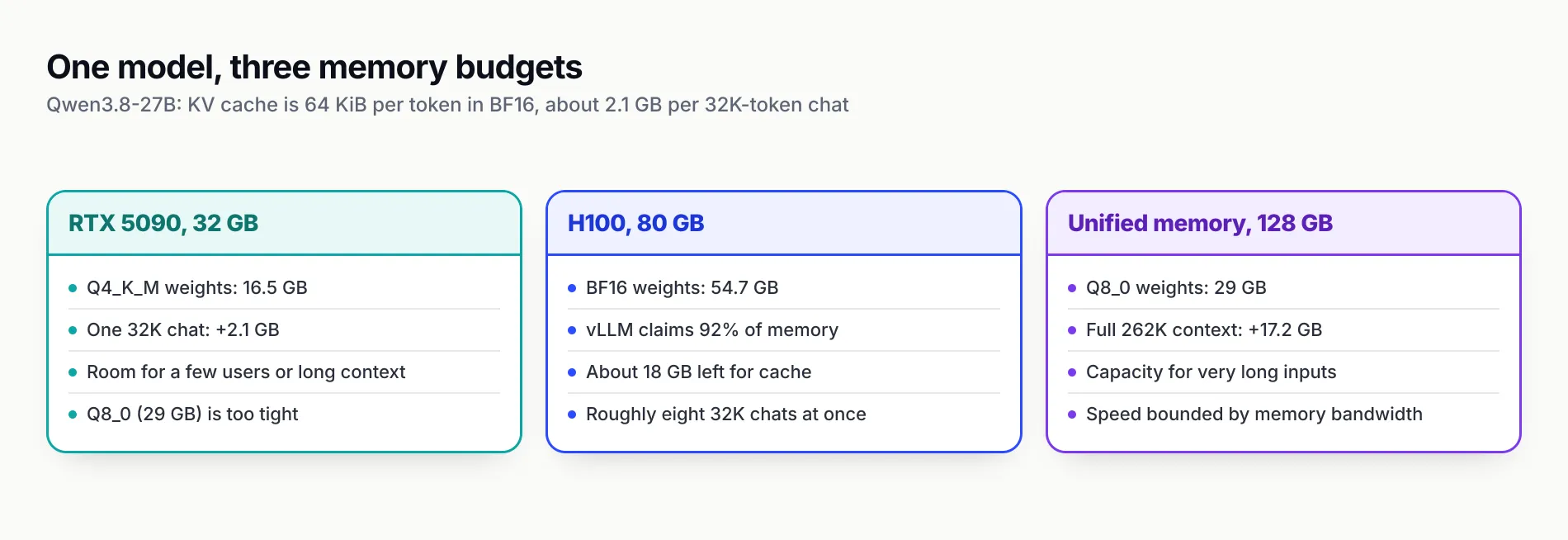
Figure 1: The same model fits three machines in three different ways. The KV cache, not the weights, decides how many people can use it at once.
Hardware tiers from laptop to multi-GPU node
Hardware for a self-hosted LLM sorts into five tiers by memory. The right tier is the smallest one that holds your chosen model’s weights plus the KV cache for your concurrency target, because memory bandwidth and capacity, not compute, are what limit most inference.
| Tier | Example hardware (official specs) | Usable memory | What fits comfortably | Typical server |
|---|---|---|---|---|
| Laptop or small desktop | Apple silicon or gaming laptops | 16 GB or more of shared memory, or a small GPU | 7B to 14B at 4-bit; gpt-oss-20b (16 GB per its card) | Ollama, LM Studio, llama.cpp |
| Single consumer GPU | GeForce RTX 5090, 32 GB GDDR7 | 32 GB | 27B to 32B at 4-bit with room for context | llama.cpp, Ollama, vLLM |
| Unified-memory workstation | DGX Spark, 128 GB; Mac Studio M5 Ultra, up to 512 GB at 1.2 TB/s | 128 to 512 GB | 100B to 200B-class models quantised, one or a few users | llama.cpp, Ollama, LM Studio, SGLang (Spark) |
| Single data-centre GPU | H100 80 GB, B200 180 GB (per Lambda’s listings) | 80 to 180 GB | gpt-oss-120b in MXFP4; 27B to 32B in BF16 with many users | vLLM, SGLang |
| Eight-GPU node and beyond | 8 x H100 (640 GB) or 8 x B200 (1.44 TB) | 640 GB to multiple TB | 500B to 1T-class mixture-of-experts models in FP8 or FP4 | vLLM, SGLang with tensor and expert parallelism |
A few notes on the tiers. NVIDIA says a single 128 GB DGX Spark handles inference on models up to 200 billion parameters, and that four linked units reach roughly 700 billion. Apple’s top Mac Studio configuration pairs 512 GB of unified memory with 1.2 TB/s of bandwidth, which makes it one of the few desktop machines that can hold a very large quantised model at all, though generation speed for one user is bounded by that bandwidth. Unified-memory machines trade throughput for capacity: they hold big models, but they do not serve fifty users at once the way a data-centre GPU with continuous batching does.
On renting rather than buying: as of 15 October 2026, Lambda’s on-demand price for an H100 SXM is $3.99 per GPU-hour in an eight-GPU instance and $4.29 for a single GPU, and a B200 is $6.69 per GPU-hour in an eight-GPU instance. RunPod lists an H100 SXM at $3.99 an hour, an H100 PCIe at $2.89 and an RTX 5090 at $1.19. Renting is the cheapest way to measure your real throughput before committing to hardware.
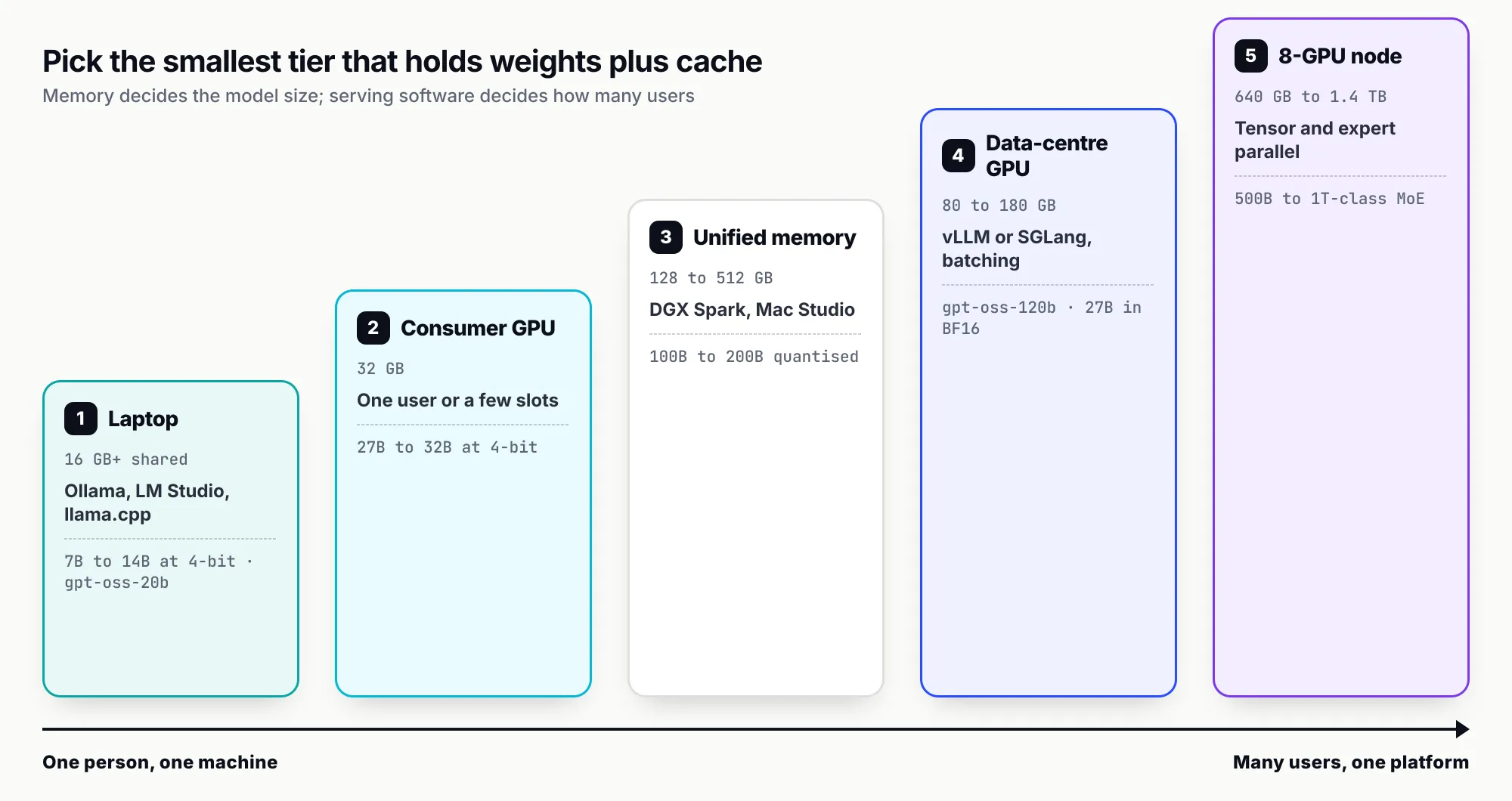
Figure 2: Choose the smallest tier that holds weights plus cache for your concurrency. Moving up a rung buys users and model size, not just speed.
Inference servers compared: Ollama, llama.cpp, LM Studio, vLLM, SGLang and TGI
The inference server is the program that loads the weights and answers requests. All the current options speak an OpenAI-compatible API, so the choice is about concurrency, hardware, model formats and how much operational control you want, not about client code.
| Server | Latest release (as of 15 Oct 2026) | Built for | Model formats | Concurrency model | API surfaces |
|---|---|---|---|---|---|
| Ollama | v0.40.4 (12 Oct) | One machine, quick setup | GGUF via its library; MLX runner on Apple silicon | 1 request per model by default; queue of 512, then HTTP 503 | Native API, OpenAI-compatible /v1 |
llama.cpp (llama-server) | v0.6.0 (5 Oct) | Maximum hardware reach, CPU to GPU | GGUF, F16 and quantised | Slots via --parallel; continuous batching on by default | OpenAI chat, responses, embeddings; Anthropic Messages |
| LM Studio | Desktop app plus llmster daemon | Desktop users, headless service | Downloaded local models | Just-in-time loading with idle auto-unload | OpenAI-, Anthropic-compatible endpoints |
| vLLM | v0.31.0 (5 Oct) | High-throughput serving on data-centre GPUs | Safetensors in BF16, FP8, FP4, INT4/INT8, GPTQ, AWQ; GGUF | PagedAttention, continuous batching, chunked prefill, prefix caching | OpenAI chat, completions, Responses, embeddings and more; Anthropic Messages |
| SGLang | v0.5.21 (2 Oct) | Agentic and high-throughput serving, from one GPU to clusters | Hugging Face weights across GPU, TPU and other accelerators | RadixAttention prefix reuse across requests | OpenAI-compatible |
| TGI | Maintenance mode | Legacy Hugging Face deployments | Safetensors | Continuous batching | OpenAI-compatible Messages API |
Ollama
Ollama wraps llama.cpp-style inference (and, on Apple silicon, an MLX runner, per its v0.40.4 release notes) in a model manager: ollama pull, ollama run, and a server on localhost:11434. Its OpenAI compatibility layer serves /v1/chat/completions, /v1/responses, /v1/completions, /v1/models and /v1/embeddings; the client must send an API key, which a local server ignores.
The defaults are tuned for one person. The FAQ lists OLLAMA_NUM_PARALLEL at 1 request per model, OLLAMA_MAX_QUEUE at 512 before the server answers 503, OLLAMA_MAX_LOADED_MODELS at three times the number of GPUs, and a five-minute keep-alive before an idle model unloads. If a requested model does not fit in remaining VRAM, new requests queue until another model unloads. These are sensible for a laptop and a poor fit for a shared service.
llama.cpp
llama-server is the reference HTTP server of the llama.cpp project and runs almost anywhere: CPU only, NVIDIA GPUs, Apple Metal and Vulkan among its backends. Its README lists OpenAI-compatible chat, responses and embeddings routes, Anthropic Messages compatibility, reranking, parallel decoding with continuous batching, function calling, speculative decoding, schema-constrained JSON, a Prometheus /metrics endpoint and --api-key authentication. A newer router mode loads and unloads several models on demand, up to four at once by default. Choose it over Ollama when you want direct control of every flag or need a backend Ollama does not ship.
LM Studio
LM Studio is a desktop app for finding, downloading and chatting with models, and it has been free for use at work since July 2025. It can now run as a service: the headless docs describe llmster, a daemon started with lms daemon up that runs on Linux servers without the GUI, plus just-in-time model loading and automatic unloading after inactivity. It exposes OpenAI- and Anthropic-compatible endpoints. It is the friendliest option for non-engineers on a team who want a local model on their own machine.
vLLM
vLLM is the default production engine for open-weight models on GPUs. Its documentation lists PagedAttention for KV-cache memory, continuous batching, chunked prefill, prefix caching, CUDA graphs and a wide set of quantisation formats and attention kernels. The original PagedAttention paper reported near-zero KV-cache waste and 2 to 4 times the throughput of earlier systems at the same latency, by managing the cache in fixed-size blocks like virtual-memory pages. Version 0.31.0, released on 5 October 2026, added a vllm preload command that keeps quantised weights resident across engine restarts, along with kernels for DeepSeek V4.1 Flash. vLLM exposes /health, /metrics and a vllm bench serve load tester.
SGLang
SGLang is the other high-throughput engine, hosted by LMSYS and pitched at agentic workloads, large-scale serving and RL rollouts. Its paper introduced RadixAttention, which stores KV cache in a radix tree so requests that share a prefix (a long system prompt, a tool schema, an agent’s history) reuse it, and reported up to 6.4 times higher throughput than other systems on such workloads. The README lists support for NVIDIA from RTX cards and DGX Spark to GB300, AMD Instinct, Google TPU, Intel, Apple silicon and Huawei Ascend. Version 0.5.21 shipped on 2 October 2026 with support for DeepSeek V4.1 Flash and MiMo-V2.6.
TGI
Hugging Face’s Text Generation Inference powered its own hosted inference for years, but the repository now carries a caution that it is in maintenance mode, accepting only minor fixes and documentation changes. Hugging Face recommends vLLM and SGLang for serving and llama.cpp or MLX for local use. Existing TGI deployments keep working; new ones should not start there.
Ollama vs vLLM: which one, and when to run both
Ollama is the better choice for a single user, a developer laptop, an edge box or a quick prototype. vLLM is the better choice once several people or services share a GPU, because it batches concurrent requests and manages KV-cache memory far more efficiently. The two are complements more often than rivals, and many teams run both behind one API.
The differences that decide it:
| Question | Ollama | vLLM |
|---|---|---|
| Setup time | One installer, ollama run <model> | Python or container install, GPU drivers, model download from Hugging Face |
| Hardware | CPU, NVIDIA, AMD, Apple silicon | NVIDIA, AMD and other accelerators; data-centre GPUs are the main target |
| Model format | GGUF quantisations, pulled from Ollama’s library or as GGUF files from Hugging Face | Hugging Face safetensors in BF16, FP8, FP4, INT4 and more; GGUF supported |
| Concurrency | One request per model by default; raise OLLAMA_NUM_PARALLEL, at a memory cost per slot | Continuous batching across all in-flight requests; KV cache shared in pages |
| Overload behaviour | Queue up to 512, then HTTP 503 | Requests wait for scheduling capacity; visible as vllm:num_requests_waiting |
| Multiple models | Loads and unloads models on demand | One model per server process; run several processes or use a router |
| Default context | 4,096 tokens unless raised | Model’s maximum, limited by the memory budget |
| Observability | Logs and ollama ps | Prometheus /metrics with TTFT, inter-token latency, KV usage and preemptions |
| Authentication | None on the local server | --api-key, covering only the /v1, /v2, /inference and /cohere paths |
Three practical points sit behind the table.
Concurrency is the dividing line. Ollama’s per-slot memory model means that serving 16 parallel users reserves 16 full context windows up front. vLLM allocates cache in blocks as sequences grow and evicts or preempts when it runs short, so the same GPU serves more users at a given context length. If more than a handful of people or services will hit the model at once, measure vLLM (or SGLang) first.
Quantisation formats differ. Ollama’s library makes 4-bit GGUF the default, which is why a 27B model runs on a gaming card. vLLM typically serves BF16, FP8 or FP4 safetensors, which need more memory per parameter at the 8-bit end and are tuned for data-centre GPUs. Comparing “Ollama runs it in 17 GB, vLLM needs 55 GB” compares a 4-bit file to a 16-bit file, not two engines.
The API is the same. Both serve /v1/chat/completions, so application code written against one runs against the other with a base-URL change. That is what makes the common pattern work: Ollama on laptops and in CI, vLLM or SGLang in production, a gateway in front of both.
Break-even: self-hosting versus API cost
Self-hosting is cheaper than an API only when the GPU stays busy. The calculation is simple: divide the monthly cost of the hardware by the API price per token, and you get the number of tokens per month (and per second, sustained) the hardware must produce to break even. Whether your hardware can produce that, at your context lengths and quality bar, is what you then measure.
All prices below are list prices read on 15 October 2026. The blended API price assumes three input tokens per output token, with no cache hits, which is typical of chat and retrieval workloads; agentic and coding workloads usually have higher input ratios and heavy prompt caching, which lowers API cost further.
| Hardware (monthly at 730 hours) | Monthly cost | Break-even vs Claude Sonnet 5.5 ($2 in / $10 out, blended $4.00 per million) | Break-even vs DeepSeek V4.1 Flash, peak ($0.30 / $1.20, blended $0.525) | Break-even vs Claude Haiku 5.5 ($0.10 / $0.50, blended $0.20) |
|---|---|---|---|---|
| 1 x RTX 5090 on RunPod at $1.19/hr | $869 | 217M tokens; 83 tokens/s sustained | 1.66B tokens; 630 tokens/s | 4.3B tokens; 1,650 tokens/s |
| 1 x H100 SXM on RunPod at $3.99/hr | $2,913 | 728M tokens; 277 tokens/s | 5.5B tokens; 2,110 tokens/s | 14.6B tokens; 5,540 tokens/s |
| 8 x H100 SXM on Lambda at $3.99/GPU-hr | $23,302 | 5.8B tokens; 2,220 tokens/s | 44.4B tokens; 16,890 tokens/s | 116B tokens; 44,330 tokens/s |
Sources for the prices: RunPod, Lambda, Anthropic and DeepSeek. DeepSeek halves its prices in off-peak hours, which doubles the break-even rate in that column.
How to read the table:
- Against frontier-class APIs, self-hosting can pay. A single H100 has to average 277 tokens per second, all month, to match Sonnet 5.5’s list price. A 27B model with continuous batching across many users can plausibly exceed that, so if a self-hosted model is good enough for the task, the saving is real. The quality question comes first: a 27B open model is not a like-for-like substitute for a frontier model on every task.
- Against cheap open-model APIs, it rarely pays on cost alone. DeepSeek serves its own V4.1 Flash, a model that needs a full eight-GPU node to self-host, at prices that require that node to sustain nearly 17,000 tokens per second around the clock. Very few teams have that steady load. The same applies to small hosted models such as Haiku 5.5.
- Utilisation is the hidden multiplier. The break-even rates assume 24 hours a day of useful work. A GPU busy eight hours a day costs three times as much per useful token. Spiky traffic either wastes capacity or needs autoscaling, which brings cold starts.
- The table omits people and overhead. Monitoring, upgrades, security patching, on-call, evaluation of new model versions and the engineering time to tune serving all cost money. Our breakdown of the real cost of an AI product shows how often non-token costs dominate, and our analysis of falling inference prices explains why API prices keep moving the break-even line upward.
Owned hardware changes the maths in self-hosting’s favour once it is amortised, and changes it back if it sits idle. The safest way to decide is to rent the target GPU for a day, run vllm bench serve (or your own load test) with real prompts at real context lengths, and compare the measured tokens per second with the break-even rates above.
Running a self-hosted LLM in production: monitoring, scaling and security
A model that answers on localhost is a prototype. Production adds four jobs: knowing whether the server is healthy and fast, adding capacity before users notice, keeping the endpoint from being abused, and giving applications a stable interface while models change underneath.
Monitoring
vLLM’s metrics page documents a Prometheus endpoint with the gauges that matter most for capacity: vllm:num_requests_running, vllm:num_requests_waiting (with a reason label separating capacity waits), vllm:kv_cache_usage_perc, and vllm:num_preemptions, plus histograms for time to first token, inter-token latency and end-to-end latency. Requests waiting with high KV-cache usage mean the server needs more memory or another replica. Rising preemptions mean sequences are being evicted mid-generation, which hurts latency. llama.cpp’s server exposes its own /metrics; Ollama has logs and ollama ps, which shows whether a model is fully on the GPU or split with the CPU (a split is a common cause of sudden slowness).
Track at least: time to first token at p50 and p95, output tokens per second per request, queue depth, KV-cache usage, error rate by status code, and GPU memory and utilisation from the driver.
Scaling
Scaling a self-hosted LLM comes in three steps. First, tune one server: raise concurrency, enable prefix caching, quantise the KV cache, and set context limits to what users actually need rather than the model’s maximum. Second, replicate: run several identical servers and balance across them, ideally with a cache-aware router so requests with a shared prefix land where that prefix is already cached. Third, shard: tensor and expert parallelism spread one large model across the GPUs of a node, and multi-node setups go further. Each step adds operational weight, so stop at the first one that meets the load.
Autoscaling GPUs is slower than autoscaling web servers. Loading tens of gigabytes of weights takes time, which is the problem vLLM’s new preload daemon targets. Plan for a warm minimum and treat cloud APIs as the burst capacity, which is cheaper than idle GPUs for most traffic shapes.
Security
Inference servers are not hardened web applications, and their docs say so.
- Ollama binds
127.0.0.1:11434by default and has no built-in authentication. ChangingOLLAMA_HOSTto0.0.0.0exposes an unauthenticated model server to the network; the FAQ’s own answer for remote access is a reverse proxy such as Nginx in front. - vLLM’s security guide warns that
--api-keyprotects only endpoints under/v1,/v2,/inferenceand/cohere, and that other sensitive endpoints on the same server are unauthenticated. It also warns that PyTorch’s distributed TCPStore listens on all interfaces by default, with no authorisation and unencrypted messages, and recommends a dedicated isolated network, firewalls and an explicitVLLM_HOST_IP. - llama.cpp supports
--api-keyand API-key files, which is better than nothing but not identity.
The pattern that follows is to never expose an inference server directly. Put it on a private network, and put something that understands users, keys, quotas and logging in front of it.
Choosing a model and keeping it current
Pick the model last, after hardware and concurrency are known: the best model for one RTX 5090 is not the best for an eight-GPU node. Our October 2026 open-weight ranking sorts the current field by hardware tier and licence. Treat vendor benchmark tables as claims rather than measurements. Then build a small evaluation set from your own prompts, because new open models arrive monthly and the upgrade decision should be a test run, not a leap.
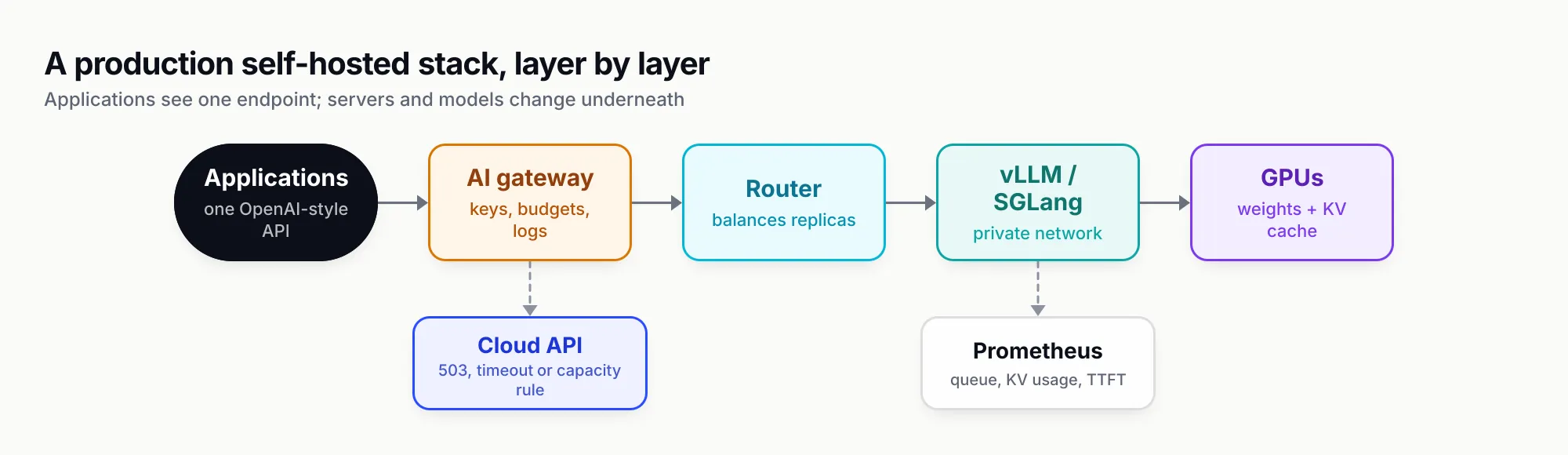
Figure 3: Applications talk only to the gateway. Routers, inference servers, models and GPUs can all change underneath it.
One endpoint in front of local and cloud models
Once there is more than one inference server, or a cloud API for overflow, applications should not hold a list of base URLs. An AI gateway gives them one OpenAI-compatible endpoint, maps model names to backends, retries and fails over, applies keys and budgets, and logs every request whether it ran on your GPUs or a provider’s. It is also where the missing authentication from the previous section belongs.
Bifrost, an open-source AI gateway written in Go by Maxim AI, is a useful worked example because it treats local servers as named providers rather than generic URLs. Its Ollama provider supports chat, Responses, text completions, embeddings and model listing, needs no API key for a local server, and requires the Ollama URL to be set per key. Its vLLM provider supports chat, text completions, embeddings, rerank, transcription and token counting, sends Responses requests natively to vLLM’s /v1/responses, and can route through vLLM’s Anthropic-compatible Messages endpoint. Each key carries a server URL and model name, so two GPU pools appear as two keys under one provider.
Three behaviours matter for a self-hosted LLM estate:
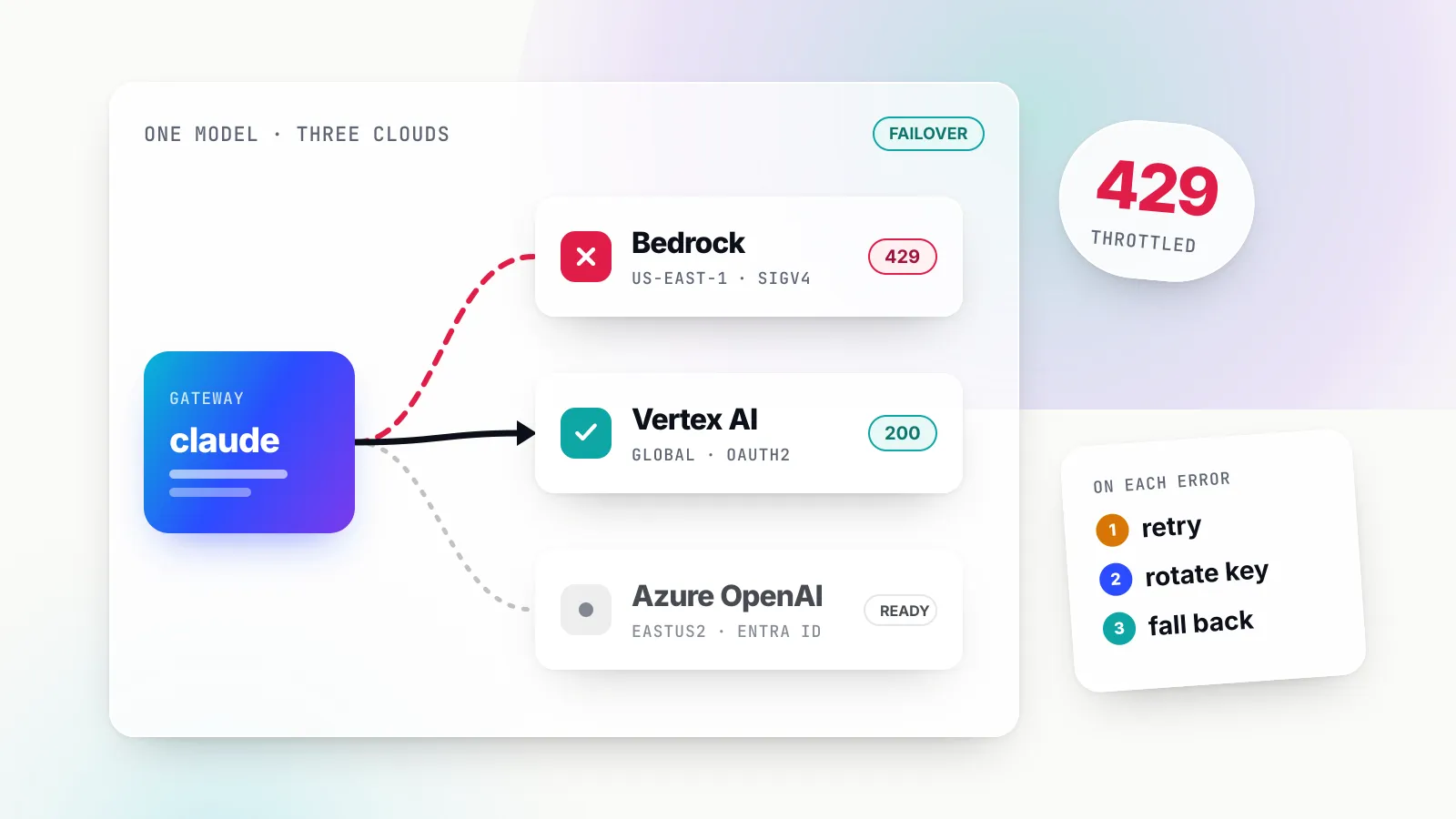
- Fallback when local capacity runs out. Bifrost’s retries and fallbacks classify every failure. A 503 (Ollama’s full-queue response), a 5xx or a network error is retried on the same backend with exponential backoff, then the request moves to the next provider in the fallback chain, such as a hosted API. Provider and time-to-first-token timeouts also trigger fallbacks, while validation errors such as a bad request do not.
- Routing before failure. Routing rules evaluate CEL expressions before provider selection and can read capacity metrics as percentages of configured limits:
budget_used,tokens_usedandrequest. A rule such astokens_used > 90can send traffic to a cloud provider when the local model’s token rate limit is nearly exhausted, before users see a queue. - Per-backend concurrency. Provider configuration sets worker concurrency and queue size per provider, which lets the gateway hold back requests for an Ollama box that can only process one or two at a time, instead of flooding it.
On overhead, Bifrost’s published benchmark reports 11 µs of added latency per request at 5,000 requests per second on an AWS t3.xlarge, which is negligible next to model generation time. Enterprise tier. Advanced controls (SSO, RBAC, audit logs, guardrails, clustering) come with the enterprise tier.
Bifrost is not the only way to do this. LiteLLM, Kong AI Gateway and others also route to Ollama and vLLM; our ranking of gateways for vLLM, Ollama and cloud compares five on health checks and fallback triggers, and a separate roundup of the best open-source LLM gateways for self-hosted deployments covers the wider field.
A setup path by team size
The right self-hosted LLM setup depends mostly on how many people will use it and how sensitive the data is. Start at the smallest step that meets your constraints and move up only when monitoring says you must.
One developer, exploring. Install Ollama or LM Studio, pull a 4-bit model that fits your machine (Qwen3.8-27B on a 32 GB GPU or a 64 GB Mac; an 8B model on a 16 GB laptop), and raise the context length from Ollama’s 4,096-token default if you paste long documents. Set OLLAMA_NO_CLOUD=1 if prompts must stay local.
A team sharing one machine. Move to vLLM or SGLang on a data-centre GPU, or llama.cpp with several parallel slots on a workstation. Size the KV cache for real concurrency using the formula above. Keep the server on a private network and put a gateway with per-user keys in front.
A product with steady traffic. Rent the target GPU and load-test with your prompts before buying anything. Compare measured tokens per second against the break-even table for the API you would otherwise use. Add replicas behind a cache-aware router, export metrics to Prometheus, and set alerts on queue depth and KV-cache usage.
Regulated or air-gapped. Treat the whole stack, model files, server, gateway and logs, as software that must install and run offline. Pin model versions and keep an evaluation set to approve upgrades.
Everyone. Keep a hosted model behind the same endpoint. It covers the hardest prompts, absorbs traffic spikes and keeps the product running while you upgrade the local model.
The case for a self-hosted LLM in 2026 is strong where data control, stability or steady volume matter, and weaker than it looks where the only argument is price. Do the memory maths before buying hardware, measure throughput before trusting the break-even, and never let applications talk to an inference server directly.
Sources
- Ollama FAQ (context length, concurrency, KV cache quantisation, network binding) Ollama
- Ollama OpenAI compatibility Ollama
- Ollama v0.40.4 release notes Ollama
- vLLM documentation vLLM project
- vLLM v0.31.0 release notes vLLM project
- vLLM engine arguments vLLM project
- vLLM security guide vLLM project
- vLLM production metrics vLLM project
- vLLM quantization vLLM project
- Efficient Memory Management for Large Language Model Serving with PagedAttention Kwon et al., SOSP 2023
- SGLang: Efficient Execution of Structured Language Model Programs Zheng et al.
- SGLang README and supported hardware SGLang project, LMSYS
- SGLang server arguments SGLang project
- llama.cpp HTTP server README ggml-org
- llama.cpp quantize README (bits per weight table) ggml-org
- Text Generation Inference README (maintenance mode notice) Hugging Face
- Run LM Studio as a service (headless) LM Studio
- LM Studio is free for use at work LM Studio
- Qwen3-8B model card Qwen team, Alibaba, via Hugging Face
- Qwen3.8-27B model card and config Qwen team, Alibaba, via Hugging Face
- Qwen3.8-27B GGUF quantisations Unsloth, via Hugging Face
- gpt-oss-120b model card OpenAI, via Hugging Face
- GPU cloud pricing Lambda
- GPU pricing RunPod
- DeepSeek API models and pricing DeepSeek
- Claude API pricing Anthropic
- GeForce RTX 5090 specifications NVIDIA
- DGX Spark NVIDIA
- Mac Studio technical specifications Apple
- Bifrost Ollama provider Maxim AI
- Bifrost vLLM provider Maxim AI
- Bifrost retries and fallbacks Maxim AI
- Bifrost routing rules Maxim AI
- Bifrost benchmarks Maxim AI
Frequently asked questions
What is a self-hosted LLM?
A self-hosted LLM is a language model whose weights you download and run on hardware you control, a laptop, a workstation, your own servers or rented GPUs, instead of calling a provider's API. Prompts and outputs stay on that hardware, and you choose the model version, the quantisation and when to upgrade.
How much VRAM do I need to run an LLM locally?
Add three things: weights (parameters times bytes per parameter, about 0.6 bytes at 4-bit), the KV cache (which grows with context length and concurrent users) and 10 to 20 per cent headroom. An 8B model at 4-bit fits in 8 GB for one short chat; a 27B model at 4-bit wants a 24 to 32 GB card; a 120B mixture-of-experts model wants 80 GB.
Is Ollama or vLLM better?
They solve different problems. Ollama is the quickest way to run a model on one machine for one user, with automatic model loading and GGUF quantisations. vLLM is built for many concurrent requests on data-centre GPUs, with PagedAttention, continuous batching and prefix caching. Many teams use Ollama on laptops and vLLM in production behind the same API.
Is self-hosting an LLM cheaper than using an API?
Only at sustained volume. A rented H100 at $3.99 an hour costs about $2,900 a month. At Claude Sonnet 5.5 prices it breaks even near 280 tokens per second around the clock; against DeepSeek's V4.1 Flash API it needs about 2,100 tokens per second. Idle hours count against self-hosting.
What is the best self-hosted LLM in 2026?
It depends on the hardware. On one 24 to 32 GB GPU, Qwen3.8-27B (Apache 2.0) is the strongest model under 100 billion parameters on the Artificial Analysis index. On one 80 GB GPU, gpt-oss-120b. On an eight-GPU node, DeepSeek V4.1 Flash or GLM-5.3. Licence terms matter as much as benchmarks.
Can I run an LLM locally without a GPU?
Yes, with llama.cpp, Ollama or LM Studio, which run quantised GGUF models on CPU and system RAM. Generation is much slower than on a GPU, which is acceptable for testing and batch jobs but not for interactive use by several people. Apple silicon Macs are the exception, because their unified memory lets the GPU use most of the system RAM.
Is Text Generation Inference still maintained?
Only lightly. Hugging Face's TGI repository says the project is in maintenance mode, accepting minor bug fixes and documentation changes, and recommends vLLM and SGLang for production serving and llama.cpp or MLX for local use. New deployments should start on one of those.