ToolsComparison
Cursor vs Claude Code in October 2026: IDE agent or terminal agent?
Cursor vs Claude Code compared on workflow, models, cloud agents, context, MCP, skills, team controls and pricing after Cursor's move to The X Subscription.
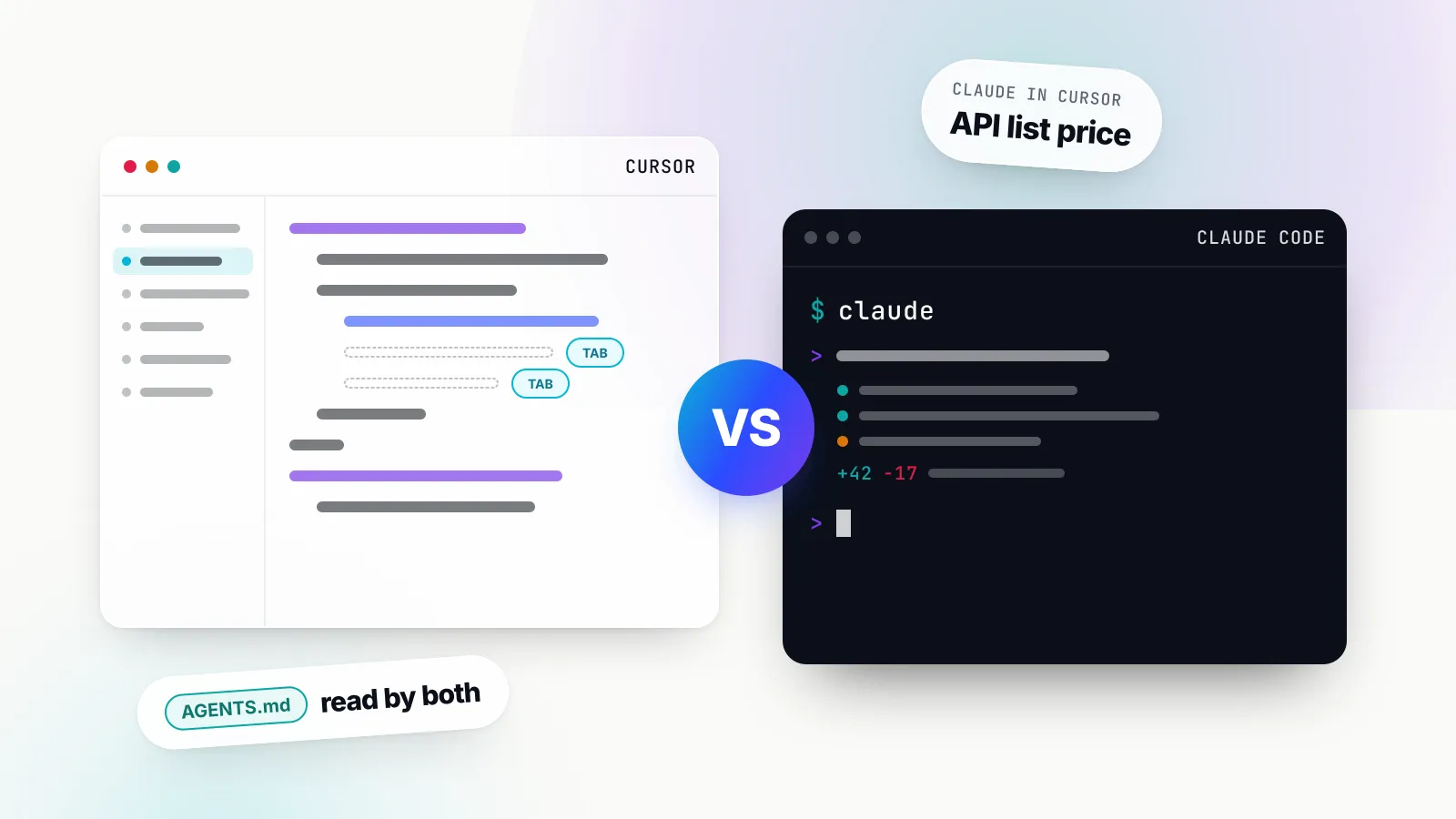
Cursor vs Claude Code is no longer a contest between a chat panel and a command-line toy. As of October 2026 both run agents that read a repository, edit many files, run tests, delegate to subagents, call MCP tools and keep working in the cloud after the laptop lid closes. The difference that remains is the starting point: Cursor is an IDE that has grown agents, and Claude Code is a terminal agent that has grown an IDE extension, a desktop app and a web interface.
That difference matters because it decides which models you can use and how you pay for them. Cursor’s pricing changed this month: new customers now buy it inside The X Subscription, where the included usage covers Cursor’s own models and Grok, and Claude models cost API list price on top. Claude Code, by contrast, is bundled into every paid Claude plan and runs only Claude models. This comparison is for developers choosing a daily tool and for engineering leads deciding what to roll out, and it sets the two side by side on the decisions that actually differ.
Every feature and price below comes from Cursor’s and Anthropic’s own documentation and pricing pages, read on 15 October 2026. GenAI Brief did not run benchmarks for this piece; where a vendor makes a performance claim, we attribute it.
Cursor vs Claude Code at a glance
Cursor wins on editor integration, Tab completion and model choice across vendors; Claude Code wins on terminal-native autonomy, policy-file governance and the economics of using Claude models heavily. The table summarises the state of both products in mid-October 2026.
| Cursor | Claude Code | |
|---|---|---|
| Primary surface | Desktop IDE with VS Code extensions, plus the Agents Window | Terminal CLI |
| Other surfaces | CLI (agent), web, iOS, Slack, GitHub, Linear, API | VS Code and JetBrains extensions, desktop app, web, mobile, Slack |
| Models | Grok 4.7/4.6/4.5 and Composer 2.5 included; Claude, GPT, Gemini at API price | Claude only: Opus 5.5, Sonnet 5.5, Haiku 5.5, Fable 5.1 |
| Inline completion | Tab, multi-line and cross-file | None (agent edits only) |
| Cloud agents | Isolated VMs from Premium up | Cloud sessions on Pro, Max, Team and eligible Enterprise seats |
| Project instructions | .cursor/rules/*.mdc, AGENTS.md | CLAUDE.md, .claude/rules/, AGENTS.md |
| Skills and subagents | Yes; also loads .claude/skills and .claude/agents | Yes; Agent Skills standard |
| Entry price with agent | $8 Plus (Cursor models only); $30 Premium for third-party models | $20 Pro ($17 billed annually) |
| Enterprise controls | Model, MCP and repository access, audit logs, SCIM | Managed settings, MCP allow/deny lists, SCIM, audit logs |
Two workflow models: an editor with agents, an agent with surfaces
Cursor puts the agent inside the place you already read and edit code, while Claude Code puts the agent first and lets you attach whichever window you like to it. Most of the practical differences follow from that.
Cursor: the IDE is the home screen
Cursor’s Agent lives in a side pane opened with Cmd+I. It searches the codebase and the web, reads and edits files, runs shell commands, drives a browser for visual checks, and creates checkpoints before significant changes so a bad turn can be rolled back without touching Git. Alongside it sit the pieces that made Cursor popular in the first place: Tab, which predicts multi-line and cross-file edits as you type, and inline edits on a selection.
The bigger shift this year is the Agents Window, which became generally available with Cursor 3 on 2 April 2026. It is an agent-first workspace across repositories and environments: local, cloud and remote SSH, with parallel agents, Git worktrees per task, a diffs view for review and commit, and one-click handoff between local and cloud. Cursor says it will keep supporting both the classic editor and the Agents Window, and describes the editor as the better fit when you want VS Code extensions and split panes.
Cursor also ships a CLI, started with agent, which supports the same Agent, Plan and Ask modes as the editor, a print mode for scripts and CI, and a sandbox toggle. Prefixing a message with & pushes the conversation to a cloud agent.
Claude Code: the agent is the home screen
Claude Code starts as claude in a terminal. Anthropic’s overview describes it as an agentic coding tool that reads your codebase, edits files, runs commands and integrates with your development tools, and its documentation frames the product as a loop of gathering context, taking action and verifying results. There is no autocomplete and no file tree; you describe a task, approve or pre-approve tool calls, and review the diff.
The surfaces have multiplied around that core. The VS Code extension adds inline diffs, @-mentions with line ranges, plan review and multiple conversations in tabs, and Anthropic’s documentation offers a direct install link for Cursor as well as VS Code. There is a JetBrains plugin, a desktop app with a Code tab, Claude Code on the web at claude.ai/code, and a Code tab in the mobile app. Each surface drives the same agent.
What the difference means day to day
A developer who spends most of the day reading and lightly editing code will get more from Cursor, because Tab and inline edits remove friction from every keystroke. A developer who hands off whole tasks, such as “upgrade this service to the new SDK and fix the tests”, and reviews the result will find Claude Code’s terminal loop more direct, and it fits naturally into scripts, SSH sessions and CI. The gap has narrowed from both sides: Cursor’s CLI and Agents Window are agent-first, and Claude Code’s IDE extension shows diffs in the editor. The habits each product encourages are still different.
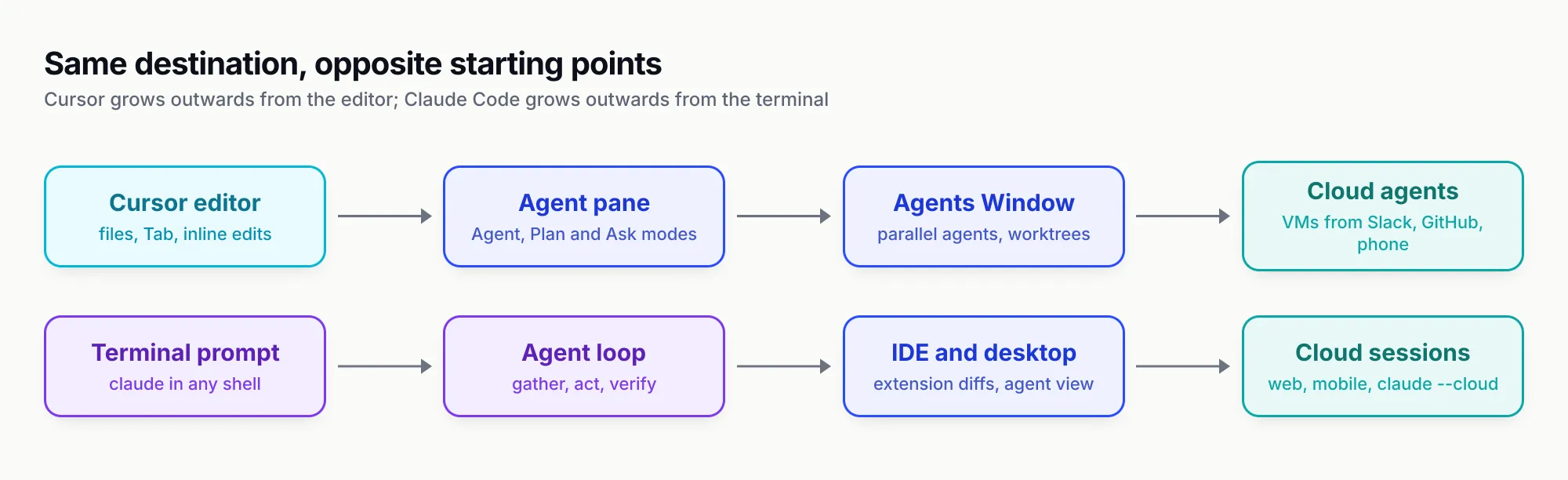
Figure 1: Both products now reach the cloud, but they start from opposite ends of the developer’s day.
Which models each tool can run
This is now the sharpest difference between the two. Claude Code runs Claude models only, and a paid Claude plan covers them. Cursor runs models from several vendors, but on its new plans only Cursor’s own models and Grok come out of the included pool; Claude, GPT and Gemini are billed per token.
Cursor: Composer and Grok in the pool, everything else at list price
Cursor’s models and pricing page lists the included models as Grok 4.7, Grok 4.6, Grok 4.5 and Composer 2.5. Cursor describes the Grok models as jointly trained by Cursor and SpaceXAI, the SpaceX AI business through which Cursor is now sold as part of The X Subscription. Composer 2.5 is Cursor’s own agentic model, which the company says it tuned with reinforcement learning on long-horizon coding tasks.
Third-party models remain available, and the list is long: Claude Opus 5.5, Sonnet 5.5, Haiku 5.5 and Fable 5.1, the GPT-5.6 family and Gemini models among them. On The X Subscription they are “not included” and are billed at the model’s API list price from the first request, paid from prepaid credit, on Premium and above. Plus, the $8 tier, has no third-party models and no bring-your-own-key option. Cursor’s own Opus 5.5 page says the model set the highest CursorBench score of any model in Cursor at launch, and prices it at $4 per million input tokens and $20 per million output tokens.
On Teams and Enterprise plans, Auto can use Cursor Router, which classifies each request and routes it to a cheaper or more capable model depending on whether the team picks Cost, Balance or Intelligence. The router documentation notes that a route to a third-party model bills as third-party usage, and individual plans only get the Cost mode.
Claude Code: Claude models, chosen by alias
Claude Code’s model configuration uses aliases. On the Anthropic API, opus resolves to Opus 5.5, sonnet to Sonnet 5.5 and haiku to Haiku 5.5, while fable selects Fable 5.1, which Anthropic describes as the most capable model in Claude Code for tasks larger than a single sitting. An opusplan alias uses Opus in plan mode and Sonnet for execution. Fable is never the default, and depending on plan it can bill to usage credits rather than the plan’s included limits: Anthropic’s pricing table lists Fable as usage credits only on Pro and as up to 50 per cent of weekly limits on Max.
Claude Code also runs on Amazon Bedrock, Google Cloud and Microsoft Foundry, where the aliases resolve to older versions on some providers; Microsoft Foundry, for example, maps opus to Opus 4.6. Anthropic does not support non-Claude models in Claude Code. Teams that want another vendor’s model inside Claude Code have to route it through a translating gateway at their own risk, a pattern covered in the site’s guide to AI gateways for Claude Code, Codex CLI and Cursor.
Why the model split changes the comparison
Under the old Cursor plans, a $20 Pro subscription included an allowance for Claude models, which made Cursor a reasonable way to use Claude. Under The X Subscription, a developer who wants Claude Opus in Cursor pays Anthropic’s list price on top of the Cursor plan. The same developer gets Opus 5.5 inside the usage limits of a $20 Claude Pro plan in Claude Code. If Claude is the model you trust for agentic coding, that tilts the economics towards Claude Code; if you are happy with Composer and Grok, Cursor’s included pool is generous. Our ranking of the top AI models for October 2026 covers how the frontier models compare beyond coding.
Agent modes, background agents and cloud agents
Both tools now offer a plan-first mode, local parallel agents and cloud agents that run on remote machines and open pull requests. The differences are in how they are launched, who can use them and what they bill against.
Plan mode and permissions
Cursor’s Plan Mode, reached with Shift+Tab, asks clarifying questions, researches the codebase and writes an editable plan before building; plans can be saved to the workspace and shared. Claude Code’s plan mode, reached the same way, explores the codebase and proposes an approach for approval before edits. Claude Code layers permission modes on top, from asking for every tool call to an auto mode, and administrators can forbid the bypass mode entirely through managed settings.
Local parallel agents
Cursor runs parallel local agents in the Agents Window, each in its own worktree. Claude Code’s agent view, opened with claude agents, shows every background session on the machine, which ones are working, which need input and which are done; Anthropic labels it a research preview. Claude Code also has experimental agent teams, in which several Claude instances coordinate; Anthropic’s cost guide warns that they use about seven times more tokens than a standard session when teammates run in plan mode.
Cloud agents
Cursor Cloud Agents run in isolated VMs with cloned repositories, installed dependencies, secrets and network access, configured by agent-led setup, a snapshot or a Dockerfile. They can be started from the desktop app, the web, the iOS app, Slack, GitHub or Bitbucket comments, Linear and an API, and they can control a desktop and browser to test their own work. On The X Subscription, cloud agents and Automations start at the $30 Premium tier.
Claude Code’s cloud sessions run on Anthropic-managed infrastructure or an organisation’s self-hosted environment, clone from GitHub, and keep running after the laptop closes. They start from claude.ai/code, the mobile app, the desktop app or claude --cloud in a terminal, and --teleport pulls a cloud session back to the local machine. Routines run scheduled or triggered tasks as cloud sessions, and Auto-fix can respond to pull request feedback. Cloud sessions are available on Pro, Max and Team plans and for Enterprise users with premium or Chat plus Claude Code seats. Anthropic notes that GitHub credentials stay encrypted on its servers and are attached by a proxy, so they never enter the session’s VM.
Code review
Cursor bundles Bugbot, its pull request reviewer, from Premium upwards and exposes it as /review-bugbot in the agent. Claude Code ships a /code-review bundled skill and GitHub Actions and GitLab CI integrations for running reviews in a pipeline. Both can sit alongside a human reviewer; neither replaces one.
Context handling and codebase search
Both tools find code by searching rather than by stuffing the repository into the prompt, and both use subagents to keep noisy exploration out of the main conversation. The differences are in context window sizes, how instructions load and what is stored where.
Cursor’s search documentation describes Instant Grep, a regex search engine that Cursor says outperforms ripgrep on large codebases. Cursor states that it builds and queries its index on the developer’s machine and does not upload file paths or store embeddings of the codebase for search. For broad questions the agent spawns an Explore subagent on a faster model, which Cursor says can run ten parallel searches in the time one main-agent search takes, and returns a summary.
Claude Code searches with pattern and regex tools and delegates verbose work to subagents that run in their own context windows. Its documentation is unusually explicit about what fills the window: the system prompt, CLAUDE.md files, the first 200 lines or 25KB of auto memory, environment details, and MCP tool names, with full MCP tool schemas deferred and loaded on demand. When the window fills, Claude Code compacts the conversation automatically, and /context shows what is using space.
Window sizes differ by model rather than by tool. In Claude Code, current Opus and Sonnet models offer up to 1 million tokens. In Cursor, Grok 4.7 runs at 256k by default with a 500k option billed at higher rates, and Claude models reach 1 million tokens at the same per-token API price. A bigger window is not free in either tool: every request resends the conversation, so long sessions cost more whichever product you use. Anthropic’s cost guide recommends clearing between unrelated tasks and keeping CLAUDE.md under 200 lines, advice that applies equally to Cursor rules.
Rules, skills, subagents and hooks
The configuration layer is where Cursor and Claude Code have converged most, and where a team can save itself duplicate work. Both support persistent instructions, on-demand skills, custom subagents and lifecycle hooks, and Cursor now reads several of Claude Code’s file locations directly.
Persistent instructions
Cursor’s rules come in four kinds: project rules as .mdc files in .cursor/rules with alwaysApply, description and globs frontmatter; user rules; team rules managed from the dashboard on Teams and Enterprise; and AGENTS.md, including nested files in subdirectories. A plain .md file in .cursor/rules is ignored.
Claude Code’s memory system uses CLAUDE.md at the project, user and managed-policy levels, path-scoped files in .claude/rules/, and auto memory that Claude writes for itself between sessions. It can also read a repository’s AGENTS.md in place of CLAUDE.md. A managed-policy CLAUDE.md, placed by IT in a system directory, gives an organisation instructions that load in every session.
Skills
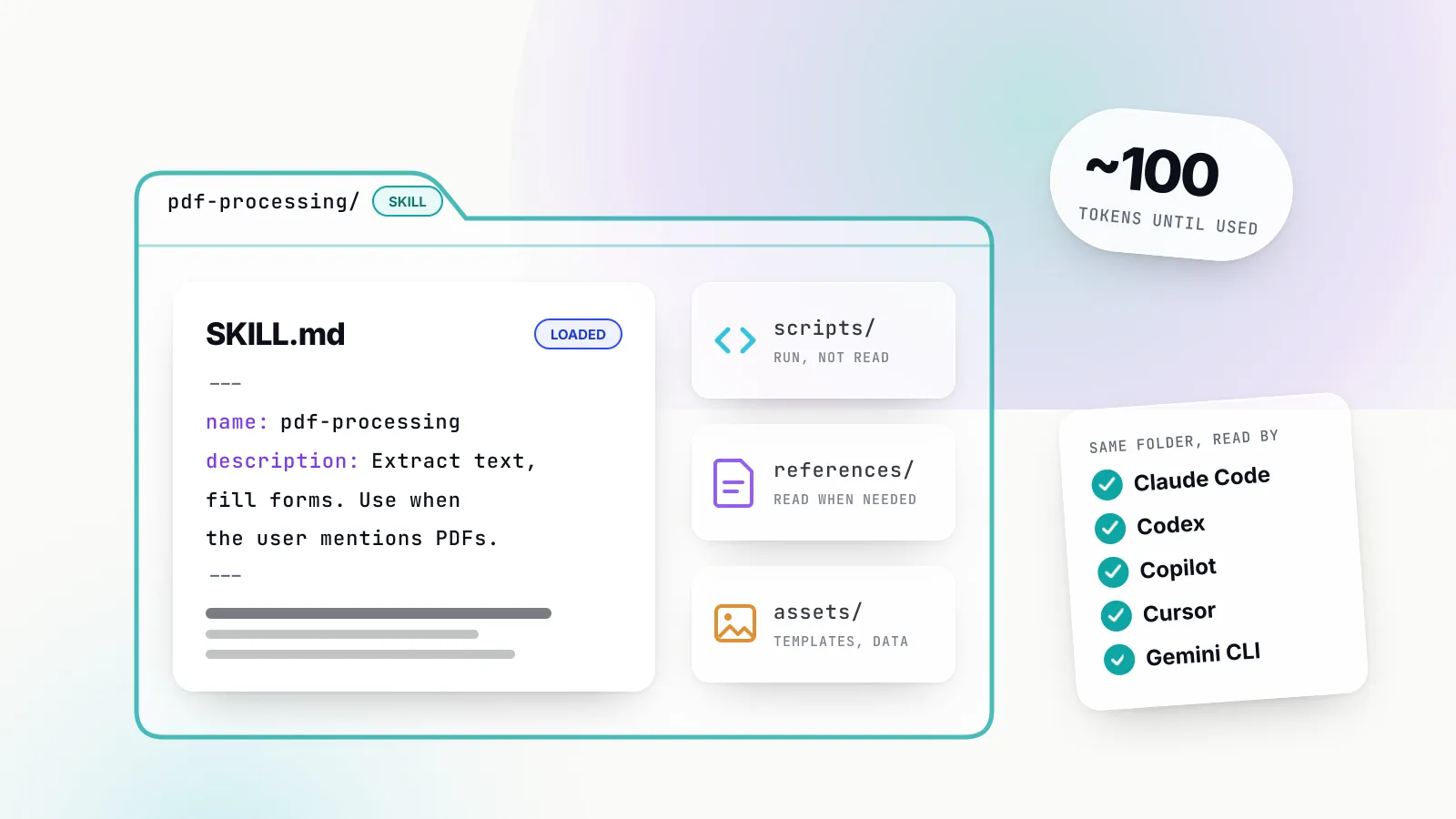
Both products implement the Agent Skills open standard: a folder with a SKILL.md and optional scripts and references, loaded only when relevant. Claude Code has merged its old custom commands into skills and ships bundled skills such as /code-review, /debug and /loop. Cursor ships its own built-ins, including /autopilot for shepherding a pull request and /review-security. Crucially, Cursor’s skills documentation says it also loads skills from .claude/skills/ and ~/.claude/skills/, so a skill written for Claude Code works in Cursor without changes.
Subagents and hooks
Cursor’s subagents run in their own context windows, in the foreground or background, in the editor, CLI and cloud. Cursor reads custom subagents from .claude/agents/ for compatibility, with .cursor/ taking precedence on a name clash. One billing detail matters: a subagent that names a third-party model bills as third-party usage even when the parent chat runs on a Cursor model. Claude Code subagents likewise run with their own prompt, tools and permissions, and their requests count against the same plan limits as the main conversation.
Cursor’s hooks and Claude Code’s hooks both run scripts at points in the agent loop, such as before a shell command or after a file edit, to format code, scan for secrets or block risky operations. Cursor states that it can load hooks written for Claude Code, and adds hooks for Tab completions that Claude Code has no equivalent of.
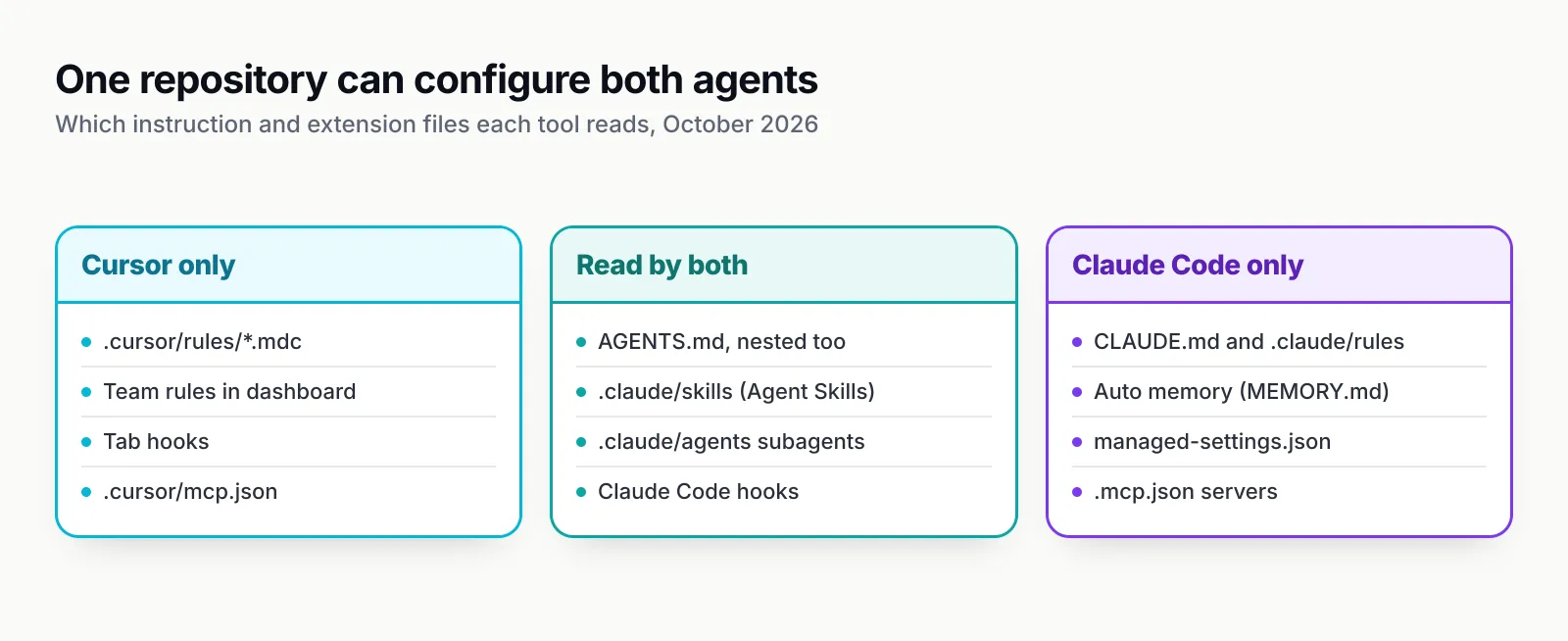
Figure 2: Write shared instructions in AGENTS.md and shared procedures as skills, and one repository serves both agents.
MCP support in both tools
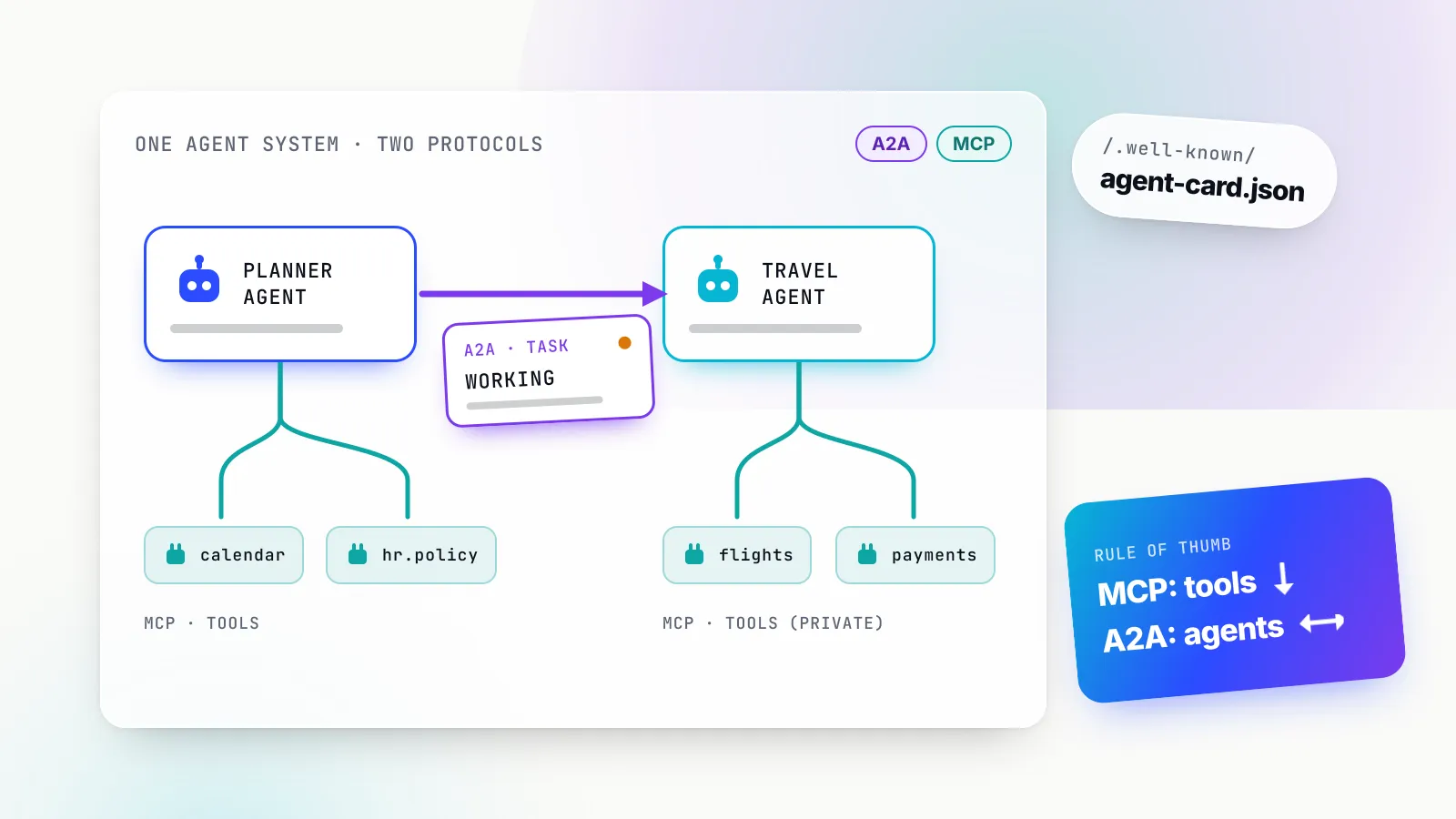
Both Cursor and Claude Code are full MCP clients, so the same servers for GitHub, databases, browsers or issue trackers work in either. The differences are in how servers are installed, how much context they cost and who can restrict them.
Cursor’s MCP support covers stdio, SSE and Streamable HTTP transports with OAuth for remote servers, and the protocol’s tools, prompts, resources, roots and elicitation features, plus the MCP Apps extension for interactive UI. Servers install from the Cursor Marketplace or an mcp.json file, and team admins can distribute servers through a team marketplace. Cloud agents support MCP servers too.
Claude Code’s MCP support recommends remote HTTP servers, added with claude mcp add --transport http, and supports local stdio servers configured in .mcp.json or user settings. Its distinguishing feature is tool search: by default only tool names enter the context window and full schemas load when Claude needs them, which keeps a dozen servers from eating the context budget. Anthropic’s cost guide still advises preferring CLI tools such as gh where they exist, because they add no per-tool listing at all.
The bigger MCP question is governance rather than features. Our ranking of MCP servers for coding agents measured how many tokens popular servers’ tool definitions cost and how often they handle untrusted content. Both products let administrators restrict servers, Cursor through Enterprise MCP access controls and Claude Code through allowedMcpServers and deniedMcpServers in managed settings, but neither tool sees servers configured in the other. Teams that need one policy across both usually look at an MCP gateway.
Cursor vs Claude Code pricing and usage limits
Claude Code is priced as part of a Claude plan and limited by time windows; Cursor is priced as part of The X Subscription and limited by a weekly pool plus prepaid credit for other vendors’ models. The two cannot be compared on sticker price alone, because what the money buys is different.
Cursor on The X Subscription
The X Subscription bundles Cursor, Grok and X into one plan billed through grok.com. According to Cursor’s pricing page and models and pricing documentation, as of 15 October 2026:
| Cursor plan | Price | Weekly pool | Third-party models | Notable inclusions |
|---|---|---|---|---|
| Free | $0 | Limited | No | Limited Agent and Chat |
| Plus | $8/mo | Base | No | Cursor models at fixed settings; no cloud agents, Bugbot or own keys |
| Premium | $30/mo | 4x Plus | API list price | Cloud agents, Automations, Bugbot, Origin |
| Super | $100/mo | 15x Plus | API list price | Priority model access at peak times |
| Ultra | $200/mo | 50x Plus | API list price | Earliest access to new products |
| Teams | $30, $100 or $200 per seat | Matches seat tier | API list price plus $0.25/M token rate | SSO, analytics, privacy enforcement |
| Enterprise | Custom | Pooled | API list price plus token rate | SCIM, audit logs, access controls |
The weekly pool is shared with Grok Chat, Imagine, Voice and Grok Bot, so heavy image generation and heavy coding draw on the same allowance. When the pool runs out, developers wait for the weekly reset, buy prepaid credit or upgrade; Cursor says requests are never downgraded in quality or speed. On Teams and Enterprise, every third-party model request carries the Cursor Token Rate of $0.25 per million tokens, including requests made with the team’s own API key. Individual plans do not pay it.
Existing customers have a choice. Legacy plans, Pro at $20, Pro+ at $60, Ultra at $200 and Teams Standard and Premium seats at $40 and $120, keep working with two monthly pools, one for Cursor models and one for other models, plus on-demand usage. Cursor says each X Subscription tier includes at least twice the Cursor-model usage of the legacy plan it replaces, but drops the included third-party allowance. Switching is optional and permanent. For a team whose developers mostly use Claude in Cursor, staying on a legacy plan may be cheaper; for a team happy with Composer and Grok, switching buys more included usage.
Claude Code on a Claude plan
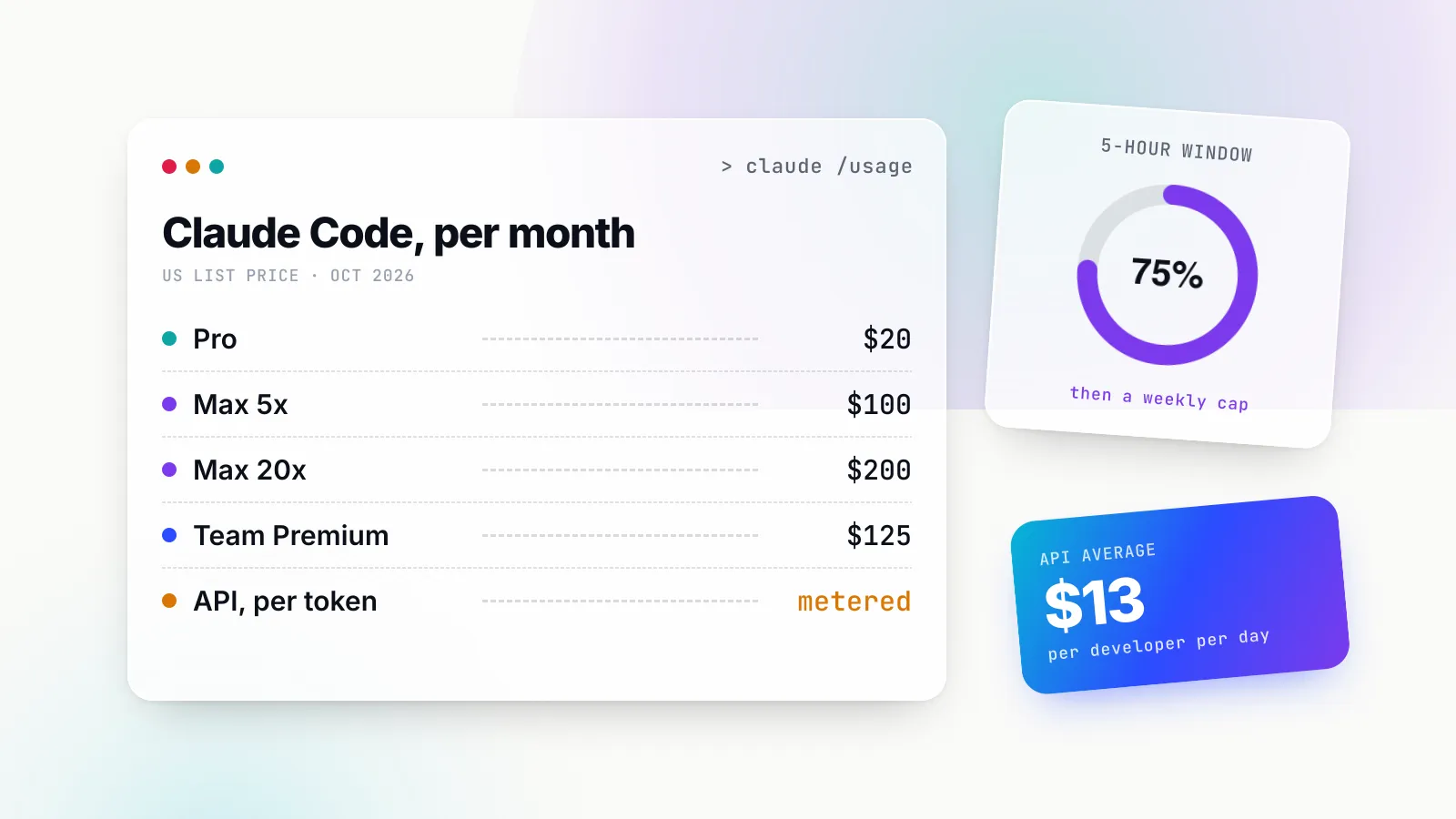
Anthropic’s pricing page includes Claude Code from Pro upwards:
| Claude plan | Price | Claude Code usage |
|---|---|---|
| Pro | $20/mo, or $17/mo billed annually | At least 5x Free per five-hour session |
| Max | From $100/mo | 5x or 20x Pro, plus monthly API credits |
| Team, Standard seat | $20 annual, $25 monthly | More than Pro |
| Team, Premium seat | $100 annual, $125 monthly | 5x Standard |
| Enterprise | $20 per seat per month, 20-seat minimum, plus usage at API rates | Scales with model and task |
Every plan has limits that reset on a rolling five-hour window, and paid plans add weekly limits. Those limits are shared across Claude on the web, desktop, mobile and Claude Code, so a long research chat and a long coding session draw on the same pool. Past the limit, subscribers can turn on usage credits with a monthly spend cap. Developers on an API key or on Bedrock, Google Cloud or Foundry pay per token instead. Anthropic’s cost guide puts average enterprise spend at about $13 per developer per active day and $150 to $250 per developer per month, with 90 per cent of users below $30 per active day.
A worked example
Consider a developer who wants Claude Opus as the main agent model. In Claude Code on a $20 Pro plan, Opus 5.5 is included until the five-hour or weekly limit, and a $100 Max plan multiplies that allowance by five. In Cursor on The X Subscription, the same developer needs Premium ($30) to use Claude at all, and then pays $4 per million input tokens and $20 per million output tokens for Opus 5.5 from prepaid credit. Agent sessions resend large contexts, mostly as cached reads, which Cursor prices at $0.20 per million for Opus 5.5; a busy day can still run into dollars rather than cents.
Now consider a developer who is content with Composer 2.5 for most work. Cursor’s Premium plan gives four times the Plus pool for that model, Tab completions and cloud agents for $30, and the developer only buys credit for the occasional Claude call. Claude Code cannot serve that developer at all, because it does not run Composer. The cheaper tool depends on which model you want, not which tool you pick.
Team and enterprise controls
Both vendors now sell to enterprises with SSO, SCIM, audit logs and model restrictions. Cursor centralises control in its web dashboard and Admin API; Claude Code adds a policy file that is enforced on each machine, which suits organisations used to MDM.
Cursor Teams adds SAML and OIDC SSO, centralised billing, usage analytics, team-wide privacy mode and a team marketplace for rules, skills and plugins. Enterprise adds SCIM, pooled usage, granular spend controls with group-level limits, auto-run, browser and network controls for agents, repository, model and MCP access controls, audit logs and service accounts. Cursor’s model management documentation explains that team and organisation-group model settings combine on a most-permissive basis, so admins should put strict defaults on the team and use groups only to widen access. Enterprise teams opt in to new models rather than receiving them automatically, and admins can block personal API keys. Cursor lists SOC 2 Type II and an OpenTelemetry export for usage metrics.
Claude Code’s managed settings sit above every other configuration level, so no user or project setting can override them. A managed-settings.json file, an MDM profile or server-managed settings from the admin console can deny reads of secrets, disable the bypass permission mode, restrict models with availableModels, allow or deny specific MCP servers, allow only managed hooks and permission rules, force a login method and require traffic to go through an approved gateway with allowedProviders. On top of that, Team and Enterprise plans offer spend limits at organisation, group and member level, analytics dashboards, and on Enterprise SCIM, audit logs, a compliance API and IP allowlisting. Claude Code’s OpenTelemetry export works on every setup, including Bedrock and Google Cloud.
The practical difference is enforcement. Cursor’s controls apply to people signed in to a Cursor team; Claude Code’s managed settings apply to the binary on a managed machine, whatever account the developer signs in with. Organisations worried about unsanctioned AI use on laptops will want both, and the site’s piece on shadow AI governance explains why tool settings alone rarely cover every endpoint.
Using Cursor and Claude Code together
The common pattern in 2026 is not choosing one but splitting work between them: Cursor for reading, navigating and small edits with Tab, and Claude Code for multi-file tasks that run for many minutes. Each vendor has made this easier.
The simplest setup is to run Claude Code inside Cursor, either as claude in the integrated terminal or through the Claude Code extension, which Anthropic links for Cursor installation. The agent then shows its diffs in Cursor’s editor while billing against the Claude plan. Developers keep Tab, Cursor’s Agent for quick questions on Composer or Grok, and Claude Code for long tasks on Opus or Sonnet, which avoids paying Cursor’s list-price rate for Claude.
To keep the two agents consistent, put project instructions that both should follow in AGENTS.md, which both read, and keep tool-specific detail in .cursor/rules or CLAUDE.md. Write reusable procedures as skills in .claude/skills, which both load. Configure the same MCP servers in both, and if you use hooks for formatting or secret scanning, write them once for Claude Code and let Cursor load them. A separate comparison of Codex and Claude Code covers the OpenAI side of the same choice.
The cost of running both is coordination. Two subscriptions, two usage dashboards and two sets of admin controls mean that nobody sees a developer’s total AI spend or every request in one place unless the organisation adds a layer underneath.
Standardising model access and spend across both tools
An AI gateway can sit underneath both tools because each exposes an endpoint override: Cursor accepts an overridden OpenAI base URL for chat and agent models, and Claude Code reads ANTHROPIC_BASE_URL. Pointing both at one gateway gives a platform team one credential per developer, one budget, one model allow-list and one request log across the two products.
Bifrost, the open-source AI gateway from Maxim AI, documents both setups. Its Cursor guide uses Cursor’s “Override OpenAI Base URL” toggle with a Bifrost virtual key as the API key, and model names in a provider/model format, so Cursor can reach any provider configured in the gateway. The guide notes two constraints that come from Cursor rather than the gateway: the endpoint must be publicly reachable, because Cursor sends requests from its own servers, and non-native models must support tool use for agent mode to work. Cursor’s own documentation adds that custom keys apply only to chat models, not Tab, are unavailable on the Plus plan, and on Teams still carry the Cursor Token Rate.
The Claude Code guide offers four setups: launching through the Bifrost CLI with bifrost claude, a static virtual key in ANTHROPIC_AUTH_TOKEN, dynamic credentials through Claude Code’s apiKeyHelper for SSO-issued tokens, and a mode that keeps billing on a Claude Pro, Max, Team or Enterprise subscription while the gateway applies governance through an x-bf-vk header. That last option matters for the “use both” pattern, because it lets a team keep Claude Code on flat-rate plans and still log and budget it alongside Cursor’s API-priced traffic.
Virtual keys carry the budgets, rate limits and provider permissions for each developer or team, and Bifrost’s published benchmark reports 11 µs of added overhead per request at 5,000 requests per second. For organisations that want these controls to cover AI use beyond the two coding tools, the wider topic is AI governance across every model call, not just coding agents. The site’s explainer on AI gateways covers the general mechanism.
Which one to choose
The decision usually comes down to three constraints: where the developer wants to work, which model family they rely on, and how the organisation enforces policy. Feature checklists are close enough that they rarely decide it.
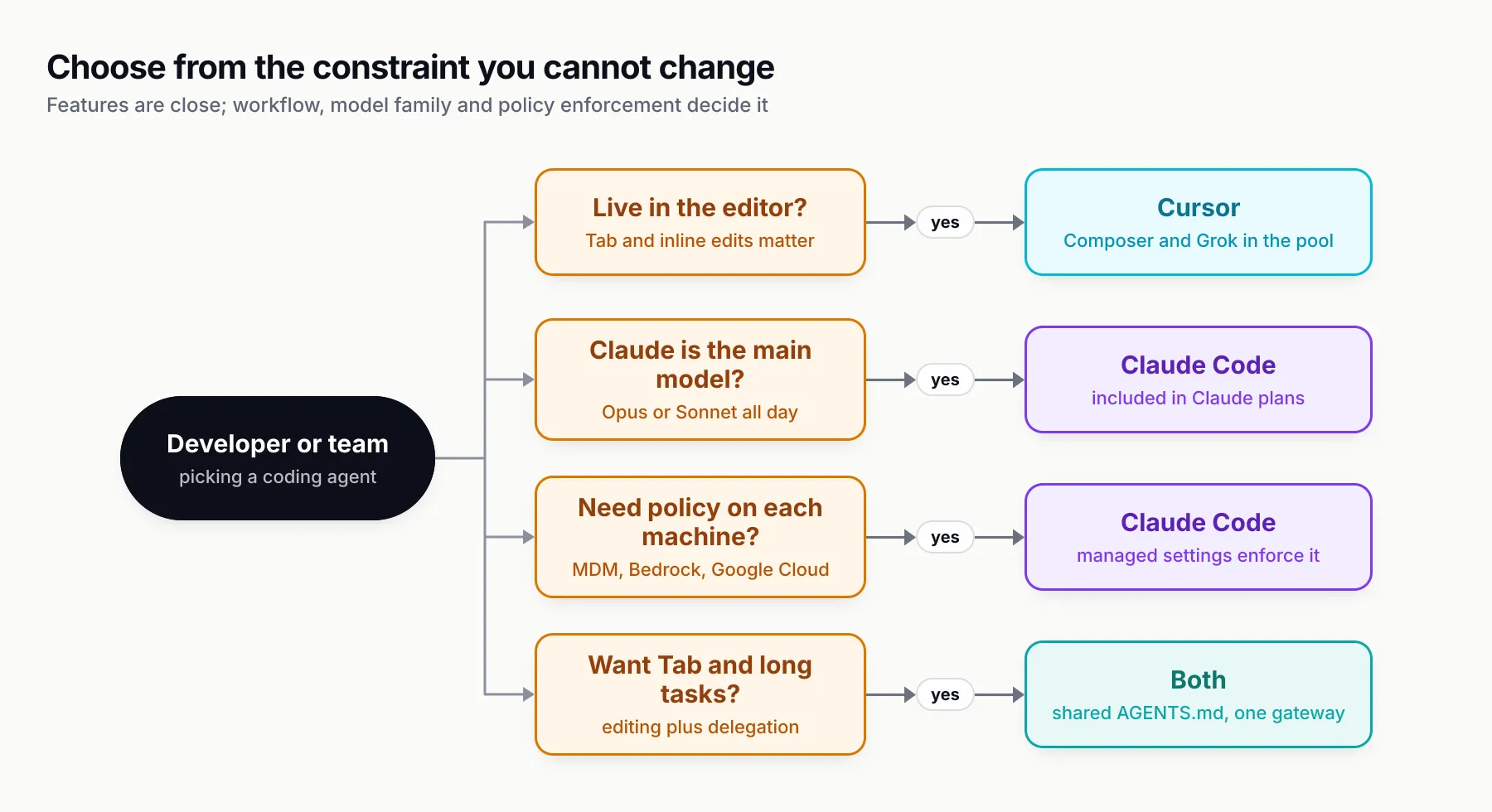
Figure 3: Start from the constraint you cannot change; the features follow.
Choose Cursor if
- You spend most of the day in the editor and value Tab and inline edits as much as the agent.
- You want to switch between vendors’ models in one interface, or Composer 2.5 and Grok cover most of your work within the included pool.
- You want cloud agents triggered from Slack, Linear, GitHub comments and a phone, managed from one web dashboard.
- Your organisation already standardised on Cursor and prefers dashboard-managed controls.
Choose Claude Code if
- You prefer to delegate whole tasks and review diffs, from a terminal, SSH session or CI job.
- Claude models are your main agent models and you want them on a flat subscription rather than per token.
- You need policies enforced on the machine through managed settings and MDM, or you must run on Bedrock, Google Cloud or Microsoft Foundry.
- You want the same agent across terminal, IDE, desktop, web and mobile, and you can live without autocomplete.
Choose both if
- You want Tab and fast edits in Cursor and long autonomous work in Claude Code, and you write shared instructions in AGENTS.md and skills.
- You can accept two bills and two dashboards, or you put a gateway underneath to see total spend in one place.
What to watch next
Cursor’s move to The X Subscription is days old, and its effects on teams that relied on Claude inside Cursor will show up over the next billing cycles. Watch whether Cursor adds third-party allowances back to higher tiers, how quickly Enterprise customers are moved across, and how Composer and Grok compare with Claude and GPT on agentic coding as independent results appear. On Anthropic’s side, agent view is still labelled a research preview and agent teams are experimental and off by default, so expect both to change.
Our judgement for October 2026: the Cursor vs Claude Code choice is now mostly a model and billing decision dressed up as an interface decision. If you want Claude at the centre, Claude Code is the cheaper and more direct way to get it, and Cursor remains an excellent editor to run it in. If you want vendor choice and Cursor’s own models, Cursor’s new plans give more included usage than before. Pick the workflow first, check the model costs second, and keep your instructions portable so the choice stays reversible.
Sources
- Cursor pricing Cursor (Anysphere)
- Models and pricing (Cursor docs) Cursor (Anysphere)
- Legacy Cursor plans Cursor (Anysphere)
- Bring your own API key (Cursor help) Cursor (Anysphere)
- Agents Window (Cursor docs) Cursor (Anysphere)
- Cloud Agents (Cursor docs) Cursor (Anysphere)
- Cursor CLI overview Cursor (Anysphere)
- Rules (Cursor docs) Cursor (Anysphere)
- Agent Skills (Cursor docs) Cursor (Anysphere)
- Subagents (Cursor docs) Cursor (Anysphere)
- Model Context Protocol (Cursor docs) Cursor (Anysphere)
- Model and integration management (Cursor Enterprise) Cursor (Anysphere)
- Claude pricing Anthropic
- Claude Code overview Anthropic
- Model configuration (Claude Code) Anthropic
- Use Claude Code in the cloud Anthropic
- Manage multiple agents with agent view Anthropic
- How Claude remembers your project (CLAUDE.md and AGENTS.md) Anthropic
- Extend Claude with skills Anthropic
- Manage costs effectively (Claude Code) Anthropic
- Deploy managed settings (Claude Code) Anthropic
- Bifrost with Cursor Maxim AI
- Bifrost with Claude Code Maxim AI
Frequently asked questions
Is Cursor or Claude Code better?
Neither is better across the board. Cursor is the stronger choice for people who want to stay in an editor, use Tab completion and switch between many model vendors. Claude Code is the stronger choice for long autonomous tasks in a terminal, for teams that want Claude models on a flat subscription, and for organisations that manage agents through policy files. Many developers use both.
Can I use Claude Code inside Cursor?
Yes. Anthropic publishes the Claude Code extension for VS Code-based editors and links an install for Cursor directly from its documentation. You can also run the claude command in Cursor's integrated terminal. In both cases Claude Code bills against your Claude plan or API account, not your Cursor plan.
Does Cursor include Claude models?
Not in the included usage on The X Subscription, which covers Grok 4.7, Grok 4.6, Grok 4.5 and Composer 2.5. Claude models are available on Premium ($30) and above at Anthropic's API list price, paid from prepaid credit, or through your own Anthropic key. Legacy Pro, Pro+ and Ultra plans still include an Other Models pool that covers Claude.
How much does Claude Code cost?
Claude Code is included in Claude Pro ($20 a month, or $17 a month billed annually), Max (from $100 a month), Team seats ($20 to $125 a month) and Enterprise ($20 per seat plus usage at API rates). Usage is limited by a rolling five-hour window and weekly caps. Anthropic puts average enterprise spend at about $13 per developer per active day.
Is Claude Code better than Cursor for large codebases?
Both search large repositories with grep-style tools and subagents rather than loading everything into context. Claude Code's current Opus and Sonnet models offer up to a 1 million token context window on subscription plans; in Cursor, Grok 4.7 runs at 256k by default with a 500k option, and Claude models reach 1 million tokens at API rates. Context size matters less than how well each tool keeps irrelevant output out of the window.
Do Cursor rules work in Claude Code?
Not directly. Cursor's project rules are .mdc files in .cursor/rules with Cursor-specific frontmatter, and Claude Code ignores them. Instructions written in an AGENTS.md file, however, are read by both tools, and skills written to the open Agent Skills standard in .claude/skills load in Cursor as well as Claude Code.
Can I control Cursor and Claude Code spend in one place?
Only through a layer both tools call. Cursor accepts an overridden OpenAI base URL and Claude Code accepts ANTHROPIC_BASE_URL, so an AI gateway can issue one credential per developer, apply one budget and log both tools' requests. Native controls are separate: Cursor's admin dashboard and Admin API, and Anthropic's admin console and managed settings.