ToolsExplainer
skills.sh and npx skills add: the complete guide to installing agent skills
What skills.sh is, who runs it, and every skills CLI command tested: how npx skills add resolves repos, scope, agent targeting, symlinks, skills-lock.json, telemetry and security review.
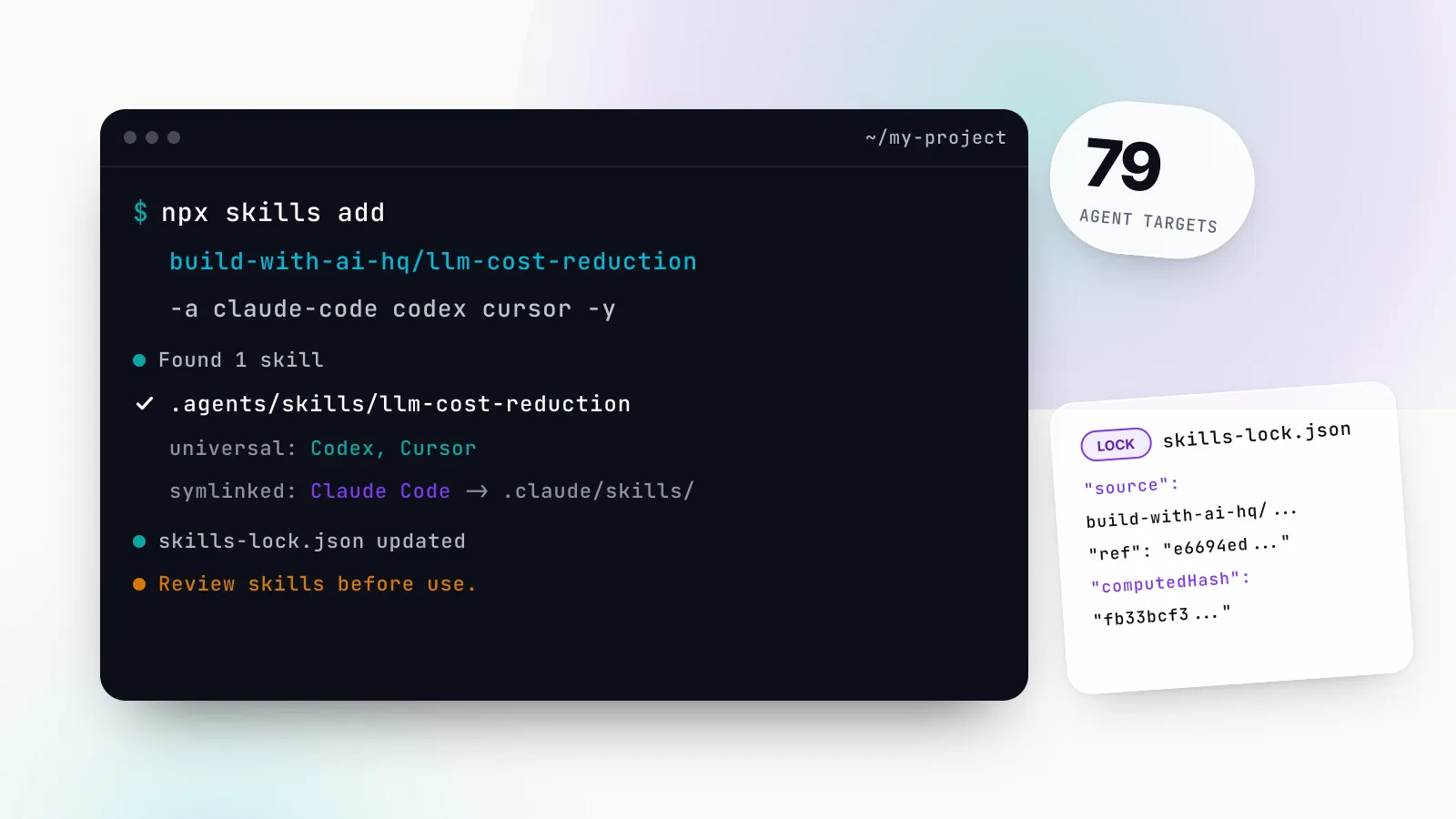
skills.sh is the public directory for Agent Skills, the SKILL.md folders that teach coding agents how to do a specific job, and npx skills add is the command that installs them. Vercel launched both on 20 January 2026: a command-line tool called skills that installs and manages skill packages, and skills.sh as “a directory and leaderboard” for them. Nine months later the CLI is at version 1.7.4, knows 79 agent targets, and has become the default way to install a third-party skill into Claude Code, Codex, Cursor or Gemini CLI.
The tool is simple to start with and has more behaviour than its one-line install suggests. Where files land depends on scope and agent. Most agents get a symlink, not a copy. A lockfile records what you installed, but restoring from it does not recreate every agent’s link. Telemetry is on by default and drives the leaderboard. And a skill is instructions an agent will follow with your permissions, so the security question is not optional.
This guide covers all of it, using real output from the CLI. We ran every command on 28 October 2026 and used six open-source skills published by the GitHub organisation build-with-ai-hq as the worked examples throughout. If you want the background on what a skill is and how agents load one, start with our Claude Skills explainer; this piece is about getting skills onto machines and keeping them there.
Quick start: npx skills add in one minute
The CLI needs Node.js 22.20 or later, according to the project README. Run it from the root of the project where you want the skill, and add -y to accept the defaults:
npx skills add build-with-ai-hq/llm-cost-reduction -yTo pick the agents yourself, pass their ids after -a. This is the form we recommend for teams, because it makes the result the same on every machine:
npx skills add build-with-ai-hq/llm-cost-reduction -a claude-code codex cursor -yThe six skills used as examples in this guide each live in their own repository, so each needs its own command:
npx skills add build-with-ai-hq/agent-skills-for-teams
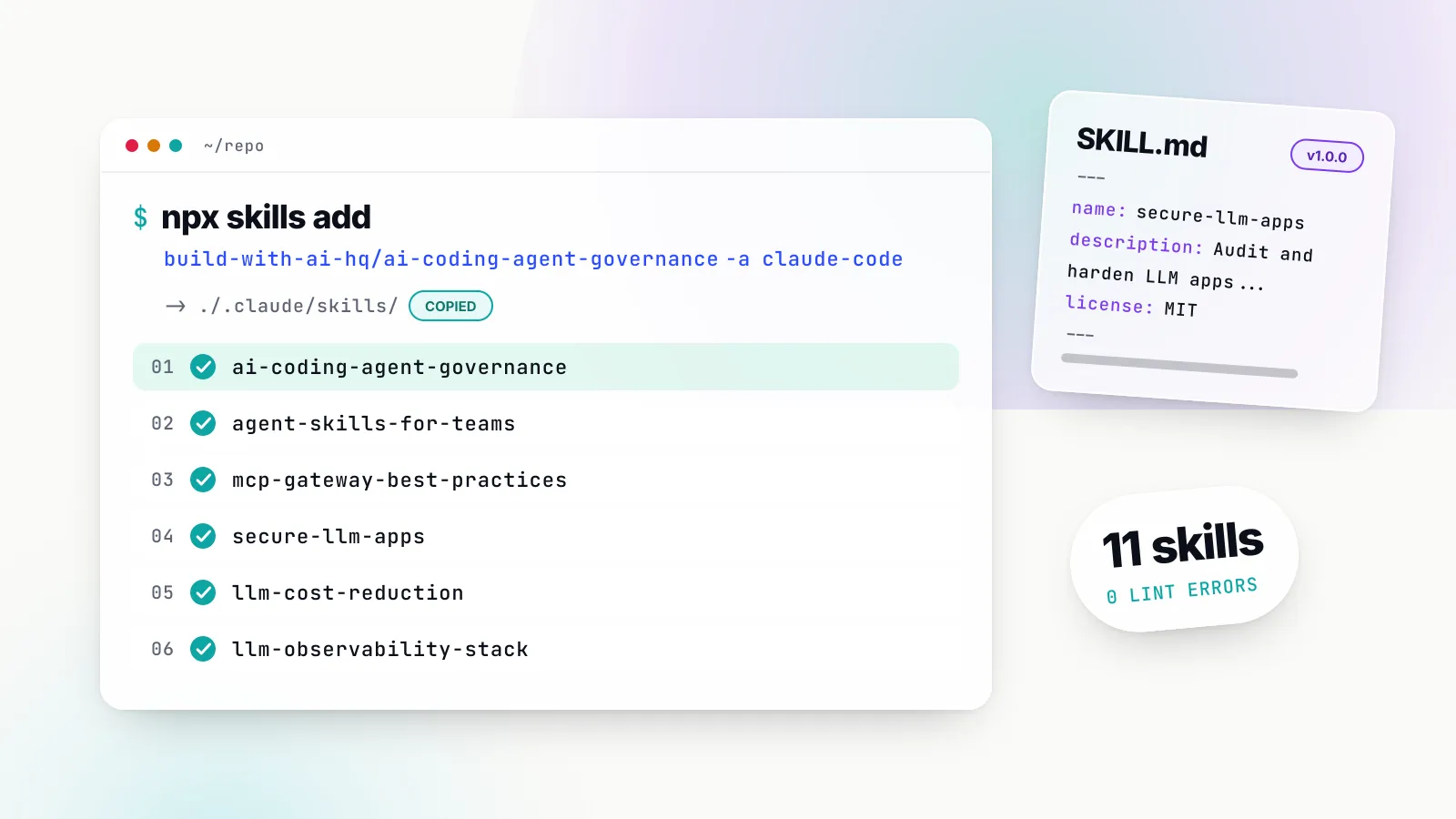
npx skills add build-with-ai-hq/ai-coding-agent-governance
npx skills add build-with-ai-hq/llm-cost-reduction
npx skills add build-with-ai-hq/llm-observability-stack
npx skills add build-with-ai-hq/mcp-gateway-best-practices
npx skills add build-with-ai-hq/secure-llm-apps
To keep your installs out of the public leaderboard, prefix any command with DISABLE_TELEMETRY=1 (covered in its own section below). Everything else in this guide explains what those commands did and what to change for your situation.
What skills.sh is and who runs it
skills.sh is a website run by Vercel that lists Agent Skills, ranks them and links to their source. Its footer reads “Made with care by Vercel”, and the CLI behind it is published as vercel-labs/skills under the MIT licence. Vercel’s launch changelog, written by Andrew Qu and dated 20 January 2026, introduced the two together.
Three things about skills.sh are easy to get wrong.
It is a directory, not a registry. skills.sh does not host skill files. Every listing points to a Git repository, and npx skills add clones that repository directly. Taking down a listing does not remove a skill from anyone’s machine, and the content you install is whatever is in the repository at that moment, not something skills.sh has reviewed or frozen.
Rankings come from telemetry. The skills.sh FAQ says skills appear on the leaderboard automatically when people install them with the CLI, and that only aggregate installation metrics are collected. There is no submission form and no editorial gate. A skill is on skills.sh because someone ran npx skills add on it with telemetry switched on.
Security ratings are third-party scans. The audits page shows “combined security audit results from Gen Agent Trust Hub, Socket, and Snyk”. Gen and Snyk label a skill Safe, Low, Medium or High Risk, and Socket reports an alert count. These are useful signals and are covered in the security section below, but they are automated scans, not a human review.
Each skill page shows the install command, the source repository and the scan results. The repository pages for the six example skills are agent-skills-for-teams, ai-coding-agent-governance, llm-cost-reduction, llm-observability-stack, mcp-gateway-best-practices and secure-llm-apps.
The format itself is not Vercel’s. Skills follow the open Agent Skills specification: a folder with a SKILL.md file whose YAML frontmatter holds a name and a description, plus optional scripts/, references/ and assets/ folders. The skills CLI is one installer for that format among several. Claude Code plugins, Codex’s own skill installer and Cursor’s repository import all work with the same folders. What the CLI adds is one command that writes to many agents at once, plus update and lockfile handling.
How npx skills add resolves a source
The argument to add is a source, and the CLI accepts more forms than the owner/repo shorthand on skills.sh. The CLI reference lists them:
| Source form | Example | What happens |
|---|---|---|
| GitHub shorthand | build-with-ai-hq/llm-cost-reduction | Clones https://github.com/<owner>/<repo>.git |
| Shorthand plus skill | build-with-ai-hq/secure-llm-apps@secure-llm-apps | Clones, installs only the named skill |
| Full GitHub URL | https://github.com/owner/repo | Same as shorthand |
| Tree URL | https://github.com/owner/repo/tree/<ref>/skills/x | Clones at that branch, tag or commit and path |
| GitLab, Azure Repos, any Git URL | git@github.com:owner/repo.git | Clones with your Git credentials |
| Local path | ./my-local-skills | Reads from disk, no network |
| Direct download | https://example.com/download/my-skill | Fetches a single SKILL.md or an archive |
For the shorthand, the CLI turns owner/repo into a GitHub clone URL. Our run printed the resolved source before cloning:
◇  Source: https://github.com/build-with-ai-hq/llm-cost-reduction.git
◇  Repository cloned
◇  Found 1 skill
Once the repository is on disk, the CLI looks for SKILL.md files. The discovery rules check the repository root, then skills/ and its .curated, .experimental and .system subfolders, then every agent folder it knows (.claude/skills/, .agents/skills/ and about 50 more). Container folders are walked up to three levels deep, so catalogue layouts such as skills/<category>/<name>/SKILL.md work. A root SKILL.md shadows anything nested below it unless you pass --full-depth. Skills declared in a .claude-plugin/marketplace.json or plugin.json are also found, which means most Claude Code plugin repositories install without changes.
Each of the six build-with-ai-hq repositories has a single SKILL.md at the root, which is why every run reported “Found 1 skill”. Repositories that bundle many skills, such as Vercel’s own vercel-labs/agent-skills, are where --skill (-s) and --list (-l) earn their keep. --list prints what a repository offers without installing anything:
npx skills add build-with-ai-hq/llm-cost-reduction --list◇ Available Skills
│ llm-cost-reduction
│ Find and cut LLM/AI API spend in applications and agents without
│ breaking quality. Measures cost per feature and per request first, ...
└ Use --skill <name> to install specific skillsThat description is the text an agent sees at the start of every session, so reading it before installing tells you when the skill will trigger.
Private repositories
The same command works for private repositories. The CLI’s private repository rules say that for GitHub shorthand and HTTPS sources it tries your normal Git credentials first, then gh repo clone if the GitHub CLI is signed in, then SSH. The documentation adds that the CLI “does not execute gh auth token” or copy the stored GitHub credential into its own process. GITHUB_TOKEN or GH_TOKEN can be set for API lookups and update checks but is optional when Git, the GitHub CLI or SSH already works. For a team skills repository, that means no new secret to distribute: anyone who can clone the repository can install from it.
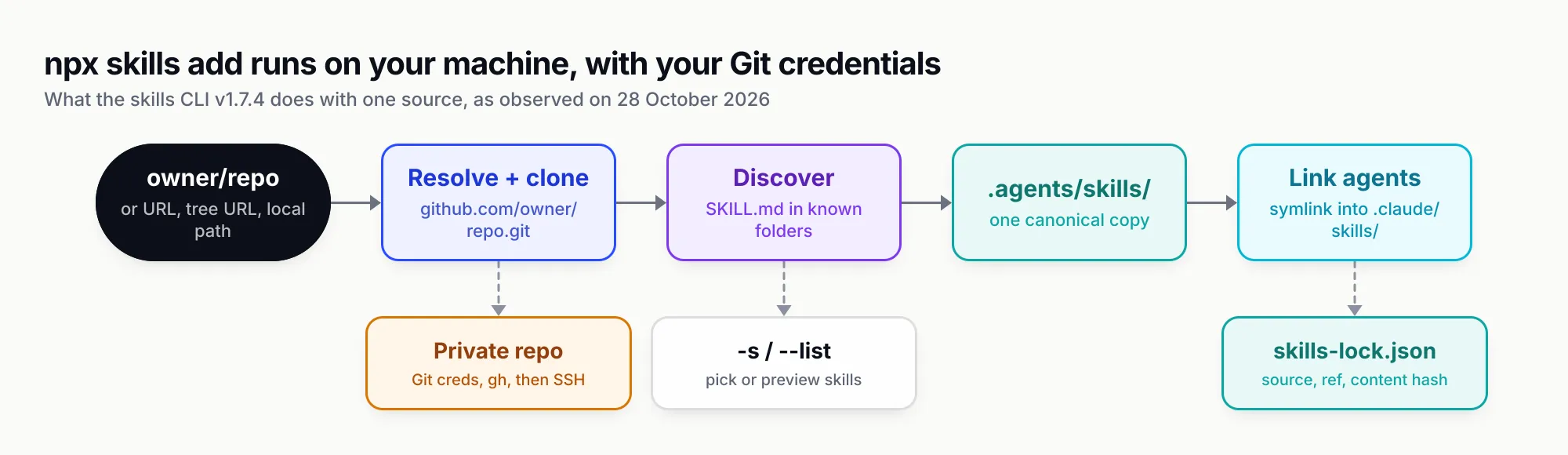
Figure 1: Everything npx skills add does happens on your machine with your Git credentials; skills.sh only appears at the end, as telemetry and security lookups.
Project vs global scope: where skills land
Scope decides whether a skill belongs to one repository or to you. The installation scope table in the CLI reference has two rows:
| Scope | Flag | Location | Use it for |
|---|---|---|---|
| Project | (default) | ./<agent folder>/skills/ | Skills committed with the code and shared with everyone who clones it |
| Global | -g | ~/<agent folder>/skills/ | Personal skills you want in every project |
Project scope is the default, and it is the right default for teams: the skill sits in the repository, changes go through code review and every clone gets it. Global scope suits personal tooling, such as a skill for writing your own commit messages.
Here is what a project install actually wrote. We ran npx skills add build-with-ai-hq/agent-skills-for-teams -y in an empty project and listed the result:
./skills-lock.json
./.agents/skills/agent-skills-for-teams/SKILL.md
./.agents/skills/agent-skills-for-teams/README.md
./.agents/skills/agent-skills-for-teams/LICENSE
./.agents/skills/agent-skills-for-teams/references/writing-skills-that-trigger.md
./.agents/skills/agent-skills-for-teams/references/versioning-and-review.md
./.agents/skills/agent-skills-for-teams/references/bifrost-skills-repository.md
./.agents/skills/agent-skills-for-teams/scripts/lint_skills.py
./.agents/skills/agent-skills-for-teams/assets/...
./.claude/skills/agent-skills-for-teams -> ../../.agents/skills/agent-skills-for-teams
Three things happened. The whole repository, not just SKILL.md, was copied into .agents/skills/, which is the canonical location. A relative symlink was created at .claude/skills/agent-skills-for-teams because Claude Code reads its own folder. And a skills-lock.json file was written at the project root.
Global installs go to each agent’s own home folder, which is not always the obvious one. Claude Code uses ~/.claude/skills/, Codex uses ~/.agents/skills/, Cursor uses ~/.cursor/skills/ and Gemini CLI uses ~/.gemini/skills/, according to the supported agents table. We did not run -g on the test machine, to avoid changing a real home directory, so the global paths in this guide come from that documentation rather than from our run.
Agent targeting: the supported agents table
-a (or --agent) chooses which agents receive the skill, and takes one or more agent ids. -a '*' means every agent the CLI knows. Without -a, the CLI detects which agents are installed and asks; with -y it installs to the detected set.
That detection showed up in our test in an unexpected way. Our shell was launched from a Claude Code session, and the CLI noticed: it printed “Agent detected” with the note “installing non-interactively”, skipped every prompt, and installed to the agents it found on the machine: Antigravity, Claude Code, Codex, Cursor, Gemini CLI, Hermes Agent, Junie, Kiro CLI, OpenCode, Trae and Windsurf. Five of those were then “skipped (project directory not found)” because their project folders did not exist. Running the same command on a different laptop would produce a different set, which is the argument for always passing -a in scripts and documentation.
The CLI’s own count is 79 agents; the add command printed “79 agents” during agent selection, and the README lists four by name “and 75 more”. The ones most teams will meet:
| Agent | -a id | Project folder | Global folder |
|---|---|---|---|
| Claude Code | claude-code | .claude/skills/ | ~/.claude/skills/ |
| Codex | codex | .agents/skills/ | ~/.agents/skills/ |
| Cursor | cursor | .agents/skills/ | ~/.cursor/skills/ |
| GitHub Copilot | github-copilot | .agents/skills/ | ~/.copilot/skills/ |
| Gemini CLI | gemini-cli | .agents/skills/ | ~/.gemini/skills/ |
| OpenCode | opencode | .agents/skills/ | ~/.config/opencode/skills/ |
| Antigravity | antigravity | .agents/skills/ | ~/.gemini/antigravity/skills/ |
| Amp | amp | .agents/skills/ | ~/.config/agents/skills/ |
| Cline | cline | .agents/skills/ | ~/.agents/skills/ |
| Warp | warp | .agents/skills/ | ~/.agents/skills/ |
| Windsurf | windsurf | .windsurf/skills/ | ~/.codeium/windsurf/skills/ |
| Kiro CLI | kiro-cli | .kiro/skills/ | ~/.kiro/skills/ |
| Goose | goose | .goose/skills/ | ~/.config/goose/skills/ |
| Roo Code | roo | .roo/skills/ | ~/.roo/skills/ |
| Continue | continue | .continue/skills/ | ~/.continue/skills/ |
| Junie | junie | .junie/skills/ | ~/.junie/skills/ |
| Trae | trae | .trae/skills/ | ~/.trae/skills/ |
| OpenHands | openhands | .openhands/skills/ | ~/.openhands/skills/ |
| Qwen Code | qwen-code | .qwen/skills/ | ~/.qwen/skills/ |
| Augment | augment | .augment/skills/ | ~/.augment/skills/ |
Source: vercel-labs/skills docs/agents.md, read on 28 October 2026.
The pattern matters more than the rows. A large group of agents, Codex, Cursor, Copilot, Gemini CLI, OpenCode, Amp and others, read the shared .agents/skills/ folder at project scope. The CLI calls these “universal” agents, and our installs reported them that way: universal: Codex, Cursor with symlinked: Claude Code. One canonical copy in .agents/skills/ serves the whole universal group with no links at all. Claude Code is the main agent that still needs its own folder, and the CLI covers it with a symlink.
Global paths are less consistent. Cursor reads .agents/skills/ in a project but ~/.cursor/skills/ globally, and Gemini CLI does the same with ~/.gemini/skills/. If a skill works in a project but not after a global install, check the global column first.
The same docs page includes a compatibility table worth reading before you write a skill for several agents. Basic skills work everywhere. allowed-tools works in most agents but not Kiro CLI or Zencoder. context: fork works only in Claude Code, and hooks only in Claude Code, Cline and Kiro CLI, per the compatibility matrix. A skill that relies on a Claude Code-only field will install fine into Cursor and then behave differently there.
Symlink vs —copy
By default the CLI symlinks each agent’s folder to the canonical copy. The installation methods table recommends symlinks as a “single source of truth, easy updates”, and offers --copy “when symlinks aren’t supported”.
With symlinks, npx skills update changes one folder and every agent sees the change. With --copy, each agent gets an independent folder. We tested both. The symlinked install produced the relative link shown earlier. The copied install, npx skills add build-with-ai-hq/secure-llm-apps@secure-llm-apps -a claude-code --copy -y, reported:
◇  Installed 1 skill
│  ✓ secure-llm-apps (copied)
│    → ./.claude/skills/secure-llm-apps
and wrote a real directory to .claude/skills/secure-llm-apps with no .agents/skills/ folder at all, because Claude Code was the only target.
Choose --copy in three cases:
- Windows without symlink permission. Creating symlinks on Windows needs developer mode or elevated rights; copies avoid the problem.
- Tools that do not follow symlinks. Some sync clients, container build contexts and archive steps flatten or drop links.
- A single agent. If only Claude Code will ever read the skill, a copy in
.claude/skills/is simpler to reason about than a link to a folder no other tool uses.
Otherwise leave the default. Two copies of one skill drift as soon as someone edits one of them, and the agent-skills-for-teams skill lists “editing an installed copy instead of the source” among its common mistakes for exactly that reason.
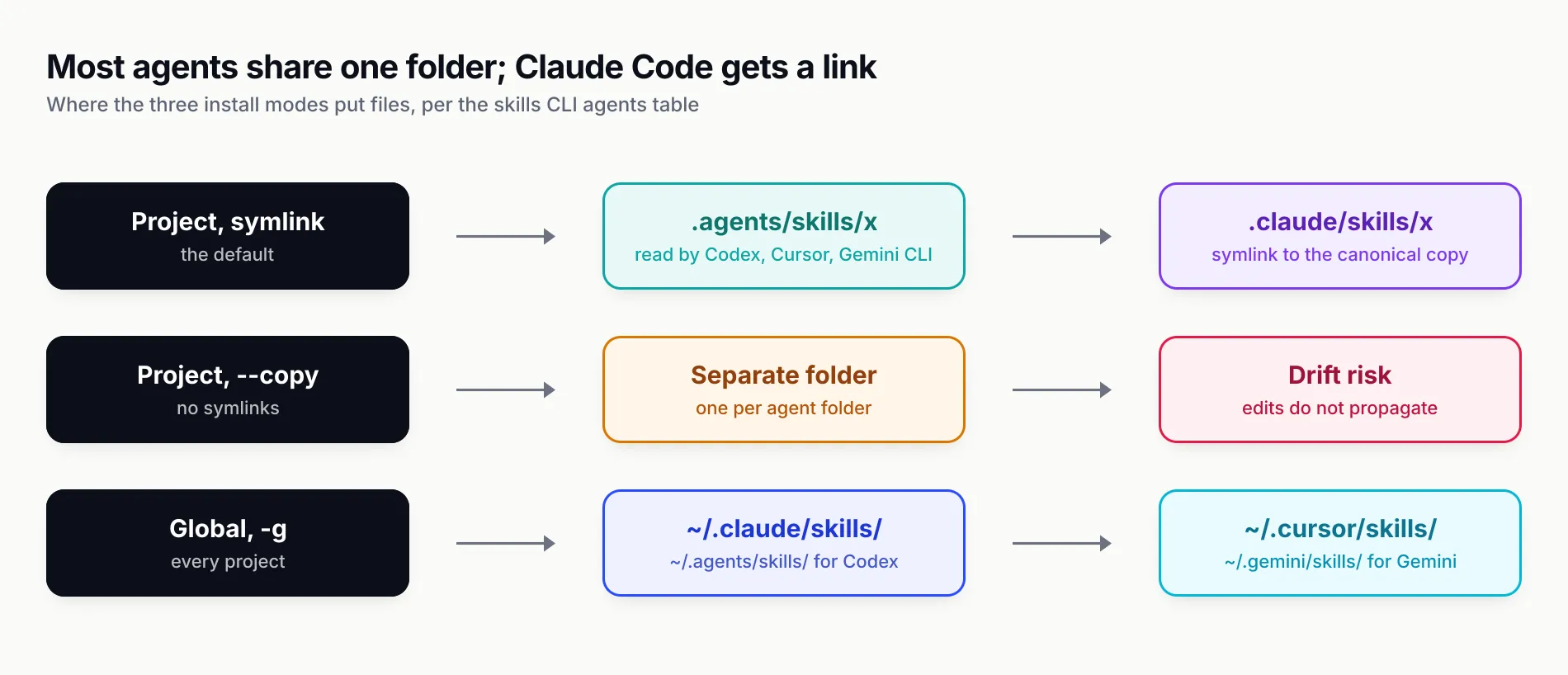
Figure 2: At project scope, most agents share .agents/skills; only agents with their own folder, such as Claude Code, need a link or a copy.
Installing several skills at once, for several agents
This is where the CLI’s behaviour surprised us. The add command takes one source. When we passed two repositories on one command line, npx skills add build-with-ai-hq/llm-cost-reduction build-with-ai-hq/secure-llm-apps -y, the CLI installed llm-cost-reduction and ignored secure-llm-apps without an error or warning. The project ended up with one new skill, not two.
There are three ways to install several skills, depending on where they live.
Several skills in one repository. Use -s with the names, or '*' for all of them. From the CLI reference: npx skills add vercel-labs/agent-skills --skill frontend-design --skill skill-creator. --all is shorthand for every skill to every agent without prompts.
Several repositories. Run one command per repository. A short loop keeps it readable:
for s in agent-skills-for-teams ai-coding-agent-governance llm-cost-reduction \
         llm-observability-stack mcp-gateway-best-practices secure-llm-apps; do
  npx skills add "build-with-ai-hq/$s" -a claude-code codex cursor -y
done
We ran the six installs, one command per repository, each with -a claude-code codex cursor -y. Each reported the same split:
◇  Installed 1 skill
│  ✓ ./.agents/skills/ai-coding-agent-governance
│    universal: Codex, Cursor
│    symlinked: Claude Code
└  Done!  Review skills before use; they run with full agent permissions.
and the project ended with six folders in .agents/skills/, six relative symlinks in .claude/skills/ and six entries in skills-lock.json. Cursor and Codex needed nothing extra because both read .agents/skills/ directly.
Declared in package.json. The experimental experimental_sync command reads a skills array in package.json, such as ["npm:agent-browser", "vercel-labs/agent-skills@web-design-guidelines"], and installs everything listed. It is marked experimental in the CLI reference, whose names and options “may change”, so we would not build a team process on it yet.
Picking agent ids
Agent ids are lowercase and hyphenated: claude-code, not claude; gemini-cli, not gemini; github-copilot, not copilot. Multiple ids follow one -a separated by spaces, or you can repeat the flag (-a claude-code -a opencode). Since all the universal agents share .agents/skills/ at project scope, -a codex alone also makes the skill visible to Cursor and Gemini CLI in that project. Name them anyway; it documents intent and protects you if an agent’s folder changes in a later release.
Managing installed skills: list, find, check, update, remove, init and use
npx skills list
list (alias ls) shows installed skills at project scope by default, -g for global, -a to filter by agent and --json for scripts. From our six-skill project:
Project Skills

agent-skills-for-teams     ./.agents/skills/agent-skills-for-teams
  Agents: Antigravity, Claude Code, Codex, Cursor, Gemini CLI +1 more
  Source: build-with-ai-hq/agent-skills-for-teams
ai-coding-agent-governance ./.agents/skills/ai-coding-agent-governance
  Agents: Antigravity, Claude Code, Codex, Cursor, Gemini CLI +1 more
...
Note the agent list: we installed for Claude Code, Codex and Cursor, but list also shows Antigravity, Gemini CLI and one more, because those agents read .agents/skills/ and are installed on the test machine. list reports who can see a skill, not who you asked for. npx skills ls -a cursor --json returns an array with name, path, scope, agents, source and sourceType for each skill, which is the version to use in CI checks.
npx skills find
find searches the skills.sh index by keyword and is interactive with no argument. --owner restricts it to one GitHub user or organisation:
npx skills find gateway --owner build-with-ai-hqInstall with npx skills add <owner/repo@skill>
build-with-ai-hq/mcp-gateway-best-practices@mcp-gateway-best-practices
└ https://skills.sh/build-with-ai-hq/mcp-gateway-best-practices/mcp-gateway-best-practices
build-with-ai-hq/ai-coding-agent-governance@ai-coding-agent-governance
└ https://skills.sh/build-with-ai-hq/ai-coding-agent-governance/ai-coding-agent-governance
...Each result also shows an install count, trimmed here. Two things to know. Results are ordered by those counts, so popularity, not relevance or quality, decides what appears first. And find only knows skills that have been installed with telemetry on; a private team repository will never appear in it.
npx skills check and update
check reports whether installed skills have upstream changes without changing anything. The CLI reference says it “exits with code 1 when any skill has an update, so it can gate CI”. It is listed in the README but not in npx skills --help for v1.7.4; it worked when we ran it:
Checking for skill updates…
Updating for: Universal, Claude Code
Checking 5 skill(s)…
✓ All project skills are up to date
update (alias upgrade) pulls the latest version of every skill, or only the ones you name. -g and -p restrict it to global or project scope, and -y skips the scope prompt, auto-detecting project scope inside a project. npx skills update -y in our project printed ✓ All project skills are up to date, which was expected minutes after installing.
Updates follow the repository’s default branch unless you installed from a pinned ref, which matters for the security section below. An update can change what every agent on the team does in its next session, so treat update as a reviewed change, not a background job.
npx skills remove
remove (alias rm) deletes by name, by source (npx skills remove owner/repo), by agent or all at once with --all. Running npx skills remove secure-llm-apps -y removed the folder from .agents/skills/, removed the symlink from .claude/skills/ and dropped the entry from skills-lock.json, leaving five of each. --agent claude-code removes only that agent’s link and keeps the canonical copy for the others.
npx skills init
init scaffolds a new skill. npx skills init release-checklist created release-checklist/SKILL.md with placeholder frontmatter (description: A brief description of what this skill does) and printed how to publish it: push to a Git repository and install with npx skills add <owner>/<repo>, or host the file and install by URL. The template is a starting point, not a working skill; the bundled linter in agent-skills-for-teams flagged the untouched template with three warnings, shown in the testing section.
npx skills use
use generates a prompt from one skill without installing it. npx skills use build-with-ai-hq/secure-llm-apps@secure-llm-apps printed a 354-line prompt beginning “You are being given a Skill to execute for the user’s next request”, followed by the full SKILL.md. With --agent claude-code it starts that agent with the prompt instead. It is a reasonable way to try a skill once before committing it to a repository, but the skill’s instructions still run with the agent’s permissions, so the same review applies.
skills-lock.json: what it records and what restoring does
Every project install writes or updates skills-lock.json at the project root. Ours, after the six installs:
{
  "version": 1,
  "skills": {
    "agent-skills-for-teams": {
      "source": "build-with-ai-hq/agent-skills-for-teams",
      "sourceType": "github",
      "skillPath": "SKILL.md",
      "computedHash": "f2c7edf50e02db5c46e3322faa751bda33c584f127cb2230670284be87188898"
    },
    "...": "five more entries"
  }
}
Each entry records the source, where the skill sits in the repository and a content hash. Two things it does not record by default: a Git ref, and which agents you installed for.
The ref is easy to add. Installing from a tree URL that names a commit pins it:
npx skills add https://github.com/build-with-ai-hq/llm-cost-reduction/tree/e6694edb83aa4d3103615f9831fc3e2ae02143ce \
  -a claude-code codex -y
The CLI printed Source: https://github.com/build-with-ai-hq/llm-cost-reduction.git @ e6694edb…, and the lock entry gained "ref": "e6694edb83aa4d3103615f9831fc3e2ae02143ce". A tag works the same way where the publisher cuts tags. The build-with-ai-hq repositories had no tags when we checked, so a commit is the only fixed point today.
The agent list is the more surprising gap. npx skills experimental_install restores every skill in the lockfile. We copied our lockfile into an empty folder and ran it; it restored all five remaining skills into .agents/skills/, and created no .claude/skills/ folder. The CLI reference says as much: the command “does not install npm packages or create agent-specific links for restored skills”. Codex, Cursor and the other universal agents would see the restored skills; Claude Code would not, until someone re-runs add with -a claude-code or commits the symlinks.
That leads to a practical recommendation for teams: commit .agents/skills/, the .claude/skills/ symlinks and skills-lock.json together. The lockfile then documents where each skill came from and lets CI detect drift (experimental_install with --frozen-lockfile fails if content differs from the recorded hash, and that is the default in CI), while the committed folders mean a fresh clone works in every agent without running anything.
Telemetry and how to turn it off
The CLI sends anonymous usage data by default, and that data is what ranks skills.sh. The troubleshooting docs say no personal information is collected, that GitHub repository and skill identifiers are sent only for repositories GitHub confirms are public, and that other remote source types “may include source and skill identifiers” because their visibility cannot be checked. Security-audit requests are limited to confirmed-public GitHub repositories.
Two environment variables turn it off, and the docs say either one disables “both” telemetry and security-audit requests:
# one command
DISABLE_TELEMETRY=1 npx skills add build-with-ai-hq/llm-cost-reduction -y

# every command in this shell
export DO_NOT_TRACK=1
DO_NOT_TRACK is the cross-tool convention, so setting it in a shell profile or CI environment covers other tools too. There is also a --metadata <json> option on add that attaches your own JSON to the install telemetry event; leave it unset unless you have a reason to send more.
If your policy is that nothing but the Git clone leaves the machine, verify it with a network monitor rather than relying on the variables alone, or install from a local path after cloning the repository yourself.
Security review before installing third-party skills
A skill is instructions that an agent follows with your permissions, plus any scripts it ships. The CLI ends every install with the same line: “Review skills before use; they run with full agent permissions.” That is the correct framing.
The evidence that review matters is not hypothetical. Snyk’s ToxicSkills study, published on 5 February 2026, scanned 3,984 skills from ClawHub and skills.sh and found that 13.4%, or 534, contained at least one critical-level issue, including malware distribution, prompt injection and exposed secrets. Its researchers confirmed 76 malicious payloads by hand. OWASP now lists malicious skills as the first risk in its Agentic Skills Top 10, and its scenarios include typosquatted names and skills that behave well until an update.
What the skills.sh ratings do and do not tell you
The Gen, Socket and Snyk ratings on skills.sh are automated scans of the current repository content. They catch known-bad patterns, and a High Risk label is a good reason to stop. A Low Risk label is not a clearance: it says the scanners found nothing they recognise today, about content that can change on the next push. Treat ratings as a filter for what is worth reviewing, not as the review.
A review that takes ten minutes
For a skill you are about to install for a team, we would do the following:
- Read the description first with
npx skills add owner/repo --list. If it claims to trigger on things unrelated to its stated job, it will load into conversations where it does not belong. - Clone it yourself and read every file, not only
SKILL.md. References and scripts are where problems hide. - Search the scripts for risky patterns:
curl ... | sh,sudo,rm -rfon broad paths,eval,base64 -dpiped to a shell, and reads of~/.ssh,~/.aws/credentialsor.npmrc. - List every URL and command the instructions tell the agent to use. A skill does not need a script to do damage; an instruction to run a remote installer is enough.
- Check the frontmatter for
allowed-toolsgrants broader than the job needs, and for agent-specific fields such as Claude Code’s!`command`injection, which runs before the model sees the skill. - Pin what you reviewed by installing from a tree URL at that commit, so
updatecannot change it without a new review. - Re-review on every update.
npx skills checktells you when something changed; it does not tell you what.
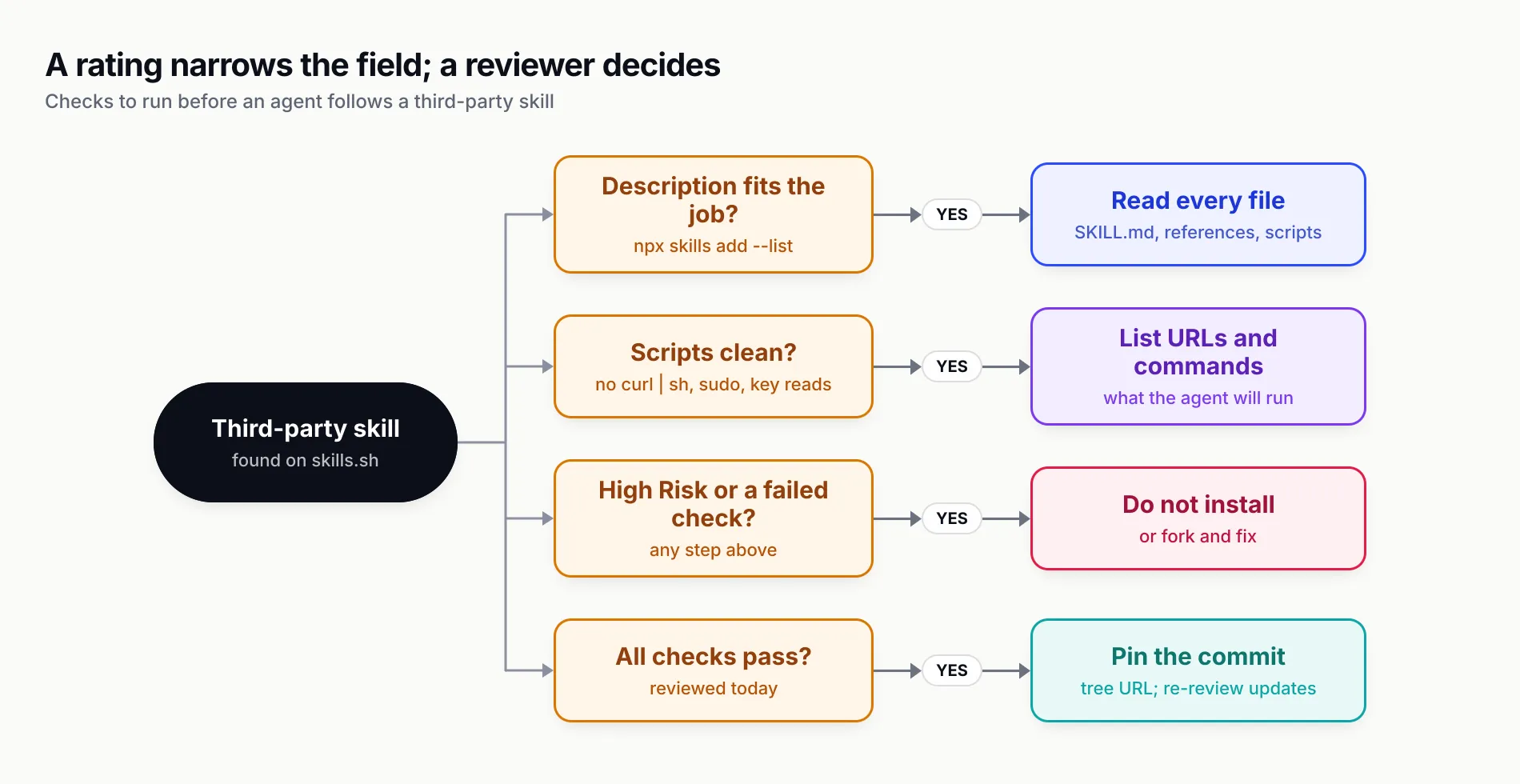
Figure 3: The ratings on skills.sh narrow the field; the decision to let an agent follow a skill still needs a human who has read it.
Applying it to the six example skills
We ran that review over the six build-with-ai-hq skills after installing them into a scratch project. Only one ships executable code: scripts/lint_skills.py in agent-skills-for-teams, a standard-library Python linter that reads SKILL.md files and prints warnings. Our search for risky patterns found matches only inside that linter’s own detection rules and in checklists that tell readers to avoid those patterns.
The URLs in the skills point to docs.getbifrost.ai, localhost, placeholder hosts such as bifrost.internal.example.com, GitHub, skills.sh and specification sites. The commands worth knowing about are the gateway start-up lines in five of the six skills: npx -y @maximhq/bifrost or docker run ... maximhq/bifrost, which fetch and run a package from npm or Docker Hub. The skills tell the agent to pin a version for production (--transport-version <version> or an image tag). If your agents work under a rule that they never run unpinned packages, that is the line to check before letting one follow these skills unattended.
None of this makes the six skills risky; it is what a review should surface for any skill, and it took a few minutes because they are small and readable.
The six build-with-ai-hq skills as a worked example
The six skills used throughout this guide are a useful test set: MIT-licensed, version 1.0.0, each a single skill at the root of its own repository, and each a playbook for one problem teams running LLM applications or coding agents hit. All six use Bifrost, the open-source AI gateway from Maxim AI, as the place where controls that should apply to every request are enforced: virtual keys, budgets, logs, MCP tool filtering and failover.
| Skill | What it helps an agent do | Notable files |
|---|---|---|
| agent-skills-for-teams | Write skills that trigger, version and review them, distribute them across agents | scripts/lint_skills.py, versioning and review checklist |
| ai-coding-agent-governance | Roll out Claude Code, Codex, Cursor and others with per-developer keys, budgets and MCP controls | Per-tool setup, rollout checklist |
| llm-cost-reduction | Audit LLM spend, then fix model choice, prompt caching, response caching, batching and budgets | Caching, complexity routing, budgets references |
| llm-observability-stack | Capture tokens, cost, latency and errors per call with OpenTelemetry GenAI conventions and Prometheus | What to capture, dashboards and alerts |
| mcp-gateway-best-practices | Put MCP servers behind a gateway with scoped tool access, auth and audit logs | Tool access control, Code Mode |
| secure-llm-apps | Audit an LLM app against practical OWASP LLM Top 10 risks and fix keys, injection, PII and output handling | Audit checklist, prompt injection, PII |
Each SKILL.md follows the same shape: when to use it, a “quick diagnosis” block of grep and shell commands to run before changing anything, fixes ordered by impact, the gateway-level version of those fixes, verification steps and common mistakes. That shape suits the progressive-disclosure model: the description is long and trigger-heavy, the body gives the agent a procedure, and the detail sits in references/ until a task needs it.
Scope is worth stating. These are procedure skills, not tools: none of them installs software, opens network connections or holds credentials on its own. They tell an agent what to inspect and change in your code and configuration, and the agent does the work with the permissions you have already given it. The gateway sections assume you are willing to run Bifrost; the diagnosis and code-level fixes work without it.
agent-skills-for-teams is the one most relevant to this guide, because it covers the step after npx skills add. It recommends one canonical home per skill, SemVer in metadata.version, releases from tags rather than main, CODEOWNERS review on the skills folder, and its own linter in CI. For organisations that want a central registry instead of Git, it documents Bifrost’s Skills Repository, which publishes immutable skill versions and serves them to Claude Code and Codex as a plugin marketplace, with a one-step switch of the served version for rollback.
To install all six for the three most common agents, use the loop from the multi-install section. To install one for a single agent user-wide:
npx skills add build-with-ai-hq/agent-skills-for-teams -g -a claude-code -yHow we tested
All commands in this guide were run on 28 October 2026 on macOS with skills CLI 1.7.4 (npx -y skills --version), with DISABLE_TELEMETRY=1, DO_NOT_TRACK=1 and NO_COLOR=1 set, in empty project folders under a scratch directory. The shell was launched from a Claude Code session, which the CLI detected and treated as non-interactive.
What we ran and saw:
add --liston llm-cost-reduction: one skill listed, nothing installed.add -ywith no-aon agent-skills-for-teams: canonical copy in.agents/skills/, relative symlink in.claude/skills/,skills-lock.jsonwritten; installed for the agents detected on the machine.addwith two repositories on one line: only the first was installed, with no warning.- Six separate
add ... -a claude-code codex cursor -ycommands: six skills, reported as universal for Codex and Cursor and symlinked for Claude Code; two printed a security assessment box. list,ls -a cursor --json,find "llm cost",find gateway --owner build-with-ai-hq,checkandupdate -y: output as shown above, with install counts removed.remove secure-llm-apps -y: folder, symlink and lock entry removed.experimental_installfrom the lockfile in an empty folder: five skills restored to.agents/skills/, no.claude/skills/links.init release-checklist,add owner/repo@skill --copy, an install from a commit-pinned tree URL anduse owner/repo@skill: behaved as described.- The bundled linter from agent-skills-for-teams,
python3 scripts/lint_skills.py, run over the five remaining skills: zero errors. Run over the untouchedinittemplate, it flagged exactly what a new author would need to fix:
WARN  release-checklist/SKILL.md: description is only 43 chars; it likely under-triggers
WARN  release-checklist/SKILL.md: description says what but not when; add 'Use when ...' trigger situations
WARN  release-checklist/SKILL.md: no metadata.version; consumers cannot tell which revision they run

1 skill(s) scanned: 0 error(s), 3 warning(s)
What we did not do: run -g against a real home directory, run an agent session that triggered each skill, or measure how often the skills load in practice. Agent-side behaviour is covered in our Claude Skills explainer and, for how the loop around the model picks up instructions at all, in what an agent harness is.
What to do next
If you are installing skills for yourself, the defaults are fine: npx skills add owner/repo, pick your agents, and read the skill before your next session uses it. Set DO_NOT_TRACK=1 in your shell profile if you would rather not feed the leaderboard.
If you are installing skills for a team, a few decisions turn the CLI from a convenience into something you can support:
- Always pass
-awith explicit agent ids in scripts, READMEs and onboarding docs, so every machine gets the same result regardless of what is installed locally. - Install at project scope and commit the result:
.agents/skills/, the.claude/skills/symlinks andskills-lock.json. Do not rely onexperimental_installto recreate agent links. - Pin third-party skills to a reviewed commit with a tree URL, and treat every update as a code change with a reviewer.
- Run
npx skills checkin CI so upstream changes surface as a failing job rather than as an agent that behaves differently on Monday. - Lint your own skills before publishing them; the agent-skills-for-teams linter catches the weak descriptions and missing versions that make skills unreliable.
- Keep the controls that matter outside the skill. A skill can tell an agent to use a scoped key or an approved MCP server, but it cannot enforce it. Enforcement belongs in managed agent settings and in the gateway the agent’s traffic goes through, which is the argument our MCP gateway explainer makes in more detail.
skills.sh made finding a skill a search and installing one a single command. The work that remains is the same as for any dependency: know where it came from, read it, pin it and decide who is allowed to change it.
Sources
- Introducing skills, the open agent skills ecosystem Vercel
- Agent Skills (Vercel documentation) Vercel
- vercel-labs/skills README Vercel Labs (GitHub)
- skills CLI reference (docs/commands.md) Vercel Labs (GitHub)
- Supported agents (docs/agents.md) Vercel Labs (GitHub)
- Creating skills (docs/creating-skills.md) Vercel Labs (GitHub)
- Troubleshooting and configuration (docs/troubleshooting.md) Vercel Labs (GitHub)
- skills.sh FAQ skills.sh (Vercel)
- skills.sh security audits skills.sh (Vercel)
- Agent Skills specification agentskills.io
- Extend Claude with skills Anthropic
- Agent Skills in Codex OpenAI
- Agent Skills in Cursor Cursor
- ToxicSkills: malicious AI agent skills on ClawHub and skills.sh Snyk
- AST01: Malicious Skills (OWASP Agentic Skills Top 10) OWASP Foundation
- Bifrost Skills Repository Maxim AI
- build-with-ai-hq/agent-skills-for-teams build-with-ai-hq (GitHub)
Frequently asked questions
What is skills.sh?
skills.sh is a directory and leaderboard for Agent Skills run by Vercel, launched on 20 January 2026. It indexes skills published in public Git repositories, ranks them using anonymous telemetry from the skills CLI, and shows third-party security ratings. Skills are installed with npx skills add owner/repo.
How do I use npx skills add?
Run npx skills add owner/repo from your project root, where owner/repo is a GitHub repository containing one or more SKILL.md files. Add -a with agent ids such as claude-code codex cursor to choose agents, -s to choose skills from a multi-skill repository, -g for a user-wide install and -y to skip prompts. Node.js 22.20 or later is required.
Where does npx skills add install skills?
At project scope the CLI writes a canonical copy to .agents/skills/<name>/ and, for agents with their own folder, creates a symlink such as .claude/skills/<name> pointing at it. With -g it writes to each agent's global folder, for example ~/.claude/skills/ for Claude Code or ~/.cursor/skills/ for Cursor.
How do I install Claude skills with the skills CLI?
Run npx skills add owner/repo -a claude-code -y in your project. Claude Code reads .claude/skills/, so the CLI symlinks the skill there from .agents/skills/. Add -g to install into ~/.claude/skills/ for every project. Start a fresh Claude Code session if the skill does not appear in the current one.
How do I turn off skills CLI telemetry?
Set DISABLE_TELEMETRY=1 or DO_NOT_TRACK=1 in the environment before running the CLI, for example DISABLE_TELEMETRY=1 npx skills add owner/repo. The CLI documentation says either variable disables both usage telemetry and security-audit requests. Telemetry is what ranks skills on the skills.sh leaderboard.
Can npx skills add install from a private repository?
Yes. The CLI uses the Git authentication you already have: your Git credential helper first, then the GitHub CLI, then SSH. You can also pass SSH or HTTPS URLs for GitLab, Azure Repos or a self-hosted Git server. GITHUB_TOKEN or GH_TOKEN can be set for GitHub API access but is optional.
Are skills on skills.sh safe to install?
Not automatically. skills.sh shows ratings from Gen Agent Trust Hub, Socket and Snyk, but a Snyk study of 3,984 skills from ClawHub and skills.sh found 13.4% with at least one critical issue. Read every file, check scripts and network calls, pin a commit, and re-review on every update.