ToolsExplainer
Prompt caching: how it cuts LLM costs at Anthropic, OpenAI and Gemini
Prompt caching bills a repeated prompt prefix at 5 to 10 percent of the input rate. Current provider numbers, why caches miss, a worked cost example and the rest of the LLM cost playbook.
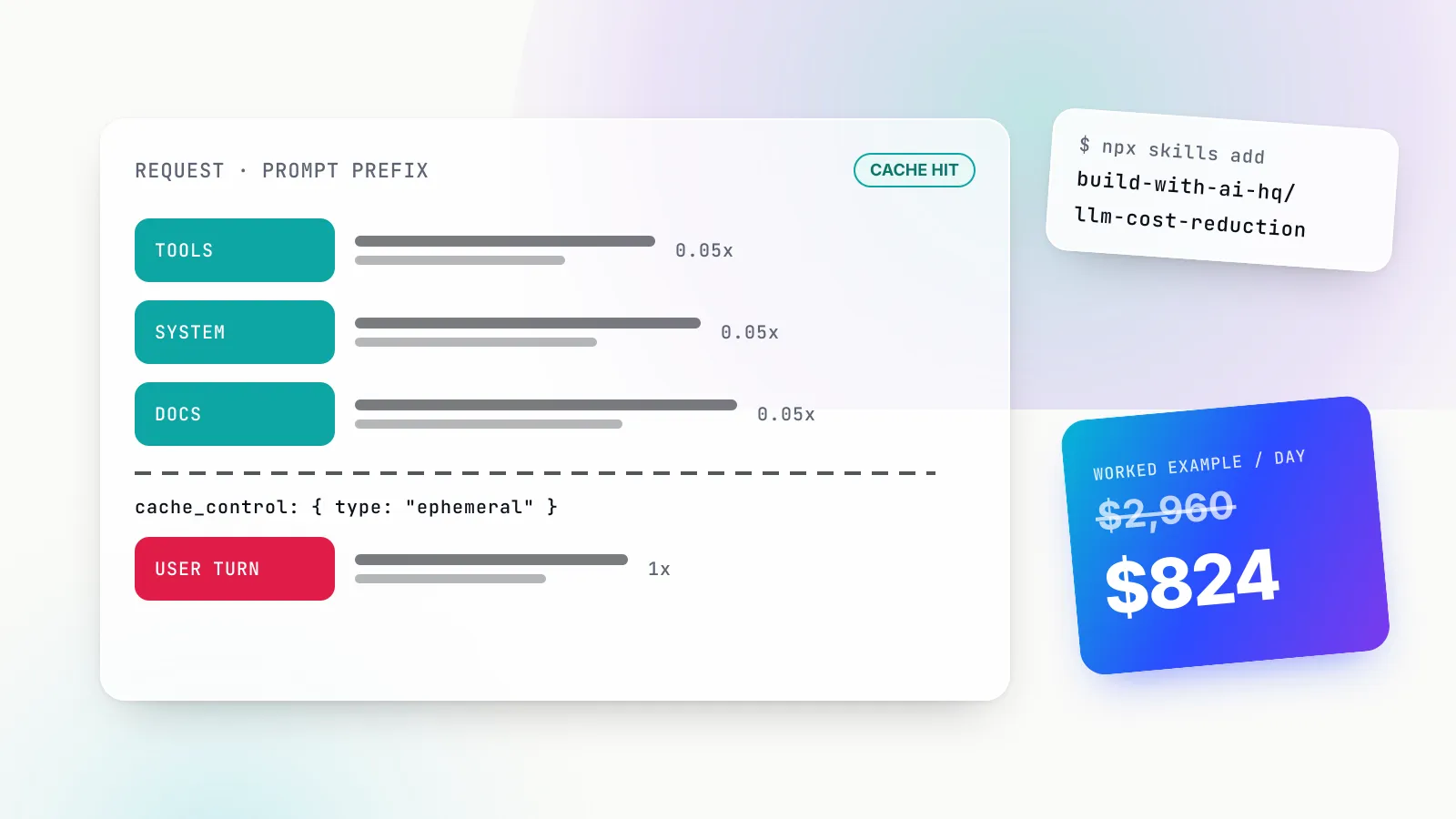
Prompt caching is the cheapest LLM cost optimisation most teams are not getting. Every major provider now discounts a repeated prompt prefix: as of 28 October 2026, a cache read costs 0.1 times the normal input rate on most Claude and OpenAI models and 0.05 times on the newest ones. For an agent or chat product that resends the same system prompt, tool schemas and reference documents on every turn, that discount applies to most of the input bill.
The catch is that the discount is conditional. The prefix must be byte-identical, above a model-specific minimum length, sent to the same provider and key, and reused before the cache expires. On the newest models the first request also pays a write premium of 1.25 to 2.5 times the input rate, so a cache that is written but never read makes the bill bigger. This guide explains how prompt caching works at Anthropic, OpenAI and Google Gemini with current numbers, why caches miss, how to measure hit rate, and a worked cost example. It then places caching in the wider playbook for how to reduce LLM costs, from right-sizing models to budgets.
If you want an AI coding agent to do the audit for you, the open-source llm-cost-reduction Agent Skill packages this workflow. Install it into a project with:
npx skills add build-with-ai-hq/llm-cost-reductionTo target one agent without prompts, which is what we tested on 28 October 2026:
npx skills add build-with-ai-hq/llm-cost-reduction -a claude-code -yWhat prompt caching is, and what it does not cache
When a transformer model reads a prompt, it computes intermediate key-value (KV) states for every token so later tokens can attend to earlier ones. That computation is most of the cost of input. OpenAI’s guide describes the mechanism plainly: the prompt cache stores key-value (KV) tensors, not the tokens themselves, and when a later request has the same prefix the model reuses that state instead of recomputing it.
Three consequences follow from that design, and most confusion about prompt caching comes from forgetting one of them.
- It caches a prefix, not a prompt. The match runs from the first token forward. A change on line one invalidates everything after it, even if the remaining 50,000 tokens are identical.
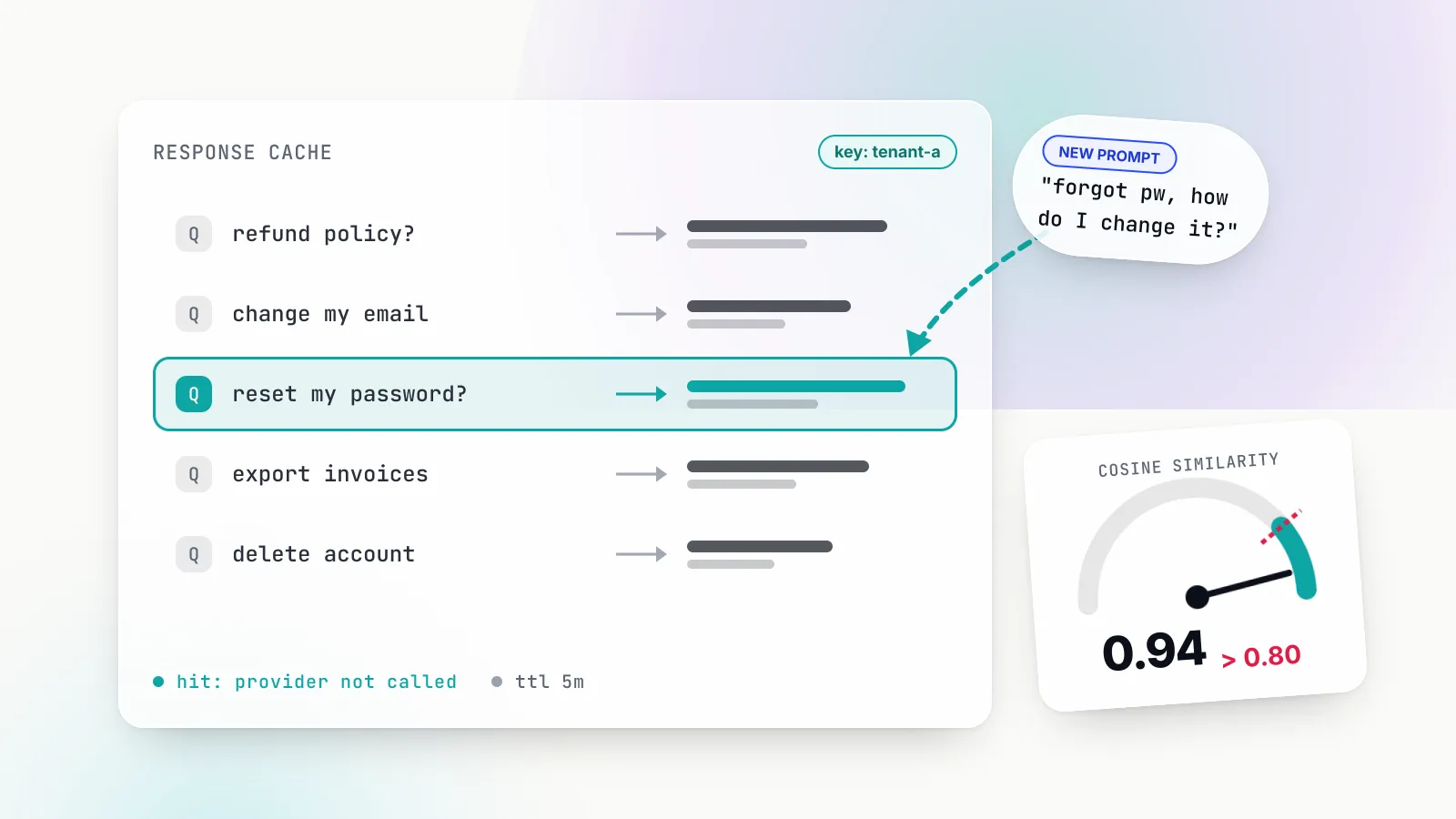
- It does not cache the answer. The model still runs, and output tokens are billed at the full rate. Anthropic’s documentation states that prompt caching has no effect on output token generation. If you want to skip the model call entirely, that is response caching, covered in our guide to semantic caching for LLMs.
- It is scoped and short-lived. Caches are isolated per organisation, and on the Claude API per workspace. They expire after minutes or hours depending on provider and settings.
Prompt caching therefore pays off where the same long prefix is resent many times within a short window: agent loops that replay tools and history every step, chat products with long system prompts, retrieval over a fixed document, coding assistants that resend repository context, and evaluation runs that apply one rubric to thousands of inputs.
How prompt caching works: prefixes, breakpoints and lookback
The unit of caching is a breakpoint: a position in the prompt where the provider computes a hash of everything before it and stores the KV state under that hash. Providers differ in who places breakpoints. Anthropic lets you place them explicitly or use an automatic mode; OpenAI places them for you by default and, on GPT-5.6 and later, also accepts explicit ones; Gemini caches implicitly and offers a separate explicit cache object on some models.
The order of the prompt matters because the hash is cumulative. Anthropic renders a request as tools, system, then messages, and a change at one level invalidates that level and everything after it. Tool definitions sit at the very front, which is why reordering tools is one of the most expensive accidents in agent code: it invalidates the whole cache.
Lookback is the other mechanism worth knowing. On a request, Anthropic computes the hash at your breakpoint and, if nothing matches, walks backwards looking for an entry that an earlier request wrote. Its documentation is precise that the lookback window is 20 blocks and that it only finds entries earlier requests actually wrote, not any stable content behind the breakpoint. A growing conversation that adds more than 20 blocks in one turn, or a breakpoint placed on a block that changes every request, gets no hit at all.
OpenAI’s GPT-5.6 and later work similarly. In implicit mode the request is checked against the first 2 and latest 50 explicit breakpoints, the implicit breakpoint, up to 20 earlier message endings and the end of the initial developer messages, per the guide’s section on how prefix matching works.
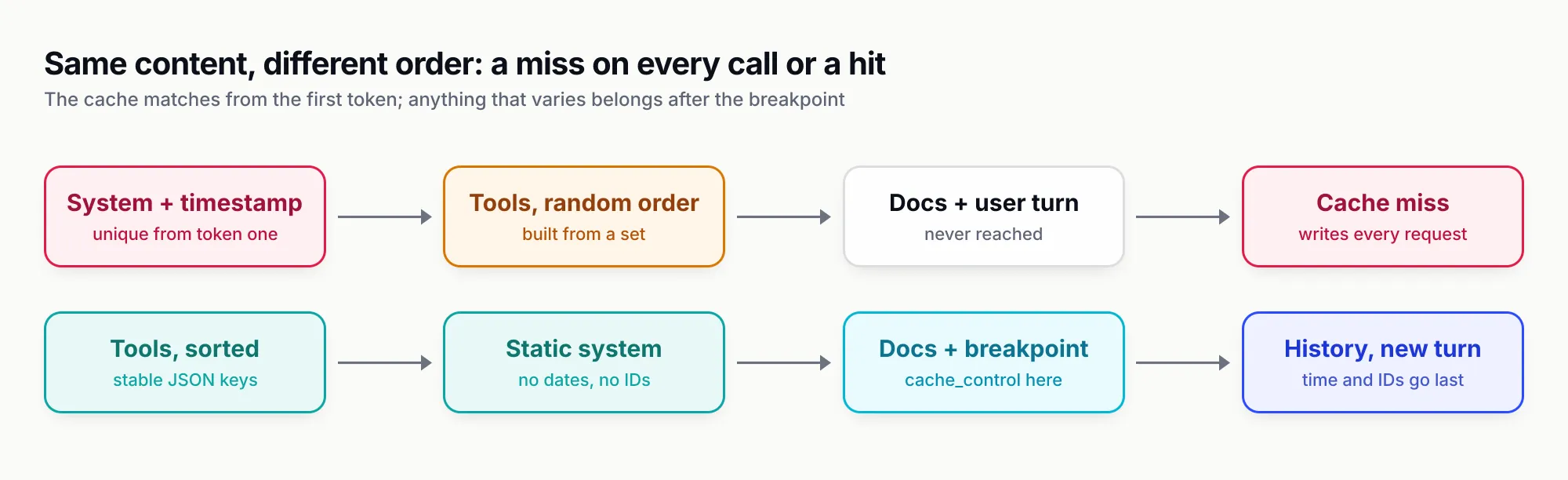
Figure 1: The same content in a different order decides whether every request is a cache hit or a cache miss. Anything that varies per request belongs after the last breakpoint.
Anthropic prompt caching: cache_control, TTLs and multipliers
Prompt caching on Anthropic is opt-in and controlled by cache_control. There are two ways to use it, both described in the Claude prompt caching documentation:
- Automatic caching. Add one
cache_controlfield at the top level of the request. The API places the breakpoint on the last cacheable block and moves it forward as the conversation grows. This is the simplest option for multi-turn chat. - Explicit breakpoints. Put
cache_controlon individual content blocks, up to four per request. Use this when sections change at different rates, for example tools that change monthly and a document that changes daily.
A minimal explicit breakpoint on a long system prompt, keeping per-request values out of the cached region:
import anthropic
client = anthropic.Anthropic()

resp = client.messages.create(
    model="claude-sonnet-5-5",
    max_tokens=800,
    system=[{
        "type": "text",
        "text": STATIC_INSTRUCTIONS_AND_POLICY,   # identical on every request
        "cache_control": {"type": "ephemeral"},   # add "ttl": "1h" for the 1-hour cache
    }],
    messages=history + [{"role": "user", "content": f"{question}\n\n(current time: {now_iso})"}],
)
u = resp.usage
print(u.cache_creation_input_tokens, u.cache_read_input_tokens, u.input_tokens)
Anthropic TTLs and pricing multipliers
The default cache lives for five minutes and is refreshed for no additional cost each time the cached content is used. A one-hour lifetime is available with "ttl": "1h". One subtlety: the lifetime is measured from the start of the request, so a response that streams for four minutes leaves about one minute for the follow-up.
Pricing is expressed as multipliers on the base input rate. From the pricing section as of 28 October 2026:
| Claude model | Base input | 5-minute write (1.25x) | 1-hour write (2x) | Cache read | Output |
|---|---|---|---|---|---|
| Claude Opus 5.5 | $4 | $5 | $8 | $0.20 (0.05x) | $20 |
| Claude Sonnet 5.5 | $2 | $2.50 | $4 | $0.10 (0.05x) | $10 |
| Claude Opus 4.8 | $5 | $6.25 | $10 | $0.50 (0.1x) | $25 |
| Claude Haiku 4.5 | $1 | $1.25 | $2 | $0.10 (0.1x) | $5 |
Prices in USD per million tokens. Claude Fable 5.1 and Mythos 5.1 read at 0.025x.
These multipliers stack with the 50 percent Message Batches discount, long-context pricing and data-residency pricing. Breakpoints themselves cost nothing: you pay for what is written, read and processed fresh.
Anthropic minimums and invalidation rules
Short prompts are not cached, and the API does not tell you. The cache limitations section lists minimums of 512 tokens for Claude Opus 5.5, Sonnet 5.5 and Haiku 5.5, 1,024 for Sonnet 5 and Opus 4.8, 2,048 for Opus 4.7 and 4,096 for Opus 4.6, Opus 4.5 and Haiku 4.5. A request under the minimum is processed without caching and without an error. If both cache counters are zero, that is the usual reason.
The invalidation table is worth reading in full. Changing tool definitions invalidates everything. Toggling web search or citations, or switching speed mode, invalidates the system and message caches. Changing tool_choice, adding or removing images, or changing thinking parameters or the effort setting invalidates message caches. Anthropic also warns that some languages randomise key order during JSON serialisation, and that keys in tool_use blocks need stable ordering for the cache to hold.
Two newer features help agents. On current models you can append a {"role": "system"} message mid-conversation instead of editing the top-level system prompt, which keeps the cached prefix intact. And a cache entry only becomes available once the first response starts, so parallel requests fired at the same moment all write; send one, wait for the first token, then fan out. Anthropic also documents pre-warming the cache with a max_tokens: 0 request, which writes the prefix without generating or billing any output.
OpenAI prompt caching: automatic by default, explicit on GPT-5.6 and later
OpenAI prompt caching needs no code change to start working. The guide states that it is enabled by default for supported OpenAI models, and the behaviour now splits by model generation.
GPT-5.6 and later. The minimum cacheable prefix is 1,024 visible tokens. Writes are billed at 1.25 times the uncached input rate for the default 30-minute lifetime, or 2.5 times for a 12-hour lifetime on the Responses API. Reads cost 0.1 times on most models and 0.05 times on GPT-6.1 Sol and GPT-6.1 Terra. You can stay in implicit mode, where OpenAI places a breakpoint at the end of the latest eligible message, or set prompt_cache_options.mode to explicit and mark blocks with prompt_cache_breakpoint. Each request can create up to four cache writes.
Earlier models. Caching is implicit only, breakpoints fall at fixed intervals (every 2,048 tokens on GPT-5.5), there is no write surcharge, and lifetime is controlled by prompt_cache_retention with values in_memory (typically 5 to 10 minutes of inactivity) or 24h. The summary of model differences is the table to check before you migrate.
The prices, from OpenAI’s pricing page for standard short-context processing as of 28 October 2026:
| OpenAI model | Input | Cached input | 30-minute write | 12-hour write | Output |
|---|---|---|---|---|---|
| gpt-6.1-sol | $2.00 | $0.10 | $2.50 | $5.00 | $10.00 |
| gpt-6.1-terra | $1.00 | $0.05 | $1.25 | $2.50 | $5.00 |
| gpt-5.6-sol | $4.00 | $0.40 | $5.00 | $10.00 | $20.00 |
| gpt-5.6-luna | $0.20 | $0.02 | $0.25 | $0.50 | $1.20 |
Prices in USD per million tokens.
The migration trap is real. OpenAI’s own gotcha section, a shared prefix is not always a cached prefix, describes a static developer message followed by a dynamic user message. In implicit mode on GPT-5.6, the breakpoint lands after the dynamic content, so each request writes a new entry and the next request, with a different user message, cannot reuse it. The fix is an explicit breakpoint after the static content:
{
  "model": "gpt-6.1-sol",
  "prompt_cache_options": { "mode": "explicit" },
  "input": [
    { "role": "developer", "content": [{
        "type": "input_text",
        "text": "Static instructions and reference material...",
        "prompt_cache_breakpoint": { "mode": "explicit" } }] },
    { "role": "user", "content": "Dynamic content..." }
  ]
}
Two more OpenAI details matter at scale. Cached state lives on individual machines, and per the cache location section, traffic above roughly 15 requests per minute for a prefix can overflow to machines without the entry. On models before GPT-5.6, a stable prompt_cache_key helps route related requests to the same cache. On GPT-5.6 and later routing is automatic, and the key’s main use is separating cache accounting per customer, which also blocks cache-hit probing across users.
OpenAI publishes the break-even arithmetic for short prefixes too. Its section on the minimum cacheable length cost trap works through when padding a short prefix up to 1,024 tokens pays: at 0.1x reads and 1.25x writes over ten requests, expanding any prefix of 221 tokens or more is cheaper than leaving it uncached.
Gemini context caching: implicit by default, explicit on some models
Google calls the feature context caching and splits it in two. Implicit caching is on by default for Gemini 2.5 and newer, with no configuration and, in Google’s words, no cost-saving guarantee. The minimum input is 4,096 tokens for Gemini 4 Argon, Gemini 3.8 Flash, Gemini 3.6 Flash and Gemini 3.1 Pro Preview, and 2,048 for Gemini 2.5 Flash and Pro. Google’s advice for hits is the same as everyone’s: put large, common content at the start and send requests with a similar prefix close together.
Gemini 4 adds an agent-specific rule. In multi-turn and agent loops, Gemini caches the full previous request only if the new request adds at least 2,050 tokens; for smaller additions it reprocesses the last 2,050 tokens at the standard input rate.
Explicit caching is different in kind. You create a cached-content object, give it a TTL (one hour by default, with no minimum or maximum), and reference it in later requests. Google labels the feature beta, it lives under v1beta, and it is not supported for Gemini 4 Argon and later, which use implicit caching only. Billing has three parts, per the section on how explicit caching reduces costs: cached tokens at a reduced rate, storage charged for the TTL, and normal charges for uncached input and output.
From the Gemini pricing page as of 28 October 2026, paid tier, standard processing:
| Gemini model | Input | Cached input | Explicit cache storage | Output |
|---|---|---|---|---|
| Gemini 4 Argon | $2.00 | $0.10 (implicit only) | Not available | $10.00 |
| Gemini 3.8 Flash | $0.75 | $0.075 | $0.50 per million tokens per hour | $3.75 |
Prices in USD per million tokens. Google lists Gemini 4 Argon prices doubling from 1 December 2026 and Gemini 3.8 Flash prices doubling from 1 January 2027.
Storage changes the arithmetic. Holding a 200,000-token codebase in an explicit Gemini 3.8 Flash cache for an eight-hour working day costs 0.2 million tokens × 8 hours × $0.50 = $0.80 in storage. Each read of that context costs 0.2 × $0.075 = $0.015 instead of 0.2 × $0.75 = $0.15 uncached, a saving of $0.135 per request. Six requests in the day pay for the storage; anything beyond that is profit.
Amazon Bedrock prompt caching
Bedrock, which ranks for this query in its own right, supports both styles. Its documentation describes implicit caching as best effort and explicit caching through model-specific cache controls or cache checkpoints, with minimums currently ranging from 512 to 4,096 tokens per checkpoint. On billing, cache reads are charged at the model’s cache-read rate and, depending on the model, writes can cost more than standard input. Bedrock and Claude models on Google Cloud isolate caches at organisation level rather than per workspace.
Prompt caching across providers at a glance
| Anthropic (Claude) | OpenAI (GPT-5.6 and later) | OpenAI (earlier) | Gemini | |
|---|---|---|---|---|
| Turned on by | cache_control, top-level or per block | Default implicit; explicit optional | Default implicit | Default implicit; explicit object on some models |
| Minimum prefix | 512 to 4,096 tokens by model | 1,024 visible tokens | Varies by request settings | 2,048 or 4,096 tokens |
| Read price | 0.1x; 0.05x on Opus and Sonnet 5.5 | 0.1x; 0.05x on GPT-6.1 | Model-specific discount | About 0.05x to 0.1x |
| Write price | 1.25x (5 min), 2x (1 h) | 1.25x (30 min), 2.5x (12 h) | No surcharge | None implicit; storage per hour explicit |
| Lifetime | 5 min refreshed on use, or 1 h | At least 30 min or 12 h | 5 to 10 min idle, or up to 24 h | Implicit unstated; explicit TTL default 1 h |
| Usage field | cache_read_input_tokens, cache_creation_input_tokens | cached_tokens, cache_write_tokens | cached_tokens | cached tokens in usage metadata |
As of 28 October 2026, from each provider’s documentation linked above.
Why prompt caches miss
When teams first turn on prompt caching and see a hit rate near zero, the cause is almost always one of a short list. The llm-cost-reduction skill’s caching reference reduces the diagnosis to four checks: diff the first 2,000 or so tokens of two consecutive requests, check the prefix is above the minimum, check the requests hit the same provider, model and key, and check the gap is shorter than the TTL. In practice, the specific culprits are these.
Unstable prefixes
- Timestamps and IDs in the system prompt. “Today is 2026-10-28T14:03:11Z” or “Request ID: 7f3a…” at the top of the prompt makes every request unique from the first line. Move them into the last user message.
- Per-user personalisation at the top. “You are helping Priya from Acme” belongs after the shared prefix, or in a separate block after the breakpoint.
- Random few-shot selection. Sampling different examples per request changes the prefix. Fix the examples, or put the variable ones after the breakpoint.
- Rewriting history. Re-summarising the conversation every turn changes everything after the first edit. Summarise in larger, less frequent steps.
Serialisation and tools
- Tool order. Building the tool list from a set, a dictionary with unstable iteration order, or a registry that loads plugins asynchronously reorders tools between requests. On Anthropic that invalidates the entire cache. Sort tools by name.
- JSON key order.
json.dumps(obj, sort_keys=True)in Python; build objects in a fixed order in TypeScript. Go and Swift randomise map ordering. - Dynamic tool sets. Adding and removing tools per step changes the front of the prompt. Prefer a stable superset, or use the provider’s mechanism for appending tools mid-conversation.
Routing and timing
- Load balancing across keys or providers. Caches are per organisation or workspace and live on specific machines. A conversation spread round-robin across three API keys lands on a cold cache two times in three.
- Model switching mid-session. Routing turn five to a cheaper model means a different cache. If you route by complexity, keep the tier stable within a session.
- Gaps longer than the TTL. A human who answers after seven minutes misses Anthropic’s default five-minute cache. That is the case for the one-hour TTL.
- Parallel fan-out. Ten identical requests fired at once all write, because an entry only becomes readable once the first response starts.
Settings you did not think of as prompt
On Anthropic, changing tool_choice, thinking settings, effort or adding an image invalidates message caches. On OpenAI, tools, parallel_tool_calls, structured output format, reasoning.effort, text.verbosity and compaction all affect the cached prefix. Treat request parameters as part of the prompt.
How to structure prompts for cache hits
The rule fits on one line: static content first, variable content last, breakpoint at the boundary. The order the llm-cost-reduction skill prescribes is tools, then system prompt, then static reference material and few-shot examples, then conversation history, then the latest user message and per-request data.
A Python request builder that bakes this in:
import json

def build_request(tools, policy_text, docs, history, user_msg, now_iso):
    tools_sorted = sorted(tools, key=lambda t: t["name"])           # stable order
    for t in tools_sorted:
        t["input_schema"] = json.loads(json.dumps(t["input_schema"], sort_keys=True))
    return {
        "tools": tools_sorted,
        "system": [
            {"type": "text", "text": policy_text},                    # never contains dates or IDs
            {"type": "text", "text": docs,
             "cache_control": {"type": "ephemeral"}},                 # breakpoint at end of static prefix
        ],
        "messages": history + [
            {"role": "user", "content": f"{user_msg}\n\n(current time: {now_iso})"},
        ],
    }
For a long-running agent, add a second breakpoint further down the conversation so the 20-block lookback never runs out, or use Anthropic’s top-level automatic mode alongside the explicit system breakpoint. On OpenAI GPT-5.6 and later, place an explicit prompt_cache_breakpoint after static developer content. On Gemini, keep large documents at the front and batch related requests close together.
A good test is to log a hash of the first N tokens of each request for a day. If one feature produces thousands of distinct prefix hashes, something in its prefix is varying.
Measuring prompt cache hit rate
You cannot manage a cache you do not measure. Each provider reports cache usage on every response:
- Anthropic:
cache_creation_input_tokens(written),cache_read_input_tokens(read) andinput_tokens(after the last breakpoint). Per the tracking section, total input is the sum of all three. - OpenAI:
cached_tokensunderprompt_tokens_details(Chat Completions) orinput_tokens_details(Responses). On GPT-5.6 and later,cache_write_tokenswith a split intottl_30m_tokensandttl_12h_tokens. OpenAI recommends dividing total cached tokens by total input tokens and grouping by user, workspace or day, in its section on monitoring cache performance. - Gemini: cached token counts in
usage_metadataon the response.
Two ratios tell you most of what you need. Token hit rate is cached read tokens divided by total input tokens; it tells you how much of the input bill is discounted. Read-to-write ratio is read tokens divided by written tokens; on providers with a write premium, a ratio near or below one means you are paying extra for nothing.
The skill’s first fix is a wrapper that logs this per feature, so cost can be attributed before anything else changes:
def llm_call(feature: str, **kwargs):
    resp = client.chat.completions.create(**kwargs)
    u = resp.usage
    log.info(json.dumps({
        "feature": feature, "model": resp.model,
        "input_tokens": u.prompt_tokens, "output_tokens": u.completion_tokens,
        "cached_tokens": getattr(u.prompt_tokens_details, "cached_tokens", 0) if u.prompt_tokens_details else 0,
    }))
    return resp
Both Anthropic and OpenAI now also ship diagnostics that compare consecutive requests and report where the prefix diverged. Use them before reading prompts by hand.
A worked prompt caching cost example
Take a customer-support agent on Claude Sonnet 5.5. As of 28 October 2026 it costs $2 per million input tokens, $2.50 for 5-minute cache writes, $0.10 for cache reads and $10 for output. OpenAI’s gpt-6.1-sol happens to carry the same four prices with a 30-minute write, so the arithmetic below applies to both.
Assume 100,000 requests a day. Each carries a 12,000-token static prefix (tools, policy manual, product documentation), 800 tokens of variable content (recent history, the new question, retrieved snippets) and produces 400 output tokens.
Without caching:
- Input: 100,000 × 12,800 tokens × $2 / 1,000,000 = $2,560
- Output: 100,000 × 400 × $10 / 1,000,000 = $400
- Total: $2,960 a day
With caching at a 95 percent hit rate (5 percent of requests write the prefix: cold starts, expiry, new instances):
- Cache reads: 95,000 × 12,000 × $0.10 / 1,000,000 = $114
- Cache writes: 5,000 × 12,000 × $2.50 / 1,000,000 = $150
- Variable input: 100,000 × 800 × $2 / 1,000,000 = $160
- Output: unchanged at $400
- Total: $824 a day
The input bill falls from $2,560 to $424, an 83 percent reduction, and the total falls 72 percent. Three things stand out.
First, writes cost more than reads even at a 95 percent hit rate: 5,000 writes cost $150 against $114 for 95,000 reads. Pushing the write share from 5 percent to 1 percent, by keeping sessions on one key and pre-warming after deploys, saves another $120 a day.
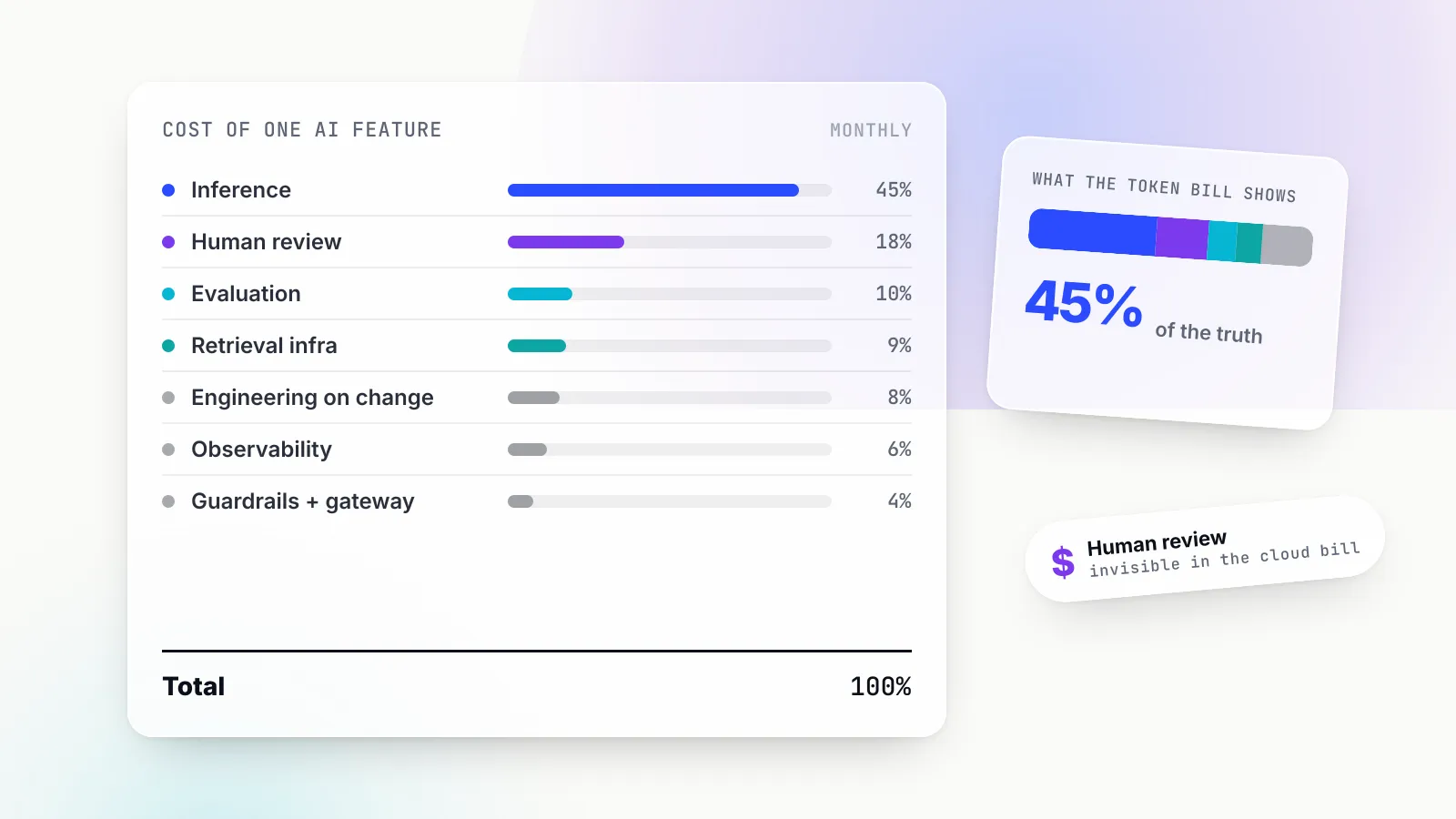
Second, output is now nearly half the bill. Caching has moved the bottleneck. The next saving comes from output limits, shorter formats or a smaller model, not from more caching.
Third, the same feature with the wrong prompt structure would cost more than doing nothing. If a timestamp at the top of the system prompt made every request a write, the input cost would be 100,000 × 12,000 × $2.50 / 1,000,000 + $160 = $3,160, plus $400 output: $3,560 a day, 20 percent above the uncached baseline. This is the case Bifrost’s documentation warns about when it says that one-shot requests that never read what they wrote pay 25% to 100% more on the marked prefix for nothing in return.
The break-even point is low when a prefix is reused. With a 1.25x write and 0.05x read, writing once and reading once costs 1.30 times the uncached price of the prefix against 2.0 times for sending it twice. One reuse pays for the write.
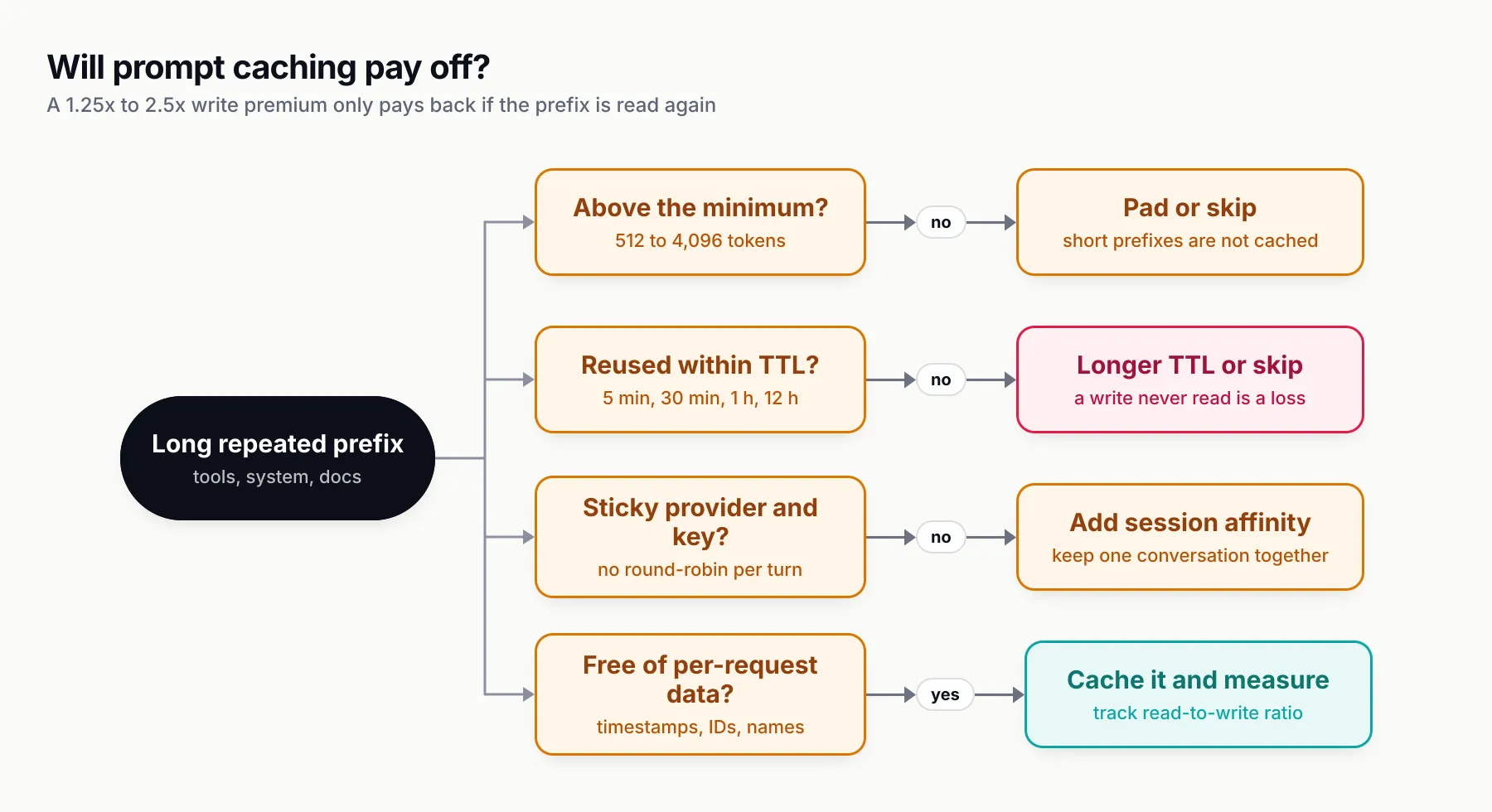
Figure 2: Prompt caching pays off when all four answers are yes. A no on any of them turns a 1.25x write premium into a loss.
Prompt caching in the full LLM cost optimisation playbook
Prompt caching attacks one term in the cost formula. The llm-cost-reduction skill states that formula at the top of its instructions: cost is requests x (input tokens x input price + output tokens x output price), and every fix cuts requests, tokens, or price per token. The skill orders the work as measure, fix the biggest line item, then verify quality did not drop. Here is where caching sits among the other levers.
1. Attribute cost to features first
Before changing anything, tag every call with a feature and owner and record tokens, cached tokens and model. The skill’s budgets and attribution reference recommends bounded label sets (feature, team, environment, and customer only if bounded) for metrics, with unbounded IDs kept to logs and traces. Rank features by spend; the top one or two usually dominate.
2. Right-size the model per task
Classification, extraction and short rewrites rarely need a frontier model. The skill’s method is a 50 to 200 example eval set per feature, the current model and a cheaper candidate run side by side, and a switch only where the eval holds. Where one endpoint receives both easy and hard requests, route per request. The skill’s complexity-routing reference suggests labelling 200 to 500 real requests first; if 70 percent are simple and a small model holds quality on them, routing is worth it. Bifrost’s complexity router, which we covered when it launched as a per-request difficulty classifier, does this at the gateway. Pair it with session-aware routing so a conversation does not bounce between models and lose its prompt cache.
3. Cap output and loops
Output costs five times input on most current models, and after caching it is often the larger half of the bill. Set max_tokens (or its equivalent) per task, ask for structured output instead of prose, set reasoning effort explicitly, and cap agent loops on iterations, total tokens and wall time. The skill’s sample loop stops at 12 steps or 200,000 tokens and returns a partial result. Cap retries at two or three, never retry 4xx errors, and stop when an agent calls the same tool with the same arguments twice in a row.
4. Trim prompts and context
Remove duplicated instructions, retrieve fewer and better chunks, summarise old conversation turns with a small model, send only the tools relevant to the step, and truncate large tool outputs. Trimming and caching interact: trimming the static prefix saves less once it is cached at 0.05x, while trimming the variable suffix saves at the full rate.
5. Turn on provider prompt caching
Everything above in this article. The skill’s rule of thumb from its caching reference: a cache write that is never read costs more than no cache at all on providers that charge a write premium, so cache only prefixes that repeat within the TTL.
6. Cache whole responses
When the same question arrives repeatedly, skip the model. Exact caches key on a hash of model, messages and parameters; semantic caches match on embedding similarity and need careful thresholds and per-user scoping. Our semantic caching explainer covers the failure modes. Bifrost’s semantic_cache plugin runs direct hash lookup first and semantic search on a miss, engages only for requests that carry x-bf-cache-key or a configured default key, and scopes entries to the requesting virtual key unless you disable identity scoping.
7. Batch offline work
Evaluations, backfills and nightly enrichment rarely need a synchronous answer. OpenAI’s Batch API offers a 50% cost discount compared to synchronous APIs with a 24-hour turnaround. Anthropic’s Message Batches API charges 50 percent of the standard API prices, and the two discounts stack with prompt caching, although Anthropic notes cache hits in batches are best effort, typically 30 percent to 98 percent depending on traffic.
8. Set budgets and fail safely
Give each team, feature or customer a hard budget and a rate limit, and handle the refusal in the application. The skill’s reference shows Bifrost virtual keys with monthly budgets that return HTTP 402 when exhausted and 429 on rate limits, x-bf-dim-* headers to tag requests by feature, a bifrost_cost_total Prometheus metric labelled by provider, model, team and complexity tier, and custom pricing so reported cost matches negotiated rates.
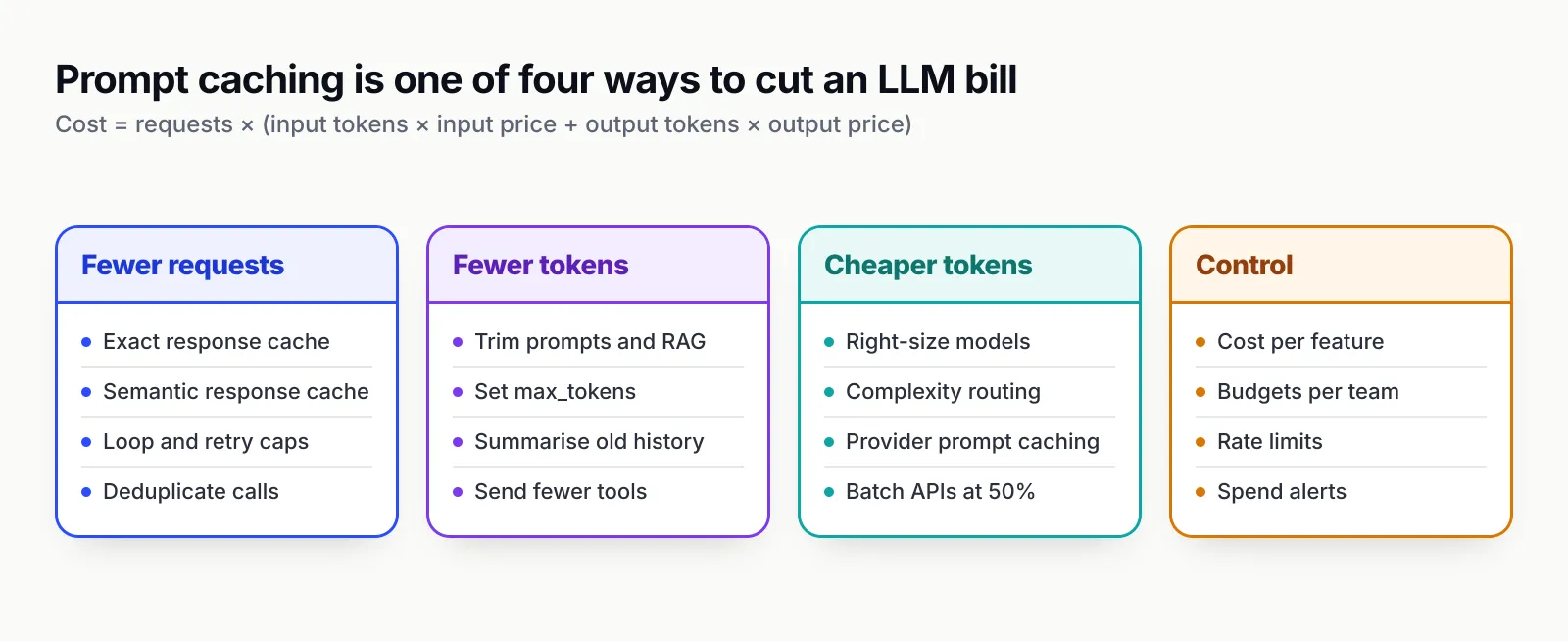
Figure 3: Prompt caching is one of four ways to make tokens cheaper. The biggest savings usually come from combining it with routing and output limits, not from tuning it alone.
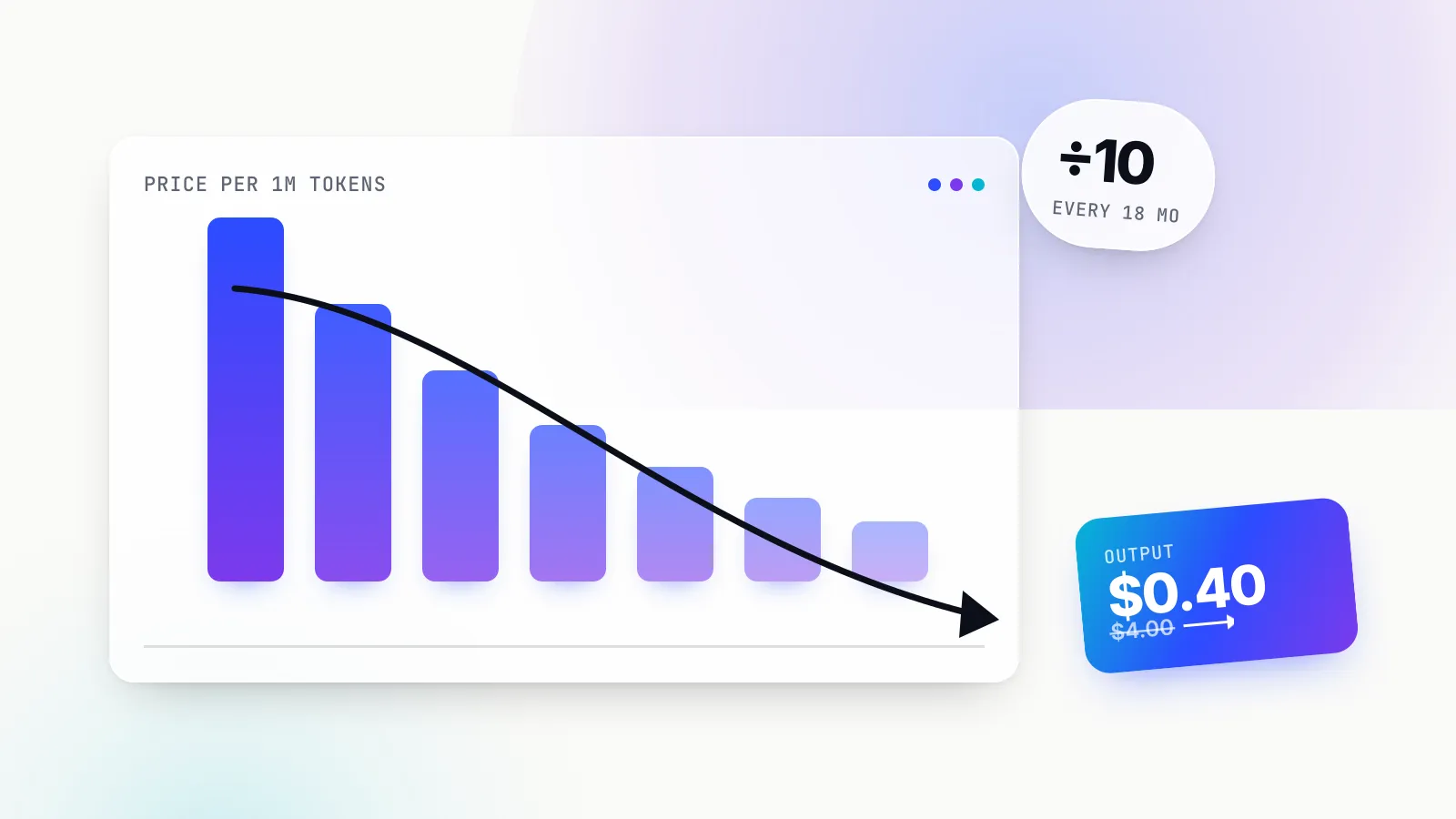
The falling price of inference does not make this list less relevant. Cheaper models encourage longer prompts and more agent steps, and the multipliers for caching and batching apply whatever the base price is.
The llm-cost-reduction skill: install it and run the audit
llm-cost-reduction is an MIT-licensed Agent Skill, version 1.0.0, published by build-with-ai-hq and listed on skills.sh. Like any skill, it is a folder with a SKILL.md file that a compatible coding agent loads when a task matches its description, as defined by the Agent Skills specification. If the format is new to you, our Claude Skills explainer covers how skills load and where they run.
Its description triggers on phrases such as “our OpenAI/Anthropic bill spiked”, “prompt caching isn’t hitting”, “the agent looped and cost $X” and “set a budget per team”. When loaded, it instructs the agent to:
- Run a grep audit for every model call site, the models in use, missing output limits, uncapped loops, retry wrappers, unrecorded usage, prompt-cache killers and re-computed embeddings.
- Instrument calls so cost is known per feature, then rank features by spend.
- Apply fixes in order of impact: right-sizing with an eval set, output and loop caps, trimming, provider prompt caching, response caching, batch APIs, embedding reuse and stream cancellation.
- Move central controls to a gateway (Bifrost) where that helps: complexity routing, semantic caching, session affinity, auto prompt caching, budgets and cost metrics.
- Verify that cost per 1,000 requests fell, quality held on the eval set, caches hit, and caps stop runaway runs.
The skill ships three references: caching.md (provider prompt caching, prefix stability, session affinity, auto prompt caching, response and embedding caches, with Python and TypeScript code), complexity-routing.md and budgets-and-attribution.md.
Install commands
# project scope (the default)
npx skills add build-with-ai-hq/llm-cost-reduction

# non-interactive, Claude Code only
npx skills add build-with-ai-hq/llm-cost-reduction -a claude-code -y

# non-interactive, Codex only
npx skills add build-with-ai-hq/llm-cost-reduction -a codex -y

# user-level install for every project
npx skills add build-with-ai-hq/llm-cost-reduction -g

# see what is installed, update later
npx skills list
npx skills update
The flags come from the skills CLI help output: -g for a global install, -a to choose agents, -y to skip prompts, -l to list a repository’s skills without installing, and --copy to copy instead of symlinking.
Once installed, ask the agent something like “Our Anthropic bill doubled last month and prompt caching shows zero reads. Audit this repo and fix the biggest cost problems.” The skill’s instructions tell it to measure before trimming.
What the skill does not do
The skill is instructions, not a service. It does not call provider billing APIs, does not know your negotiated prices (its sample price table is explicitly marked as placeholders), and does not run evals for you; it tells the agent to build and run them. Its model IDs are examples, and it tells the agent to use whatever models the project already uses. The grep audit finds leads, not proof: a hit on while True may be a well-capped loop. And it cannot see traffic patterns, so whether a prefix repeats within the TTL is something you confirm from usage logs after the change.
How we tested
On 28 October 2026 we installed the skill with the skills CLI version 1.7.4 into an empty directory under a scratch folder, with telemetry disabled (DISABLE_TELEMETRY=1 DO_NOT_TRACK=1).
npx skills add build-with-ai-hq/llm-cost-reduction -lcloned the repository and reported one skill,llm-cost-reduction, with its full description.npx skills add build-with-ai-hq/llm-cost-reduction -a claude-code -ycopied the skill to./.claude/skills/llm-cost-reduction/and wrote askills-lock.jsonrecording the source (build-with-ai-hq/llm-cost-reduction), source typegithuband a content hash. The CLI ended with the line “Review skills before use; they run with full agent permissions.”- Running the same command with
-a codexplaced a second copy in./.agents/skills/llm-cost-reduction/. npx skills listshowed the skill under Project Skills with the agent and source.- The installed folder held
SKILL.md,README.md,LICENSE, the three files inreferences/and anassets/folder of banner images. It matched the repository’s files exactly. There is noscripts/folder: the audit is a block of shell commands insideSKILL.md.
We then ran that audit block, command by command, against a 20-line Python support bot we wrote with deliberate mistakes: a system prompt starting with datetime.now(), a uuid4() and the user’s name; tools built from a set(); a while True agent loop; no max_tokens; and no usage logging. The audit found both call sites (messages.create and chat.completions.create), both model IDs, zero output limits, the uncapped while True loop, zero usage recording and, under its “prompt-cache killers” check, the system prompt line with the timestamp and UUID. It did not flag the set() tool ordering, which no grep pattern in the block targets; that is caught by the caching reference’s checklist rather than the audit.
We did not run a full agent session with the skill loaded, and we did not send live API traffic, so the cost figures in this article come from the providers’ published prices, not from our own bills.
Prompt caching at the gateway with Bifrost
Two problems are hard to fix inside each application. Agent harnesses and generic OpenAI-compatible code often send no cache markers at all, and gateways that load-balance across keys scatter a conversation across cold caches. The skill points to Bifrost, Maxim AI’s open-source LLM gateway, for both.
Auto prompt caching. Shipped in Bifrost v2.1.0 on 8 September 2026, a per-provider prompt_cache block makes Bifrost add a breakpoint to requests that arrive without one:
{
  "providers": {
    "anthropic": {
      "keys": [{ "name": "anthropic-key-1", "value": "env.ANTHROPIC_API_KEY", "models": ["*"], "weight": 1.0 }],
      "prompt_cache": { "auto_inject": true }
    }
  }
}
Per the Bifrost documentation, the setting is off by default, caller markers always win, injection is gated per model so implicit-caching providers such as Gemini are left alone, at most four markers are added, and the x-bf-prompt-cache-auto-inject header flips it per request. The marker is translated per provider: cache_control for Claude on Anthropic, Vertex and OpenRouter, cachePoint on Bedrock, and prompt_cache_breakpoint for the GPT-5.6 family and later on OpenAI and Azure. An optional "ttl": "1h" requests the longer Anthropic lifetime, and cache_control_injection_points targets specific messages instead of the first cacheable block. The v2.2.6 release on 6 October 2026 extended this so Anthropic-style markers on tool results, as Claude Code sends them, become prompt_cache_breakpoint for GPT-5.6 and later.
Session affinity. Sending a stable x-bf-session-id per conversation keeps it on the provider and key that served it before. The session affinity documentation is explicit about why: provider prompt caches are per provider and usually per key, so a conversation that hops between keys misses the cache it warmed a turn ago. Claude Code, Codex CLI and OpenCode session headers are adopted automatically, bindings default to a one-hour TTL refreshed on each served request, and Claude Code subagents share their parent’s session.
Verification. On Chat Completions, Bifrost surfaces the provider’s counters as cached_read_tokens and cached_write_tokens under usage.prompt_tokens_details. The verification section says to expect a write on the first request of a session and reads afterwards; writes on every turn mean the prefix is changing. Sending x-bf-send-back-raw-request: true shows where the marker landed.
Bifrost’s release notes also show the less glamorous work caching needs. Version 2.0.0 made MCP tool ordering deterministic for prompt-cache stability, and 2.2.0 kept MCP tool schema property order fixed across tool syncs. Those are exactly the tool-order misses described above, fixed once at the gateway instead of in every client. For how Bifrost compares with other gateways on routing and governance, see this production-ready comparison of LLM gateways.
What to do this week
- Log cache counters today. Add
cache_read_input_tokens,cache_creation_input_tokensorcached_tokensto the usage line for every call, tagged by feature. Compute token hit rate and read-to-write ratio per feature. - Find the cache killers. Install the skill (
npx skills add build-with-ai-hq/llm-cost-reduction) and ask your coding agent to run its audit, or grep fordatetime.now,Date.now,uuidand user fields near your system prompts yourself. - Reorder prompts. Sorted tools, static system prompt, reference material, breakpoint, then history and the new turn. Move every timestamp and ID to the end.
- Pick the TTL deliberately. Five minutes for agent loops that turn over in seconds; one hour (Anthropic) or 12 hours (OpenAI) only when gaps are long and the prefix is reused many times.
- Keep sessions sticky. One conversation, one provider, one key, one model tier.
- Then look at output. Once input is cached, output is often half the bill. Set
max_tokens, cap loops, right-size models and move offline work to batch APIs.
Prompt caching is the rare optimisation that cuts cost and latency together without touching output quality. The work is not turning it on; it is keeping the first few thousand tokens of every request exactly the same, and proving it with the counters.
Sources
- Prompt caching (Claude API) Anthropic
- Message Batches API (Claude API) Anthropic
- Prompt caching (OpenAI API) OpenAI
- OpenAI API pricing OpenAI
- Batch API (OpenAI) OpenAI
- Context caching (Gemini API, generateContent) Google
- Gemini Developer API pricing Google
- Prompt caching for faster model inference (Amazon Bedrock) Amazon Web Services
- Bifrost auto prompt caching Maxim AI
- Bifrost session affinity Maxim AI
- Bifrost semantic caching Maxim AI
- Bifrost v2.1.0 changelog Maxim AI
- llm-cost-reduction Agent Skill (repository) build-with-ai-hq
- llm-cost-reduction on skills.sh skills.sh
- skills CLI (vercel-labs/skills) Vercel Labs
- Agent Skills specification agentskills.io
Frequently asked questions
What is prompt caching?
Prompt caching is a provider feature that stores the processed state of a prompt prefix, such as a long system prompt, tool definitions or reference documents, so a later request that starts with the identical prefix does not pay to process it again. The model still runs and output is billed in full, but cached input tokens are billed at a fraction of the normal input rate, typically 0.1x and as low as 0.05x on some current models.
How does prompt caching work?
The provider hashes the prompt up to a cache breakpoint and saves the key-value attention state for that prefix. When a new request arrives, it looks for the longest previously written prefix that matches byte for byte. Anything after the match is processed normally. Because the match is on an exact prefix, one changed character early in the prompt invalidates everything after it.
Is OpenAI prompt caching automatic?
Yes. Prompt caching is on by default for supported OpenAI models. On GPT-5.6 and later, implicit mode places a breakpoint at the end of the latest eligible message, and you can add explicit breakpoints or switch to explicit-only mode. Earlier models cache implicitly at fixed intervals and charge nothing extra for cache writes.
How long does Anthropic prompt caching last?
The default cache lifetime is 5 minutes, refreshed at no cost each time the prefix is read. A 1-hour lifetime is available by setting ttl to 1h in cache_control, at a write price of 2x the base input rate instead of 1.25x. The lifetime counts from the start of the request, so a long-running response eats into it.
Does prompt caching reduce output token costs?
No. Prompt caching only changes how input tokens are billed. Output tokens are generated fresh and billed at the full output rate, and the response is the same as it would have been without caching. To cut output spend you need output limits, shorter formats, smaller models or response caching.
What is the difference between prompt caching and semantic caching?
Prompt caching is run by the model provider and makes repeated input cheaper while the model still answers. Semantic caching runs in your application or gateway and replays a stored answer for a similar request, so the provider is not called at all. They are independent and can run together.
How do I check whether prompt caching is working?
Read the usage block on each response. Anthropic reports cache_creation_input_tokens and cache_read_input_tokens, OpenAI reports cached_tokens and, on GPT-5.6 and later, cache_write_tokens under the input or prompt token details, and Gemini reports cached tokens in usage metadata. If every request shows writes and no reads, something in the prefix is changing between calls.