ToolsExplainer
Slack MCP server: the definitive guide to tools, setup and security
Slack's hosted MCP server lets Claude, Cursor and coding agents search, read and post in Slack as the signed-in user. Tools, scopes, setup, rate limits, risks and governance.
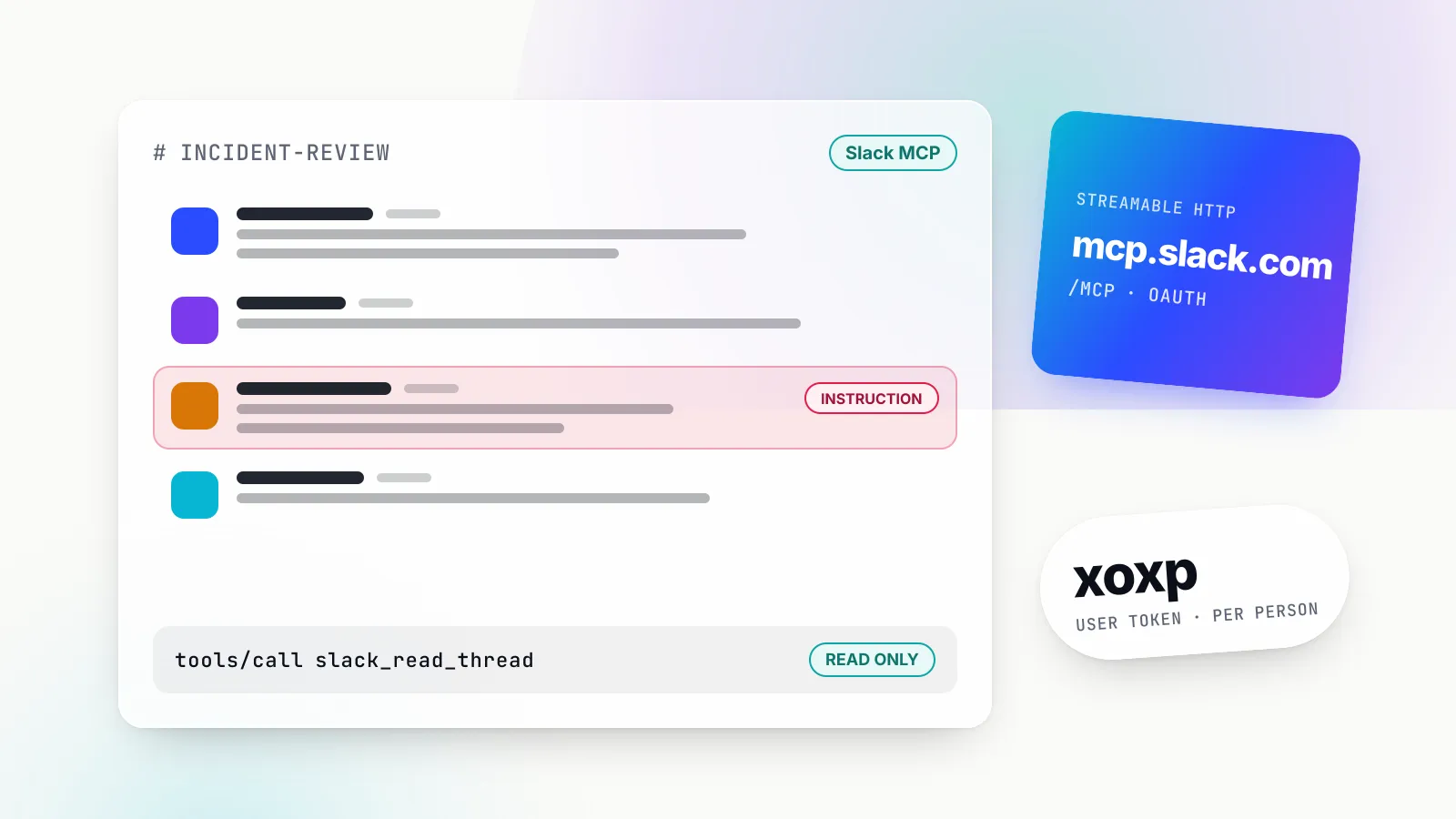
Slack now runs its own Model Context Protocol server. Point an MCP client at https://mcp.slack.com/mcp, sign in, and the agent can search your workspace, read a channel or a thread, post or schedule a message, and create a canvas, all as you and with exactly your access. Slack announced it on 17 February 2026 alongside the Real-time Search API, and has added tools roughly every quarter since.
That matters because Slack is where most companies’ decisions, incidents and half-finished arguments actually live. An agent that can read it answers “what did we decide about the launch date?” without someone pasting a transcript. An agent that can write to it can also leak from it. This guide is for engineers wiring Slack into Claude, Cursor or their own agents, and for the admins who have to approve that. It covers what the server exposes, how authentication and admin approval work, verified setup for each client Slack documents, the Real-time Search API underneath, worked workflows, the security risks that are particular to chat data, and how to govern it once more than a handful of people use it.
For where Slack sits among other vendor servers, our ranking of the top MCP servers of 2026 puts it sixth and calls it the most tightly governed server on the list. This piece goes one level deeper.
What “Slack MCP” can mean in October 2026
Search for “Slack MCP” and you will find four different things. They have different owners, different authentication and very different risk profiles, so it is worth separating them before configuring anything.
- The Slack MCP server. Slack’s hosted server, documented on docs.slack.dev. Slack runs the code; you bring a client and a user’s OAuth consent. This is what the rest of the article is mostly about.
- The Slackbot MCP client. The reverse direction. Slack’s MCP overview describes it as the way to connect remote MCP servers to Slack, so that Slackbot discovers and calls tools from Jira, Figma or your own service inside a conversation. It launched on 18 June 2026.
- The archived reference server. The
@modelcontextprotocol/server-slackpackage Anthropic published as one of the original MCP reference implementations. It now lives in a repository whose README states that no security guarantees are provided; the repository was archived on 29 May 2025. - Community servers. Open-source projects you run yourself, usually over stdio, with a bot token, a user token, or in some cases tokens lifted from a logged-in browser session.
If you are new to the vocabulary, our batch explainers on what an MCP server is and the Model Context Protocol itself cover hosts, clients, transports and the authorisation spec. Here we assume you know that a server exposes tools and a client calls them.
A short timeline
The official server has moved quickly. The dates below come from Slack’s developer changelog.
| Date | Change |
|---|---|
| 29 May 2025 | Reference servers repository archived, including the Slack server |
| 17 Feb 2026 | Slack MCP server and Real-time Search API announced; assistant.search.context moves to granular search:read.* scopes |
| 16 Mar 2026 | Optional OAuth scopes; admins can pre-approve which optional scopes users may grant |
| 30 Mar 2026 | PKCE generally available for public clients such as desktop apps |
| 13 May 2026 | New tools: add reactions, create a conversation, list channel members, list emoji, read files |
| 18 Jun 2026 | Slackbot MCP client announced |
| 31 Jul 2026 | Slack MCP and Skills Plugin for Claude Code and Cursor |
| Jul to Sep 2026 | Slack Marketplace submissions again need at least 10 active workspace installs |
The last line matters more than it looks. Because only Marketplace and internal apps can use MCP, the Marketplace bar is effectively the bar for shipping a third-party Slack MCP client. Slack’s September notice says apps must have at least 10 installations on active workspaces and keep that count throughout review.
How the official server works
The design choices are conservative, and almost all of them are about identity. Five things define it.
One endpoint, one transport. Slack says it supports JSON-RPC 2.0 over Streamable HTTP, with every request going to https://mcp.slack.com/mcp. It states plainly that it does not support SSE-based connections or Dynamic Client Registration at this time. That second point is the one that trips people up: a generic MCP client that expects to register itself on the fly will fail, and you need a client ID from a real Slack app.
Every client is a Slack app. The docs require that MCP clients must be backed by a registered Slack app with a fixed app ID. Slack uses that identity for admin approval, logging, rate limits and access control. Partner clients (Claude, Cursor, Perplexity) ship with their own app IDs, which is why their setup is one click. If you build your own client, you create a Slack app, toggle on the MCP server feature under the app’s Agents settings, and enable the app for MCP in the same place.
Only listed or internal apps. The overview is blunt: only directory-published apps or internal apps may use MCP. An unlisted distributed app, the sort a startup might share with a few design partners, is refused.
User tokens, confidential OAuth. Slack supports confidential OAuth for MCP clients, using the app’s client ID and secret. Clients that support OAuth authorisation server metadata (RFC 8414) can discover the endpoints from https://mcp.slack.com/.well-known/oauth-protected-resource and https://mcp.slack.com/.well-known/oauth-authorization-server. The token the agent ends up holding is a Slack user token, so every tool call runs as that person. For desktop clients that cannot keep a secret, PKCE has been generally available since March; Slack’s notice adds that all refresh tokens issued to PKCE-enabled apps expire after 30 days, and that enabling PKCE is one-way.
Slack-side enforcement. If your app has IP allowlisting configured, requests to the Slack MCP server are subject to the same restrictions. And MCP activity is written to Slack’s audit trail, which we come back to in the governance section.
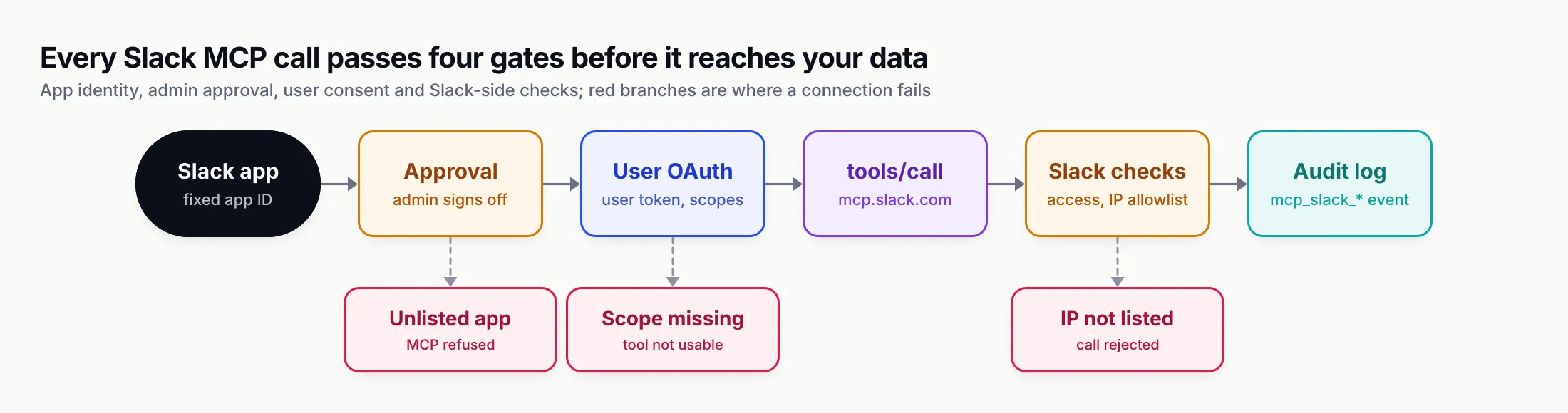
Figure 1: The Slack MCP server is strict about identity. Most setup failures are one of the three red branches, not a bug in the client.
The tools, the scopes they need and their rate limits
Slack groups the tools into search, messages, canvases, users, files and lists. The table below combines three tables from Slack’s own pages: the feature list, the user-token scopes per tool, and the per-tool rate limits. Where Slack publishes a tool’s wire name, in the audit-log event types or the file-upload instructions, we give it; otherwise we describe the tool by what it does. As of October 2026, the rate-limit table lists 20 tool entries.
| Tool | What it does | User-token scopes | Rate limit |
|---|---|---|---|
Search messages and files (slack_search_public, slack_search_public_and_private) | Filter by date, user and content type | search:read.public, plus .private, .mpim, .im; search:read.files for files | Special (search API) |
Search channels (slack_search_channels) | Find public and private channels by name or description | search:read.public and related | Tier 2 |
Search users (slack_search_users) | Partial name, email or user ID | search:read.users | Tier 2 |
| Search emoji | List custom emoji | emoji:read | Tier 2 |
| List user channels | Channels you belong to, by type; archived channels included by default | channels:read, groups:read, im:read, mpim:read | Tier 2 |
Read a channel (slack_read_channel) | Full message history | channels:history, groups:history, mpim:history, im:history | Tier 3 |
Read a thread (slack_read_thread) | Full thread conversation | Same as above | Tier 3 |
Send message (slack_send_message) | Post to any conversation type | chat:write | Special |
| Schedule message | Post at a future time | chat:write | Tier 3 |
| Draft message | Draft and preview inside the AI client | Not listed separately | Not listed |
| Create conversation | New channel, group DM or DM | channels:write, groups:write, im:write, mpim:write | Tier 2 |
| Add or get reactions | Emoji reactions on a message | reactions:write, reactions:read | Tier 3 |
Create, update, read canvas (slack_create_canvas, slack_update_canvas, slack_read_canvas) | Rich documents; read exports Markdown | canvases:read, canvases:write | Tier 2 to 4 |
Read user profile (slack_read_user_profile) | Profile, custom fields, status | users:read, users:read.email | Tier 4 |
| List channel members | User IDs in a conversation | channels:read, groups:read, mpim:read | Tier 4 |
| Read files | File metadata and content | files:read | Tier 4 |
Upload a file (slack_get_file_upload_url, slack_complete_file_upload) | Two-step upload, optional share | files:write | Tier 4 |
| Lists | Create, read and update Slack lists and records | lists:read, lists:write | Tier 2 to 3 |
Three details in that table deserve emphasis.
First, the scopes are on the user token, not a bot token. Slack’s scope table is explicit about it. That is what makes “the agent sees what you see” true, and it is also why an over-scoped token is dangerous: it holds the full reach of a human account.
Second, a missing scope removes a tool rather than erroring loudly. Slack’s troubleshooting guide tells you that if you connected but tools are missing, check that your user token has the necessary scopes and that an admin has not restricted MCP access. That is useful: a read-only deployment is simply one that never requests chat:write, canvases:write or the *:write conversation scopes.
Third, rate limits are the Web API’s. Slack says limits are enforced per tool or action type, and the same limit applies whether the action comes through MCP or a direct Web API call. Slack’s rate-limit page defines Tier 2 as 20+ per minute, Tier 3 as 50+ and Tier 4 as 100+, and notes that all Slack plans receive the same rate limit tier for each method. The two special cases are the ones agents hit most: search, covered in the next section, and sending, where chat.postMessage will generally allow an app to post 1 message per second to a specific channel, under a workspace-wide ceiling of several hundred a minute.
The Real-time Search API underneath search
The search tools are the reason most people connect Slack to an agent, and they sit on a separate API that Slack announced the same day. The Real-time Search (RTS) API is what the Data Access API has evolved into. Its core method is assistant.search.context, and the Slack MCP rate-limit table points its search entry at that method’s limits. You can use RTS directly, without MCP, if you are building your own assistant and want deterministic JSON rather than natural-language tool output.
Its design goal is in the first paragraph of the guide: let third-party apps retrieve relevant Slack data without storing customer information on external servers. The rules that follow from that are strict.
- Scopes.
search:read.publicis required.search:read.private,search:read.mpimandsearch:read.imadd private channels, group DMs and DMs, and are presented to each user for consent.search:read.filesandsearch:read.usersadd files and people. In February Slack replaced the single legacysearch:readscope with this set, saying it moved away from the single search:read scope to give finer control. - Public means workspace-public. A searching user need not be a member of the public channels, only of the workspace. That is Slack’s normal search behaviour, but it is also the property the injection attacks below exploit.
- Semantic versus keyword. Queries phrased as questions trigger semantic retrieval, but semantic search is available only on workspaces within plans that include Slack AI Search; Slack asks apps to tell users they must have a Business+ or Enterprise+ Slack plan for it. Everywhere else, search is keyword-based with stemming but no synonyms, so “revenue” will not find “profit”. Sorting by timestamp also forces keyword mode, which changes which results match, not just their order.
- Rate limits. For most teams the method allows 10+ requests per minute with bursts, rising to 400+ for larger teams, plus an additional user-level limit of 10 requests per minute. Paginated requests count. Slack’s advice is to make fewer than ten calls per user question, because sustained use hits daily limits and can throttle the whole workspace.
- No storage, no training. The guide says, in bold, that you must not store or copy any of the data retrieved from this API, may not train on it, and may not scrape data unrelated to a user query.
- Guests are out. Workspace guests are not permitted to access apps using platform AI features, so RTS and anything built on it.
- Slack Connect is in. The API will retrieve results from Slack Connect channels, which means content written by people outside your company can land in an agent’s context.
The “no storage” rule has a practical consequence for agent builders. A pipeline that searches Slack and writes the results into a vector store or a long-lived agent memory is outside Slack’s policy, whatever the MCP client allows. Ask your agent host where tool results persist before you connect it.
Plans, admin approval and who can turn it on
This is the area where the documentation is thinnest, so it is worth being precise about what is stated and what is not.
What Slack states. Admins approve MCP clients through Slack’s standard app-approval process; the overview says admins can approve and manage all MCP client integrations. The client setup pages list, as a prerequisite, access to a Slack workspace with the MCP integration approved by your workspace admin. Since March, admins approving an app can also pre-approve which optional scopes are available to users, which is the cleanest way to ship a client that can read DMs only for the people who opt in.
What Slack does not state. The developer docs for the MCP server do not restrict it to a Slack plan. Plan gates appear on adjacent features: semantic search (Business+ or Enterprise+), the Audit Logs API, which Slack documents as only available to Slack workspaces on an Enterprise plan, and the admin methods for the Slackbot client’s server allow-list. If your organisation is on Free or Pro, test in a sandbox before promising anything; Slack’s Developer Program offers free sandboxes.
What the client side adds. Your AI tool has its own gate. Anthropic’s Slack page says the Claude connector is available on Team and Enterprise plans, needs an Owner to enable it under Organization settings, and requires the Claude in Slack app to be installed first. Claude Code admins can block it outright: Anthropic’s MCP docs say a deniedMcpServers entry with the server name “claude.ai Slack” blocks the Slack connector.
The Slackbot client has finer controls. For the reverse direction, Slack’s help centre says org owners and admins on Enterprise Grid and Enterprise+ can manage access to MCP servers and individual tools, and that it is not possible to manage MCP server or tool access on the Pro, Business+ or Enterprise Select plans. An Enterprise-only Admin API method can list third-party app MCP servers approved for an organization. Do not confuse these with controls on the Slack MCP server; they govern which outside servers Slackbot may call.
Setting it up in each client
Slack lists four partner clients available in these select partner-built clients: Claude.ai, Claude Code, Perplexity and Cursor. It also documents Codex, Pi and a generic recipe for other harnesses. Everything below is taken from those pages as of October 2026. In every case the workspace admin approval must already be in place.
Claude and Claude Desktop
In Claude, open the sidebar, go to Customize, then Connectors; Slack’s page says on the Customize page, click Connectors, add Slack and complete the OAuth flow. On a Team or Enterprise plan an Owner has to enable the connector for the organisation first, and Anthropic’s page asks for the Claude in Slack app to be installed before the connector is turned on. Once connected, you switch it on per conversation from the + menu.
Claude Code
Slack recommends its plugin, which bundles the MCP connection with skills for Block Kit, the Web API, the Slack CLI and searching Slack. The plugin is currently available for Claude Code and Cursor.
/plugin install slack@claude-plugins-officialThe plugin writes this configuration, with Slack’s own client ID and a fixed OAuth callback port:
{
  "mcpServers": {
    "slack": {
      "type": "http",
      "url": "https://mcp.slack.com/mcp",
      "oauth": {
        "clientId": "1601185624273.8899143856786",
        "callbackPort": 3118
      }
    }
  }
}
Without the plugin, Slack’s harness guide gives the CLI form and tells you to finish sign-in from /mcp:
claude mcp add --transport http --scope local slack https://mcp.slack.com/mcpIf you are using your own Slack app, put its client ID in the oauth block of .mcp.json (or ~/.claude.json for all projects), keep callbackPort matching the redirect URL registered on the app, and restart. Claude Code’s docs cover this case under pre-configured OAuth credentials, which is the path any server without Dynamic Client Registration takes; claude mcp add accepts --client-id, --client-secret (prompted, masked) and --callback-port.
Before giving an autonomous Claude Code session write access to Slack, read our guide to --dangerously-skip-permissions. A send-message tool is exactly the kind of call you want a person to approve.
Cursor
Slack’s Cursor page offers an “Add to Cursor” button, or a manual entry under Cursor Settings, MCP:
{
  "mcpServers": {
    "slack": {
      "url": "https://mcp.slack.com/mcp",
      "auth": {
        "CLIENT_ID": "3660753192626.8903469228982"
      }
    }
  }
}
Save it and you will then see a connect button once added; click it to authenticate. The Slack plugin is also in the Cursor Marketplace.
Codex, Pi and other harnesses
For OpenAI’s Codex CLI, Slack documents codex mcp add --transport http slack https://mcp.slack.com/mcp, or a TOML block in ~/.codex/config.toml:
[mcp_servers.slack]
url = "https://mcp.slack.com/mcp"
auth = "oauth"
then to run codex mcp login slack to complete the OAuth flow and check codex mcp list. Pi needs the pi-mcp-adapter extension and then the same URL with OAuth. For anything else, the recipe is the URL, your Slack app’s client ID and OAuth 2.0.
Your own agent
Slack’s sample app, built on Bolt for JavaScript, passes the Slack MCP server to an LLM API as a remote tool with the user’s token in a bearer header. One line in that sample deserves a warning: it sets require_approval: 'never'. That is fine for a demo that posts to #general on a sandbox. In production, keep approval on for any write tool; the security section explains why.
When it does not connect
Slack’s troubleshooting list covers nearly every failure we have seen reported: the redirect URI is wrong, the admin has not approved the app, or the app is unlisted, in which case Slack says to verify that your Slack app is published in the Slack Marketplace or is an internal app. Add two more from the overview: a client trying Dynamic Client Registration, and a corporate egress IP missing from the app’s allowlist.
Worked workflows, with the scopes and the risk
The tools are simple; the value is in combining them. Four patterns cover most of what teams do, and each comes with a scope set you can request and a risk you should name.
1. “Where did we leave off?”
The RTS guide walks through this case. A user asks about a conversation with a colleague from yesterday. The agent searches users to disambiguate the name, searches messages in a time window with context messages included, pulls the full thread with conversations.replies, summarises it, and on request replies in the thread.
- Tools: search users, search messages, read thread, then optionally send message.
- Scopes:
search:read.users, the foursearch:read.*channel scopes, the four*:historyscopes, andchat:writeonly for the reply. - Risk: the agent reads every message in the window, including any planted text. Slack’s own guidance for this pattern is to allow users to confirm before sending messages to discovered channels or users.
2. Incident retrospective into a canvas
After an incident, an engineer in Claude Code asks for a timeline. The agent reads the incident channel’s history and the key threads, cross-references the repository, and creates a canvas with the timeline, the contributing factors and the follow-up actions, shared back to the channel.
- Tools: read channel, read thread, create canvas.
- Scopes:
channels:history(orgroups:historyfor a private incident channel),canvases:read,canvases:write. - Risk: incident channels attract pasted logs and credentials. Anything in the canvas is now in a second place, with its own sharing. Keep
chat:writeoff; a canvas is reviewable before anyone is notified.
3. A weekly digest of a noisy channel
A product manager wants Friday summaries of three customer-feedback channels. The agent searches with a date filter and an OR query (RTS supports OR in both keyword and semantic modes), clusters themes and schedules a message to the team channel.
- Tools: search messages, read thread for the top items, schedule message.
- Scopes:
search:read.public(and.privateif the channels are private),channels:history,chat:write. - Risk: feedback channels often bridge Slack Connect with customers, so external text flows into the prompt. Use the scheduled message as a review window: the draft exists before it posts.
4. A coding agent that reports back
A developer asks Claude Code or Cursor to fix the bug described in a thread, then post a summary with the pull request link back to that thread.
- Tools: read thread, then send message.
- Scopes:
channels:historyandchat:write. - Risk: this is the most dangerous combination. The agent reads untrusted text (the bug report, plus any file it opens in the repository), has access to private data (your environment and code), and can write to an outbound channel that fetches links. Approve every send by hand.
Security risks that are specific to chat data
Most MCP security guidance is generic: validate tokens, pin versions, review tool descriptions. Our MCP security and authentication guide covers those. Slack adds four risks that come from what chat is: a large, many-author, partly external text corpus that renders links.
Prompt injection via messages
Anyone who can post in a workspace can write text your agent will later read as context. This is not hypothetical. In August 2024 PromptArmor showed that Slack AI is susceptible to data exfiltration via indirect prompt injection from a public channel. The attacker created a public channel with only themselves in it, posted an instruction, and when a victim asked Slack AI for an API key stored in a private channel, the answer included a link carrying that key. The attacker never joined the private channel, and the victim never joined the attacker’s channel; search reached both because workspace-public channels are searchable by every member.
The Slack MCP server has the same shape. Search results are untrusted input, and so are thread contents, canvases, file text and user profile fields. Our catalogue of prompt injection examples and defences has the broader pattern; the Slack-specific defences are to keep write tools behind human approval and to separate agents that read widely from agents that can post.
Exfiltration through link unfurling
Slack previews links. The chat.postMessage reference says we unfurl all links in any messages posted by users and Slack apps by default. When Slack fetches a URL to build the preview, whatever is in that URL’s query string reaches the URL’s owner, without anyone clicking.
In 2025 the security researcher behind Embrace The Red published an advisory showing that the archived reference server does not disable unfurling of hyperlinks when posting. A prompt injection in a document the agent analyses tells it to read a secret and post a link containing it, even to a private channel the user believes is a safe sink; Slack’s preview services then deliver the secret. The issue was assigned CVE-2025-34072, and VulnCheck’s advisory is titled Anthropic Slack MCP Server Data Exfiltration via Link Unfurling. Because the server is archived, the advisory notes there is no plan to fix it.
Slack’s documentation for the official server does not say whether its send-message tool suppresses unfurls; we could not confirm it either way. The Web API lets a caller set unfurl_links and unfurl_media to false. Until that behaviour is documented, treat every agent-authored message containing a URL as a potential exfiltration channel and review it before it posts.
Direct messages and private channels
The difference between a useful Slack agent and an alarming one is often four scopes: search:read.private, search:read.mpim, search:read.im and im:history. They put private channels, group DMs and DMs in reach. Slack mitigates this well at the platform level: those search scopes are presented for user consent, users can revoke them, and the RTS guide tells admins not to install a search:read.* app on workspaces whose data it should not see. Slack also limits what search returns depending on where it is called from: in a Slack Connect channel, it will return results from only the channel where it was invoked.
The residual risk sits in the client. A connector enabled for a whole Claude organisation, with DM scopes granted by each user, is one injected instruction away from quoting a DM into a channel. Request private scopes only for clients whose job needs them, and use optional scopes so users choose.
Mixing servers
Slack’s own overview includes an unusual line of advice: please be mindful about connecting to or utilizing other MCP servers at the same time. The reason is cross-server flow. A Slack read tool next to a web-fetch tool, an email sender or a GitHub issue creator gives injected text more than one way out. The fewer tools an agent holds while it reads Slack, the smaller the blast radius.
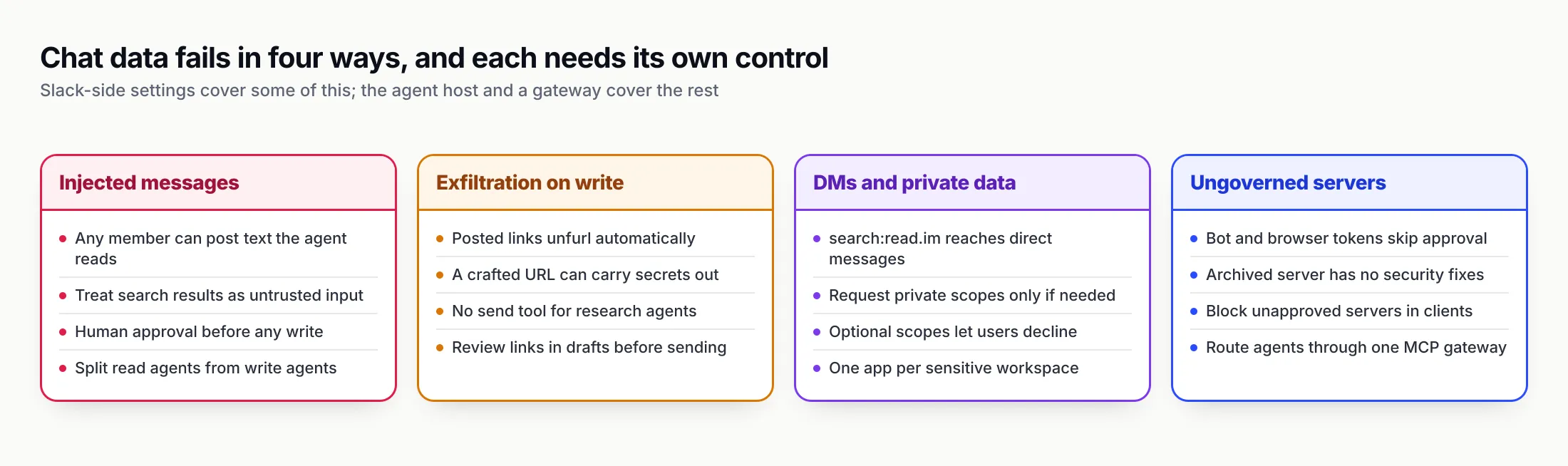
Figure 2: Slack’s platform controls handle identity and consent well. Injection and exfiltration have to be handled in the agent host and in front of the tools.
Governing Slack MCP across a company
Once a dozen people have connected Slack to three different AI tools, the question shifts from “does it work?” to “who can do what, and can we prove it?”. There are three layers, and you probably need all of them.
Layer 1: Slack itself
Slack’s controls are the foundation and they are good. App approval decides which clients exist at all. Scope choices, and optional scopes since March, decide what each client can reach. IP allowlists bind a client to known egress. And the audit trail records MCP activity: the Audit Logs API reference lists event types such as mcp_slack_read_channel_tool_called, described as an AI app read the contents of a channel on behalf of a user, plus events for searches, sends, profile reads and canvas reads and writes. On Enterprise plans those events can feed a SIEM. What Slack’s layer cannot see is what the agent did next with the data, or which other tools it held at the time.
Layer 2: the AI clients
Each client has its own allow-list. Claude organisations enable connectors centrally; Claude Code supports managed MCP settings with allowedMcpServers and deniedMcpServers, so an admin can allow the official endpoint and deny everything else that calls itself Slack. This is also where you stop the community and archived servers: they run locally over stdio, so Slack never sees an app to approve.
Layer 3: an MCP gateway
The client layer breaks down when agents are not people with laptops: a support bot, a nightly digest job, an incident agent in CI. Those workloads need the same Slack access policy applied consistently, with credentials held centrally and every tool call logged in one format next to the LLM calls that triggered it. That is the job of an MCP gateway: one governed endpoint between agents and the MCP servers they call, which decides which tools each caller can see.
Bifrost, Maxim AI’s open-source AI gateway, is one example that fits Slack’s constraints. Slack refuses Dynamic Client Registration, and Bifrost’s per-user OAuth mode lets an admin supply a client ID and secret (stored as environment or vault references) instead of registering on the fly, then stores each user’s Slack token against their identity, so calls still run as that user. Its MCP authentication overview distinguishes that per-user model from a shared server-level credential, which for Slack you would generally avoid. Tool access is set per virtual key and defaults to deny: a research agent’s key might allow only the search and read-thread tools, while a reporting job gets schedule-message and nothing else. MCP tool calls appear in the same logs as model requests. The trade-off is one more component in the path, and advanced controls such as SSO, RBAC and audit logs come with Bifrost’s enterprise tier. Our comparison of MCP gateways covers the alternatives.
Community servers and the archived reference server
There are good reasons people still reach for unofficial Slack servers: no admin to ask, a workspace on a plan without some features, an air-gapped setup, or a need for tools the official server lacks. It is worth knowing exactly what you give up.
The archived reference server (@modelcontextprotocol/server-slack, also shipped as the mcp/slack Docker image) uses a bot token (xoxb-) and a team ID, optionally restricted to a list of channel IDs, and exposes eight tools: list channels, post message, reply to thread, add reaction, get channel history, get thread replies, get users and get user profile. It has no search, acts as a bot rather than as you, and sits in a repository that says no security guarantees are provided. Given CVE-2025-34072, it should not be in production.
korotovsky/slack-mcp-server is the best-known community alternative. It is MIT-licensed, runs over stdio, SSE or HTTP, and supports a user token, a bot token, or browser session tokens (xoxc/xoxd) in what its README calls a “stealth mode” that needs no workspace permissions or scopes. Its message-posting tool is off unless you set SLACK_MCP_ADD_MESSAGE_TOOL, which can also restrict posting to listed channel IDs. That default is sensible. The browser-token mode is the problem: it is, by design, a way to give an agent a person’s full Slack session with no app for an admin to approve and no MCP audit events in Slack’s sense. A security team should treat it as shadow access.
Other community servers exist in large numbers. We have not reviewed them individually and do not name them; the questions to ask of any of them are the same. What token does it use, and who issued it? Does it respect channel membership? Can posting be turned off? Who maintains it, and how are vulnerabilities handled?
The counter-argument deserves a fair hearing. The official server’s strictness makes small-team experimentation slower than it needs to be, and an unlisted internal tool shared between two companies has no route to MCP at all. For a single developer on a personal workspace, a self-hosted server with a user token and posting disabled is a reasonable choice. For anything involving other people’s messages, the approval step is the point.
Limits worth knowing before you commit
The official server is the right default, but it has real constraints.
- No Dynamic Client Registration or SSE. Generic clients that only support those will not connect without your own Slack app and a client ID.
- Search budget. About ten search calls per user per minute is enough for interactive questions and too little for an agent that searches in a loop. Design for one or two searches per question, then targeted thread reads.
- Semantic search is a paid feature. On plans without Slack AI Search, a natural-language question falls back to keyword matching, with no synonyms.
- Whole-channel reads are expensive. “Read a channel” returns full history at Tier 3. On a busy channel that is a lot of tokens; filter by search first.
- The wire contract can change. Slack added five tools in May and publishes tool descriptions written for models. Pin nothing to exact tool names in prompts, and re-review the tool list when Slack’s changelog announces additions.
- Documentation gaps. Plan eligibility for the server itself and the unfurl behaviour of its send tool are not documented as of October 2026.
What to do
If you are an engineer connecting Slack to an agent, start with the official server and the partner client you already use. Request read scopes first, add chat:write only when a workflow needs it, and keep human approval on every send. Do not store search results.
If you are a Slack admin, decide which clients you will approve and with which scopes before the requests arrive. Use optional scopes for anything touching DMs, configure IP allowlists for internal clients, and on Enterprise route the mcp_slack_* audit events to your SIEM. Then block the alternatives in the clients you manage, starting with the archived server and browser-token community servers.
If you run agents as services rather than as people, put an MCP gateway in front of Slack, give each workload its own key with a deny-by-default tool list, and keep the read agents and the write agents separate. Slack has done the identity work well. Whether an injected message in #random can make your agent post a secret is still decided on your side of the connection.
Sources
- Slack MCP server overview Slack
- Announcing the Slack MCP server and Real-time Search API Slack
- New Slack MCP Server tools released (13 May 2026) Slack
- Connect the Slack MCP server to Claude Slack
- Connect the Slack MCP server to Cursor Slack
- Connect the Slack MCP server to agent harnesses Slack
- Using the Real-time Search API Slack
- assistant.search.context method reference Slack
- Audit Logs API actions reference (Slack MCP server) Slack
- chat.postMessage method reference (unfurling) Slack
- PKCE is now generally available Slack
- Optional scopes have landed Slack
- Announcing the Slack MCP and Skills Plugin Slack
- Slack integration (Claude connector) Anthropic
- Connect Claude Code to tools via MCP Anthropic
- Archived MCP reference servers Model Context Protocol
- Security Advisory: Anthropic's Slack MCP Server Vulnerable to Data Exfiltration Embrace The Red
- Data exfiltration from Slack AI via indirect prompt injection PromptArmor
- Bifrost MCP tool filtering per virtual key Maxim AI
- Bifrost MCP authentication Maxim AI
Frequently asked questions
What is the Slack MCP server?
It is Slack's own hosted Model Context Protocol server at https://mcp.slack.com/mcp. It gives MCP clients such as Claude, Claude Code, Cursor and Codex tools to search Slack, read channels and threads, send and schedule messages, and work with canvases, lists, files and user profiles, all acting as the signed-in user.
Is the Slack MCP server free?
Slack does not list a separate charge for the MCP server, and its developer docs do not restrict it to a plan. Some features are gated: semantic search through the Real-time Search API needs a plan that includes Slack AI Search, the Audit Logs API is Enterprise-only, and Claude's Slack connector requires a Claude Team or Enterprise plan.
How do I add the Slack MCP server to Claude Code?
The quickest route is the Slack plugin: run /plugin install slack@claude-plugins-official in a Claude Code session and complete the OAuth prompt. Alternatively run claude mcp add --transport http slack https://mcp.slack.com/mcp and finish sign-in with /mcp. Your workspace admin must have approved the integration first.
Does the Slack MCP server need admin approval?
Yes. Every MCP client must be backed by a registered Slack app, only Slack Marketplace and internal apps may use MCP, and admins approve or restrict those apps through Slack's standard app-approval process. If approval is missing, Slack's troubleshooting guide says OAuth will fail or the connection will show as inactive.
Can the Slack MCP server read my direct messages?
Only if the app requests the relevant scopes and you grant them. Search across DMs needs search:read.im and reading DM history needs im:history; Slack presents private-channel and DM search scopes for user consent, and users can revoke that consent later.
What happened to the old Slack MCP server from Anthropic?
The reference Slack server in the original modelcontextprotocol servers repository was moved to an archive repository that was archived on 29 May 2025 with no security guarantees. It used a bot token, exposed eight tools, and was later the subject of CVE-2025-34072, a link-unfurling data exfiltration issue.
What are the Slack MCP server rate limits?
Limits are per tool and match the underlying Web API methods, from Tier 2 (20+ per minute) to Tier 4 (100+ per minute). Search and sending messages have special limits: search follows assistant.search.context, around 10 requests per minute per user by default, and posting is generally one message per second per channel.