ToolsExplainer
What is an MCP server? Meaning, anatomy and how to vet one
An MCP server is the program that hands an AI app its tools, resources and prompts. What it is and is not, stdio versus HTTP, a working server in TypeScript and Python, and the trust checks.
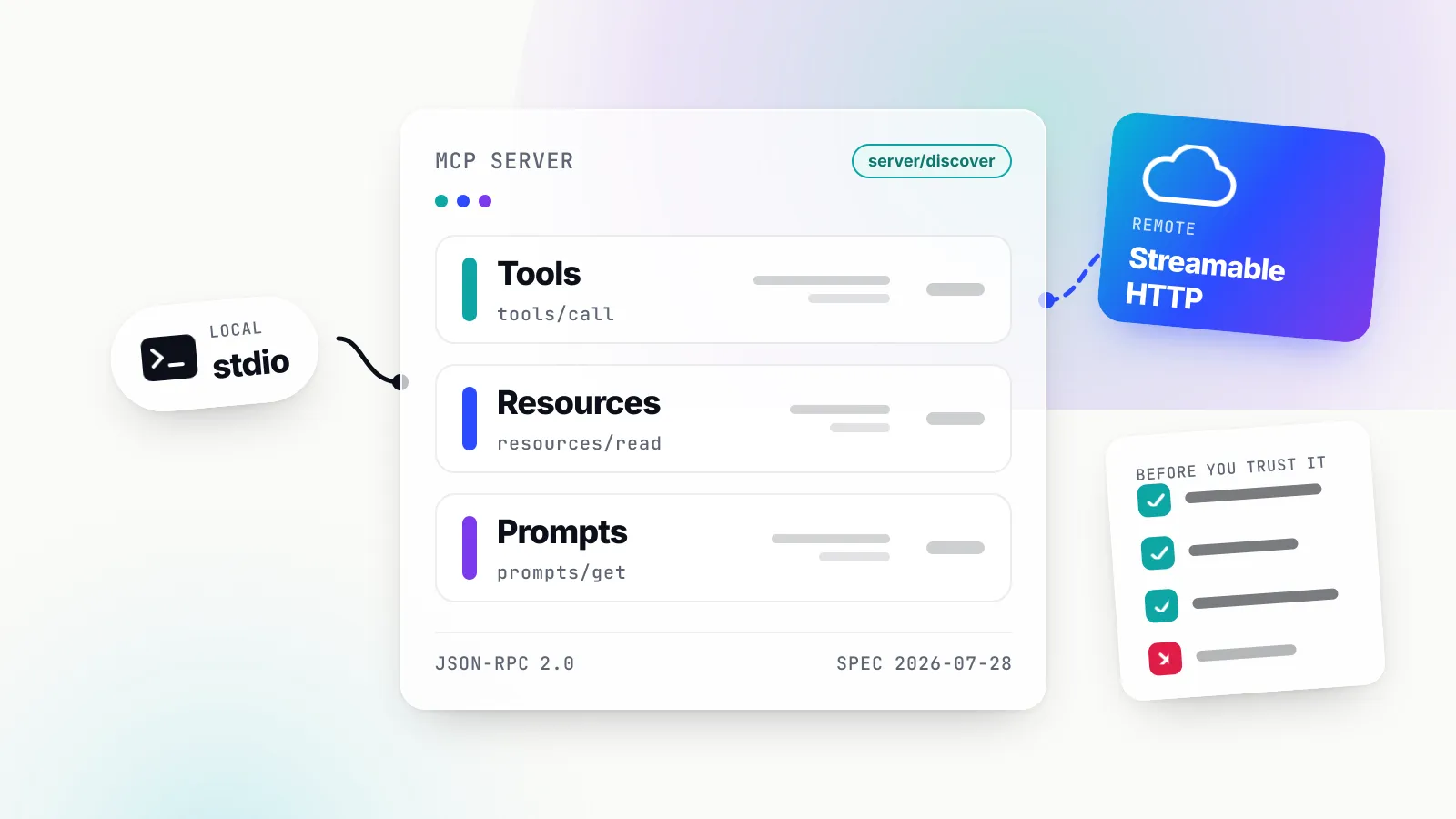
An MCP server is a program that exposes capabilities to an AI application through the Model Context Protocol. The official documentation puts it in one line: MCP servers are programs that expose specific capabilities to AI applications through standardized protocol interfaces. Those capabilities come in three shapes: tools the model can call, resources the application can read, and prompts the user can pick. The server might wrap GitHub, a Postgres database, your local filesystem or a company’s internal ticketing system. The host (Claude Code, VS Code, Cursor, Claude Desktop, ChatGPT) does not need to know any of that. It only needs to speak MCP.
The term causes confusion because “server” usually means a machine or a web service, and because a lot of MCP servers run on your laptop as a child process with no network port at all. This explainer pins down what the term means precisely, what it does not mean, how a server talks to a host, the kinds of server you will meet in practice (with real, vendor-hosted examples), what a minimal server looks like in the official TypeScript and Python SDKs as of October 2026, how the official MCP Registry fits in, and how to judge a server before you hand it your credentials.
If you want the hands-on version first (connecting your first servers in a client), read our beginner’s guide, what MCP is and how to start using it. If you want every message type and the protocol’s history, the Model Context Protocol guide is the spec-level reference. This piece sits between them and is about the server alone.
What “MCP server” means, precisely
MCP has three roles. The host is the AI application the user works in. The client is a connector component inside the host. The server is the program on the other end that provides context and capabilities. The architecture overview is explicit that a host keeps one client per server: it connects by creating one MCP client for each MCP server. So when VS Code connects to the Sentry server and to a local filesystem server, it runs two clients, one per connection.
The definition does not depend on location. The same page says the term refers to the program that serves context data, regardless of where it runs. A filesystem server launched by Claude Desktop on your Mac is an MCP server. So is the Sentry server running on Sentry’s infrastructure. The first is called “local”, the second “remote”, but both play the same role in the protocol.
Under the hood, the server speaks JSON-RPC 2.0. The host’s client sends requests such as tools/list or tools/call; the server answers with results. As of the 2026-07-28 revision, which is the current specification in October 2026, the base protocol is described as “stateless, self-contained requests” with per-request capability negotiation. That matters for anyone reading older tutorials, and we return to it below.
A tight working definition, then: an MCP server is any process or service that answers MCP requests and offers at least one of tools, resources or prompts. Everything else (language, hosting, authentication, what it wraps) is an implementation choice.
What an MCP server is not
Most of the confusion about the term comes from things people assume an MCP server is. Six are worth ruling out.
It is not a web server in the usual sense. A local stdio server opens no port. The host launches it as a subprocess and talks over standard input and output. Even a remote MCP server is not a website: the Streamable HTTP transport defines a single endpoint that accepts JSON-RPC over POST, not pages or a REST resource tree.
It is not the model. The server never has to touch an LLM. The model lives in or behind the host. The architecture page says plainly that MCP focuses solely on the protocol for context exchange and does not dictate how applications use LLMs. Earlier revisions let a server borrow the client’s model through a feature called sampling. The 2026-07-28 changelog deprecates the Roots, Sampling, and Logging features and suggests servers integrate directly with LLM provider APIs if they need one.
It is not the host or the client. Claude Code is a host. The “MCP client” is a component inside it. People sometimes call a whole integration “the MCP”, but only the provider side is the server.
It is not a replacement for the API it wraps. The GitHub MCP server calls GitHub’s APIs; Stripe’s server exposes tools like stripe_api_read and stripe_api_write that sit on top of Stripe’s API. The server adds discovery and a model-friendly description layer. Rate limits, permissions and data rules of the underlying service still apply. Slack says this outright: the same rate limits apply whether an action goes through an MCP tool or the Web API directly.
It is not a sandbox. A local server is an ordinary operating system process. The project’s own security guide is blunt: the stdio transport is not a sandbox, and the client and a stdio server share one trust domain.
It is not the same thing as a function-calling tool. A tool in an API request is a JSON schema your own code handles. An MCP server is a separate program that publishes tools for any host to discover. If only your application will ever call a function, you may not need a server at all (see the limits section).
What a server exposes: tools, resources and prompts
A server offers its capabilities through three primitives. Each has a different controller, which is the single most useful idea for understanding how they behave in a host.
| Primitive | Who controls it | Protocol methods | Typical example |
|---|---|---|---|
| Tools | The model | tools/list, tools/call | Create an issue, run a query, send a message |
| Resources | The application | resources/list, resources/templates/list, resources/read | A file, a schema, a calendar, addressed by URI |
| Prompts | The user | prompts/list, prompts/get | A “plan a vacation” or “review this PR” template, often shown as a slash command |
This split comes straight from the server concepts page, which marks tools as model-controlled, resources as application-controlled and prompts as user-controlled.
Tools
Tools are where the risk and most of the value sit. Each tool has a name, a description and an inputSchema in JSON Schema (the 2026-07-28 revision defaults to the 2020-12 dialect). The model reads the name and description and decides when to call the tool. That is why tool descriptions are a security surface: they are text the model treats as guidance. The specification says clients must consider tool annotations to be untrusted unless they come from trusted servers, and that there SHOULD always be a human in the loop with the ability to deny invocations.
A tool call on the wire is small. Under 2026-07-28, every request carries its own protocol version and client capabilities in _meta, because there is no longer a connection-level handshake to remember them:
{
  "jsonrpc": "2.0",
  "id": 2,
  "method": "tools/call",
  "params": {
    "name": "get_weather",
    "arguments": { "location": "New York" },
    "_meta": {
      "io.modelcontextprotocol/protocolVersion": "2026-07-28",
      "io.modelcontextprotocol/clientCapabilities": {}
    }
  }
}
The result comes back with "resultType": "complete" and a list of content blocks. If the server needs something from the user first (a login name, a confirmation), it can instead return "resultType": "input_required" with the questions, and the client retries the call with the answers. The changelog calls this pattern Multi Round-Trip Requests and it replaces the older server-initiated requests.
Resources and prompts
Resources are passive data with a URI, such as file:///path/to/document.md or a template like travel://activities/{city}/{category}. The host decides what to do with them: show a picker, search them, or pass them to the model. Prompts are reusable templates with arguments that the user invokes deliberately. Many servers expose only tools; resources and prompts are optional, and a host may not surface all three.
Discovery and the stateless change
Every 2026-07-28 server must also answer server/discover, which advertises supported protocol versions, capabilities, and identity. The same release removed the initialize handshake, the ping method and protocol-level sessions. For server authors this is a real simplification: any request can land on any instance, which is what makes horizontally scaled remote servers straightforward. For readers of 2025 blog posts it means code that calls initialize or reads an Mcp-Session-Id header is describing the previous era.
How a server talks: stdio versus Streamable HTTP
The specification defines two standard transports. The protocol messages are identical on both; what differs is who starts the process, where it runs, and how it is secured.
stdio. The client launches the MCP server as a subprocess. Messages are newline-delimited JSON-RPC on stdin and stdout. The server may log to stderr, but it must never write anything else to stdout, because stdout is the wire. Shutdown is simple: the client closes the server’s stdin and waits for it to exit. One stdio server typically serves one client.
Streamable HTTP. The server is an independent process with a single HTTP endpoint, for example https://example.com/mcp. Every JSON-RPC message is its own POST. The server answers with a single JSON object or a short-lived Server-Sent Events stream scoped to that request. Long-lived change notifications now travel on a subscriptions/listen request rather than a separate GET stream, which 2026-07-28 removed. One remote server typically serves many clients.
The older HTTP+SSE transport from the first 2024 revision is formally deprecated; a few vendors still publish /sse endpoints for legacy clients, but new work should not use it.
| stdio (local) | Streamable HTTP (remote) | |
|---|---|---|
| Who starts it | The host, as a child process | Its operator, as a long-running service |
| Where it runs | Your machine, as your user | The vendor’s or your own infrastructure |
| Clients per server | Usually one | Many |
| Credentials | From the environment, per the spec | OAuth 2.1 bearer tokens, or API keys in headers |
| Main security duty | Contain the process | Validate tokens, Origin and Host |
| Typical example | Filesystem, Git, a local database | GitHub, Atlassian, Slack, Linear |
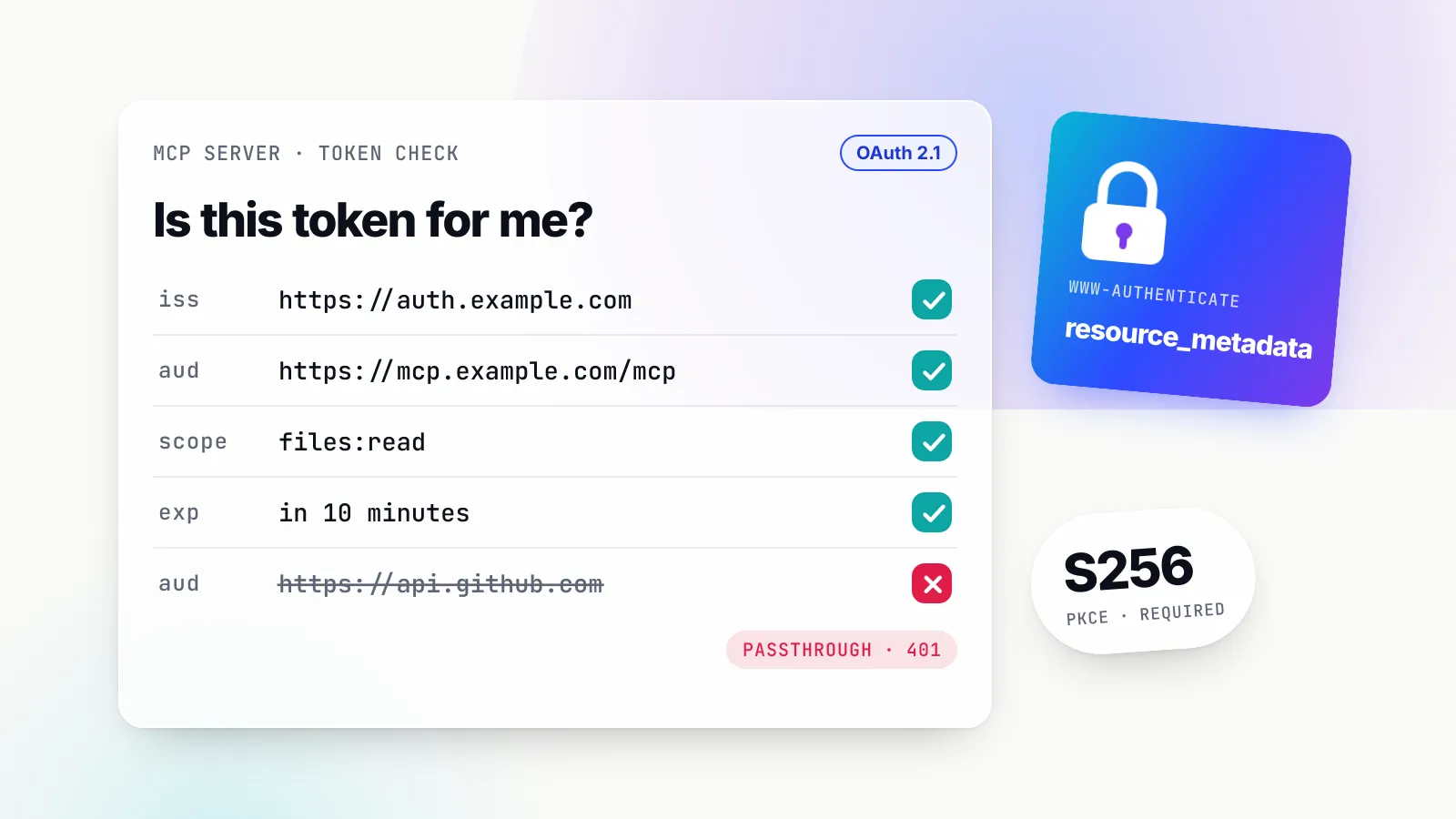
Authentication splits the same way. The authorization chapter says Authorization is OPTIONAL for MCP implementations. HTTP servers that do support it should follow the OAuth-based flow, while stdio servers should not and should instead retrieve credentials from the environment. A remote server acting as an OAuth resource server has hard obligations: it must check that each token was issued for it as the audience, and it MUST NOT accept or transit any other tokens. Forwarding a user’s token unchanged to a downstream API is the anti-pattern the security guide calls token passthrough. We cover the OAuth side in depth in MCP security and authentication.
HTTP servers have one more duty that catches people out on localhost. The spec requires servers to validate the Origin header on all incoming connections to block DNS rebinding, and says local servers should bind only to localhost. Without that, a malicious web page can reach a server listening on your laptop.
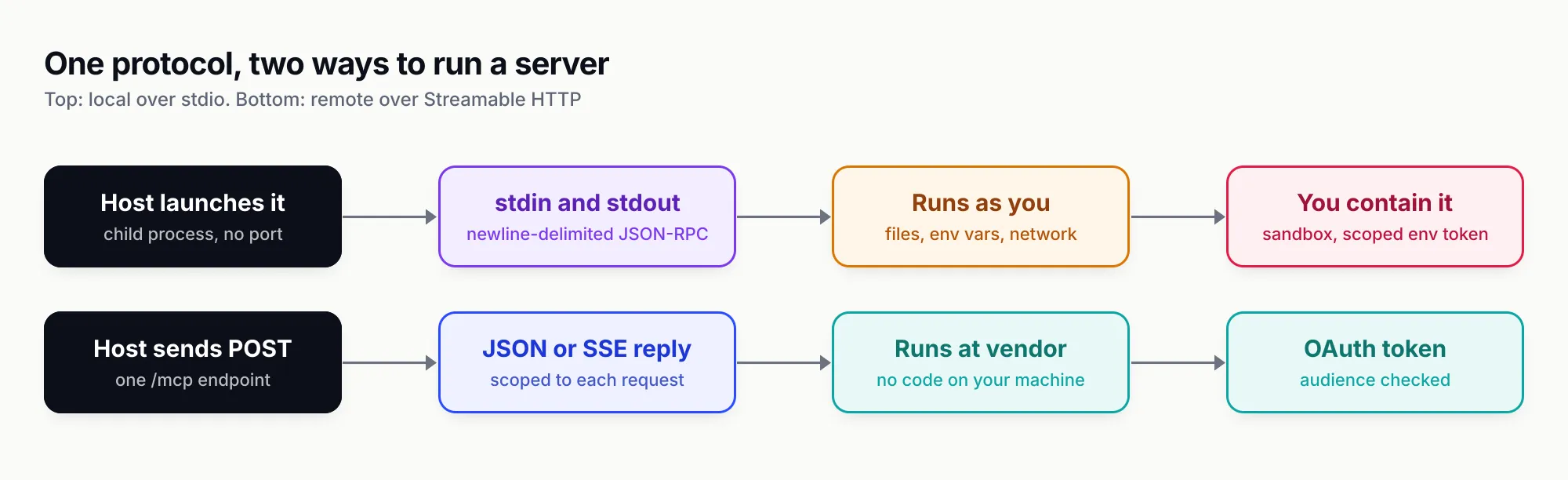
Figure 1: The protocol is the same on both lanes. What changes is who runs the code, whose privileges it holds and where the security work happens.
Local, remote and vendor-hosted: the kinds of MCP server
In practice you will meet five categories. The table lists real examples, verified against each publisher’s documentation or the official registry in October 2026.
| Category | Runs where | Real examples (endpoint or package) | What to expect |
|---|---|---|---|
| Vendor-hosted remote | Vendor’s cloud, Streamable HTTP | GitHub api.githubcopilot.com/mcp/; Atlassian mcp.atlassian.com/v2/mcp; Slack mcp.slack.com/mcp; Linear mcp.linear.app/mcp; Notion mcp.notion.com/mcp; Stripe mcp.stripe.com; Sentry mcp.sentry.dev/mcp | OAuth sign-in, admin controls, vendor rate limits, nothing installed locally |
| Vendor-published local | Your machine, stdio | GitHub’s ghcr.io/github/github-mcp-server Docker image | Needed for self-hosted products such as GitHub Enterprise Server; you hold the token |
| Reference servers | Your machine, stdio | Everything, Fetch, Filesystem, Git, Memory, Sequential Thinking, Time from modelcontextprotocol/servers | Teaching code, explicitly not production-ready |
| Community servers | Usually your machine | Many npm, PyPI and OCI packages listed in the registry; the archived reference Slack server now maintained by Zencoder | Quality varies from excellent to hostile; vet each one |
| Aggregators and gateways | Your infrastructure | MCP gateways that connect to many servers and re-expose them as one server | One endpoint, central policy; see our MCP gateway explainer |
A few details from the vendor docs show how differently these servers behave even though they all speak the same protocol.
GitHub says its remote server is hosted by GitHub and provides the easiest method to start, and that GitHub Enterprise Server does not support remote hosting, so those customers run the local image. The server ships with a default toolset of context, repos, issues, pull_requests and users, a --read-only flag, and a lockdown mode that filters public-repository content from authors without push access. GitHub describes lockdown as a best-effort content filter and says explicitly that it is not an authorisation boundary.
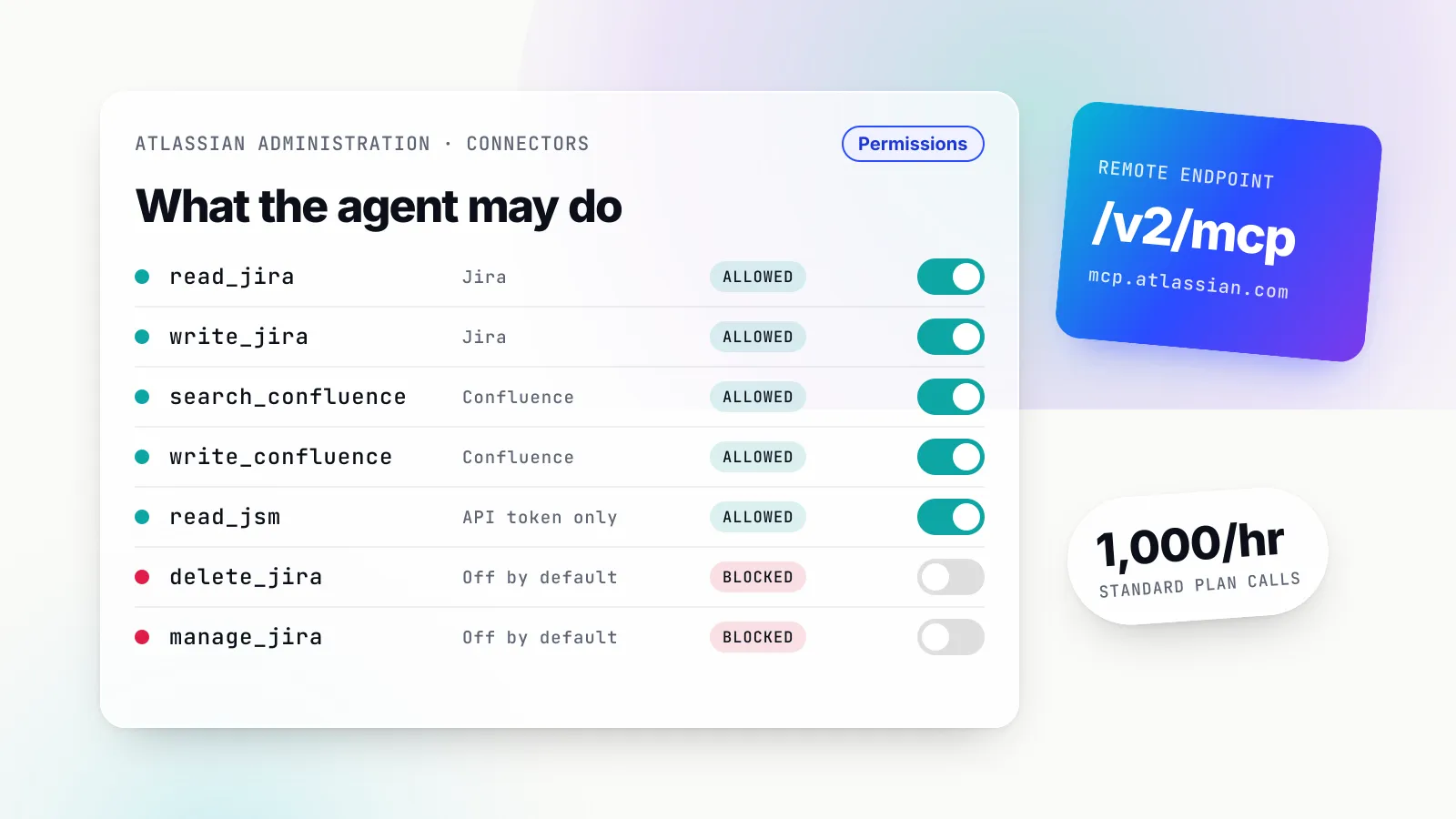
Atlassian has moved its server to v2 at mcp.atlassian.com/v2/mcp and documents it under its AI Gateway product. Two facts stand out. MCP calls are metered: when an AI client calls the server, it consumes Rovo credits from the organisation’s shared pool. And v1 users get migrated automatically: On March 1, 2027 any existing utilization of v1 starts using v2 tools. Our Atlassian MCP server guide covers setup and admin controls.
Slack runs only Streamable HTTP at mcp.slack.com/mcp and says We do not support SSE-based connections or Dynamic Client Registration. Every MCP client must be backed by a registered Slack app, and Only directory-published apps or internal apps may use MCP. That is a deliberate choice to make every MCP client visible to workspace admins. More in our Slack MCP server guide.
Linear offers a read-write endpoint and a separate /mcp/readonly endpoint which only ever exposes read tools, a useful pattern for agents that should look but not touch.
Stripe shows how vendor servers tighten over time. Its docs warn that from December 2026, Stripe MCP will stop accepting full-access secret keys and restricted keys without the Agent tag; users must move to agent API keys or OAuth by 30 November 2026. Stripe also requires human confirmation before it takes certain write actions such as refunds.
Notion describes its offering as a remote MCP server hosted by Notion that acts on content the authorising user can already access.
The reference servers deserve a separate warning. The modelcontextprotocol/servers repository now holds only seven of them, and its README says they are educational examples, not as production-ready solutions. Thirteen former reference servers, including GitHub, Slack, PostgreSQL, Puppeteer and Sentry, have been archived. If a 2025 tutorial tells you to install @modelcontextprotocol/server-github, use GitHub’s own server instead. For curated picks by use case, see our top MCP servers for 2026.
Anatomy of a minimal server
The fastest way to understand a server is to write one. The TypeScript and Python SDKs, both Tier 1, moved to v2 in 2026 to implement the stateless specification, and their APIs changed enough that older snippets will not run. The examples below follow each SDK’s README and docs as published in October 2026.
TypeScript (SDK v2)
The TypeScript SDK now ships split packages, @modelcontextprotocol/server and @modelcontextprotocol/client. The legacy @modelcontextprotocol/sdk package lives on a v1.x branch that continues to receive bug fixes and security updates for at least six months after the v2 release on 27 July 2026. Tool schemas use Standard Schema, so Zod v4, Valibot or ArkType all work.
npm init -y && npm pkg set type=module
npm install @modelcontextprotocol/server zod tsx
// src/index.ts
import { McpServer } from '@modelcontextprotocol/server';
import { StdioServerTransport } from '@modelcontextprotocol/server/stdio';
import * as z from 'zod/v4';
const server = new McpServer({ name: 'greeting-server', version: '1.0.0' });
server.registerTool(
'greet',
{
description: 'Greet someone by name',
inputSchema: z.object({ name: z.string() }),
},
async ({ name }) => ({
content: [{ type: 'text', text: `Hello, ${name}!` }],
}),
);
async function main() {
const transport = new StdioServerTransport();
await server.connect(transport);
}
main();That is the README’s own minimal example. Four things are happening. McpServer holds the server’s identity. registerTool declares a tool with a name, a description the model will read, and an input schema the SDK converts to JSON Schema and validates before your handler runs. The handler returns content blocks. The stdio transport wires it to stdin and stdout. The SDK’s tutorial adds the rule that bites everyone once: one console.log corrupts the JSON-RPC stream, so log with console.error.
To serve the same tool over HTTP, v2 replaces the old per-session transport wiring with createMcpHandler, which takes a factory function. The docs explain that the factory runs once per HTTP request and the handler holds nothing between requests, so the endpoint scales horizontally as-is. The handler validates no Host header, Origin header or token itself; the docs tell you to validate Host and Origin in front of it, which the Express, Fastify and Hono helper packages do by default on localhost binds.
Python (SDK v2)
The Python SDK’s v2 is the default pip install mcp line and needs Python 3.11 or later. The biggest change for anyone who learned on v1 is a rename: FastMCP is now MCPServer, and the old import path is gone rather than deprecated.
uv add "mcp[cli]" # or: pip install "mcp[cli]"# server.py
from mcp.server import MCPServer
mcp = MCPServer("Demo")
@mcp.tool()
def add(a: int, b: int) -> int:
"""Add two numbers."""
return a + b
@mcp.resource("greeting://{name}")
def greeting(name: str) -> str:
"""Greet someone by name."""
return f"Hello, {name}!"
if __name__ == "__main__":
mcp.run()The first part is the README’s “server in 15 lines”, which it calls a complete MCP server: one tool and one templated resource. The type hints are the schema and the docstring is the description. The mcp.run() guard at the bottom comes from the SDK’s running guide, where with no argument, the transport is stdio. Change it to mcp.run(transport="streamable-http", port=3001) and the same file becomes an HTTP server; the guide says clients then connect to http://127.0.0.1:3001/mcp, with host and path defaults of 127.0.0.1 and /mcp.
Test it, then connect it
Before a model ever sees the server, open it in the MCP Inspector, which lists every tool and lets you call it by hand:
npx @modelcontextprotocol/inspector npx tsx src/index.ts   # TypeScript
uv run mcp dev server.py                                     # Python
Then register it with a host. In Claude Code that is one command for a stdio server (claude mcp add greet -- npx tsx /path/to/src/index.ts); Claude Desktop takes a mcpServers entry with a command and args; the Python CLI’s mcp install server.py writes the Desktop entry for you. A remote server is added by URL instead, for example claude mcp add --transport http linear-server followed by Linear’s endpoint, as Linear’s setup docs show.
A good first server does one job. Five well-described tools beat forty vague ones: every tool definition is sent to the model, costs context tokens on each turn, and gives the model another option to choose wrongly.
The official MCP Registry
The MCP Registry is the project’s official catalogue of publicly accessible servers, backed by Anthropic, GitHub, PulseMCP and Microsoft among others. As of October 2026 the page still says the MCP Registry is currently in preview, with breaking changes or data resets possible before general availability.
Three design choices define what it is and is not.
It stores metadata, not code. Each entry is a server.json that says where the server lives: an npm, PyPI, NuGet, Cargo, OCI or MCPB package, or a remote URL. Package registries host the code; the MCP Registry points at it.
Names prove who published, not what the code does. Server names are reverse-DNS, such as io.github.username/server or com.example/server, and publishers must verify the GitHub account or domain. Querying the public API in October 2026 shows the pattern working: GitHub’s server is io.github.github/github-mcp-server with the remote api.githubcopilot.com/mcp/ and the OCI image; Atlassian’s is com.atlassian/atlassian-mcp-server; Linear’s is app.linear/linear; Notion’s is com.notion/mcp; Stripe’s is com.stripe/mcp; Sentry’s is io.github.getsentry/sentry-mcp. The same searches also return unrelated packages with near-identical names from other publishers, which is exactly why the namespace, not the display name, is the thing to check. The registry is explicit that it delegates security scanning to package registries and downstream aggregators.
It is built for aggregators, not end users. The registry is not intended to be directly consumed by host applications; marketplaces and private registries pull from it and add curation. It also does not support private servers, so a company’s internal servers belong in a private registry that implements the same OpenAPI spec.
Publishing is done with the mcp-publisher CLI: mcp-publisher init generates a server.json, you authenticate the namespace, and mcp-publisher publish pushes it. For npm packages, the name in server.json must match an mcpName field in package.json, which is how the registry ties the entry to the package.
How to evaluate an MCP server before you trust it
The project’s Local Server Security guide states the uncomfortable starting point: no check proves what a server will do. Vetting lowers the odds of a bad decision; containment limits what a bad decision costs. Work through these checks in order.
- Does it need to run locally at all? If the server only wraps an internet API, the guide’s advice is to prefer the remote version where one exists: it runs no code on your machine, uses OAuth instead of a token in a config file, and is patched in one place. A third-party server that needs no local access yet ships only as a stdio package is itself a signal.
- Who published it? Tie the package to a source repository and a real maintainer. On the registry, check the namespace (
com.atlassian,app.linear,io.github.github) rather than the display name. Remember that a listing on a registry is not an endorsement. - Is the version pinned, and what does the pin cover? Pin a specific version rather than
latest. Note the guide’s caveat that pinning withnpxoruvxfixes only the top-level package, while pinning a container image by digest freezes the whole dependency tree. - What do the tools say? Read every tool name and description in the Inspector before a model sees them. Descriptions that contain instructions unrelated to the tool’s job are a reason to remove the server. Definitions can also change after approval, so prefer clients that re-prompt when they do.
- What can its credentials reach? Give each server its own token with the smallest scope that works, passed per server rather than exported in your shell profile. Use the vendor’s narrowing controls where they exist: GitHub’s
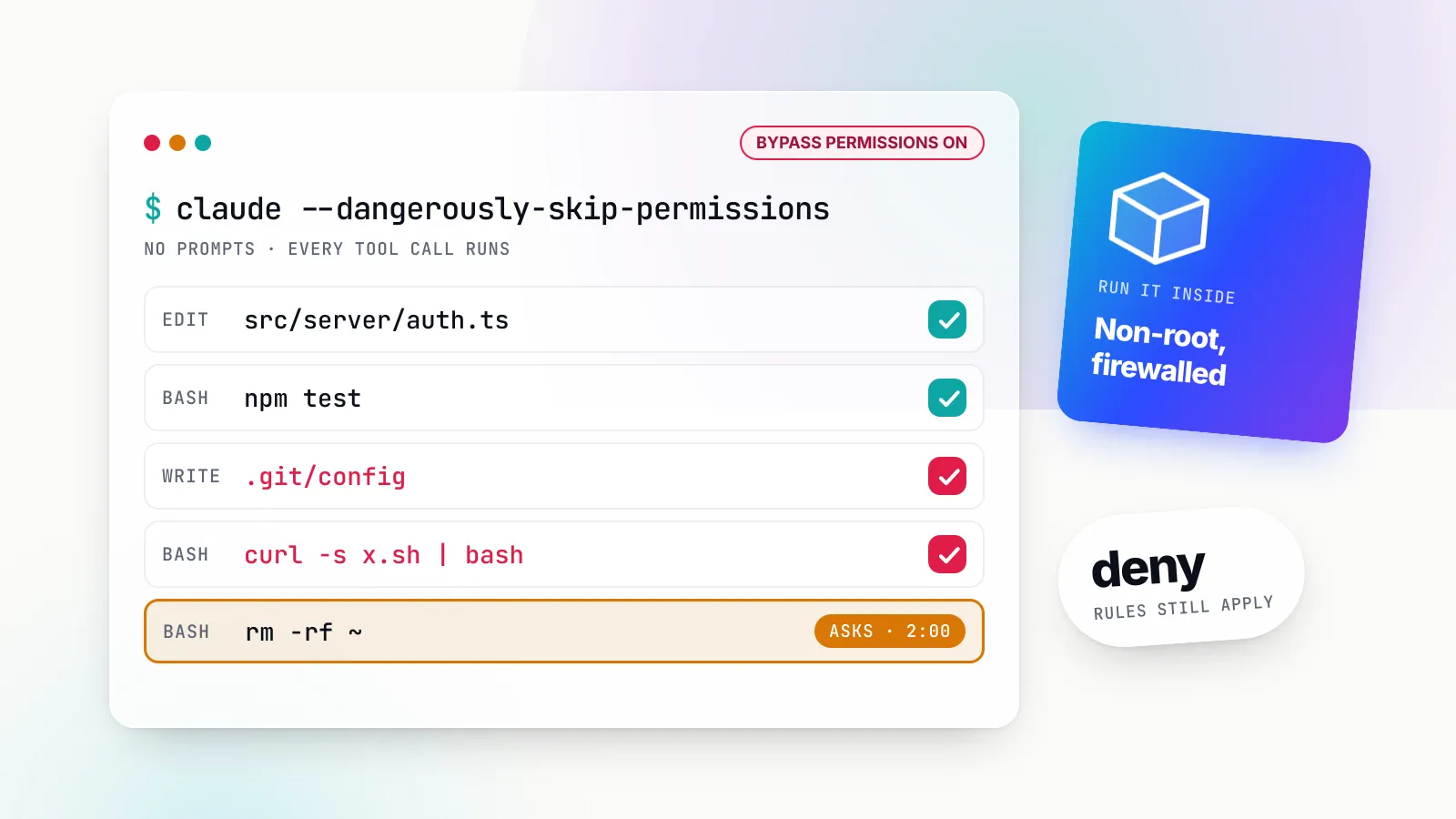
--read-onlyand toolsets, Linear’s read-only endpoint, Stripe’s agent API keys. - What can the process reach? For third-party local servers, the guide ranks process isolation as the most effective single mitigation: run them in a container with nothing mounted except the directory they need, and
--network=noneif they need no network. - For remote servers, does auth follow the spec? Look for OAuth with protected resource metadata, tokens bound to the server’s audience and no token passthrough. A remote server that asks you to paste a broad personal token into a URL query string fails this test; the spec forbids tokens in query strings.
- How many servers are already connected? The guide’s advice to keep the roster small exists because every server shares the model’s context, so one malicious server can steer how the agent uses the others. Our prompt injection examples and defences shows how that plays out.
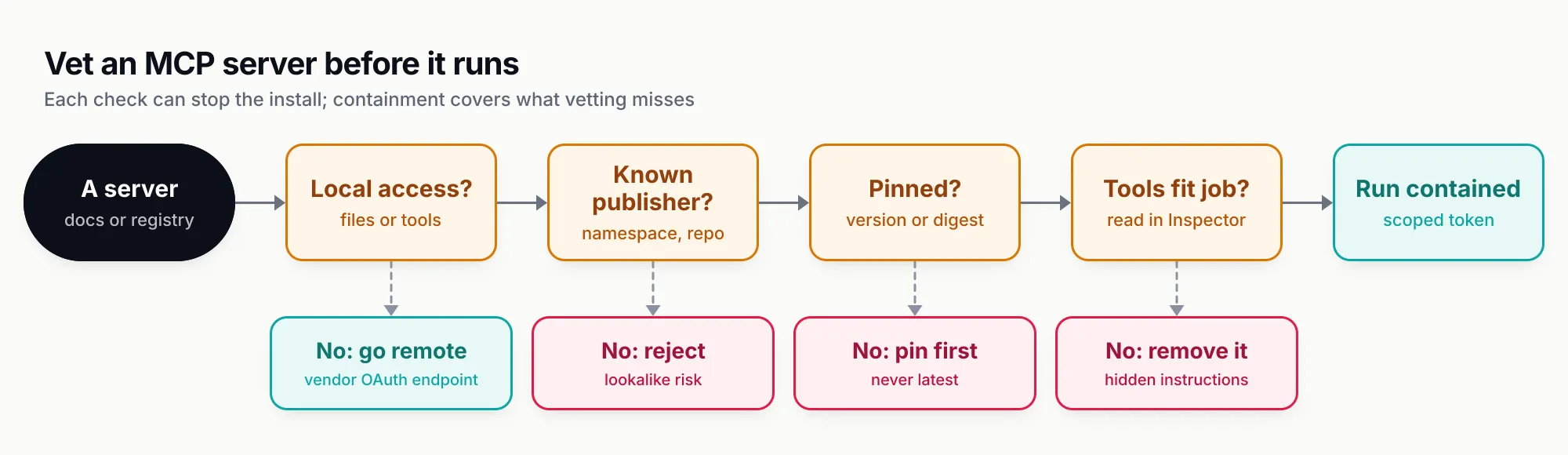
Figure 2: Most bad MCP decisions are made before launch. Location, provenance and pinning come first; containment covers what vetting misses.
When one team becomes fifty
The checklist works for one developer. It strains when fifty engineers each configure their own servers with their own tokens. At that point teams usually put a gateway in front: a single MCP endpoint that connects to the approved servers, holds the upstream credentials and decides which tools each caller can see. Bifrost, Maxim AI’s open-source Go AI gateway, is one example of this pattern. Its docs describe it acting as an MCP client to upstream servers and, in gateway mode, as an MCP server that exposes the aggregated tools to Claude Desktop, Cursor and other clients through one endpoint. Tool access is tied to virtual keys and is deny-by-default: a key with no MCP configuration gets no MCP tools are available unless a client is explicitly marked allow-by-default. The gateway is itself an MCP server from the host’s point of view, which is a neat illustration of the definition above: the term describes a role, not a product. Our MCP gateway comparison covers the alternatives.
The limits: when an MCP server is the wrong answer
MCP servers are not free, and three counter-arguments deserve a fair hearing.
You may only need function calling. If one application calls one internal function and no other host will ever use it, defining the tool directly in your model API request is simpler, faster and has fewer moving parts. A server earns its keep when several hosts (an IDE, a chat app, an agent framework) need the same capability, or when the capability belongs to another team or vendor.
The protocol still moves. The 2026-07-28 revision removed the handshake, sessions, ping and the GET stream, and moved tasks into an extension. The project now has a formal deprecation policy with a minimum twelve-month window, and the SDKs serve older clients from the same code, but server authors should expect to track spec revisions the way they track a framework’s major versions.
Remote servers carry someone else’s terms. A vendor-hosted server is convenient, but its tool list, rate limits and pricing are the vendor’s. Atlassian meters MCP calls in Rovo credits; Stripe stops accepting full-access secret keys for MCP from December 2026; Slack requires a registered app. None of that is bad, but it is a dependency, and it belongs in the same review as any other SaaS integration.
There is also a measurement gap. No published, independent benchmark compares MCP server quality across vendors, and tool counts say little about usefulness. Judge a server on the tasks you need, run in the Inspector and in your host, not on its feature list.
What to do next
- If you are choosing servers, start from the vendor’s own remote endpoint (GitHub, Atlassian, Slack, Linear, Notion, Stripe all have one), confirm the namespace in the registry, and turn on the narrowest mode the vendor offers.
- If you are installing a local server, pin it, read its tool list in the Inspector, give it a token of its own and run it in a container with one mounted directory.
- If you are building one, use the v2 SDKs, write five clear tools rather than forty vague ones, log to stderr, validate
OriginandHoston any HTTP listener, and never forward the user’s token downstream. - If you run a platform team, inventory which servers people have configured, decide which are approved, and centralise credentials and tool policy before the roster grows.
The term “MCP server” sounds like infrastructure, but it describes something closer to a plugin with a contract: a program that tells a model what it can do, and then does it with whatever access you gave it. The contract is now stable enough to build on. The access is the part to get right.
Sources
- MCP specification 2026-07-28: overview Model Context Protocol
- MCP specification 2026-07-28: key changes Model Context Protocol
- MCP specification 2026-07-28: stdio transport Model Context Protocol
- MCP specification 2026-07-28: Streamable HTTP transport Model Context Protocol
- MCP specification 2026-07-28: tools Model Context Protocol
- MCP specification 2026-07-28: authorization Model Context Protocol
- Understanding MCP servers Model Context Protocol
- MCP architecture overview Model Context Protocol
- Local Server Security Model Context Protocol
- MCP Security Best Practices Model Context Protocol
- The MCP Registry Model Context Protocol
- MCP SDKs and tiers Model Context Protocol
- MCP TypeScript SDK README (v2) Model Context Protocol (GitHub)
- MCP TypeScript SDK v2: serve over HTTP Model Context Protocol
- MCP Python SDK README (v2) Model Context Protocol (GitHub)
- MCP Python SDK: running your server Model Context Protocol
- MCP reference servers repository Model Context Protocol (GitHub)
- GitHub MCP Server README GitHub
- Get started with the Atlassian MCP server Atlassian
- Slack MCP server overview Slack
- Linear MCP server Linear
- Stripe MCP Stripe
- Notion MCP overview Notion
- Bifrost MCP overview and gateway mode Maxim AI
- Bifrost MCP tool filtering per virtual key Maxim AI
Frequently asked questions
What is an MCP server in simple terms?
An MCP server is a program that gives an AI application a menu of things it can use: tools the model can call, resources the app can read, and prompts the user can invoke. It speaks the Model Context Protocol, so any MCP-capable host such as Claude Code, VS Code or Cursor can connect to it without custom integration code.
Is an MCP server the same as an API?
No. Most MCP servers wrap an existing API, but they add a standard way for an AI host to discover what is available (tools/list, resources/list, prompts/list) and to call it with JSON-RPC messages. The API still does the work; the MCP server describes it in a form a model can use.
Does an MCP server run the AI model?
No. The model lives in or behind the host application. The server never needs to talk to a model at all, and the 2026-07-28 specification deprecates the sampling feature that let servers ask the client's model for completions.
What is the difference between a local and a remote MCP server?
A local server is launched by the host as a subprocess and talks over stdio, so it runs with your user account's access to files, environment variables and the network. A remote server is a hosted HTTP endpoint using the Streamable HTTP transport, usually protected with OAuth, and runs no code on your machine.
Where can I find official MCP servers?
The official MCP Registry at registry.modelcontextprotocol.io lists published servers under reverse-DNS names tied to verified GitHub accounts or domains, such as com.atlassian/atlassian-mcp-server or app.linear/linear. The vendor's own documentation remains the best confirmation of the official endpoint.
Are MCP servers safe to install?
Not by default. A local server is ordinary code running with your privileges, and tool descriptions are read by the model as instructions. Check the publisher, pin the version, read the tool list, give each server its own narrowly scoped token and run third-party local servers in a container.
Do I need the MCP SDK version 2 to build a server?
For new servers, yes in practice. The TypeScript SDK v2 (@modelcontextprotocol/server) and Python SDK v2 (pip install mcp) implement the 2026-07-28 specification and still serve older clients; the TypeScript v1 line keeps receiving fixes for at least six months after its 27 July 2026 v2 release.