ToolsExplainer
What is MCP? A practical guide to connecting AI apps to your tools
MCP is the open protocol that lets Claude, VS Code and Cursor call your files, repos and SaaS tools. What it is, why it exists, and the exact config to connect your first servers safely.
MCP, the Model Context Protocol, is an open standard that lets an AI application such as Claude, ChatGPT, VS Code or Cursor call tools, read data and reuse prompt templates from any program that speaks the protocol. Instead of every app building its own GitHub, Postgres or Slack integration, one MCP server wraps the system once and every compliant app can use it. That is why “connect it over MCP” has become the default answer when someone asks how to give an assistant access to real work.
This guide is for people who want to use MCP rather than implement it: developers wiring tools into a coding agent, and anyone who wants Claude to read their files or tickets. It explains what MCP is in plain terms, why it exists, and how the three moving parts fit together, then gives the exact configuration for connecting servers in Claude Desktop, Claude Code, VS Code and Cursor, each checked against the vendor’s documentation as of October 2026. It closes with safety basics and the cases where MCP is the wrong tool.
For depth beyond the hands-on, two companion pieces go further: what an MCP server is, from anatomy to trust, and the spec-level Model Context Protocol guide covering lifecycle, primitives, transports and governance.
What is MCP, in plain terms?
MCP is a shared plug format between AI apps and the outside world. The project’s own introduction uses the comparison that sticks: “think of MCP like a USB-C port for AI applications”. A laptop does not need a different socket for every monitor brand; an AI app does not need a different integration for every service.
What travels over that plug is small and well defined. An MCP server can offer three kinds of thing, which the architecture overview calls primitives:
| Primitive | What it is | Who decides to use it | Everyday example |
|---|---|---|---|
| Tools | Functions the model can call | The model, with your approval | create_issue, run_query, move_file |
| Resources | Read-only data the app can attach | You or the app | A database schema, a file, an issue body |
| Prompts | Reusable templates | You, usually as a slash command | “Review this pull request” with fixed steps |
There is also a feature that flows the other way. With elicitation, a server can pause and ask the user for missing input or confirmation, such as which repository to use.
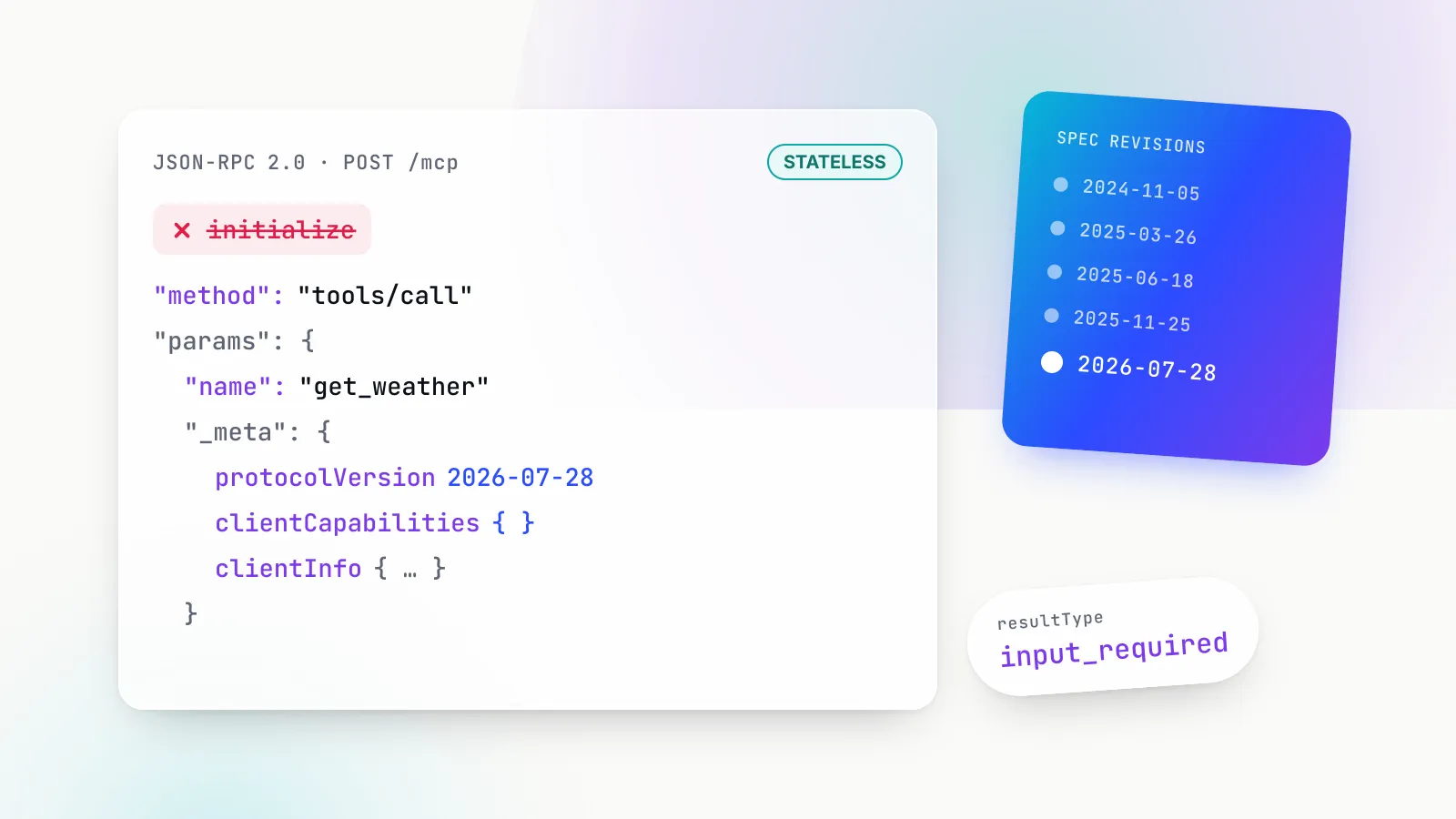
Under the hood, messages are JSON-RPC 2.0. The current revision of the specification is dated 2026-07-28, and the versioning page states that the current protocol version is 2026-07-28. That revision made the protocol stateless: every request now carries its protocol version and capabilities with it, and sampling is deprecated as of protocol version 2026-07-28, with new servers told to call model provider APIs directly. None of this changes how you configure a client, which is the point of a protocol: the clients and SDKs absorb it.
What MCP does not do matters as much. The architecture page is explicit that MCP “focuses solely on the protocol for context exchange” and does not dictate how an app uses its model. Which tools get picked, how results are summarised and whether you are asked before each call is the host application’s business.
Why MCP exists: the N×M integration problem
MCP exists because AI integrations were being rebuilt from scratch in every app. When Anthropic introduced MCP on 25 November 2024, its framing was that “every new data source requires its own custom implementation, making truly connected systems difficult to scale.”
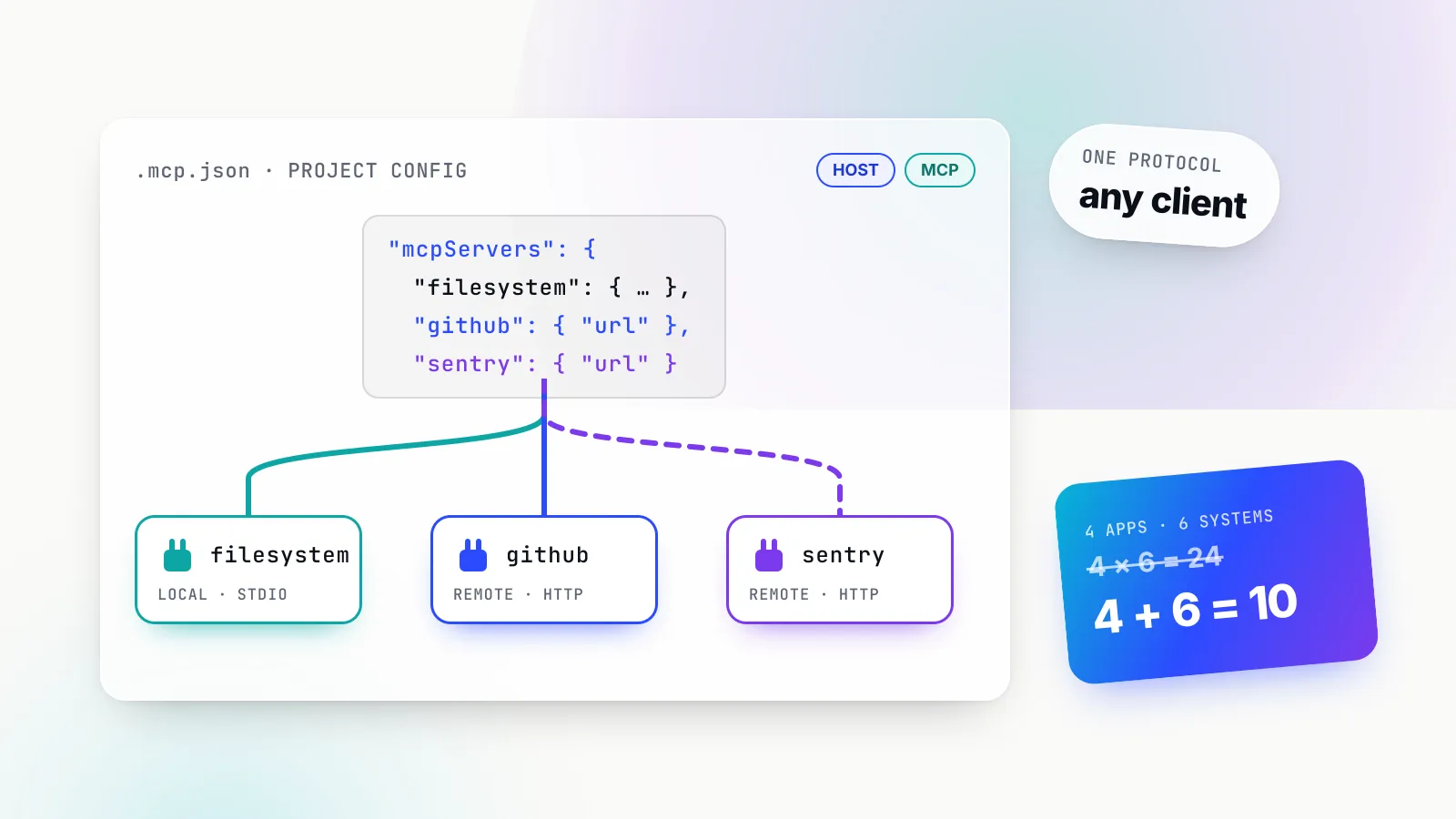
The arithmetic is simple. Take four AI apps a team uses (a chat app, a coding agent, an IDE assistant and an internal bot) and six systems they need (GitHub, Jira, Postgres, Google Drive, Sentry, Slack). Point-to-point, that is up to 4 × 6 = 24 integrations, each with its own auth handling, its own quirks and its own maintenance. With a shared protocol it is 4 clients plus 6 servers: 10 pieces of work, and a seventh system costs one new server rather than four new integrations.
The idea is borrowed. The specification says MCP takes some inspiration from the Language Server Protocol, which did the same job for programming languages in editors: one language server, every editor.
The bet appears to have paid off on adoption. When Anthropic donated MCP to the Agentic AI Foundation on 9 December 2025, it reported more than 10,000 active public MCP servers and 97M+ monthly SDK downloads across Python and TypeScript. Those are Anthropic’s figures, not an independent count. The foundation itself is a directed fund under the Linux Foundation; its launch announcement lists MCP alongside Block’s goose and OpenAI’s AGENTS.md as founding projects. The practical consequence for a beginner: MCP is no longer one vendor’s format, so a server you set up today is not tied to the app you happen to use today.
Host, client and server in one picture
Every MCP setup has three roles, and most confusion comes from mixing them up. The architecture overview defines them:
- Host: the AI application you use, such as Claude Desktop, Claude Code, VS Code or Cursor. It runs the model conversation and asks for your approval.
- Client: a connector inside the host. The host creates one MCP client for each server, and each client keeps a dedicated connection to its server.
- Server: a program that provides context and tools. It can run on your machine or on someone else’s.
The docs’ own example is VS Code: when it connects to the Sentry MCP server it instantiates one client; when it also connects to the local filesystem server it instantiates a second. You rarely see clients directly; they are why each server shows up as its own line in a client’s MCP panel.
Servers come in two flavours, defined by transport:
- Local (stdio). The host launches the server as a subprocess on your machine and they talk over standard input and output. The filesystem server is the canonical example. There is no network hop, and a local server typically serves exactly one client.
- Remote (Streamable HTTP). The server runs as a web service. In the current specification each message is an HTTP POST to a single MCP endpoint, and replies come back as JSON or a stream. Sentry’s hosted server is the docs’ example. One remote server serves many users, and the docs recommend OAuth for obtaining tokens.
An older transport, HTTP with Server-Sent Events (SSE), still appears in some server READMEs. Claude Code’s documentation marks the SSE transport as deprecated; use the HTTP endpoint wherever a server offers one.
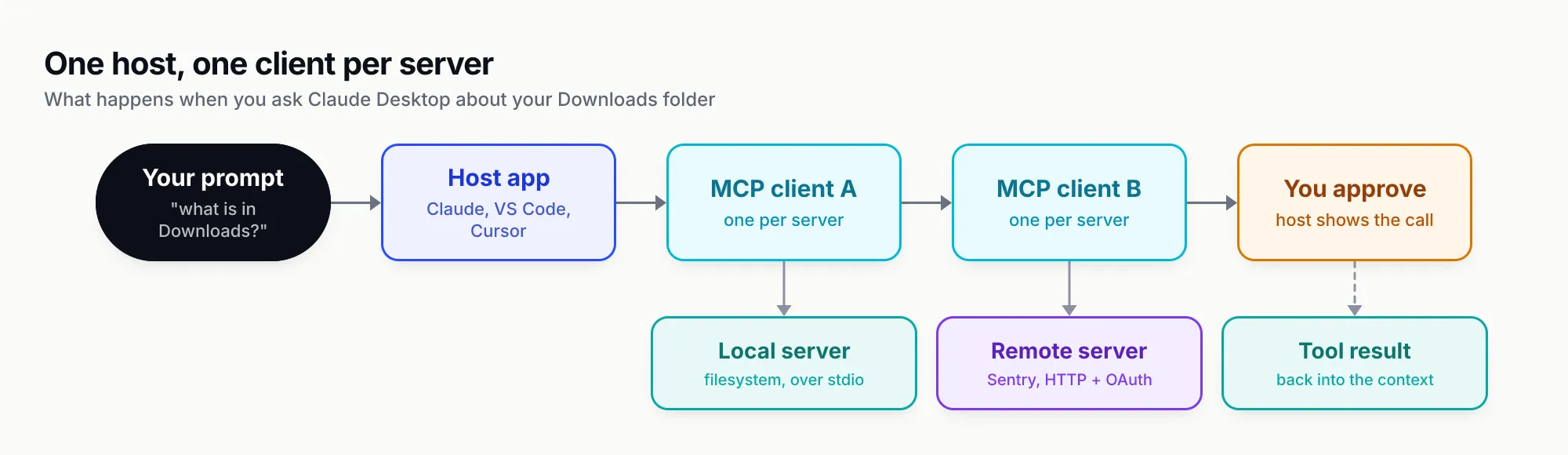
Figure 1: One host, one client per server. Local servers are subprocesses; remote servers are web endpoints. The host owns the approval step.
A single request makes the roles concrete. You ask Claude Desktop “what work files are in my Downloads folder?”. The host already knows, from its client’s discovery and tools/list call, that the filesystem server offers tools such as listing and searching directories. The model proposes a tools/call to one of them with your Downloads path as the argument. The host shows you the proposed call, you approve it, the client sends it to the server, the server reads the directory, and the result goes back into the model’s context so it can answer. At no point does the model touch your disk directly; the server does, with whatever access you configured.
Before you connect anything: three checks
Three things decide whether a first server works and whether it is safe. Spending two minutes on them saves most of the troubleshooting.
- The runtime. Most local servers are launched with
npx(Node.js) oruvx(Python’s uv). The Claude Desktop tutorial asks you to confirmnode --versionbefore starting because “the Filesystem Server and many other MCP servers require Node.js to run”. VS Code’s walkthrough uses the Playwright server, which needs Node.js 18 or newer. Remote servers need no local runtime. - The publisher. A local server is a program that runs as you. The official reference servers (Everything, Fetch, Filesystem, Git, Memory, Sequential Thinking and Time) are described by their own maintainers as educational examples, “not as production-ready solutions”. For real work, prefer the server published by the vendor of the system you are connecting, and look it up in the official MCP Registry, which is still marked as in preview.
- The credential. Decide up front which token the server will use and where it lives. A fine-grained token scoped to two repositories is a different risk from your personal admin token. Each client below has a way to keep that token out of files you commit.
How to connect an MCP server in Claude Desktop
Claude Desktop has two routes: a JSON file for local servers, and the Connectors screen for remote ones. The official local-server tutorial walks through the filesystem server.
Local servers through claude_desktop_config.json
Open the Claude menu in the system menu bar (not the settings inside the chat window), choose Settings, then the Developer tab, then Edit Config. That opens, or creates, the config file at:
- macOS:
~/Library/Application Support/Claude/claude_desktop_config.json - Windows:
%APPDATA%\Claude\claude_desktop_config.json
Add a server under the mcpServers key. This is the documented example, granting access to two folders:
{
  "mcpServers": {
    "filesystem": {
      "command": "npx",
      "args": [
        "-y",
        "@modelcontextprotocol/server-filesystem",
        "/Users/username/Desktop",
        "/Users/username/Downloads"
      ]
    }
  }
}
The key (filesystem) is a display name you choose. command and args are exactly what would run in a terminal, and the trailing paths are the only directories the server will touch. Credentials for other servers go in an env object on the same entry.
Then quit Claude Desktop completely and reopen it; the app only reads the file at launch. The server’s tools appear under the “Add files, connectors, and more” button in the chat box, under Connectors. If nothing shows up, the troubleshooting section points to the logs: ~/Library/Logs/Claude on macOS and %APPDATA%\Claude\logs on Windows, where mcp.log covers connections and mcp-server-SERVERNAME.log captures each server’s stderr. The fastest check is to paste the same npx command into a terminal and see whether it errors.
Remote servers through Connectors
Remote servers are added in the app, not the file. Per the remote-server guide, open Settings, choose Connectors, click Add, then “Add custom connector”, paste the server’s URL (the guide offers https://example-server.modelcontextprotocol.io/mcp for practice) and complete the sign-in the server asks for, usually OAuth. The same connector then works in Claude on the web.
As of October 2026, Anthropic’s help centre says custom connectors are available on Free, Pro, Max, Team and Enterprise plans, and that “Free users are limited to one custom connector”. On Team and Enterprise plans an Owner or Primary Owner adds the connector for the organisation and members then connect individually.
Desktop extensions: the one-click option
For local servers there is now an installer route that avoids JSON. Desktop extensions package a local MCP server as a single .mcpb file. Settings, then Extensions, then “Browse extensions” lists Anthropic-reviewed ones; a custom .mcpb installs from Advanced settings. Team and Enterprise owners can turn off public extensions and publish an approved set, which is the simplest governance lever an organisation has on Claude Desktop.
How to add MCP servers in Claude Code with claude mcp add
Claude Code configures servers from the shell with claude mcp add, and stores them in JSON you can also edit. The MCP reference is long; the commands below cover most of what a newcomer needs. Run them in a terminal, not inside a claude session.
A remote server
The documented pattern for a remote HTTP server, with Notion as the real example:
# Basic syntax
claude mcp add --transport http <name> <url>

# Notion's hosted server
claude mcp add --transport http notion https://mcp.notion.com/mcp

# A server that takes a static token instead of OAuth
claude mcp add --transport http secure-api https://api.example.com/mcp \
  --header "Authorization: Bearer your-token"
For a no-sign-in first test, the Claude Code quickstart uses Anthropic’s own docs server: claude mcp add --transport http claude-code-docs https://code.claude.com/docs/mcp.
If a server needs OAuth, add it and then run /mcp inside Claude Code to complete the browser flow; the authentication section notes tokens are stored and refreshed automatically, and claude mcp login <name> does the same from the shell.
A local server
For a local stdio server, everything after a double dash is the launch command:
# Basic syntax
claude mcp add [options] <name> -- <command> [args...]

# Airtable, with its API key passed into the server's environment
claude mcp add --env AIRTABLE_API_KEY=YOUR_KEY --transport stdio airtable \
  -- npx -y airtable-mcp-server
The -- is the part people get wrong. It separates Claude Code’s own flags (--transport, --env, --scope) from the server’s; without it, Claude Code tries to parse flags such as -y itself.
Check it worked
claude mcp list prints each server with a status such as ✔ Connected, ! Needs authentication or ✘ Failed to connect. claude mcp get <name> shows detail, claude mcp remove <name> deletes it, and /mcp inside a session shows live status. A worked PostgreSQL example in the docs adds DBHub with a read-only database user, which is the right instinct for any first database connection.
Scopes: who sees the server
Claude Code stores a server at one of three scopes:
| Scope | Loads in | Shared with team | Stored in |
|---|---|---|---|
| Local (default) | Current project only | No | ~/.claude.json |
| Project | Current project only | Yes, via version control | .mcp.json in the project root |
| User | All your projects | No | ~/.claude.json |
Adding --scope project writes a .mcp.json that teammates get when they pull. Claude Code asks for approval before using project-scoped servers in interactive sessions, which matters because a repository can now propose a program to run on your machine. To keep secrets out of that shared file, .mcp.json supports environment variable expansion with ${VAR} and ${VAR:-default}:
{
  "mcpServers": {
    "api-server": {
      "type": "http",
      "url": "${API_BASE_URL:-https://api.example.com}/mcp",
      "headers": {
        "Authorization": "Bearer ${API_KEY}"
      }
    }
  }
}
One guardrail here is easy to miss and worth knowing. In a remote server’s url and headers, Claude Code deliberately reads its own and cloud-provider credential variables as empty, such as ANTHROPIC_API_KEY and AWS_BEARER_TOKEN_BEDROCK, so a project file cannot ship your Claude credentials to a server it names. Copy a secret into a variable with your own name if a server genuinely needs it.
Shortcuts worth knowing
- Reuse Claude Desktop’s setup.
claude mcp add-from-claude-desktopimports servers from the Desktop config on macOS and WSL. - Paste another client’s JSON.
claude mcp add-json <name> '<json>'takes the object inside anmcpServersblock. The docs warn that an entry with aurlbut notypeis read as a stdio server and skipped, so add"type": "http". - Many servers without a context penalty. Tool search is on by default: only tool names and server instructions load at session start, and full definitions load when needed.
- Large outputs. Claude Code warns when one tool returns more than 10,000 tokens and caps output at 25,000 tokens by default, adjustable with
MAX_MCP_OUTPUT_TOKENS.
How to add MCP servers in VS Code
In VS Code, MCP servers feed the agent features in Copilot Chat, and the guided route is a command. Per the VS Code walkthrough, open the Command Palette, run MCP: Add Server, choose “HTTP” for a URL or “Command (stdio)” for a launch command, enter it (the docs’ example is npx -y @playwright/mcp@latest), pick a server ID and pick where to save it.
The “where” has changed recently, and older tutorials are now out of date. As of October 2026 the configuration reference describes two formats:
| File | Top-level key | Notes |
|---|---|---|
.vscode/mcp.json (workspace) or user-profile mcp.json | servers | VS Code format: input variables, env files, per-server sandboxing; labelled deprecated in the guided flow |
.mcp.json at the workspace root | mcpServers | Portable Copilot format, shareable with compatible tools; stdio and HTTP |
~/.copilot/mcp-config.json (or $COPILOT_HOME) | mcpServers | Portable personal config, the “Copilot Global” choice |
The portable format looks like every other client’s:
{
  "mcpServers": {
    "playwright": {
      "command": "npx",
      "args": ["-y", "@playwright/mcp@latest"]
    }
  }
}
The older VS Code format uses servers and requires an explicit type:
{
  "servers": {
    "context7": {
      "type": "http",
      "url": "https://mcp.context7.com/mcp"
    }
  }
}
The VS Code format’s advantage is secrets. Input variables such as ${input:api-key} make VS Code prompt for a value on first start and store it securely, so the committed file holds no token. The trade-off, which the docs flag, is that servers needing interactive inputs are not forwarded to Copilot harness sessions. Two other details help in practice: code --add-mcp '{"name":"playwright","type":"stdio","command":"npx","args":["-y","@playwright/mcp@latest"]}' adds a server from the command line, and automatic discovery can reuse servers already configured for Claude Desktop or Cursor (those sources are off by default).
Workspace configs inherit Workspace Trust: restricted mode prevents these servers from starting, so opening an untrusted repository does not launch its servers. On macOS and Linux, VS Code-format stdio servers can also run sandboxed with "sandboxEnabled": true and explicit allow-lists for writable paths and network domains.
How to add MCP servers in Cursor
Cursor reads mcp.json in two places, per its configuration locations: .cursor/mcp.json in a project for project-specific tools, and ~/.cursor/mcp.json for tools available everywhere. It also offers one-click installs from the Cursor Marketplace on the Customize page. The documented examples for a local and a remote server:
{
  "mcpServers": {
    "server-name": {
      "command": "npx",
      "args": ["-y", "mcp-server"],
      "env": { "API_KEY": "value" }
    },
    "remote-server": {
      "url": "https://api.example.com/mcp",
      "headers": { "Authorization": "Bearer ${env:MY_SERVICE_TOKEN}" }
    }
  }
}
Two differences from the other clients matter. First, a remote entry needs only url; Cursor infers the transport. Second, secrets use ${env:NAME} interpolation, alongside ${userHome} and ${workspaceFolder}, rather than Claude Code’s bare ${NAME}. For OAuth servers that do not support dynamic client registration, an auth object holds a static client ID and secret.
In chat, Cursor asks for approval before using MCP tools by default, and the arrow beside a tool name shows its arguments. When something fails, the Output panel’s “MCP Logs” view shows server start-up, tool calls and errors.
The same server in four clients
The formats are close enough to copy between, and different enough to break when you do. Figure 2 lays them side by side.
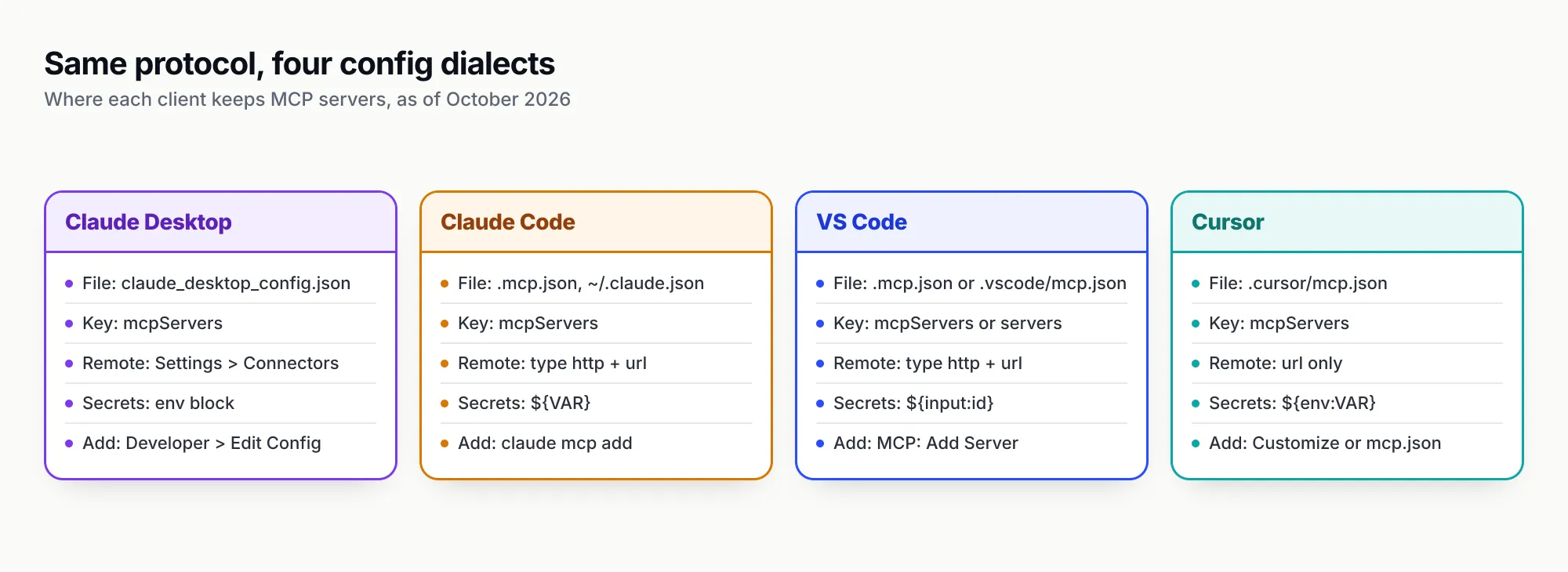
Figure 2: Same protocol, four config dialects. The top-level key, the remote-server syntax and the secret syntax are what break when you paste between them.
The edits needed when moving one entry between clients, in order of how often they bite:
- Top-level key.
mcpServerseverywhere except VS Code’s own format, which usesservers. - Remote entries. Claude Code and VS Code’s format need
"type": "http"besideurl; Cursor does not. A missingtypemakes Claude Code treat the entry as stdio and skip it. - Secrets.
${VAR}in Claude Code,${env:VAR}in Cursor,${input:id}in VS Code’s format, and literal values in Claude Desktop’senvblock (the file sits outside any repository, which is why that is tolerable). - Where remote servers live in Claude Desktop. Not in the JSON file but in Settings, Connectors.
The server itself does not care. Whether Claude Code or Cursor launches npx -y @playwright/mcp@latest, the same program answers the same requests. That is the N×M problem being solved in front of you.
What people actually use MCP for
The servers that earn a permanent place tend to remove a copy-paste step. Claude Code’s docs put it well: connect a server “when you find yourself copying data into chat from another tool”. Common starting points:
- Code hosting and review. GitHub’s remote server at
https://api.githubcopilot.com/mcp/, authenticated with a fine-grained personal access token, is the docs’ code review example: “Review PR #456”, “Show me all open PRs assigned to me”. - Errors and monitoring. Sentry’s hosted server (
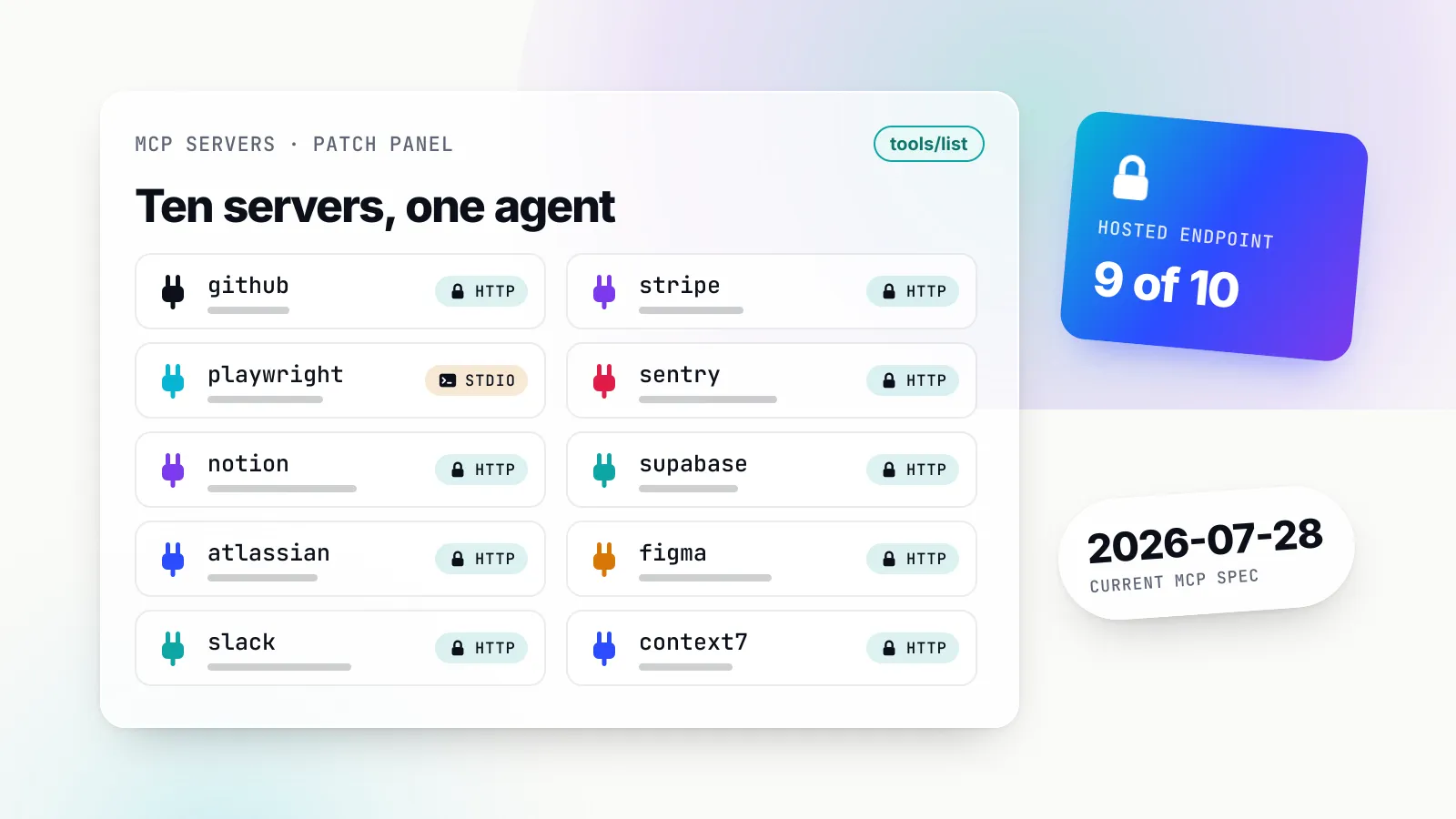
https://mcp.sentry.dev/mcp, OAuth) lets an agent read the stack trace instead of you pasting it. - Docs and knowledge. Notion, Context7 for library documentation, or an internal wiki server, so answers cite current text rather than training data.
- Databases. A read-only Postgres or warehouse connection for “what was revenue this month?” questions, with the database user, not the prompt, enforcing read-only.
- Browsers. Playwright for opening pages, filling forms and taking screenshots during testing.
- Personal files. The filesystem server scoped to one or two folders for sorting downloads or drafting documents.
Resources and prompts show up differently from tools. In Claude Code you can reference a resource with an @ mention, for example @github:issue://123, and a server’s prompts appear as slash commands in the form /mcp__github__pr_review 456. VS Code exposes prompts as /<server>.<prompt> in chat. For curated lists of servers worth installing, see the top MCP servers of 2026 and the narrower best MCP servers for coding agents.
Safety basics before you connect a server
MCP makes it easy to give a model hands. The safety model is mostly about which hands, and who approves their use.
A local server is a program running as you. Claude Desktop’s tutorial says it plainly: the filesystem server “runs with your user account permissions”, so it can do anything you can do to files. The MCP project’s security best practices list what goes wrong when that is forgotten: a malicious start-up command hidden in a config, a malicious payload inside the server package, or an insecure local HTTP server reachable by other processes. Its example of a booby-trapped config line is an npx install chained to a curl that posts your SSH key elsewhere. Read the command and args of anything you paste.
Keep a human in the loop. The tools specification says there SHOULD always be a human in the loop with the ability to deny tool invocations. All four clients here ask before running a tool by default. Auto-approve modes exist in each; turn them on per tool, not per server, and never for tools that write, delete, send or pay.
Tool descriptions and tool results are untrusted input. Invariant Labs’ research on tool poisoning showed that a malicious server’s tool descriptions can override instructions provided by other, trusted servers. Anthropic’s connector guidance warns similarly that “malicious MCP servers may include hidden instructions”. Even an honest server can relay an attack: a GitHub issue or a web page fetched by a tool can carry text aimed at the model. Our prompt injection examples and defences cover the patterns.
A short checklist that covers most of the risk:
- Install servers from the vendor of the system, or from source you have read.
- Scope access at the server: named folders, a read-only database user, a fine-grained token for specific repositories.
- Keep secrets in environment variables or input prompts, never in a committed
.mcp.jsonor.vscode/mcp.json. - Connect only the servers a task needs. Each one adds tools the model may choose, and more ways for injected text to do something.
- Use client-side isolation where it exists: VS Code’s per-server sandbox, Cursor’s per-server network modes, Claude Code’s approval prompt for project-scoped servers.
Authentication for remote servers (OAuth 2.1, token audiences, the confused-deputy problem) is a topic of its own, covered in MCP security and authentication.
When not to use MCP
MCP is a good default for “let my assistant use this system”, but it has costs, and several jobs are better done another way.
When context is the bottleneck. Every tool definition a client loads is text the model reads. Anthropic’s engineering team noted that agents connected to thousands of tools may need to process hundreds of thousands of tokens before reading a request, and showed that moving to code execution with on-demand tool loading cut one workflow from 150,000 tokens to 2,000 tokens, a 98.7% reduction on that example. Clients now mitigate this (Claude Code’s tool search defers definitions by default), but connecting fifteen servers “just in case” still dilutes tool choice. Fewer, sharper servers work better.
When a command-line tool already exists. A coding agent with a shell can already run gh, psql or kubectl. If the CLI is installed, authenticated and allowed by your permission rules, an MCP server for the same system adds a second path to maintain. MCP earns its place when there is no CLI, when you want typed tools with clear descriptions, or when the host has no shell at all, as in Claude Desktop.
When you are writing your own app, not configuring someone else’s. If you control the code that calls the model, ordinary function calling against your own API is simpler than standing up a server. MCP pays off when the same capability must reach several apps you do not control.
When the knowledge is a procedure, not a system. A house style guide or a release checklist does not need a server; it needs instructions loaded at the right moment. Claude Skills do that with a folder of files.
When the other end is an agent. MCP connects an app to tools. Delegating a task to another team’s autonomous agent, with its own lifecycle and hidden internals, is what A2A is designed for.
VS Code’s docs give the shortest version of the rule: “If your existing tools meet your needs, you don’t need another server.”
From one laptop to a team
The configs above are personal. Once several people or agents share the same servers, three problems arrive together: tokens copied onto every machine, every agent seeing every tool, and no single record of who called what. Each client has a first step. Claude Code has project-scoped .mcp.json plus managed MCP configuration with allow and deny lists; Cursor has a team MCP allowlist that approves servers by command or URL pattern and can restrict tools; Claude’s Team and Enterprise plans let owners control which connectors and desktop extensions members can use.
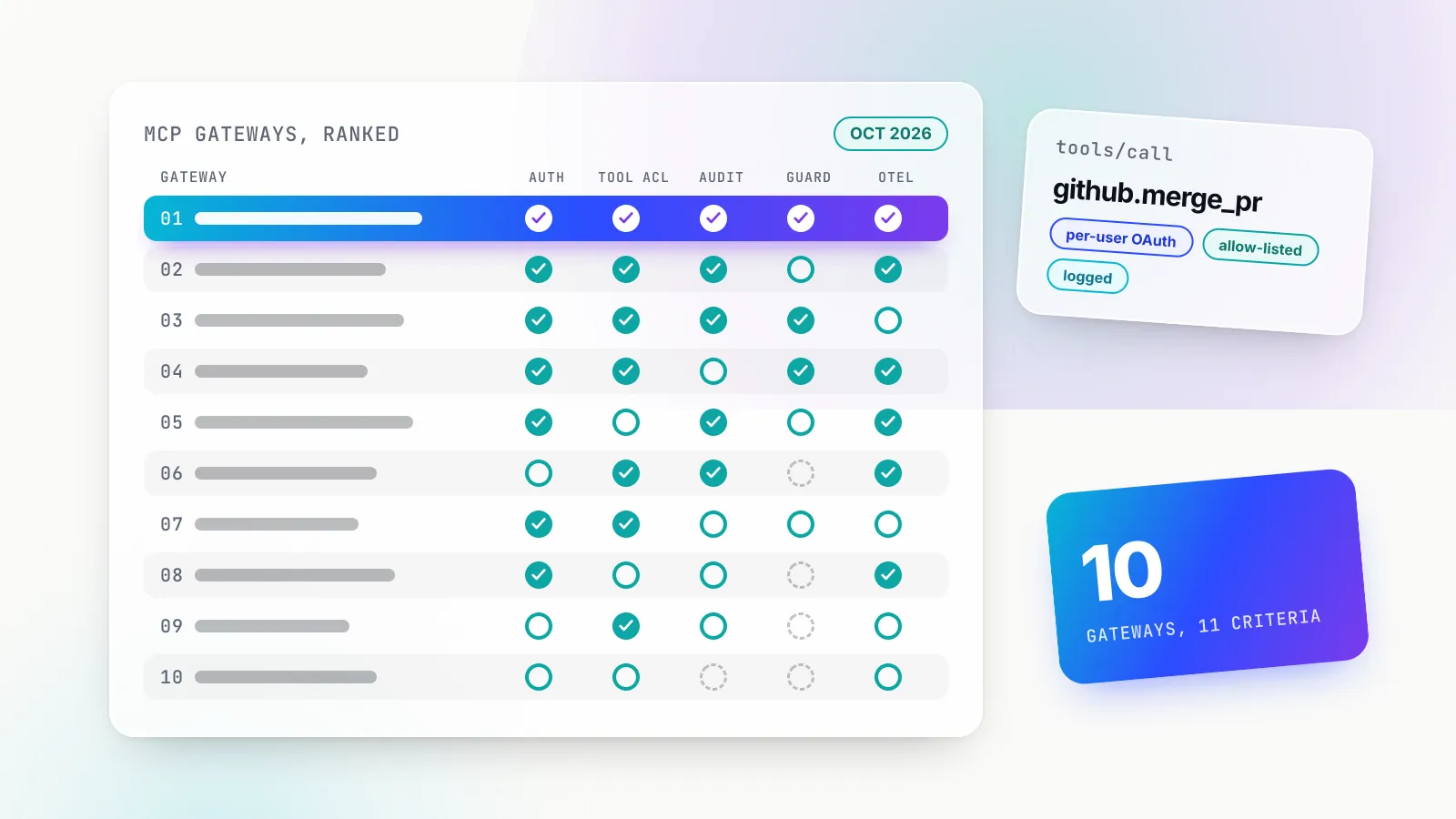
Those controls are per client. When the same servers must be governed across all of them, teams put an MCP gateway in the middle: agents connect to one endpoint, and the gateway holds the upstream credentials, filters tools per caller and logs every call. Bifrost, Maxim AI’s open-source Go gateway, is one example that does this alongside routing model traffic. Its virtual keys are deny-by-default for MCP tools: a key with no MCP configuration gets no tools, an administrator lists allowed tools per server, and the allow-list is enforced again when a tool is executed. Clients such as Claude Code, Claude Desktop and Cursor connect to its /mcp endpoint with a virtual-key header or, depending on the gateway’s authentication mode, a browser-based OAuth 2.1 flow, so the key’s budgets, rate limits and tool scoping follow each user. The MCP gateway explainer covers how this works and when it is worth the extra hop.
What to do this week
MCP rewards starting small and specific. A sensible first week:
- Pick one copy-paste you do daily (an error from Sentry, an issue from GitHub, a table schema) and connect the one server that removes it.
- Start remote if you can. A vendor-hosted HTTP server with OAuth avoids local runtimes and long-lived tokens on disk.
- Verify the tool call, not the answer. VS Code’s docs make the point well: a plausible reply is not proof the server was used. Expand the tool call and check it came from the server you added.
- Scope before you share. Before committing a
.mcp.jsonor.vscode/mcp.json, replace every secret with a variable or input prompt and read everycommandline. - Prune monthly. Remove servers you have not used. Fewer tools mean better tool choice and a smaller attack surface.
The protocol will keep moving: the 2026-07-28 revision rewrote its core into a stateless design and deprecated sampling within twenty months of launch. Client configuration has barely changed through all of it, which is the best argument for learning MCP at the level this guide covers. The JSON entry you write today should still work after the next spec revision.
Sources
- What is the Model Context Protocol (MCP)? Model Context Protocol
- MCP architecture overview Model Context Protocol
- MCP versioning (current revision 2026-07-28) Model Context Protocol
- MCP specification 2026-07-28: Tools Model Context Protocol
- MCP specification 2026-07-28: Transports Model Context Protocol
- Connect to local MCP servers (Claude Desktop) Model Context Protocol
- Connect to remote MCP servers Model Context Protocol
- MCP security best practices Model Context Protocol
- The MCP Registry Model Context Protocol
- Introducing the Model Context Protocol Anthropic
- Donating the Model Context Protocol and establishing the Agentic AI Foundation Anthropic
- Linux Foundation announces the formation of the Agentic AI Foundation The Linux Foundation
- Connect Claude Code to tools via MCP Anthropic
- Claude Code MCP quickstart Anthropic
- Get started with custom connectors using remote MCP Anthropic
- Getting started with local MCP servers on Claude Desktop (desktop extensions) Anthropic
- Code execution with MCP Anthropic
- Add MCP servers in VS Code Microsoft
- VS Code MCP configuration reference Microsoft
- Cursor docs, Model Context Protocol Anysphere
- MCP reference servers Model Context Protocol
- MCP Security Notification: Tool Poisoning Attacks Invariant Labs
- Bifrost MCP tool filtering per virtual key Maxim AI
- Bifrost MCP gateway authentication Maxim AI
Frequently asked questions
What is MCP in simple terms?
MCP, the Model Context Protocol, is an open standard for plugging AI applications into outside systems. A program called an MCP server wraps something useful, such as your files, a GitHub account or a database, and any MCP-capable app (Claude, ChatGPT, VS Code, Cursor and others) can discover and call it the same way.
Is MCP only for Claude?
No. Anthropic created MCP in November 2024 and donated it to the Linux Foundation's Agentic AI Foundation in December 2025. The official documentation lists Claude, ChatGPT, Visual Studio Code and Cursor among supporting clients, and the same server can be used from all of them.
What is the difference between an MCP server and an MCP client?
The server is the program that offers tools, resources and prompts. The client is the connector inside the AI application (the host) that talks to one server. A host such as Claude Desktop creates one client for each server you configure.
Where is the Claude Desktop MCP config file?
On macOS it is ~/Library/Application Support/Claude/claude_desktop_config.json and on Windows it is %APPDATA%\Claude\claude_desktop_config.json. Open it from Settings, Developer, Edit Config, add servers under an mcpServers key, then fully quit and restart the app.
How do I add an MCP server to Claude Code?
Use claude mcp add. For a hosted server run claude mcp add --transport http <name> <url>; for a local one put the launch command after a double dash, for example claude mcp add airtable -- npx -y airtable-mcp-server. Check it with claude mcp list and sign in to OAuth servers with /mcp.
Are MCP servers safe to install?
Only as safe as the code and the publisher. A local server runs with your account's permissions and a remote one can return text that tries to steer the model. Install servers from publishers you trust, grant the narrowest directories and tokens, keep approval prompts on, and never commit secrets in shared config.
Do I need to write code to use MCP?
No. Using existing servers needs only a JSON entry or one command per client. Writing code comes in only when you want to build your own server, which the official SDKs cover.